-
Kindred Arts Interior Speed lights HELP
mding said:
kindred arts also created a culling camera for https://www.daz3d.com/interior-light-pro-for-filament-and-iray
There the culling slider is under parameters - camera or currently used. I have both, but it is wierd, i can't find a culling slider in the speed lights camera.
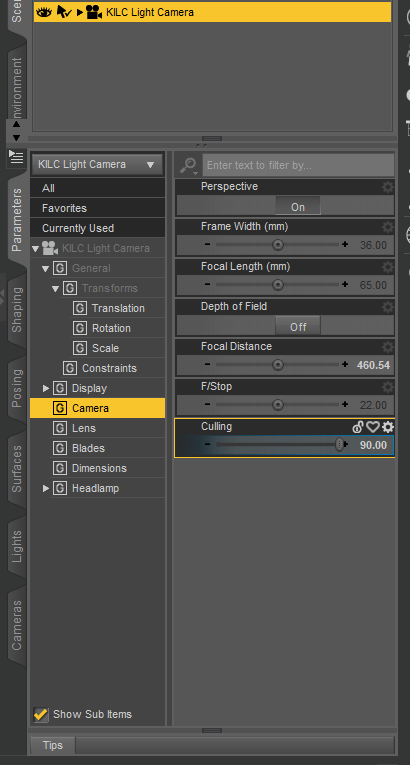
I don't mind buying the other one, but the product page doesn't list it as required. I might get the other one just to have more options.
Kindred Arts Interior Speed lights HELPkindred arts also created a culling camera for https://www.daz3d.com/interior-light-pro-for-filament-and-iray
There the culling slider is under parameters - camera or currently used. I have both, but it is wierd, i can't find a culling slider in the speed lights camera.
Where do I find Filament?felis said:
In your viewport, upper right corner, you have a menu. Left of that a square button where you can select 'perspective view', 'cammera' etc, and left of that a small icon called drawstyle. There you can select Filament.
I would suggest to also Create > New Filament Draw Options Node, so you can adjust some settings.
That’s assuming you're using Windows, as Filament is not yet available in the Mac version (the Qt framework upgrade which will be included in DS5 is required for Filament to work on a Mac)
Where do I find Filament?In your viewport, upper right corner, you have a menu. Left of that a square button where you can select 'perspective view', 'cammera' etc, and left of that a small icon called drawstyle. There you can select Filament.
I would suggest to also Create > New Filament Draw Options Node, so you can adjust some settings.
Where do I find Filament?Hi all, I just discovered there is another render engine called Filament, but I can't find where it is or how to use it, and the link to the tutorial doesn't work. Can someone point me in the right direction, please? Thanks!
What is an "Avatar" node, can I create one?Filament renderer has this "Draw Avatars" option where certain things like cameras, guides, nulls and other objects are shown/hidden. Is there a way to create or tag an object as an avatar so that they behave the same way?
Basically I would like to create some helper objects, (with geometry, nulls wont do) that will behave the same way.
Thanks.
What's the difference between "Diffuse color", "specular color", "ambiant color", etc...crosswind said:
Sven Dullah said:
crosswind said:
yuyu.atem said:
Thank you very much!
 Could you also tell me what's the difference between reflection color", "refraction color" and "line preview color"?
Thank you in advance!
Reflection Color is RSL only, it only works when Reflection Active is on and you have to set other parameters to make a colorized 'fake reflection' (mirroring). Refraction Color relates to refraction and works when Refraction Color is Active and it's on both RSL and MDL but you could only get real refraction with Nvidia Iray engine. If you turn off Share Glossy Inputs on iray Uber shader, you can define Refraction Color separately.
Line Preview Color is maily for wireframe draw style. For instance, if you define a red color on it and presse Ctrl + 8, the wireframe will be highlighted in red. Still suggest you learn and experiment Iray MDL shader other than RSL... better start from Genesis 8.
Look, I don't want to interfere or confuse things further, but I don't care much for this fake talk, to be honest. Of course 3Delight is capable of handling true raytraced reflection/refraction. You should really check your "facts" before posting them.
I know there're always arguments about this. I don't want to fight back with quoting lots of theories and renders to comment about a 'biased' engine, however, facts are facts... they will not disappear on account of your or my preferences.
Pls search 'fake' in here - https://blog.daz3d.com/whats-the-difference-between-iray-3delight-and-filament-in-daz-studio/ , and argue with Daz... I 'just learnt from there' though I tested a lot before...
Yup I've seen it. But they don't mention the built in path tracer, do they? Or the fact that, with DS standard shaders, you just remove the reflection color map and you'll have raytraced reflections. In fact I doubt there are many devs left that actually know much about RSL, and what they actually have in there...
As a 3DL user it's obviously up to you to fix all those things and more, starting with turning on RT shadows, you get the drift?
I don't mind you calling 3DL fake, as everything 3D is fake to me. I just don't see why refraction in 3DL would be more fake than in IRay? And I don't wish to argue about it. The main point is: Yes, 3Delight does reflections and refraction and emission, LOL.!
That said, it is true that you can fake a lot of stuff in 3DL, one of the strengths of a biased renderer
 What's the difference between "Diffuse color", "specular color", "ambiant color", etc...
Sven Dullah said:
crosswind said:
yuyu.atem said:
Thank you very much!
Could you also tell me what's the difference between reflection color", "refraction color" and "line preview color"?Thank you in advance!
Reflection Color is RSL only, it only works when Reflection Active is on and you have to set other parameters to make a colorized 'fake reflection' (mirroring). Refraction Color relates to refraction and works when Refraction Color is Active and it's on both RSL and MDL but you could only get real refraction with Nvidia Iray engine. If you turn off Share Glossy Inputs on iray Uber shader, you can define Refraction Color separately.
Line Preview Color is maily for wireframe draw style. For instance, if you define a red color on it and presse Ctrl + 8, the wireframe will be highlighted in red. Still suggest you learn and experiment Iray MDL shader other than RSL... better start from Genesis 8.
Look, I don't want to interfere or confuse things further, but I don't care much for this fake talk, to be honest. Of course 3Delight is capable of handling true raytraced reflection/refraction. You should really check your "facts" before posting them.
I know there're always arguments about this. I don't want to fight back with quoting lots of theories and renders to comment about a 'biased' engine, however, facts are facts... they will not disappear on account of your or my preferences.
Pls search 'fake' in here - https://blog.daz3d.com/whats-the-difference-between-iray-3delight-and-filament-in-daz-studio/ , and argue with Daz... I 'just learnt from there' though I tested a lot before...
What's the difference between "Diffuse color", "specular color", "ambiant color", etc...@OP: You're talking about RSL shader (Renderman Shader Language) which is based on 3Delight engine. Ambient Color does not work unless you switch Engine to 3Delight (RSL) in Render Settings pane - Advanced tab... If you own a Nvidia Card, suggest you use Iray Uber (MDL) shader, and render with engine of NVIDIA Iray.
3Delight is a biased render engine ( as Richard mentioned above - 'fake' ) while Nvidia Iray is an unbiased physically based render engine. You may learn some essentials from -: https://blog.daz3d.com/whats-the-difference-between-iray-3delight-and-filament-in-daz-studio/
What is the AuxViewport?The AuxViewport was added to show a preview 3Delight render, using a feature for 3Delight that allowed a faster version to render, while keeping the main Viewport to Texture Shaded for responsiveness. You can assing it the Iray Drawstyle too, with the 3Delight IPR off, if you like though I am not sure how much benefit that would be compared to the main Viewport in Iray (or Filament) Drawstyle.
I am trying to use lighting in my scene but that isn't working
Sorry but I am unable to find that render. It was iray render and I will stop using filament node for checking. Can you suggest me some settings show that I can make a render that I want?prixat said:There's an annoying problem with a recent forum update that has stopped attachments for the last few weeks!
Can you show the successful preview to see how the scene should look?
Is it the Iray preview and Iray render you're using?
Why bother with a Filament node?
I am trying to use lighting in my scene but that isn't workingThere's an annoying problem with a recent forum update that has stopped attachments for the last few weeks!
Can you show the successful preview to see how the scene should look?
Is it the Iray preview and Iray render you're using?
Why bother with a Filament node?
Iray culling camera questionI have a question. When using an Iray culling camera, can you use it inside the scene or outside the scene with a part of the scene like a wall removed. I am thinking of buying Interior Light Pro for Filament and Iray to solve my interior lighting problems with Iray. Any help would be appreciated.
When I use PowerPose from time to time the posed character suddenly disappears in filament view modeI did some more simple tests, this time I used SpyroruE's gray shaders for G3 (now at deviant art?) cause I realised that I wasn't removing all of the textures and remembered I had that helpful one click solution. But using my partial map removal setup, I tested again exactly like mentioned before,(loaded G3F, loaded the anatomical elements, opened Animate loaded G3 "body shake", set it to loop), but with a fresh instance of DS 4.21. That test resulted in G3F+ anatomical elements dissapearing from Filament in less than 8 mins. except for the eyelash geometry (which of course is connected to the head in G3). As usual, all visable in texture view and when switching back, all was gone. I closed DS, opened a new instance and did the same test with the gray shader and it all dissapeared in less than 8mins ( all visible in texture view etc. but still all gone in Filament). I probably should have pointed out by now that I have 2 monitors, 1 for the DS tabs /content/scene/parameters/etc. powered by onboard intel graphics. The other monitor is a 4K TV that only displays the Filament viewport ( unless switched to another drawstyle ) always kept in fullscreen view (portrait) powered by the 3060ti. ( that should have enough power to run the TV in 4K , right?) Actually, both monitors are in portrait position - could it be that DS doesn't work well in portrait setup? Seems like everything else is okay. Thanks for reading all this. If you have any similar experiences your response will be much appreciated. / Peace / My PC is : Win10 10th gen i7 2.50 ghz 32 GB ram nvidia 3060 ti, using DS 4.21.
Help-how do I render this sceneIf you are using the Bottom View and are using Iray is Draw ground off in the Environment settings (properties for the Environment Settings node or in the Editor tab of Render Settings pane, though you will not see it until you have rendered or previewed using Iray or Filament, or have explicitly added the node via Create menu)
sky dome. think i need it? how get? what do?The Sun/Sky option is available in the Environment Settings node or through the editor tab of Render Settings - though you will need to render, do an Iray or Filament preview, or explicitly create the node from the Create menu. Set the Environment Mode to Sun/Sky (or Dome or Dome and Scene, the last of which will also allow local lights, with no map applied) and then set the location and time. If you mean an HRD image used for lighting, that is set in the Dome modes - there are a few free sources, though they may have usage restrictions, but there are also a great many in the store here and elsewhere for purchase.
When I use PowerPose from time to time the posed character suddenly disappears in filament view modeHi Dissendior, I much appreciate your feedback on this issue. My experience is that the "naughty bits" could certainly cause the problem like any other geograft, by Daz PAs or anyone else - I have some free ones from sharecg.com that are identically problematic. Anyway, last night I did a simple test in Filament. I loaded G3F, loaded the anatomical elements, removed all the textures, opened Animate2 (you could use the basic version). Then I loaded the G3 "body shake" aniblock and set it to loop (choosing that aniblock cause it's rather hyperactive). After G3F flailed around for almost exactly 10 minutes, she dissapeared. Swtching to texture shaded made G3F + the geograft visable again. I hadn't tried it before but this time, I then switched to iray view and that looked normal (of course there weren't any textures) then switched back to Filament and again nothing was visable. My test was somewhat flawed in that I didn't do the test with a fresh instance of DS, I'll do a better test soon. At least I finally found a use for "body shake" :) And thanks to everyone giving this issue some thought and response! / peace / My PC is : Win10 10th gen i7 2.50 ghz 32 GB ram nvidia 3060 ti, using DS 4.21.
When I use PowerPose from time to time the posed character suddenly disappears in filament view modeHi Dissendior, did you determine if there were geografts in your scenes when this problem happens? Maybe you have some hidden geografts applied, for example; pants, that with a geograft remove some of the pelvis and legs of the figure, but not the ankles and feet (created so the item won't have pokethrough). I forgot to mention the dissapointment of having this issue with the Legacy V4 UVs for G8F. Since it's created with geografts, the dissapearing issue is the same as with any other geograft that I have. Converting G8/G8.1 UVs to G9 would seem to have the same problem. Thanks for submitting a ticket! >>>>>>>>>>>>>>>>>>>>>>>>>>>>>>>>>>>>>>>>>>>>>>>>>>>>>>>>>>>>>>>> Hi WendyLuvsCatz, I just wanted to say that I also had this issue on my old Win 7 first gen i7 PC that had a pitiful 2 gig nvidia card. It was well below specs for using Filament (when DS first implemented it) but magically, most of Filament was functional! Knowing the graphics card wasn't up to the minimum specs, I figured that was why I was having the problem. Then I drastically upgraded my setup, but the issue is the same. And it doesn't even take any longer for the figures to go bye bye :) / peace / My PC is 10th gen i7 2.50 ghz 32 GB ram nvidia 3060 ti, using DS 4.21.
When I use PowerPose from time to time the posed character suddenly disappears in filament view modeI wonder a little bit which view mode you guys use when preparing your scenes / renders... I found Filament most helpful as it is closer to the scene in iray but due to this issue I now work more and more in "Texture shaded".
@3DmentiaNull - you describe exactly what I see: the figure disappears, leaving hair and clothing there. Switching to another view mode like texture shaded shows everything again. Except when I go back to Filament the disappeared figure is still disappeared. But the other items of the scene only start to disappear this way when I hide them via scene navigator and unhide them there again... then they are also not visible anymore. Until now I think I had not the issue that when I leave filament and come back the whole scene is invisbile.
@WendyLuvsCatz - thank you for this tip, but no. I really just do a position change on a figure for example in Filament and suddenly the figure disappears.
@RexRed - this sounds promising. But I remember that I have made several renders with the characters in the scene without doing any changes when it comes to props / objects / textures (just pose and position changes). It does not mean that there is no influence of incompatible textures or so but at least it is for sure not the only influence as I was able to work for a longer time on the scene without this problems. I just try to remember if it may be connected to a special camera angle / position... so that this problem may only have appeared when an item was actually included into the viewport... may this be a point? That this issue appears when an object with incompatible texture come into the viewport?
When I use PowerPose from time to time the posed character suddenly disappears in filament view modeI'm sorry to hear someone else is having this problem, but misery loves company :) At this point in time, I use the Filament view exclusively, and in my experience, the issue is : if there is a geograft in the scene, figures will definitely disappear at some point. Any generation, any character (though I don't use G9) that has compatible geografts attached, including clothing, will end up with this issue. I'm typically spinning dials to refine some figure's shape and frequently previewing aniblocks to see how it works in motion, and that motion can be the tipping point. However, I could be working on the textures or anything else, when the figure with the geograft will disappear, but leaving parented items like, eyebrows, hair etc. alone. As noted, switching to another drawstyle makes it all visible again. But then switching back to Filament makes everything disappear completely! It's hard to remember if you need to save the scene in it's present state when you can no longer see the PBR version. And, yes, after retarting DS and reloading the scene everthing will be visable again ( for a while ). I hardly use geografts any more. It also adds to why I wouldn't want to use G9, figuring that one needs geografts to make the base figure look right. 'Hope newer DS versions will work better. / peace //////////////// My PC is 10th gen i7 2.50 ghz 32 GB ram nvidia 3060 ti, using DS 4.21.
Daz 3D is part of

Connect
DAZ Productions, Inc.
7533 S Center View Ct #4664
West Jordan, UT 84084Licensing Agreement | Terms of Service | Privacy Policy | EULA
© 2026 Daz Productions Inc. All Rights Reserved.