-
Free Toon Characters coming July 1st, early download available now
richardandtracy said:
Can I suggest a work-around for the clothing clone problem? It's a work-around I have followed myself to create a G8F/M clone for V3.
If you use DS itself to modify the shape of your character to moderately closely match G8 using bend, twist side-side and scale-x/y/z to match the surface of the character as well as is reasonable, then that shape will be close, but not a copy of the G8 shape. This posed shape could then be used as a close-enough clone to function as an auto-fit clone without being a copy. You should be able to get the clone surface within 2mm or so over the body simply by posing this way - and where it's difficult, pose your character so it's slightly inside a superimposed G8 as that'll reduce the chance of poke-through.
Now, that shape could be used as the clone, and I think you should be safe distributing it because it's only a loose representation of G8. BUT, if you're feeling terminally cautious, you could supply a script which the user would run to apply that pose to your character, save an obj, re-import the obj and turn it into a clone (I will confess the script is beyond me at the moment, but as there is a deformation to morph script product in the shop, it's possible). Then the only material being distributed is a pose and a script, both of which are your copyright and neither is an infringement of DAZ copyright.
I hope this contribution is helpful. If not that, I hope that it's not unhelpful.
Regards,
Richard
If you are trying to match the shape of another figure then you are creating a derivative and the issue still remains.
Obj imports without any textures after recent updatedaz obj import dialogue has an option to read material file. Are you checking that option?
Does Blender write the textures correctly to the material file? you can open .mtl file in a text editor like notepad to check
Can you not just add the textures manually to the Surfaces tab? Noting that an .obj material file is no a Blender-to-Daz bridge and will never add textures properly anyway and therefore is a flawed method to rely upon to get textures onto an obj and it is perhaps better to add them manually, or at least if you are going to rely on the material file, please ensure you check that they are all loading, and they are loading into correct slots in your shader, with correct values applied.
Obj imports without any textures after recent updateI can no longer import obj format assets (in my case imported from fbx into blender 4.0 and exported to obj first) since the recent Daz update. How do I fix it? I need obj assets to work in Daz for the type of scenes I do
Free Toon Characters coming July 1st, early download available nowrichardandtracy said:
Can I suggest a work-around for the clothing clone problem? It's a work-around I have followed myself to create a G8F/M clone for V3.
If you use DS itself to modify the shape of your character to moderately closely match G8 using bend, twist side-side and scale-x/y/z to match the surface of the character as well as is reasonable, then that shape will be close, but not a copy of the G8 shape. This posed shape could then be used as a close-enough clone to function as an auto-fit clone without being a copy. You should be able to get the clone surface within 2mm or so over the body simply by posing this way - and where it's difficult, pose your character so it's slightly inside a superimposed G8 as that'll reduce the chance of poke-through.
Now, that shape could be used as the clone, and I think you should be safe distributing it because it's only a loose representation of G8. BUT, if you're feeling terminally cautious, you could supply a script which the user would run to apply that pose to your character, save an obj, re-import the obj and turn it into a clone (I will confess the script is beyond me at the moment, but as there is a deformation to morph script product in the shop, it's possible). Then the only material being distributed is a pose and a script, both of which are your copyright and neither is an infringement of DAZ copyright.
I hope this contribution is helpful. If not that, I hope that it's not unhelpful.
Regards,
Richard
Thanks for the suggestion, it's much appreciated.
Currently, I have the four clones (Genesis 3 and Geneis 8 for male and female Omnitoons) and I *think* I have a workaround. As Richard has stated, we're allowed to use DAZ shapes to make clothing, since those are add-ons, not standalone figures.
My current plan is to remove the clones, but to include the Omnitoon meshes used to create the clones as Genesis 3 and 8 clothing. The users would get (probably pretty poor-quality) bodysuits for Gen3/8 that they could also use to create their own clothing clones fairly simply.
How to create a "squeeze" effect on breasts and buttocks
For more complex situations, the solution seems to be to learn how to use other software to create more advanced things. Exporting a 3D model from Daz to Blender (or another 3D software), making morph adjustments there and re-exporting it to Daz, sounds like a better option for more advanced details, but that's the thing: if you don't have the knowledge, you'll be more limited and may need to learn some tutorials to master another software or a certain feature of it.Squishy said:Magic Dragon 3D said:
Squishy said:
Imo you are much better off altering the geometry by hand, looking at references (if you have boobs of your own, that is super convenient). Mesh Grabber can do this, sculpting tools are much better (part of Premier subscription version).
It seems that Daz is not very perfect for simulating pressure and tightness in soft areas of the body from what I've heard. Apparently, the result would be better if done in other softwares like Blender.
It's very complex to simulate with physics and imo you will spend a huge amount of time learning the prerequisite import/export stuff and the blender specific "how do I make this hard mesh behave like a boob with physical accuracy" and setting up the collision and animating that. Whatever works best for you I can't say but I know from experience that's a huge set of prerequisites even when you already know what they are and where to go learn them.
Free Toon Characters coming July 1st, early download available nowCan I suggest a work-around for the clothing clone problem? It's a work-around I have followed myself to create a G8F/M clone for V3.
If you use DS itself to modify the shape of your character to moderately closely match G8 using bend, twist side-side and scale-x/y/z to match the surface of the character as well as is reasonable, then that shape will be close, but not a copy of the G8 shape. This posed shape could then be used as a close-enough clone to function as an auto-fit clone without being a copy. You should be able to get the clone surface within 2mm or so over the body simply by posing this way - and where it's difficult, pose your character so it's slightly inside a superimposed G8 as that'll reduce the chance of poke-through.
Now, that shape could be used as the clone, and I think you should be safe distributing it because it's only a loose representation of G8. BUT, if you're feeling terminally cautious, you could supply a script which the user would run to apply that pose to your character, save an obj, re-import the obj and turn it into a clone (I will confess the script is beyond me at the moment, but as there is a deformation to morph script product in the shop, it's possible). Then the only material being distributed is a pose and a script, both of which are your copyright and neither is an infringement of DAZ copyright.
I hope this contribution is helpful. If not that, I hope that it's not unhelpful.
Regards,
Richard
MimicMolly's Renders & WIPsI have been trying to organize my files and I have discovered that I bought a product a while ago that I can no longer ask for a refund for it because it's past the 30 days. (Besides, I had purchased it because it lowered the price of another product I wanted.) The problem is that it is not as I hoped it would be and because of that, I am unlikely to buy other characters from this vendor.
For the sake of the people who use the DAZ Deals 3rd party browser extension, the product in question is HD Details Plus Tattoo for Genesis 9. The product page makes it seem like it is selling the HD details (masc head, fem head, masc body, fem body), the tattoos, and the lemur-looking people (male head, male body, female head, female body). But the Read Me, which you have to jump through hoops to find, unless you're using the aforementioned browser extention, shows that it's only the HD details that are for like SubD 5 and the tattoos, no lemur people. I wanted the lemur people and maybe the tattoos, but since there's no lemur people I should technically go and get a refund. But, it's too late because I bought these back in February. RIP. (Fortunately, the details can be used on any G9 character, but I don't render with HD characters. Especially since I prefer to do "NPR," so it doesn't work out well)
Also, the icing on the cake is the way these HD morphs are saved in the "Characters" folder. I will have to move these manually, which would break metadata links, but I don't use Smart Content.
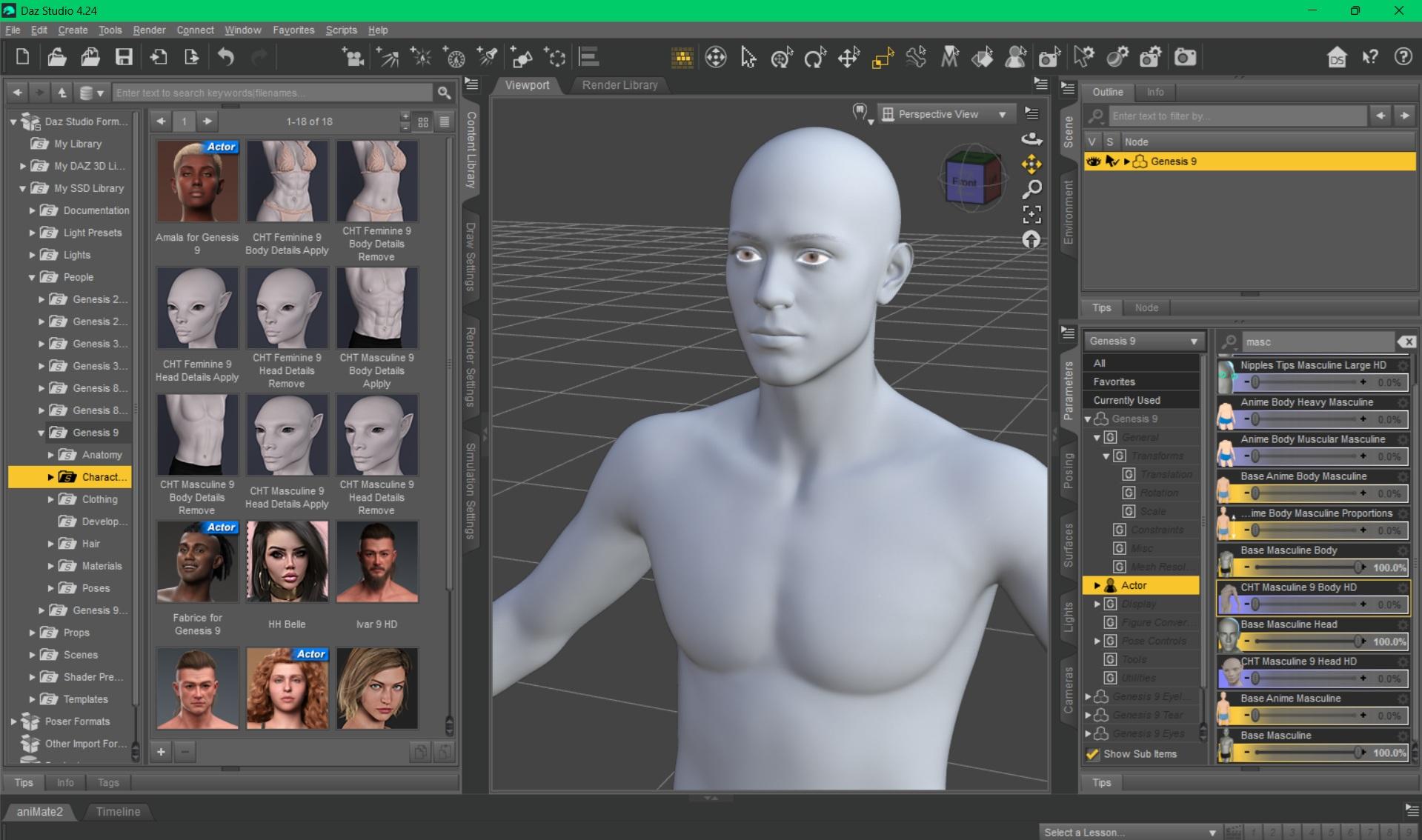
TL;DR - I wanted the lemur characters (the male and the female), and was fine with them not having skins. But these shapes aren't in the product, only the musculature and veins (for the heads and bodies), plus the tattoos. It's too late for a refund.
How to create a "squeeze" effect on breasts and buttocksMagic Dragon 3D said:
Squishy said:
Imo you are much better off altering the geometry by hand, looking at references (if you have boobs of your own, that is super convenient). Mesh Grabber can do this, sculpting tools are much better (part of Premier subscription version).
It seems that Daz is not very perfect for simulating pressure and tightness in soft areas of the body from what I've heard. Apparently, the result would be better if done in other softwares like Blender.
It's very complex to simulate with physics and imo you will spend a huge amount of time learning the prerequisite import/export stuff and the blender specific "how do I make this hard mesh behave like a boob with physical accuracy" and setting up the collision and animating that. Whatever works best for you I can't say but I know from experience that's a huge set of prerequisites even when you already know what they are and where to go learn them.
Can DAZ do obj sequence animation?Stonemason said:
how did you do the obj sequence?, in the past I think I used collada import?
I've not tried geometry switching in DS, it was a cool feature in Poser though, I first saw it used on the Dystopia city blocks by Moebius87 and Ajax
Oh really? Collada? Interesting. There is a function in Poser that we edit in text called 'uniqueInterp'.
We ended up making use of this feature in Poser for all sorts of things in RWBY and Red vs Blue since Monty realized it doesn't care how many frames there are. We were able to use this for Weapon transformations (even up to 500 frames for Ruby's Scythe). It was animated in Maya, exported obj. but we needed a script to rename the mtl lines written within the obj files to be in sequencial order. We also used this for fx animations on cars within Poser. I experinemted with various geometry shaps for fx too. You can then use a single dial to animate through all the frames since it is pulling up these models in a sequence in real-time. It worked out quite lovely. The process was very tedius to setup as you need to copy nodes in the pz3 file. Im pretty rusty at setting it up from scratch now, but we had a script to help automate the process too. For fx, we would end up doing the work once (per type) so there was a template, like 100 frames of cards. and then make a copy of the file and replace the file paths/textures, etc to make it unique.
Here are some visual examples
https://x.com/shanewville/status/1540896131663683592
That would be hilaruous though if no one actually edited it this way and we just stumbled onto it the hardway. It was all Monty Oum just looking at thins in the pz3 files and figuring things out.Can DAZ do obj sequence animation?how did you do the obj sequence?, in the past I think I used collada import?
I've not tried geometry switching in DS, it was a cool feature in Poser though, I first saw it used on the Dystopia city blocks by Moebius87 and Ajax
Modular building generator and cityscape generator scriptsGordig said:
Have you checked the Unreal store? Seems like the kind of thing they'd have, and for a pretty reasonable price.
im looking for one for Daz. I already have one for unreal that I currently use a lot. I want one for Daz as nothing seems to want to import into unreal seamlessly. Besides some assets look better in Daz as opposed to being imported into unreal. Just my personal opinion though.
Halloween 2023 Cup with cat-shaped handleThanks Elor! I'm glad you liked my cups and I thank you very much for this work you did for the metadata.

I noticed that the download link is still active, if there are any problems let me know, so I'll republish the cups here in the forum.Halloween 2023 Cup with cat-shaped handleHello,
I created metadata for these three beautiful cups, so if someone else want to have them too on their own computer, they are in the archive attached to this message.
I have done them two times: one for the default folders structure used by @emanuela1 (in the archive, it's in the folder named 'Default') and one for the folders structure I'm using on my own computer (in the folder named 'Elor'). If you have your own folders structure, sorry, you'll have to create the metadata yourself (you're also more likely to not care that much about metadata though).
Note: I didn't make a DIM compatible installer, just created the metadata and you'll have to import them using tools available in Daz Studio.
If you installed the cups keeping the default folders structure, you'll have to merge the content of the 'Default/Runtime/Support folder into the Runtime/Support folder of the library you have them installed (or in any active library, Daz Studio doesn't really care that much about that as long as it's in an active library but I think it's best to have the metadata files in the same library as the rest of a product's files).
The safest way to do the merge is by copying and pasting the three files 'LOCAL_USER_EM_Halloween_Cat_Cups.dsa', 'LOCAL_USER_EM_Halloween_Cat_Cups.dsx' and 'LOCAL_USER_EM_Halloween_Cat_Cups.jpg' inside the chosen 'Runtime/Support' folder especially if you're using a Mac (Finder is not great at merging folders).
If you want to use the folders structures I'm using:
1. Copy the content of the Props folder into the Props folder of the library where you installed the cups (you're unlikely to have an Emanuela folder here already, but beware if it's the case).
2. Move the three duf files located into 'cup3size' into '/Props/Emanuala/Halloween Cat Cups'
3. Rename them according to the name of the PNG files you'll find here (it's the thumbnails I created for them), so:
- 'cup3cat-big.duf' will become 'Cup Cat - Big.duf'
- 'cup3cat-med.duf' will become 'Cup Cat - Medium.duf'
- 'cup3cat-small.duf' will become 'Cup Cat - Small.duf'
Then you'll have to copy-paste the three files 'LOCAL_USER_EM_Halloween_Cat_Cups.dsa', 'LOCAL_USER_EM_Halloween_Cat_Cups.dsx' and 'LOCAL_USER_EM_Halloween_Cat_Cups.jpg' inside the chosen 'Runtime/Support' folder.
Once everything is done, you should be able to delete the 'cup3size' folder.
Regardless of which folders structures you want to use, the next steps are:
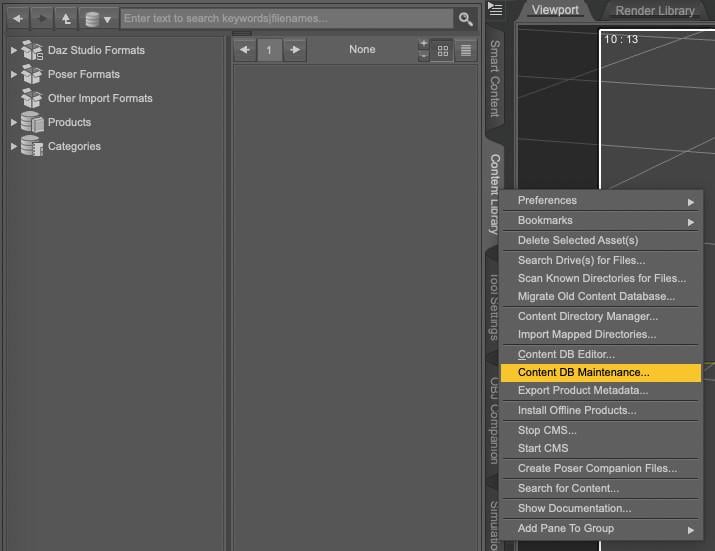
1. Open your Content Library, right click on the tab to get the following menu and select Content DB Maintenance
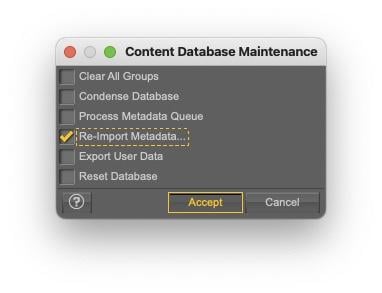
2. Select Re-import Metadata
3. UNSELECT everything by unchecking User Data and All Products, to avoid overwritting existing metadata (it'll also be much faster to only import one product metadata than your whole library…).
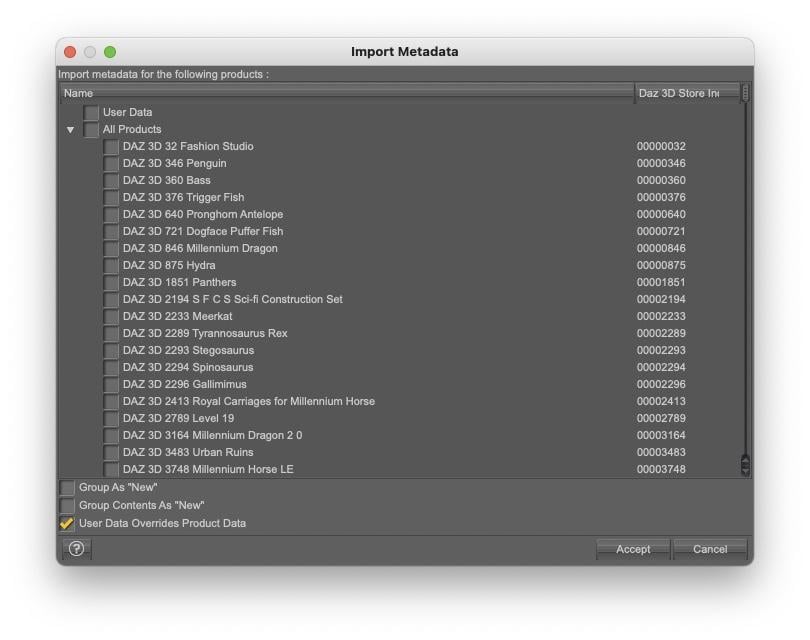
4. Select 'LOCAL USER EM Halloween Cat Cups' and click accept:
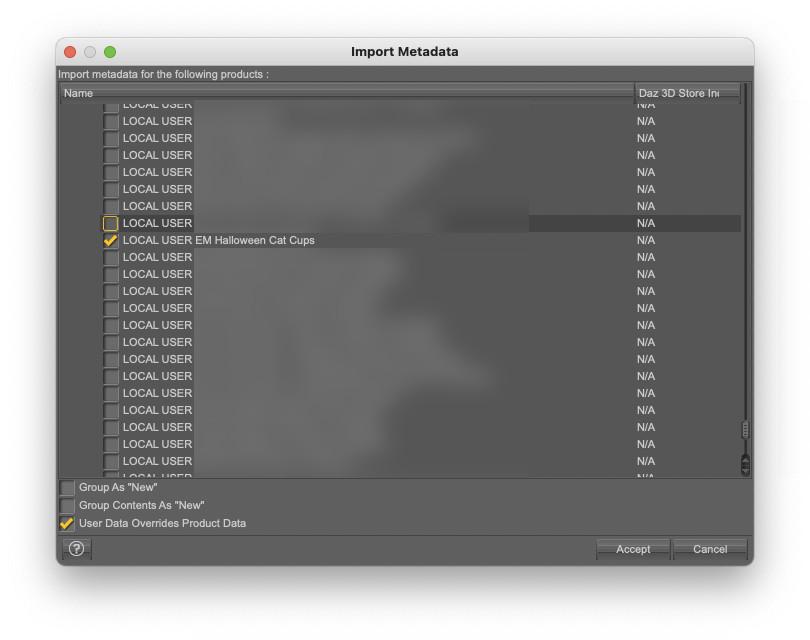
Once done, you'll be able to find the cups either by typing 'Halloween' (or any of the other words, but halloween is likely a less used word that cup or cat) or by searching using the author name as a key, so by typing key::Emanuela. The cups will also appears if you're looking for Props or Props/Kitchenware:
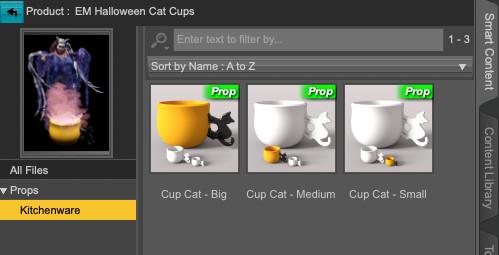
As they are no material presets, it's likely not that useful, but the correct Compatibility Bases are set for each cup (it'll save a step to someone who created material presets and wants to add metadata to them, but you'll have to learn how to do it yourself, this message is already far too long).
The product picture is based on an old render I did two years ago (The Tooth Buster) and you can replace the default product's picture by another one if you prefer: you can do so by replacing the file 'LOCAL_USER_EM_Halloween_Cat_Cups.jpg' located in 'Runtime/Support'. It's best to have a 10:13 picture ratio and I'm using a 380x494 picture. Once done, Smart Content will use the new picture the next time you're opening the product or searching for it.
Edit:
I don't know if it's necessary or not, but it won't hurt: do what you want with the content of the metadata archive, except pretending you did the various pictures included (no need to credit anyone though, except Emanuala1 for creating these three cups).
File TransferA while ago, I moved my content files to an external hard drive from the main hard drive of my iMac:
I copied my content folders/runtimes to the new hard drive; in your case, you will copy those folders to
I took a nice screenshot of the the settings of Daz Studio's Preferences/Content Manager and the DIM installation settings and printed it
In your case, you will install Daz Studio and DIM and you will copy the Daz Studio folders that are in the Shared User directory of your mac
You will open Daz Studio and go to Preferences and Content Manager and configure Content manager to match your now moved directories and DIM to match where you will now install content
Reinstall things like scripts
And Log into Daz Studio and update metadata and render
Content Manager needs to know where your content folders are, where Poser runtimes are, and where CMS cluster will live as well as Daz Connect info.
Workaround for G8 SBH Auto-Fit failure to G9UncannyValet said:
If you dont want to make it again, you have two options:
Option 1: Export and rig using transfer utility
Dial up clone morph on G8/G9 as required so both donor and acceptor figure are same shape. Export the G8 SBH with Tesselation Sides value =1. On obj exporter dialogue ensure Write Polylines is checked. Import the exported obj back into Daz. Use Transfer Utility to transfer from Source (Genesis 9*) rigging to the Target (Imported SBH obj), setting shape to Current for both. If the Genesis 9 figure is not at default shape (e.g., if you have dialled in a clone shape on the Genesis 9 figure or any other active morph), you will need to set Reverse Source Shape from Target (or whatever it is called) in the Transfer Utility advanced options.
*Or Genesis 9 haircap instead of Genesis 9 figure.
Option 2: Genesis 8 Skinsuit on Genesis 9
Create a skinsuit for Genesis 9 made out of Genesis 8's skin such that Genesis 9 will wear Genesis 8. You can equip the Editable SBH Object to the Genesis 8 wearable skinsuit since geomery of G8 is conserved.
Again, you will use Transfer Utility to transfer Genesis 9 rigging to Genesis 8. Again, they will need to be the same shape before you run Transfer Utility.
I have not tested if Option 2 actually works...
I did end up making it from scratch again (better than before so no harm no foul) but I'll keep these in mind for other things, thanks!
Daz Studio 4.24[.0.x], General Release!4.24 has corrupted all animation files for me, can animate things just fine, but when I go to render it's like the file corrupts mid-render.
Both Image Seqences and Movies will pop an error saying the file cannot be saved, and ask me if I want to cancel or pick a new file location. Moving the location does nothing, and if I cancel it and try to open the file again, the file can't be opened and Daz tells me there's an error in the file.
Here's what I was able to find in the log about the errors:
About the Corrupted File:
2025-05-07 14:07:38.375 [INFO] :: Unlocking viewport redraw...
2025-05-07 14:07:38.375 [INFO] :: Viewport redraw unlocked.
2025-05-07 14:12:59.801 [INFO] :: Prepare asset load (open): /Scenes/abo ghoap kissing animation redo.duf
2025-05-07 14:12:59.801 [INFO] :: Locking viewport redraw...
2025-05-07 14:12:59.801 [INFO] :: Viewport redraw locked.
2025-05-07 14:12:59.837 [VERBOSE] :: Native format content directories: 10
2025-05-07 14:12:59.837 [VERBOSE] :: Poser format content directories: 3
2025-05-07 14:12:59.837 [VERBOSE] :: Other import format content directories: 0
2025-05-07 14:12:59.837 [INFO] :: Begin asset load (open): /Scenes/abo ghoap kissing animation redo.duf
2025-05-07 14:12:59.837 [WARNING] :: Error loading asset: FILE.dufOperation failed
About the Failure to Save:
2025-05-06 19:52:27.055 [INFO] :: Failed to save image: D:\Roxanne\Documents\DAZ 3D\Studio\Render Library\ghoap\kissing ani\smoochies muah muah006.png
2025-05-06 19:52:27.055 [INFO] :: Operation failed
2025-05-06 19:54:43.371 [INFO] :: Failed to save image: D:\Roxanne\Documents\DAZ 3D\Studio\Render Library\ghoap\kissing ani\smoochies muah muah006.png
2025-05-06 19:54:43.371 [INFO] :: Operation failed
2025-05-06 19:54:44.061 [INFO] :: Failed to save image: D:\Roxanne\Documents\DAZ 3D\Studio\Render Library\ghoap\kissing ani\smoochies muah muah006.png
2025-05-06 19:54:44.061 [INFO] :: Operation failed
2025-05-06 19:54:45.980 [INFO] :: Failed to save image: D:\Roxanne\Documents\DAZ 3D\Studio\Render Library\ghoap\kissing ani\smoochies muah muah006.png
2025-05-06 19:54:45.980 [INFO] :: Operation failed
2025-05-06 19:54:46.402 [INFO] :: Failed to save image: D:\Roxanne\Documents\DAZ 3D\Studio\Render Library\ghoap\kissing ani\smoochies muah muah006.png
2025-05-06 19:54:46.402 [INFO] :: Operation failed
2025-05-06 19:54:46.748 [INFO] :: Failed to save image: D:\Roxanne\Documents\DAZ 3D\Studio\Render Library\ghoap\kissing ani\smoochies muah muah006.png
2025-05-06 19:54:46.748 [INFO] :: Operation failed
2025-05-06 19:54:47.545 [INFO] :: Rendering frame 7...Other Random Errors:
2025-05-07 14:06:40.124 [VERBOSE] :: Total class factories: 2165
2025-05-07 14:06:40.126 [INFO] :: Creating Script Engine...
2025-05-07 14:06:40.146 [WARNING] :: 3DConnexion Plug-in Error: Could not create Device, CoCreateInstance failed
2025-05-07 14:06:40.146 [INFO] :: 3D mouse support library could not be loaded.
2025-05-07 14:06:40.865 [INFO] :: Creating Main Window...
2025-05-07 14:06:40.867 [INFO] :: Creating Viewport Manager...
2025-05-07 14:06:40.900 [INFO] :: Successfully created OpenGL viewport for Viewport1.
2025-05-07 14:06:40.979 [INFO] :: Successfully created OpenGL viewport for Viewport2.
2025-05-07 14:06:41.086 [INFO] :: Successfully created OpenGL viewport for Viewport3.
2025-05-07 14:06:41.145 [INFO] :: Successfully created OpenGL viewport for Viewport4.
2025-05-07 14:06:41.248 [INFO] :: Creating Action Manager...
2025-05-07 14:06:41.272 [INFO] :: Creating Pane Manager...
2025-05-07 14:06:41.423 [INFO] :: Successfully created OpenGL viewport for AuxViewportView.
2025-05-07 14:06:52.032 [INFO] :: Loading Actions: C:/Users/Roxanne/AppData/Roaming/DAZ 3D/Studio4/actions.dsx
2025-05-07 14:06:52.058 [INFO] :: Loading Custom Actions: C:/Users/Roxanne/AppData/Roaming/DAZ 3D/Studio4/customactions.dsx
2025-05-07 14:06:52.064 [INFO] :: Loading Menus: C:/Users/Roxanne/AppData/Roaming/DAZ 3D/Studio4/menus.dsx
2025-05-07 14:06:52.081 [INFO] :: Loading ToolBars: C:/Users/Roxanne/AppData/Roaming/DAZ 3D/Studio4/toolbars.dsx
2025-05-07 14:06:52.582 [VERBOSE] :: Update Check: Interval = 7 days, Since = 2 days, Last = Mon May 5 2025
2025-05-07 14:06:52.582 [VERBOSE] :: Update Check: Days (2) < Min (7)
2025-05-07 14:06:52.589 [INFO] :: Executing startup script...
2025-05-07 14:06:52.638 [INFO] :: Started in: C:/Daz 3D/Applications/64-bit/DAZ 3D/DAZStudio4
2025-05-07 14:06:52.638 [INFO] :: DAZ Studio started
2025-05-07 14:06:52.639 [INFO] :: Creating Pixel Buffer...
2025-05-07 14:06:52.662 [VERBOSE] :: Pixel Buffer: Width = 1024, Height = 1024
2025-05-07 14:06:52.664 [INFO] :: Compiling OpenGL Shaders...
2025-05-07 14:06:52.677 [VERBOSE] :: Compiling Fragment Shader: Succeeded
2025-05-07 14:06:52.680 [VERBOSE] :: Linking Shader Program: Succeeded
2025-05-07 14:06:52.682 [INFO] :: Loading Layout: C:/Users/Roxanne/AppData/Roaming/DAZ 3D/Studio4/layout.dsx
2025-05-07 14:06:54.200 [WARNING] :: QColor::setRgb: RGB parameters out of range
2025-05-07 14:06:54.214 Iray [INFO] - IMAGE:IO :: 1.0 IMAGE io info : Loading image "C:\Daz 3D\Applications\64-bit\DAZ 3D\DAZStudio4\shaders\iray\resources\DTHDR-RuinsB-500.hdr", no selector, pixel type "Rgb_fp", 512x256x1 pixels, 1 miplevel.I have 124 Gb free on the drive where I save things, so I don't think it's my drive. Has anyone else been having these issues? I wasn't having any problems before the update, and single images are still rendering 100% fine and those files are not corrupting. I can save and reload them as normal.
Any help is appreciated! Full log is attached. Don't judge my file names too hard.
Add to Smart ContentIf I'm installing metadata (ones I created myself) with the script, the Compatibility Bases will not be applied on the items, while its not the case when I'm doing the same with the Re-import metadata tool.
To explain the process:
- Metadata created on my Mac.
- .dsa / .dsx files transfered on another computer.
- Script used to install said metadata.
Once I have done that, I can see the product in Smart Content, looking exactly the same as it would on another computer, I can ask Smart Content to show me the addon for one item (let's say a dress) of that product and Smart Content will show me them (material presets in my example).
But if I'm loading that dress and I ask Smart Content to filter by context, with the dress selected in the Scene tab, Smart Content will not show me the material presets. Checking the scene identification of the dress, it has 'None' as Compatibility Bases.
Using the 'Set Default Compatibility Bases' tool, I can watch the list of the known Compatibility Bases and the product I just installed appears here, with the corret Sub-root Compatibility bases.
I tried to import the metadata multiple times with the script: I though that maybe there could be a problem in the order the metadata were processed, so with the Comptibility Bases already created, maybe it would add them to the items, but it didn't change the problem.
Does someone know the root of the problem ? Is it a problem with the script or a problem on my side of the screen ?
Edit: I forgot but in case it's important, I'm using Daz Studio 4.23 PB on my Mac to create the metadata and I saw the problem on Daz Studio 4.23 PB on Windows but did most of my test on an older machine laying around, using Daz Studio 4.21.
Workaround for G8 SBH Auto-Fit failure to G9If you dont want to make it again, you have two options:
Option 1: Export and rig using transfer utility
Dial up clone morph on G8/G9 as required so both donor and acceptor figure are same shape. Export the G8 SBH with Tesselation Sides value =1. On obj exporter dialogue ensure Write Polylines is checked. Import the exported obj back into Daz. Use Transfer Utility to transfer from Source (Genesis 9*) rigging to the Target (Imported SBH obj), setting shape to Current for both. If the Genesis 9 figure is not at default shape (e.g., if you have dialled in a clone shape on the Genesis 9 figure or any other active morph), you will need to set Reverse Source Shape from Target (or whatever it is called) in the Transfer Utility advanced options.
*Or Genesis 9 haircap instead of Genesis 9 figure.
Option 2: Genesis 8 Skinsuit on Genesis 9
Create a skinsuit for Genesis 9 made out of Genesis 8's skin such that Genesis 9 will wear Genesis 8. You can equip the Editable SBH Object to the Genesis 8 wearable skinsuit since geomery of G8 is conserved.
Again, you will use Transfer Utility to transfer Genesis 9 rigging to Genesis 8. Again, they will need to be the same shape before you run Transfer Utility.
I have not tested if Option 2 actually works...
Daz Studio 6 Beta - version 6.26.2026.26903! (Updated September 29, 2026)fiskblack111 said:
Bug reports:
In version 6.25.2025.12207:
1) Newest DAZ Studio 2025 is not loading plugins. I installed Octane render engine, but it's not showing up anywherePlug-ins will all need to be reworked if they are to work in 2025, assuming the author is available to do so. See https://www.daz3d.com/forums/discussion/727631/daz-studio-2025-6-25-2025-x-evergreen#latest This will also affect some scripts.
2) Viewport is VERY laggy and slow comparing to DAZ Studio 4.23
What GPU? Though I did encounter an issue like this exploring a big (in dimensions) scene last night.
3) DAZ Studio shows error message when trying to load Poser props (.pp2). After clicking "OK" the import process windows still remains, making it impossible to close, and continue use Studio. The only way to get rid of it - kill the process in task manager, loosing the scene
What error?
4) "Texture shaded" mode of the viewports is not working at all. When switching to this mode - everything becomes invisible
What GPU is handling the display? Intel GPUs-on-a-CPU seem to have issues.
Daz Studio 6 Beta - version 6.26.2026.26903! (Updated September 29, 2026)Bug reports:
In version 6.25.2025.12207:
1) Newest DAZ Studio 2025 is not loading plugins. I installed Octane render engine, but it's not showing up anywhere
2) Viewport is VERY laggy and slow comparing to DAZ Studio 4.23
3) DAZ Studio shows error message when trying to load Poser props (.pp2). After clicking "OK" the import process windows still remains, making it impossible to close, and continue use Studio. The only way to get rid of it - kill the process in task manager, loosing the scene
4) "Texture shaded" mode of the viewports is not working at all. When switching to this mode - everything becomes invisibleDaz 3D is part of

Connect
DAZ Productions, Inc.
7533 S Center View Ct #4664
West Jordan, UT 84084Licensing Agreement | Terms of Service | Privacy Policy | EULA
© 2026 Daz Productions Inc. All Rights Reserved.