-
Character ID FE Aydoan Hair for Genesis 9
Pretty sure thats Josie 9, perhaps with Victoria 9 skin? Havent been able to get it right so wondering if I might be close.
- DekeDartanbeck's Journey - CG FilmmakingRosie's Platina Armor was made for Victoria 3 and she's riding Predatron's first LoRez Horse through a much more modern "A Walk Through the Woods", by Andrey Pestryakov with more modern elements from ThePhilosopher's iReal series to add some nice motion
 Victoria 9 eyes issue
Padone said:
This seems a bug introduced in the recent commits, now reported to Thomas. You can get commit 2e01cc8 that works fine, see the bug report for the link. Thank you for reporting this bug.
Carissimo, thanks for getting involved in this even on a Sunday! I downloaded and installed the commit mentioned above but unfortunately the Victoria 9 eyes still render wrong. Same error as before. Keep on waiting Thomas can sort this out. Cheers!
Sorry. More Questions about Genesis versionsGenesis 3 skins can be used on Genesis 8. A few caveats:
- Eye materials won't work properly. Here's a free fix.
- Lash materials won't work.
- For Genesis 3 core character skins to work (Michael 7, Victoria 7, Olympia 7, etc... all the ones with "7" in their name, basically), you need these two items: Character UVs G8M, Character UVs G8FGenesis 3 morphs can be transferred pretty much flawlessly with XTransfer, with only the occasional minor inaccuracy.
Only caveat is that geografts won't transfer, so things like Star 2.0 or Centaur 7 won't work.To transfer skins and morphs from Genesis 2 and earlier to Genesis 8 you'll have to work a little harder, and the results won't always be very accurate.
For morphs you will need various "GenX" products by Dimension3D.
For skins you will need various Legacy UV products by Cayman Studios.Good luck!
Victoria 9 eyes issuePadone said:
Does this happen only with Victoria 9 or other figures too ? Do you have missing textures after reopening ? Especially if you use external drives or multiple drives for the daz content, it is better to use absolute path when you save the scene instead of relative.
Hi Padone, thanks for answering so quickly!
I've tested with plain Gen8 and a character for Gen8, everything was ok.
No missing textures after opening the Victoria 9 .blend file and the shaders' topology and files of the "Eye Left" shaders are the same for both the imported thru Diffeo and the .blend saved file versions.Then I made the following test with Victoria 9:
- opened two sessions of Blender,
- on the first one I imported the DAZ file thru Diffeo - eyes ok
- on the second one I opened the .blend file of the saved version - eyes messed up
- I opened the Shader Editor of the first and copied the shader for the Left Eye
- then opened the Shader Editor of the second (eyes messed up) and pasted the shader replacing it
- No changes!! For both shaders the eyes were messed up in the .blend file!
Then I did the opposite, bringing the Left Eye shader from the .blend file (eyes messed up) to the first file (DAZ imported - eyes ok) and replacing it
- No changes!! For both shaders the eyes were ok!In both cases the Image shaders (diffuse, normal) point to the same files located in:
E:\ .... \My DAZ 3D Library\Runtime\Textures\DAZ\Characters\Genesis9\Base\Eyes\Split\Genesis9_Eyes_Iris_02.png
E:\ .... \My DAZ 3D Library\Runtime\Textures\DAZ\Characters\Genesis9\Base\Eyes\Split\Genesis9_Eyes_Iris_02_NM.png
E:\ .... \My DAZ 3D Library\Runtime\Textures\DAZ\Characters\Genesis9\Base\Eyes\Split\Genesis9_Eyes_Sclera_02.png
In the File menu after saving the .blend file I chose File --> External Data --> Make Paths Absolute after saving the .blend fileMerging actors - educational purposesThe daz Studio preset will be in the Content Library pane, Daz Studio Formats>[Conent Directory name]>People>Victoria 4>Materials>V4 Sample-Res, if you installed the StudioCF package.
Can you put anatomy on characters that don't come with anatomical elements mats?Late reaction, but oh well... if you're looking for realistic anatomy, and no matter the character, then I can strongly suggest some of the products on 3rd party adult websites such as Renderotica. See, some of the female anatomy elements that are available over there can be applied to pretty much any character; from Victoria to Sukai for example. Many of those assets are provided with a "material copy" script that basically makes sure that the asset looks fully matched to the character.
Another alternative can be Substance 3D Painter; that software makes it very easy to texture assets, which can include the default Daz Studio anatomy elements. But... it can become a very time consuming process.
Victoria 9 eyes issueDoes this happen only with Victoria 9 or other figures too ? Do you have missing textures after reopening ? Especially if you use external drives or multiple drives for the daz content, it is better to use absolute path when you save the scene instead of relative.
Product: Skin Builder Pro for Genesis and Genesis 2 Female[Using Skin Builder Pro for Genesis and Genesis 2 Female] I don't understand why the UVs don't line up with Genesis 2 when running makeup builder. Only works with standard Victoria 5. Figure on left G2F, right Victoria 5. Not sure why the script doesn't run "out of the box". Please advise.
Victoria 9 eyes issueBlender 3.5.6
Daz 4.21.0.5
Diffeo 1.7.2.1891After importing Vic 9 to Blender with Diffeo all shaders are OK, eyes in particular, both in the Viewport Shanding and in the Render views in Blender (eyes_1.png)
When I save the file in Blender and reopen it the eyes get corrupted in the Viewport and after Rendering (eyes_2.png)
All files referred by the eye shaders and the topology and settings of the eyes shaders are the same in both situations.Appreciate any help with this issue.
[Released] Character Converter from Genesis 3 Female to Genesis 8 Female(Now Conv JCMs) [Commercial]Xagrim said:
RiverSoftArt said:
Xagrim said:
During the process its dialed in.
After the process if i dial it out/in on the new G8 the changes are minimal.
Yes could be that its not coverted correct.
Maybe delete the Victoria 7 morph and try to convert Victoria 7 to get a new morph?
I have tried, delete all morphs and characters (Backup first)
And try to convert the original Victoria 7 (not HD)
It looks then like this:
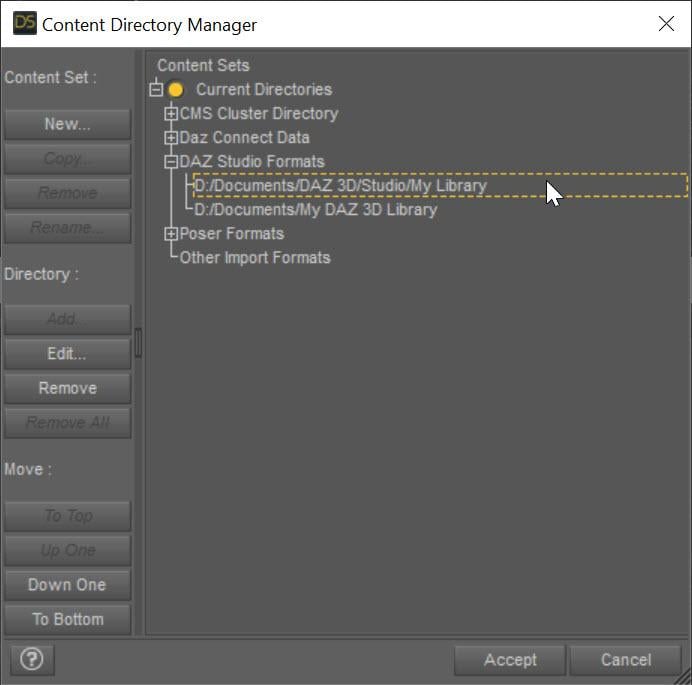
Ok, this looks like you did a double conversion. You need to make sure you have deleted the MORPHS, not just the presets. The morphs always go in \data\DAZ 3D\Genesis 8\Female\Morphs under the first directory listed in the Daz Studio Formats section of the Content Directory Manager:
 Strange Problem on Basic ERC
lilweep said:
crosswind said:
lilweep said:
crosswind said:
Actually it does make sense. Officially, on all Base pJCMs (G8) and Base cbs (G9), Base Joint Correctives property are set on 2nd Stage Controllers, otherwise those 2 properties will be meaningless...
If a vendor doesn't do so on their custom corrective morphs, it's not correct 'cause if users turn off the corrective toggle or tweak the percentage of correctives, the result will be wrong.
Right. I now see people/vendors often put the base corrective as the controller in Stage 1 instead of the bone itself, so the 'Base Joint Corrective' toggle is propogated to the cbs via Stage 1 scalar controller even if its not directly related by Stage 2 controller.
But that is not correct. Can you name one ?
These 2 properties have to be set on 2nd stage to be multiplied rather than to be added on 1st stage...
I mean like, for example, Gen 9 cbs on base figure are set up like you show in your screenshot - they have the Base Joint Correctives control as 2nd stage multiplier.When it comes to character cbs, e.g., Michael 9 which uses the base corrective cbs as its 1st stage controller (as a scalar), it's perhaps a more elegant approach, since the Base Joint Correctives control is propogated to the cbs anyway even though its on Stage 1. I guess just look at Victoria 9 or Michael 9 for examples of what im saying. Ultimately im agreeing with you and backtracking what i was saying earlier about it not being convention, as clearly it is convention to define the relationship of character cbs to Base Joint Correctives control, in one of two ways (directly or indirectly).
Oh... yeah, sorry I misunderstood. You're right. If a cbs rather than a joint rotation property is placed on 1st stage of a character's corrective morph, BJC control property is not needed to be on 2nd stage, as it's already set on the first cbs, like a 'cascade control'.
Strange Problem on Basic ERCcrosswind said:
lilweep said:
crosswind said:
Actually it does make sense. Officially, on all Base pJCMs (G8) and Base cbs (G9), Base Joint Correctives property are set on 2nd Stage Controllers, otherwise those 2 properties will be meaningless...
If a vendor doesn't do so on their custom corrective morphs, it's not correct 'cause if users turn off the corrective toggle or tweak the percentage of correctives, the result will be wrong.
Right. I now see people/vendors often put the base corrective as the controller in Stage 1 instead of the bone itself, so the 'Base Joint Corrective' toggle is propogated to the cbs via Stage 1 scalar controller even if its not directly related by Stage 2 controller.
But that is not correct. Can you name one ?
These 2 properties have to be set on 2nd stage to be multiplied rather than to be added on 1st stage...
I mean like, for example, Gen 9 cbs on base figure are set up like you show in your screenshot - they have the Base Joint Correctives control as 2nd stage multiplier.When it comes to character cbs, e.g., Michael 9 which uses the base corrective cbs as its 1st stage controller (as a scalar), it's perhaps a more elegant approach, since the Base Joint Correctives control is propogated to the cbs anyway even though its on Stage 1. I guess just look at Victoria 9 or Michael 9 for examples of what im saying. Ultimately im agreeing with you and backtracking what i was saying earlier about it not being convention, as clearly it is convention to define the relationship of character cbs to Base Joint Correctives control, in one of two ways (directly or indirectly).
Hot New (Northern) Season, New Sales Thread: Report Issues Here "Reporting Only"Wonderland said:
I don't think people are understanding my question. Like right now I have something from my wishlist in my cart that I may put back into my wishlist and move another item up that may get a better discount. But if I put that item back into my wishlist, it may count as having put it in today and not count as being in my wishlist prior to today if I change my mind.
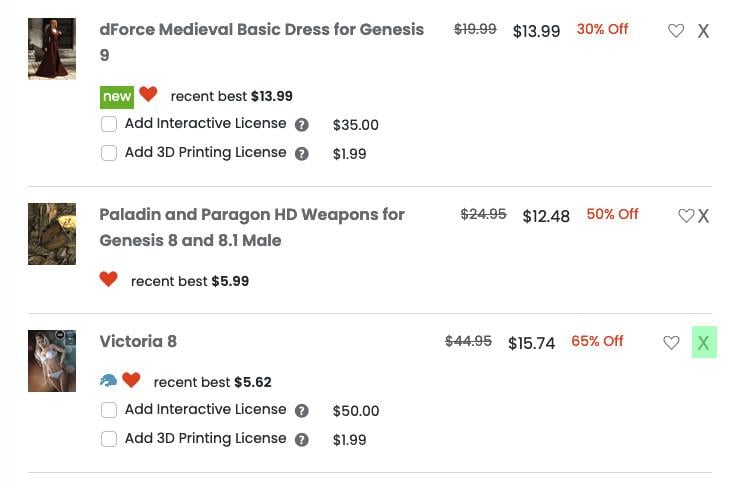
We don't understand your process: an item doesn't leave a wishlist when it's added to the cart, so there is no need to add it to your wishlist when you're removing it from your cart, you can do it with the X. On this screenshot, it's the third time I'm adding Victoria 8 to my cart and each time, I added it from my wishlist and removed it from my cart by clicking on the 'X' showed by the green overlay: it never left my wishlist during the whole test and the discount applied to it each time.
 Can someone PLEASE identify these props?
SapphireBlue said:
Drogo Nazhur said:
Linwelly said:
not sure but I would search through jepes body jewels for those
actually found it:
https://www.daz3d.com/jepe-s-jewels-and-tears-for-victoria-4-genesis-2-female-for-daz-studio
I don't think that is it because when I clicked on the link, it shows that I didn't buy it and this would have been something that I purchased but thank you for the possible leads
I think Linwelly did find the right ones, but linked the V4 jewels. You probably have the M4 ones: https://www.daz3d.com/jepes-project-m4-jewels-and-tears
 See promo pic 4
EDIT: Noticed ZippyGuitar just posted the same ahead of me...

Hmmmm? That's strange because it shows that I didn't purchase that one either.
Can someone PLEASE identify these props?Drogo Nazhur said:
Linwelly said:
not sure but I would search through jepes body jewels for those
actually found it:
https://www.daz3d.com/jepe-s-jewels-and-tears-for-victoria-4-genesis-2-female-for-daz-studio
I don't think that is it because when I clicked on the link, it shows that I didn't buy it and this would have been something that I purchased but thank you for the possible leads
I think Linwelly did find the right ones, but linked the V4 jewels. You probably have the M4 ones: https://www.daz3d.com/jepes-project-m4-jewels-and-tears
See promo pic 4EDIT: Noticed ZippyGuitar just posted the same ahead of me...
Can someone PLEASE identify these props?Linwelly said:
not sure but I would search through jepes body jewels for those
actually found it:
https://www.daz3d.com/jepe-s-jewels-and-tears-for-victoria-4-genesis-2-female-for-daz-studio
I don't think that is it because when I clicked on the link, it shows that I didn't buy it and this would have been something that I purchased but thank you for the possible leads
Can someone PLEASE identify these props?not sure but I would search through jepes body jewels for those
actually found it:
https://www.daz3d.com/jepe-s-jewels-and-tears-for-victoria-4-genesis-2-female-for-daz-studio
[Released] Character Converter from Genesis 3 Female to Genesis 8 Female(Now Conv JCMs) [Commercial]RiverSoftArt said:
Xagrim said:
During the process its dialed in.
After the process if i dial it out/in on the new G8 the changes are minimal.
Yes could be that its not coverted correct.
Maybe delete the Victoria 7 morph and try to convert Victoria 7 to get a new morph?
I have tried, delete all morphs and characters (Backup first)
And try to convert the original Victoria 7 (not HD)
It looks then like this:
Merging actors - educational purposesI am not sure why you are getting the poke-through, then.
Both Victoria 4 adn Michael 4 have underwear painted on their default materials - there is an All natural preset, which makes the areas skin-like (but doesn't add any nipple detail).
Daz 3D is part of

Connect
DAZ Productions, Inc.
7533 S Center View Ct #4664
West Jordan, UT 84084Licensing Agreement | Terms of Service | Privacy Policy | EULA
© 2026 Daz Productions Inc. All Rights Reserved.