-
Converting "Other" File Formats to Work in DAZ Studio
Mattymanx said:
Elor said:
I tried to import objects with round hole in them, like a car phone holder and it was a mess around the hole.
Daz Studio can only handle triangles and quads. When you import a model into DS and you have polygons with 5 sides or more, refered to as Ngons, you will see weirdness in the mesh, as though polygons are over running their own boundries. This is because the larger modeling apps can handle things differently than DS can and dont have to follow the same rules.
When converting a blender model, you would need to check if modifiers are active and if so, have them backed in, in the order they appear in the modifiers list. You may also want to apply a triangulate modifier and have it triangulate any polygon with 5 sides or more.
n-gons are triangulated on import, but data is kept so that they can be rebuilt on export. The problem is that there are different ways to triangulate, and if the ngon is concave (or for rendering, even if a quad is concave) the trianles created may cover the concavity producing the running over boundaries effect.
Iray is not rendering at all and someting Daz is freezing my pcI have Ryzen 5 1600, Gtx 1060 6gb, 16gb of ram, i reinstalled Daz, older a newer versions, updated gpu drivers, downgrade them too, nothing works.
I can play games without problems. Iray works randomly sometimes
Log trying to render a cube (just daz is open):
2025-01-23 12:08:05.477 WARNING: ..\..\..\..\..\src\pluginsource\DzIrayRender\dzneuraymgr.cpp(359): Iray [ERROR] - IRAY:RENDER :: 1.22 IRAY rend error: CUDA device 0 (NVIDIA GeForce GTX 1060 6GB): an illegal memory access was encountered (while launching CUDA renderer in <internal>:966) 2025-01-23 12:08:05.478 WARNING: ..\..\..\..\..\src\pluginsource\DzIrayRender\dzneuraymgr.cpp(359): Iray [ERROR] - IRAY:RENDER :: 1.22 IRAY rend error: CUDA device 0 (NVIDIA GeForce GTX 1060 6GB): Failed to launch renderer 2025-01-23 12:08:05.478 WARNING: ..\..\..\..\..\src\pluginsource\DzIrayRender\dzneuraymgr.cpp(359): Iray [ERROR] - IRAY:RENDER :: 1.9 IRAY rend error: CUDA device 0 (NVIDIA GeForce GTX 1060 6GB): Device failed while rendering 2025-01-23 12:08:05.478 WARNING: ..\..\..\..\..\src\pluginsource\DzIrayRender\dzneuraymgr.cpp(359): Iray [WARNING] - IRAY:RENDER :: 1.9 IRAY rend warn : CUDA device 0 (NVIDIA GeForce GTX 1060 6GB) is no longer available for rendering. 2025-01-23 12:08:05.479 WARNING: ..\..\..\..\..\src\pluginsource\DzIrayRender\dzneuraymgr.cpp(359): Iray [WARNING] - IRAY:RENDER :: 1.9 IRAY rend warn : All available GPUs failed. 2025-01-23 12:08:05.479 WARNING: ..\..\..\..\..\src\pluginsource\DzIrayRender\dzneuraymgr.cpp(359): Iray [ERROR] - IRAY:RENDER :: 1.9 IRAY rend error: Fallback to CPU not allowed. 2025-01-23 12:08:05.479 WARNING: ..\..\..\..\..\src\pluginsource\DzIrayRender\dzneuraymgr.cpp(359): Iray [WARNING] - IRAY:RENDER :: 1.9 IRAY rend warn : Re-rendering iteration because of device failure 2025-01-23 12:08:05.479 WARNING: ..\..\..\..\..\src\pluginsource\DzIrayRender\dzneuraymgr.cpp(359): Iray [ERROR] - IRAY:RENDER :: 1.9 IRAY rend error: All workers failed: aborting render 2025-01-23 12:08:05.479 WARNING: ..\..\..\..\..\src\pluginsource\DzIrayRender\dzneuraymgr.cpp(359): Iray [ERROR] - IRAY:RENDER :: 1.9 IRAY rend error: CUDA device 0 (NVIDIA GeForce GTX 1060 6GB): an illegal memory access was encountered (while de-allocating memory) 2025-01-23 12:08:05.479 WARNING: ..\..\..\..\..\src\pluginsource\DzIrayRender\dzneuraymgr.cpp(359): Iray [ERROR] - IRAY:RENDER :: 1.9 IRAY rend error: CUDA device 0 (NVIDIA GeForce GTX 1060 6GB): an illegal memory access was encountered (while de-allocating memory) 2025-01-23 12:08:05.479 WARNING: ..\..\..\..\..\src\pluginsource\DzIrayRender\dzneuraymgr.cpp(359): Iray [ERROR] - IRAY:RENDER :: 1.9 IRAY rend error: CUDA device 0 (NVIDIA GeForce GTX 1060 6GB): an illegal memory access was encountered (while de-allocating memory) 2025-01-23 12:08:05.480 WARNING: ..\..\..\..\..\src\pluginsource\DzIrayRender\dzneuraymgr.cpp(359): Iray [ERROR] - IRAY:RENDER :: 1.9 IRAY rend error: CUDA device 0 (NVIDIA GeForce GTX 1060 6GB): an illegal memory access was encountered (while de-allocating memory) 2025-01-23 12:08:05.480 WARNING: ..\..\..\..\..\src\pluginsource\DzIrayRender\dzneuraymgr.cpp(359): Iray [ERROR] - IRAY:RENDER :: 1.9 IRAY rend error: CUDA device 0 (NVIDIA GeForce GTX 1060 6GB): an illegal memory access was encountered (while de-allocating memory) 2025-01-23 12:08:05.480 WARNING: ..\..\..\..\..\src\pluginsource\DzIrayRender\dzneuraymgr.cpp(359): Iray [ERROR] - IRAY:RENDER :: 1.9 IRAY rend error: CUDA device 0 (NVIDIA GeForce GTX 1060 6GB): an illegal memory access was encountered (while de-allocating memory) 2025-01-23 12:08:05.480 WARNING: ..\..\..\..\..\src\pluginsource\DzIrayRender\dzneuraymgr.cpp(359): Iray [ERROR] - IRAY:RENDER :: 1.9 IRAY rend error: CUDA device 0 (NVIDIA GeForce GTX 1060 6GB): an illegal memory access was encountered (while de-allocating memory) 2025-01-23 12:08:05.480 WARNING: ..\..\..\..\..\src\pluginsource\DzIrayRender\dzneuraymgr.cpp(359): Iray [ERROR] - IRAY:RENDER :: 1.9 IRAY rend error: CUDA device 0 (NVIDIA GeForce GTX 1060 6GB): an illegal memory access was encountered (while de-allocating memory) 2025-01-23 12:08:05.480 WARNING: ..\..\..\..\..\src\pluginsource\DzIrayRender\dzneuraymgr.cpp(359): Iray [ERROR] - IRAY:RENDER :: 1.9 IRAY rend error: CUDA device 0 (NVIDIA GeForce GTX 1060 6GB): an illegal memory access was encountered (while de-allocating memory) 2025-01-23 12:08:05.481 Iray Render error: Internal rendering error. 2025-01-23 12:10:05.699 Iray [INFO] - IRAY:RENDER :: 1.0 IRAY rend info : Device statistics: 2025-01-23 12:10:05.699 Iray [INFO] - IRAY:RENDER :: 1.0 IRAY rend info : CUDA device 0 (NVIDIA GeForce GTX 1060 6GB): 1053 iterations, 0.146s init, 15.193s render 2025-01-23 12:10:05.699 WARNING: ..\..\..\..\..\src\pluginsource\DzIrayRender\dzneuraymgr.cpp(359): Iray [ERROR] - IRAY:RENDER :: 1.0 IRAY rend error: CUDA device 0 (NVIDIA GeForce GTX 1060 6GB): an illegal memory access was encountered (while de-allocating memory) 2025-01-23 12:10:05.699 WARNING: ..\..\..\..\..\src\pluginsource\DzIrayRender\dzneuraymgr.cpp(359): Iray [ERROR] - IRAY:RENDER :: 1.0 IRAY rend error: CUDA device 0 (NVIDIA GeForce GTX 1060 6GB): an illegal memory access was encountered (while de-allocating memory) 2025-01-23 12:10:05.700 WARNING: ..\..\..\..\..\src\pluginsource\DzIrayRender\dzneuraymgr.cpp(359): Iray [ERROR] - IRAY:RENDER :: 1.0 IRAY rend error: CUDA device 0 (NVIDIA GeForce GTX 1060 6GB): an illegal memory access was encountered (while de-allocating memory) 2025-01-23 12:10:05.703 Compiling OpenGL Shader... 2025-01-23 12:10:05.703 Vertex Shader: Vertex Shader compiled successfully. Fragment Shader: Fragment Shader compiled successfully. Linking Shader: Shader Program successfully linked. 2025-01-23 12:10:24.981 Iray [INFO] - IMAGE:IO :: 1.0 IMAGE io info : Loading image "D:\Program Files\DAZ 3D\DAZStudio4.16\shaders\iray\resources\DTHDR-RuinsB-500.hdr", pixel type "Rgb_fp", 512x256x1 pixels, 1 miplevel. 2025-01-23 12:10:24.992 Iray [INFO] - IRAY:RENDER :: 1.0 IRAY rend info : Updating geometry. 2025-01-23 12:10:24.992 Iray [INFO] - IRAY:RENDER :: 1.0 IRAY rend info : Updating motion transforms. 2025-01-23 12:10:24.992 Iray [INFO] - IRAY:RENDER :: 1.0 IRAY rend info : Importing scene graph. 2025-01-23 12:10:24.992 Iray [INFO] - IRAY:RENDER :: 1.0 IRAY rend info : Auto instancing compression ratio 0.90 (Full instancing compression ratio 0.89) 2025-01-23 12:10:24.992 Iray [INFO] - IRAY:RENDER :: 1.0 IRAY rend info : Importing geometry for motion time 0 2025-01-23 12:10:24.993 Iray [INFO] - IRAY:RENDER :: 1.0 IRAY rend info : Geometry import (1 triangle object with 48 triangles, 0 fiber objects with 0 fibers (0 segments), 1 triangle instance yielding 48 triangles, 0 fiber instances yielding 0 segments) took 0.001s 2025-01-23 12:10:24.993 Iray [INFO] - IRAY:RENDER :: 1.0 IRAY rend info : Updating materials. 2025-01-23 12:10:24.994 Iray [INFO] - MATCNV:RENDER :: 1.0 MATCNV rend info : found 0 textures, 0 lambdas (0 unique) 2025-01-23 12:10:24.994 Iray [INFO] - IRAY:RENDER :: 1.0 IRAY rend info : Updating environment. 2025-01-23 12:10:25.004 Iray [INFO] - IRAY:RENDER :: 1.0 IRAY rend info : Updating backplate. 2025-01-23 12:10:25.007 Iray [INFO] - IRAY:RENDER :: 1.0 IRAY rend info : Updating lens. 2025-01-23 12:10:25.007 Iray [INFO] - IRAY:RENDER :: 1.0 IRAY rend info : Updating lights. 2025-01-23 12:10:25.007 Iray [INFO] - IRAY:RENDER :: 1.0 IRAY rend info : Updating object flags. 2025-01-23 12:10:25.007 Iray [INFO] - IRAY:RENDER :: 1.0 IRAY rend info : Updating caustic portals. 2025-01-23 12:10:25.007 Iray [INFO] - IRAY:RENDER :: 1.0 IRAY rend info : Updating decals. 2025-01-23 12:10:25.011 Iray [INFO] - IRAY:RENDER :: 1.0 IRAY rend info : Using iray core convergence estimate. 2025-01-23 12:10:25.011 Iray [INFO] - IRAY:RENDER :: 1.0 IRAY rend info : Allocating 1-layer frame buffer 2025-01-23 12:10:25.014 Iray [INFO] - IRAY:RENDER :: 1.0 IRAY rend info : Using interactive scheduling, caustic sampler disabled 2025-01-23 12:10:25.014 Iray [INFO] - IRAY:RENDER :: 1.0 IRAY rend info : Initializing local rendering. 2025-01-23 12:10:25.017 WARNING: ..\..\..\..\..\src\pluginsource\DzIrayRender\dzneuraymgr.cpp(359): Iray [ERROR] - IRAY:RENDER :: 1.0 IRAY rend error: No device specified or usable 2025-01-23 12:10:25.017 Iray [INFO] - IRAY:RENDER :: 1.0 IRAY rend info : Rendering with 0 device(s): 2025-01-23 12:10:25.017 Iray [INFO] - IRAY:RENDER :: 1.0 IRAY rend info : Rendering... 2025-01-23 12:10:25.017 WARNING: ..\..\..\..\..\src\pluginsource\DzIrayRender\dzneuraymgr.cpp(359): Iray [ERROR] - IRAY:RENDER :: 1.0 IRAY rend error: No worker to render with: aborting render 2025-01-23 12:10:25.017 Iray Render error: Internal rendering error.Mirroring Conforming Clothing GeometryI would flip the normals first and then import that and do transfer rigging.
Then on top of that you can do fit morphs to specific characters.
Mirroring Conforming Clothing GeometryThanks!
You're right that Jay doesn't have a tutorial for this, but I simply followed the Daz Studio online user guide to do the conversion. It worked great, but as I went to sculpt fit morphs in zbrush, it appears that all of the normals are inverted. This makes sense because we didn't really 'mirror' the geometry as much as turn it inside out, lol. So I am unable to sculpt a fit morph for the bag. If you have any suggestions on how to flip the normal view in zbrush, let me know. I'm worried if I flip the normals, even though the geometry hasn't changed, Daz Studio might not recognize it as a morph and refuse to import it. Thoughts?
EDIT: So it looks like, if I go Tools->Display Properties->Flip in zbrush, it will flip the normals so I can do my sculpt. Exporting that morph, however, doesn't work. But if I flip the normals back to the way they were after doing my sculpt, I can import the morph. So, problem solved I guess. Sloppy hack, but whatever. XD
Converting "Other" File Formats to Work in DAZ StudioElor said:
I tried to import objects with round hole in them, like a car phone holder and it was a mess around the hole.
Daz Studio can only handle triangles and quads. When you import a model into DS and you have polygons with 5 sides or more, refered to as Ngons, you will see weirdness in the mesh, as though polygons are over running their own boundries. This is because the larger modeling apps can handle things differently than DS can and dont have to follow the same rules.
When converting a blender model, you would need to check if modifiers are active and if so, have them backed in, in the order they appear in the modifiers list. You may also want to apply a triangulate modifier and have it triangulate any polygon with 5 sides or more.
Converting "Other" File Formats to Work in DAZ StudioElor said:
crosswind said:
If you're regular Blender users, I strongly recommend a pretty good add-on : (Link removed by mod "Blender to Daz Studio")
The latest version can convert and export geometry, weight, texture maps + Principle BSDF material setting for Iray Uber shader, animation, lights / cameras directly to DS.
$50 is a steep price, but it could be worth it just to import assets from Blender in the long run.
Does it fix some problems related to Geometry ? I think I now know how to care about materials and simple riggings (more complex ones one day too), but geometry is just a bigger beast, one I have yet to tame…
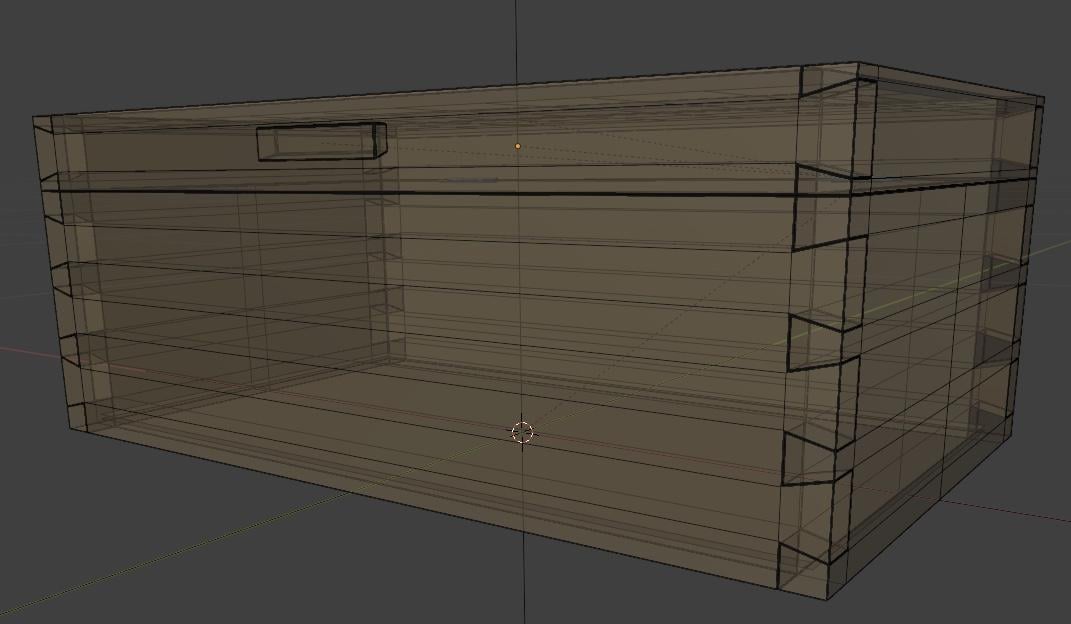
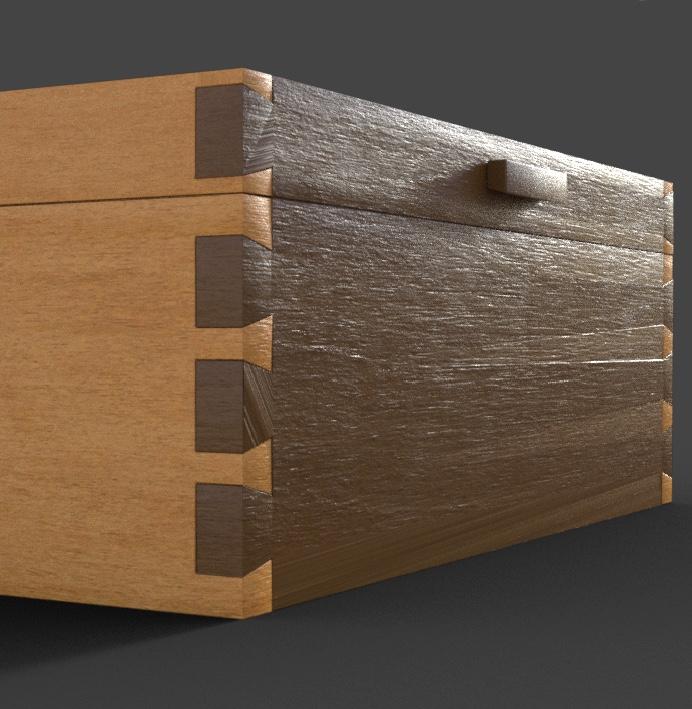
As a recent example, I tried to import the Wooden Dovetail Box from Blendswap into Daz Studio, thinking it would be easy because it was a simple shape (I tried to import objects with round hole in them, like a car phone holder and it was a mess around the hole…) but the end result is disappointing (and I have no idea what's going wrong and don't know the key words to use to find a solution: a search about transfering object from Blender to Daz usually ends with results about Daz to Blender discussions instead…)
In Blender:
In Daz Studio, they are triangles everywhere (even after using a Tris to Quads converter in Blender, who found nothing):

Ah, right ~ I shouldn't have posted a commercial link there. Anyway...
The add-on doesn't fix anything on the geometry... but with FBX format, it can assure a precise export in terms of geometry. It may be case by case... though I don't think it's an issue comes from tris per se. Check your export settings if you selected Normals / Trianglated Mesh.
In below example (from a blend file on Polyhaven...), no geometry issue was found after exporting with OBJ or the add-on but the add-on gave the correct material settings + precisely assigned maps. (the one on the right...)
Blender To Daz Studio PluginRefer to this post:
Converting "Other" File Formats to Work in DAZ Studiocrosswind said:
If you're regular Blender users, I strongly recommend a pretty good add-on : (Link removed by mod "Blender to Daz Studio")
The latest version can convert and export geometry, weight, texture maps + Principle BSDF material setting for Iray Uber shader, animation, lights / cameras directly to DS.
$50 is a steep price, but it could be worth it just to import assets from Blender in the long run.
Does it fix some problems related to Geometry ? I think I now know how to care about materials and simple riggings (more complex ones one day too), but geometry is just a bigger beast, one I have yet to tame…
As a recent example, I tried to import the Wooden Dovetail Box from Blendswap into Daz Studio, thinking it would be easy because it was a simple shape (I tried to import objects with round hole in them, like a car phone holder and it was a mess around the hole…) but the end result is disappointing (and I have no idea what's going wrong and don't know the key words to use to find a solution: a search about transfering object from Blender to Daz usually ends with results about Daz to Blender discussions instead…)
In Blender:
In Daz Studio, they are triangles everywhere (even after using a Tris to Quads converter in Blender, who found nothing):
How to import and save a Blender Prop for use in Daz StudioYes, import with the defaut settings first... then check the Dimensions in Blender after import, by pressing N, in Item panel > Dimensions.
Besides, I thought you have a *.blend file... since you just have OBJ/MTL files, you also can directly import to DS to take a look.. for comparing its size with a G8F figure ~~
Converting "Other" File Formats to Work in DAZ StudioDepending on which site you're using, you can get an attempt at a .duf conversion. TurboSquid has done this for me several times, as has CGTrader. Otherwise, I use fbx through Poser 11 Pro, save a PZ3, and import into DS; Uber Iray the surfaces, scale to Genesis, and test render to see what if any materials have to be replaced with shaders. With some large environments, I'll often have to group, name, and position the parts, which can take a day or two; however, it does give me a deep appreciation for how easy our vendors make life. Kitbash3D FBX files come in grouped and named; all they need is scaling, Iray Uber, and emission settings.
How to import and save a Blender Prop for use in Daz StudioNo no~ that's 2-steps process, export OBJ from Blender, then import OBJ in DS.
zzz first ~~ sleep tight !
"info" of an itemFor the products from this store that you installed in DIM ? Yes. Right-click on the file, Show Asset in > Content Library > Products. Then right-click on the product > Edit Metadata, you'll see all product info.
Besids, right-click on the product > More Information..., it'll bring you to the product wiki page > product page.
For the 3rd-party product, go to the mapped folder, you at least can get the product name from its upper-level folder.
How to open or use mtl. filesDS has two ways to import OBJ.
First is through File/Import, this allows you to load it from any where on your system, with this pathways in the MTL need to be the full pathway including drive letter.
Second is using the Content Library tab, by setting up an "Other Formats" content directory, with this pathways just need to start from the location of the MTL file.
How to import and save a Blender Prop for use in Daz StudioFor instance, a Coke can in my Library, is more or less with Height: 13.39cm, Width/Depth: 7.17cm. If you have a can object in Blender with the similar measurement, just export it to OBJ with Scale 100%. Import OBJ to DS with 100% as well.
Then you'll get the very same size / measurement in DS. Besides, manually Scaling the can size is also doable.
Mirroring Conforming Clothing GeometryYea, no problem ! Actually that'll be simple:
After exporting / importing OBJ (Base Resolution !), go to : Edit > Object > Transfer Utility, rig the mirrored object with the settings in below ss1.
Then, if there're adjustment morphs as well as corrective morphs on the original leg bag, dial the adjustment morphs on the original right leg bag with mirrored status ! Export it to OBJ, import OBJ to the newly-rigged left leg back with Morph Loader Pro, in below ss2 ~ 3. Do the same for the corrective morphs but the relevant pose needs to be dialed firstly ~~ (I'm one of Jay's fans but I don't think Jay has ever given a relevant tutorial about this workflow, IIRC....
 )
)But if you find this workflow cumbersome, you also can consider using this product, which automates the whole process : https://www.daz3d.com/mirror-geometry (only there're 3 products for G3, G8, G9...)
Universal Scene Description (USD) Export / IntegrationSeven193 said:
NVidia Omniverse is the only software I know that uses USD format as it's main format. But, it still accepts FBX, OBJ, and GLTF as input.
For me, USD is just another format. To use it, it would have to fill a purpose, a means to an end, and replacing another format is not a good enough of a reason.
To expand a bit further on what Mattymanx said. If USD were to be implemented properly, you (or any user) would be able to take your assets from DS (Daz Studio) to any other application (including Omniverse) with no loss of quality and functionality, and any changes to the scene or scene elements made in the external application could then be used in DS with no loss of information/quality. The current implementation of FBX in DS does not allow that (insufficient), and OBJ does not support rigging. So, for example if DAZ did a proper implementation of USD export/import you would be able to export an entire scene in DS to Blender, Omniverse, Unreal Engine, etc. with all rigging, lighting and shader/materials information intact. Meaning you could then animate the scene in another software, and render it in that software and have everything look virtually identical to how it looks in DS. That is why Pixar developed USD, so they could easily use assets in different applications without any loss of information/quality between applications (i.e the lighting artist can work on lighting in Katana, the shader artists can work on editing the shaders/materials in that application with the proper lighting, etc.). Additionally, any updates to an asset is then seen in it's new form in all the applications they use because they are reading the USD data live, not doing static import/export operations.
This would truly open up the use of DAZ assets well beyond what is currently provided by the bridges (which for the DAZ bridges is rudimentary at best, Diffeomorphic. which is developed by an individual developer goes way beyond what DAZ has provided with their plugin), and if developed for import as well, it would open up DS to a huge variety of potential content.
Mirroring Conforming Clothing Geometrycrosswind said:
Export the mirrored leg bag to OBJ, import OBJ. Rig it to Genesis figure with Transfer Utility.
Thanks! I haven't used the Transfer Utility yet, but I'll find one of Jay's tutorials and give it a shot.
Mirroring Conforming Clothing GeometryExport the mirrored leg bag to OBJ, import OBJ. Rig it to Genesis figure with Transfer Utility.
Organizing DAZ contentmalswansky said:
So I've looked through a number of tutorials & threads, but I still have a bunch questions -- I certainly don't expect anybody to answer all, but any tips would be much appreciated!
1. Let's say I have successfully created an additional content directory (on another drive) to keep stuff that I don't want to clutter my main drive (but still want to keep installed). Is there a way to move an existing installed product from the current content directory to this new one? Or should I just a) uninstall from current, b) install to new?
For the products installed with DIM, yes. For other products, you have to manually move the folders/files to the new Library.
2. The organization of the installed stuff in my Content Library doesn't make a lot of sense to me, e.g. a product that consists of Clothing + Poses seemingly arbitrarily goes into clothing, or some products are in a folder by artist name, while others are under product/set name, etc. Is there way to reorganize it in a more custom way? I assume one isn't supposed to mess with the physical folder structure, because that might mess up the information in the manifests, etc... or can one?
There's no absolute / right or wrong rules but better or best practices for organizing product folders.... as long as the vendor don't make the folders very messy ~~ If you never use Smart Content, you can freely re-organize the folders / file locations as per your preferences. But if you use Smart Content, better not re-organize them because that'll easily break the metadata...then any product update in DIM can make things even messy... unless, you're very familiar with the ways of preventing these mess from happenning (that's another long story....).
3. I'm kind of confused by the metadata, e.g. type vs. category, what is actually important and what is is used by Smart Content? Like, what might I need to add as far as metadata to make Smart Content work better? And what metadata do you try to maintain/keep organized for your content?
Type, aka Content Type, is defined by Daz as higher level classification for user-facing files as well as Properties, which is maily used for showing you the Type icon on the file thumbnails and as the conditions for saving / applying some Presets and running certain scripts, etc. You have no way to add new Types in DS. Categories can be freely and flexibly defined as per how a user want to show the Tree of Categories in Smart Content for fast filtering products by choosing more detailed Category from the Tree.
Content Type are used in both Smart Content and Content Libary while Categories are mainly useful in Smart Content.
4. In the same vein, what does one use Content DB Editor for? Is it to set metadata for products where the artist didn't bother to do it, and stuff that you create? Or is it needed to fix some other issues?
To create metadata for the products from 3rd-parties or the products we made, as well as correct wrong Content Type / Categories.
5. Categories seems like maybe the way to go to set up a completely custom hierarchy of all the content... is that what experienced users do? Or is it kind of superfluous if one properly organizes Content Library and Smart Content?
Technically, yes. But I don't think most of the users do that ~~ because the top and 2nd level Categories are defined by Das well enough. Whether spending time on manipulating Categories or not is always up to one's preferences... as well as depends on one's capability and time ~~
6. Finally, maybe an alternative way to cover all the bases is just to ask -- what is your workflow when you get or create new Daz content and want to keep it organized -- do you move stuff around, set you custom categories, or perhaps do something else with metadata?
For selling / sharing my products, I most of the time assigne Content Type and Categories in the simplest way, by using Default values. For the use of myself, I just necessarily added some custom Categories at higher level and mainly add some useful Keyword to the main user-facing files for precise filtering.
Thank you!
Organizing DAZ content1. The easiest way would be to uninstall them with DIM (assuming you installed the products, that was), and then reinstall them to the new mapped location.
2. The reason for the difference for the most part is most Daz Original products is that the saving functions make them easier for smart content. The PA folder and products within are so users can keep all packs from them in one place for ease of use, though it is highly argued in the forums about doing this. We have pretty strict guidelines we follow on our brokered products when saving certain files so they can be used and tagged properly for use in smart content.
3. Not too positive.
4. Daz does the metadata so it can't be messed up by the PA. The products that are missing metadata at this time are most likely newly ported products from other stores because the PA is now selling here.
5. Yes, categories are the easiest way to custom organize your library.
6. The important thing is how you install your products. The most customizable one is DIM. You can set up numerous libraries to install products to so you can get it close to how you want your library to look.
Daz 3D is part of

Connect
DAZ Productions, Inc.
7533 S Center View Ct #4664
West Jordan, UT 84084Licensing Agreement | Terms of Service | Privacy Policy | EULA
© 2026 Daz Productions Inc. All Rights Reserved.