-
Fiddling with Iray skin settings...
I have an Intel HD 3000 GPU and 8GB RAM and am doing CPU iRay renders using the standard exposure settings. The lighting and the Dome background is an HRDI freebie with a mostly bright sunny day and it appears to be about noone from the shadows generated under the Girl 7's feet. One of the renders uses no Auto Headlamp and one does. I've replaced the Girl 7 default texture set with Victoria 7's iRay optimized texture set.
So why is the Girl 7 looking like the light from the HRDI is in heavy shade or at dusk? Is this because the iRay shader is not bouncing light off the ground to create more diffuse light?
The same thing happens with the Guy 7.
If the characters (Girl 7, Victoria 7, and Guy 7) were portrayed on the DAZ Store as having darker skin than that would be fine but since they aren't that leads me to believe I am doing something fundamentally wrong in the iRay settings of the Render even though I'm really leaving it mostly alone and not changing any exposure settings. Why they must be using flood lights to get the skin tones they are getting in the
If I have to adjust any of the exposure settings then I am concerned because I know that typical consumer grade photography is based off of ISO 100 which is already the default they've set.
In reading the forums I've seen most people compensate by adding extra lights to the scene but that is defeating the purpose of HRDI lighting.
Depends on if the HDRi used is actually one. Many freebies out there really aren't, but just some highres medium or low dynamic range jpegs with different exposure values slapped together and then exported in hdr format. Didn't count all the fake HDRi's I trashed already. You can try and rotate the dome to see if the lighting changes significantly. Could be that the sunlight's origin is from behind your figure's back.
When it comes to Iray HDR lighting, I'd recommend "certified" distributors like DimensionTheory, Dumor3D, OutOfTouch... that way you can be sure you get something from someone who exactly knows what he/she is doing... including the knowledge that one simply can't built an appropriate HDRi by just slapping a bunch of jpegs together.

Thanks. It is 8K big my current HRDi from one of those freebie sites from that HRDI thread elsewhere in these forums, but I will go back to using the well known Freebie of the Pixar Campus or that Golf Course near the French Alps as they are known to be good.
As suggested I dropped the translucency color to 1.0 1.0 1.0 but Girl 7 was still much too dark. So then I drop the translucency weight from 0.65 to 0.33 and the Girl 7 begins to look about the tone of the Victoria 7 promo ads in the DAZ Store since I'm using that material set. Finally I try dropping translucency weight to 0.10 and set the translucency color to 1.0 0.31 0.23 and it appears more or less similar to the 2nd render where I dropped translucency weight to 0.33 but left translucency color as 1.0 1.0 1.0.
She is facing the North Sea in these renders so the sun is to her southwest between 14:00 and 16:00 I'd guess but I'm not a sundial reader. I will see if she is too washed out when facing south.
How do I make her appear sweaty without spending cash? That's what the spectral or glossiness maps are for no?
DIM won't install two packages...I looked in the Content Library and couldn't fined either products. The DIM actually said "Installation Failed" for those two products.But, I'll check again. Thanks for the tip... that might resolve some issues I'm having with the installation of Victoria 1.
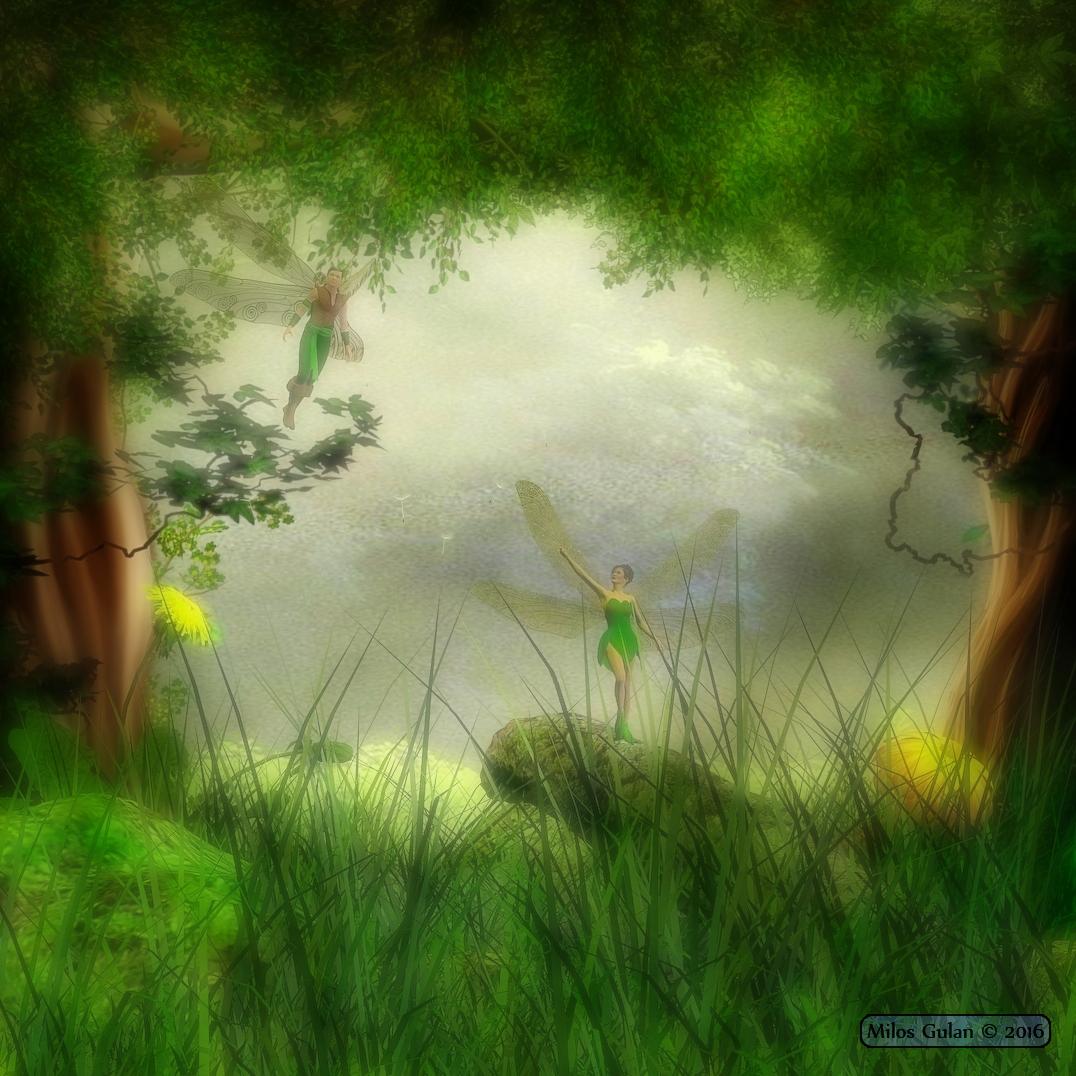
3D Art Freebie Challenge ---April: “When I Grow Up I Want To Be A Woodland Fairy” (Entry Thread)Enchanted Forest
*******
Another loud and crowded evening at Lazy Lion Inn, voices from other tables could be overheard: "I am telling You, that I saw flying fairies deeper in the forest... They were almost beautiful as elves I also saw there...", ... "Yeah, right... and what about treasure? I am guessing that there must be some treasure in that forest too..."
*******
Done with Daz Studio 4.9
Items marked with an asterisk require registration.
Not Counting: Victoria 4, Genesis 1, Journeyer Scout Outfit
Freebies:
1.)* ANNE V4 Character zip 1-3
1.)* ANNE V4 Character zip 2-3
1.)* ANNE V4 Character zip 3-3
2.)* Dmon Wings for Poser and DS
3.)* DAZ Studio MATs for Dmon Wings
4.)* Woodland Peace Backgrounds
5.)* Louise Hair for V4 and V3
6.)* Sulu Hair
7.) Tink Dress
8.) Leafy Boots
9.)* Primitive textures for Journeyer Arms+Sash
10.)* Primitive for Journeyer Scout Pants M4-Genesis
11.)* Dragon Touch for Journeyer Scout 1.0.0
12.)* Set of Scene Bases Part 1
12.)* Set of Scene Bases Part 2
13.)* Grassy Patch
14.)* RDNA Fae Flower Brolly
15.)* Xfrog Plants: Dandelion
16.)* TransPond Dandelion Seedling
17.)* Render Profiles for DAZ Studio 4.5 (Rendered on Insane)
Fiddling with Iray skin settings...I have an Intel HD 3000 GPU and 8GB RAM and am doing CPU iRay renders using the standard exposure settings. The lighting and the Dome background is an HRDI freebie with a mostly bright sunny day and it appears to be about noone from the shadows generated under the Girl 7's feet. One of the renders uses no Auto Headlamp and one does. I've replaced the Girl 7 default texture set with Victoria 7's iRay optimized texture set.
So why is the Girl 7 looking like the light from the HRDI is in heavy shade or at dusk? Is this because the iRay shader is not bouncing light off the ground to create more diffuse light?
The same thing happens with the Guy 7.
If the characters (Girl 7, Victoria 7, and Guy 7) were portrayed on the DAZ Store as having darker skin than that would be fine but since they aren't that leads me to believe I am doing something fundamentally wrong in the iRay settings of the Render even though I'm really leaving it mostly alone and not changing any exposure settings. Why they must be using flood lights to get the skin tones they are getting in the
If I have to adjust any of the exposure settings then I am concerned because I know that typical consumer grade photography is based off of ISO 100 which is already the default they've set.
In reading the forums I've seen most people compensate by adding extra lights to the scene but that is defeating the purpose of HRDI lighting.
Depends on if the HDRi used is actually one. Many freebies out there really aren't, but just some highres medium or low dynamic range jpegs with different exposure values slapped together and then exported in hdr format. Didn't count all the fake HDRi's I trashed already. You can try and rotate the dome to see if the lighting changes significantly. Could be that the sunlight's origin is from behind your figure's back.
When it comes to Iray HDR lighting, I'd recommend "certified" distributors like DimensionTheory, Dumor3D, OutOfTouch... that way you can be sure you get something from someone who exactly knows what he/she is doing... including the knowledge that one simply can't built an appropriate HDRi by just slapping a bunch of jpegs together.
3D Art Freebie Challenge ---April: “When I Grow Up I Want To Be A Woodland Fairy” (Main Thread)Here is my entry, I hope did it good:
Enchanted Forest
*******
Another loud and crowded evening at Lazy Lion Inn, voices from other tables could be overheard: "I am telling You, that I saw flying fairies deeper in the forest... They were almost beautiful as elves I also saw there...", ... "Yeah, right... and what about treasure? I am guessing that there must be some treasure in that forest too..."
*******
Done with Daz Studio 4.9
Items marked with an asterisk require registration.
Not Counting: Victoria 4, Genesis 1, Journeyer Scout Outfit
Freebies:
1.)* ANNE V4 Character zip 1-3
1.)* ANNE V4 Character zip 2-3
1.)* ANNE V4 Character zip 3-3
2.)* Dmon Wings for Poser and DS
3.)* DAZ Studio MATs for Dmon Wings
4.)* Woodland Peace Backgrounds
5.)* Louise Hair for V4 and V3
6.)* Sulu Hair
7.) Tink Dress
8.) Leafy Boots
9.)* Primitive textures for Journeyer Arms+Sash
10.)* Primitive for Journeyer Scout Pants M4-Genesis
11.)* Dragon Touch for Journeyer Scout 1.0.0
12.)* Set of Scene Bases Part 1
12.)* Set of Scene Bases Part 2
13.)* Grassy Patch
14.)* RDNA Fae Flower Brolly
15.)* Xfrog Plants: Dandelion
16.)* TransPond Dandelion Seedling
17.)* Render Profiles for DAZ Studio 4.5 (Rendered on Insane)
Those are gorgeous.
Fiddling with Iray skin settings...I have an Intel HD 3000 GPU and 8GB RAM and am doing CPU iRay renders using the standard exposure settings. The lighting and the Dome background is an HRDI freebie with a mostly bright sunny day and it appears to be about noone from the shadows generated under the Girl 7's feet. One of the renders uses no Auto Headlamp and one does. I've replaced the Girl 7 default texture set with Victoria 7's iRay optimized texture set.
So why is the Girl 7 looking like the light from the HRDI is in heavy shade or at dusk? Is this because the iRay shader is not bouncing light off the ground to create more diffuse light?
The same thing happens with the Guy 7.
If the characters (Girl 7, Victoria 7, and Guy 7) were portrayed on the DAZ Store as having darker skin than that would be fine but since they aren't that leads me to believe I am doing something fundamentally wrong in the iRay settings of the Render even though I'm really leaving it mostly alone and not changing any exposure settings. Why they must be using flood lights to get the skin tones they are getting in the
If I have to adjust any of the exposure settings then I am concerned because I know that typical consumer grade photography is based off of ISO 100 which is already the default they've set.
In reading the forums I've seen most people compensate by adding extra lights to the scene but that is defeating the purpose of HRDI lighting.
3D Art Freebie Challenge ---April: “When I Grow Up I Want To Be A Woodland Fairy” (Main Thread)Here is my entry, I hope did it good:
Enchanted Forest
*******
Another loud and crowded evening at Lazy Lion Inn, voices from other tables could be overheard: "I am telling You, that I saw flying fairies deeper in the forest... They were almost beautiful as elves I also saw there...", ... "Yeah, right... and what about treasure? I am guessing that there must be some treasure in that forest too..."
*******
Done with Daz Studio 4.9
Items marked with an asterisk require registration.
Not Counting: Victoria 4, Genesis 1, Journeyer Scout Outfit
Freebies:
1.)* ANNE V4 Character zip 1-3
1.)* ANNE V4 Character zip 2-3
1.)* ANNE V4 Character zip 3-3
2.)* Dmon Wings for Poser and DS
3.)* DAZ Studio MATs for Dmon Wings
4.)* Woodland Peace Backgrounds
5.)* Louise Hair for V4 and V3
6.)* Sulu Hair
7.) Tink Dress
8.) Leafy Boots
9.)* Primitive textures for Journeyer Arms+Sash
10.)* Primitive for Journeyer Scout Pants M4-Genesis
11.)* Dragon Touch for Journeyer Scout 1.0.0
12.)* Set of Scene Bases Part 1
12.)* Set of Scene Bases Part 2
13.)* Grassy Patch
14.)* RDNA Fae Flower Brolly
15.)* Xfrog Plants: Dandelion
16.)* TransPond Dandelion Seedling
17.)* Render Profiles for DAZ Studio 4.5 (Rendered on Insane)
Rendered on Insane!
 I avoid that setting whenever possible but some images just need that high a level.
A lovely render Milos. All links verified.
ENTRY ACCEPTED
Please move to Entries Thread.
Introduce Yourself, Hello, my name is.....Hi, all. My name is Tracy and I'm a comic book and free lance commission artist. I've been doing 2D art professionally for a few years and have always wanted to learn 3D. When I discovered Daz Studio (and more importantly that it's FREE), I had no more excuses to not learn how to do 3D. I'm a complete 3D newb though, and honestly I'm feeling a bit overwhelmed. There are SO MANY figures and models and different versions of Genesis and different figures and many aren't compatable with different Genesis versions and I just don't know where to start.
I don't make much money - as a freelance artist some months I barely make enough to put some food on the table, so I need some advice. What figure(s) and product(s) should I get that will give me the most "bang for my buck". I'm really into toon type figures but I also enjoy realism and realistic figures. I'd love to have figures that I can do "hybrid" morphs with that will give me a cool mix of realizm and "toon"/anime looks. I also would want to know what figures would be best to get for someone who is going to need to rely pretty heavily on finding "freebies" (again, I'm a "starving artist" and often barely make enough to pay some bills, so I won't be able to buy many products at all and will be interested in the products/figures with the most freebies available).
Any help and advice you can give me on what to get for someone in my situation would be a huge help! Thank you in advance for those who take the time to give some advice! I do hope I get some - because right now I'm feeling so overwhelmed and have no idea what I should get and where to start.
Tracy, my guess is that there is more free stuff for Victoria 4 than the Genesis models, because she has been around much longer, but that is a guess. However, I think all generations of Genesis models are easier to work with than the generation 4 models (Victoria 4, Michael 4). One thing to consider is that the original Genesis could be a man, a woman, or a child, right out of the box, without purchasing any add-on products. Like Richard said, there fewer options with toons. Also, the original Genesis is getting older now, and there are often very good sales on wardrobe and accessories for it. However, you will not see much new content released for it. Most content released now is for Genesis 3. Even Genesis 2 is passe now, as far as new products are concerned, for the most part. You can find free content on sites like ShareCG, and forum member WilmaP has a whole line of free clothing at her website. Here is her forum thread http://www.daz3d.com/forums/discussion/45589/wilmap-s-digital-creations-last-updated-20-02-16. The most important thing is to just start learning to use Daz Studio. So download some free items and play around.
Legacy UVs for Genesis 3 [Commercial]Thanks, Redz.
Yes, as well as Genesis, there are a fair few G2F textures which use the V5 UVs as well. I went through the store product pages for Genesis 2 Females and before my stamina gave out I'd found at least thirty. There's probably a lot more all told, here and elsewhere.
I'd like to know how many Victoria 6 UVs there are. It's a shame we can't just run a query on a database somewhere and get these figures out. And a lot of the product pages, certainly early on in the Genesis 2 run, don't even say what the UVs are. But I would like to do sets for the core UVs if it's manageable.
Where do you see that? Most of the Older (Genesis/early G2) characters tht i looked into did not note this on the STorepage, like the newer ones most of the time do....
Yes, you're right, many of the earlier ones don't. I have a few which are undocumented in this way, for example FW Diana, which lists Olympia 6 as a requirement (for the morph), but actually uses Victoria 5 UVs. But there are others which are documented, e.g. Rene for Monique 6 and EJ Guadalupe.
Celebrity Look-a-Likes for 3D figures Part 2What do you think? Doesn't this character look like Anna Friel?
Character:
https://www.renderosity.com/mod/bcs/p3d-eva-for-victoria-4-and-genesis-2-female/109236/
Original person:
Sorry, not seeing it.
It is strange. I can definitelly see the resemlance. Maybe it is because she is an actress (and not model) so she has thousand faces. Anyway, the thumbnail photo on IMDB is not the best one.
Legacy UVs for Genesis 3 [Commercial]Thanks, Redz.
Yes, as well as Genesis, there are a fair few G2F textures which use the V5 UVs as well. I went through the store product pages for Genesis 2 Females and before my stamina gave out I'd found at least thirty. There's probably a lot more all told, here and elsewhere.
I'd like to know how many Victoria 6 UVs there are. It's a shame we can't just run a query on a database somewhere and get these figures out. And a lot of the product pages, certainly early on in the Genesis 2 run, don't even say what the UVs are. But I would like to do sets for the core UVs if it's manageable.
Where do you see that? Most of the Older (Genesis/early G2) characters tht i looked into did not note this on the STorepage, like the newer ones most of the time do....
Legacy UVs for Genesis 3: Victoria 5?http://www.daz3d.com/legacy-uvs-for-genesis-3-victoria-5
Am I reading right? could I use my genesis textures on G3f?You can use Genesis textures which have V5 UVs, yes. Here is a link to the thread in the Daz PA Commercial Products forum which has been set up to field any questions people may have:
http://www.daz3d.com/forums/discussion/79141/legacy-uvs-for-genesis-3-commercial
Legacy UVs for Genesis 3: Victoria 5?http://www.daz3d.com/legacy-uvs-for-genesis-3-victoria-5
Am I reading right? could I use my genesis textures on G3f?Fiddling with Iray skin settings...I been trying to follow this thread and i am still scratching my head. Can someone in laymens terms tell me what happens when you convert skin to iray shaders. To my eye it really does a lot of things but especially to skin tone and fine skin details.
Hi Daniel.
Applying the Iray Uber Base! converts the 3Delight material settings to Iray use. The procedure is suboptimal, because the 3Delight settings are just simply transfered without any adjustments to PBR shading needs. For example, the "Specular Color" and "Specular2 Color" from the 3Delight material will become "Glossy Color" and "Top Coat Color" on the Iray material. In case of the Genesis 2 Base Figures that will be a light orange for "Glossy Color" and a light blue for "Top Coat Color". Which is just plain wrong. Can't say it often enough, the "Glossy Color" and "Top Coat Color" of a dielectric (non-metal) material needs to be white, only metals are able to change the color of the specular reflection. If one creates a dielectric material for Iray, greys, blues, oranges, or any other color has nothing to do there in "Glossy Color" and "Top Coat Color".
The "Subsurface Color" of the 3Delight material will become "Translucency Color". Specular maps will be put into the "Glossy Color" and "Top Coat Color" texture slots, although DAZ's Iray Uber documentation states that those rather need to be put into the "Glossy Layered Weight"/"Top Coat Weight" ones. That's not the converters fault but the result of the year long bad habit of 3Delight material creators to put those into the "Specular Color" rather than into the "Specular Strength" texure slots where they actually belong. But even then the weights needs to be raised (3.00 and more) since the standard specular maps for the 3Delight renderer aren't really Iray compatible. Too much black in them, and in the PBR shading realm Black (0.00) means "No". No glossiness, no roughness, no reflectivity, etcpp.
Values are transfered 1:1, for example a "Bump Strength" of 25% in 3Delight will be a 0.25 in Iray. Since Iray handles bump a bit differently, the value needs to be much higher, depending on the bump map around five to ten times the 3Delight material value.
The "Iray Optimized Genesis 2" MATs are a bit better than just converting the 3Delight material to Iray by the Uber Base (or the auto-conversion), but still contain a glitch there and then. The "TL" designated translucency texure maps in the "Translucency Weight" texture slots f.e. supress any translucency effect and so any color you put into "Translucency Color" won't affect your skin in the final render. They're either not Iray compatible or the renderer expects a simple float value in this place rather than a texture map. Similar to the "Transmitted Color" texture slot where a map plugged into simply doesn't work and make that parameter ineffective. "Floats only" in this place.
Too red (and also dark) skins are mostly a result of enough red already contained in the diffuse texture and adding even more red (darken) through a not so optimal "Translucency Color" and/or "Transmitted Color". The Victoria 6 diffuse textures are a good (or bad
) example.For setting up a skin shader I'd recommend a neutral light which AndyGrimm suggests: a spot with 15000 Lumen and a temperature of 5000 (K). If your skin setup looks realistic in that lighting, it will most likely look realistic in any lighting.
Introduce Yourself, Hello, my name is.....Hi, all. My name is Tracy and I'm a comic book and free lance commission artist. I've been doing 2D art professionally for a few years and have always wanted to learn 3D. When I discovered Daz Studio (and more importantly that it's FREE), I had no more excuses to not learn how to do 3D. I'm a complete 3D newb though, and honestly I'm feeling a bit overwhelmed. There are SO MANY figures and models and different versions of Genesis and different figures and many aren't compatable with different Genesis versions and I just don't know where to start.
I don't make much money - as a freelance artist some months I barely make enough to put some food on the table, so I need some advice. What figure(s) and product(s) should I get that will give me the most "bang for my buck". I'm really into toon type figures but I also enjoy realism and realistic figures. I'd love to have figures that I can do "hybrid" morphs with that will give me a cool mix of realizm and "toon"/anime looks. I also would want to know what figures would be best to get for someone who is going to need to rely pretty heavily on finding "freebies" (again, I'm a "starving artist" and often barely make enough to pay some bills, so I won't be able to buy many products at all and will be interested in the products/figures with the most freebies available).
Any help and advice you can give me on what to get for someone in my situation would be a huge help! Thank you in advance for those who take the time to give some advice! I do hope I get some - because right now I'm feeling so overwhelmed and have no idea what I should get and where to start.
There's nothing saying you have to pick just one figure. Many items can be covnerted from one figure to another (clothes are free to convert, using AutoFit, from one generation to the next and you can do a two step conversion to go from Genesis to Genesis 3, or Victoria 4 to Genesis 2; maps from the previous generation are usable on the next up to Genesis 2 but skipping generations or going to Genesis 3 requires a paid-for add-on or more fiddling; morphs can be transferred using the Transfer utility or the paid-for GenX 2 utility) and you can always simply use more than one geenration of figures in a scene. Toons are harder to judge sicne there are many kinds of toon, and not so much that is free. I assuem you are checking out http://www.daz3d.com/forums/categories/freebies
Legacy UVs for Genesis 3 [Commercial]Thanks, Redz.
Yes, as well as Genesis, there are a fair few G2F textures which use the V5 UVs as well. I went through the store product pages for Genesis 2 Females and before my stamina gave out I'd found at least thirty. There's probably a lot more all told, here and elsewhere.
I'd like to know how many Victoria 6 UVs there are. It's a shame we can't just run a query on a database somewhere and get these figures out. And a lot of the product pages, certainly early on in the Genesis 2 run, don't even say what the UVs are. But I would like to do sets for the core UVs if it's manageable.
I don't envy you that search. On a very cursory look, I've found about a dozen that use the V6 UVs, including a lot of popular Raiya characters. Many of the characters for V6 don't specify which is frustrating.
Legacy UVs for Genesis 3 [Commercial]Thanks, Redz.
Yes, as well as Genesis, there are a fair few G2F textures which use the V5 UVs as well. I went through the store product pages for Genesis 2 Females and before my stamina gave out I'd found at least thirty. There's probably a lot more all told, here and elsewhere.
I'd like to know how many Victoria 6 UVs there are. It's a shame we can't just run a query on a database somewhere and get these figures out. And a lot of the product pages, certainly early on in the Genesis 2 run, don't even say what the UVs are. But I would like to do sets for the core UVs if it's manageable.
3D Art Freebie Challenge ---April: “When I Grow Up I Want To Be A Woodland Fairy” (Main Thread)Here is my entry, I hope did it good:
Enchanted Forest
*******
Another loud and crowded evening at Lazy Lion Inn, voices from other tables could be overheard: "I am telling You, that I saw flying fairies deeper in the forest... They were almost beautiful as elves I also saw there...", ... "Yeah, right... and what about treasure? I am guessing that there must be some treasure in that forest too..."
*******
Done with Daz Studio 4.9
Items marked with an asterisk require registration.
Not Counting: Victoria 4, Genesis 1, Journeyer Scout Outfit
Freebies:
1.)* ANNE V4 Character zip 1-3
1.)* ANNE V4 Character zip 2-3
1.)* ANNE V4 Character zip 3-3
2.)* Dmon Wings for Poser and DS
3.)* DAZ Studio MATs for Dmon Wings
4.)* Woodland Peace Backgrounds
5.)* Louise Hair for V4 and V3
6.)* Sulu Hair
7.) Tink Dress
8.) Leafy Boots
9.)* Primitive textures for Journeyer Arms+Sash
10.)* Primitive for Journeyer Scout Pants M4-Genesis
11.)* Dragon Touch for Journeyer Scout 1.0.0
12.)* Set of Scene Bases Part 1
12.)* Set of Scene Bases Part 2
13.)* Grassy Patch
14.)* RDNA Fae Flower Brolly
15.)* Xfrog Plants: Dandelion
16.)* TransPond Dandelion Seedling
17.)* Render Profiles for DAZ Studio 4.5 (Rendered on Insane)
Legacy UVs for Genesis 3 [Commercial]These have now been released and are available in the store:
Legacy UVs for G3... Same as at Rendo? (SOLVED)Today the Legacy UVs hit the store: http://www.daz3d.com/legacy-uvs-for-genesis-3-victoria-5
A same named product by the same vendor was on sale over at Rendo (they still have the G2F to G3F version). Is this the same product, or have there been any changes to it?
Daz 3D is part of

Connect
DAZ Productions, Inc.
7533 S Center View Ct #4664
West Jordan, UT 84084Licensing Agreement | Terms of Service | Privacy Policy | EULA
© 2026 Daz Productions Inc. All Rights Reserved.