-
HD Add-ons What's the point?
Just came to this topic among search results for something (which I haven't been able to find). But while I'm here ...
To the original poster:
I think that the reason you are seeing the same detail from a character like Mei Lin 6 and Mei Lin 6 HD whereas the promos of the HD product show the non-HD version smooth and without the detail is something I noticed and did some experiments on. It's the normal maps. Not the bump maps - they have other details on; it is specifically the normal maps that have the same details on as the HD add-on morphs.
If you load any of the figure actors - like Mei Lin 6 which loads the figure morphed and textured - it loads with the normal maps applied. If you load the HD version that loads the figure with the HD morphs and textures applied, it loads WITHOUT the normal maps, because the HD morph produces the same details as the normal maps (and in fact DAZ have released updates for several of the HD add-ons specifically to change the HD figure so they loaded without the normal maps, where the original release had the HD figure load with the normal maps on as well as the HD morph by mistake). So your renders and the promos for the base figures look to have all the details of the HD version because the normal maps are supplying that detail. In the HD add-on promos with the side-by-sides of the untextured, grey figure with and wiithout the HD morphs applied, the 'without HD' version doesn't have the normal maps applied so looks smooth (and quite different to the base figure's own promos where the normal maps were on). If you take that grey, non-HD figure shape and just apply only the normal maps (each of the main -6 and -7 figures has a 'normal maps on 'and 'normal maps off' preset in that figure's material folder, which only puts the normla maps on or off and doesn't change anything else, so you can use them on an untextured grey Genesis 2 or 3), you will find it now looks just like the HD morphed version; if you re-did the promo side-by-sides of grey figure, one with no HD morph but the normal maps, and the other (as in the actual promos) with HD morph and no normal maps, you will be hard pressed to tell the difference. Certainly the tests I did for a couple of the HD add-ons, with an otherwise untextured grey figure, rendering close in, once with the HD morph on, then again with the HD off but the normal maps on, the fine detail was the same in each case and there wasn't a pixel different in the HD-morph-Vs-normal map pairs of test renders.
So, yes, in a way it is valid to ask what's the point of the HD morphs when you can just use the normal maps (which also use much less computer resources and have little affect on rendering speed as compared with the HD morphs).
Two points:
1 You can use e.g. the Mei Lin 7 or Gia 6 or Victoria 7 or whatever normal maps with other character textures for that UV, and instead of any normal maps that came with that character texture set (if any - many PA chaaracter texture sets don't have normal maps anyway, and if they come with their own good set of micro-detail normal maps you don't need the HD morph).
2 The apparent advantage of the HD morphs over the normla maps is that theHD morphs are UV independent. So. e;g; you can use the Gia 7 HD add-on or Eva 7 HD add-on to add some definition and 'abs' with a character set that uses the V7 morph as the base for its shape and the Genesis 3 Female Base UVs for its textures. The various normal maps are each, as they come, only for the UV set of the figure thay came with - so the Gia 7 normal maps are specific to the Gia 7 UVs and texture sets which use those UVs. Except ... actually DS comes with the wonderful Map Transfer tool built in, and it actually takes less than a minute to get DS to take e.g. the Gia 7 normal maps and produce a version of them changed to the Genesis 3 Female Base UVs. And you only have to do each conversion once. So ... the majority of PA Genesis 3 textures use the Genesis 3 Female UVs, so if you get the Map Transfer tool to make conversions to those UVs of the Gia 7 normal maps, Olympia 7 normal maps, Mei Lin 7 normal maps etc, then you can get virtually the same detail effects with those normal maps with any of the Genesis 3 Female Base UV texture sets as using those HD add-ons. Just make sure to crank the baking quality setting in the Map Transfer to the max ... it still only takes seconds to convert the normal maps to another UV, and testing - rendering up close on a grey, untextured shape - the original normal maps using their native UV against the Map Transfer converted normal maps using the UV converted to, I again can't find a pixel difference.
So, using the Map Transfer tool within DS to convert the assorted -6 and -7 figure normal maps to other UVs (for the -6 figures, most PA texture sets are Base Female or Victoria 6 UV; for the --7 figures almost all PA texture sets are Base female UV; so those are the UVs to convert the other UV normal maps to), all the normal maps actually ARE - in effect - UV independent, and can be used with other characters just like the HD add-ons to add in the same detail as the HD add-on morphs.
Michael 4 for Genesis 2 male OR V4 for G2Female How to use?The V4 to G2F works in an identical way (enough so that I wondered if SloshWerks may have PA aliases for different product lines as many businesses do).
If the v4 to G2F product you mean is this one, http://www.daz3d.com/victoria-4-for-genesis-2-female , it is made by MallenLane who is Daz Staff and not a pen name for Slosh.
Anyone else's "Smart Content" lost its mind in D|S 4.9?Search for "victoria 4 elite" or victoria 4 elite" instead.
Anyone else's "Smart Content" lost its mind in D|S 4.9?Ok this is driving me a bit batty. I'm running the connect version of 4.9 with a clean DB populated ONLY with products downloaded via connect and I swear to gawd my smart content has lost its mind, epecially on searches. I can search anywhere from a specific product name to a more generic term and i'm getting everything BUT what i'm putting in the search paramter window.
Example: I search> smart content> Victoria 4 elite
And I get back 436 entries and not a single one has ANYthing to do with V4. Um Wha?
I cant even find anything Vicky 4 elite searchnig under the regular contant tab either. You wanted Vicky? Here have Brock and 11,000 orther entries instead cause... reasons.
I can't figure it out. Metadata has be reimported half a dozen times, yes everything is pointing to the correct folders. I can see said products in the folders if I browse to them, etc. Why do you hate me search function?? It's gone from being occassionally frustrating to downright no longer working.
When Jayden/Brodie 7?One missed opportunity that Daz has done before but not repeated in a while is bundles that have a paired male and female. For Generation 5 we had http://www.daz3d.com/base-young-teens (plus a Starter and Pro bundle) and http://www.daz3d.com/genesis-michael-victoria-combo-bundle . The one for the teens benefited from the two being released together and the Mike/Vicky bundle was very "complete" in that it had the morphs and acted as a Pro bundle so it came with the Anotomical Elements. It's actually what I think the main figure bundle should be for a generation.
I agree that there should be a morphs/expression bundle that will turn up in the store, whenever a new generation figure base launches, rather than *having* to go hunting them out and buy them piecemeal. The primary morph set needs to be there for the underlying base, rather than the named chartacter. Some people may only want to pick them up one at a time, but the bundle option ought to be there.
The Young Teens launch was very much a blast from the past, resembling the Kids4 launch more than a little. But then, K4 was a shared base, as was Genesis 1. The decision seems to have been whether to split by age or split by gender. And the choice was to split by gender. There are advantages either way. But now that the gender split has been reinforced by changes in the underlying mesh, I don't know if there is a way back.
I rather suspect that the real question is whether the bends of G2 and G3 are *so* much better than G1's that the apparant rush to always develop only for the latest version is justifiable. I know that I have no problem buying Genesis 1 skins to put on kid characters. (Or gen4 skins either, when you come right down to it). But maybe not everyone feels that way. Perhaps it would make sense to push for vendors to try developing for G1 again. It's a perfectly valid figure to use.
Clean Uninstall / Reinstall questions (MAC)Running Mac OS X 10.11.4 and looking to thoroughly uninstall Daz3d and reinstall in on a seperate harddrive.
It's eating up too much space on my SSD currently and I want to move to a different drive. I've changed the DIM 64/32 bit software and content updates to /Volumes/OtherHD/Daz3D. The program installs fine, and starts up fine, but then I begin hitting problems.
None of the files load properly (eg Victoria 7 loads with generic G3 body shape) and with the figures none of the associated actor sliders are appear. I've tried doing database maintenance but to no avail. Am I missing something in the preferences?
In summation:
- What is the best means of doing a total uninstall / clean install?
- What do I need to do to install Daz3D in a folder besides the generic Applications folder and still have it properly load all the associated files?
My apologies if this has been answered already, and thank you in advance for any assistance.
When Jayden/Brodie 7?One missed opportunity that Daz has done before but not repeated in a while is bundles that have a paired male and female. For Generation 5 we had http://www.daz3d.com/base-young-teens (plus a Starter and Pro bundle) and http://www.daz3d.com/genesis-michael-victoria-combo-bundle . The one for the teens benefited from the two being released together and the Mike/Vicky bundle was very "complete" in that it had the morphs and acted as a Pro bundle so it came with the Anotomical Elements. It's actually what I think the main figure bundle should be for a generation.
New here, hoping for some clarifications and advice!1. It's more of a 'catching up without overwhelming older hardware' type thing. Most of the community is hobbyist and do not devote much monetary resources towards hardware that won't bog down under a higher poly workload. There is also the 'that's the way it's always been done' factor in there, too.
2. Pretty much it...but most often it is best to model to the BASE figure. Most of the things like the Minotaur are just morphs for the base figure. In some cases it does make sense to use the morphed figure, but it is more difficult (not impossible) to set up/rig/turn into a usable/salable product.
3. Actually all 3 generations of Genesis come with the current version of Studio...and there are some morphs and basic content...not a lot, but enough to get most people started.
4. Genesis 3 is the newest (coming close to 1 yr for G3F and 6 months for G3M) so support isn't quite as wide as the Genesis 2 based figures, which are pushing 3yrs old. But that said, the bases or Victoria/Michael versions are the most popular and would generate the widest content audience.
5. Yes, materials are fairly standard....there are 2 included renderers, 3Delight (although many of the most recent features are not supported very well by the current shaders) and Nvidia's Iray (PBR materials do work in it).
6. No, nothing like that...although some of that is lack of shaders more than anything else.
7. Not sure exactly how exclusive the exclusivity is....a current PA would need to comment on that or you'd have to ask directly (not even sure exactly who to ask, but a properly tagged CS request should get to the right person...)
8. Yes, some PAs do make a living at it...others (I'm working toward this one) as supplemental income or a way to make a little something off what they'd be doing for fun, anyway. No, it's not a path to 'riches beyond imagining', but it can pay the bills.
PS: Love the shields, especially the one with the Celtic style horse.
Why is Victoria 4.2 Not Opening in Nude FormIf you look in "Content Library > DAZ Studio Formats > People > Victoria 4 > Materials > V4 Sample-Res" there should be a material preset named "!All_Natural_NG", I believe that's the one without the bikini.
Why is Victoria 4.2 Not Opening in Nude FormI'm new to DAZ Studio (despite my join date) and really fairly lost. I recently opened the figure Victoria 4.2 in DAZ Studio and noticed she was not nude, but wearing some kind of purple bikini. I prefer all my character figures open as nudes (I'll often paint clothing on in PS, but "I" want to decide what gets covered by those clothes, or not.) I looked and looked in DAZ Studio (no separate clothing), and searched the forums here, but I can find no solution.
How can I either remove the bikini Victoria 4.2 opens with in DS, or how can I have her open to a nude state (preferred). I assume this is something relatively simple, but I can't figure it out.
Thanks!
Who is this character for aiko 3 ?Aiko 3 is a generation 3 character along with Michael 3 and Victoria 3, designed to be an anime character. Very popular in the day. There is still content in the store for her.
Still is popular, many sites still make new stuff for Aiko3 and I see a lot of Japanese sites make stuff still, too. Aiko3 and Hiro3 are the 2 humanoid figures I use more than anything else. :D
Where? Can you PM me some links?
THE GIRLThe only relationship between The Girl and Victoria 3, Aiko 3 etc. is that there is a version of the Girl that will accept Victoria/Aiko 3 textures.
A Rare Deal for Fast Grab!I have some of the base figure packages mainly because it's a good way to get a varied list of things. I have Michael 6 Pro, Ninive 6 Pro, Michael 4 Pro... huh, I didn't get Victoria 6 bundle? Weird.
Ninive 6 I got because it was heavily discounted and had a bunch of extras I found useful (like the hair).
Generally I prefer flexibility of skins and morphs to generate what I want, although lately I've been snatching up legacy stuff to add range of options (like Legacy 5 and 4).
THE GIRLHello there.
I need a little help on The Girl. I figured out Aiko 3 but I am having problems with The Girl. Is the The Girl a stand alone figure and if so where is she at? and or, I am unable to get her Morphs to work in Daz3d 4.9. I have Victoria 3, Aiko 3 and The Girl 3 and all Morphs. I'm not new but I am new to the old style of these figures. I thought I would give them a try. Of course Genesis, Genesis2 and Genesis3 is way easier. Thank you.
If someone can help me, that would be way cool of you! Thanks Brian
skin builder pro problemsUse a texture based on the Victoria 5 UV mapping...
That is if you are trying to add a make-up layer to an existing texture.
skin builder pro problemsThe UV map defines what polygons on the model are affected by each pixel on the texture image. Genesis/Genesis 2/Genesis 3 can have more than one UV map, so a different shape won't cause a stretching of the texture. Skin Builder uses the Victoria 5 UV map, but the makeup you're using uses a different UV map, so it's getting applied to the wrong parts.
so what can i do to fix it
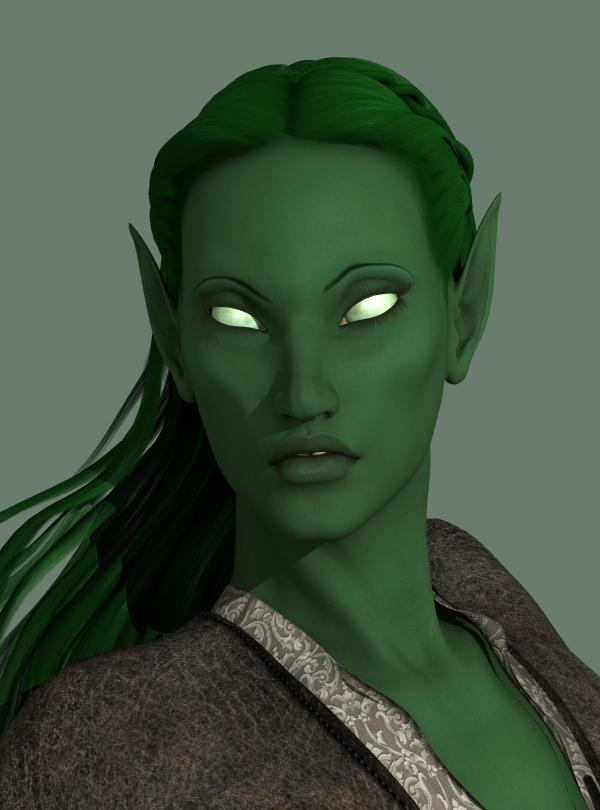
Dracorn's Render ThreadCharacter: Green Elf (3Delight)
I created a green elf using Genesis a while back, and I wanted to update it. I tried Dark Elf for Genesis, but it didn't have the right face/body type, and I didn't like the leaf pattern on the face. However, I loved those glowing green eyes.
I'm a dial-spinning fanatic. I almost never use a character out of the box. In fact, most of the time I buy characters for their skin because I have my own ideas about what they should look like. However, some characters to have morphs I really like and I will use those.
Face: I started with Victoria 5. I really like her face and have made some very nice characters with her. I didn't use Supermodel for this one. I started with Branwen's head because I love her lips. Then I added a little of Anwyn's head. I gave her Mina's skin because of her nice clear completion and also has nice green eye makeup.
Eyes: I added other dial spinning for the eyes (I think I will do an elf eye tutorial separately), and Dark Elf's glowing green eyes.
Ears: I used a combination of Anwyn Ears, Dark Elf Basic and three options from DD Resource Ears.
Skin Color: I played with the subsurface to achieve the color I wanted. My original settings are (red green blue):
Diffuse: 62 139 99
Specular: 78 85 127
Ambient 101 112 47
So 'nuff said about the original figure. Here she is:
 Who is this character for aiko 3 ?
Aiko 3 is a generation 3 character along with Michael 3 and Victoria 3, designed to be an anime character. Very popular in the day. There is still content in the store for her.
Still is popular, many sites still make new stuff for Aiko3 and I see a lot of Japanese sites make stuff still, too. Aiko3 and Hiro3 are the 2 humanoid figures I use more than anything else. :D
putting back the dson morph into the figuremost of the morph dont work, even tho they show up.
the victoria 6 morph shows up for example, but has no effect on the figure. Its parent reads:
"parent" : "/data/DAZ%203D/Genesis%202/Female/Genesis2Female.dsf#GenesisFemale"
while the androgenous morph works and reads:
"parent" : "/data/DAZ%203D/Genesis%202/Female/Genesis2Female.dsf#GenesisFemale-1"
where does the -1 comes from ?
i tried to change the parent name on the victoria6 morph to match that of the androgenous but no result.
Who is this character for aiko 3 ?Aiko 3 is a generation 3 character along with Michael 3 and Victoria 3, designed to be an anime character. Very popular in the day. There is still content in the store for her.
http://www.daz3d.com/catalogsearch/result/?q=aiko+3
Iconic shapes for genesis has an Aiko 3 clone
Thanks FirstBastion. Yah, I just went through the store and didnt find that particular character. Im wondering if she might just be a setting from the a3 morph pack. Ill look around some more.
Daz 3D is part of

Connect
DAZ Productions, Inc.
7533 S Center View Ct #4664
West Jordan, UT 84084Licensing Agreement | Terms of Service | Privacy Policy | EULA
© 2026 Daz Productions Inc. All Rights Reserved.