-
Object now distorts when parented. Did not used to do that. (Solved!)
In my OP I was wrong. Actually all of the objects do distort when parented to a figure (person). But the magnitude of their distortion appears to be proportional to their distance from the (0,0,0) scene origin. so an object attached to ankles does not distort as much as an object attached to the wrists.
The objects are all rope loops that were originally from a free set authored by someone else. I merged them individually into an empty scene. Then I exported them as obj files and opened them in hexagon to try to get rid of rigging, set their origins to their centers, and to align their axes with the primary x-, y-, and z-axes of an empty scene. Then I use "import" to bring them into the scene. When I look at the object with the joint editor, there are no bones but some clusters of small white circles on them. I have no idea what those are.
One other strange thing: If I try to move one of them using the sliders they move in the wrong directions. For example if I increase the y translation, it moves it moves up but away from the y-axis (i.e. it moves in x and z, too) and rotates relative to its pose at the origin. This is independent of the coordinate system selected in the tool parameters. However if I drag on the coordinate frame attached to the object (using the universal tool), it moves like I expect it to (drag the y-axis pointer and it moves only in the y-direction and does not rotate.I suspect those two behaviors are related. How can I make these loops static objects centered on the origin that I can move correctly with either the sliders or the attached coordinate frame. And parent to a figure without distortion?
Thank you, Richard!
Daz Install Manager (DIM) 1.4.1.87, Now Available! (*UPDATED*)Sometimes it's just a metadata update to go along with the recent release version or beta of DS, or it was fixing or adding in metadata.
Free Toon Characters – Released Early!Hello,
If someone wants metadata for their Webboids, here the ones I created with a small text file explaining how to install them. Everything should be labelled as official products are labelled (at least the ones I have with similar items in them) and the easiest way to find them in Smart Content is to search for 'Webboids'.
No icon because I don't have the content to create one myself but there is a '380x494' placeholder JPEG picture.
How to export an Obj with displaced mesh intact from Daz Studio?Squishy said:
Headwax said:
What I would like to do is export the obj from studio with the displacement embedded into the mesh.
the short answer is, D|S cannot do this. some other apps can do it, e.g. blender or zbrush or maya or rhino, but this is not treated as an import/export feature. I don't know anything about cararra but that kind of import/export dialogue has never referred to what you want to do with converting a displacement map to hard geometry that I have ever seen, skinning refers to weight mapping and rigging.
thank you Squishy for that. Much obliged! It only works in Carrara if you have 'show displacement in 3d view" ticked. Perhaps Carrara is referring to the displacement as a morph, which is silly as you have a choice of subdivision which would change the geometry of the mesh and nullify the morph. Thanks again. Cheers :)
How to export an Obj with displaced mesh intact from Daz Studio?Headwax said:
What I would like to do is export the obj from studio with the displacement embedded into the mesh.
the short answer is, D|S cannot do this. some other apps can do it, e.g. blender or zbrush or maya or rhino, but this is not treated as an import/export feature. I don't know anything about cararra but that kind of import/export dialogue has never referred to what you want to do with converting a displacement map to hard geometry that I have ever seen, skinning refers to weight mapping and rigging.
How to export an Obj with displaced mesh intact from Daz Studio?OBJ objects can come in with a super basic material with most of the channels (like Displacement) unavailable. When you import an OBJ file (or all sorts of other import formats) you will generally need to apply a base shader for the render engine you're using (e.g. Iray, you need the Iray UberShader) - select your object in the hierarchy and on the Materials pane, select your material, and go to the Presets tab -> Shaders -> Iray -> apply the !Iray Uber Base shader. This should add all the channels you're not seeing.
NB: you generally will want to do this for every object you import to D|S, even if you exported/imported from D|S itself
Strand-Based Hair Edit PleaseI personally would love a way to turn polylines into editable strandbased hair albeit without simulation abilities
since apparently nobody will buy DAZ hairs if they allowed that in spite of the fact we all happily buy every other product even though Blender exists
if that were possible, I could use Zbrush, Carrara, Poser hairs or polygon hairs converted to lines in the editor, I already CAN import them and turn them into curves so it's not replacing anything
just giving a starting point from software I find easier to work in as I suggested before,
LAMH is even easier to use than that editor
Strand-Based Hair Edit PleaseLeana said:
Gordig said:
Leana said:
Most strand-based hair available in the store has been converted to dForce Hair, and AFAIK once that's done it's not editable as strand-based hair anymore.
Once exported to another program, "dForce" hair is fully editable. I don't know everything that's involved in the process of making something dForce hair, but I suspect the inability to edit it is a choice.
Yes but once exported it's not dForce hair anymore, it's "whatever kind of hair the other program uses"

I'm not a PA so I've never used the conversion tool, but my guess is that the conversion somehow "freezes" the hair into something it can apply the dForce properties to, hence why it's not editable anymore.
Maybe worth bearing in mind that this is a product suggestion thread. The OP is not asking Daz/PAs to cure an incurable illness, they are simply making a product suggestion for more user controls, which other software have implemented. The fact that these controls are exposed to users in other software suggest they are not impossible to implement but of course may be infeasible for Daz if they have limited development resources to spend on this.
At the moment the SBH Editor has one big limitation which is that it only generates hair guides at vertices on the haircaps. For example, in the SBH Editor, you ostensibly cant have a guide strand anywhere you want on the mesh surface, it is only at the vertex positions, which is not a limitation of other grooming software like Blender and XGen. Im pretty sure the dForce Hair Modifier does not have that limitation either. So I see that as a potential issue with the SBH Editor that they would need to work around were they to allow people to import any random dForce SBH guides in the SBH Editor.Most of the dForce Hair Modifier settings seem completely paramaterised, with their dependencies being only the guide strands and surface mesh, so in this hypothetical scenario I dont think reapplying the dForce settings would be the development bottleneck. Instead the more difficult part is probably getting the guides into the SBH Editor in the first place.
The SBH Editor is now in viewport anyway in DS 2025, according to what I read (?), so maybe Daz are moving towards making it more integrated. Meshgraber can allegedly see/move the hairs, so maybe this request will be a reality anyway.strange error messiages when importing two different fbx assets into blender 3.6Why are you using such an old version of Blender? You are asking for things like what you are experiencing. This is not DAZ and you can easily run multiple versions of Blender side by side and revert if you choose to. No reason to not be using 4.4. The FBX importer seems better, though I don't use it often.
Second, since FBX is proprietary, the Blender guys had to essentially reverse engineer it, and so it never worked robustly. But there is an addon called Better FBX Import which is preciselt that. It might work better for you.
Object now distorts when parented. Did not used to do that. (Solved!)I have an object in a .obj file. When I import it into Daz Studio (4.22-4.24). It looks fine. When I parent the object to a figure's forearm, its shape distorts. Yes. I am using parent in place. I've also tried not checking that box. Same thing happens. It is as if parent in place is ignored when checked, This did not used to happen with this same object. I have several such objects. Parenting them in place leaves their shapes unchanged. Only one of them distorts when parented. It is an object without bones. It has not been rigged. How can I prevent the shape distortion from occuring upon parenting it?
List of Products Used - script [Commercial]barbult said:
Linwelly said:
Richard Haseltine said:
barbult said:
Linwelly said:
ok I don't seem to get any further with this, might have to return the product then
I could never get it to work either. I even reset the database and reimported metadata, but it still didn't work. I did return it.
I saw the link in the thread further up, I'm not sure how I apply that, do I download and place it in scripts in DAZ like products from offsite?
Yes, that's right.
or for a quick test just drag the downloaded file into the DS Viewport.
Off Topic Thread #2Steve K said:
3deedlin said:
Both are good. Vue and plant factory also work well in Blender. Haven't tried the plants in C. Really amazing what an allrounder C was for it's time. I got the 8.5P on a recent sale just in case. Carrara wiggles it's way into your heart.♥ Wanted the 64bit version. It totally choked on a LAMH OBJ model though.It's weird cause after 100% import, which took foreeever. It reached it, but just stared blankly back. Lol. Then the other attempt ended w/ the rest of the OBJ coming in as some kinda blob. Probably, coulda converted it. I did get it to work okay in Blender though.
Yes, Carrara has become second nature to me, I don't have to think how to do something, just what I want to do, especially for animation. And I've pretty much learned what will import and what to avoid (DAZ Studio files are iffy). One of my alltime favorite VUE model vendors switched to Blender a while back, but I just can't get my head around it and do not (yet?) have the incentive. Happily I have a good collection of his earlier VUE models. I used one in this animation done mostly in Carrara (one of the VUE scenes attached, the yacht is imported from a Poser format model which Carrara also handles nicely):

Very Nice! The last V of Blender (4.4) had some nice improvements, however, 4.5 is gonna be big. Just around the corner.
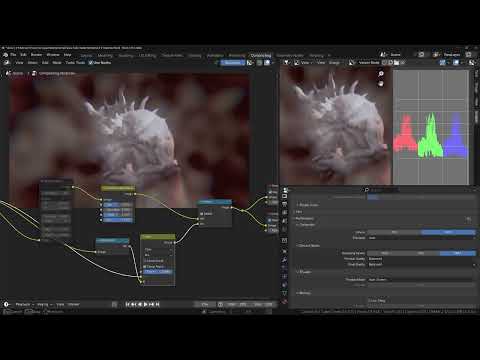
This is the 4.5 Alpha Compositor. Impressive!
 List of Products Used - script [Commercial]
Linwelly said:
Richard Haseltine said:
barbult said:
Linwelly said:
ok I don't seem to get any further with this, might have to return the product then
I could never get it to work either. I even reset the database and reimported metadata, but it still didn't work. I did return it.
I saw the link in the thread further up, I'm not sure how I apply that, do I download and place it in scripts in DAZ like products from offsite?
Yes, that's right.
List of Products Used - script [Commercial]DoctorJellybean said:
barbult said:
Linwelly said:
ok I don't seem to get any further with this, might have to return the product then
I could never get it to work either. I even reset the database and reimported metadata, but it still didn't work. I did return it.
I got it to work by using Connect and updating the Metadata. Others got it to work without doing that, so your mileage may vary.
I do not want to use Connect. I gave up on it after it caused me so many problems, like updates that broke previously working products. I only use DIM now. I did spend quite a bit of time trying to get the "show products used" to work, including resetting the database and updating metadata. No luck. Some people get it to work; other people do not.
List of Products Used - script [Commercial]Richard Haseltine said:
barbult said:
Linwelly said:
ok I don't seem to get any further with this, might have to return the product then
I could never get it to work either. I even reset the database and reimported metadata, but it still didn't work. I did return it.
The sample script used to work for me, a long time ago, but not during the same time I tested the commercial product.
List of Products Used - script [Commercial]barbult said:
Linwelly said:
ok I don't seem to get any further with this, might have to return the product then
I could never get it to work either. I even reset the database and reimported metadata, but it still didn't work. I did return it.
I got it to work by using Connect and updating the Metadata. Others got it to work without doing that, so your mileage may vary.
List of Products Used - script [Commercial]Richard Haseltine said:
barbult said:
Linwelly said:
ok I don't seem to get any further with this, might have to return the product then
I could never get it to work either. I even reset the database and reimported metadata, but it still didn't work. I did return it.
I saw the link in the thread further up, I'm not sure how I apply that, do I download and place it in scripts in DAZ like products from offsite?
List of Products Used - script [Commercial]barbult said:
Linwelly said:
ok I don't seem to get any further with this, might have to return the product then
I could never get it to work either. I even reset the database and reimported metadata, but it still didn't work. I did return it.
List of Products Used - script [Commercial]Linwelly said:
ok I don't seem to get any further with this, might have to return the product then
I could never get it to work either. I even reset the database and reimported metadata, but it still didn't work. I did return it.
Buy Something That Doesn't Work in Carrara? Post your Questions and Workarounds here. (please)Possibly.
It might be working in Daz Studio, but not in Carrara, if within Daz Studio the clothing is using the Smoothing Modifier
(with item selected in Scene pane > General > Mesh Smoothing)
If there is Not as Mesh Smoothing listing under General, then that's not the problem - but it likely is.
I really Wish that Carrara had that same modifier - maybe it does and I don't know about it? In DS, it works So Well for So Many Things. And many things - especially tight-fitting clothing (and clothin in general, for that matter) rely upon it.
The only possible solution for this for Carrara that I can think of is to reshape the mesh to fit the Semi-Realistic morph, export that as an OBJ. The import that into the original item in DS using Morph Loader Pro as a new morph. We'd likely have to dial it ourselves in Carrara manually, but it should would - albeit not neccesarily with all poses.
Daz 3D is part of

Connect
DAZ Productions, Inc.
7533 S Center View Ct #4664
West Jordan, UT 84084Licensing Agreement | Terms of Service | Privacy Policy | EULA
© 2026 Daz Productions Inc. All Rights Reserved.