-
How do I import Favorite Morphs after I've already imported?
You can import either custom morphs or daz favorites by hand, after easy import. Docs in the wiki as usual.
https://bitbucket.org/Diffeomorphic/import_daz/wiki/Setup/Morphs
How to Place Multiple Mixamo Characters in Single Scene (For a Dance Party)expand the timeline and check all the filters to see if the roots are animated (usually are not)
then move those root bones to move the figures
I didn't think you could rig multiple figures at once in one file
there is usually an extra uneeded bone hierarchy you don't need to in a DAZ FBX import from Mixamo and also under display you must hide bones
How do I import Favorite Morphs after I've already imported?Importing favorites morphs with Easy Import is straight forward, but let's say I've already imported my character then make some new morphs with zBrush and saved them to favorites in daz. How do I now import these morphs onto my Diffeo character in blender? I see "import custom morphs," is that what I need to use? And if so do I need to save them a special way in daz? Also what directory are they saved to? Can't seem to find any information on this. Thanks in advance
Diffeomorphic - Weird Expression Import4.3.0.2501, blender 4.3.2
Yes I can reprodude the issue here, @crosswind please let us know how you got it working. If I understand correctly, you posed in daz then imported in blender as dbz, that's not what @ffsyke is looking for, he's rather asking to use the "jw feelings" morphs in blender. Unless I misunderstand something.
my steps:
- in global settings set ERC as "armature all", this is necessary for FACS to work
- easy import a G9 figure with default settings for G9, I used Mira 9 but any will do
- import "JW Her Feelings" as custom morphs
- load the pose preset, or set "tongue out" to 1
update. One ERC bug is reported to Thomas, not sure this will resolve the issue but it is a first step.
the program closes during renderingRendering stopped abnormally again. I attach a screenshot. I restarted Daz and downloaded the log.txt file
I hope someone can help me solve this problem. ThanksRichard Haseltine said:
We would need the regular log, not the cloudlog - that is about Daz Studio working online to get metadata and install content etc.
Diffeomorphic - Weird Expression ImportTongue morphs are ERCs so you have to set ERCs as "armature all" in the global settings. Also ERCs are approximated anyway so there may be some small difference with daz, for this reason using the basic FACS works better then mixing FACS expressions. If the issue is not resolved, within these limitations, you can also upload the pose for us to check.
p.s. Anyway, though diffeomorphic provides some nice tools to import and export daz poses, the main goal is to import in blender and pose/animate there.
Diffeomorphic - Weird Expression ImportHi there,
Hoping someone can help with this.
When I import a G9 character with this expression / tongue pose into Blender, the tongue is longer and distorted (see images, it's longer and poking through the bottom lip, lol).
I'm just using the easy import G9 preset, with this expression saved as a favourite.
I've also tried importing it separately as a pose, with the same result.
If I mess around with the FACS sliders I can sort of achieve the desired effect.. but I'm just wondering what is causing the distortion when importing, and if there's a way to fix it?
Any ideas would be appreciated.
Las Vegas Strip (External)I have purchased items from CGTrader and even TurboSquid before, and many have worked in DAZ Studio. But I strongly recommend purchasing items that contain OBJ files or just OBJ files, as FBX is questionable (not all FBX files from those sites import well in DAZ Studio), and DAE files end up with a greater triangle count which can result in slow renders. To use them in DAZ Studio, all you have to do is import the OBJ files (or FBX or DAE files).
However, you may have to add the textures to the 3D object manually, but it may not take that long.
the program closes during renderingWe would need the regular log, not the cloudlog - that is about Daz Studio working online to get metadata and install content etc.
Is AI killing the 3D star?While it is theoretically true that someone can create what ever they want with 3D, or more specifically for this conversation/forum, with DAZ Studio, however reality falls well short of theory. Unless someone takes the time (and has the skills/talent/ability) to become proficient with 3D modeling, texturing, and rigging, their imagination is limited to the products you can find in the store(s). I would venture to guess that the vast majority of DS users don't even have the knowledge/skills to import models from other formats and set up the textures properly for DS/Iray. So this limits their ability to explore new ideas beyond what is available for DS functionally impossible.
While the centar examples done with DS are quite impressive, they also show a great deal of skill that I would argue the average DAZ user does not have. To get more guided results from AI, you will need to have specific loras, and possibly custom checkpoints to help guide the AI to the result you want. Still, it's largely true if you want the image to look exactly like the image in your minds eye, it can be quite difficult. But this is also true with DS. Most users are limited to the content they can purchase, and possibly modify a bit with different materials (usually bought as well) and maybe a bit of kit bashing. So we typically end up settling for something that is "close enough", just like with AI image generation.
In general, the learning curve for AI Image generation is much much less than for DS/3D. The cost of AI image generation is much less than with DS, and in fact can be done for just the cost of electricity if the user has a decent computer. If the users' intent is to just make a pretty picture, then AI image generation is no doubt a very attractive option.
Diffeo - Morphs for eyelashes no longer working after import?You don't have to import Custom Morphs... importing with Daz Favoites always work, neat and quick. But because default Eyelashes Length properties (default value 1.0) on G8 trigger Eyelashes Length morphs (with geometry data...) by AutoFollow on the G8 Eyelashes attachment in DS, you need to:
1) Zero Eyelashes properties on G8 to avoid morph baking. Favorite Eyelashes properties on G8 Eyelahses attachement. (ss 1 ~ 2)
2) Import the scene with Diffeo by checking Daz Favorites option. Then dial the morph properties in Blender (ss3)Be noted, if working with G8.1 / G9, you need to firstly dial the eyelash properties on G8.1 / G9 so as to trigger Auto Follow, then favorite the morphs on Eyelahses attachement ~~
Edit: If you want to import Custom Morphs, select Eyelashes mesh, import from the folder: data\DAZ 3D\Genesis 8\Male Eyelashes\Morphs\DAZ 3D\Head\ (ss4) (What you've imported are just control properties on G8 with no geometry data...)
Looking for layered shorts over leggings. Both Free and Buyable products is fine.So I'm looking for loose shorts that can go over leggings... the ones I've got and looked at all ended up being too tight and way too short to the point that they might be called hot pants instead. and those shorts I have tend to clip through the leggings. :(
I don't mind whichever model it is for, as I've got the scripts that allow me to import clothing between all models.
For an image to show what I mean, I'm thinking of something like this: https://www.amazon.com/Hotfiary-Waisted-Running-Athletic-Leggings/dp/B0CW3D89ZC?th=1
Diffeo - Morphs for eyelashes no longer working after import?Thanks for looking into this, Padone.
I've finally figured out how to import custom morphs, and for me at least the sliders still don't have any effect.
Are my import settings below incorrect?
Still no subdivision on fbx export ?crosswind said:
Daz HD morphs and SubD are different things. Up to now, Diffeomorphic Daz Importer (with HD add-ons from Xin) and Daz to HUE can export HD morphs, AFAIK, as lilweep mentioned.
Well, as for Sub-divided mesh, DS built-in FBX Exporter cannot export it... but you can dial HD morphs firstly then Bake Subdivision with needed level by using any Daz to xxx bridges (e.g. Daz to Blender), then import the baked FBX from bridge folder to CC4. Only the figure in CC4 may be heavy, I think...
I doubt cc4 will read the fbx file but i will give it a try, thank you mate.
Still no subdivision on fbx export ?Daz HD morphs and SubD are different things. Up to now, Diffeomorphic Daz Importer (with HD add-ons from Xin) and Daz to HUE can export HD morphs, AFAIK, as lilweep mentioned.
Well, as for Sub-divided mesh, DS built-in FBX Exporter cannot export it... but you can dial HD morphs firstly then Bake Subdivision with needed level by using any Daz to xxx bridges (e.g. Daz to Blender), then import the baked FBX from bridge folder to CC4. Only the figure in CC4 may be heavy, I think...
Still no subdivision on fbx export ?I want to import the HD morphs provided by daz3d to cc4 and dont want to use a 3rd party software to create subdiv, is it really that difficult for daz to include this feature after all this years of release ?
Genesis 1/2/3/8/9 to Genesis 2/3/8/9 Pose Converter (Updated 2025-01-03)They are indeed not pose presets: to apply a prop and a pose in one action, you have, AFAIK, to use a wearable preset saved with the pose.
While creating metadata for that wearable preset, you can decide to categorize it as a pose, which is done to make the life of people easier, as long as they are not trying to use a pose converter on a wearable preset.
To check, just let your mouse cursor hovers over the icon in your Content Library (doesn't seem to work in Smart Content) and here's what you'll likely see:
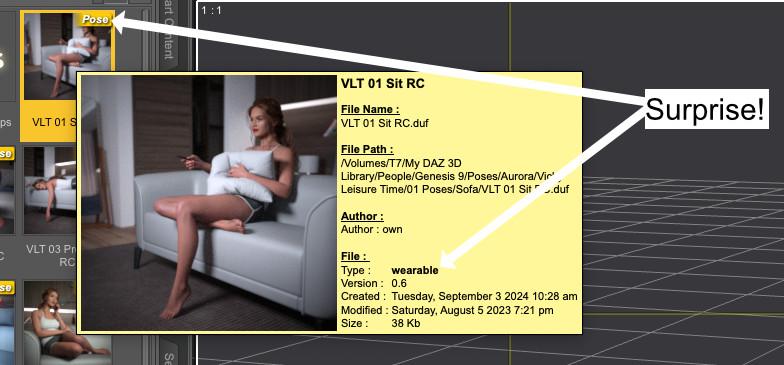
I know next to nothing about Daz scripting, so I don't know if converters can work with wearable presets, keeping only the pose part and discarding the rest.
Diffeo - Morphs for eyelashes no longer working after import?One way is to set the morphs to zero in daz studio then import as custom morphs in blender, this works fine. I also tried as daz favorites but didn't work, however it is expected that daz favorites don't always work and this is what custom morphs are for. Anyway it is now reported to Thomas, in case he has something to add.
https://bitbucket.org/Diffeomorphic/import_daz/issues/2380/
update. Daz favorites work fine if we mark them on the eyelashes figure. They don't work if we mark them on the genesis figure where they're an alias.
update. Now fixed in the last commit.
FilaToon / Cell shaded rendering with FilamentI think someone said above, but the Matcaps are just for faux reflections, i don't think they do anything else.
Matcaps in the common vernacular of 3D/ CG programs do far more than Faux reflections.
They are typically used to show modeling & sculpting surface details in the viewport without needing to
even have lights with shadows.
However they can also be used as an actual render style
( in Blender at least)
Here is a Global Graphic Novel NPR style I amusing in Blender with zero editing of shader nodes, just the default Daz texture maps and the global matcap previews in the Blender viewport.No cumbersome geoshells involved
 Just import the Daz content via the Diffeo plugin or Daz to Blender
instant realtime viewport renders in Blender and a “cartoon” line pass in Adobe After Affects.
I will be using this toon matcap for my next graphic novel.
(Free on GUMROAD not Mine!!)
https://eyedesyn.gumroad.com/l/mgeiu


Honestly I am not seeing anything in these Daz "filatoon "renders that cannot already be achieved with a post filter in the FREE gimp krita or photoshop or affinity photo
and gimp has FREE batch processing script for toon filtering animation frames.
The Comiclife page layout book design software $30 has built in cartooning filters as well.No content restrictions, ALL genesis generations and legacy prop content.
And easily comping in of AI generated backgrounds like below.

of course, your milage may vary.
key and keyholerichardandtracy said:
Also, an obj model of a more modern escutcheon is attached. Never made it into a DS model. Just import it at 100% and apply matt black to the 'Keyhole' material and brass/silver to the other materials.
There are four keys. Two cylinder keys and two mortice lock keys. All in obj format. For the keys, import at 100%, then apply brass or silver shaders to the models.
Usage: Commercial or non-commercial. Just don't claim the models as your work.
Regards,
Richard
Thank you very much!
Daz 3D is part of

Connect
DAZ Productions, Inc.
7533 S Center View Ct #4664
West Jordan, UT 84084Licensing Agreement | Terms of Service | Privacy Policy | EULA
© 2026 Daz Productions Inc. All Rights Reserved.