-
Can't seem to get imported expressions to work on HD Mesh.
Had a bit of trouble getting expressions imported with figures via Favorites, but got that figured out. Whenever I import a model via Diffeo, I get a normal "Model Name" and "Model Name HD". Since I do a lot of closeups, I prefer to work with the latter. But the only expressions that seem to work are the FACS ones. If I try something like "JW The Cool Boy" from JWolf, nothing but the eyes move or the jaw just opens up.
To clarify, the imported favorite epxressions work as expected with the normal (non-HD) version. But only a couple seem to move the eyebrows/mouth a bit on the HD version. Am I missing a step? Using the wrong expressions? Is not possible? Do I have to use the HD Morphs addon for it? Kind of lost after trying several different things before positing here.
TIA.
Diffeo - Import DAZ Materials - Is that working?I see, thanks Padone.
I didn't understand the functionality of this feature and was hoping that you can import a DS shader .duf to get the material into Blender.Free Toon Characters – Released Early!I have yet to install the update, but looking at its content, the updated package seems to includes the same files inside the same folders and what was changed is the content of some of them.
If it's the case, as far as I understand metadata, no update should be necessary: the roles of each file and the links between them should still work.
Diffeo - Import DAZ Materials - Is that working?I never used "import daz materials", but I tried it with a material preset and seems to work fine here. It loads the material preset on the selected mesh. However it can't load custom shaders, if this is what you mean.
my steps:
- in daz studio save a material preset wit the iray uber shader
- in blender create a cube then "import daz materials" from the material preset
Free Toon Characters – Released Early!Ok great and I don't recall seeing any posts about updated metadata. I also know very little about it, other then it exists lol
strange error messiages when importing two different fbx assets into blender 3.6milliethegreat said:
I actually got better fbx exporter and it definitely solved the issue I was having with the error messages i mentioned. I got the assets to import into blender with zero issues and i exported the assets from blender into Daz as obj afterwards just fine too. That's one major problem solved. I'll count that as a win! Thanks for the suggestion on the plugin!
I'm ecstatic at hearing that! We really have to take the wins where we find them :)
Diffeo - Import DAZ Materials - Is that working?Hi,
I'd like to use my extensive library of DS shaders in Blender.
I tried the Import DAZ Materials function in DAZ Setup / Materials, but that doesn't generate that material for me.Couldn't find that function in the Diffeo documentation either. That section seems outdated.
Is this feature functioning?Thanks!
strange error messiages when importing two different fbx assets into blender 3.6I actually got better fbx exporter and it definitely solved the issue I was having with the error messages i mentioned. I got the assets to import into blender with zero issues and i exported the assets from blender into Daz as obj afterwards just fine too. That's one major problem solved. I'll count that as a win! Thanks for the suggestion on the plugin!
Is there a way to add a column to the Content DB Editor ?Hello,
The Content DB Editor has a lot of columns (File Name, File Ext, File Type, Type, Audience, etc), a couple who are rarely if ever useful while creating metadata, but it's missing a column to easily check if every file has its category set:

Is there a way to add it ?
How to achieve the Desaturated Rembrandt Style?Write Idea said:
Legendary Lights and Male Iray lights are SO good. Also try Fast Production Lights for Iray. I use it a lot.
Fauvist said:
If it is the colour effect that you're going for - then what you want to do is have the content in your scene to be in colours of tan, beige, brown, grey, black, muddy darkish blues, greens, orange/browns, - that would be the colours of the background or room, and the colours of the clothing and hair - you don't want bright pink or blazing red or saphire blue, or emerald green. You want darkish colours to begi with. The lighting is called LOW KEY lighting - which basically means "not bright". Then after you render your scene. Import it into virtually any image editing sofware, ad you want to DESATURATE THE COLOURS, LOWER THE CONTRAST, and apply a colour effet - like SEPIA, or TOBACCO, which gives you that old fashioned mafia look, or old west saloon look. And you'll end up with the kind of image you are describing.
The color effect is exactly what I'm looking for. Where light and shadow interact with one another (thank you for teaching me chiaroscuro). I have been toying around with this desaturated/sepia look. And I just think mine look cheap. An EXAMPLE from my DAZ3D gallery. Maybe my scenes are to bright.
Thank you everyone for the suggestions and ideas!
If you give me permission - I can upload your image to my computer and see what I can accomplish with adjusting the contrast, brightness, the sepia effect etc. If not, you can eventually try the effects yourself.
How to achieve the Desaturated Rembrandt Style?Legendary Lights and Male Iray lights are SO good. Also try Fast Production Lights for Iray. I use it a lot.
Fauvist said:
If it is the colour effect that you're going for - then what you want to do is have the content in your scene to be in colours of tan, beige, brown, grey, black, muddy darkish blues, greens, orange/browns, - that would be the colours of the background or room, and the colours of the clothing and hair - you don't want bright pink or blazing red or saphire blue, or emerald green. You want darkish colours to begi with. The lighting is called LOW KEY lighting - which basically means "not bright". Then after you render your scene. Import it into virtually any image editing sofware, ad you want to DESATURATE THE COLOURS, LOWER THE CONTRAST, and apply a colour effet - like SEPIA, or TOBACCO, which gives you that old fashioned mafia look, or old west saloon look. And you'll end up with the kind of image you are describing.
The color effect is exactly what I'm looking for. Where light and shadow interact with one another (thank you for teaching me chiaroscuro). I have been toying around with this desaturated/sepia look. And I just think mine look cheap. An EXAMPLE from my DAZ3D gallery. Maybe my scenes are to bright.
Thank you everyone for the suggestions and ideas!
How to achieve the Desaturated Rembrandt Style?If it is the colour effect that you're going for - then what you want to do is have the content in your scene to be in colours of tan, beige, brown, grey, black, muddy darkish blues, greens, orange/browns, - that would be the colours of the background or room, and the colours of the clothing and hair - you don't want bright pink or blazing red or saphire blue, or emerald green. You want darkish colours to begi with. The lighting is called LOW KEY lighting - which basically means "not bright". Then after you render your scene. Import it into virtually any image editing sofware, ad you want to DESATURATE THE COLOURS, LOWER THE CONTRAST, and apply a colour effet - like SEPIA, or TOBACCO, which gives you that old fashioned mafia look, or old west saloon look. And you'll end up with the kind of image you are describing.
Obj imports without any textures after recent updaterichardandtracy said:
It sounds as if you could do with a script to run (when or after) importing an obj file to apply an uber shader to the object,
Importing an obj to daz applies an uber shader by default so a script wouldnt need to do that when it's already default behaviour of the obj importer
re-read the .mtl file, 'find' or 'ask help to find' the texture required and apply them wherever sensible in the appropiate surface shader.
Well, the OP doesnt need to do any of that and it would be a moot point if the .mtl file they have exported from Blender does not even contain texture references.
The OP still has not bothered to confirm if their .mtl file has texture references in it, therefore it would be pointless to have a script that reads an .mtl file for texture references which may or may not even be there.
Their first step is to establish they are exporting their obj and mtl from Blender with texture freferences before jumping to the conclusion that the issue is the obj importer in Daz Studio. (Hint: it isnt).
I think this would speed things up for anyone who wanted to do this and could save a fair bit of time all round.
Daz obj importer already has an option to read material file on import, so there doesnt need to be a new script created to do the exact same thing. One could just import the obj again and click read material file
I only have a very rudimentary grasp of scripting (as shown how few commands I actually used in my Pose Transfer Scripts), so probably definitely can't do it at the moment. I have quite a few poses to catch up on creating after 8 months without a DS compatible PC, and then I may be in a position to start learning what I need. I won't make any promises because I'm not sure I will ever be able to do it, but I will look at what I need to learn and see if I can do it.
It would be a waste of your time as mentioned above.
And I only ever do freebies, because I'm someone who has a tiny budget, too..
Regards,
Richard
To save anyone reading this time in future. The issue the OP is facing is probably not with the obj importer. That is a presumption fallaciously built into their question.
There are multiple steps in the process (1. importing fbx with embedded textures to blender, 2. exporting to obj without unpacking textures first, then 3. importing to daz studio as obj). The problem could be any step in that chain and the likely culrpit is obviously step 2, so that should obviously be assessed first before jumping to conclusions about a faulty obj importer.
If 2 is the point of failure, then the question becomes how to export fbx with embedded textures to obj so it writes mtl file correctly.
Free Toon Characters – Released Early!Elor can correct me if I'm wrong (I haven't worked much with metadata to date) but I don't believe you'll have to update things for the base package update.
bridge from daz to Bryce 7Martinal - yes, it works both ways. I used it with Bryce 6 and 7, and with Studio 2, 3 and 4 in the past but very seldom I use the bridge now. Adjusted arms and legs, etc from a person in Studio works fine and sending it over to Bryce. However, for material and textures the results are unsatisfying. When I need something from Studio in Bryce, I export the object as obp and import it in Bryce, then I work on the materials. I seldom used Studio to render, I use Studio objects to render them in Bryce.
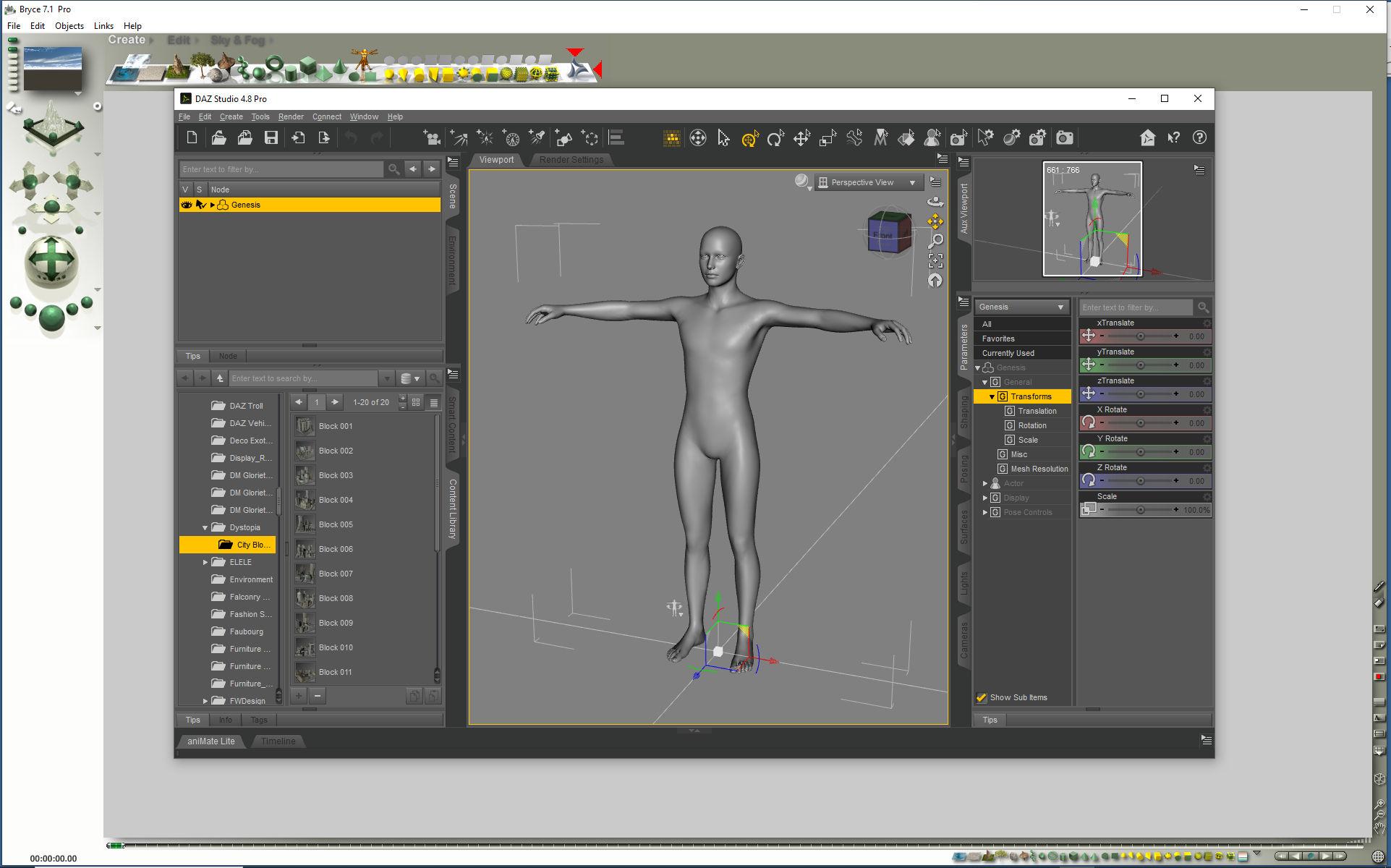
Image B+S shows Bridge from Bryce to Studio. Click on image for full size. In Bryce, select Create than you see on top right the Studio sign (enhanced here with 2 red arrows).
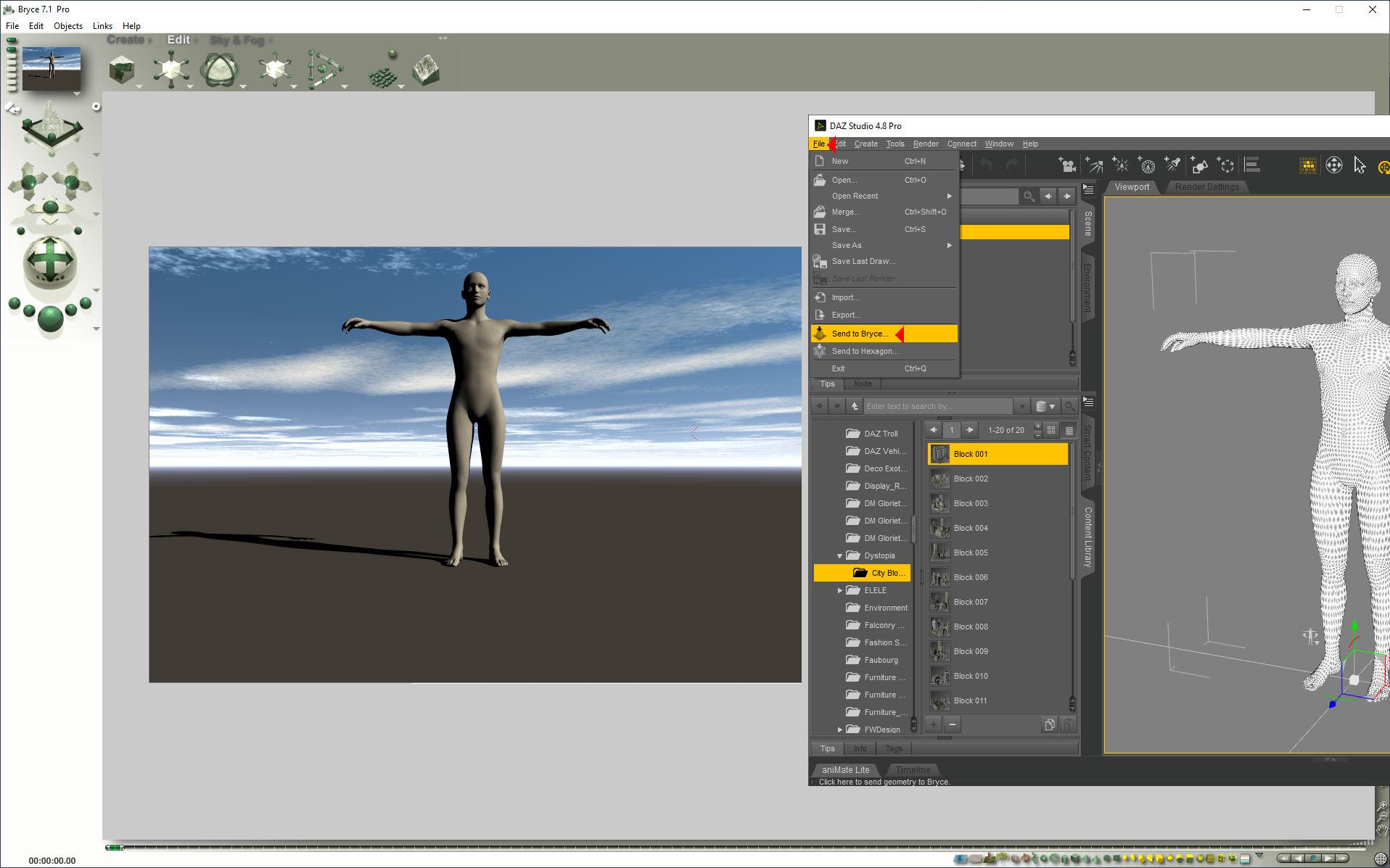
Image S+B shows Bridge from Studio to Bryce. Click on image for full size. Select object in Studio, click on File and below send to Bryce and after a moment, it will appear.
Does a saved figure/prop .duf file contain geometry?oddoneout said:
So the .duf file would not work without the .dsf file, even if the user owned the original v4 poser figure dress (with the original .obj file in their runtime)?
Therefore the duf file with the .dsf could not be distributed to people who did not purchase the original V4 poser figure dress otherwise they would be getting it for free?
Is there any way of distributing refits of V4/M4 clothing, that have been put through the transfer utility or autofit and then modified, so that they can only be used by people that have purchased the clothing?
Even though this is 12 years old, I ran across it whilst looking for something else (a way to save two prop/figure assets with the same geometry without a new DSF geometry being made for them, but I found a workaround). So anyway...
I don't know why Richard gave a wrong answer. He usually knows all the stuff. But... It's easy to do. Not the most 100% user friendly, but them's the breaks.
1: Make a Poser file that has the dress as just a prop. Do not include the geometry. Make sure the prop is pointing at the geometry, and not storing it in the pp2 file as customGeom.
2: Load your changes as a morph. Set it to 1 and memorise.
3: Instruct for users to load this prop into Poser (after all, they HAVE Poser and they HAVE the original item). It will load in referencing the original geometry and apply the morph you gave it.
4: Give them instructions to export this to a new OBJ, no world transformations and no groups. DAZ doesn't need the groups for clothes.
5: Tell them to import the OBJ into DAZ Studio, use the transfer utility to make it conform to the new figure, save it as a prop/figure asset with certain parameters, and THEN install your DUF file, which you'll make sure points at the DSF geometry created when they save it out.
It's tedious. But it's easy.Instant Rain did not work anymore (solved)2025-05-30 14:28:47.193 [WARNING] :: \src\sdksource\cloud\dzcloudtasknotifier.cpp(203): Invalid file header for encrypted file: "G:/Renderordner/DAZ content database/Applications/Data/DAZ 3D/My DAZ 3D Library/data/cloud/1_80174/props/dreamlight/iray/instant rain/instant rain load prop.duf.enc"
2025-05-30 14:28:47.193 [ERROR] :: Open Stream Error - No stream for CloudFile: G:/Renderordner/DAZ content database/Applications/Data/DAZ 3D/My DAZ 3D Library/data/cloud/1_80174/props/dreamlight/iray/instant rain/instant rain load prop.duf.enc
2025-05-30 14:28:47.193 [ERROR] :: Open File Failed - Could not read asset information: /props/dreamlight/iray/instant rain/instant rain load prop.duf
2025-05-30 14:28:47.720 [INFO] :: Prepare asset load (merge): /Props/Dreamlight/Iray/Instant Rain/Instant Rain Load Prop.duf
2025-05-30 14:28:47.720 [INFO] :: Locking viewport redraw...
2025-05-30 14:28:47.720 [INFO] :: Viewport redraw locked.
2025-05-30 14:28:47.820 [VERBOSE] :: Native format content directories: 6
2025-05-30 14:28:47.820 [VERBOSE] :: Poser format content directories: 6
2025-05-30 14:28:47.821 [VERBOSE] :: Other import format content directories: 1
2025-05-30 14:28:47.821 [INFO] :: Begin asset load (merge): /Props/Dreamlight/Iray/Instant Rain/Instant Rain Load Prop.duf
2025-05-30 14:28:47.821 [WARNING] :: \src\sdksource\cloud\dzcloudtasknotifier.cpp(203): Invalid file header for encrypted file: "G:/Renderordner/DAZ content database/Applications/Data/DAZ 3D/My DAZ 3D Library/data/cloud/1_80174/props/dreamlight/iray/instant rain/instant rain load prop.duf.enc"
2025-05-30 14:28:47.821 [ERROR] :: Open Stream Error - No stream for CloudFile: G:/Renderordner/DAZ content database/Applications/Data/DAZ 3D/My DAZ 3D Library/data/cloud/1_80174/props/dreamlight/iray/instant rain/instant rain load prop.duf.enc
2025-05-30 14:28:47.821 [ERROR] :: Open File Failed - Could not read file: /Props/Dreamlight/Iray/Instant Rain/Instant Rain Load Prop.duf
2025-05-30 14:28:47.821 [WARNING] :: Error loading asset: G:/Renderordner/DAZ content database/Applications/Data/DAZ 3D/My DAZ 3D Library/data/cloud/1_80174/props/dreamlight/iray/instant rain/instant rain load prop.duf.enc
Operation failed
2025-05-30 14:28:47.893 [INFO] :: Unlocking viewport redraw...
2025-05-30 14:28:47.893 [INFO] :: Viewport redraw unlocked.
strange error messiages when importing two different fbx assets into blender 3.6TheMysteryIsThePoint said:
Why are you using such an old version of Blender? You are asking for things like what you are experiencing. This is not DAZ and you can easily run multiple versions of Blender side by side and revert if you choose to. No reason to not be using 4.4. The FBX importer seems better, though I don't use it often.
Second, since FBX is proprietary, the Blender guys had to essentially reverse engineer it, and so it never worked robustly. But there is an addon called Better FBX Import which is preciselt that. It might work better for you.
I use the old version of blender because when I import posed Daz figures into the newer versions it either doesn't import the poses right or any attached props don't import attached to the characters. I use diffeomporphic because some objects have emissives. Also how expensive is that plugin? If it's not anything crazy price it's probably worth a try. I don't want to spend bookoo amounts of money if it turns out not to be what i need after all.
Free Toon Characters – Released Early!Thanks also to Elor for the metadata. :)
Is there a way to load a set or a scene without the timeline ?I think it is simply the creator doesn't render animations and likely hasn't even looked at the timeline setting up their scene which is obviously not at frame 0 when they did it
or they import all their props at one then go to another frame to move them into place again not expecting anyone to render animation
99% of people only render still images
Daz 3D is part of

Connect
DAZ Productions, Inc.
7533 S Center View Ct #4664
West Jordan, UT 84084Licensing Agreement | Terms of Service | Privacy Policy | EULA
© 2026 Daz Productions Inc. All Rights Reserved.