-
Defect on the joints of the clothes
iacoposk8 said:
I tried to morph only the shirt but always the same problem. I think the problem is that I made them with marvelous. When it does the simulations, one for each pose, he changes everything. For example, if you lift the shoulder, it will not only change the area around the shoulder, but will generate creases on the belly, shoulder and even the wrist. So if you have a pose where the character has the torso bent and the arm raised, there should be a morph that changes the torso area and one of the shoulder, so instead there are two for the shoulder and two for the torso creating interference. Is there no way to tell daz to only consider part of the morph? Because it would be a shame not to be able to use marvelous.
Because I would be sorry not to be able to use marvelous.
I changed the drive folder with the new morphs and the daz file (.duf), so it is easier for you to find my errors.
Thanks
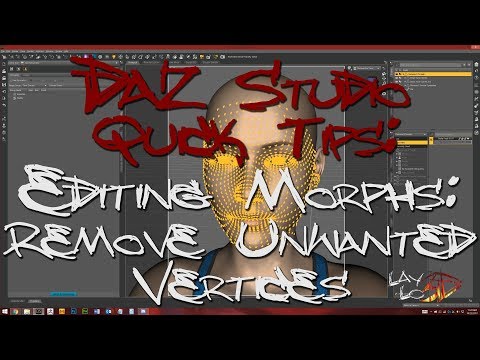
Marvelous is used for making the clothing .obj files. I do not have Marvelous Designer, I have used dForce to help start morphs so would think that such can be done using M.D. however as I did in using dForce, it could be that you still need to use a modeler such as Hexagon or Blender or Zbrush, etc. to polish the morph. AND you would have to use some of the other tools in D/S to clean up your morphs so that each pJCM is basically affecting ONLY the joint area it is supposed to be affecting. In lifting up the arm, that would be the armpit area, not the entire shirt. In one of those tutorials of mine I did cover how to clean up the morphs however you may find this video helpful. I think there are a couple such tutorials on YouTube. This is one:
 How to get "armpit folds"? (solved)
Hi :) Sorry for my bad English.
So I noticed a detail problem, underarm folds, I browsed most of the characters in the daz store and couldn't find this detail, is there such a morph?Custom Morphsin Carrara you can use an existing morph channel, which one depends if the whole figure or a body part such as the head
obviously your morph import will overwrite the original one you are replacing in that Carrara scene
Custom MorphsJust to add this, i did a few testings and there are things that might could influence the result, if anybody knows more about this, i would appreciate it.
I did adjust the figure manually in Daz yesterday night and found out that the head morphs in Daz are all in percent but in Carrara there are not. Could that have some impact of the morph import?
On the other end, i modified a dress to fit on my figure, saved as obj and imported it as morph in morph loader pro in Daz to create a morph for the dress itself.
The lower part, hips region morphs as it should but the chest region did get distorted again as it creates a spike displacement.
About the distortion effect, i've heard that if the Geometry or Vertexes get out of order that the results could lead to distortion.
The question is, does shaping and changing the position of the vertexes are the reason for that? If yes, why did i got this kind of result for the full body morph if i haven't changed any of the vertexes there? Or is there an easier way to create the morph in Carrara itself without the need to import and export the file?Defect on the joints of the clothesI tried to morph only the shirt but always the same problem. I think the problem is that I made them with marvelous. When it does the simulations, one for each pose, he changes everything. For example, if you lift the shoulder, it will not only change the area around the shoulder, but will generate creases on the belly, shoulder and even the wrist. So if you have a pose where the character has the torso bent and the arm raised, there should be a morph that changes the torso area and one of the shoulder, so instead there are two for the shoulder and two for the torso creating interference. Is there no way to tell daz to only consider part of the morph? Because it would be a shame not to be able to use marvelous.
Because I would be sorry not to be able to use marvelous.
I changed the drive folder with the new morphs and the daz file (.duf), so it is easier for you to find my errors.
Thanks
Some (posing?) morphs distortions in UEachesco said:
Hi everyone!
I'm getting the strange character distortions using posing morphs on imported character in UE. You can see the distored left leg on the attached image, in this case the 'Knees Up Left' with 0.55 value is applied. The second one is the 'Waist Bend' - makes upper body smaller... Is there any cure for this issue? Or maybe I'm doing something wrong it terms of export/import settings?
Software versions: UE 4.25, DazToUnreal Plugin 4.2.0, Daz Studio 4.20
you can't export a "pose" morph or it not gonna work as you want, when you try to export a "pose" it will only gona work when applied the 100%, any value between 0 and 1 will see as a "distortion not a moviment, when you use the morph in daz it's a mixing between "moviment with the internal pupet and some morphs to fix the body part while moving, something like when you are moving the character leg with the morph is like you are using a "pupet stuff to move the leg then during the process the morph try to apply some corrections to the leg, but when you export it to unrel it only go the "corrections the "moviment" is lost and only the "final pose" correction is saved this is why it's happening.
Custom Morphsjust wondering, if i have a figure in Carrara, V4.2 for example morphed in the way i like it.
Than i want to create a single morph that makes the normal V4.2 to the morphed figure, so all face and body morphes are applied.
I have exported the figure to .objFor the options i have choosen Daz Studio Morph Target, Sureface Fidelity 100%, no Materials and Name Only.
Export Objects in Local Coordinates and Map Carrara Z axis to OBJ Y was greyed automaticly when i choosed Daz Studio Morph Target, so couldnt turn them off.
Than in Daz Studio, i just opened V4.2 (i've done without any morphs and than again with all morphs except Creature Morphs.
Than i selected V4.2, clicked on Edit > Figure > Morph Loader Pro.
Converted from Carrara, tried All Groups and another one with Vertex only, choosed the created obj file as morph file and than clicked accept.
The figure got a morph but when i use the morph it seems like it won't morph to the figure i wanted, i just get lots of spikes out of the figure and it looks very distorted like as it uses a displacement for that.
What am i doing wrong here? Is it because it have Octane Material? But that couldnt do anything as the exported obj was saved without any material.
I created the figure many years ago in Daz Studio, so i might have the original figure but i did a few adjustments to it over the years in Carrara and i wrote down any morph i have made within Carrara, so that i also could manually add the figure in Daz Studio but i would like to do the easiest way.
I think about that i could manually adjust the figure in Daz and create a morph target there, i did one years ago but not sure about it right now.
Edit: Just checked the Model Room in Carrara and it shows the standard V4.2 Figure, so meches should all be correct, so i guess it have something to do with the import/export settings but not sure about that.How do I Make Gmail Not Hate Daz3d?Zendesk is the help centre, It usually has a Sign In button at top-right when you first visit in a session as the Daz site log-in does not seem to transfer automatically.
Difficulty Saving MCMSo I tried attaching the source images in the hope that they'll be more legible. On a diiferent note:When you say linking these morphs are you referring to filling the "Link" field with custom morph and vanilla morph? And also is confirming that the morpoh is saved as an FHM_morphs done throught the parameter settings or is there an property I can modify within the property hierarchy that I am ignorant of.
Looking for Conan the Barbarian for M4 or F4wolf359 said:
but I'm not going for the movie Conan (this would be perfect if I were,
since it's a morph of Ahnold S. himself)."
Alhough you are not looking for the movie version,
I could not resist the challenge.
The legacy DAZ Freak3 with the free "Barnold" morph
and the old "Barbarian for the Daz Freak" Set, Poser5 era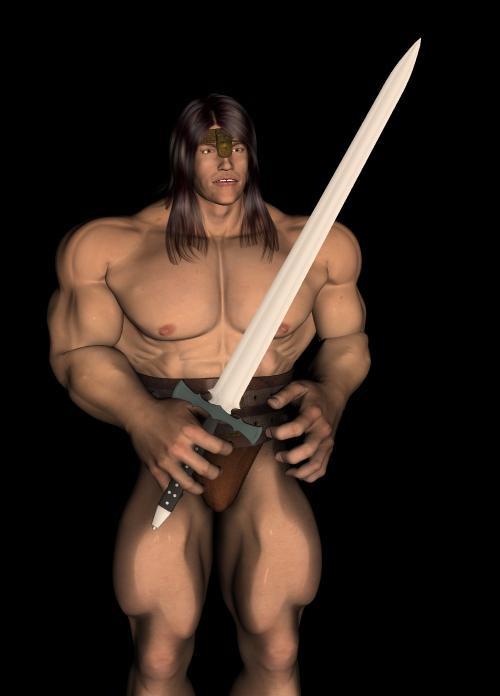
hey got a link to this morph or any other freebies? cant find it anywere and im trying to collect and preserve most of them^^
G8 to FBX GlitchThe skeleton is not aligned with the mesh - was there a morph applied that changed the figure's overall size?
3D Art Freebie Challenge May 2022 - "Cozy Corner" - Entries Thread OnlyBuccaneer's Corner
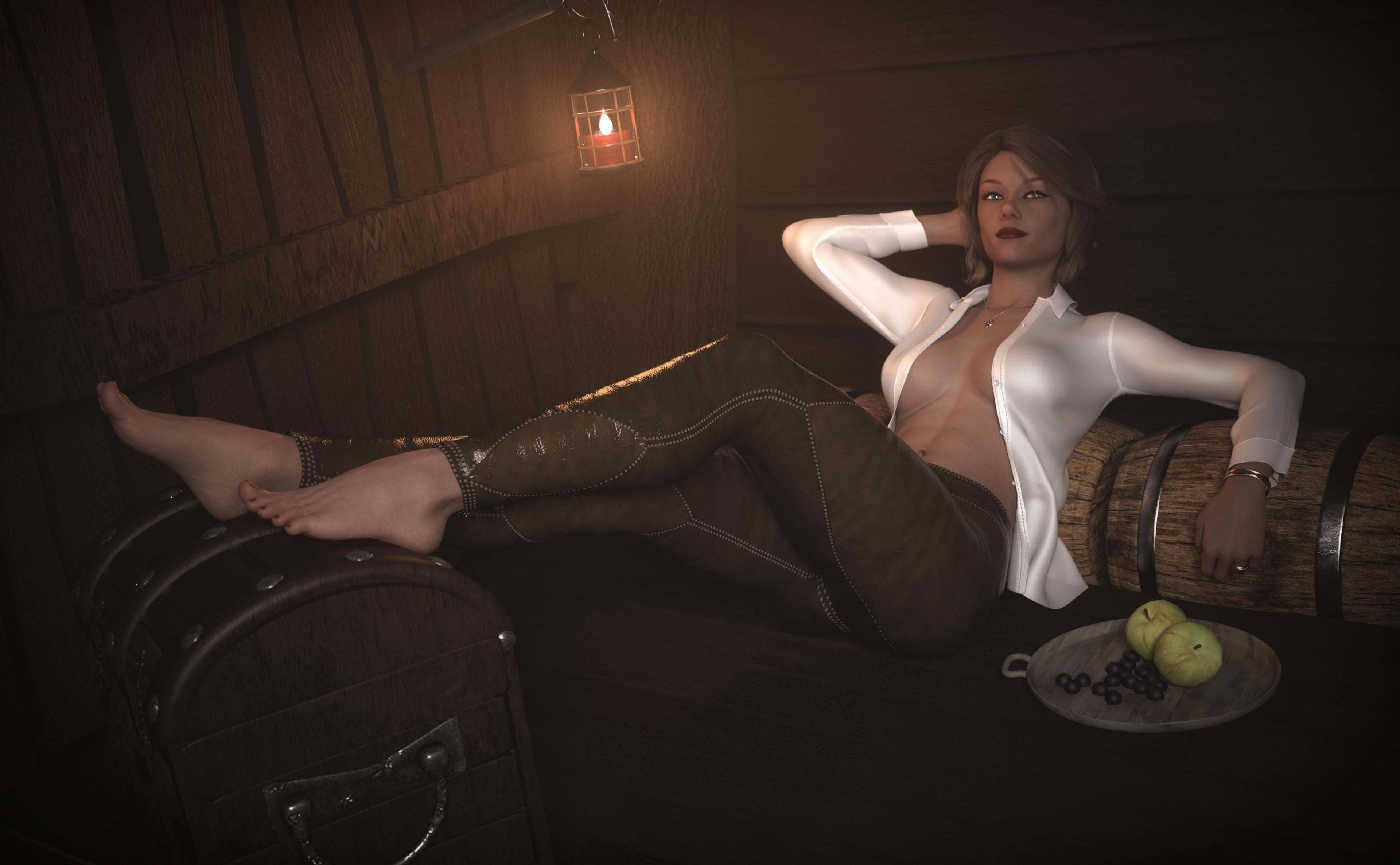
Nay Free
Auto Shape Enhancer
iReal Shaders
V8 HD-AddonYay Free
Hair - Gwennili Hair
Hair shader - 72 'Funky Madness' Hair Shaders
Morph - Inga Britt
Skin - Irene Angevin (NSFW)
Brows - G3 Morphing Fibermesh Eyebrows and Pubic Hair
Lashes - PS Raeny Shape Morphs
Make-up - Genesis 8 Female Makeup Kit 1 - Lips and Eyeliner
Pants - Leather Outfit
Shirt - Blazer Uniform Set
Ring - Diamond Heart Ring
Necklace - Cross Necklaces
Bracelet - Braid Bracelets
Walls - Tweendeck
Lantern - Stable Builder
Sword - Rapiersword
Barrels/Food - Medieval Hovel
Wood Shader - Bed with dForce Blankets
Jewelry ShadersNo Count
Kahhl Chest (can't find it anymore)
AtmoQubeOctagonal GlassesOK, maybe I am overstating it at the moment, but hopefully the title will fully come to fruition in time.
Please find an Octagonal Highball Glass freebie attached.
The glass is modelled on a set my wife and I bought not long after getting married. Think we have 4 left of the six.. Anyway, it's a tall glass, modelled separately from the contents. The contents have a fill level morph and a tilt morph. To avoid having to do many, many different tilt morphs I left the contents as a separate object that can be rotated in 45 degree steps to get the correct angle of tilt.
The glass and contents are totally invisible in Filament preview mode, and difficult to see in any preview mode except iRay, so I have included an opaque shader, to aide visibility, and a series of glass shaders to return the glass back to the colour you want. I have included four liquid colour shaders, Red & White Wine, Absinthe and 'Blue Lagoon' Cocktail.
This is what it looks like:
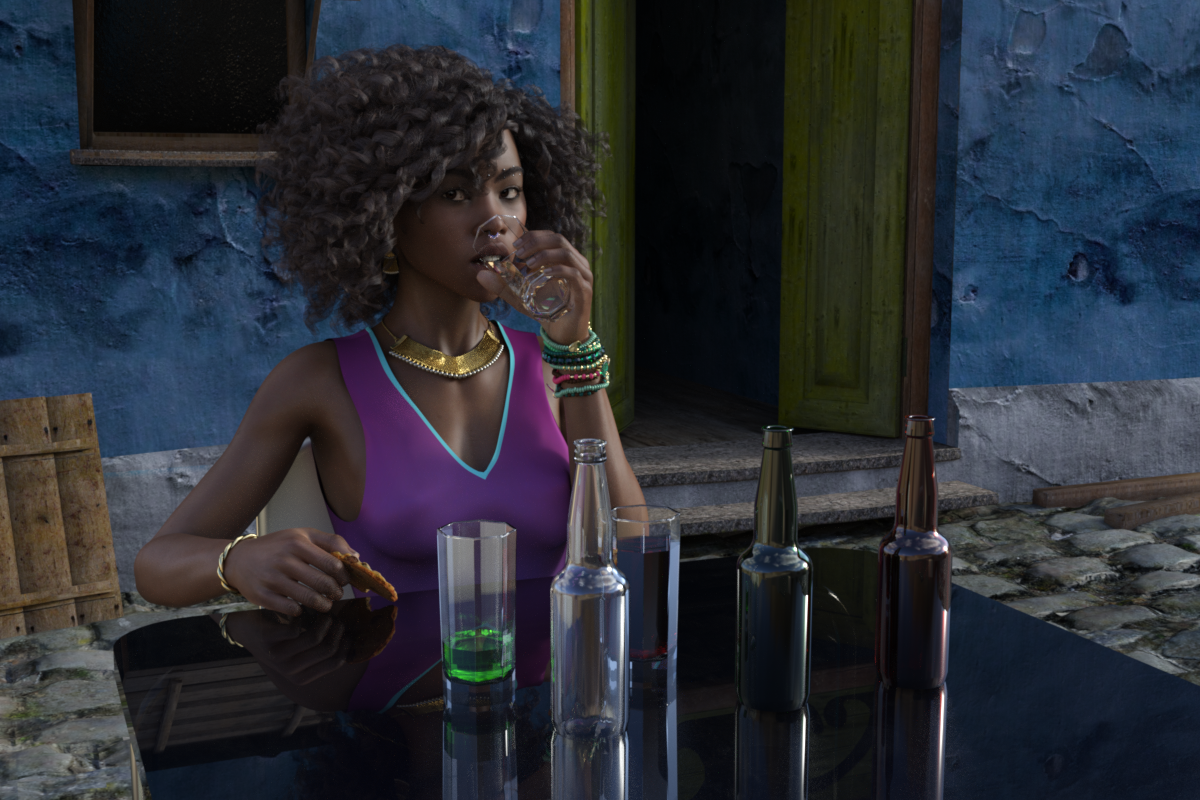
BTW, everything in that image is a freebie except the hair, skin texture and left arm bracelets.
Regards,
Richard.
3D Art Freebie Challenge May 2022 - "Cozy Corner" - Main Thread Onlyioonrxoon said:
Buccaneer's Corner
Nay Free
Auto Shape Enhancer
iReal Shaders
V8 HD-AddonYay Free
Hair - Gwennili Hair
Hair shader - 72 'Funky Madness' Hair Shaders
Morph - Inga Britt
Skin - Irene Angevin (NSFW)
Brows - G3 Morphing Fibermesh Eyebrows and Pubic Hair
Lashes - PS Raeny Shape Morphs
Make-up - Genesis 8 Female Makeup Kit 1 - Lips and Eyeliner
Pants - Leather Outfit
Shirt - Blazer Uniform Set
Ring - Diamond Heart Ring
Necklace - Cross Necklaces
Bracelet - Braid Bracelets
Walls - Tweendeck
Lantern - Stable Builder
Sword - Rapiersword
Barrels/Food - Medieval Hovel
Wood Shader - Bed with dForce Blankets
Jewelry ShadersNo Count
Kahhl Chest (can't find it anymore)
AtmoQubeEntry Approved! Please move to Entries Thread
Difficulty Saving MCMHello All,
I've created some MCMs for some character morphs. The problem is that after saving the MCMs as morph assets they seem to lose their properties and as such don't add/subtract/multiply/divide with their linked morph. Would anyone have any idea as to what the issue could be? Could it be the location I'm saving to, I believe the MCM's are in the same library as the morph they're tied to. Or is it an issue with how I am saving them? Any help would be appreciated.
To focus on a specific morph I'm running into this issue with: I have a gen1 custom morph (essentially a slightly modded Anubis Head).

As such because of the shape of the mouth I had to create several MCMs to account for it.

Now for this I've created several MCMs stored in directories corresponding to the vanilla morphs that they're correcting for. After creating the MCM's for poses in one section (e.g. "Cheeks and Jaw") I've added the properties as shown below.

After saving the morphs together as morph assets under a library I have on my Public User directory. I then load in a new gen1 figure with the custom morph and check the properties of the MCMs. To give you an idea as to how I expect the MCMs to behave below is an image of the testing model, with the custom morph loaded along with the cheeks balloon pose dialed up and the corresponding MCM.

Unfortunately that isn't the case when I load ina new gen 1 model with the custom morph loaded. Dialing up the corresponding vanilla poses, with the custom morph dialed up, doesn't also dial up the MCMs. Looking at the Cheeks and Jaw MCMs only one saved the properties for both multiplication for the head and add for its respective vanilla pose. The rest look like the Cheek balloon MCM like below.

I'm also considering the possibility that as a possible solution: Say take the example above with the Cheeks Balloon pose, I save the not only the MCM "NWCheeksBallooon" but also a copy of the Cheeks Balloon Pose Morph. But this may simply result in a duplicate error. I would appreciate any input into this issue.
Kindest Regards,
funkiestface
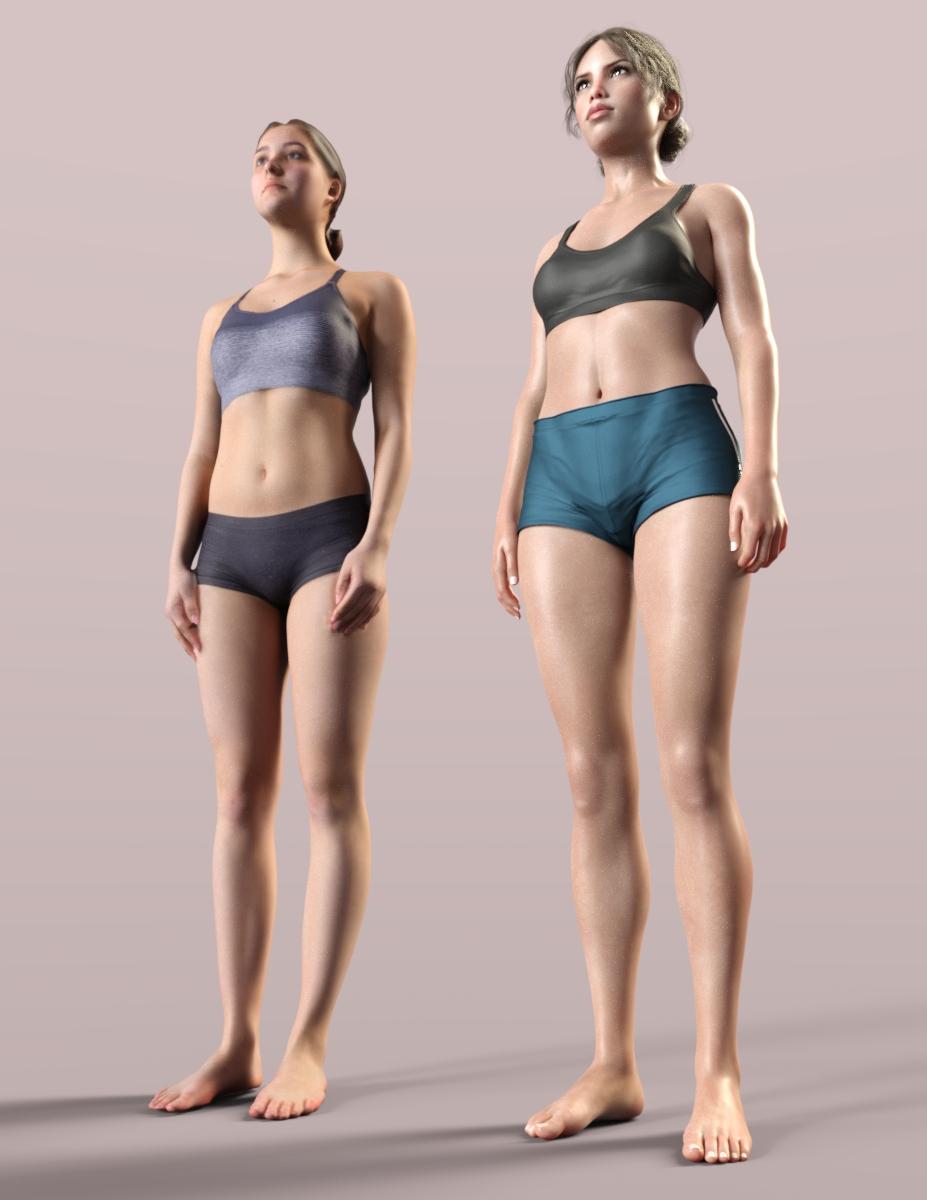
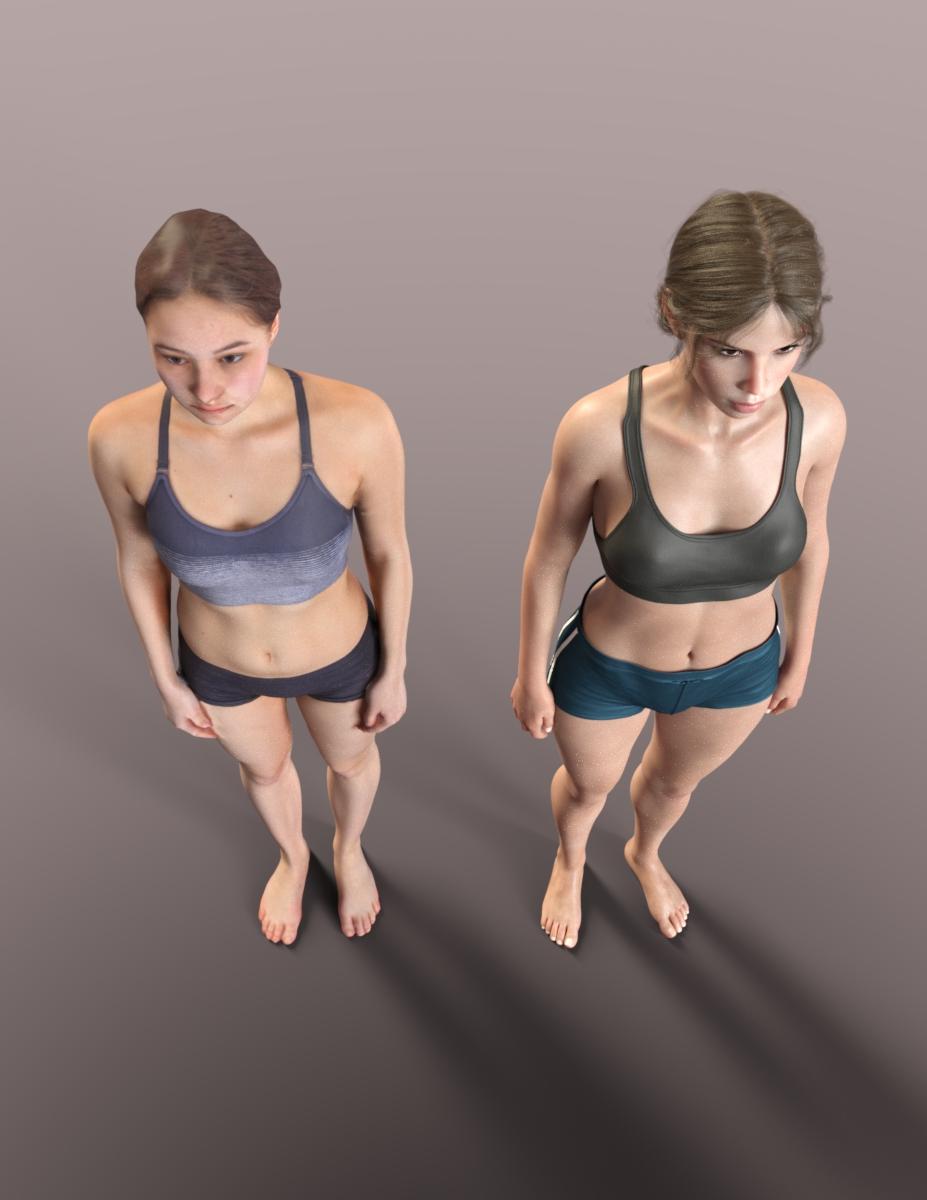
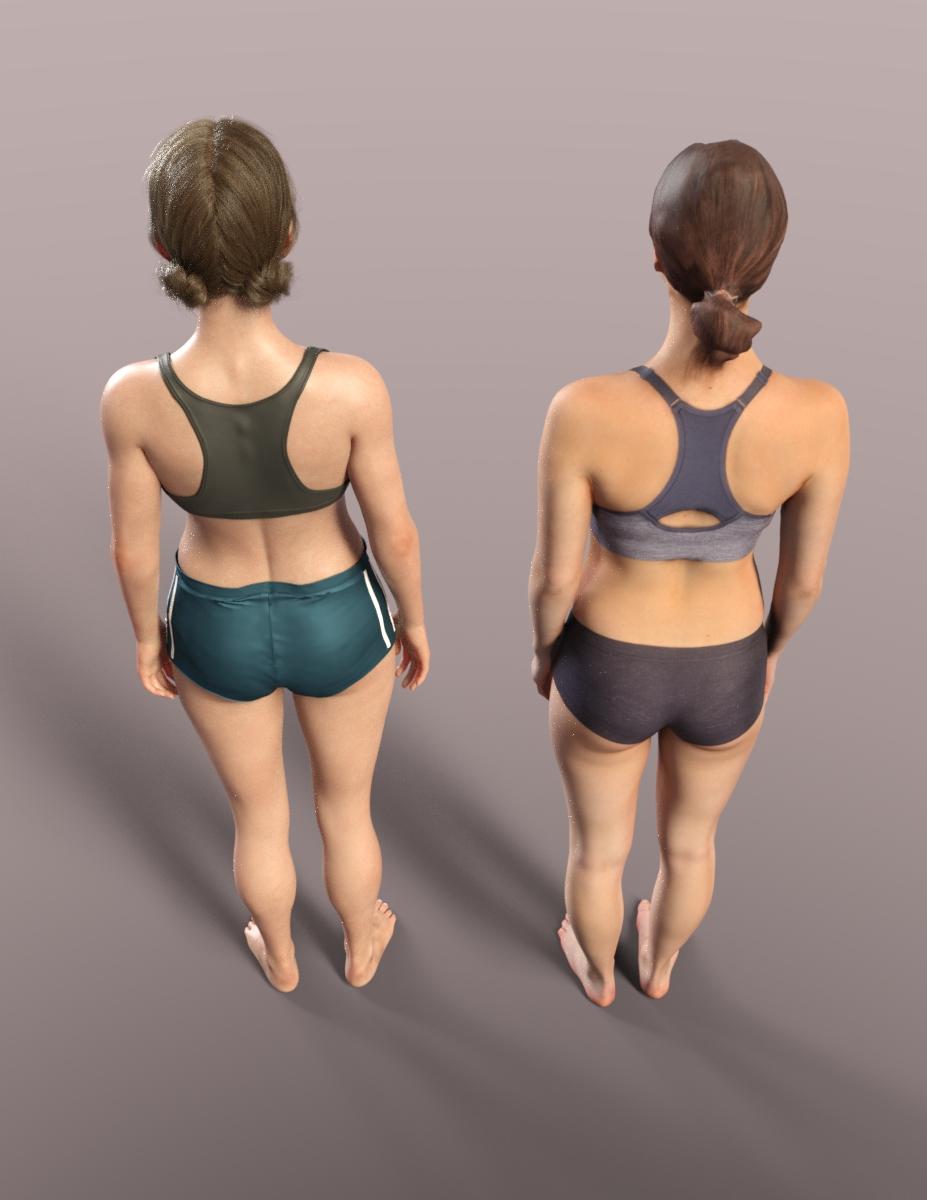
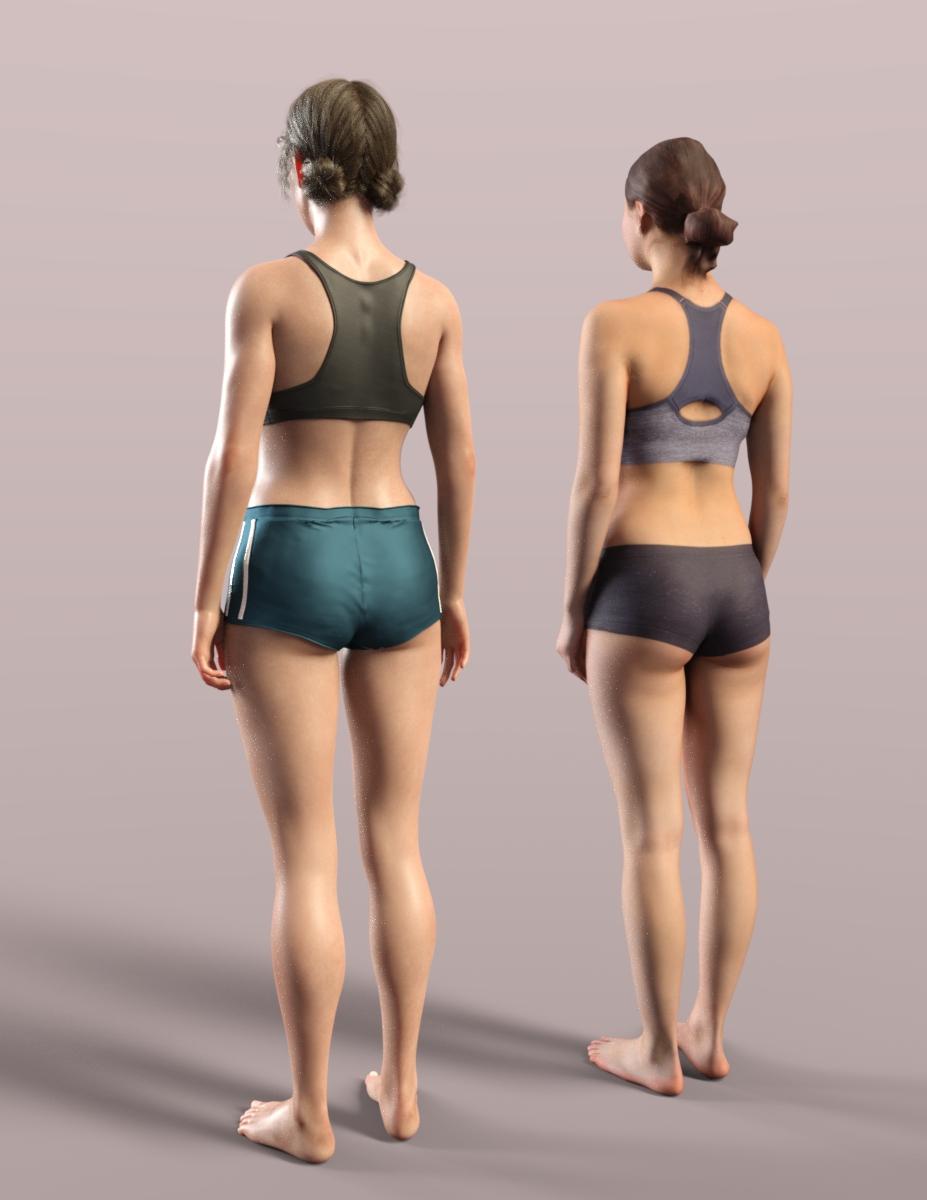
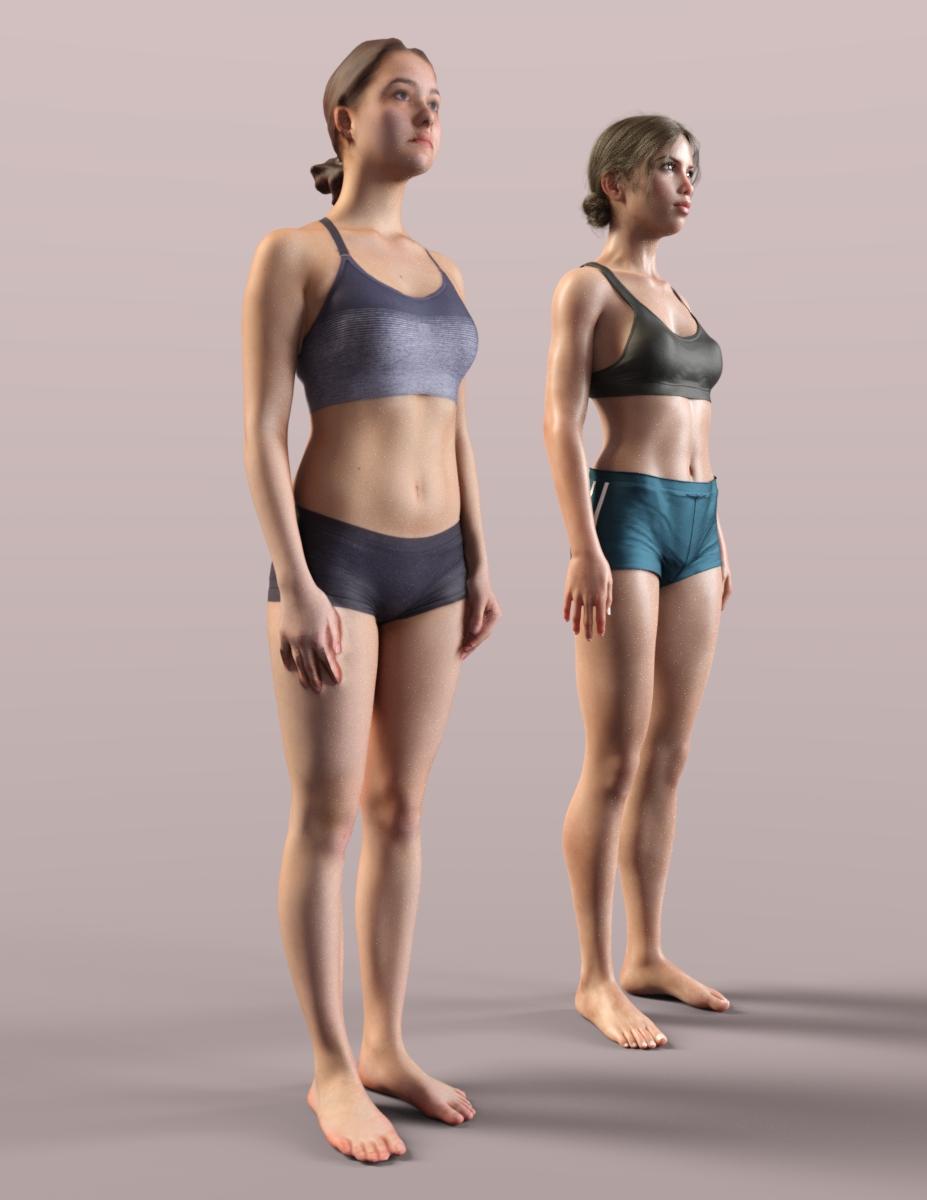
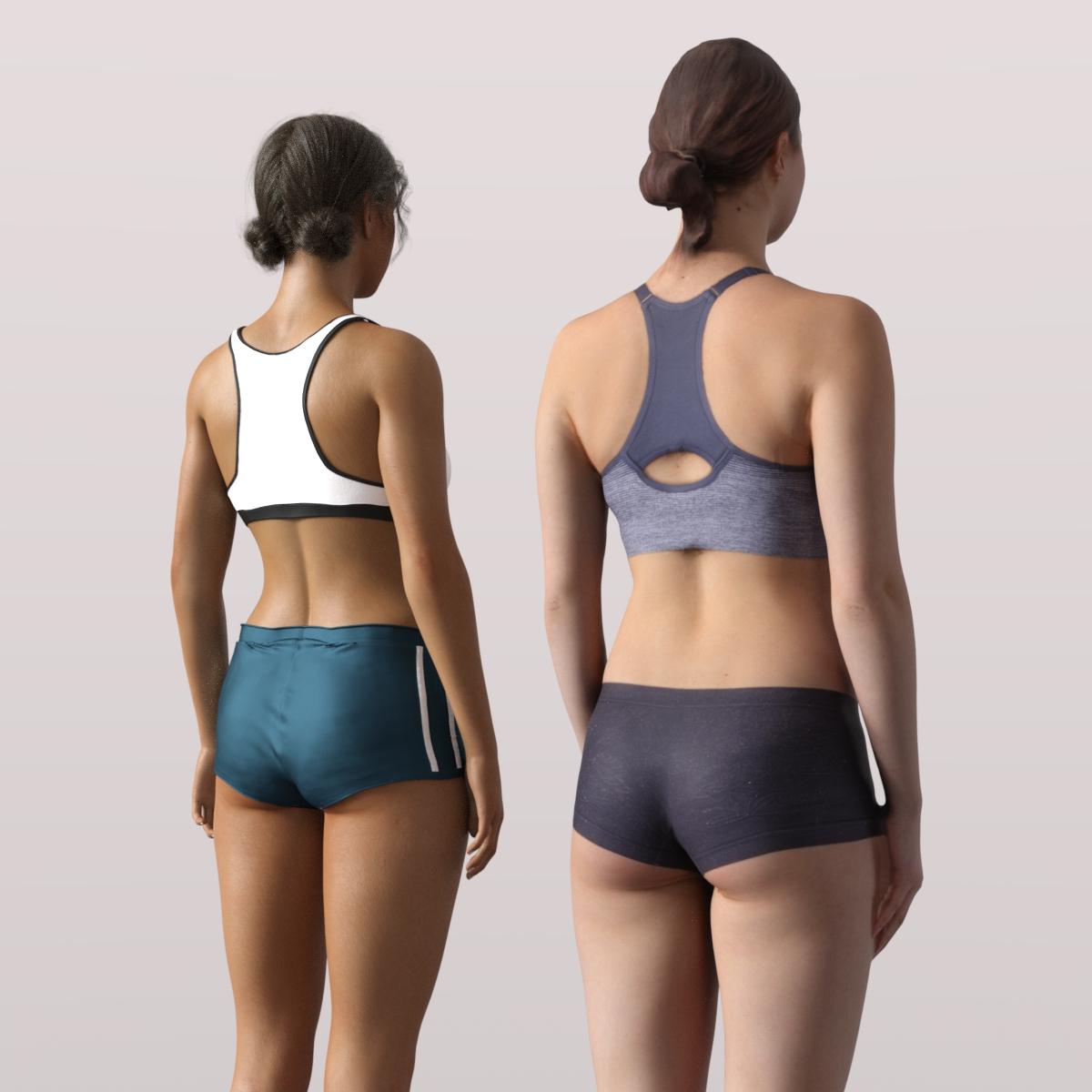
My Projects in 3D Digital RenderingA few renders comparing a 3D figure scan with the Genesis8 figure. I tried to choose a similar outfit for comparison.
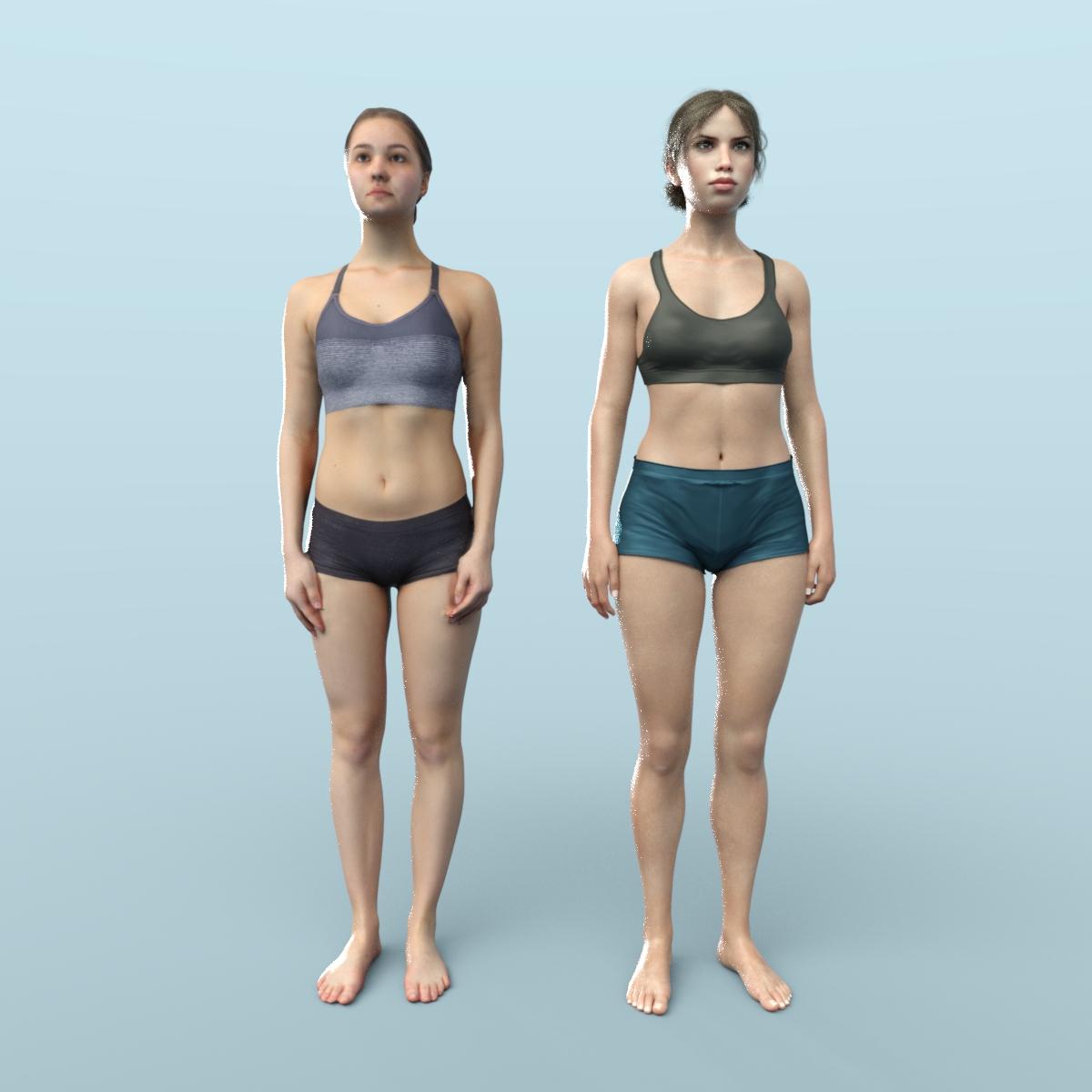
Notable areas of difference are as follows:
- the muscle that bridges between the breast and the shoulder has somewhat different structure when the arm has fallen to the side.
- Also, when the arm is down, the fatty tissue between the deltoid and the bicep is distorted outward leaving a bulge toward the outside that I don't find an adequate morph for.
- From the back also when the arm falls down, the tissue in the pit of the arm is compacted and the arm pit is lowered also the inner edge of the bicep is squashed inward but not so much for the Genesis 8 figure. This leaves the arm pit feeling a little high.
- The love handles actually drop into the hip a little bit higher in the rib cage in the real figure versus the Genesis 8. Thls leaves less volume in the hips up high. Not sure if this is to gracefully accommodate the weight mapping for bending?
- There is less volume on the inner curve of the upper thigh.
- I tried some morphs to get a little more natural fall of the glutes. Before morphing it was a little anti-gravity.
It makes an interesting comparison and hilights areas that would need adjustment in post-rendering in order to approximate reality.

 Merlin 8.1
Merlin 4 Aliases takes Merlin 8.1's morph to the next level. I wonder why it and SBibb Magic at Their Fingertips weren't released earlier? No matter. This makes Merlin 8.1 a real dude to me, but I could never get the Pro Bundle below $75.
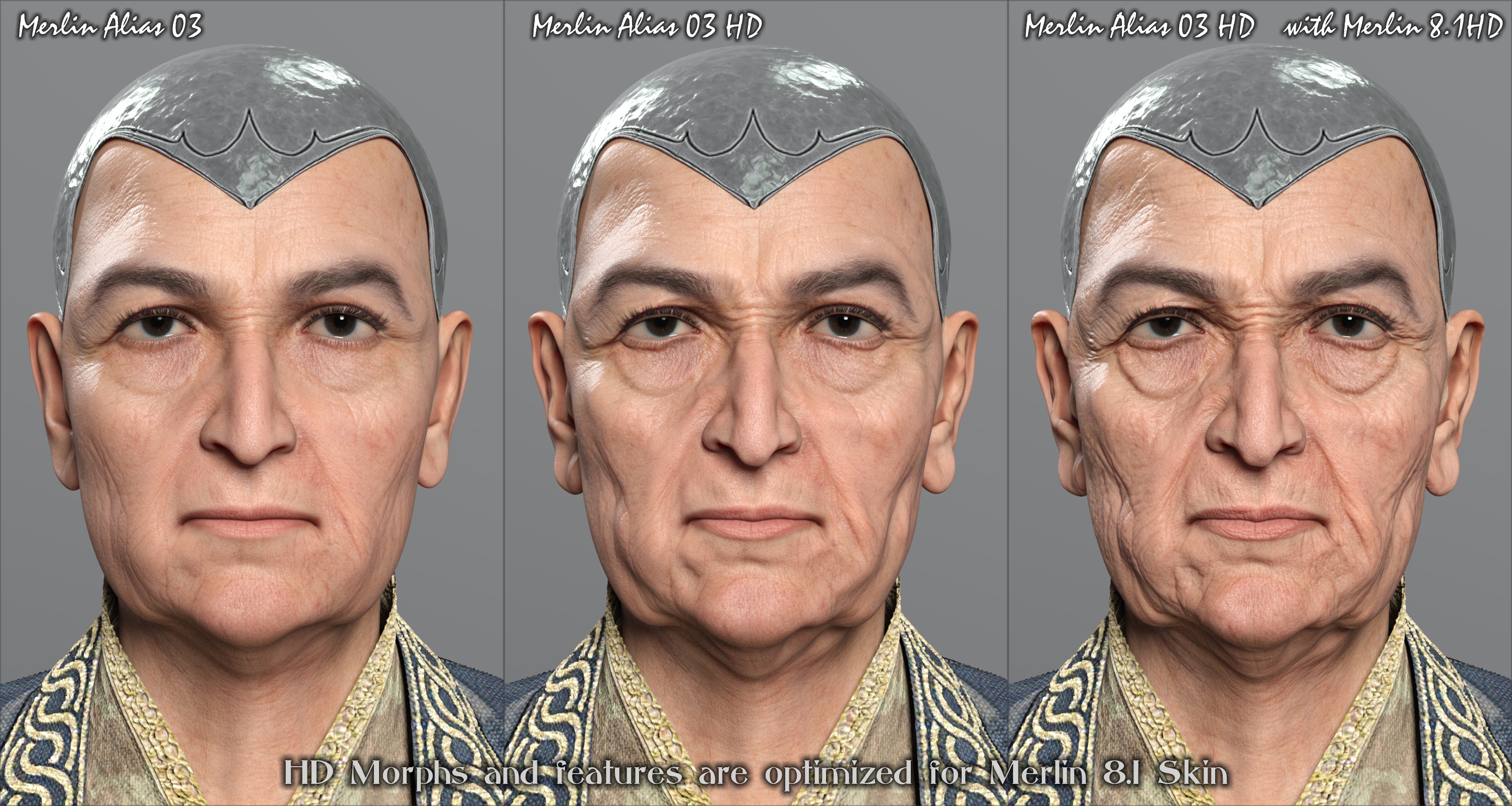 Merlin 8.1
Merlin 4 Aliases takes Merlin 8.1's morph to the next level. I wonder why it and SBibb Magic at Their Fingertips weren't released earlier? No matter. This makes Merlin 8.1 a real dude to me, but I could never get the Pro Bundle below $75.
Re-rigging a freebie propThank you for all the suggestions, particularly those reminding of what morphs can and cannot do.
I decided to go back to basics, by breaking the model apart in Hexagon, then sending it back to Daz, and organising the components into groups. I have not added rigging yet, but using xtrans, xrot, etc, I can now raise, rotate and pitch the platform. I can also swing each leg in and out, and telecope them individually (each leg has four segments, something I forgot to mention in the OP). The leg braces need positioning by trial and error, but I can now produce a configuration which 'looks right'. However, I'm still a long way from making this into a simple prop which can be posed elegantly. Also, some things don't work so well, and I'd be grateful for thoughts on how to address any of them. I've posted a new pic to show where I've got to.
1) Seen from above, each pair of legs is separated by an angle of 120 degrees, so only one leg can align with one of Daz's orthogonal axes. The other two legs must be positioned using xrot and zrot in some combination, and I don't see a way to do this with a single morph.
2) Each leg has a brace (or arm) coupled to a ring on the central column. As the legs open and close, the ring should rise or fall, because leg, brace and central pole form a triangle, with two sides (leg and brace) having fixed lengths.
3) In the real world, the three legs would open and close in synchrony, but I have no idea how a single control can make that happen. I don't see a way to ensure that all 3 legs move together, or that the ring rises and falls to reflect the positions of the legs.
Incidentally, if I make more progress, what would be the rules, ethics and/or conventions of sharing the results here?
Making the hole in a torus resizable.I know plenty of ways you could do this but none would use the dropdown menu
not knowing what video (or possibly having access to it as I am not DAZ+) I have no idea what they did
what I myself would do is send it to Hexagon, select and resize the inner ring then send it back as a morph
Daz 3D is part of

Connect
DAZ Productions, Inc.
7533 S Center View Ct #4664
West Jordan, UT 84084Licensing Agreement | Terms of Service | Privacy Policy | EULA
© 2026 Daz Productions Inc. All Rights Reserved.