-
How to get "armpit folds"? (solved)
Oh!If it's a morph, Maybe I can get the details like the reference by lifting the limit by 200% I think, Thanks for your answer! I never noticed that item! thanks! !('▿')Gordig said:Skin Folds and Creases gets you a little bit of that, but I'm not aware of anything as detailed as your reference image.
Carrara Challenge #62 "Clowns and Other Circus Stuff" -Bunyip02 said:
Doing the Harlekin Walk starring Aiko 3
Let me know if you can't see the video, newbie at work !!!
Animation is based on a bvh file, spent over 5 hours correcting glitches, just noticed I missed a few. Please excuse the sliding feet !
really nice work, terrific to see how your animation is turning out

I had a play with puppeteer and also saving master poses to make a walk cycle but failed miserably heh
have you thought about using morph targets instead of the bones morphs move verticies in straight lines so you need a few morphs to describe an arc
here's one fromn 2009 done in anim8or which had lousy skeletons at the time - so i used to use morphs for everything
Is there a UV swap for a G2Male skin to a G8Female model?I'm guessing you'd have to Map Transfer from G2M to G2F before using the Legacy UVs product. You could try just using the G2F to G8F legacy UVs product, but I'd expect there to be visible seams if you use a G2M skin. An alternative is getting the G2M to G8M Legacy UVs product and then the Cross-Figure Resource Kit to fit it to a G8F.
[Release] dForce MI Two-Piece Business Suit for Genesis 8 and 8.1 Malesleemoon_c43b45a114 said:
mal3Imagery said:
leemoon_c43b45a114 said:
Here's my first try at using the suit (as conforming.)
I love the textures and the cut of the suit on my characters. I haven't tried the tie yet, as I wanted a more casual walking pose for my first test.
An excellent outfit, as usual, from mal3Imagery. Very happy with my purchase!
Lee
He looks great! If you want a less clingy look in the conforming use, you can dial out your character's body morph and apply the stocky morph (if you have it) to closely match that of your character's custom body. Thanks for the support and glad you are happy with the purchase!
Thank you, mal3Imagery! I wanted to see how the outfit conformed to a substantially morphed figure (despite your instructions on the promo images.). It did quite well, but dialing out all (most?) of this character's morphs and putting in around 25% Stocky and a bit of Augustus' Slim is giving a much nicer result. I'm getting there. Thank you for the excellent feedback and suggestion! I'm so very delighted with this outfit and appreciate the high quality products that you create. :)
Lee

That's a lot better! He looking good :)
Downloading OptionsOneDrive is a pain, that Microsoft really wants you to buy a subscription for. The modified paths when it is allowed to run has caused a lot of issues for users (and of course the free version would be overwhelmed by the volume of data in no time flat).
Public Documents and the user documents folder are entirely separate - you would need to move the My Daz 3D Library to the D: drive yourself, and update paths in Daz Studio and DIM (there are a couple of scripts that will transfer the settings from one to the other, which helps keep them synched - http://docs.daz3d.com/doku.php/public/software/dazstudio/4/referenceguide/scripting/api_reference/samples/start#directory_mapping ).
Face transfer issueTransfer Utility, as in the body of the post, or Face Transfer, as in the title ( Please put your question in the post body and the title - Daz 3D Forums )
[Release] dForce MI Two-Piece Business Suit for Genesis 8 and 8.1 Malesmal3Imagery said:
leemoon_c43b45a114 said:
Here's my first try at using the suit (as conforming.)
I love the textures and the cut of the suit on my characters. I haven't tried the tie yet, as I wanted a more casual walking pose for my first test.
An excellent outfit, as usual, from mal3Imagery. Very happy with my purchase!
Lee
He looks great! If you want a less clingy look in the conforming use, you can dial out your character's body morph and apply the stocky morph (if you have it) to closely match that of your character's custom body. Thanks for the support and glad you are happy with the purchase!
Thank you, mal3Imagery! I wanted to see how the outfit conformed to a substantially morphed figure (despite your instructions on the promo images.). It did quite well, but dialing out all (most?) of this character's morphs and putting in around 25% Stocky and a bit of Augustus' Slim is giving a much nicer result. I'm getting there. Thank you for the excellent feedback and suggestion! I'm so very delighted with this outfit and appreciate the high quality products that you create. :)
Lee
[Release] dForce MI Two-Piece Business Suit for Genesis 8 and 8.1 Malesleemoon_c43b45a114 said:
Here's my first try at using the suit (as conforming.)
I love the textures and the cut of the suit on my characters. I haven't tried the tie yet, as I wanted a more casual walking pose for my first test.
An excellent outfit, as usual, from mal3Imagery. Very happy with my purchase!
Lee
He looks great! If you want a less clingy look in the conforming use, you can dial out your character's body morph and apply the stocky morph (if you have it) to closely match that of your character's custom body. Thanks for the support and glad you are happy with the purchase!
Face transfer issueIs anyone having issues with the transfer utility extending the neck?
Custom Morphsin DAZ studio using morphloader you need to make sure you are in fact importing her the correct scale
exporting from Carrara with the option for DAZ studio morph target in the obj dialogue should do it but you can check by importing the obj its self
morphloader it should be default
only Carrara setting if you exported it default from Carrara
you need to create a delta using the ExP under the hamburger menu to save it as an injectable morph without loading the obj that is why using an existing morph is much easier for Carrara
to put it simply you need to choose whether you are intending to use it in Carrara or DAZ studio as doing it for both is much more complicated and honestly I use Poser 7 myself to do that!
Finally a decent suit - but it's not in the bundleJOdel said:
More likely the older Memphis was done by only applying the morph part way and using the Memphis textures.
Useful alternate for GrowingUp for youtheing the base figure.
Another trick I've found for getting an older version of a young character is to turn off limits on the Youth Morph and apply a negative value. Sometimes it works really well; sometimes the results are really strange.
Custom Morphs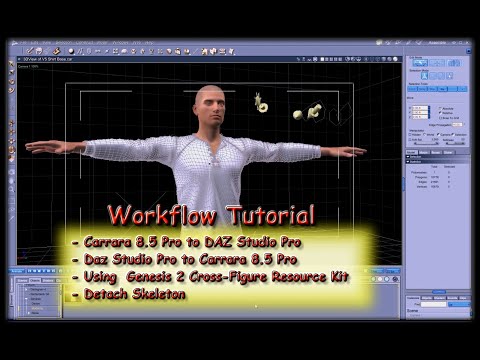
I was able to get at least the dress for my character as i have modeled it but for this video it is applied to G2 so it's at the end not a morph but a standalone shaped dress.
Transfer Utility works for Genesis, Genesis2 and i guess also Genesis3 but loaded V4.2 didn't appeared there (for source item), is there another way for that?Pressing a face against a windowI do not know any morph pack that can do that (but maybe some exist).
You can try to force a deformation on the face
- by adding a smoothing modifier to the figure and slowly pushing her face on a window.
- by using a dformer. This will let you define some weight maps so that the nose is less deformed than the lips, for instance.
In either case, I doubt that the results will be excellent, but the experiment are easy and fast.
Other wise, you can try to do the deformation yourself in a modelling program like hexagon or blender, but it is more complex.
Finally a decent suit - but it's not in the bundleMore likely the older Memphis was done by only applying the morph part way and using the Memphis textures.
Useful alternate for GrowingUp for youtheing the base figure.
AIUTO...CHI CONOSCE L’ITALIANO? PARTE TREDICIImago said:
Kainjy said:
Gli asset nuovi (vestiti e capelli) sono belli, iper-texturizzati (con texture a 8K) ma privi di funzionalità... li prendi e li fai indossare alla figura e stop. Gli asset vecchi erano molto più modulari e ti permettevano di giocare molto coi morph o i settaggi (e contenevano molte più variazioni di colore), quelli di adesso hanno solo il supporto a Dforce e stop (se vuoi la colorazione diversa è venduta a parte).
Sindrome del doppioclick-render-sonounartista.
 Nessuno ha più voglia di avere qualcosa di articolato perchè tanto basta applicarlo, proprio come dici tu, mettere un set Iray, pigiare render e andare in vacanza alle Hawaii, due settimane di soggiorno tutto compreso.
  Vedo tanti lamentarsi che ci sono pochi set di texture per questo o quello quando basta perfino Paint per creare una texture nuova di pacca. Oppure chiedere un port di un vestito per V4 su G8 quando bastano letteralmente trenta secondi per farlo da loro stessi.
Beh, oddio....non è proprio così, almeno per me "neofita". Forse vale per chi conosce Daz ed i suoi anfratti da tanto e giustamente sa fare anche queste cose. Io ho iniziato un anno e mezzo fa, e mi sono concentrato nelle ore dedicate alle "prove sul campo" sul creare scene e luci accattivanti con l'utilizzo della cam, degli hdri e delle spotlights....Se ci sono due cose CHE NON SO FARE nella vita sono cantare e disegnare. Quindi certamente dovrei spendere un mese di tempo solo per imparare a creare una texture, che sarebbe comunque una ciofeca. Perchè, appunto, a disegnare sono negato. Quindi preferisco, talvolta, investire qualche euro su un set di textures per non perdere ore e ore di tempo (ed avere un risultato che, ne sono certo, sarebbe deludente). Preferisco concentrare le ore da dedicare all' apprendimiento a Lightroom e Photoshop (che sto iniziando piano piano a conoscere), strumenti che, questi si, possono (se usati bene) portare ad un livello superiore i miei rendering.
Detto ciò, anche io noto un certo appiattimento nel livello dei prodotti offerti su Daz e non solo. Escluso il ristretto novero dei miei artisti "must", al massimo ogni mese i nuovi items in grado di stuzzicarmi al punto di acquistarli si contano a malapena sulle dita di una mano. Preferisco piuttosto aspettare la combo saldo+coupon Daz Plus per portare a casa qualcosa magari rilasciato due anni fa, ma a prezzo di saldo.
Defect on the joints of the clothesiacoposk8 said:
I tried to morph only the shirt but always the same problem. I think the problem is that I made them with marvelous. When it does the simulations, one for each pose, he changes everything. For example, if you lift the shoulder, it will not only change the area around the shoulder, but will generate creases on the belly, shoulder and even the wrist. So if you have a pose where the character has the torso bent and the arm raised, there should be a morph that changes the torso area and one of the shoulder, so instead there are two for the shoulder and two for the torso creating interference. Is there no way to tell daz to only consider part of the morph? Because it would be a shame not to be able to use marvelous.
Because I would be sorry not to be able to use marvelous.
I changed the drive folder with the new morphs and the daz file (.duf), so it is easier for you to find my errors.
Thanks
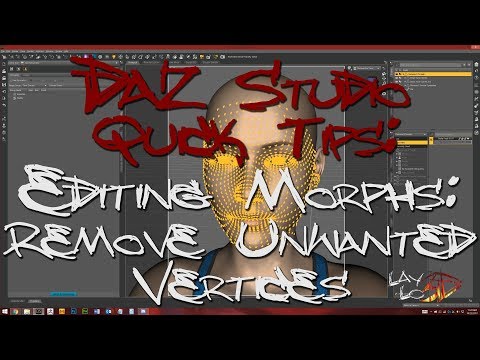
Marvelous is used for making the clothing .obj files. I do not have Marvelous Designer, I have used dForce to help start morphs so would think that such can be done using M.D. however as I did in using dForce, it could be that you still need to use a modeler such as Hexagon or Blender or Zbrush, etc. to polish the morph. AND you would have to use some of the other tools in D/S to clean up your morphs so that each pJCM is basically affecting ONLY the joint area it is supposed to be affecting. In lifting up the arm, that would be the armpit area, not the entire shirt. In one of those tutorials of mine I did cover how to clean up the morphs however you may find this video helpful. I think there are a couple such tutorials on YouTube. This is one:
 How to get "armpit folds"? (solved)
Hi :) Sorry for my bad English.
So I noticed a detail problem, underarm folds, I browsed most of the characters in the daz store and couldn't find this detail, is there such a morph?Custom Morphsin Carrara you can use an existing morph channel, which one depends if the whole figure or a body part such as the head
obviously your morph import will overwrite the original one you are replacing in that Carrara scene
Custom MorphsJust to add this, i did a few testings and there are things that might could influence the result, if anybody knows more about this, i would appreciate it.
I did adjust the figure manually in Daz yesterday night and found out that the head morphs in Daz are all in percent but in Carrara there are not. Could that have some impact of the morph import?
On the other end, i modified a dress to fit on my figure, saved as obj and imported it as morph in morph loader pro in Daz to create a morph for the dress itself.
The lower part, hips region morphs as it should but the chest region did get distorted again as it creates a spike displacement.
About the distortion effect, i've heard that if the Geometry or Vertexes get out of order that the results could lead to distortion.
The question is, does shaping and changing the position of the vertexes are the reason for that? If yes, why did i got this kind of result for the full body morph if i haven't changed any of the vertexes there? Or is there an easier way to create the morph in Carrara itself without the need to import and export the file?Defect on the joints of the clothesI tried to morph only the shirt but always the same problem. I think the problem is that I made them with marvelous. When it does the simulations, one for each pose, he changes everything. For example, if you lift the shoulder, it will not only change the area around the shoulder, but will generate creases on the belly, shoulder and even the wrist. So if you have a pose where the character has the torso bent and the arm raised, there should be a morph that changes the torso area and one of the shoulder, so instead there are two for the shoulder and two for the torso creating interference. Is there no way to tell daz to only consider part of the morph? Because it would be a shame not to be able to use marvelous.
Because I would be sorry not to be able to use marvelous.
I changed the drive folder with the new morphs and the daz file (.duf), so it is easier for you to find my errors.
Thanks
Daz 3D is part of

Connect
DAZ Productions, Inc.
7533 S Center View Ct #4664
West Jordan, UT 84084Licensing Agreement | Terms of Service | Privacy Policy | EULA
© 2026 Daz Productions Inc. All Rights Reserved.