-
Kenji 7 - Discuss
Well I got off the fence and made my first ever Genesis3 purchase, picking up the Kenji starter bundle. I also picked up the Gen X2 latest plugins for Genesis3, but I must be doing something wrong, since I keep trying to transfer the shape to Genesis1 but the only thing that seems to actually transfer is the belly button. I've been studying the documentation for GenX2 but not sure where I'm going wrong (I already had GenX2 and the plugin for Genesis2, so I should have all I need in the tool to make this work), I'll keep tinkering, and may end up having to post a query for help on the GenX2 thread. But I'm stoked to have Kenji in my possession, even if I haven't quite figured how to get him onto my Genesis1 yet.
Congratulations on the move to G3! I think you'll be happy. I've enjoyed the small out of G3 content I have and definitely see myself moving forward with using more and more G3 content. I've been insanely happy with Victoria 7 and hope to get some of the G3F and G3M morphs as soon as they go on sale (assuming I have the money at the time lol). :)
As for the GenX2, from what I've read about the product, in order to go to G3 you need all three of these products:
http://www.daz3d.com/genesis-generation-x2
http://www.daz3d.com/genx2-addon-for-genesis-2
http://www.daz3d.com/genx2-addon-for-genesis-3
Sadly I can't afford to go that route unless these go on a deep deep sale some day.
Problem is me and Jon work in Carrara that is not able to use G3 yet.
Kenji 7 - DiscussWell I got off the fence and made my first ever Genesis3 purchase, picking up the Kenji starter bundle. I also picked up the Gen X2 latest plugins for Genesis3, but I must be doing something wrong, since I keep trying to transfer the shape to Genesis1 but the only thing that seems to actually transfer is the belly button. I've been studying the documentation for GenX2 but not sure where I'm going wrong (I already had GenX2 and the plugin for Genesis2, so I should have all I need in the tool to make this work), I'll keep tinkering, and may end up having to post a query for help on the GenX2 thread. But I'm stoked to have Kenji in my possession, even if I haven't quite figured how to get him onto my Genesis1 yet.
Congratulations on the move to G3! I think you'll be happy. I've enjoyed the small out of G3 content I have and definitely see myself moving forward with using more and more G3 content. I've been insanely happy with Victoria 7 and hope to get some of the G3F and G3M morphs as soon as they go on sale (assuming I have the money at the time lol). :)
As for the GenX2, from what I've read about the product, in order to go to G3 you need all three of these products:
http://www.daz3d.com/genesis-generation-x2
http://www.daz3d.com/genx2-addon-for-genesis-2
http://www.daz3d.com/genx2-addon-for-genesis-3
Sadly I can't afford to go that route unless these go on a deep deep sale some day.
Questions about FBX, Bot Genesis and Bot Armor for Genesis 2 FemaleMetamotion, a new DAZ Studio user (but not new to 3D), had a bunch of product specific questions for me, along with one about FBX export (which I'm not sure about). So I thought I should post my reply here incase it is useful to others and also so that someone who has worked with FBX might chime in with suggestions.
First I have to say that I'm a little mystified as to how new users find out that Readme files exist. It seems like they often are under the impression that there is no documentation for products, and that's a shame. While a Readme doesn't always have the information that new users are looking for, it often does and it is the official place for product documentation. Check out this very short thread for two methods to find the readme for a product:
http://www.daz3d.com/forums/discussion/33721/how-to-find-the-readme-files
Ok next: Metamotion said "My Max guy says UV maps missing on the face upon export (FBX)? Not sure what that's about, I'm not strong on UVs. I did notice that Genesis 2's face texture sort of disappears when I add the HotRod sunshine material, for instance."
Partial Answer: Having not used FBX export, I'm not sure but this could be an issue with either the FBX exporter or Max import of FBX, or it could be related to Geografts and FBX. Hopefully someone else here knows more, but be sure your Max guy knows that standard DAZ Studio figures use multiple UVs (one for the head, one for the torso, and one for the limbs). Additionally, Bot Genesis and Bot Armor are Geografts (which means that when you load them, they sort of replace some of the base figure's geometry with their own), so they have some UVs that match the base figure (the "human" parts in my Promos) and additional UVs for mechanical parts. Lastly, when you apply one of my Material Presets to the base figure, it automatically applies a robot like texture to the face and head. You can then select the face and other surfaces (those that are meant to be human) in the Surface tab and apply your prefered character material presets to that. Step by step instructions can be found in the Readme's for these products.
Metamotion asked: "1. How do I create this hair, this face and these eyes"

Answer: The hair is http://www.daz3d.com/fashion-hair . The face texture is Belle which comes with Victoria 6 . The eyes come from the Chrome4Face material preset in People > Genesis 2 Female > Clothing > Bot Armor > Materials.
Metamotion Asked: "2. How do I create this hair, face and eyes and the ear thingies?"

Answer: Hair is http://www.daz3d.com/ricardi-hairstyle.Face and eyes are from http://www.daz3d.com/v4-elite-texture-lana . Ears thingies are from Bot Genesis. Specifically, make sure you have Genesis selected in the Scene tab, then navigate on the Content Library tab to My Library > People > Genesis > Clothing > Bot Genesis > and choose (double-click) BotGen_All or BotGen_Head.
Metamotion asked: "3. Having trouble figuring out what to load to get the basic female robot shown here (ultimately with human face)."

Answer: The fastest way is to make sure you have Genesis selected in the Scene tab, then navigate on the Content Library tab to My Library > People > Genesis > Clothing > Bot Genesis > and double-click BotGen_All. Then, on the Scene tab, click the arrow to expand Genesis, select the Bot_Gen_torso figure and delete it. Next, make sure you have Genesis selected again, then double-click Bot_Torso_b (for human head) in the Content Library tab to load it. Finally, to get human skin texture on just the face and head see the Readme for Step-by-step instructions on how to apply partial mats.
Metamotion asked: "4. How do I create the fishnet (criss-cross) texture shown here?"

Answer: You need either http://www.daz3d.com/genesis-2-female-bot-armor-bundle , or http://www.daz3d.com/advanced-texture-for-bot-armor and http://www.daz3d.com/genesis-2-female-bot-armor or http://www.daz3d.com/genesis-2-female-bot-armor-set-2 . Then select Genesis 2 Female in the Scene tab and on the Content Library tab, navigate to My Library > People > Genesis 2 Female > Materials > Bot Armor and double click Hotrod_Sunrise or one of the other material presets. The metalic fishnet look is created by a displacement map on the shader. Please note this was made for 3Delight. Converting to iray is a bit tricky.
That's all for now. I hope this helps!
G3F skin with dark nipplesFWSA Paloma HD for Victoria 7
 Windows, Poser re-installed, some DAZ V4 morphs don't work
Thanks. I'll make a note of it and keep working on it.
Yes, I've done some research on this. When I did a fresh install of Poser 10, I found no !DAZ folder in runtime:libraries and had to create one. I haven't run V4V3.bat yet. I ran the other one in Poser 6, didn't work, ran it in Poser 10 as well.
I don't like multiple runtimes at all, but I'm stuck with loads of old content from Poser 6 that I needed to import into libraries.
I'm too afraid to delete the old V4 morphs from Poser 6, because I'm afraid I will be left with nothing.
New Poser 10 downloads from Install Manager seem to be running off of zip files in Public Documents/My DAZ 3D Libraries.
Special DAZ morphs like Creature Creator and Stephanie 4 are to hard to install by hand because they contain a Victoria 4 folder with a list of body parts a mile long.
iRay Render - Scene OnlyWell my Tonal Mapping was already turned on & I set the settings as suggested but no luck. I also set the F-Stop directly on the camera to 5.6 but I could find no where on the 'camera 1' settings to set the ISO to 400 which I found a bit wierd. I think maybe because the light preset I use gets stuck outside the Victorian Shoppes and not inside. So I need to zoom out I suppose, knowing my luck with DAZ, way, way, way out and then click & drag, click & drag, click & drag until I get the lights inside the Victoria Shoppe that I actually am using.
Now when I turned the Tonal Settings off then I began to get a very dark render that had the more reflective surfaces showing, mainly the native iRay surfaces on the characters. In this case no ISO to set on 'camera 1'. The surfaces on the Victorian Shoppes were mostly black. No big surprise the light preset was outside the room. I am going through with DAZ3D's and MecD's PBR presets and converting the shoppes to real PBR which should help make the 'camera' work more like a camera I guess. DAZ Studio can be a lot of work.
July 2016 New User 3D Art Contest “Portrait Rendering” – WIP ThreadOK, 2nd attempt. All I really have left that I want to try to improve is silk for the dress, metalicise the green on the building, make the wood in the windows look better, amd maybe improve the glass in the windows to look better.
I wonder if putting a bit of furniture in the room with him would help move him more toward the background of the scene. The girl's space would be uncluttered and might draw the eye more toward her.
That would then leave a mystery as to her shocked reaction but I agree as a still it is not working. To convey those old Victoria sensibilities to those that weren't raised strictly (lol, there are some) or as an historical curiosity needs a short animation which is out of the scope of this contest. I will finish the picture and save if so animation a scene later but not enter it into the contest. Instead I will try a couple of more portrait like rendering into a picture in a couple of other ways and see if those work.
Thanks. I am learning.
WHAT DOES "FWSA" mean or stand for?here are some other forum usable suggestions I'm making up while I'm on hold with Apple Computer...
IDTAMLVCOODIMIB "If daz takes all my legacy Victoria content out of DIM I'm boned"
IIANOSADBAMCWWSOO3HD" I Installed a new OS and didn't backup all my content which was spread was over 3 hard drives"
ISCRTIOA5KLCD,CYFTAD? "I still cant read the interface on a 5K LCD, can you fix this already Daz?"
ITTDGOATBAA? HJLBMAABP "Is that the Daz Gorilla on all those bowling alley animations? He just lost a boxing match against a bowling pin."
ICTV7OOMRBSSN/WITNCS? "I cant take Victoria 7 out of my runtime because she's still naked/When is the next clothing sale?"
FCSFV7!TN*CFM! "Forget clothing sales for Victoria 7! Theres no *!@$% clothing for men!"
SNUIDFP. IYBTCNYAAI "Still no useable iray drivers for Pascal. If you buy the card now you are an idiot."
all apple advisors are busy but I managed on my own. money will spent!
RRRR Twisted Lyrics Contesttag:luci45 #9
Original Lyrics:
Do you come from a land down under?
Where women glow and men plunder?
Misheard Lyrics:
Do you come from a land down under?
Where women glow and men blunder?
Down Under - Men at WorkUsed:
Komodo Dragon (Content Paradise)
Hover Platform
West Park Treatment Room Specimen
Victoria 5
Pure Hair: Bubblegum for Genesis (LB)
Ra's Palace for DAZ Studio (LB)
Shades of Life - Urban Construct (LB)
Mec4d PBS Shaders vol.1 for Iray (LB)Also Used:
Sundress Summer Dress?
PH Crazy Hair
M Fisher dress
PD Shaders 2
George Ivan & Leo morphs
DAZ Firearms
Basic Wear G3M
Ancient Combat Hair
Just Josh shorts
Dark Whisper vest & choker Sidereal texture
LoRez Crows
Skies of iRadiance
Rons War Elements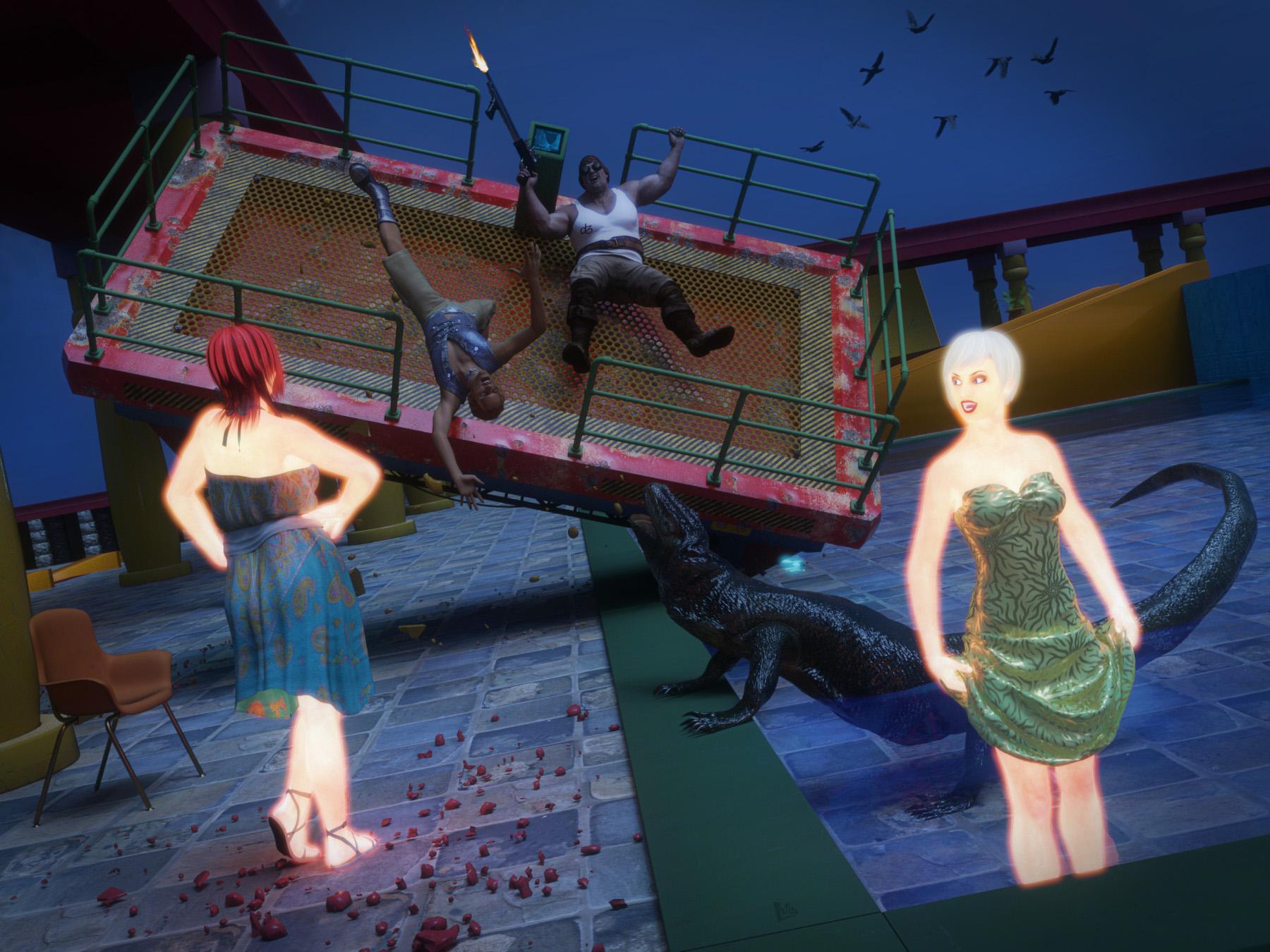 what would you call the averge time for you to set the scene up the way you want
it takes my computer 15 minutes just to load my scene with girl 7, genesis 3 male, suitable clothing, and victoria shoppes...
Quick Question regarding ARTMakeoverThough it is possible to use Victoria 4 maps on Genesis 2 Female https://www.daz3d.com/victoria-4-for-genesis-2-female (but only if the base materials used are also on the Victoria 4 UV set).
I think I'll just not buy it and wait for a similar makeup thing for Genesis 2.
Windows, Poser re-installed, some DAZ V4 morphs don't workHard drive crash, Windows and Poser re-installed. 10 instead of 9.
Here’s how it is. Victoria 4.2 and morphs are in the old Poser 6 library.
(Poser 6 was untouched after the crash. Everything in Program files (x86) was nuked)
Newer things like Creature Creator and Stephanie 4 are in My DAZ 3D Library, or new Poser 10.
I remember being told once that Victoria needs to be in the same place as the morphs to work.
3 years ago I asked DAZ for help with Creature Creator, but nothing worked.
6 months later, an idea came to me, and I fixed it, but now I don’t remember what I did.
I’ve been told that multiple runtimes are bad.
The morphs that are in the same Poser 6 Runtime with Victoria 4.2 work. Like Morphs ++.
The new ones outside of Poser 6 don’t.
In other ways, importing the old Poser 6 library was a huge help, because many things were saved.
Nothing was saved that was in Poser 9. Individual files (purchases) were backed up on an external drive.
Many have been restored, but DAZ morphs? Forget it.
I remember having the Stephanie 4 morphs working before the crash. They won’t now.
I'm not blaming anyone but me, and sometimes I fix things eventually with some help.
Quick Question regarding ARTMakeoverThough it is possible to use Victoria 4 maps on Genesis 2 Female https://www.daz3d.com/victoria-4-for-genesis-2-female (but only if the base materials used are also on the Victoria 4 UV set).
Quick Question regarding ARTMakeoverIt says its for Victoria 4 and Genesis. Does that mean its compatible with Genesis 2? I'd like to know before buying it.
https://www.daz3d.com/artmakeover-merchant-resource-for-v4-and-genesis
David?I've searched this forum and can't find anything about this. I'm wondering if David will ever be brought up to date along with all the other standard DAZ characters (i.e. Michael, Victoria, Stephanie, etc.). He's been left behind at David 5. Even Stephanie has a version 6. Has he been abandoned? I'd love to see him brought up to 6 or 7.
madness trying to import into fallout 4 creation kitThis isn't so much a product suggestion as it is a plugin, formatting or support suggestion I and I am sure there are more people would like some support when it comes to different engines like unity unreal and my current headache the Bethesda creation kit for fallout 4. I would like to see some plugins or support with Daz studio that would allow you to use genesis figures in some of the different game and animation suites the 3DS max is ok but it leaves alot to be disered some of the rigging doesn't work this is a step I would like to see though being able to use the different characters in some of the different popular I know well you can tell that all the morph 3D characters are is victoria 6 and Michael 6 rerigged for unity it would be nice to be able to just cut out the middle man and use the genesis figures that are for Daz just something I would like to see
WHAT DOES "FWSA" mean or stand for?AHHHH, okay, thank you! I wouldn't have guessed that on my own. I thought it was for characters that are split off from characters that are split off from a base.
So, like, Genesis 3, for example -> Victoria 7 -> FWSA characters lol
Looking for casual kimonos for men and women ( Yukata )For V4:
http://www.sharecg.com/v/81110/browse/11/Poser/Updated%21-Yukata-for-V4
http://www.sharecg.com/v/39890/favorite/11/Poser/Conforming-Kimono-for-V4
http://www.sharecg.com/v/26014/gallery/21/daz-studio/yukata-mats-for-daz-mfd-kimono-expansion (Requires DAZ MFD http://www.daz3d.com/v4-morphing-fantasy-dress and Kimono expansion http://www.daz3d.com/kimono-expansion-pack-for-victoria-3-mfd)
https://www.renderosity.com/mod/bcs/v4-kimonos/95264
For M4:
https://www.renderosity.com/mod/bcs/japanese-yukata-for-m4/81952
cross-eyedI often add a Null to a scene, and name it "Victoria Gaze" (or whatever), and point Victoria's eyes to that. It could be parented to the camera with some distance offset as needed.
Sometimes after reposing or re-expressioning a character, the eyes fail to update; I have never figured out why. Jiggling the null will do the job, though.
who is this model?Looks like Victoria 7, fourth image is Olympia 7
Daz 3D is part of

Connect
DAZ Productions, Inc.
7533 S Center View Ct #4664
West Jordan, UT 84084Licensing Agreement | Terms of Service | Privacy Policy | EULA
© 2026 Daz Productions Inc. All Rights Reserved.