-
Brawl poses
Looking for Brawls pose for Micheal 4 and Victoria 4 since 3dbrawls.com (Matrix3D) is closed.
Making Gens Textures for a Figure that has NoneI think I found my solution.Ultimate PBRSkin Manager
I was using the Ultimate Iray Skin Manager and afataer I updated it and read the PDF again it mentioned that the PBRSkin Manager was the correct on to use for the GF8.1 and GF9 models.
I took a chance and got it and it seems to have fixed my problem on top of the genitalia it also worked the skin to be more like the custom one I created for the GF8 model.
I was able to use the Victoria maps for GF8.1 and get what looks like desired results.
More testing needs to be done but my suspicion is this is the fix I was looking for.
Thank you to everyone that responded.
►►► aniMate 2 - Real aniMating Power for Daz Studio!
The Power of aniMate 2
A new page at my website
A truly wonderful experience of animating in Daz Studio awaits, and this page will help you delve right in with ideas, links, images and videos
Along with the actual User Manual for aniMate 2 viewable/downloadable right on the page!
Links to products specifically designed with animation in mind as well as direct links back to this forum thread if you need help with any of it - I monitor this thread manually and I also get an email if someone responds - so you can expect to get answers in a timely manner.
I'll also be adding subpages to this one that will expand our learning experience within the realms of aniMate 2 and animating in Daz Studio in general - because in my world, animating in Daz Studio almost Always involves aniMate 2.
The Power of aniMate 2
A new page at my website - Come on in an Join the Fun!!!
►►► Back to Main Menu ►►►
►►► Handy Helpful Links
Dartanbeck's workflow tips:
- Creating Partial aniBlocks
- aniBlock Importer for Carrara
- Using aniBlocks for entirely different motions
- Cross-Generation Animation Translation using Bone Minion
- LimbSick and Bone Minion videos
- Animation Four Wheeler Template Promo and Tutorial Videos
- My Mixamo Workflow
Added the User Guide to my aniMate 2 page
Using zaz777's amazing animated pose conversion script along with the necessary rsg's "Updated: Daz Studio Posing Scripts (now for G3F)" available on sharecg.com has brought great results for me over the couple years I've been working in Daz Studio for animation.
If using Mixamo animation FBX
3D Universe's Daz Studio Animation Tools Set 1 includes a tool called Body2Hip
Run this on the FBX result Before saving the animated pose, and you'll enjoy Massive Improvements!!!
Use is simple: Select figure (I just select the imported FBX figure) then run Body2Hip
I had converted a lot of my Mixamo FBX downloads to Victoria 7 using Zaz777's conversion script (see below), and they work great. But they're for Victoria 7, so to use them on Rosie 8, I'd either use the G3F to G8F World's Greatest Pose Convertor pose dials or run a Bone Minion. (there's also G3M to G8M World's Greatest Pose Convertor for our male figures)
Rather than using the Victoria 7 conversions I already made I decided to just use my new Genesis 2 Pose Bone Minion to start from scratch with the original Mixamo FBX downloads. (I purchased the Genesis 2 Pose bone Minion Bundle so that I can easily translate my Mixamo FBX downloads to Any of my Daz 3d Figure generations from M4 and V4 through Genesis 8.1)
LimbStick is a Great Way to get even more custom, believable edits to your aniMations!
Linday's amazing aniMation four-wheeler template system brings Life into our vehicles in Amazing Ways!!!
Some Daz 3d aniBlock/Animated Pose Vendors
Visit Dartanbeck.com for a Whole World of CG Filmmaking topics and articles!
►►► Back to Main Menu ►►►
Victorian ice skatingMorning Eros!
The clothing is going to depend on which figures you are wanting in your scene! As for the Male and Female versions that is up to the Artist who created the product. Sometimes you can get the flat footed shoes to work on both figures but it can take some fiddling.
The Genesis, Genesis 2, Genesis 3, Genesis 8/8.1 and Genesis 9 Starter Essentials are all included free with Daz Studio so should be in your account for download either manually or via DIM.
If you have the older generations like Victoria 4 and Michael 4 there are tons of clothing options in DAZ+ (little purple + sign under the store thumbnail images) as the Victorian/Steam Punk was really heavily supported for them! The only downside for those is that V4/M4 were created with Poser files that do still work in Studio but some may or may not have Iray materials in the products so that would be something you would want to check on.
If you don't mind a little extra work to get the clothing you want onto the figure(s) you want you could also check out the RSSY series of clothing and hair converters available. I have them and they work really well except for shoes ... sometimes those don't work but that is expected usually.
ElliPamawo products here at DAZ - being applied to our account?daveso said:
i would assume the products are still in my account. I still have one of the earliest ones I bought way back forever - 10 August 2001, a product for Victoria 2
Yes, they should be in your account at the other store. For example the Pin Up Box Bundle is no longer for sale at the other store but is in myaccount there.
Pamawo products here at DAZ - being applied to our account?i would assume the products are still in my account. I still have one of the earliest ones I bought way back forever - 10 August 2001, a product for Victoria 2
Natural Movements Pack for Genesis 9Elor said:
outrider42 said:
I have seen Genesis 9. Genesis 9 has World Devouring Thighs. Actual promo pic for a G9 product in this store:
It's not the base Genesis 9 figure and in a direct comparison, with Genesis 9 (with Victoria 9 mats) and Genesis 8.1 (with Victoria 8.1 mats), the difference isn't that big (I tried to reduce G8.1's height a bit but I don't know what percentage I needed to remove):
I don't get why the existence of products like Natural Movements or UNBM for Genesis 9 is seen as a defect of G9 when similar products are also available for previous generations too.
Totally agree!
Advices about reproducing a Fantasy outfit + Severed monster head questionI forgot about that outfit, but for the legs, the Untamed Warrior for Genesis 3 Female(s) is an alternative if you want armored legs:
https://www.daz3d.com/untamed-warrior-for-genesis-3-female-s
It's for Genesis 3, but it convert perfectly to Genesis 8 following SickleYield tutorial (which allow to keep the bones in the legs, the shoulders and the 'kilt'), like all other Genesis 3 items used on the picture:

The figure is the Genesis 8 version of Tara 2 (I don't have any green skined G8F, so I used a demoness):
https://www.daz3d.com/tara-2-hd-for-victoria-7-victoria-8
Her hairs are:
https://www.daz3d.com/iselind-hair-for-genesis-3-and-8-females
with:
https://www.daz3d.com/colorwerks-extreme-hair-texture-blending-for-iray-and-dforce-hair
The sword is from:
https://www.daz3d.com/chevaleresse-armor-for-genesis-3-females
The loinclothes is a freebie from SickleYield on ShareCG (from her Genesis 3 bundle), and the leather bottoms is from:
https://www.daz3d.com/fantasy-barbarian-outfit-for-genesis-3-female-s
Diffeomorphic DAZ Importer version 1.7.0 released@AlternateDreams Yes I can reproduce the issue with the Victoria 8 FHM. The explanation is epic eyes doesn't provide a vendor morph for Victoria 8 so in blender it is used a fast "nearest face" method to transfer, while this works fine enough in most cases it is not the same as the daz studio transfer. So when vendor morphs are not provided there's some difference.
What you can do is to export the eye shape from daz studio as obj, then import in blender as shapekey for the FHM. In general you can use this technique whenever you need to export a complex daz morph to blender.
Another simpler way in this case is to just use some smoothing to fix the transferred shape.
p.s. As for implementing morphing armatures that's what Thomas did in blender. You can't just "pose" the armature because the geometry will follow the deforming bones. You need to enter edit mode and modify the rest pose.
search by context/filter issue?crosswind said:
You have no Genesis figure or figure of other Content Type selected in the scene... then it won't let you drop down to select other options.
As for searching by filter a full product name, you should type in and paste "Genesis 8 Starter Essentials, ie: " + correct product name. Usually we just type in: starter, or save a filter there.
Hello Crosswind,
I have tried that. I have selected an item and tried to use it. It won't do anything.
I have tried with the "filter by content" checked and unchecked.
I have tried just about everything. It doesn't do a thing. Unless I do a screen record, a screenshot doesn't show it not working,(just in case, I just tried it while writing this. I selected "lainey" then "victoria 8.1, and tried to click it. Nothing. It doesn't even act like a button. I could try a screen record but it may be too large up attach)
as for the search, I pasted the name from the product page. I also looked for "genesis 8 starter". and just about everything genesis came up.

ALSO, just quickly out of curiosity, is there any way to make the thumbnails bigger?Diffeomorphic DAZ Importer version 1.7.0 releasedI tried the epic eyes and they seem to work fine here with ERC morphs. Blender 3.6.5 and diffeomorphic 1.7.3.
my steps:
- in daz studio load and autofit the epic eyes to g8f
- export to blender
- in blender import as dbz
- import the victoria 8 fbm as custom morph
- morph armature, the epic eyes follow fine
Then unreal doesn't support morphing armatures, that is a feature unique to daz studio you will not find it in any other software. So I doubt the daz bridge exports them, probably you are confused. Also unreal doesn't support dual quaternion so the daz deformations will not be exported fine.
p.s. As for distinguishing ERCs there's no easy way that I know of. Usually most actor morphs are ERC and most pose morphs aren't, but this also depends on the PAs who unfortunately tend to mix the two.
Is G8 being neglected?kyoto kid said:
...whenever a new Genesis generation was released content for the previous one almost immediately disappeared. This was frustrating when the "shelf life was around 2 years and made me hesitant to dump hundreds into a new generation on a tight budget. to get the versatility I needed for character design. I will admit Genesis 8 sort of broke that mould, not only lasting more than twice as long as previous generations (not counting 8.1 which changed the UV map) meaning a larger selection of content, but also introduced a number of new and interesting characters aside from just another rehash of the same ones again.
As mentioned, G3 and G8 are probably the most cross compatible generations as they share the same basic body mesh and UV map. which makes fitting clothing and even mixing shapes between the two possible, the latter through Zev0's XTransfer. (it even accommodates transfer older Genesis morphs/shapes to G8, provided they were originally converted to G3 via GenX2). That makes for providing an extensive "gene pool" for custom character design (I basically have over a decade worth of material to work with).
The main reason I decided not to adopt G9 is that I no longer am in a financial position to drop a pile of zlotys into a entirely new generation to support the level of the character development I do. That said, I actually do like the fact that G9 returned to the androgynous base figure which makes cross fitting clothing and even mixing shapes/morphs between genders simple Also certain resource content (likeZev0's Skin Builder) now accommodates both genders.. The downside Is the single base figure limits cross compatibility with older generations. True, there are fit clones and a few conversion tools (primarily clothing and poses) but mixing shapes and morphs along with adapting skins based on the older UV maps
is a more difficult process.
That's my situation, too. My disposable income changed shortly after Victoria 8 was released, so I haven't spent much on new content, but using my G3 content on G8/8.1 has worked fine for my needs. The only thing keeping me from using G9 much is not having much content for it, but autofit works well, and converting morphs from earlier generations is pretty simple. My ancient computer doesn't handle iRay well, and DAZ won't load on my machine at all if the DForce plugin is installed, so I'm fine with the content I have.
And I'm thrilled that G9 went back to a unified base, which was one of the things I liked about the original Genesis. At some point, I'll get a new computer, and be able to do more with the newer features.
Render your buys! Use buys from the current month and the previous month of sales‘Just get there, take and keep control of the ford, they said.’
‘Scouts saw no ones here, they said.’
Keeping his sword high in a defiance gesture, he was trying to regain his footing while everyone else was running or swimming for their lives before the fiery fury of the sorceress who was where no one was supposed to be.
‘With my luck, the charm against magic I bought a week ago will not work against fire…’
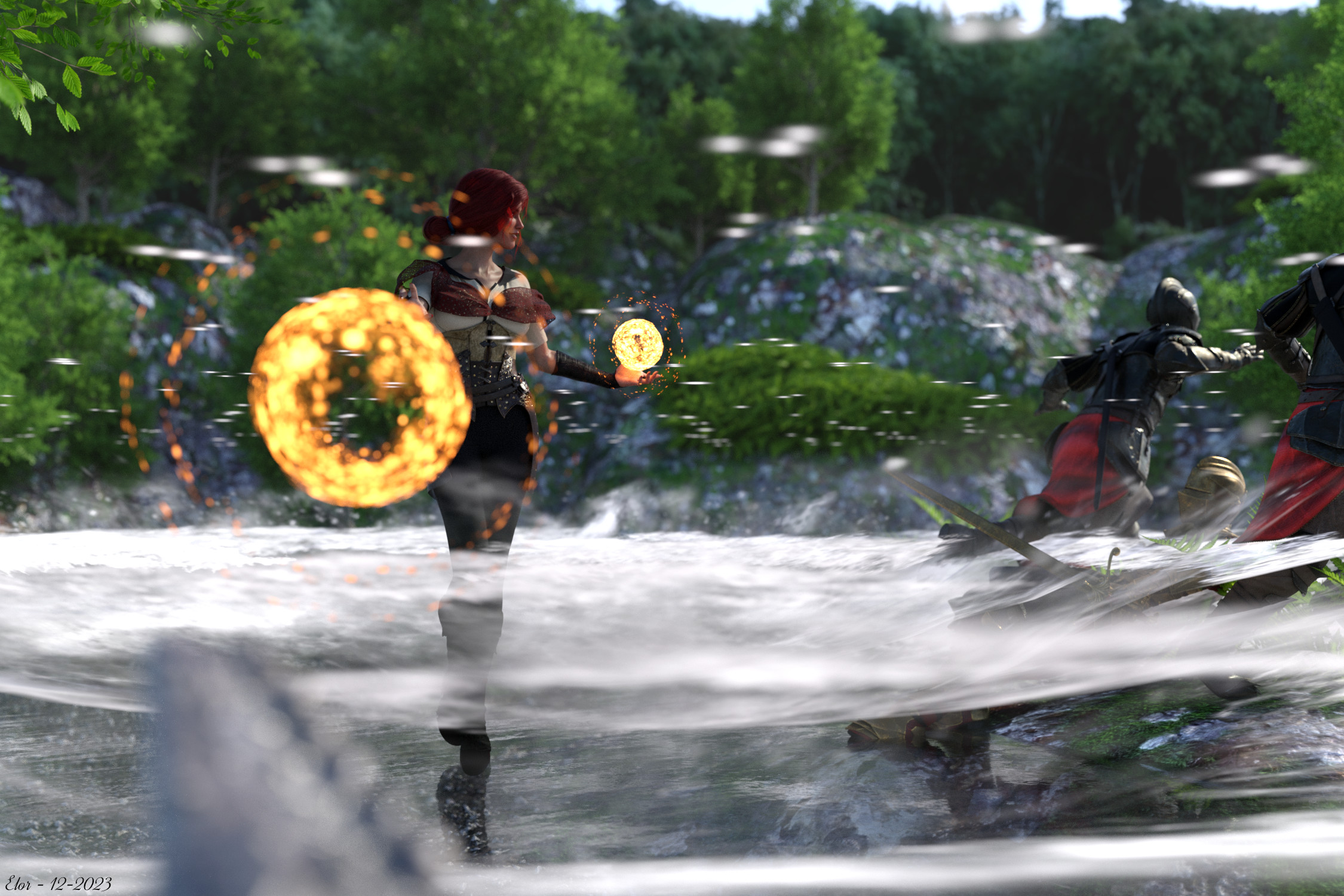
I got Trish last month, a couple of days after Victoria 7 was highly discounted, the textures for the armor as a free gift from the Advent Calendar and the pose for the narrator (in golden armor, on the ground) at the end of November, when the Daz Dragon 3 bundle found its way inside my lightning deals

I think Trish's (how am I even supposed to pronounce that ? or is it even written as it should in the first place
 ) outfit alone would qualify for the All Time Challenge because it's the first time I rendered enough of the parts used to kitbash her outfit. I have a long way to go before getting closer to Triss Merigold's outfit in the Witcher 3, but for now, I'm happy with the result (afterall, a sorceress can have multiple outfits
  ).
).MelanieL said:
A very basic render (I've not had much spare time this week):
The Little Princess
She looks perfect for the part, as a the Little Princess presented for the first time to the court
murgatroyd314 said:
Picked up the Thimor bundle with the recent coupon, and got Mount Olympus from the Advent Calendar.
I get his feeling, being at the bottom of that huge stairs, thinking 'Do I really need to walk there?'
[Released] RSSY Character And Material Conversion Bundle Genesis 8 to Genesis 9 [Commercial]alienarea said:
RiverSoftArt said:
alienarea said:
- 8.1 characters see easier than 8 characters
I would not expect this to be true (and hasn't been in my experience)
All of my 8.1 converted easily, even with other characters dialed-in and saved as new character preset.
I have a lot of issues with early G8 Females, especially those that are for both G3 and G8 or are official upgrades like Victoria 7 for Victoria 8.
Huh. Good to know.
Is G8 being neglected?Man, this thread makes me feel old for some reason....

I remember when clothes, textures and hair ONLY worked with the character they were created. (Except things like hair could be manually parented and sometimes work okay.) So to me, instead of only having Aiko 3 and her stuff or Victoria 4 and her stuff, now I have Genesis and Genesis 2, 3, 8, 9, etc... Only I can almost always get clothes and hair to work now on any of them, AND each one of them have unique characters I like to use for different reasons, so I like the variety. But, I also have "old" characters that aren't part of my "DAZ" collection of charaters (Like Nursoda's stuff or my Maya Ball Joint Doll) so... it doesn't feel like I'm losing anything at all. Just growing an enormous runtime! LOL
[Released] RSSY Character And Material Conversion Bundle Genesis 8 to Genesis 9 [Commercial]RiverSoftArt said:
alienarea said:
- 8.1 characters see easier than 8 characters
I would not expect this to be true (and hasn't been in my experience)
All of my 8.1 converted easily, even with other characters dialed-in and saved as new character preset.
I have a lot of issues with early G8 Females, especially those that are for both G3 and G8 or are official upgrades like Victoria 7 for Victoria 8.
[Released] RSSY Character And Material Conversion Bundle Genesis 8 to Genesis 9 [Commercial]alienarea said:
Roobarb said:
I'm really not having much luck with conversions. I've tried through some batch conversions as wel as in scene from a G8 to G9 and the result vary from slightly deformed to wildly mangled. I'm not sure where I'm going wrong but I'm definitely not getting the results I see others getting. Screenshot attached from Agma 8 to Gen 9 (added some clothing for modesty).
I've tried answering the pop up question for zeroing as both Restore and Zero in case I'd picked the wrong option but this is generally what I'm getting.Any ideas on what's happening here?
It's a hit and miss for me as well. Daz core characters like Charlotte 8 and Victoria 8 transfer well, characters from other sites fail miserably.
Not sure if it's true, but I found this:
- characters installed through DIM seem to work better than those installed through DAZ connect
I definitely agree that DIM installed characters are better. Metadata seems better, etc. (You can force convert to get around bad metadata)
- dial out HD morphs
Yes. These cannot be converted anyway and just mess stuff up.
- 8.1 characters seem easier than 8 characters
I would not expect this to be true (and hasn't been in my experience)
Did DS 4.22 brake Diffeomorphic also ?mikael-aronsson said:
I used a Genesis 2 based character when I got the error messages, I just now tried with a Genesis 8 character and that look like it worked fine so it's possible there is an issue with Gensis 2 or maybe with just my specific Gensis 2 character, I will try out a few different ones and see what the problem is.
Update: I exported a Victoria 6 out of the box, no cloth or hair and I get the same error messages so I think the problem is with Genesis 2
I tried with a G2 in the scene though I've not used it for at least 2 years. Yes, you're right. The error messages popped up. It seems a bone merge issue, but there's no problem with Blender 3.6, so it's not related to DS version.
Pls report the bug..
[Released] RSSY Character And Material Conversion Bundle Genesis 8 to Genesis 9 [Commercial]Roobarb said:
I'm really not having much luck with conversions. I've tried through some batch conversions as wel as in scene from a G8 to G9 and the result vary from slightly deformed to wildly mangled. I'm not sure where I'm going wrong but I'm definitely not getting the results I see others getting. Screenshot attached from Agma 8 to Gen 9 (added some clothing for modesty).
I've tried answering the pop up question for zeroing as both Restore and Zero in case I'd picked the wrong option but this is generally what I'm getting.Any ideas on what's happening here?
It's a hit and miss for me as well. Daz core characters like Charlotte 8 and Victoria 8 transfer well, characters from other sites fail miserably.
Not sure if it's true, but I found this:
- characters installed through DIM seem to work better than those installed through DAZ connect
- dial out HD morphs
- 8.1 characters seem easier than 8 characters
Did DS 4.22 brake Diffeomorphic also ?I used a Genesis 2 based character when I got the error messages, I just now tried with a Genesis 8 character and that look like it worked fine so it's possible there is an issue with Gensis 2 or maybe with just my specific Gensis 2 character, I will try out a few different ones and see what the problem is.
Update: I exported a Victoria 6 out of the box, no cloth or hair and I get the same error messages so I think the problem is with Genesis 2
Daz 3D is part of

Connect
DAZ Productions, Inc.
7533 S Center View Ct #4664
West Jordan, UT 84084Licensing Agreement | Terms of Service | Privacy Policy | EULA
© 2026 Daz Productions Inc. All Rights Reserved.