-
Daz Studio 4 Scene Tools 4 - Morph Tools
RAMWolff said:
Daz Studio 4 Scene Tools 4 - Morph Tools. Do we finally have advanced morph tools in DS without having to be Premier members? Can this really be so?
https://www.daz3d.com/daz-studio-4-scene-tools-4--morph-tools
It's just a set of tools for Morph creation not for geometry scultping. At least I don't see any hint of such ability in the description.
Daz Studio 4 Scene Tools 4 - Morph ToolsNO overlap but ManFriday's morph tool system is behind the Premier paywall that I'm not willing to go for. So just wondering if this tool set from 3D Universe is just as complete and useful. I have ManFriday's set before the update that ended up behind that Premier paywall.
SaveGuard: Ultimate Scene Saver for Daz Studio Win 64 v1.2matew said:
Artini said:
Saxa -- SD said:
Since no Wearables Manager thread, will post this here again :)
Wearables Manager makes sending a character to Hexagon for morph-making an absolute breeze.
Just did it.
Have scripts on toolbar of your choice, select undress script, send figure to Hex, make morph in Hex, back to DAZ and save new morph, click script to dress and Viola!
Before was always a groaner removing all items inorder to send to Hex.
With this and the raw power of Hexagon (it's not perfect but pretty darn good for morphs), that program so tightly bound with DAZ, can't even imagine using DAZ GeomEditor even with it's improvements.
Anyway, just wanted to pass on how much of a time-saver this was.
Been focussed on other 3d things, so this is why just doing & posting now.
Thks Matew.Great to know, that it is working for you.
https://www.daz3d.com/wearables-manager
I was wondering what is the difference between Wearables Manager and personality in Daz Studio.
I guess you meant Personas, right?
Wearables Manager doesn’t use or replace Personas.
Personas are a very old DAZ feature that defines metadata for interactive tools (like PowerPose handles). It has nothing to do with clothing or managing outfits.
Wearables Manager is specifically for organizing, fast putting on / taking off outfits, handling materials when geografts are present, and some toggling some material states — completely separate from the Persona system.Persona prsets are a newish feature https://www.daz3d.com/forums/discussion/comment/8999416/#Comment_8999416
Daz Studio 4 Scene Tools 4 - Morph ToolsDaz Studio 4 Scene Tools 4 - Morph Tools. Do we finally have advanced morph tools in DS without having to be Premier members? Can this really be so?
https://www.daz3d.com/daz-studio-4-scene-tools-4--morph-tools
Genesis 9 geometries don't matchIs there any geo-grafts on the figure ?
If there is, you can either export / import OBJ with Geometry Editor tool activated, or use the Load Morph option > Primary Figure from Graft (Facet Order) in Morph Loader Pro.
Genesis 9 geometries don't matchSo I morphed my genesis 9 develeper figure and exported as obj, when everytime I used morph loader it says geometry doesn't match. No eyes or mouth or lashes were loaded and base resolution too, but still get the same results never had that problem before have a few morphs I created for G9 and G8. Can't figure this out.
Skin Randomizer (Commercial)Find it here : https://www.daz3d.com/skin-randomizer
Lack of inspiration? Want your characters to feel fresh again?
Skin Randomizer is designed to instantly add variation and bring new life to any figure’s skin. (all generations)What’s inside
• Three dedicated scripts:
– Base Color Randomizer
– Volume Randomizer (translucency, transmission, subsurface)
– Gloss Randomizer (bonus)• A simple, flexible interface:
Define or reset the amplitude of each random variation in a few clicks.
Hue, Saturation, and Value ranges are controlled separately, giving you precise and safe control over how far colors can drift.
Lower amplitudes keep results in realistic human tones, higher amplitudes open the door to stylized or fantasy skins.Universal Partial Presets
Skin Randomizer includes a set of scripted partial presets:
– 34 Base Color (Diffuse) presets
– 13 Volume Color presets
– 11 Base/Volume ratio presetsThey let you instantly restore solid, reliable skin bases if your exploration goes too far — or serve as new starting points for further randomization. They will work on all generations and with many initial shaders (Iray Uber, PRBSkin but much more).
Compatibility
• Works with every Genesis figure (down to Victoria 4)
• Optimized for PBRSkin and Iray Uber
• Partial support for older standard shaders
• Fully compatible with both Daz Studio 4 and Daz Studio 6Integration with other products
Skin Randomizer works on its own, but also integrates seamlessly with:
– Ultimate Iray Skin Manager
– Ultimate PBRSkin Manager
– Texture Booster and Shader ConverterWhich were also all updated to be compatible with DS 6. When any of these are installed (DS 4 or DS 6), you can enjoy safe randomization directly from within their interfaces (no color ever pushed above 1).
Additional Tools
• Full PDF documentation
• A Geograft Transfer Tool to preserve shader coherence on figures using anatomical geografts (including Genesis genitalia)
In short:
Skin Randomizer can be your quick way to add variety when inspiration is low, a playground for discovering new skin ideas, and a complementary tool supporting the free DS 2025 updates of the main skin-related products it connects to. Characters Deforming
This is still valid today (November 2025) Had a bad morph with a G9 character (Vo Suzu) that hosed the default G9 base character. Just look under currently used in peramiters and you will find the offending morph.
SaveGuard: Ultimate Scene Saver for Daz Studio Win 64 v1.2Artini said:
Saxa -- SD said:
Since no Wearables Manager thread, will post this here again :)
Wearables Manager makes sending a character to Hexagon for morph-making an absolute breeze.
Just did it.
Have scripts on toolbar of your choice, select undress script, send figure to Hex, make morph in Hex, back to DAZ and save new morph, click script to dress and Viola!
Before was always a groaner removing all items inorder to send to Hex.
With this and the raw power of Hexagon (it's not perfect but pretty darn good for morphs), that program so tightly bound with DAZ, can't even imagine using DAZ GeomEditor even with it's improvements.
Anyway, just wanted to pass on how much of a time-saver this was.
Been focussed on other 3d things, so this is why just doing & posting now.
Thks Matew.Great to know, that it is working for you.
https://www.daz3d.com/wearables-manager
I was wondering what is the difference between Wearables Manager and personality in Daz Studio.
I guess you meant Personas, right?
Wearables Manager doesn’t use or replace Personas.
Personas are a very old DAZ feature that defines metadata for interactive tools (like PowerPose handles). It has nothing to do with clothing or managing outfits.
Wearables Manager is specifically for organizing, fast putting on / taking off outfits, handling materials when geografts are present, and some toggling some material states — completely separate from the Persona system.SaveGuard: Ultimate Scene Saver for Daz Studio Win 64 v1.2Saxa -- SD said:
Since no Wearables Manager thread, will post this here again :)
Wearables Manager makes sending a character to Hexagon for morph-making an absolute breeze.
Just did it.
Have scripts on toolbar of your choice, select undress script, send figure to Hex, make morph in Hex, back to DAZ and save new morph, click script to dress and Viola!
Before was always a groaner removing all items inorder to send to Hex.
With this and the raw power of Hexagon (it's not perfect but pretty darn good for morphs), that program so tightly bound with DAZ, can't even imagine using DAZ GeomEditor even with it's improvements.
Anyway, just wanted to pass on how much of a time-saver this was.
Been focussed on other 3d things, so this is why just doing & posting now.
Thks Matew.Thank you! I am glad my script is useful for you.
DAZ to 3ds Max Bridge support for Genesis 9Moved to the 3ds Max forum.
What issues are you currently having with Genesis 9 transfer?
Problem with Wolfie's Decorous OutfitI bought this outfit very recently.
The fit for G8 and G9 is rather different.
So I made 2 morphs, one for the vest and one for the pants, as the vest alone was not sufficient to cover fully. The morphs is simply that I used the G9 fit as a morph for G8. The morphs are in the zip.
Here with only vest morph.
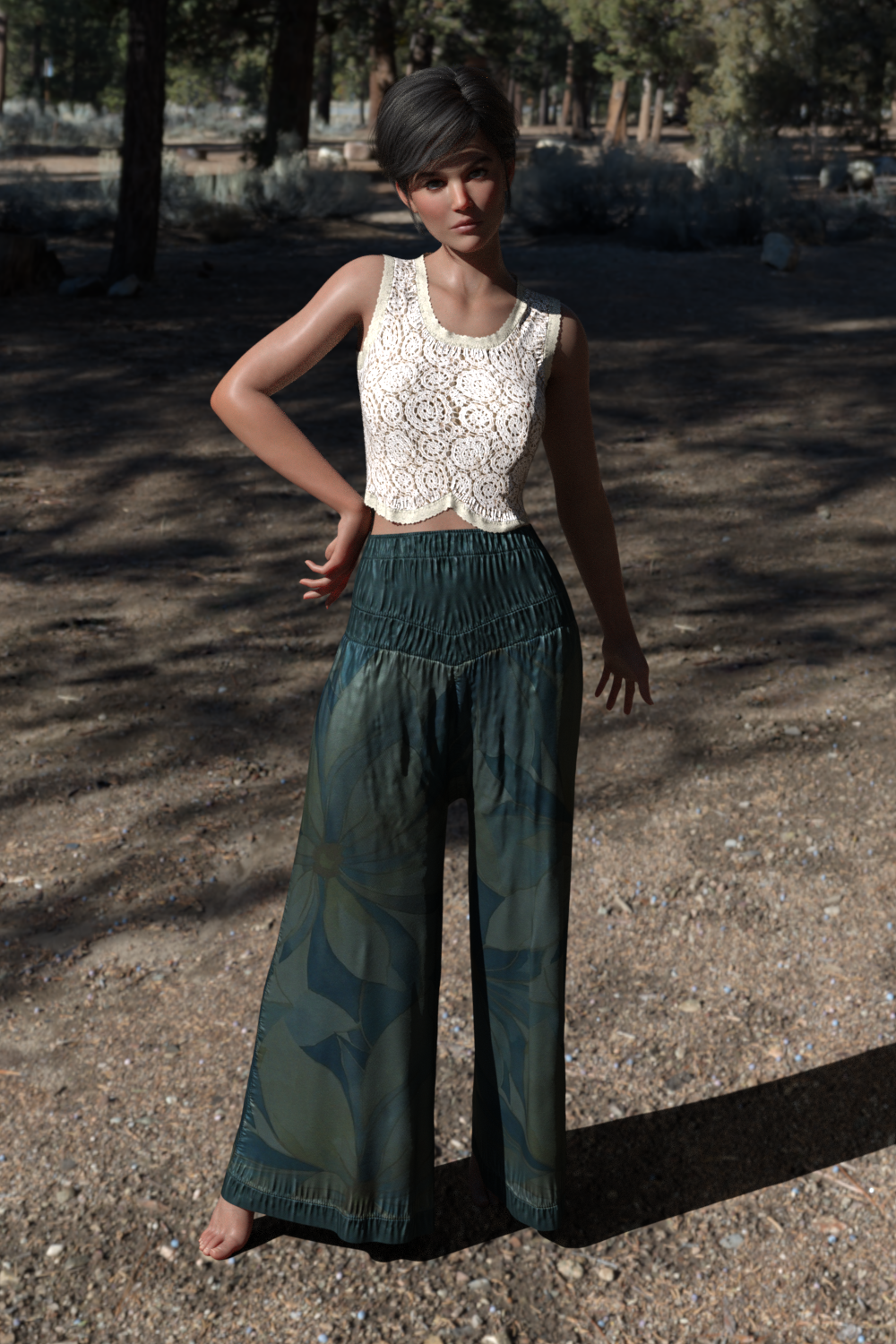
And here with both (the pants are also longer for G9 than G8).
 Can I copy and paste the entire material to another body?
Trake118 said:
jestmart said:
Pasting will transfer only settings it will not change the shader.
This is correct. As far as I'm aware, there is no way to do what you want to do. It is the biggest problem I have with Daz Studio. If anyone knows a way to actually copy and paste a shader, I'd love to know.
If the target surface(s) has a different Shader, the standard function:Copy / Paste selected surfaces will never correctly work ~~
Apply the same Shader beforehand to the target surfaces... or write Daz Scripts to combine the actions of applying Shader + Copy / Paste selected surfaces. There seems no better way, AFAIK ...
Can I copy and paste the entire material to another body?jestmart said:
Pasting will transfer only settings it will not change the shader.
This is correct. As far as I'm aware, there is no way to do what you want to do. It is the biggest problem I have with Daz Studio. If anyone knows a way to actually copy and paste a shader, I'd love to know.
Naturally Bending AledaThey're just Corrective Blend Shapes (cbs) made by the vendors... in addition to the default cbs on Genesis 9 ~~
Usually, if a character vendor finds the area around a rotated joint has an unexpected deformation or not a good-looking shape, he/she will make a new shape to further correct the existing cbs... (which used to be called MCM: Morph Corrective Morphs, on Genesis figures before G9)
In below screenshot, it shows a character's cbs of Victoria 9 when her upper arm bends 90 degrees. The character product you mentioned above would work in the same way ~~
Edit: You can also find some useful info. in here: http://docs.daz3d.com/doku.php/public/software/dazstudio/4/userguide/creating_content/assembling/tutorials/creating_morph_controlled_morphs/start
Hardware required to run two GPUs at x16 speedWhy do they need to run at 16x? I assume this is for another application or tool, in geenral the data transfer speed does not seem to be critical for iray sonce the start up time is usually a very small part of the entire rendering process.
AIUTO...CHI CONOSCE L’ITALIANO? PARTE QUATTORDICIeman said:
 Ma no dai, a qualcuno potrebbero piacere... io sono sempre favorevole alle novità... e poi non dirmi che sei un G9 hater, mi cadrebbe un mito!
A proposito di G9, sai dove posso trovare delle buone animazioni (free ovviamente)?
Purtroppo G9 è sfondato... Le uniche coe positive sono i morph correttivi sulle posizioni estreme e l'unisex. Il rig è terribile così come la creazione di morph (il modello è separato in sette/otto pezzi, una tortura creare nuovi morph). Per questo uso da sempre G1 (almeno finche non sistemano G9 o fanno G10 come G1), lo animo un un attimo, lo vesto con tutto quello che esiste sui mercati (gli metto perfino i guanti per le prime figure Poser) e creare i morph è questione di pochi click. Trasferire i morph delle generazioni successive (e precedenti!) non è un problema grazie al alto numero di poligoni. E poi G1 si presta alla grandissima per il kitbash!
Trovare animazioni free pronte? Stai chiedendo allo zio sbagliato!
 Io non uso mai nessuna animazione pronta nè riciclo quelle che realizzo io stesso. Ogni scena è animata da me dettaglio per dettaglio, così sono sicuro di avere il movimento che serve. E poi si fa molto prima! Invece di passare sei ore a spulciare una pagina web alla ricerca di una animazione "dove il personaggio si siede" e poi sei costretto ad usare una animazione di un wrestler che esegue un german supplex ( con un mare di jerkiness!) perchè non esite altro. Quando sei fortunato e il rig coincide.
facendo da solo ho realizzato centinaia di animazioni di situazioni che sicuramente non sono contemplate da nessua libreria di animazioni pronte: Spadaccini che lottano su ponti che precipitano, lupi che "fanno a pugni" contro dei ninja, dinosauri che si litigano una preda sul bordo di una scogliera, robot giganti che combattono mostri spaziali a suon di cannone gatling, corvi che fanno gesti specifici con le ali...Animare con DAZ Studio è molto più semplice di quanto non si creda.
Freebie Challenge November 2025 - "The Winter Witch!" - Entries ThreadCasting an Icy Spell
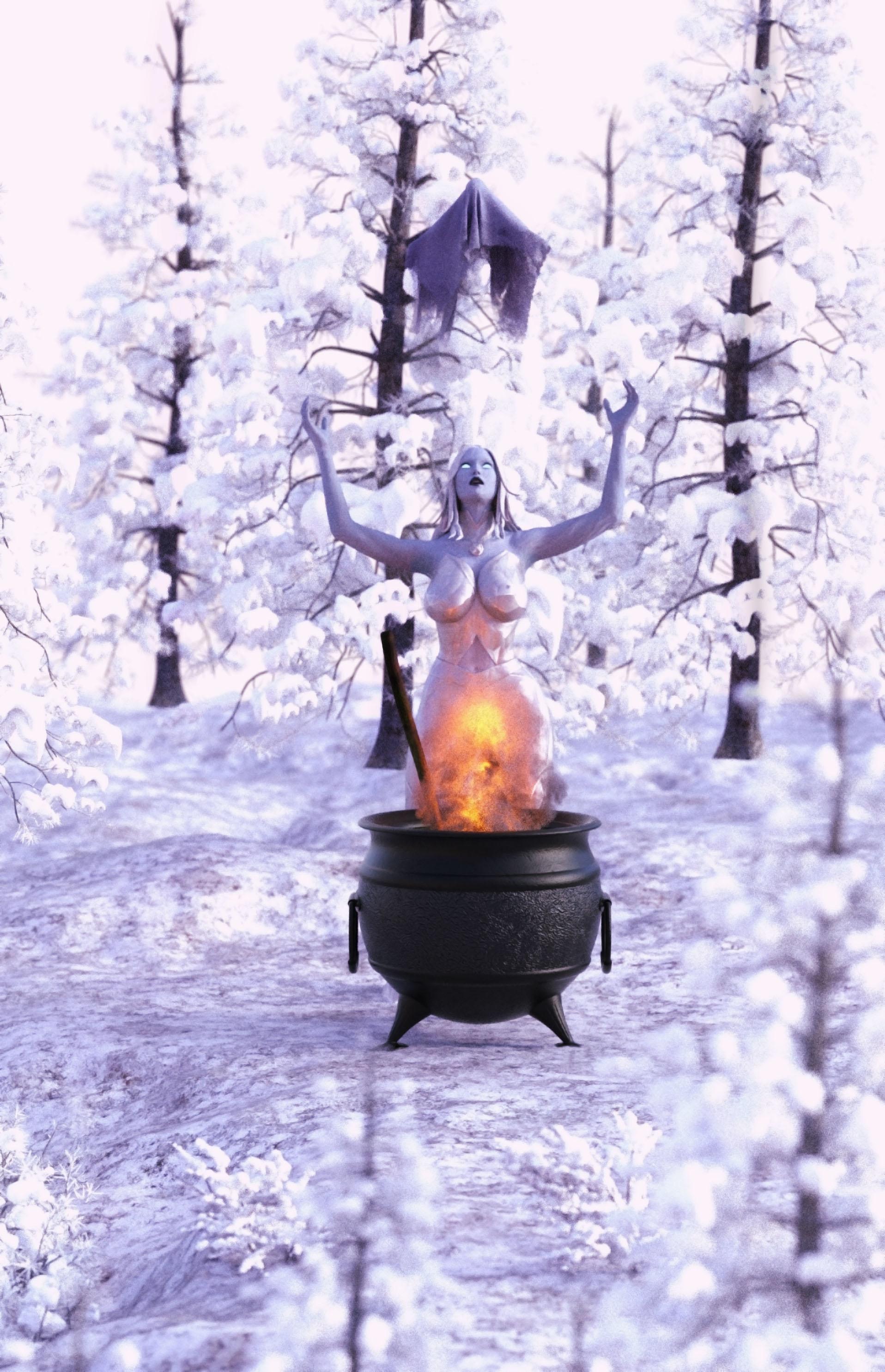
Postwork: Light retouch on PS
Freebies:
G8F Character and morph: https://www.renderhub.com/vfoxgames/vfox-victoria-for-genesis-8-and-9-mothers-day-2025-gift
G8F Skin Material: https://www.patreon.com/posts/emma-frost-for-139200528
G8F Outfit & Hair: https://www.patreon.com/posts/emma-frost-for-139200528
Ghost Cloth: https://www.renderosity.com/freestuff/items/99287/ghostly-apparitions-halloween-props
Cauldron & Paddle: https://www.renderosity.com/freestuff/items/90667/cauldron-with-stirring-paddle-and-ladle
Paid:
Snow Terrain: https://www.daz3d.com/winterland
Snowy Trees: https://www.daz3d.com/rpc-volume-2-winterland-trees
Fire/Flame: https://www.daz3d.com/oso-vdb-magus-effects-volume-1
moving contentI know this has been discussed before but i cant seem to find it. Can someone please tell me the best way to transfer all my content from one external drive to another larger onr without uninsalling all my content .
Question about Z Fit and Strong Props and PosesDrogo Nazhur said:
manually dial and in using the scale option?
No, there is a morph made by the vendor. You just dial the morph rather than Scale.
Daz 3D is part of

Connect
DAZ Productions, Inc.
7533 S Center View Ct #4664
West Jordan, UT 84084Licensing Agreement | Terms of Service | Privacy Policy | EULA
© 2026 Daz Productions Inc. All Rights Reserved.