-
i want to put cat ears on a Michael 4 model but i cant. help?
For Genesis 3 and 8 you can get Fantasy-Ears. They work great. You can make different Animal, and Elfen ears. And you can mix them. Your also can adjust them with the normal Ear-Controllers, and you get a lot more Ear-Controllers with these pagages. Download G3 and/or G8 the Basic-Figures are free. And an Update from Victoria an Michael 4 to 8 you will not regret. Believe me.
Daz to Unity engineI'm trying to import my Victoria 4 and Michael 4 into Unity 5.6f1 engine. Can anyone help me? I'm using Daz 3.1 characters. My system is Windows 10. 64 Bit.
i want to put cat ears on a Michael 4 model but i cant. help?i managedto get it working earlier but now for some reason i cant.
if any one knows how to put https://www.daz3d.com/tandy-hair this on any male models ill be quite happy.
p.s. i think i imported the cat ear model by itself rather than have it attached to a model to start with, if anyone nkows how to do that as well then ill still be quite happy
* closed* RRRR The're ba....ack! Render contestOkay, it's on to Round 4!
My pull:
7732 - Fairytale Collection: Palace Entrance
7511 - The Courtyard
5061 - DAZ Dragon 3 Morphs
688 - Piranha Zipper Dress (Hmm, I've had a few experiences with "piranha zippers", but they wouldn't be very TOS-friendly...!)Now, what to make of this mess....
This one turned out to be pretty obvious once I dropped everything into a scene and started poking at it...! And I had no idea that Palace Entrance set was so big! and so..., PINK!
Also used:
Fairytale Collection: Palace Entrance Fixtures and Fittings
Addison for Genesis
Pyrit Hair for Genesis
Roxana Yaroslavna for Genesis
Votive Candles and Stand (Worked like a charm; thanks, Luci!)
Michael 4 (Yes, I still use Michael 4; there's still a lot of life in the old boy...!)
Stratton (Michael 4 Elite texture)
Mon Chevalier Hair
Fairytale Prince for M4/H4
Gothic Construction Kit
Iray Ghost Light KitTAG: obanion#04
Title: The Hobbit, Book 2 (The Sequel Tolkein Never Got Around To Writing): The Return of Smaug
Lifting a page from The Princess Bride, it turns out that Smaug was only 'mostly dead'. But he was seriously honked off, and out for revenge! Time to call in some heavy-duty, industrial-strength 'pest control': Addison Yaroslovna, Dragon-Slayer!Prince: "I'll just, um..., wait right here for you, so I'll be out of your way. Are you cool with that?"
Dragon-Slayer: "Yeah, sure, whatever." (Under her breath): "Pansy!"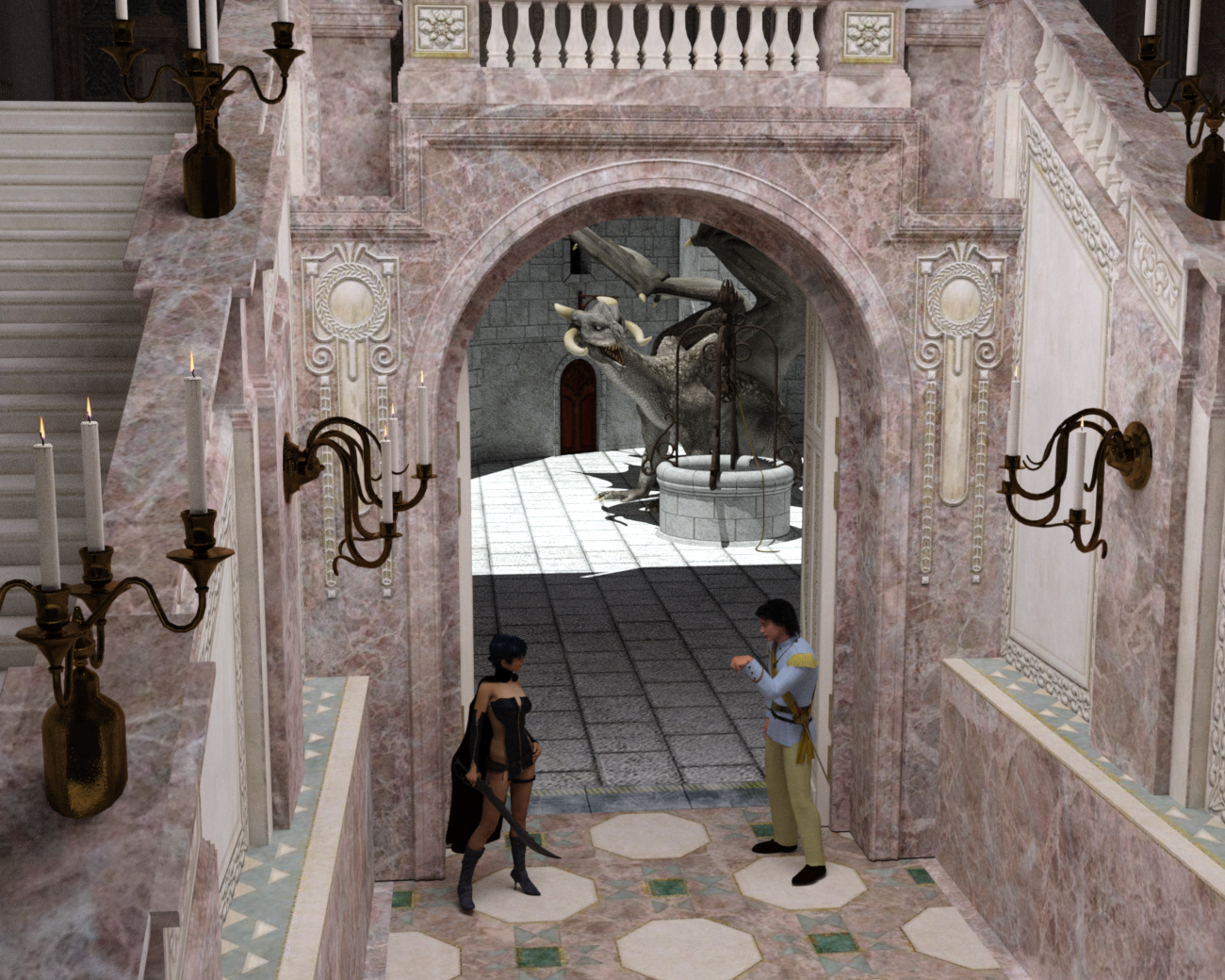 Dynamic Baldric or Warrior Outfit for Poser M4?
I just thought I'd throw it out there to see if anyone knows of an existing baldric (that strap that goes across your chest in fantasy and historic outfits -- see below). I'm doing a fantasy fighter character based on Michael 4 in Poser, and am really struggling to fit his existing baldric to his body when he moves. I'm thinking that something Dynamic might work better, but before I go down the path to make something (or attempt to make something), I thought I would ask if anyone has any suggestions.

or something like this:

I already have Knight Gear Accessories and K Warrior for Genesis 2 Male looks good, but not quite what I need (neither have native fits for M4). Right now, I'm very flexible on what the top of the outfit will look like. It just needs to be "cool" and easy to pose.
All suggestions welcome!
Legacy UVs for Genesis 8 [Commercial]Greenturnsblue, yes, the Michael 4 UV conversion is almost done. Then I will submit it, then it will be QA'd, and eventually (hopefully) it will be released. So I think you have to think in terms of several weeks.
@philip_gould, Cayman Studio stated the above further up the thread, so you'll have to wait a bit, but it wilol come. :-)
Where can I find ... poses for guards ?Just I want to be sure it doesn't exist yet before spending time to do it by myself.
I found an old pose for Michael 4 for standing with spear/banner.
 faceshop/headshop to poser
I have been trying to create a new face and I am using an older version of Faceshop ( Faceshop 6 ) because it works on my Mac. I created a head for Michael 4, so I ended up with an Obj file and the Bmp file ( which i edited in Photoshop). I am using Poser Pro 2012 and I am wondering in what directories I put the two files or what extra steps i need to take to get the new head on a Michael 4 in poser? I don't use Daz studio as it never recognizes my Micheal or Victoria models and I would like to only use poser if possible. I looked through the tiny read me file that came with Faceshop 6 an watched the video but it ends without explaining what to do with the the two files. Any help would be greatly appreciated.
G3m to G2m???Genesis 3 Male For Genesis 2 Males. I have it and it does an excellent job. They've also got something similar if you want to use Genesis 3 female clothes and hair, etc. on Genesis 2 Females.
https://www.daz3d.com/genesis-3-male-for-genesis-2-male-s
Also check out: https://www.daz3d.com/wear-them-all-autofitting-clones-and-clothing-smoothers-for-genesis-3-male-s
And: https://www.daz3d.com/michael-4-for-genesis-2-male
Thank you. Will these work on hair and beards also?
G3m to G2m???Genesis 3 Male For Genesis 2 Males. I have it and it does an excellent job. They've also got something similar if you want to use Genesis 3 female clothes and hair, etc. on Genesis 2 Females.
https://www.daz3d.com/genesis-3-male-for-genesis-2-male-s
Also check out: https://www.daz3d.com/wear-them-all-autofitting-clones-and-clothing-smoothers-for-genesis-3-male-s
And: https://www.daz3d.com/michael-4-for-genesis-2-male
Daz to Unity EngineIm trying to import my Victoria 4 and Michael 4 into Unity 5.6f1 engine. Can anyone help me? I'm using Daz 3.1 characters. My system is Windows 10. 16 Bit, Please E-Mail me [email protected]
Thank you
Robert
Still desperately searching for skin...I'm about to lose my mind.
I have been working on this character for several months and have realized I am not happy with the way he looks, but I don't think he will ever look right if I don't have the right skin, and boy have I tried so many skins and they have all failed me.
I'm using Genesis 2, so what I need has to be for Genesis 2, or at least convertable to Genesis 2, so Michael 4 also works. But nothing for Genesis 3 or 8! I cannot stress this enough.
I'm using Poser but at this point I am literally considering downloading a Daz only skin and setting all the nodes myself if I can just get this skin to work.
I don't know what I'm doing wrong but they end up too dark, or too light, or don't look right at all with his facial features so it's not right and I'm going crazy because I cannot even use him until I can fix him and I can't fix him until I have better skin!
And he has a counterpart who's skin is very detailed and the skins I have for him never seem to play nice with lighting. I'll get a good light for his counterpart but it completely wrecks him.
Please help.


 Will there be a Wear them All / Autofit for V4/M4 and Male/Female for Genesis 8?
I'm waiting to use my Victoria 4 / Michael 4 content on Genesis 8. I would also love an autofit between G8F and G8M.
Those lovely morphing eyebrows are only for G8F and I would love to use them on G8M. Of course, I would purchase morphs for G8M's eyebrows if someone is willing to make them.
There will be a male Super Natural Brows along soon, with more masculine styles.
As to the wear them all, I don't know if that's in the works, but in the meantime, you could make your own V4/M4 clones. If you have them for Genesis 3, I expect you could transfer them using Singular Blues morph transfer script.
REDZ! You are awesome. Please make some super-bushy eyebrows for guys. :)
And at least one that isn't straight, please.
Will there be a Wear them All / Autofit for V4/M4 and Male/Female for Genesis 8?I'm waiting to use my Victoria 4 / Michael 4 content on Genesis 8. I would also love an autofit between G8F and G8M.
Those lovely morphing eyebrows are only for G8F and I would love to use them on G8M. Of course, I would purchase morphs for G8M's eyebrows if someone is willing to make them.
There will be a male Super Natural Brows along soon, with more masculine styles.
As to the wear them all, I don't know if that's in the works, but in the meantime, you could make your own V4/M4 clones. If you have them for Genesis 3, I expect you could transfer them using Singular Blues morph transfer script.
REDZ! You are awesome. Please make some super-bushy eyebrows for guys. :)
Will there be a Wear them All / Autofit for V4/M4 and Male/Female for Genesis 8?I'm waiting to use my Victoria 4 / Michael 4 content on Genesis 8. I would also love an autofit between G8F and G8M.
Those lovely morphing eyebrows are only for G8F and I would love to use them on G8M. Of course, I would purchase morphs for G8M's eyebrows if someone is willing to make them.
There will be a male Super Natural Brows along soon, with more masculine styles.
As to the wear them all, I don't know if that's in the works, but in the meantime, you could make your own V4/M4 clones. If you have them for Genesis 3, I expect you could transfer them using Singular Blues morph transfer script.
Will there be a Wear them All / Autofit for V4/M4 and Male/Female for Genesis 8?I'm waiting to use my Victoria 4 / Michael 4 content on Genesis 8. I would also love an autofit between G8F and G8M.
Those lovely morphing eyebrows are only for G8F and I would love to use them on G8M. Of course, I would purchase morphs for G8M's eyebrows if someone is willing to make them.
INJection Pose Builder: INJ files not workingI'm encountering a weird problem with the INJ files that I've created using INJection Pose Builder 1.5 for V4 and M4. I have installed INJection Pose Builder correctly, I have put it on my C:/ for easy access and I have created the Vikki 4++ and Mike 4++ figures as is directed by the tutorial but when I go to create my INJ/REM files, the INJ files don't apply the morphs to my character inside Poser unless I have all Morphs++ and Muscle INJ's added to the figure.
I don't know if this is normal behaviour or not, but I don't think so because I don't need to apply these base morphs to my figure when I apply any morphs from a purchased character that uses any dials from the Morphs++ pack.
V4 and M4 have been both utilised with the .bat files, and to double check I even ran them again last night but no joy. I thought that since I saved my Michael 4 Morph++ figure to plug into INJection Pose Builder on a external runtime that it was causing problems, so today I created another M4 Morph++ and saved it in the main Poser directory that is in My Documents. It didn't make any difference. The INJ files are still not applying my character's morphs.
These characters are created using only the dials, no sculpting in Zbrush, and I'm not looking to distribute them. I only want them INJ/REM files to make it easier to use these characters.
I'm using Poser Pro 2014 and I'm on a Windows 7 64-bit system. My Daz figures are all installed in the default folder that is created in My Documents, while all my other content is installed in external runtimes on a partition. This is not happening to a single character I've made - it is happening to ALL the characters I've created using the dials and exporting the INJ/REM files through INJection Pose Builder. There is about seven of them in total and all of them have a broken INJ file.
Any help would be greatly appreciated. I spent several hours wrestling with this last night and it's incredibly frustrating to have this issue happen when I'm just beginning to feel like getting back into art.
Michael and Friends Appreciation Association [Lots of images, please.]I was curious to understand dual lobe specularity so I started doing renders of two male characters by the same artist; I have to confess I think it does add a certain realism.
WOW... what's your set up for that particular area of the Surfaces... I was curious but wanted to ask someone and kept forgetting. Amazing results!
These are the defaults for the characters... it is worth looking at the dual lobe settings for a given piece of skin such as torso because you can use one of the many products to convert your 3Delight Michael 4 or Genesis to iRay and then the new Uber Iray shader to have the dual lobe settings and just match them to a genesis 8 character and you get a lovely translucence.
Legacy UVs for Genesis 8 [Commercial]Legacy UVs for Genesis 8: Genesis 2 Male, Michael 5 and Michael 6 is released today.
https://www.daz3d.com/legacy-uvs-for-genesis-8-genesis-2-male-michael-5-and-michael-6
The Eye (Sclera-Cornea) Attachment which loads with the geografts can now also be loaded as a standalone attachment from the Components folder. This means that legacy eye MATs (including Genesis 3) can be used with Genesis 8 skins. For more information see the PDF Documentation:
This is great news. Please consider updating the product page info to mention this, as well as updating at least one of the G8F packages with this option.
Once the Michael 4 UVs are done I shall be updating all the G8F conversions to include the Sclera Attachment as a standalone. I may or may not get the product description amended - there is always a danger of including too much information, and I like to make things as simple as possible. I'll see if I can incorporate it into the Michael 4 UVs product description first.
instal Genesis 3, Genesis 8 to Poser 11Unfortunately, neither Genesis 3 nor Genesis 8 are supported in Poser 11. Previous generations could be used with the use of the DSON importer/exporter (Genesis and Genesis 2), and generation 4 figures (Victoria 4, Michael 4) and earlier are supported natively in Poser. There are workarounds for Genesis 3, including the Genesis 3 Poser Updater by Willdial available for free over at Renderosity, but I personally have not used them so I cannot comment on their effectiveness. There is also a thread in the Renderosity forums that discusses the use of the aforementioned Updater for Genesis 3 with Genesis 8 with some degree of success. Again, I cannot speak to the results myself.
Daz 3D is part of

Connect
DAZ Productions, Inc.
7533 S Center View Ct #4664
West Jordan, UT 84084Licensing Agreement | Terms of Service | Privacy Policy | EULA
© 2026 Daz Productions Inc. All Rights Reserved.