-
How to make shirts drape properly on large-chested girls?
Matt_Castle said:
watchdog79 said:
Would you mind explaining point 3 in more details, for total dummies like me, please?
dForce simulation is based on the shape that the clothing starts the simulation with. If the clothing is already distorted at the first tick of the simulation, then it will continue to simulate with that warped initial shape.
You can however set dForce simulation to simulate over the DS timeline, rather than just for a single frame, so you can start the simulation from a non-distorted shape, then change the shape of the character underneath the clothes (auto-follow is ignored on full dynamic clothing during a simulation).
This can be simply dialling out problematic breast morphs on frame zero and then fading them in over the simulation, or starting from (and then fading out) another shape entirely; for one of my characters, I often start simulation for her from about 50% "Heavy" morph before fading that to her actual body shape. Heavy is a very widely supported clothing fit, which means the clothes are large enough for her and don't look stretched, but once the simulation is complete, it is then draped over her own shape.
Thank you.
Face transfer so much betterpaulawp (marahzen) said:
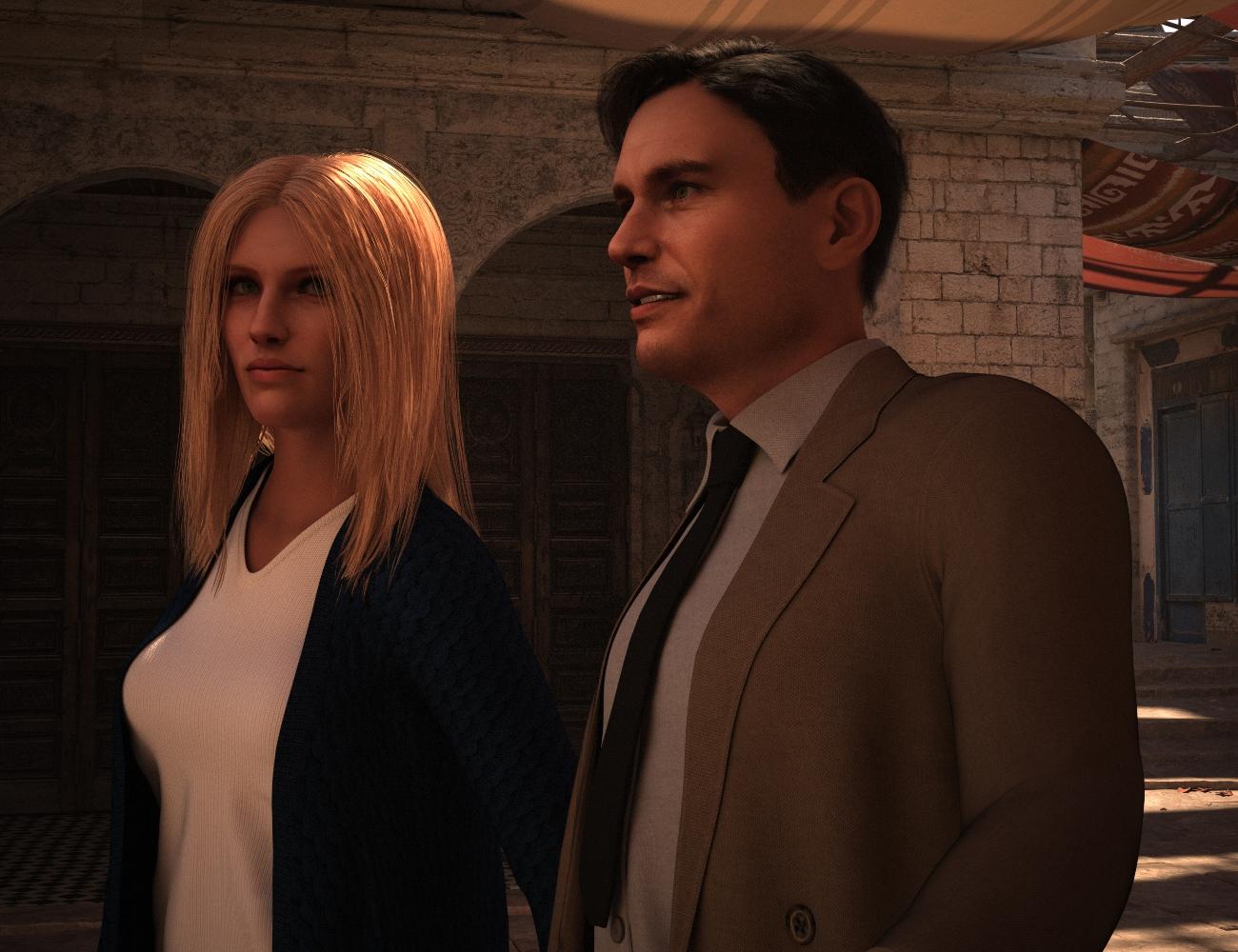
These characters are done with Face Transfer Shapes at 75% - my default. (You can't reasonably use Face Transfer without Face Transfer Shapes.)
I've had others comment on it, and I see it, too: Some FT characters, from some angles, have a jaw along the bottom line to the angle that seems disproportionate to the rest of the face. IMO, this girl is affected more than the guy. Her hair obscures it in this shot - it's more pronounced in the other picture I posted. That said, if I spent some time with morphs, I could fix it. These are quickly done from the source image, with no morphs and minimal tweaking.
I haven't used HeadShop but I started out with FaceGen and from my experience, its oddities (it creates overly wide, squirrel-faced figures with oddly long noses) are harder to fix. I use FT exclusively now.
Awesome render, can't wait to FT (and build scenes ) myself on that level. The fine tuning after applying Face Transfer Shapes is a bit daunting to me because there are so many sliders to consider but I guess narrowing it down to the 'problem area' as best as you can is a good start. I was wondering whether "Dial Fusion for Genesis 2 to 8.1" [link] would be a good product once you have figured out which specific dials tackle the chin issue and other post-conversion problems (problem areas) like that.
Using DAZ/3D figures ‘as is’ in (semi-)professional 3D productions?PerttiA said:
Federmann said:
am I right in assuming if it sticks too close to the original it doesn't have added value or is it the opposite if it doesn't adhere it might be troublesome?
When I'm looking at the geometry, I'm looking at what does it add to the gene pool, does it look like a 'normal' and realistic human (if it's supposed to be one). I dial in the head and body also separately to see if, for example the head doesn't sink in to the chest or doesn't look like a beach ball or peanut when used without the related body morphs, or if the body morph makes the torso look unnaturally long compared to the size of the legs/arms, if the gender related protrusions are anywhere reasonable in size and proportions and in general the quality of the changes to the default figure - All these are things that cannot be seen in the promo pictures.
One also must remember that each and every character costs one something, even if there is no monetary compensation required, they still cost storage space and add to the complexity of the base figure platform, creating possible conflicts and adding to the loading time of all characters using that base figure - So, does the character add more value than it costs to have it installed?
Some good points to ruminate on, you were not kidding about the 'gene pool' thing! I have begun my slider experiment against the base figure, but most figures (surprsingly) seem to conform with only small permutations on breast size and shoulder widths. Some exceptions were found like having quite long arms. I am not sure the 'gene pool' concept would favor or rather avoid 'diversity' like having longer arms. Having a disproportionally large head is something we do see in 'real life'. I am not attacking your definition or methodology, in fact I feel I have learned something from it, but I haven't yet figured out how I want my own 3d 'gene pool' play ground to look like!
Celebrity Look-a-Likes for 3D figures part 3Haruchai said:
zombietaggerung said:
Is anyone aware of a Liam Neeson head morph?
magnus1781 has a Liam Neeson morph, and it's free :)
Thank you!
 Will Spine and Ribs Detail HD work with XTransfer?
Masterstroke said:
Where are those HD morph sliders located? I just can't find them.
Same here...
How to make shirts drape properly on large-chested girls?felis said:
Here are 3 images:
1: Shirt just fitted
2: Shirt fitted, followed by dForce simulation
3: Shirt fitted, breast (here character) dialed in during the timeline, and done dForce simulation
And if wanted, you could export the last, and import it as a morph for the shirt.
That result looks very good, but tbh the process is a PITA. Simulation is pretty slow to begin with.
How to make shirts drape properly on large-chested girls?UHF said:
I often use clothing
Whatever method you use to fit the clothing. You should export the mesh, and reimport it as a morph tied to the figure's shape. This will make your life easier using the clothing, and it will also make things easier for applying morphs.
I have no idea how to do that.
Eye Poke-ThroughUpdate: I went back to square one - totally reset the eyes in my face morph, loaded the face morph with the default eyes and aligned, scaled, etc them only with Daz parameters until they matched the original eyes almost perfectly, saved and rigged that new face and the eye movement is perfect now!
I feel really silly now, but lesson learned: don't reshape the eyes way too much unless you want to go through the trouble of fixing all the pose controls LOL. The eyes I had done were to match an existing eye model, hence how they got majorly (and unncecessarily) reshaped to cause these problems.
Anyway thank you for all the help, Richard! I did learn some useful things to reference in the future - cheers!
Problem with Transfer Utility1. Describe "breaks".
2. When you're creating the t-shirt in MD, is the avatar you're using in the "A" pose or the "T" pose? Because that does affect the final outcome when using the transfer utility.
3. What figure are you using to load the t-shirt onto in DS? Because this will also mess with the transfer utility if you're trying to apply an outfit on a figure that is in the opposite pose ("A" or "T") that the outfit was created in. It's not impossible, but there can be some wonkiness.
Celebrity Look-a-Likes for 3D figures part 3zombietaggerung said:
Is anyone aware of a Liam Neeson head morph?
magnus1781 has a Liam Neeson morph, and it's free :)
Daz to Unity Bridge Issuesno said:
I'm trying out the Daz to Unity script and while it's useful, there's a few major issues which I think the dev team (and users) should be aware of.
The importer generates way too many materials! The importer should combine any materials which use the same texture maps. For example, on a G8 figure, Face+Lips+Ears+Eyesocket can be combined into one material. Also, Mouth+Teeth, Arms+Fingernails, and Legs+Toenails. Realtime assets should use as few materials as possible, so it's very silly to have so many unneccessary duplicates.
In the import settings, "Blend Shape Normals" is set to "calculate". This is very bad! This will cause unwanted changes to the normals across the entire mesh any time a blendshape dial is used. Just look at any figures ears while turning up a dial to see what I mean. "Blend Shape Normals" should be set to "None".
The script allows the export of JCMs, but there doesn't seem to be a way to have them be automatically driven by the figure's pose inside of Unity. Are there plans to include a JCM driver script in a future version of Daz to Unity?
Limits on bone rotations would also be very useful for posing.
I've also noticed that every selected morph is exported for every item. This is very wasteful of resources. We do not need JCMs on eyelashes and hair, for example. Or upper-body morphs on pants, etc. Please give us the option to select which morphs we want to export for each item that is attached to the figure. This is probably the biggest issue with the addon, because there is no way to remove blendshapes after importing.Thanks very much for your feedback! There are plans to do duplicate material merge as well as many other game optimization operations. JCM drivers are also planned, but may be a little further out, since it would involve developing an efficient "runtime module" that is incorporated into the end-user game executable rather than just scripts which are run in Editor-only mode. Regarding exporting of all morphs, we are aware of the issue. Unfortunately, it is more difficult to solve in the short term. For many reasons, the Daz Studio FbxExporter is currently being treated as a black-box for DazBridge development. In the longer term, that and many other things will definitely get overhauls.
How to make shirts drape properly on large-chested girls?watchdog79 said:
Would you mind explaining point 3 in more details, for total dummies like me, please?
dForce simulation is based on the shape that the clothing starts the simulation with. If the clothing is already distorted at the first tick of the simulation, then it will continue to simulate with that warped initial shape.
You can however set dForce simulation to simulate over the DS timeline, rather than just for a single frame, so you can start the simulation from a non-distorted shape, then change the shape of the character underneath the clothes (auto-follow is ignored on full dynamic clothing during a simulation).
This can be simply dialling out problematic breast morphs on frame zero and then fading them in over the simulation, or starting from (and then fading out) another shape entirely; for one of my characters, I often start simulation for her from about 50% "Heavy" morph before fading that to her actual body shape. Heavy is a very widely supported clothing fit, which means the clothes are large enough for her and don't look stretched, but once the simulation is complete, it is then draped over her own shape.
Celebrity Look-a-Likes for 3D figures part 3Is anyone aware of a Liam Neeson head morph?
Problem with Transfer UtilityHi. Need clothing for use in Unity3D (i.e. with bones). I made a t-shirt in Marvelous. Then in .obj and in DAZ. Get dressed - dressed, but after the transfer "breaks". Moreover, if you do it in T-pose, the transfer is obtained without problems. What am I doing wrong?
How to make shirts drape properly on large-chested girls?felis said:
Here are 3 images:
1: Shirt just fitted
2: Shirt fitted, followed by dForce simulation
3: Shirt fitted, breast (here character) dialed in during the timeline, and done dForce simulation
And if wanted, you could export the last, and import it as a morph for the shirt.
Would you mind explaining point 3 in more details, for total dummies like me, please?
Will Spine and Ribs Detail HD work with XTransfer?Where are those HD morph sliders located? I just can't find them.
How to make shirts drape properly on large-chested girls?Here are 3 images:
1: Shirt just fitted
2: Shirt fitted, followed by dForce simulation
3: Shirt fitted, breast (here character) dialed in during the timeline, and done dForce simulation
And if wanted, you could export the last, and import it as a morph for the shirt.
How to make shirts drape properly on large-chested girls?I often use clothing
Whatever method you use to fit the clothing. You should export the mesh, and reimport it as a morph tied to the figure's shape. This will make your life easier using the clothing, and it will also make things easier for applying morphs.
autofit not working rightOften hair or anything can just be told to fit from G3 to G8, and it will just work with no issues, including shoes (but you may need to morph\pose the feet by hand).
Load a base G8, make sure its not selected, then load in what you want.
Edit->Scene Identification
Set;
Compatibility Base to the original figure.
Autofit Base to the original figure.
Prefered Base to the your current figure.You can now just change the Fit To parameter to the current figure, and it will just work. It should also follow as you morph.
You can then save the fitted clothes as figure support assets, and reuse them like you normally do.
Over the years, I've had lots of issues with hair, and its not autofit. Some hair just doesn't play nice with the figure's mesh.Rib details for G3?...I don't think they released a "medically" proper skeleton or G3, only Gen4 and G8. Not sure how that would hold up when posing and what it would do to the rest of the body as smoothing affects the entire mesh as a whole, it doens't work on just a section..
My usual resort is to dial in some of the Emaciated Upper Details morph (from Zev0's Body Mixer for Genesis 3) and then having to go back and morph the arms, shoulders, neck, chest and lower abdomen to add bulk to them again which is a bother and still doesn't look totally correct.
Daz 3D is part of

Connect
DAZ Productions, Inc.
7533 S Center View Ct #4664
West Jordan, UT 84084Licensing Agreement | Terms of Service | Privacy Policy | EULA
© 2026 Daz Productions Inc. All Rights Reserved.