-
Hot New (Northern) Season, New Sales Thread: Report Issues Here "Reporting Only"
kimh said:
I don't think today's extra 20% is working. I put the HD bundle in my cart as well as three add-ons from HD bundle sale and I get my 35% punch discount a and 30% for the add-ons for a total of $54.53 which is the same total as yesterday for the same items. Even if I add another count-down item (from todays new releases or still new releases) it does not discount the HD bundle or any of the addons further.

The qualifying Christmas Countdown items are a very limited selection, i.e. DAZ+ membership. Victoria 9 HD, RSSY Clothing Converter from Genesis 8 to 9 or DAZ Horse 3 Megabundel. Click the shop now button in the ad you pictured to see them.
Do Genesis 9 Daz Originals characters like Victoria 9 go on sale?Elor said:
Speaking of Victoria 9 going on sale, I don't know if it's low enough for you, but today, there is a 60% discount:
She gets down to $6.55 in the cart.
Do Genesis 9 Daz Originals characters like Victoria 9 go on sale?Speaking of Victoria 9 going on sale, I don't know if it's low enough for you, but today, there is a 60% discount:
https://www.daz3d.com/2023-daz-holiday-sale#countdown
Regarding the original question, I saw bundles for Victoria 9, Michael 9 and Minerva 9 in my Lightning Deals, each time after the one year anniversary of each release. I don't know if it just happened randomely or if there is a delay before a Daz Original product can appear in Lightning Deals, but you might want to check them when a sale impacting a character you want is happening because it can get this character or a bundle including them at a high discount.
►►► aniMate 2 - Real aniMating Power for Daz Studio!►►► Handy Helpful Links
Dartanbeck's workflow tips:
- Creating Partial aniBlocks
- aniBlock Importer for Carrara
- Using aniBlocks for entirely different motions
- Cross-Generation Animation Translation using Bone Minion
- LimbSick and Bone Minion videos
- Animation Four Wheeler Template Promo and Tutorial Videos
- My Mixamo Workflow
Added the User Guide to my aniMate 2 page
Using zaz777's amazing animated pose conversion script along with the necessary rsg's "Updated: Daz Studio Posing Scripts (now for G3F)" available on sharecg.com has brought great results for me over the couple years I've been working in Daz Studio for animation.
If using Mixamo animation FBX
3D Universe's Daz Studio Animation Tools Set 1 includes a tool called Body2Hip
Run this on the FBX result Before saving the animated pose, and you'll enjoy Massive Improvements!!!
Use is simple: Select figure (I just select the imported FBX figure) then run Body2Hip
I had converted a lot of my Mixamo FBX downloads to Victoria 7 using Zaz777's conversion script (see below), and they work great. But they're for Victoria 7, so to use them on Rosie 8, I'd either use the G3F to G8F World's Greatest Pose Convertor pose dials or run a Bone Minion. (there's also G3M to G8M World's Greatest Pose Convertor for our male figures)
Rather than using the Victoria 7 conversions I already made I decided to just use my new Genesis 2 Pose Bone Minion to start from scratch with the original Mixamo FBX downloads. (I purchased the Genesis 2 Pose bone Minion Bundle so that I can easily translate my Mixamo FBX downloads to Any of my Daz 3d Figure generations from M4 and V4 through Genesis 8.1)
LimbStick is a Great Way to get even more custom, believable edits to your aniMations!
Linday's amazing aniMation four-wheeler template system brings Life into our vehicles in Amazing Ways!!!
Some Daz 3d aniBlock/Animated Pose Vendors
►►► Back to Main Menu ►►►
PRODUCT FAILURERichard Haseltine said:
Moved to Technical Help as it is a product issue, not a Daz Studio application issue.
I expect the shoes are ment to be used with a foot shape or pose, or with the feet hidden, a lot of Victoria 4 high heels did one or the other. Judging by the way they are acting I would guess there is a pose.
I don't have this product, but the store page for it does indicate that there is one V4 feet pose.
PRODUCT FAILUREMoved to Technical Help as it is a product issue, not a Daz Studio application issue.
I expect the shoes are ment to be used with a foot shape or pose, or with the feet hidden, a lot of Victoria 4 high heels did one or the other. Judging by the way they are acting I would guess there is a pose.
Organizing Suggestions, PleaseHi everyone!

So, I have a little issue....
When I was hanging about here before, I primarily used Poser because, back then, you needed it to create most content. Even though I had Daz Studio, I never really dug into how it works. But... things change. And, not only am I embracing Daz Studio and Iray and trying to learn about them, but it puts me in this weird place of kinda knowing stuff... but not knowing stuff. And one of those issues for me, is... How the heck am I going to organize my stuff now?
I used to organize it for optimization in Poser, but tht is not really helpful to me now since I haven't even installed Poser since being back. Okay! So... what I have done so far is put all of my Genesis Generations into the "Daz" section and all of my Generation 3 and 4 figures (Aiko 3, Victoria 4, etc) into the "Poser" Runtime section of my library and so far, that is working out great for keeping my figures organized. The issue I am having is reguarding Props and Environments.
OMG!
How do you guys organize this stuff so you can find it? Should I put props from Character clothing into a "Props" folder or leave them with the clothing they came with? I am struggling to find what I have and remember where to look. Do you put all jewelry in one folder, or leave it with the figure it was designed? Currently I have Hair organized in it's own folder, wiith subfolders for G1, G2, G3...etc... and that is working out fine for hair...
But the PROPS!! I'm so overwhelmed! How do you guys do it? Any suggestions would be helpful. Thanks.
 Skin Builder for 8.1
I tried that. The issue is you need to have the settings for the skin to make the overlays. What has to happen is you have to build the skin first to do the overlays. (see image one.)
Since I am using the Ultimate PBRSkin manager to get my GF8.1 skin and male genitalia for female to match up, I then have to get those settings to work too.(See image two).
I am loading the GF8.1 model then loading the Victoria 8.1 All Maps to it. This gives me an overall skin plus the gens that I can then use the Ultimate PBRSkin Manager to change the skin to look as I want. I can then save the settings to a text file that I can also apply to the gens, and make all the skin match up. The problem is the program does not write new maps just modifies the existing one somehow (I don't know how or what exactly is done.)
While I can get it quite close the Skin Builder 8 does not get close enough to actually match up the Face to the neck. (See image three)
The idea I have is to use Skin Builder 8 to replicate the skin of Victoria 8.1 but I am not sure what settings will work to do that.
December 2023 - Daz 3D New User Challenge - Open Render ChallengeTitle: The Only Way To Fly
Challenge: Beginner
I fell in love with one of the poses in the set I have linked below and just had to use it. Wanting the focus to be on the character and pose, I decided to keep the image uncomplicated. I have always had trouble moving 3D items around. Posing and scaling the individual butterflies, as well as adjusting the hair, taught me a lot about what the different parameters do. So, though simple, it was definitely a learning experience.
It also took me awhile to get the character’s expression right. She is supposed to have a blissful smile on her face, but I’m not sure if I succeeded.
I have included two versions because I am not certain which one looks best. The one with lots of butterflies uses one of the butterfly flurries that come with the set so I didn’t have to pose those. I added a few more to it as well. I'm not sure why but the extra butterflies changed the lighting a bit. Yep, still a newbie.
As always, feedback is appreciated.
Character: https://www.daz3d.com/fwsa-vanessa-hd-for-victoria-7-and-her-jewelry
Hair: https://www.daz3d.com/laguna-naoko-hair-for-genesis-3-female-s-genesis-2-female-s-and-victoria-4
Dress: https://www.daz3d.com/isidora-dress-for-genesis-3-female-s
Dress Texture: https://www.daz3d.com/embroidered-fabric-shader-presets-linen-and-cotton
Pose and Butterflies: https://www.daz3d.com/dance-of-the-butterfly-poses-and-props
HDRI: https://www.daz3d.com/skies-of-economy-redux--volume-3
Do Genesis 9 Daz Originals characters like Victoria 9 go on sale?I got her in a bundle on sale for 22.50 a while back
Do Genesis 9 Daz Originals characters like Victoria 9 go on sale?Great, thanks for the info Catherine3678ab and PerttiA! I'm just getting into Gen 9 so I haven't been keeping track of prices but $60 regular price for Victoria 9 was making me pause. Whoa, $5.65 for Victoria 9! Big discount! I've installed the plugin you linked to and I'll check out the features. Thanks for the recommendation - this will be very useful!
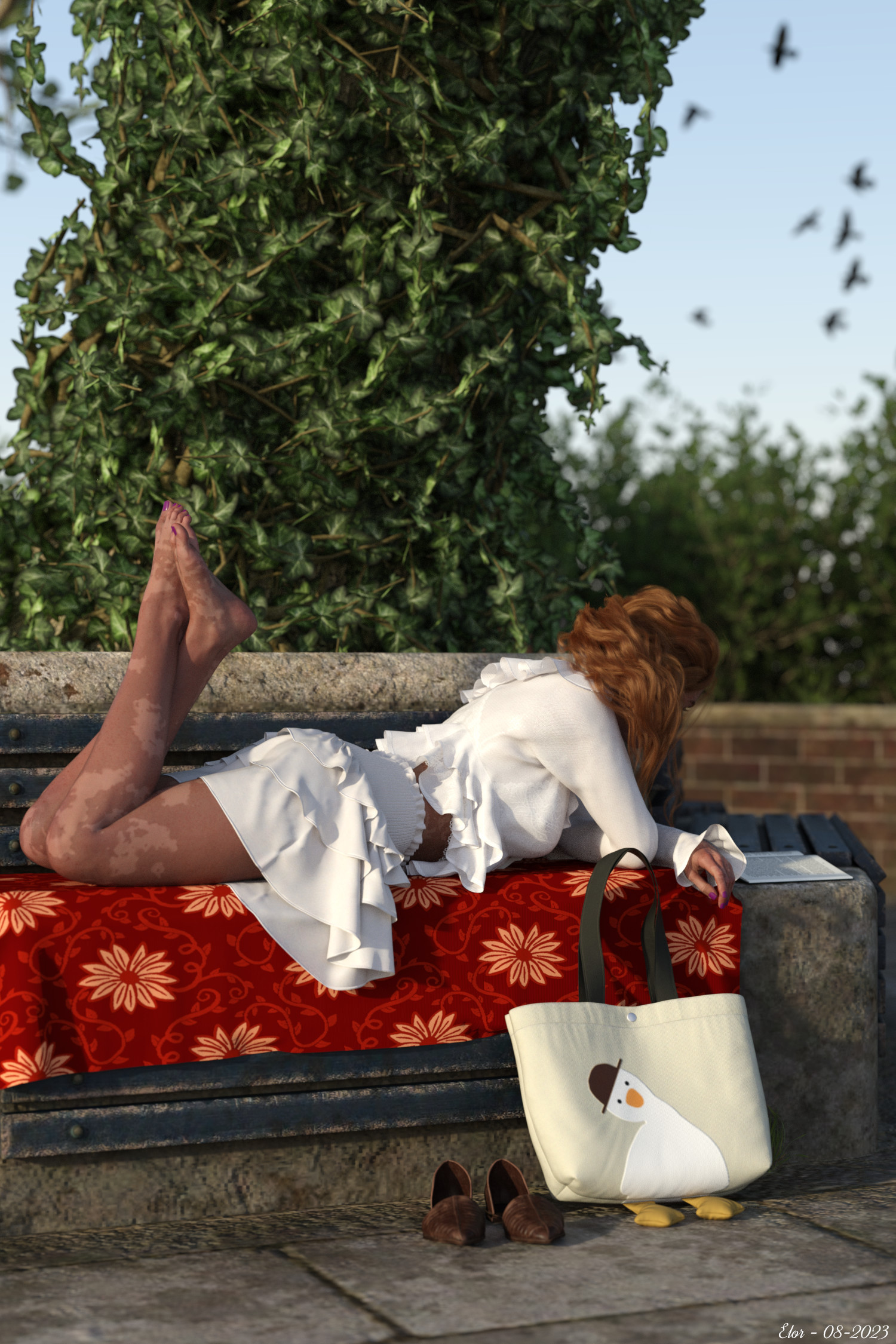
Please let me see your most photorealistic render using only the sun-sky system or default hdriI didn't knew what all these sun-sky system settings did (I didn't even knew some of them even existed in the first place), so, thank to everyone who shared their settings and explanations about them
I don't have a lot of renders satisfying the criterias (sun-sky only or default HDRI), but among the ones I have, this one is the one I like the best.
Let's say that it was supposed to be a portrait, but Victoria was so immersed in her book that she decided to spend an afternoon at the park reading it

(Well, not really
 but it's a nice story ?)
The only source of light is the sun, and it's the default setting: at the time, I only knew how to play with the date and hour (I tried to play with the lattitude and longtitude setting, but didn't succeed) but in the end, the default date and hour was what provided the more pleasing result to my eyes
 Do Genesis 9 Daz Originals characters like Victoria 9 go on sale?
Get yourself the DazDeals plugin https://www.daz3d.com/forums/discussion/106296/announcing-daz-deals-browser-add-on/p1
With it you can see at what price the products have been offered within the last year.Victoria 9 on her own was listed at $10.50 in October (bought her in May for $5.65)
Victoria 9 HD Mega Bundle was listed at $47.25 also in OctoberThose were just the prices that have been shown in the shop (for Daz+ members), they can also get a lot cheaper if there are other discounts to take advantage of.
For example, in September/October I got;Zack 9 HD Pro Bundle, MSRP $194.99, bought for $30.71 (84% off) - Lowest listed price = $68.24
Amelia 9 HD Pro Bundle, MSRP $148.99, bought for $18.91 (87% off) - Lowest listed price = $41.72Do Genesis 9 Daz Originals characters like Victoria 9 go on sale?Hello! I recently added Victoria 9 to my wishlist but I'm just wondering if this character and other Gen 9 Originals characters even go on sale. Typically, I don't buy Daz items unless they're on sale so I will hold out on this purchase until there's a discount. But can anyone please tell me if they've seen these characters on sale? Thanks!
Skin Builder for 8.1The textures skin builder uses are made for G8F UVs, which is why they don't match V8.1 texture which uses G8.1F UVs.
Maybe you could use Map Transfer tool in DS to create a "G8 UVs" version of Victoria 8.1 skin maps, and use your skin builder overlays over that version?
Daz Interactive LicenseAn example might make this clearer -- the infamous "House Party" game on Steam uses 3D character meshes that are Daz products, e.g. Victoria 7, hair, clothing, etc. To incorporate not just a rendered image of Vicky but the actual 3D mesh, you need the interactive license and agree to a bunch of conditions. (Basically ensuring the 3D mesh cannot be ripped from your game, which thereby protects Daz's products from being copied)
But if House Party consisted solely of pre-rendered images you click on to advance the story, basically a visual novel, then the interactive license would not be needed since the game does not includes the actual 3D data.
Hope that helps clear up the difference.
Which Character Is This?That looks like it's just Victoria 9 with some additional body shaping, probably from the Genesis 9 body morphs package, and facepaint. You can see her face more clearly, from the same angle, in this promotional image from the AJC Dawn Warrior Weapons:
https://gcdn.daz3d.com/p/88820/i/ajcdawnwarriorweaponsforgenesis900maindaz3d.jpg
I don't know what facepaint this is, though. It's not from the LIE war paint that's in the same Freja bundle as the Dawn Warrior packages.
Hot New (Northern) Season, New Sales Thread: Report Issues Here "Reporting Only"Elor said:
I suppose it's a mistake, but who knows, maybe I missed something.
In the list of supported shapes, on 'dForce Hawk Eye: Wildenlander HD for Genesis 9' page, a Basic Female is listed, except Genesis 9 doesn't have a 'Basic Female' shape, but a 'Base Feminine' shape (its 'Base Masculine' shape is correctly identified):
Supported Shapes:
- Classic Barbarian Character HD
- Base Masculine
- Ivar 9
- Lawrence 9
- Michael 9
- Thimor 9
- Genghis Khan 9
- Yuko HD
- Victoria 9
- Freja 9
- Angela 9
- Xiu Lin 9
- Olympia 9
- Basic Female
https://www.daz3d.com/dforce-hawk-eye-wildenlander-hd-for-genesis-9
Edit: Pentonville Modern (one of the current freebies) doesn't list Pentonville Prison as a required product (I was a bit disapointed to discover it was only a textures pack with some props
 ):
):https://www.daz3d.com/pentonville-modern
https://www.daz3d.com/pentonville-prison
It's only listed on the wiki:
http://docs.daz3d.com/doku.php/public/read_me/index/10518/start
will send a report to daz
Hot New (Northern) Season, New Sales Thread: Report Issues Here "Reporting Only"I suppose it's a mistake, but who knows, maybe I missed something.
In the list of supported shapes, on 'dForce Hawk Eye: Wildenlander HD for Genesis 9' page, a Basic Female is listed, except Genesis 9 doesn't have a 'Basic Female' shape, but a 'Base Feminine' shape (its 'Base Masculine' shape is correctly identified):
Supported Shapes:
- Classic Barbarian Character HD
- Base Masculine
- Ivar 9
- Lawrence 9
- Michael 9
- Thimor 9
- Genghis Khan 9
- Yuko HD
- Victoria 9
- Freja 9
- Angela 9
- Xiu Lin 9
- Olympia 9
- Basic Female
https://www.daz3d.com/dforce-hawk-eye-wildenlander-hd-for-genesis-9
Edit: Pentonville Modern (one of the current freebies) doesn't list Pentonville Prison as a required product (I was a bit disapointed to discover it was only a textures pack with some props
):https://www.daz3d.com/pentonville-modern
https://www.daz3d.com/pentonville-prison
It's only listed on the wiki:
http://docs.daz3d.com/doku.php/public/read_me/index/10518/start
Skin Builder for 8.1I am thinking if you could replilcate the Victoria 8.1 skin using Skin Builder 8 you could then create your Makeup for a 8.1 model.
Here is what I am trying to do.
I have an 8.1 character, In order to get the Male Genitalia for Female to match the skin I loaded the Victoria 8.1 skin on it, all the maps, including the maps for the gens. Using the Ultimate PBRSkin Manager I am then able to get the skintones I want on the model, including the gens. However the Makeup I created with the Skin Builder 8 product creates a skin that does not match up with that 8.1 skin I have on my model. Attempts to use the skin made from Skin Builder 8 to match up the gens using Ultimate PBRSkin Manager do not give the desired results. (It ends up being quite bright, tone wise.) If I could replicate the Victoria 8.1 skin settings in Skin Builder 8 I think I could then create the makeup skins I want and place them on the 8.1 model and then using the Ultimate PBRSkin Manager get the desired results I want. It has been suggested I use add-on third party gens but they don't look right to me so I want to use the gens provided with the 8.1 model.
I guess what I am asking is can anyone tell me what the settings would be in Skin Builder 8 to repllicate the Victoria 8.1 skin.
Thanks
Daz 3D is part of

Connect
DAZ Productions, Inc.
7533 S Center View Ct #4664
West Jordan, UT 84084Licensing Agreement | Terms of Service | Privacy Policy | EULA
© 2026 Daz Productions Inc. All Rights Reserved.