-
Genesis 2 and Aniblocks
what are aniblocks you working with? Did you try a different set of aniblocks to see if you got the same results? V4 ani blocks usually work just fine with genesis 2 characters , But you do have to add a genesis foot off set aniblock to the sub track to correct the feet. Also some of dantanback sword works aniblocks don't work well with genesis or gensis 2 v I'm not sure why But i have always had trouble with the characters becoming distorted. But they work great for v4
I bought the V4 belly dancing aniblock and, apart from curled back fingers and odd-shaped feet, my character will stay in place.
I've also just tried the expressions on the G2F base (with no morphs or characters), a G2F with the Lilith 6 morph and, Lilith 6 and they work fine.
It's just the G2 aniblocks that I'm having problems with:
V6/G2F High Heel Walk aniblock http://www.daz3d.com/victoria-6-genesis-2-female-s-high-heel-walk-aniblock
V6/G2F Jogging aniblock http://www.daz3d.com/victoria-6-genesis-2-jogging-aniblock
Genesis 2 Female(s) Expression and Face aniblock http://www.daz3d.com/genesis-2-female-expressions-face-aniblocks
Genesis 2 Male(s) Expression and Face aniblock http://www.daz3d.com/genesis-2-male-expressions-face-aniblocks
It just seems to be my own model that has a problem with aniblocks.
AIUTO...CHI CONOSCE L’ITALIANO? PARTE UNDICICiao a tutti,
Era una vita che non frequentavo piu' questo forum,son rimasto fermo anche alcuni anni senza piu' usare Poser,Daz Studio praticamente mai usato.Ora ricominciando ad usare Poser ho semplicemente il desiderio di voler provare una figura diversa da Victoria 4 e precisamente Victoria 6.Avendo Poser 10 ed essendo cambiate parecchie cose sull'importazione e compatibilita' dei vari modelli,volevo sapere se Vic 6 puo' essere importata in Poser 10 con il DSON importer,sempre che quest'ultimo sia compatibile con la mia versione di Poser.Scusate se faccio la figura del troglodita su problemi che probabilmente ora sono gia' datati....
Ciao e grazie
Installing The Freak 4 and Aiko 4If you don't use Poser uncheck it in DIM's filter. Do you have Michael 4 and Victoria 4.2 as Freak 4 and Aiko 4 are morphs for them?
Novica & Forum Members Tips & Product Reviews Pt 7Ignore the fact my character on the right is floating (she's a magician's assistant, obviously), I wanted you to see the original Star and body vs what you can do with dialing her body in about 24%. Her head was 45%. Amaya and Tahnee are good additions to Star or Stella. The second image is Stella, and look at the striations above her upper lip, below the nose. Very light, but there. I messed with the teeth because they were too squarish for my preferences, and I still want them more rounded. So note those are not the default teeth, and may be the cause of the striations? Swam's Anny Hair is cute for anime.
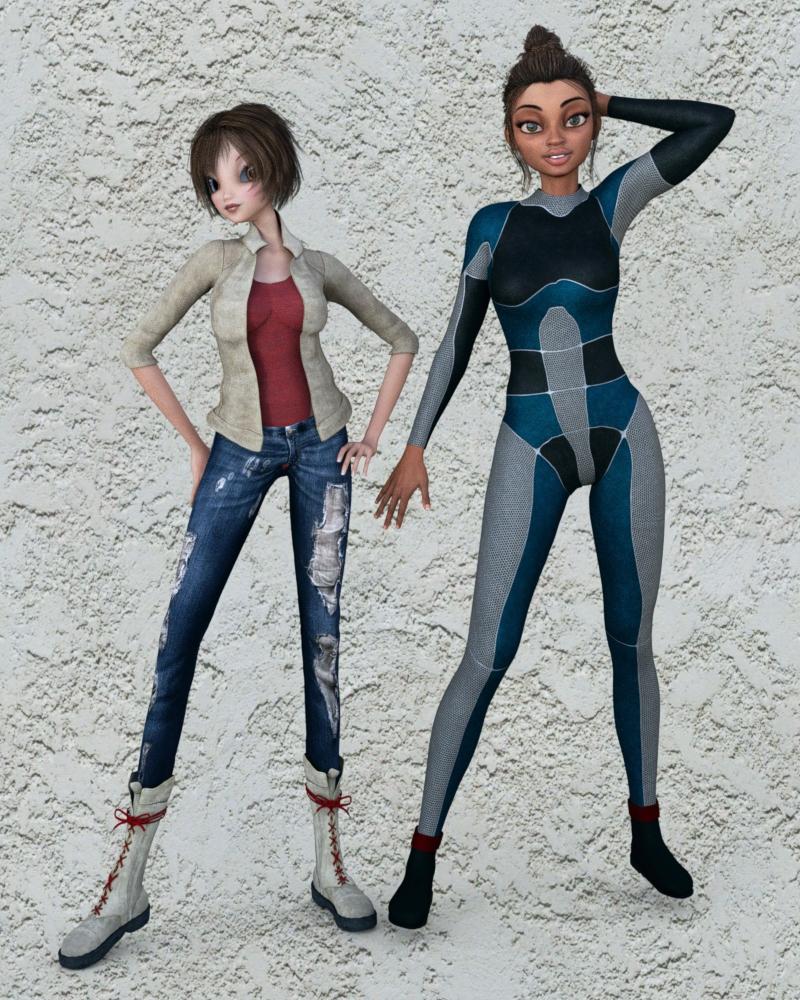
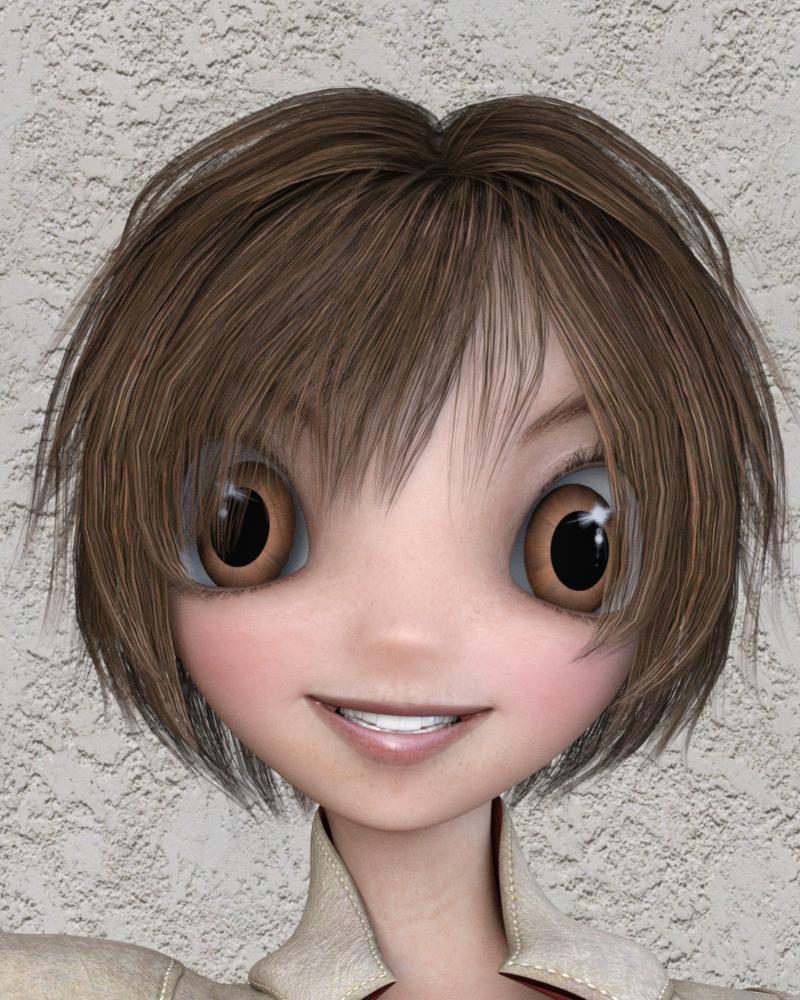 hi can someone tell me who the model is in this pic on the left , thanks so much
I have no idea, but she reminds me of a Sabby character. She just has that look about her and she is really close in looks to Sabby - Tiffany by Fred Wrinkler Art and Sabby:

I don't think that this is the same model, but close so I would probably look at other models by these two vendors. Good luck!
i was looking at some dream light trainingI noticed that in dream light training the caption said to make money from victoria 6 charicter made yourself,,,,,is there something special about V6?or is it that she can be used for this pourpose? and not the other victorias like 4 or 4.2
? thanks
V4 Skins Batch Converter to Genesis 2 Female.....Create a new Subfolder in your DAZ Library. Start the Script ( DAZ Studio Formats => My Library => Scripts => Victoria 4 Skins Batch Converter ). Follow these steps:
- Point to the subfolder you created
- Point to the folder where the material presets are located
- Convert the files
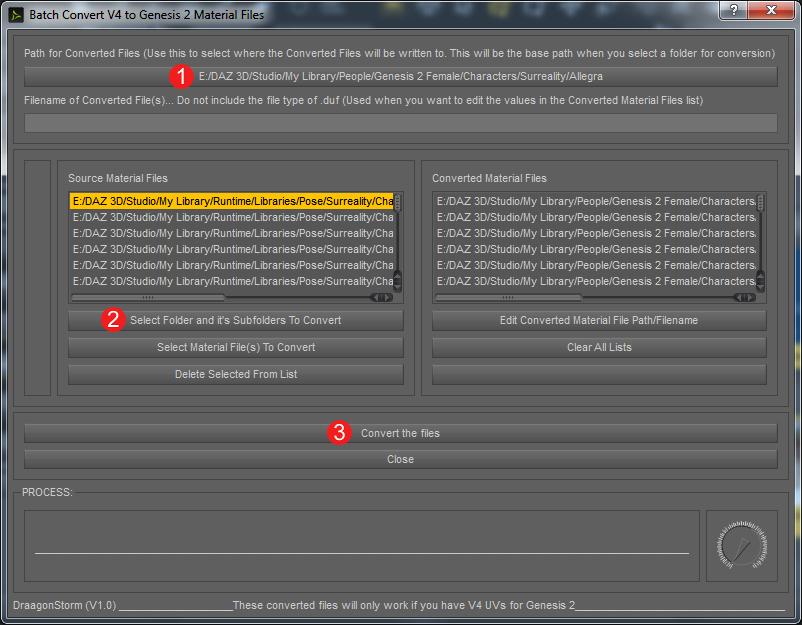
People confused about where to find the relevant pz2 files to import should note the screenshot above. It's showing Runtime>Libraries>Pose. That's where to look. It's a good idea to make a subfolder just for the character you're going to convert. Make this in the Genesis 2 Female>Characters folder. I'm converting one character at a time.
Some of the pz2 files are for injecting morphs. I don't want to convert those. I find it easy to just click on "select material files to convert" instead of "select folders and subfolders." The program shows me PNG files instead of pz2 files. This way I can look at pictures for easy indentification, and I select which materials I want. The program then finds the corresponding pz2 files to convert.
Hi. I've never converted a v4 file to genesis before so consider me a rank beginner. I'm scared that I'm somehow going to mess up one of the files I love using this so some reassurance from the experts on here would be nice. I agree with the request of a pdf instruction manual. Even that image that was posted with the 1,2,3 instructions was very helpful. But I have a question for you. Why would we not want to convert the file for injecting morphs?
Star 2.0 for G3F!!! whoot!!Love this character.
That is terrifyingly realistic.
But fantastically cool. If you don't mind sharing, which characters did you combine?
The body is 100% Star 2.0
The head is a combination of Teen Josie and Toon Josie Slim (both 36%), Aiko 16%, Anime Head 100%, and scaled the head up and neck down a bit.
I used the skin from the Vanessa character.
Anime Head for Genesis 3 is a freebie morph (with a dial) that you can find on ShareCG.
Vanessa is this one: http://www.daz3d.com/fwsa-vanessa-hd-for-victoria-7-and-her-jewelry
Eric
Excellent, thanks! I didn't know there was a Toon Josie...was that a typo or is there a morph for the Teen Josie character that creates a toon version?
Sorry! I meant to type teen josie. I don't think there is a toon josie, that was just a typo.
Yep, no worries, I kinda thought as much, though I wasn't clear on how you could combine regular Teen Josie head with slim version of her head. Do you mean you started with her regular head at 36% and then added 36% slimming or is there a separate Teen Josie head slimming morph? Regardless, you have a great eye for creating multi-character mixes. I hope you share more!
I seem to remember there being seperate slimming morphs, for the character's body and head.
Star 2.0 for G3F!!! whoot!!Love this character.
That is terrifyingly realistic.
But fantastically cool. If you don't mind sharing, which characters did you combine?
The body is 100% Star 2.0
The head is a combination of Teen Josie and Toon Josie Slim (both 36%), Aiko 16%, Anime Head 100%, and scaled the head up and neck down a bit.
I used the skin from the Vanessa character.
Anime Head for Genesis 3 is a freebie morph (with a dial) that you can find on ShareCG.
Vanessa is this one: http://www.daz3d.com/fwsa-vanessa-hd-for-victoria-7-and-her-jewelry
Eric
Excellent, thanks! I didn't know there was a Toon Josie...was that a typo or is there a morph for the Teen Josie character that creates a toon version?
Sorry! I meant to type teen josie. I don't think there is a toon josie, that was just a typo.
Yep, no worries, I kinda thought as much, though I wasn't clear on how you could combine regular Teen Josie head with slim version of her head. Do you mean you started with her regular head at 36% and then added 36% slimming or is there a separate Teen Josie head slimming morph? Regardless, you have a great eye for creating multi-character mixes. I hope you share more!
Carrara Challenge #27: “Carrara 9, Give us a Sign” WIP Thread: Voting has started.This is how I built my picture :
The forrest started out as http://www.daz3d.com/stoney-creek-sprucevale , wich I did some (heavy) modifications on.
When I had the shape, placement of the camera, lights and the Carrara path part in place, I saved it as a file and called it Master.
I then made a copy, deleted the forrest, and kept only the part of the ground where I was going to build the Carrara path. When this was done, I grouped everything and dropped it in the object folder in the browser.
The genie is Victoria 4. The bottle is created in the vertex modeller, and so is the Carrara sign.
For the number 9, I used a Primvol Fog from http://www.daz3d.com/advance-pack ( http://www.inagoni.com ) I created the number in the vertex modeller and used this as a shape in the Primvol Fog. The Vertex object is made invissibel in the render. The smoke from the bottle is a Primvol Rising Smoke (wich I borrowed and modified from the Doc&tuto page at inagoni.com)
There is also a creature lurking in the forrest. This is a Genesis Creature, setup in Studio and exported out as a .obj (to save memory)
When all parts where done, I opened the Master, and imported and or dragged from the object browser the differente parts. Made some adjustment in placement, and then waited for 5 hour to render it out.
Meet the MusesFun topic! Very beautiful renders in here! :)
Have to admit, I am very lazy when it comes to character creation. Here is just basic Victoria 5.


And there is basic Victoria 6.


Head shot looks really good, MN-150374 - extremely photorealistic!
- Greg
Meet the MusesFun topic! Very beautiful renders in here! :)
Have to admit, I am very lazy when it comes to character creation. Here is just basic Victoria 5.
And there is basic Victoria 6.
G3F Skins render Chocolate....First: Thank you for the time it took for your response.
I am using DS 4.9.
ONE of the skins that is giving me choclate is: http://www.daz3d.com/fwsa-eliya-hd-for-victoria-7
Admittedly it is a skin that is a little tanned. Here is my render (it does not use the character morph included with the skin)
Are you using the default HDRI for light? As noonesuch already said, the light can make a huge difference. The skin of the model looks okay (not too dark), and according to the Readme, she was designed for 4.9.
Here are some examples. Characters are the same in all 4 renders - Michael 7 and Kimo 7 with default skin. As you can see, depending on the light type you throw at them, the skin colour looks quite different.
Default HDRI

Sunlight

Set 13 of OOT Male Lights

Set 11 of OOT Male Lights
 Animation Conversion V4.2 to Genesis and Genesis 2 Female, not working
Can't get It to work.
I load victoria 4.2 (w/addons and without)( have to change its name to Victoria 4.2 )(cussing while im changing its name BTW)
Load Genesis 2 Base Female (from Gen 2 starter essentials)
select Vic 4.2, apply an animation ( run it once to set it in timeline) set the animation back to frame 0
Gen 2 female still in T pose
run the products V4 to Gen 2 script.
when finished G2F animation is only raising up its legs. :(
anyone got any ideals what im doing wrong. Thanks
Who is this character?It looks like straight Victoria 7 to me.
Laurie
Carrara Sale Email Message Alert threadBe Careful - I found a few Pro Bundles which I already have everything... must have either come with Carrara or I bought all the seperate items to add up to the bundle since the bundle wasn't listed as "Purchased".
Whoa Right! I've noticed the same thing!
Sometimes I've even bought bundles when I already owned almost everything in it, but the bundle price was low enough where the few products I didn't already have made it totally worth it! Good call, wdgjohn! Thanks for the warning!
Some - "Genesis" 73% off and "Genesis 2" 83% off 'til the end of the day at least. "Victoria 4 3D Model Pro Suite" 83% off. Note that even the individual items are marked down... some extremly low.
Pretty sure it's today only! Grab 'em now if ya need 'em!!!
Carrara Sale Email Message Alert threadSome - "Genesis" 73% off and "Genesis 2" 83% off 'til the end of the day at least. "Victoria 4 3D Model Pro Suite" 83% off. Note that even the individual items are marked down... some extremly low.
Be Careful - I found a few Pro Bundles which I already have everything... must have either come with Carrara or I bought all the seperate items to add up to the bundle since the bundle wasn't listed as "Purchased".
Star 2.0 for G3F!!! whoot!!Love this character.
That is terrifyingly realistic.
But fantastically cool. If you don't mind sharing, which characters did you combine?
The body is 100% Star 2.0
The head is a combination of Teen Josie and Toon Josie Slim (both 36%), Aiko 16%, Anime Head 100%, and scaled the head up and neck down a bit.
I used the skin from the Vanessa character.
Anime Head for Genesis 3 is a freebie morph (with a dial) that you can find on ShareCG.
Vanessa is this one: http://www.daz3d.com/fwsa-vanessa-hd-for-victoria-7-and-her-jewelry
Eric
Excellent, thanks! I didn't know there was a Toon Josie...was that a typo or is there a morph for the Teen Josie character that creates a toon version?
Sorry! I meant to type teen josie. I don't think there is a toon josie, that was just a typo.
Newbee Issues Applying MATS to V6 Figures-Poser 11Hi All, I wanted to get back to creating after a long absence and updated my Poser 9 to 11. I'm experiencing all the newbee issues and slowly working through the cobwebs in my brain to get things in order. Wanting to try out the lastest figures I purchased Victoria 6, Genesis 2 Female(s) Morphs Bundle, Milena Bundle and Genesis Starter Essentials, a few DAZ figures and the latest DSON Importer for Poser. After loading V6 figure and Morphs things look to be OK The figure has an OK caucasian flesh tone, when loading figure MATS, areas turns a carmel brown and the makup, etc. won't change anything when applied. Also I have one figure, Carlene, that loads totally black becaue it can't findt the SabbyCarleneLashes02. I think my MAT files may be in the wrong places even though I used the DAZ file manage to load to the default folders or I am doing some thing wrong. I've been looking in various forums attempting to find the solution but to no avail. Any help would be appreciated. Hopefully you can point me in the right direction. Thanking you in advance - Tom.
Registering OnlineI think how it works now is that, ever since DIM was released, and they came up with that how we can sign one EULA for all purchases rather than for each item separately, the need to register has simply become obsolete.
Enjoy your new Carrara 8.5 Pro, along with all of this added stuff:
-
-
Carrara 8 Native Content (Lots of fun examples)
-
Digital Painters 3D Paint Brushes Sampler (more fun examples!)
-
-
Additional Content
-
Genesis Starter Essentials
-
-
V5 General Poses
-
Genesis Female Geo-Grafted Genitalia
-
-
Other Installers
-
Carrara Render Node Win 32 Application
-
Carrara Render Node Win 64 Application
-
Carrara Render Node MAC 32 Application
-
Carrara Render Node MAC 64 Application
-
Daz 3D is part of

Connect
DAZ Productions, Inc.
7533 S Center View Ct #4664
West Jordan, UT 84084Licensing Agreement | Terms of Service | Privacy Policy | EULA
© 2026 Daz Productions Inc. All Rights Reserved.