-
Interactive License?
I spent a little over $1,000 back in 2009 for Daz Studio 3 Advanced, Bryce 6, Carrara 7 Pro, Mimic Pro and Hexagon 2.5... I never even used them. The licensing back then was too restrictive. Or at least that is what it appeared to me. I was into XNA game development at the time, and it didn't appear that the content could be licensed to used in games.
Well, I came back last week (only 8 years later) and since I'm now utilizing the Unity game engine and decided to give Daz another go... what's that? Oh Daz is now free? um, ok.
But there is this license you need to get? Commercial game dev license is $2,500 ... hmmm ... but it can only be used in a single game?
I log in today to look at some items and see now that each item has this interactive license. OK, so if I need a character I need to get a base at the cost + license ... and then the actual model and then the clothes ... and each one has this $50 interactive license fee? So after 50 items I've hit that original $2,500 mark. Now from what I could tell, the dev license was for a single game ... so that was bogus. Are the interactive licenses for the item bought now ... and so it can be in any number of games? You know what, nevermind.
Sorry Daz, but yet again your licensing headaches is making me go elsewhere. Maybe I'll be back in the year 2025 or something to see if you all have figured out licensing content yet. It really shouldn't take a lawyer to figure out how the assets can be used. I still have no idea if the Victoria 4.2 and Michael 4.2 models I have can be used in a game or not.
I'll grab my 3D character content elsewhere, thanks. I have too many things to do to spend so much time trying to figure out your crazy licensing.
Dracorn's Render ThreadRender Diary - Ghost Fleet (Part 2 Iray)
Part 1 (3Delight) is located here: https://www.daz3d.com/forums/discussion/comment/2509871/#Comment_2509871
Just in case you were wondering, I didn't do this for Halloween, even though I finished it then. I let it wait a day and made a couple more changes.
Change to Iray
I decided to redo this in Iray. So I converted the Prince and he looked pretty darn good.
Original 3DL:
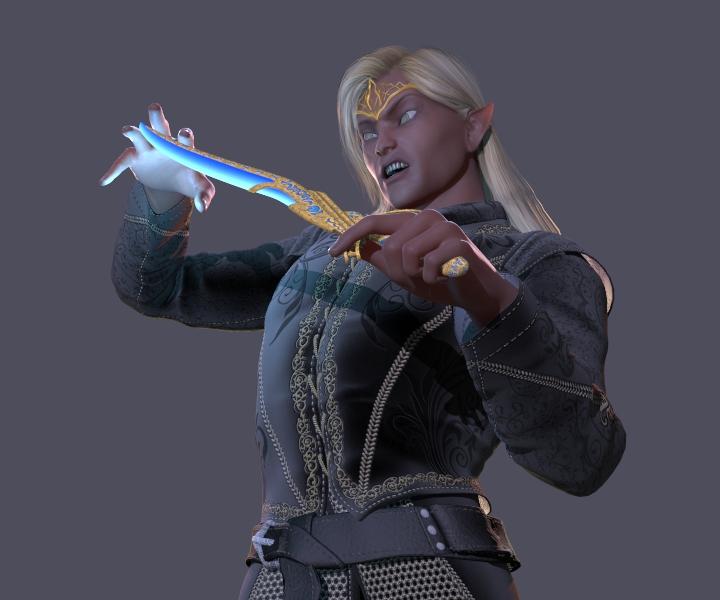
Iray Conversion:
I used Marshian's Rim Light Rig Iray for the lighting.
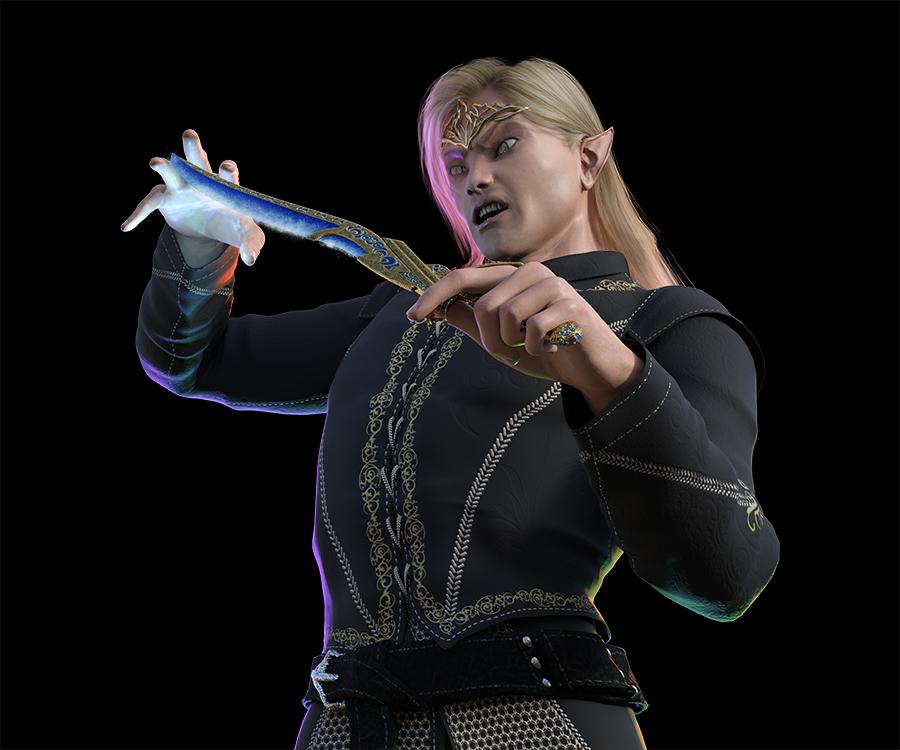
The 3DL skeleton used Age of Armor's Metalized Glass, which are lovely shaders, but I needed something in Iray, so I used Anodized Shaders for Iray.
Original 3DL:
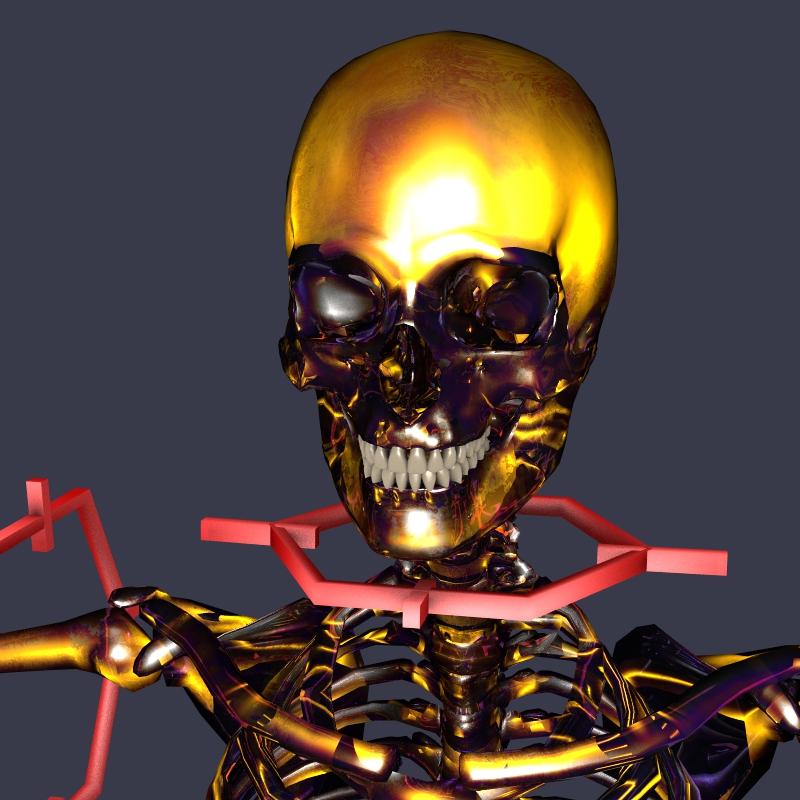
Iray Conversion:
Michael 4 Skeleton is low res, so I had to do some cleanup in Photoshop to remove some unrealistic looking geometry. Mind you, I did this before the new M8 Skeleton came out.
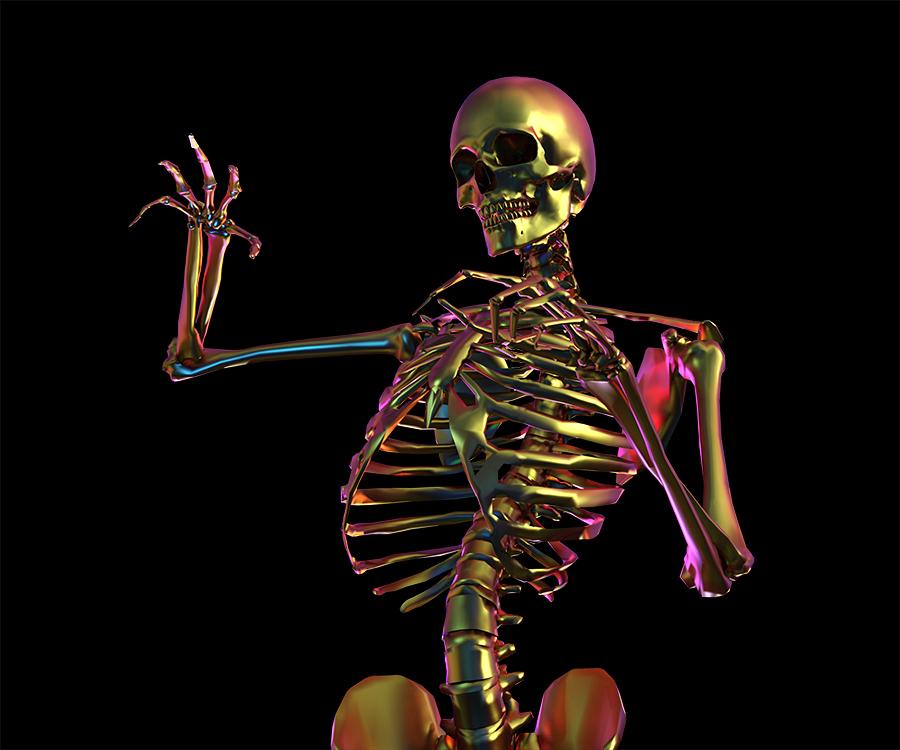
I loaded both renders into Photoshop, with the Prince in a layer above the skeleton. I reduced the opacity on the Prince layer so I could see the skeleton underneath, then I carefully used the eraser tool to remove portions of the Prince so that the skeleton would show underneath. This afforded me much more control then rendering with the Prince set at a lower Cutout Opacity value.
 Slightly confused by new installers - what's "Poser CF"?
I tried DS and don't like it so what files do I need for Poser ONLY?
Have hair, hairPS and hairPoserCF still confused!
Depends on the product - if you have Hair adn Hair PoserCF then you'd need both (and the DSON Importer). if there's also a Poser isntaller in its own right it may be supporting multiple figures, with the Hair PS files for (at a guess) Michael 4 or Victoria 4 and the hair and Hair PosceCF for a Genesis (in whichase the hair PS would be standalone for supporting the older figures, as long as it included the textures).
M & M Productions Hoplite Armor and WeaponsNo that will be Michael 3, the precursor to Michael 4 whos is the figure before Genesis
GenX2 with ConnectGenX is for transferrign morphs, Michael 4 as Michael 4 is the base shape so there's nothing for GenX to transfer (also I don't think GenX supports Genesis 8)
Freebies I got from daz storeI am moving your thread to the New Users help forum, because it is not an offer of a freebie, so doesn't belong in the freebie forum
sorry about that, now that I think about it, yeah had me a brain fart.
However, I have a "fit to" option, which generally allows none gen 2 stuff to fit to the model.More precisely, it allows first-generation Genesis clothes to be auto-fitted to Genesis2. The two items you linked are for Generation 4, which is pre-Genesis, so the auto-fit won't work.
What you can do, though, is convert in two stages. Auto-fit the V4 clothes to Genesis, save it, then auto-fit the saved clothes to Genesis2. There are converter plugins you can buy in the store to do the job in one step, but the built-in auto-fit for each generation of Genesis can only convert the previous generation's clothes.
Usually when I Auto-fit, I would click the item and it attach, but it not fit correctly, then I use fit to feature on bottom right, which sorts it. Sure you know that.
However, this time, when I click on item, nothing happens at all, its like I don't have the model selected in the scene but I do.
when you say fit to Genesis , you mean the basic model? same with that model, nothing happens.
https://www.daz3d.com/basicwear-for-m4
This is one of the items I got today, I should spend more time looking at it first, the add-ons at bottom show a auto fit from Michael 4 to Genesis 2 for free.
I guess its trial and error , just got to play around until you get it.
Merge Eyes for M4That would be a pretty drastic morph, I'm not sure the Michael 4 mesh would take it or the rigging be usable. It would have to be done my moving one eye, you can't break the eyes sockets pen and merge them or literally merge the eyes via a morph.
Confusion over Figures, Models, Genesis 1-2-3 to 8, Victoria models and so onIf I may, I'm still very new to this and am floundering about with which direction I should go base model wise.
So, If I'm reading this right...
Genesis 8 is the new Victoria/Michael 4.
Most anything from the Genesis/Genesis 2/Genesis 3 groups can be used (with a bit of fiddling) on Genesis 8, but not the other way around.
Anything labeled 6/7/8 is specifically for Genesis 8, while anything labeled 4/5/6 is specifically for Genesis "1"/2/3, respectively.
Now, in my own flailing about, I've seen that the Victoria 4.2/ Michael 4.2 combination have their own families (Stephanie, Hiro, The Girl, Freak, etc.) all of whick are based off of Victoria / Michael of the past. So here's my first actual question: would something from "back then," Stephanie 2, for example work on the Victoria 4.2 with a minimum of grief providing i have the right add on (Victoria 4.2++ morphs)?
Second question: Where should I be putting my resources when it comes to characters, since it's looking like the Victoria / Michael combo and Genesis 8 are becoming the standards?
* closed* RRRR The're ba....ack! Render contestTag: Totte #7
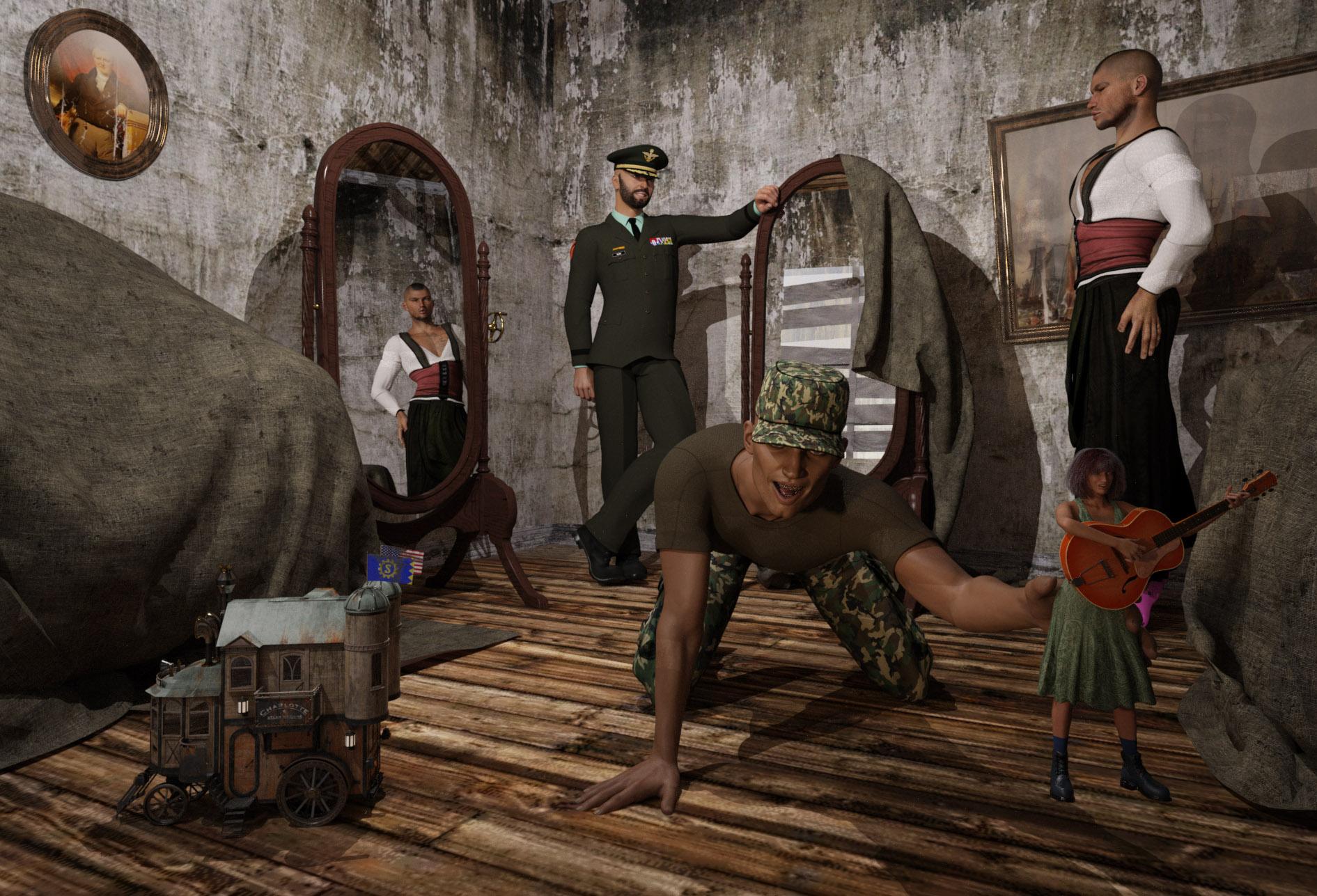
#5537 Steam House (#17169)
#2230 FWSA Oscar HD for Lucian 7 (#34343)
#5903 The Forgotten Refuge (#12853)
#355 Army Boots for Michael 4 (#8646)
LB #1: #324 Apple Hair for Genesis and Genesis 2 Female(s) (#21768)
LB #2: #4757 Retro Party Wear Textures (#16317)
LB #3: #5769 Tavern Maid (#13786)
LB #4: #2449 Genesis Musicians Acoustic Guitarists (#17777)Also used:
M4 + Jepes Yves + Army General For M4
Army Uniform For G3M + Lucian Shadow Poses
V5 + Zoey + Retro Party Wear + Workboots for Genesis+ Music Man Guitar
P3D Tom + Sport clogs
Shaders used:
PBS Shaders Vol 3
UHT2 Hair Salon
Subsurface Workshop
The kid that never grew upGeneral Clarke’s son never really grew up, and the General is more interested in his new house maid than his son playing with his toys.
 Legacy UVs for Genesis 8 [Commercial]
Legacy UVs for Genesis 8: Michael 4 is released today.
https://www.daz3d.com/legacy-uvs-for-genesis-8-michael-4
This is a link to the online PDF documentation:
Confusion over Figures, Models, Genesis 1-2-3 to 8, Victoria models and so onOkay, so i'm correct in my line of thinking, that Victoria 4 and Michael 4 is pre-genesis native models?
So Genesis is a new way for having native models?
Yes.
Would it be possible to fit clothing/hair from previous/other figures to a Genesis 8/3 figure using fit? I can fit some of the Genesis 3 clothes to Genesis 8, but further back seems to cause clipping or the hair not being where it should.
AutoFit works back to Genesis, for fourth generation content you can either AutoFit to Genesis and then AutoFit that to Genesis 8 or you could wait to see if a PA brngs out clones for older figures. Any automated process is going to be hit-and-miss, I'm afraid, though adding a Smoothing Modifier (Edit>Figure>Geometry>Apply Smoothing Modifier) to the converted clothes and settings them, under Mesh Smoothing in the parametrs pane, to collide with the wearer can help a lot.
Confusion over Figures, Models, Genesis 1-2-3 to 8, Victoria models and so onOkay, so i'm correct in my line of thinking, that Victoria 4 and Michael 4 is pre-genesis native models?
So Genesis is a new way for having native models?
Would it be possible to fit clothing/hair from previous/other figures to a Genesis 8/3 figure using fit? I can fit some of the Genesis 3 clothes to Genesis 8, but further back seems to cause clipping or the hair not being where it should.
Looking around i can something like magnet/fit, so i was think that maybe it's possible to make it snap properly and remove clipping?
Thanks
Confusion over Figures, Models, Genesis 1-2-3 to 8, Victoria models and so onAnother way of looking at the evolution of DAZ figures is like this.
Generations 1 to 4 are stand-alone figures comprised of unique meshes, bones, and maps. The popularity of generation 4 (eg. Victoria 4.2 & Michael 4) largely continues due to their compatibility with Poser.
Generation 5 is known as Genesis. These figures move from stand alone meshes to the use of morphs for unique character creation. This is also why Genesis characters are nomenclatured "5" (eg. Victoria 5, Michael 5, Aiko 5, etc). While a viable and inovative concept, Genesis revealed compatibility issues between male and female geometry when creating clothing and wearable items. Genesis is the only androgynous (neither male nor female) generation.
Generation 6 is known as Genesis 2. That is to say, it is the 6th generation of models and the 2nd generation of the Genesis concept. The characters are so named for the overall generation "6" (eg. Olympia 6, Lee 6, etc.). Genesis 2 also noted a return to seperate meshes for male and female geometry, yet they continue the Genesis concept where characters are morphed from the base mesh.
Generation 7 is known as Genesis 3 and continues the nomenclature to the next step; 7th generation overall, and 3rd generation Genesis. Characters are noted by "7". What was also noted was the increasing confusion about which assets were intended for which generation of meshes.
By this point, the nomenclatures became confusing enough. 4 is 4, 5 is 1, 6 is 2, and 7 is 3. DAZ responded by keeping with the overall generation rather than adding another step to the Genesis evolution. This also solved the potential confusion with "Genesis 4" (current models) being mistook for Generation 4 (Victoria 4, Michael 4). So, the newest generation was nomenclated for the overall generation "8". This makes character allignment simpler as well. All models and characters of the 8th generation are named as "8".
Confusion over Figures, Models, Genesis 1-2-3 to 8, Victoria models and so onThe FigureName Number figures up to 4 are in Poser format, the Victoria and Michael are stand-alone figure and for older gernations so are the others with the same number; the 4 series are all add-ons for Victoria 4 or Michael 4. Victoria 4.2 is the last update, in general anything for Victoria 4.x will work on 4.2.
The Genesis (unnumbered but effctively 1) figure and its successors are Daz Studio native figures. Victoria 5/Michael 5 and co. are add-ons for Genesis, Victoria 6/Michael 6 and co. are add-ons for Genesis 2 Female/Male, whatever 7 for Genesis 3, and then the latest generation has jumped the Genesis number to 8 so it matches the named figures (Victoria 8 and Michael 8 etc.).
There is a certain amount of backwrad compatibility - the Genesis figures, for example, come with clones for the previous generation that can convert clothing (the 8s include clones for all previous Genesises) and textures often carry over at least one generation - but each geenration is new mesh and rigging.
Which DAZ Genesis 8 M/F items are the most realistic?It is also worth noting that there are some artists who still use Victoria 4 and Michael 4 and produce work that looks more realistic than the majority of us can manage with the latest figures and tools.You had me right up until you ignored the technology gap. Genesis 8 can produce not only more accurate bodies but does it in a way that the pre-genesis simply can't because they lack 'articulation points'. It is simply not a physical reality that the old characters can even begin to compare. Old character are simply unable to replicate the realism of the new characters much less high definition morphs. No way does Pre-genesis even begin to compare.
 Which DAZ Genesis 8 M/F items are the most realistic?
I have to second (or third) Lyra for Genesis 8 Female. I also like the look of Victoria 8. Although I have only been using Daz Studio for a few months and am new to anything above Genesis v1, I find the Genesis 3 figures to be more realistic to my eyes, but I am sure that others would disagree.
As others have said though, "realistic" is very subjective. The human brain is brilliant at pattern recognition (sometimes even where there isn't a pattern such as on a creepy twilight walk home) and so it can recognise human faces in lots of different styles. Every artist who makes a 3D human figure will have a slightly different take on what makes it look realistic. I personally think that many of the child figures here at Daz have slightly exaggerated features that are not very realistic - but they are there to elicit a response from us that this is a child because most of us are programmed to respond to large eyes and a slightly oversized head as "cute", which is why we respond to babies, puppies and kittens.
Overall though, if you are going for realism in your renders, it is not just the figure. The lighting is probably much more important. There are many times over the years that I have bought a wonderful-looking figure, only to render it in a scene and wonder why it didn't look anywhere near as good as the promos. It took a while for me to realise that the lighting is what makes the difference. But even that is subjective and different for everyone.
It is also worth noting that there are some artists who still use Victoria 4 and Michael 4 and produce work that looks more realistic than the majority of us can manage with the latest figures and tools.
Shader Creating & Settings for Carrara - Q&A - Come One, Come AllSomething I just grabbed that I wrote in another thread:
At the risk of sounding like a broken record, I've really taken a liking to using my "Invisible" shader (set everything to invisible) on all eye parts except the lacrimals, then replacing the eyes using Arki's EYEdeas 3+ eyes. There is an enormous amount of really good eye maps made for M4 and V4, and EYEdeas 3+ includes remapped UV versions for both of those, plus the ones that use Arki's maps, which are also really cool.
This is one of Rosie's eyes. The shot on the right shows how the refraction of the cornea fills the cornea with colors from the iris (instead of seeing straight through the cornea), which might look a little strange here, but looks great when placed in the living figure.
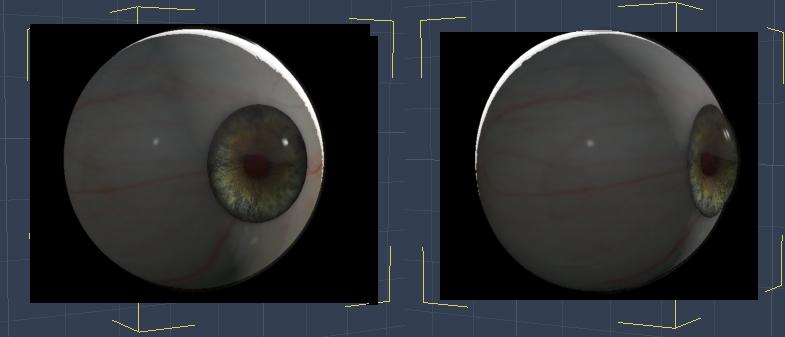
(two quick renders of just one eye model)
I really like having the flexibility of using these eyes. For Genesis figures, I've been using the separate Right and Left individual eyes. After setting up the character's final shape, I bring in the eyes and copy over the actual scale from the Motion tab, then parent them each to their respective eye. But I can further tweak their size if I like, which is really valuable to have.
As an added bonus, we can now link lights specifically to these eyes - we cannot do that on the actual figure's eyes because we cannot separate parts of a rigged figure for light linking in Carrara.
I never heard of Eyedeals before, but now I'm thinking it might just be a 'must have'. Looks like the V4/M4 version is on sale at the moment, so it might be an 'ideal' time to pick it up :)
They've only been made for M4/V4. But a really special product in many ways.
[cut]Dart... I just grabbed Arki's EYEdeas 3+ for Victoria 4 and Michael 4 but also grabbed Arki's EYEdeas 3+ - Vol. 01 - Natural 1 also there is another, EYEdeas 3+ - Vol. 02 - Fantasy 1, note that both of the latter require the one you mention. Since you mention using these in Genesis I suspect they will also work in G2. I also noticed that Arki has a G3 and G8 version, EYEdeas 4 and 5... they have IRay material presets and a few other features.
Regarding Jeremy Birn's Digital Lighting and Rendering book... I just received it, 3rd Edition, earlier this week... started to give it a glance and then thought I'd better get going on Animation in Carrara Video Tutorials - by PhilW since I've had it TODO longer.
Yes. I have also bought Arki's EYEdeas 3+ - Vol. 01 - Natural 1 expansion, but I don't think I got the Fantasy one yet. I love Arki's maps, though for Rosie I'm back to using some V4 maps I have - and just bought a bunch more that were on sale. Dart's EYEdeas 3+ are using Indigone's Endless Eye Kit for V4 , now available at ShareCG (I got them when Daz3d's forum had a freebies section we could upload to), which are mostly procedural, like Indigone's V4 Skin Shader Kit and Lights., with the exception of a few mask maps for the various eye parts.
As for Genesis and Arki's EYEdeas, these eyes will actually work for anything that needs this anatomy of eye. Anything! That's the beauty of having separate eye figures!
They come as conforming pairs of eyes for V4 and M4, either UV Mapped for V4 or M4's eyes or using Arki's own custom mapping, of which she's included a huge selection of maps to mix and match.
Darn I always feel like I'm trying to sell these thngs! LOL I'm actually just very happy to own the is all :)
Shader Creating & Settings for Carrara - Q&A - Come One, Come AllSomething I just grabbed that I wrote in another thread:
At the risk of sounding like a broken record, I've really taken a liking to using my "Invisible" shader (set everything to invisible) on all eye parts except the lacrimals, then replacing the eyes using Arki's EYEdeas 3+ eyes. There is an enormous amount of really good eye maps made for M4 and V4, and EYEdeas 3+ includes remapped UV versions for both of those, plus the ones that use Arki's maps, which are also really cool.
This is one of Rosie's eyes. The shot on the right shows how the refraction of the cornea fills the cornea with colors from the iris (instead of seeing straight through the cornea), which might look a little strange here, but looks great when placed in the living figure.
(two quick renders of just one eye model)
I really like having the flexibility of using these eyes. For Genesis figures, I've been using the separate Right and Left individual eyes. After setting up the character's final shape, I bring in the eyes and copy over the actual scale from the Motion tab, then parent them each to their respective eye. But I can further tweak their size if I like, which is really valuable to have.
As an added bonus, we can now link lights specifically to these eyes - we cannot do that on the actual figure's eyes because we cannot separate parts of a rigged figure for light linking in Carrara.
I never heard of Eyedeals before, but now I'm thinking it might just be a 'must have'. Looks like the V4/M4 version is on sale at the moment, so it might be an 'ideal' time to pick it up :)
They've only been made for M4/V4. But a really special product in many ways.
[cut]Dart... I just grabbed Arki's EYEdeas 3+ for Victoria 4 and Michael 4 but also grabbed Arki's EYEdeas 3+ - Vol. 01 - Natural 1 also there is another, EYEdeas 3+ - Vol. 02 - Fantasy 1, note that both of the latter require the one you mention. Since you mention using these in Genesis I suspect they will also work in G2. I also noticed that Arki has a G3 and G8 version, EYEdeas 4 and 5... they have IRay material presets and a few other features.
Regarding Jeremy Birn's Digital Lighting and Rendering book... I just received it, 3rd Edition, earlier this week... started to give it a glance and then thought I'd better get going on Animation in Carrara Video Tutorials - by PhilW since I've had it TODO longer.
Shader Creating & Settings for Carrara - Q&A - Come One, Come AllHere's another little article I wrote before I was entirely used to using them:

Being mostly self-taught, learning by asking questions, reading what other's ask and say... it's really different to start taking occasional online courses on the subjects - learning that there are 'basics' that all animators/filmmakers know, that I had no clue about. I discovered "Iris Gleam" through my own observations, and was always planningon getting my characters fixed to be able to display such a thing without special lighting - at least not a LOT of special lighting. My solution fell in my lap - I didn't need to persue altering the original iris mesh shapes anymore! ;) Funny how that happens!
A forum pal bought and sent to me the latest edition of Jeremy Birn's Digital Lighting and Rendering book, which is a tremendous help. It was Jeremy who has illustrated the common ways that CGI professionals use to create this Iris Gleam, so I immediately went into my V4 Rosie character, saved as a CAR file, and did a quick edit to her Iris shape to make them concave instead of their default convex curve, which was kinda easy, but I did a very quick job of it - so to do a 'saved' version, I'd need to start over.
 It was just that time when Daz3d added Runtime DNA to the store! Arki, an artist for both RDNA and Daz3d, had this great RDNA product (now at Daz3d), EYEdeas 3+ for Victoria 4 and Michael 4, which is modeled just the way Jeremy recommends! What a time saver, I bought them immediately!
 Earlier on than the subject of Iris Gleam, Jeremy was talking about light-linking - the process where a light only affects certain (linked) things in the scene - and that it's common to adjust the mood of a scen by linking to the eyes alone. Well in Carrara, we cannot link to specific bones of a rigged figure. Not a real issue because we could just copy the mesh and paste it in separately - Carrara will let us link lights to items that are parented to specific bones!
 Much better than that (in my opinion), Arki's EYEdeas don't need to parent (but the kit includes models meant for that as well), but actually can be loaded as a single, conforming item, which puts both eyes exactly where they need to be, with a plethora of useful adjustment morphs, which then turn perfectly along with the eyes pose dials on the figure! Parented ones would too... but this makes it super-simple to select for light linking... Handy!
As it turns out, with the special shaders I made and Arki's modeling, I don't need special light linking... they just work with whatever light is already available. Special tweaking of Highlight and Shininess was the real trick - well... along with this nice eye model!
I've just added this to my characters in early August of this year... so you see how I'm still tweaking even my main figures. But I suppose full production still won't change that either. The cool part is that, even though I now render with full refraction and reflection enabled, it hasn't changed my render times! ;) Love that!
Shader Creating & Settings for Carrara - Q&A - Come One, Come AllSomething I just grabbed that I wrote in another thread:
At the risk of sounding like a broken record, I've really taken a liking to using my "Invisible" shader (set everything to invisible) on all eye parts except the lacrimals, then replacing the eyes using Arki's EYEdeas 3+ eyes. There is an enormous amount of really good eye maps made for M4 and V4, and EYEdeas 3+ includes remapped UV versions for both of those, plus the ones that use Arki's maps, which are also really cool.
This is one of Rosie's eyes. The shot on the right shows how the refraction of the cornea fills the cornea with colors from the iris (instead of seeing straight through the cornea), which might look a little strange here, but looks great when placed in the living figure.
(two quick renders of just one eye model)
I really like having the flexibility of using these eyes. For Genesis figures, I've been using the separate Right and Left individual eyes. After setting up the character's final shape, I bring in the eyes and copy over the actual scale from the Motion tab, then parent them each to their respective eye. But I can further tweak their size if I like, which is really valuable to have.
As an added bonus, we can now link lights specifically to these eyes - we cannot do that on the actual figure's eyes because we cannot separate parts of a rigged figure for light linking in Carrara.
I never heard of Eyedeals before, but now I'm thinking it might just be a 'must have'. Looks like the V4/M4 version is on sale at the moment, so it might be an 'ideal' time to pick it up :)
They've only been made for M4/V4. But EYEdeas 3+ for Victoria 4 and Michael 4 is a really special product in many ways.
Again, not trying to be a salesperson for this.
For Gen 4 figures, the conforming figure set of eyes is incredible. They follow whatever morphs and/or pose dials we might use as well as being a separate figure for light linking besides all of the shader bliss we get for them being modeled the way they are.
No matter what model or figure we're using, however, there are individual figure eyes as well, available both in Arki's own UV mapping or Gen 4 eye texture mapping, so we can choose between the huge assortment included with the product and those we might already have in our Gen 4 texture collections. What's cool about that is that Arki has some really cool expansion textures using her own mapping, and Gen 4 eye maps are very easy to find on sale or whatever. It's also easy to see (in a photo editor) how we could use any eye maps to make our own to use either mapping solution - so there's that too.
For Genesis, I've used the individual figure EYEdeas
First I setup the character's final shape, then use the motion tab to copy the scale of the original Genesis eye (I click the size number, then hit Enter to make sure the entire (non-rounded) value gets selected (not just what's visible in the box)) and paste that value into the new EYEdeas, then use Align to place them where they should go.
Once that's all done, I simly drag them into the Genesis Actor, onto the appropriate eye, to parent them... Done
The only thing here is that they won't 'follow' any shaping morphs, but they will follow pose controls for the eyes. So if I end up changing the character's shape to where the eyes might be effected, I simply unparent them first, then scale and align them again as above. It might sound like a process, but it really isn't - and I find it totally worth it!
They do take a little getting used to - they actually have a lens, inner eye mapping, individual morphs... I love 'em!!!
Daz 3D is part of

Connect
DAZ Productions, Inc.
7533 S Center View Ct #4664
West Jordan, UT 84084Licensing Agreement | Terms of Service | Privacy Policy | EULA
© 2026 Daz Productions Inc. All Rights Reserved.