-
Creating clothing in blender to bring into Daz3d?
I agree with @benniewoodell.
model your clothing in Blender to fit the base G8 male or female and import it to DS and use the transfer utilitie.
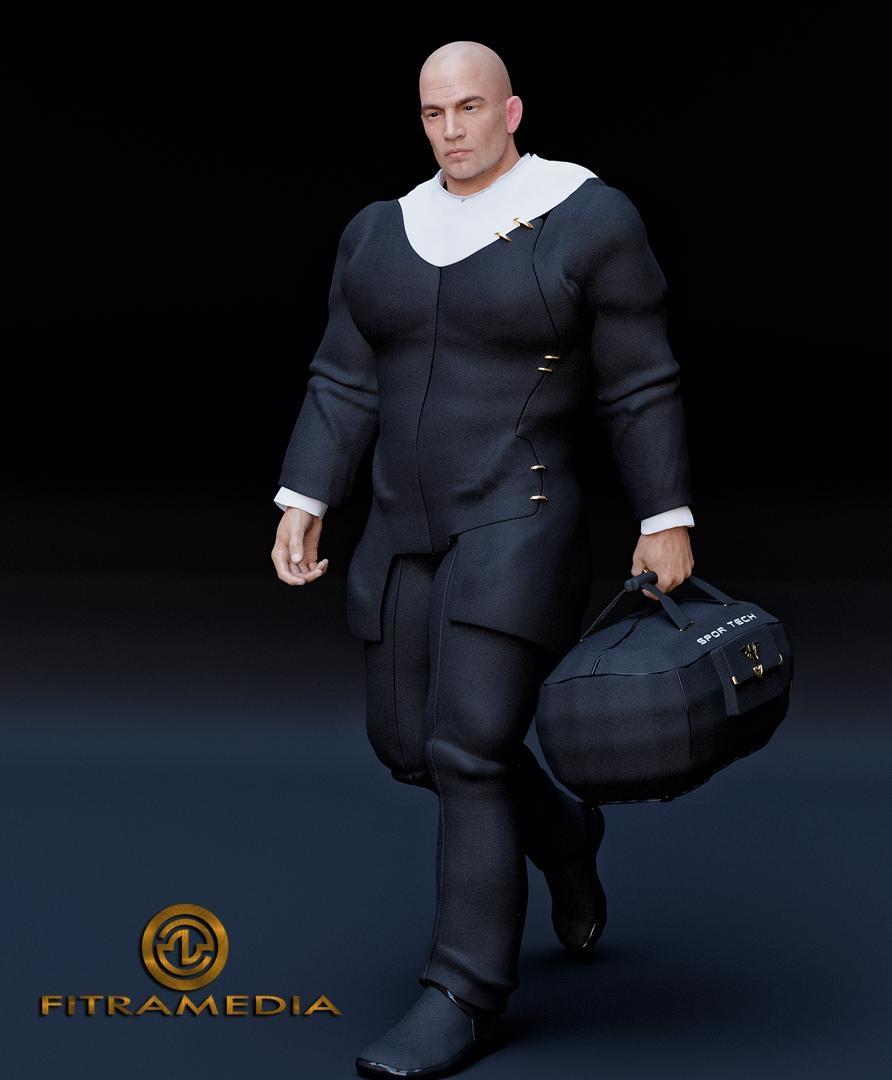
Then use Diffeo to import fully rigged/dressed Characters back to Blender
where you will have multiple options for animation and mocap retargeting
 Aging morph
Is that possible without any plugin? I don't remember well, but with Genesis 3 I think there were more morph and a slider to control the aging. Would be great to have more slider in new generations too to have completely customizable figures.
Missing Files, and my brutal solutionYou can Nuke them if you want, but it might help if you knew what it was you were Nuking.
In this case it's the modifier call to load and dial up the Mouth Realism HD morph, that morph is part of G8F's Starter Essentials and is used in most characters.
In this case it would appear that the vendor has made an ass of things and got the pathway wrong.
Aging morphHello,
I would like to create old and young people using Genesis 8.1 female (Victoria 8.1 HD), is this possible?
Thank you
Face transfer face/skin color helpMy 3D Spin said:
Do it in Gimp or Photo shop. Face transfer always comes out to reddish in the face.
Oh, so like edit out the red in photoshop/Gimp?
Face transfer face/skin color helpDo it in Gimp or Photo shop. Face transfer always comes out to reddish in the face.
Creating clothing in blender to bring into Daz3d?You have, as I read it, a number of questions.
But if sticking to your title 'creating clothing in blender and bring them into Das Studio'.
Then the answer is yes, I have done it mahy times.
When you have modelled your clothing and imported into DS, you can run Transfer Utility to make it fitted to that character.
I always model towards the base character shape. But if you just want to use it on a particular character, you can model towards that, but then you must tick 'reverse deformation' when runnnig transfer utility.
dForce can best handle regular quads, and all mesh must be welded, if it shall take part in the simulation. Default collision distance in dForce is 2 mm, so your quads shold in average be somewhat larger. I tend to strife for 10 mm, with some areas smaller when needed.
I would suggest to model something simple to get acquainted with the process.
Edited to add: materials must generally be applyed inside Daz Studio.
Morphs issue after upgrading to DS 4.20Tks for replying! I made sure the Genesis was all zeroed out before I applied the torso length to it. I'll re-check when I get to my DS rig, but I'm afraid there's more to it. The torso length morph ( and numerous other morphs) don't behave as expected anymore. Adjusting the length of the torso shouldn't really also scale arms, shoulders and head along the y-axis? I still have DS4.9 properly working on an older rig so will have to start it up and have a closer look...
Genesis 8 model without facestem_athome said:
Have attached the G8 morph file.
It's just wonderful it works great!
thank you very very much !
If you want I can pay you for this morph[Released] Conrad for Genesis 8.1 Male Bundle [commercial]FaberInc said:
Oh, I see Greta. Thanks for letting me know.
A couple of questions:- Did you purchase the bundle or only the individual character?
- Do the morphs presets in the Conrad folder work for you when you apply/remove them?
- The second image looks like him but is it at 100%? Are you sure there's no other character dialed as well? The first image doesn't look like genesis 8 base or Conrad. Have you tried zero everything through the shape/parameters and see if there's a change to the gen 8 base default morph?
I guess is something related to the character preset only, but once you give me those details I will ask support for letting me update this.vwrangler, do you also see this character morph that isn't genesis 8 default as well? or are you referring to the morphs not loading when loading the character preset?
@Faberinc: Thanks for your answer. I've bought not the bundle, only the character + HD Add and TattooAddOn.
And I have checked, there are no other morphs loaded when I use Conrad. And he is at 100%. The single morphs "body" and "head" works, but he looks like my picture 2 also. :(Missing Files, and my brutal solutionhello all,
several of my figures have been giving me the old 'missing files' popup - it doesn't say which files, but specifies Sisi for G8F as the source
a quick search with Agent Ransack and then a find with Notepad++ reveals the following block in a whole bunch of my figures' code:
---------------------------------------------------------------------------{
"id" : "PHMMouthRealism_HD_div2","url" : "/data/DAZ%203D/Genesis%208/Female/Morphs/Elianeck/Sisi/PHMMouthRealism_HD_div2.dsf#PHMMouthRealism_HD_div2","parent" : "#geometry","channel" : {"id" : "value","type" : "float","name" : "Value","value" : 1,"current_value" : 1},"region" : "Mouth","group" : "/Real World"},---------------------------------------------------------------------------...i deleted that entire block, saved the figure and test-loaded it, and it came up without errors.
now - before i do something i may regret - can anyone give me a valid reason why i should *not* go through the other 20 figures and edit them the same way? is there something in this method that's going to bite me later if i proceed?
*** for what it's worth, i have never added that morph to a figure myself, it has happened under its own steam and without my knowledge.
*** for what it's worth, part II - the Sisi character is still installed in my library, so no idea why anything would be flagged as missing.
Face transfer face/skin color helpHello so I figured out FT only really works for G8 not G8.1
But I'm having a dilemma where the skin will appear vastly different from the body,
I wondered if it was the asian tattoos I added but wouldn't that not effect skin coloration?
I also notice its a lot harder to notice in filament.
Is there a way to fix?
Or is that something I commission some for?
Thank you!
(Tattoos-https://www.daz3d.com/asian-skinworks-lie-tattoos-for-genesis-3-and-8-males)
Genesis 8 model without faceHave attached the G8 morph file.
[Released] Conrad for Genesis 8.1 Male Bundle [commercial]Greta said:
Does any body else have trouble with Faber's new chara Conrad? I have :(
If I load the "Actor" I got this: 01_Conrad (Morph doesn't load, only textures)
If I load a Genesis 8.1 Male Base and then load the character I got this result: 02_Conrad
He doesn't look like him. Other charas for Genesis 8.1 Male works well. If I look at the "Shapes" parameters, there are only the morphs for Conrad shown.
Does anybody has an idea, what can I do? Thanks very much
I've already submitted a problem ticket #414045 the day after release. Customer service has replicated the issue and it's in the queue to be fixed.
[Released] Conrad for Genesis 8.1 Male Bundle [commercial]Oh, I see Greta. Thanks for letting me know.
A couple of questions:- Did you purchase the bundle or only the individual character?
- Do the morphs presets in the Conrad folder work for you when you apply/remove them?
- The second image looks like him but is it at 100%? Are you sure there's no other character dialed as well? The first image doesn't look like genesis 8 base or Conrad. Have you tried zero everything through the shape/parameters and see if there's a change to the gen 8 base default morph?
I guess is something related to the character preset only, but once you give me those details I will ask support for letting me update this.vwrangler, do you also see this character morph that isn't genesis 8 default as well? or are you referring to the morphs not loading when loading the character preset?
Lava/Molten Rock Skin for G8M?JoeQuick said:
you might check out mr. rubble too. He's more man shaped so there should be less distortion if you dial out the brute and leave him more of a normal person.
https://www.daz3d.com/mr-rubble-hd-for-brute-8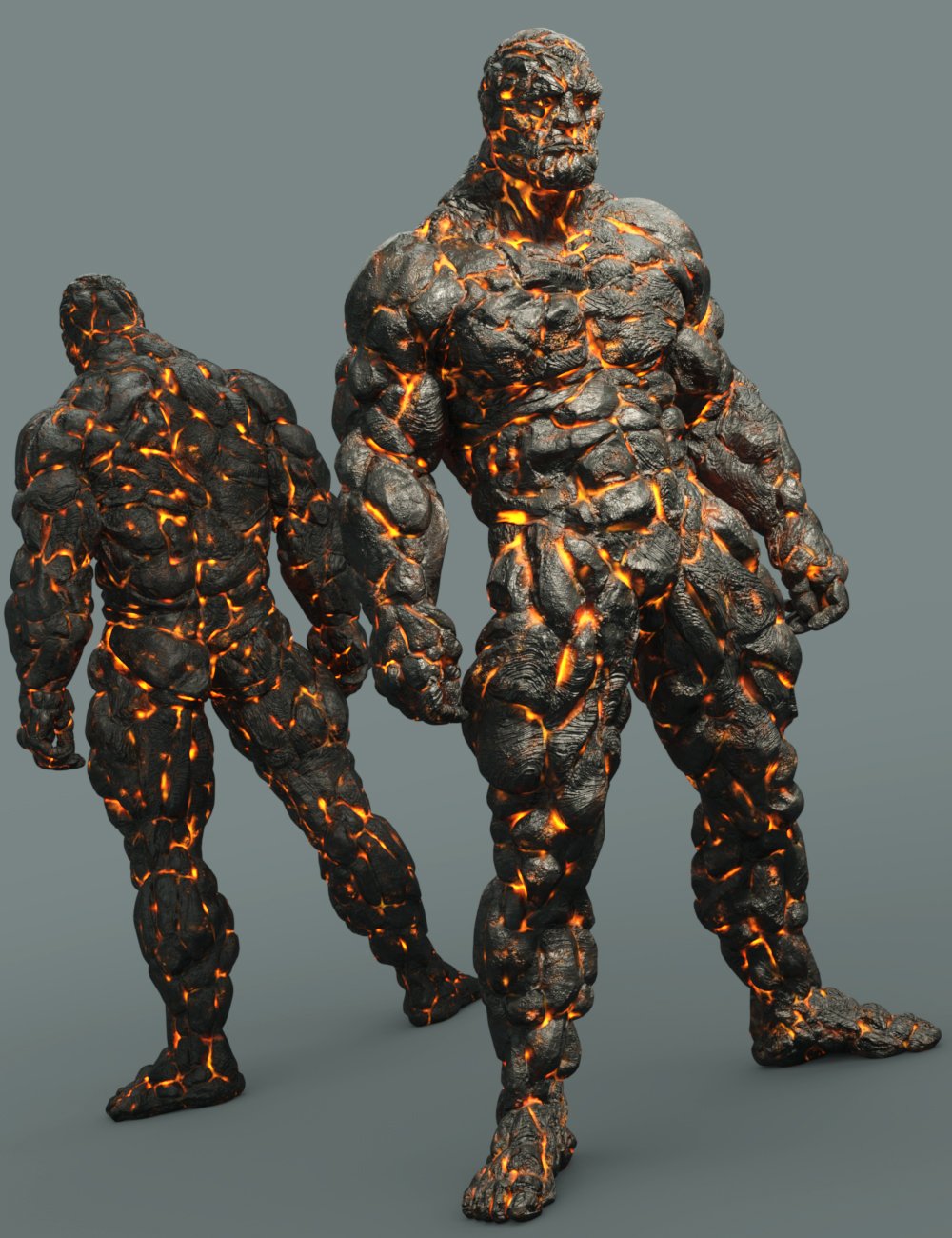
Was already suggested and yes, this is what I'm going with! I'm using Shape Splitter as well so I can just dial the actual morph/shape into the arm I want to use (it also works out that the character I'm doing all this with uses Brute 8).
Lava/Molten Rock Skin for G8M?JoeQuick said:
you might check out mr. rubble too. He's more man shaped so there should be less distortion if you dial out the brute and leave him more of a normal person.
https://www.daz3d.com/mr-rubble-hd-for-brute-8Was already suggested and yes, this is what I'm going with! I'm using Shape Splitter as well so I can just dial the actual morph/shape into the arm I want to use (it also works out that the character I'm doing all this with uses Brute 8).
I'm doing some fanart with this character from Guild Wars 2, though for my purposes, I'm wanting to basically show him half-corrupted instead of full-on corrupted -
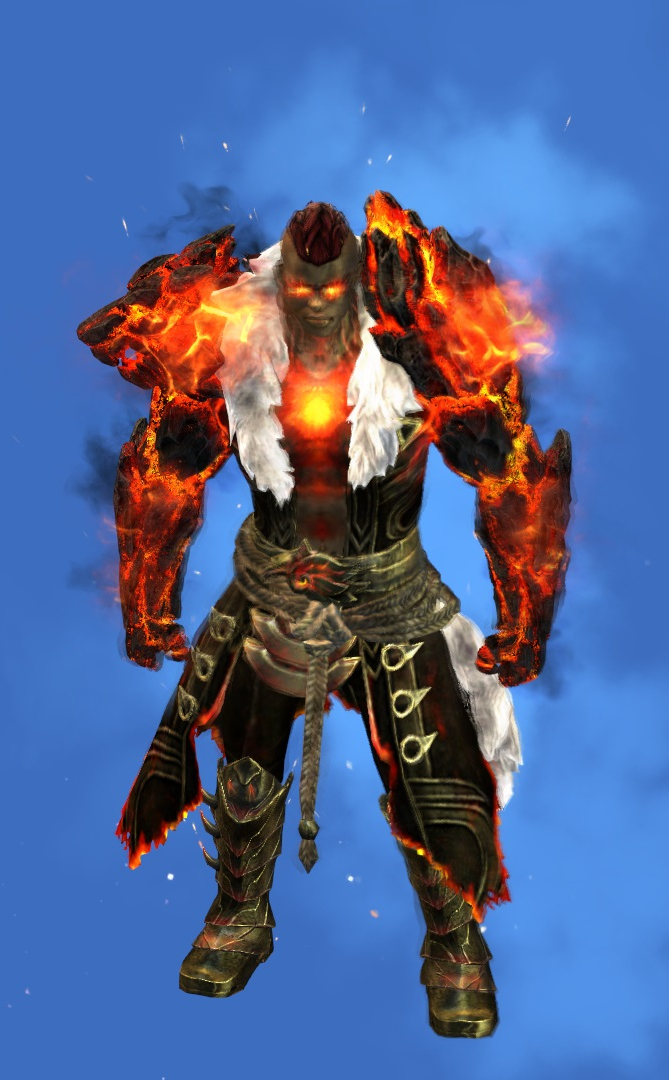
I'm taking it in steps...trying to get the arms/skin handled and then I'll work on the armor, which will need to be kitbashed as closely as I can get it. I already have some magic geoshells and whatnot to help get the actual flames and embers going.[Released] Conrad for Genesis 8.1 Male Bundle [commercial]Does any body else have trouble with Faber's new chara Conrad? I have :(
If I load the "Actor" I got this: 01_Conrad (Morph doesn't load, only textures)
If I load a Genesis 8.1 Male Base and then load the character I got this result: 02_Conrad
He doesn't look like him. Other charas for Genesis 8.1 Male works well. If I look at the "Shapes" parameters, there are only the morphs for Conrad shown.
Does anybody has an idea, what can I do? Thanks very much
G8F Limping PosesI would like to offer a story accompanied by a freebie. Or you could see reading the story as a penance... So here's the story. What's surprising is that it's basically true.
In the late 1950's or early 1960's, the lead engineer at Decca in the UK invented the concept of, and built, the first aircraft flight data recorder/ cockpit voice recorder - an idea that was patented. When the Decca family were deaf to his suggestions that he should become a board member having made them a fortune, he left. He joined with a financier to buy a walking stick manufacturer called 'Coopers'. Coopers was a small and mismanaged firm hemorrhaging money, and likely to go bankrupt if nothing happened urgently. The lead engineer, my Uncle by marriage, needed to create a product that could be sold, and fast.
The new owners of 'Coopers' realized that the NHS was putting out a major contract for walking sticks and crutches. Up until then, they had been made from wood, were heavy and cumbersome. My Uncle invented and patented the use of lightweight telescopic aluminium tubes with moulded plastic fittings for such equipment. My Aunt, being a Physiotherapist, worked out shapes that were less harmful to the body than the wooden type, and my young cousins tested the prototypes. The contract was won, and my Uncle's family stopped staring the very real prospect of bankruptcy in the eye and slowly became quite comfortably off. After my Uncle died of his third heart attack, my Aunt was forced to sever her connection with Coopers, but they remain fond of the company.
The first version of the telescopic aluminium tube walking stick was very, very similar to this freebie..
This freebie consists of a walking stick, a couple of wearable presets, and a pose (with mirror) of G8F using the walking stick. The walking stick has a length morph, but the brass detent pins don't move with the length.
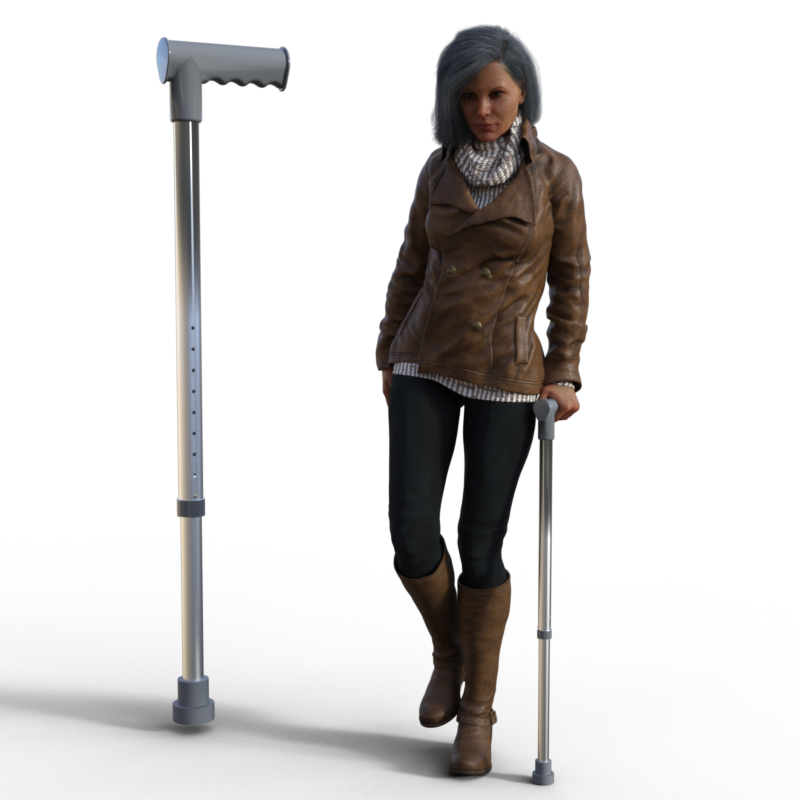
I do hope that you will find it useful.
Regards
Richard.
Daz to Blender Bridge - Meet the TeamThank you so much for your detailed information. I beleve my error was not zero-ing the figure before I sent the content across to Blender. I had sent across a file with an animated timeline.
I used the figure and character morph at zero pose (character still applied), and the transfer is without distortion in the hands.
For reference, here aremy responses to your information requests
dzblenderbridge.dll
version 2022.1.9.30Daz Studio Pro
4.20.1.17Blender add-on
Import-Export : DazToBlender
version 2022.1.1Scene figure: Genesis 8 Male
Character morph and shader set: Yuzuru
Hair: Yuzuru hair
Lucidity clothing set: pants and shirt
Jasper Black clothing set: boots
Hippusuta clothing set: headphonesSteps prior to sending to Blender:
Set up scene with figure character and background props
Pose figure (noted should have been in zero default pose)
Save scene
Send To Daz To Blender
(See screenshots of options I selected)Steps inside Blender:
Open DazToBlender drawer tab
Import New Genesis Figure
(See screenshots)Daz 3D is part of

Connect
DAZ Productions, Inc.
7533 S Center View Ct #4664
West Jordan, UT 84084Licensing Agreement | Terms of Service | Privacy Policy | EULA
© 2026 Daz Productions Inc. All Rights Reserved.