-
Strand Hair Oddnesseses
- To save money, I dust off the old Zygote bear and start with that. Then I create a new hair object and fit it to her.
- The hair editor opens and there's the bear rotated to some oddball angle. I didn't rotate anything.
Weird, I have created SBH on countless figures and clothing, and it has never changed the rotation in the SBH Editor viewer or viewport for me.
The SBH Editor viewer should reflect the rotation and morph of the figure at the time that you create the SBH item. Even if you re-pose/remorph the figure, opening the SBH Editor will show you the view of the figure at the time that SBH was created. And you should have free-reign to morph/pose the figure after creating the SBH.
it might be something weird with that figure?
- When I exit the editor, she's still rotated, and I can't unrotate her. The controls aren't locked, but the sliders and the typed inputs and the rotate widget all do nothing. Until I delete the hair object, she's stuck like that. I have to juggle three axis rotates of the hip node to level her out or reorient her. What's up with that?
That said, it would be interesting to see how your Scene tab was set up, maybe you had weird parenting relationships? (It was unclear from your screenshots)
- So I ignore that for the moment and proceed with the hair, giving it a salted golden-ish color.
- When I finish, the hair ain't golden, even after I reassign the dual-lobe shader and return to the hair editor to confirm the color-picker. I can change the transmission color and the highlight color and the glossy, but the hair itself stays black-hole black no matter what I change. Is it supposed to do that?
The color in the SBH Editor itself should just be ignored, imo. if you can figure out what the purpose of this is, let me know. I think this is just a holdover from when the SBH Editor was Garibaldi and had a 3DLite Shader, but i could be completely wrong.
SBH Editor should just be used for creating geometry, imo, and then adjustment to hair colours should be done in Daz Studio surface tabs.
I just use these hair presets (https://www.daz3d.com/real-hair-shaders-for-dforce-and-strand-based-hairs) for dual lobe shader from the Daz Store.
- I decide to settle for a black bear and feel grateful that at least it's not green. I also update the figure to iRay Uber surfaces and color them to match the fur. I add two D-formers for closing the eyes, pose a scene with a second figure and add a camera.
- I want more than one pose combination with the two figures, so I set the poses as keyframes and advance the timeline. When I finish posing, I save it all one more time and shut down.
- When I open the file next time, something's missing. Where is the camera in my timeline? Where are the D-formers? I can see that all visibility flags are active, so what's going on? Sometimes keyMate and graphMate can show me channels that have vanished from the primary timeline, but not always. The animation tools are failing me again, and I'm not even animating. What gives?
I will leave someone else to answer such questions as these are animation related.
how to have a nose look like its inhaling?Have you looked at yourself in a mirror?
I, at least, have only a very suttle movement when inhaling.
If you are using FACS you can slighty raise the nose/nostrils.
Or if you want to exaggerate it, you could push the nostrils to the side, with mesh-grabber, d-former or a dedicated morph.
Suddenly, all my G3F Characters are "Deflated"had that happen to my g3f once... I used the old programmers trick... when to the folder with the gen 3 female moprhs and took half out ... and opened again that told me which half the half out or the half in had the bad morph... then do that again cutting the load by half unti you find out which one it is.
---
same thing with shape presets etc
3D Art Freebie Challenge June+July 2022 - "The secret life of ..." - Main Thread OnlyThe Secret Lives of Superheroes
Even superheroes need some time off sometimes! So here's Captain Marvel, watching TV in her comfy clothes and enjoying some junk food XD
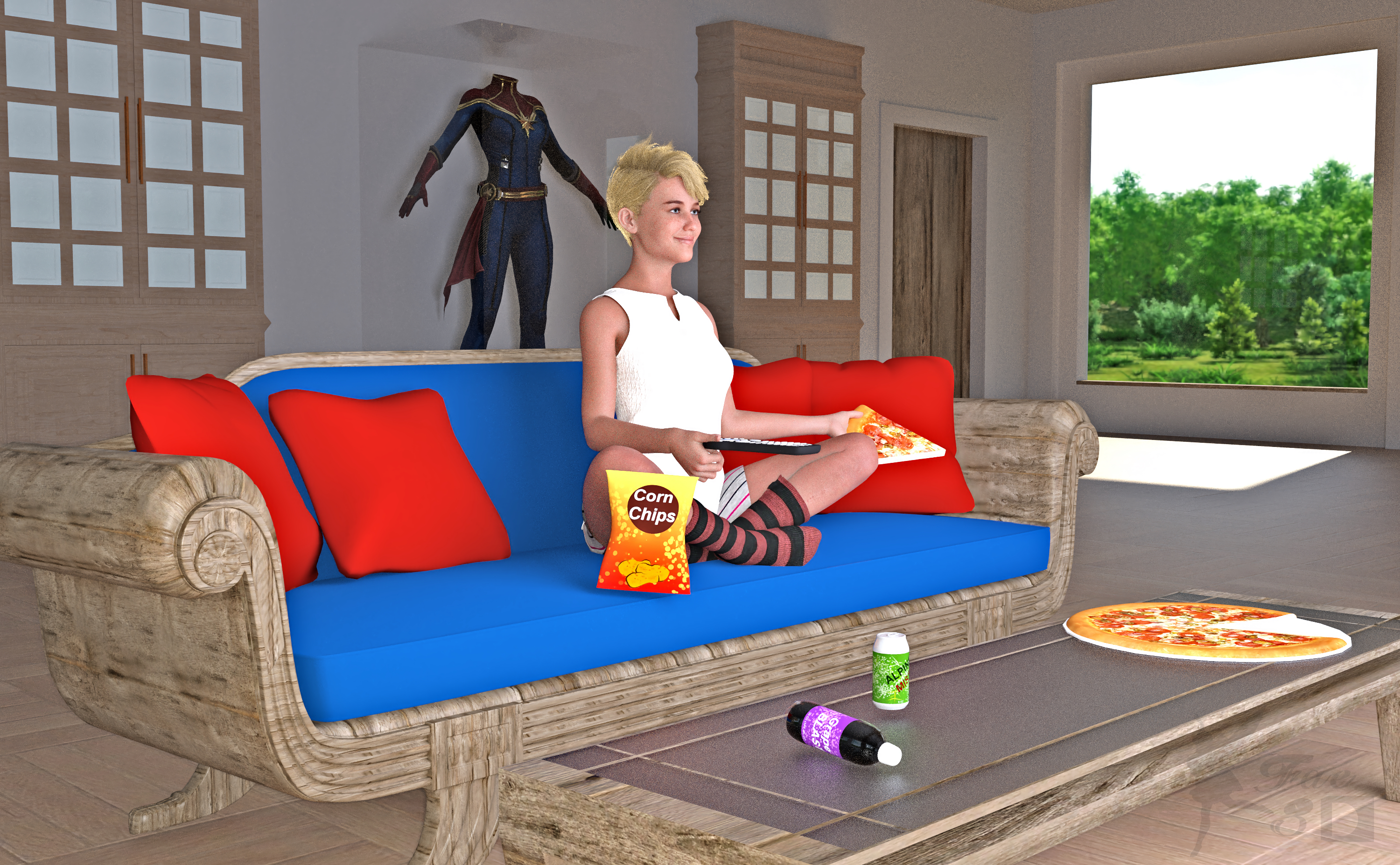
Free:
Captain Marvel (Hair and Outfit on Display) - https://www.deviantart.com/dddark898/art/Captain-Marvel-921629533
Wool Socks for Genesis 8 Female - http://www.digi-dotz.com/index.php/free-poses/daz-clothes/206-socks-for-daz-genesis-8-female?highlight=WyJzb2NrcyJd
G8F Shorts & Summer Top - https://www.wilmapsdigitalcreations.co.uk/view_product.php?id=459
25 Beach Photoshooting Poses (Lower Body Pose) - https://www.deviantart.com/hemi-426/art/25-Beach-Photoshooting-Poses-774842043
Media Remotes - https://www.renderosity.com/freestuff/items/74431/media-remotes
Toon Food (Pizza) - http://trumarcar.francemi.net/foodprops_tc.htm (scroll down almost to end)
Classic Furniture Set (Coffee Table) - https://www.renderosity.com/freestuff/items/77267/classic-furniture-set
Office Furniture Set (Bookcases) - https://sharecg.com/v/94502/gallery/21/DAZ-Studio/Office-Furniture-Set
Gas Station & Convenience Store (Chips, Sodas) - https://sharecg.com/v/91301/browse/21/DAZ-Studio/Gas-Station-Convenience-Store
Wood Shaders - https://www.renderosity.com/freestuff/items/89287/woodshader-daz3d-iray
Contemporary Loft - https://www.renderosity.com/mod/freestuff/contemporary-loft/77790
No Count:
Primitive Cubes for Door and Outfit Display Case
Primitive Cylinder for Pizza Plate
Iray Glass Shaders that came with Studio
Mooncraft’s Sleek Sofa (No longer available?)
Paid:
Bridget 8 (Head Morph and Textures) - https://www.daz3d.com/bridget-8
SY Invisilights Iray (to help light the scene) - https://www.daz3d.com/sy-invisilights-iray
ColorWerks Extreme: Hair Texture Blending for Iray and dForce Hair - https://www.daz3d.com/colorwerks-extreme-hair-texture-blending-for-iray-and-dforce-hair
Medea HD for Genesis 8 Female (Expression and Eye Color Only) - https://www.daz3d.com/medea-hd-for-genesis-8-female
I tweaked the materials and the pose. Set up and rendered within Daz Studio Iray. Postwork in Pixelmator. I’ve attached the before post render (the one that says Render) and the finished image file. Captain Marvel is ©Marvel, and ©Walt Disney Company
Using morphs for rotation in DAZI'm not about to start creating joints in the Genesis figures. Make the morph, make the controller. Seemed pretty simple to me - maybe I'm missing the point of what you're all finding so difficult. Try as I might, this foot did not deform into an ugly explosion of polygon goo.

 New! Novica & Forum Members Tips & Product Reviews Pt 14
memcneil70 said:
@Gordig, Jun-fan has two skin material, and a Human and a Warlock Head to apply.
Yes, but all the promos show the morph as exceptionally - dare I say superhumanly - veiny and with almost Liefeldian musculature. JunJi is a realistic human character that can be made into a vampire, where JunFan looks like a vampire character that can be made slightly more human.
Process on making Custom Character?To be clear, are you wanting to ceate a new figure from scratch or a custom morph for an existing figure?
3D Art Freebie Challenge June+July 2022 - "The secret life of ..." - Entries Thread Only3D Art Freebie Challenge June-July 2022 "The secret life of ..."
Here's my first entry for this month, not sure if there's enough time for a second. So many ideas, so little time...
"(The secret life of ...) Masataka and Walther"
[Best watched at full size for details.]Starring: Masataka and Walther
The tale: (Entirely fictional)
None of Walther's friends, acquaintances, or co-workers know that he's a ventriloquist, not even his girlfriend, because he's afraid they won't think he's so cool anymore. He practices when she is not at home and every now and then he performs in small venues, while, because he has been a ventriloquist since childhood, he is very good and could perform well in very large venues.
Masataka: "Can you believe this guy? You all know he locks me up in that filthy old suitcase? Well he does! And I wasn't allowed to tell anyone about it, but I do it anyway 'cause he can't stop me from doing that! I am not a child anymore, what is he thinking! I think it's time to start living on my own..."
Walther is both amazed and stunned, how is it possible that Masataka can speak on his own?
Non-Motion Picture Soundtrack:
Queen - A Kind of Magic (© 1986) https://www.youtube.com/watch?v=0p_1QSUsbsM
COUNTABLE FREEBIES: (Alphabetic order)#01! 33 Eyes Materials for the Genesis 8 + 8.1 people by LevKornowska
https://www.renderosity.com/freestuff/items/88372/33-eyes-materials-for-the-genesis-8-81-people **#02! Bear Ring by kalhh
https://www.deviantart.com/kalhh/art/Bear-Ring-853733610 **#03! Drinks by klausdbg
https://www.sharecg.com/v/74240/gallery/5/3D-Model/Summer-IV-Drinks **#04! ED's Brick Shader (Iray) by Edheldil3D
https://www.deviantart.com/edheldil3d/art/Freebie-ED-s-Brick-Shader-Iray-788871766 **#05! Free Table and Stool for Daz by Digi-Dotz
http://www.digi-dotz.com/index.php/free-poses/props/14-free-table-and-stool-for-daz#06! G8M Walther 2.0 by Ruslanomar
https://sharecg.com/v/97276/gallery/21/DAZ-Studio/G8M-Walther-2.0 **#07! Genesis 2 Female Short Skirt & Jumper by Wilmap's Digital Creations
https://www.wilmapsdigitalcreations.co.uk/view_product.php?id=217 **#08! Iray car related shader presets 'megapack' by Tom2099
https://www.deviantart.com/tom2099/art/Iray-car-related-shader-presets-megapack-539622361 **#09! Kiara Interior HDRI by Poly Haven
https://polyhaven.com/a/kiara_interior#10! Leon Noir For G8M by Shinteo
https://www.patreon.com/posts/leon-noir-for-31685639#11! Lights for Daz Studio w/ Iray by DrBoots
https://www.deviantart.com/drboots/art/Freebie-Lights-for-Daz-Studio-w-Iray-579993105 **#12! Maddy for GF8 Charakter Shape by MysticArtDesign
https://sharecg.com/v/98461/browse/21/DAZ-Studio/Maddy-for-GF8-Charakter-Shape **
[LIE Blush Make up & freckles, customized, used on G8M]#13! Masataka for Walther 2.0 by Ruslanomar
https://sharecg.com/v/99056/browse/21/DAZ-Studio/Masataka-for-Walther-2.0 **#14! New Walther 2.0 tanned skin + hair system by Ruslanomar
https://sharecg.com/v/98463/browse/21/DAZ-Studio/New-Walther-2.0-tanned-skin-%2B-hair-system **#15! mcjJapaneseStyleScreens by mCasual Jacques
https://sites.google.com/site/mcasualsdazscripts9/mcjjapanesestylescreens
[Wood texture]#16! MIC Set by MDP Download
https://sites.google.com/site/mdp6gdl/ (item 11)#17! MicCable Set by MDP Download
https://sites.google.com/site/mdp6gdl/ (item 13)#18! MicStand Set by MDP Download
https://sites.google.com/site/mdp6gdl/ (item 12)#19! Morphing Pillow by TrekkieGrrrl
https://trekkiegrrrl.dk/mpp3.htm (item 1)#20! Mystics Floor & Backplanes by MysticArtDesign
https://sharecg.com/v/94620/browse/21/DAZ-Studio/Mystics-Floor-Backplanes **#21! Old Suitcase by hypnagogia
https://sharecg.com/v/82975/gallery/5/3D-Model/Old-Suitcase **#22! Pd-Soft Leather Daz Studio Shaders for Iray by Parrotdolphin (Janet)
https://sharecg.com/v/80223/gallery/7/Material-and-Shader/Pd-Soft-Leather-Daz-Studio-Shaders-for-Iray **#23! Realistic Curtains by Cherubit
https://www.renderosity.com/freestuff/items/83637/realistic-curtains **#24! Shimmery Sheer Fabrics II by AllenArt
https://sharecg.com/v/95898/gallery/21/DAZ-Studio/Shimmery-Sheer-Fabrics-II **#25! Simple Glasses for Genesis 8 Male/Female by GEOmetalics
https://www.renderosity.com/freestuff/items/85459/simple-glasses-for-genesis-8-male-female **#26! Spotlight Prop by DrBoots
https://www.deviantart.com/drboots/art/Freebie-Daz-3D-Studio-Iray-Spotlight-Prop-582958157 **#27! Stage Speaker by woodkz71
https://www.renderosity.com/freestuff/items/78116/stage-speaker **#28! "STRONG" for G8M Character Morph & Pose by Mar3D
https://www.renderosity.com/mod/freestuff/strong-for-g8m-character-morph-amp-pose/82833 **#29! SuitWell Watch G8M - FREE by SdeB
https://www.sdebstore.com/collections/free-stuff/products/suitwell-watch-g8m-free **#30! SY 200 Morphs for Genesis 8 Head and Body by SickleYield
https://sharecg.com/v/91888/view/21/DAZ-Studio/SY-200-Morphs-for-Genesis-8-Head-and-Body **
NO-COUNT ITEMS:--- Iray Satin Shaders by AllenArt
--- Scene Lights for Iray by Lali Kamala (The Holiday Loyalty Sale 2021 Free Item)
--- Sneakers for G3F by TabPURCHASED/PAID FOR ITEMS: None 100% Freebies
*1 E-mail address required
** Registration required
#x! Countable Items (Bold ones are used by me for the first time I think.)
--- No longer available freebies
++ Free with DAZ Studio (or the Essentials)
$x. Purchased/Paid For Item
Rendered with DAZ Studio 4.10.0.123 (nVidia Iray)Other free software used: GIMP v2.10.30 and Irfanview 4.60
Postwork: used the AltaLux Image Enhancement Filter (Effect) by Stefano Tommesani that comes with Irfanview and some filters (oa) that come with GIMP. Also used mcjDenoise (https://sites.google.com/site/mcasualsdazscripts9/mcjdenoise) and mcjLut by mcasual (https://sites.google.com/site/mcasualsdazscripts9/mcjlut) with the free RocketStock LUTs (Neon 770.CUBE).

"(The secret life of ...) Masataka and Walther"
New! Novica & Forum Members Tips & Product Reviews Pt 14Jin-ju HD for G8.1F LI Incandescent - Portrait Lighting 3-in1 Low Ponytail Hair for G8F dForce Maho Outfit for G8.1F
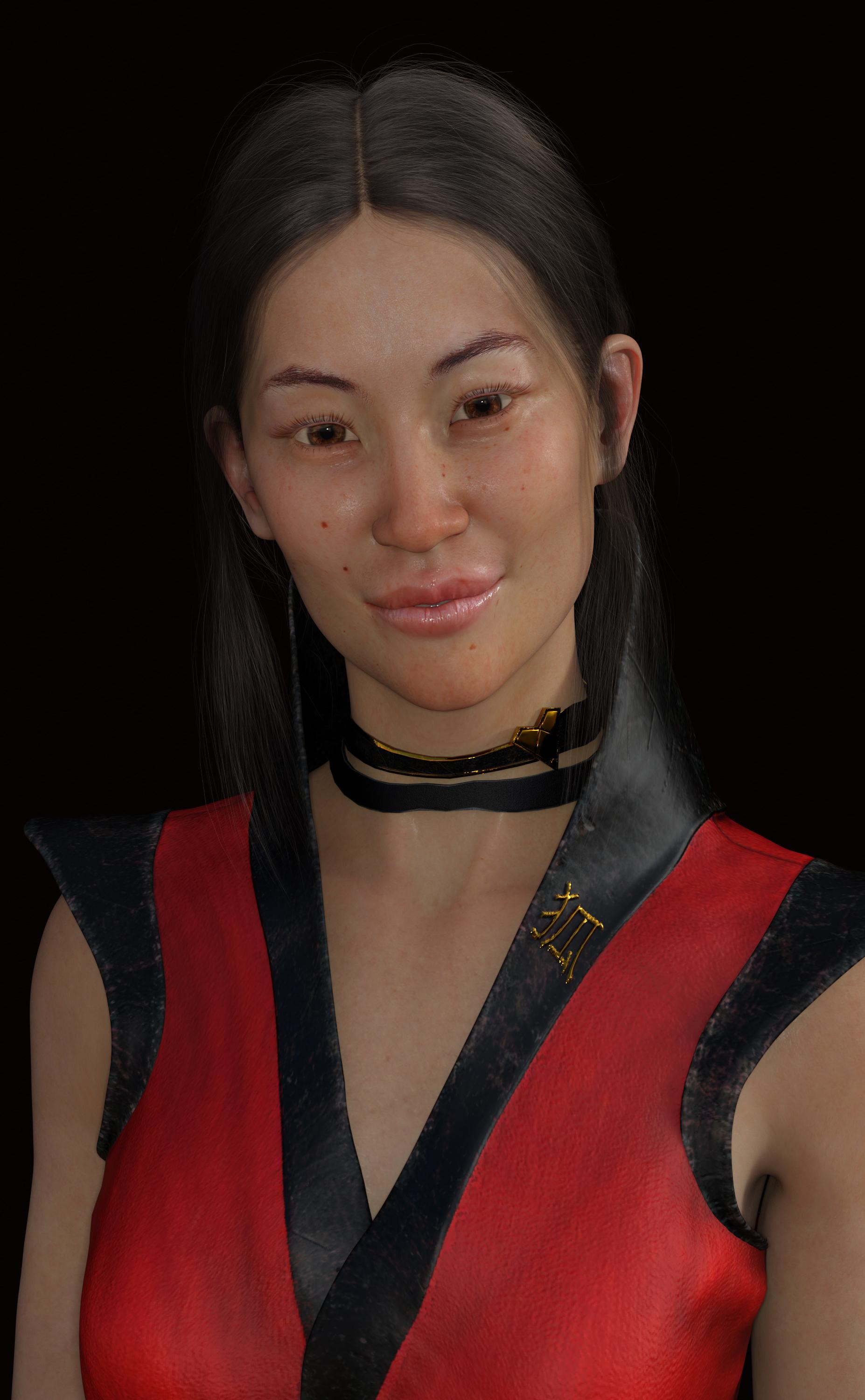
I really like the skin of this character. To me it looks very realistic. I don't really care to much about the morphs but i thought I would do at least one render with the original morphs/skin. There is nothing wrong with the morph its just not the type of renders I do, although who's to say that I won't use it in the future. This is a straight out of the box render. No adjustments at all. My only complaint with this is she seems to be a little bit oily with these lights.
Edited:
 Strand-based hair - need testers
I think I was wrong about the strand-based hair parenting problem being fixed in 4.20. I think I was simply lucky once. Today it fails for me again if I parent the strand-based hair to the scalp, save the hair, and reload it.
This is what does seem to work for me:
- Create a scalp geometry and use transfer utility to rig it to G8F, or use an existing rigged scalp
- Fit the scalp to G8F but do not parent the scalp to G8F
- Create the strand-based hair elements fit to the scalp
- Do not parent the strand based hair elements to the scalp
- Create a new group with the scalp and strand-based hair elements parented to the new group
- Select G8F (nothing is parented to her)
- File/Save as/Wearable Preset and select the new group as the thing to save
With this method, I can load the saved wearable preset on any morphed G8F and it will follow the morphs. Fit may not be exactly perfect, just like any other autofollow scalp doesn't follow perfectly. I generally add morphs to my scalps to adjust forehead depth, etc. Sometimes I even create FHMs for extreme shapes.

Oops, I didn't mean to name my scalp "scalp scalp" but it doesn't matter what the name is.
3D Art Freebie Challenge June+July 2022 - "The secret life of ..." - Main Thread OnlyJackyBrown said:
3D Art Freebie Challenge June-July 2022 "The secret life of ..."
Here's my first entry for this month, not sure if there's enough time for a second. So many ideas, so little time...
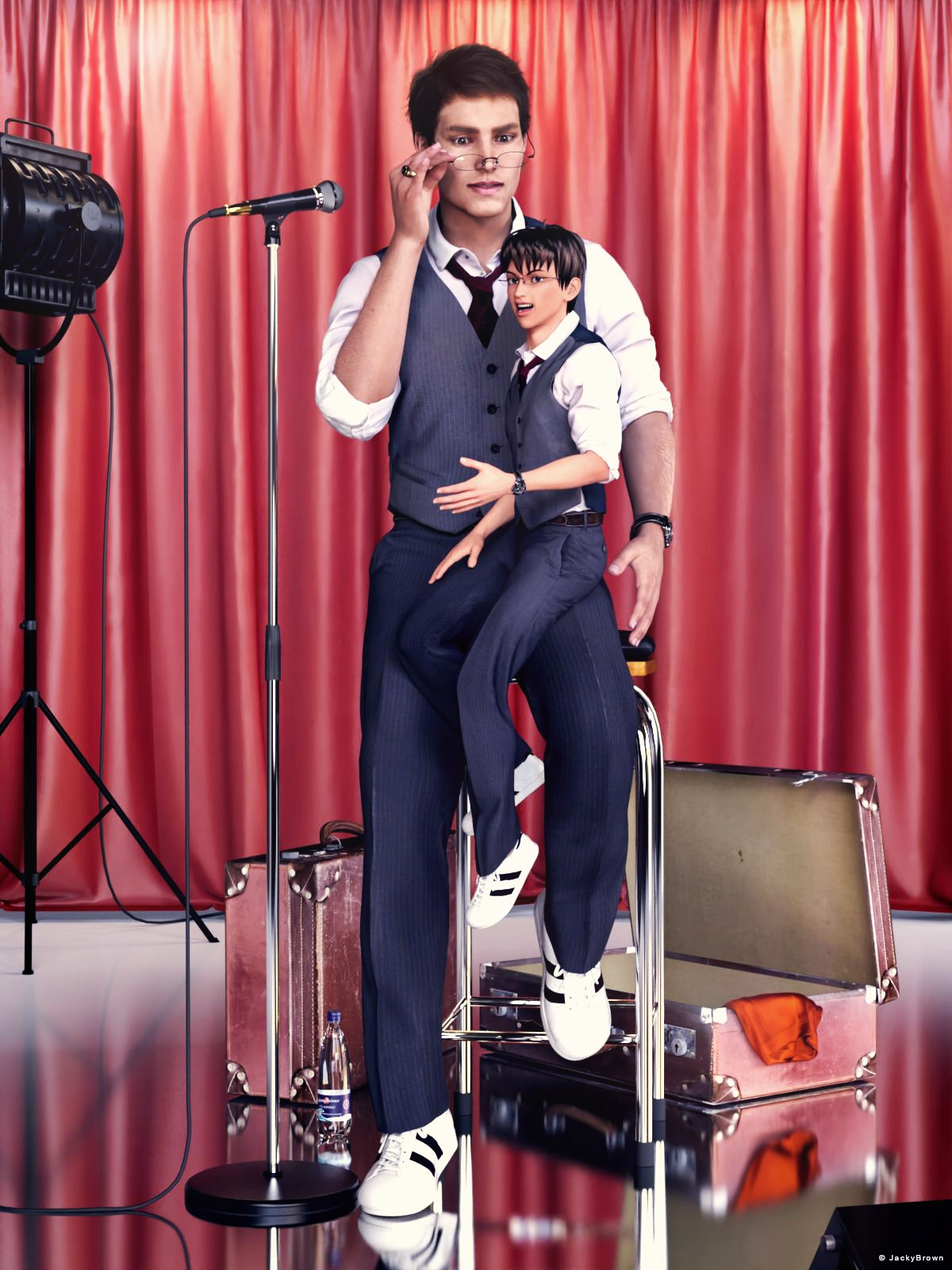
"(The secret life of ...) Masataka and Walther"
[Best watched at full size for details.]Starring: Masataka and Walther
The tale: (Entirely fictional)
None of Walther's friends, acquaintances, or co-workers know that he's a ventriloquist, not even his girlfriend, because he's afraid they won't think he's so cool anymore. He practices when she is not at home and every now and then he performs in small venues, while, because he has been a ventriloquist since childhood, he is very good and could perform well in very large venues.
Masataka: "Can you believe this guy? You all know he locks me up in that filthy old suitcase? Well he does! And I wasn't allowed to tell anyone about it, but I do it anyway 'cause he can't stop me from doing that! I am not a child anymore, what is he thinking! I think it's time to start living on my own..."
Walther is both amazed and stunned, how is it possible that Masataka can speak on his own?
Non-Motion Picture Soundtrack:
Queen - A Kind of Magic (© 1986) https://www.youtube.com/watch?v=0p_1QSUsbsM
COUNTABLE FREEBIES: (Alphabetic order)#01! 33 Eyes Materials for the Genesis 8 + 8.1 people by LevKornowska
https://www.renderosity.com/freestuff/items/88372/33-eyes-materials-for-the-genesis-8-81-people **#02! Bear Ring by kalhh
https://www.deviantart.com/kalhh/art/Bear-Ring-853733610 **#03! Drinks by klausdbg
https://www.sharecg.com/v/74240/gallery/5/3D-Model/Summer-IV-Drinks **#04! ED's Brick Shader (Iray) by Edheldil3D
https://www.deviantart.com/edheldil3d/art/Freebie-ED-s-Brick-Shader-Iray-788871766 **#05! Free Table and Stool for Daz by Digi-Dotz
http://www.digi-dotz.com/index.php/free-poses/props/14-free-table-and-stool-for-daz#06! G8M Walther 2.0 by Ruslanomar
https://sharecg.com/v/97276/gallery/21/DAZ-Studio/G8M-Walther-2.0 **#07! Genesis 2 Female Short Skirt & Jumper by Wilmap's Digital Creations
https://www.wilmapsdigitalcreations.co.uk/view_product.php?id=217 **#08! Iray car related shader presets 'megapack' by Tom2099
https://www.deviantart.com/tom2099/art/Iray-car-related-shader-presets-megapack-539622361 **#09! Kiara Interior HDRI by Poly Haven
https://polyhaven.com/a/kiara_interior#10! Leon Noir For G8M by Shinteo
https://www.patreon.com/posts/leon-noir-for-31685639#11! Lights for Daz Studio w/ Iray by DrBoots
https://www.deviantart.com/drboots/art/Freebie-Lights-for-Daz-Studio-w-Iray-579993105 **#12! Maddy for GF8 Charakter Shape by MysticArtDesign
https://sharecg.com/v/98461/browse/21/DAZ-Studio/Maddy-for-GF8-Charakter-Shape **
[LIE Blush Make up & freckles, customized, used on G8M]#13! Masataka for Walther 2.0 by Ruslanomar
https://sharecg.com/v/99056/browse/21/DAZ-Studio/Masataka-for-Walther-2.0 **#14! New Walther 2.0 tanned skin + hair system by Ruslanomar
https://sharecg.com/v/98463/browse/21/DAZ-Studio/New-Walther-2.0-tanned-skin-%2B-hair-system **#15! mcjJapaneseStyleScreens by mCasual Jacques
https://sites.google.com/site/mcasualsdazscripts9/mcjjapanesestylescreens
[Wood texture]#16! MIC Set by MDP Download
https://sites.google.com/site/mdp6gdl/ (item 11)#17! MicCable Set by MDP Download
https://sites.google.com/site/mdp6gdl/ (item 13)#18! MicStand Set by MDP Download
https://sites.google.com/site/mdp6gdl/ (item 12)#19! Morphing Pillow by TrekkieGrrrl
https://trekkiegrrrl.dk/mpp3.htm (item 1)#20! Mystics Floor & Backplanes by MysticArtDesign
https://sharecg.com/v/94620/browse/21/DAZ-Studio/Mystics-Floor-Backplanes **#21! Old Suitcase by hypnagogia
https://sharecg.com/v/82975/gallery/5/3D-Model/Old-Suitcase **#22! Pd-Soft Leather Daz Studio Shaders for Iray by Parrotdolphin (Janet)
https://sharecg.com/v/80223/gallery/7/Material-and-Shader/Pd-Soft-Leather-Daz-Studio-Shaders-for-Iray **#23! Realistic Curtains by Cherubit
https://www.renderosity.com/freestuff/items/83637/realistic-curtains **#24! Shimmery Sheer Fabrics II by AllenArt
https://sharecg.com/v/95898/gallery/21/DAZ-Studio/Shimmery-Sheer-Fabrics-II **#25! Simple Glasses for Genesis 8 Male/Female by GEOmetalics
https://www.renderosity.com/freestuff/items/85459/simple-glasses-for-genesis-8-male-female **#26! Spotlight Prop by DrBoots
https://www.deviantart.com/drboots/art/Freebie-Daz-3D-Studio-Iray-Spotlight-Prop-582958157 **#27! Stage Speaker by woodkz71
https://www.renderosity.com/freestuff/items/78116/stage-speaker **#28! "STRONG" for G8M Character Morph & Pose by Mar3D
https://www.renderosity.com/mod/freestuff/strong-for-g8m-character-morph-amp-pose/82833 **#29! SuitWell Watch G8M - FREE by SdeB
https://www.sdebstore.com/collections/free-stuff/products/suitwell-watch-g8m-free **#30! SY 200 Morphs for Genesis 8 Head and Body by SickleYield
https://sharecg.com/v/91888/view/21/DAZ-Studio/SY-200-Morphs-for-Genesis-8-Head-and-Body **
NO-COUNT ITEMS:--- Iray Satin Shaders by AllenArt
--- Scene Lights for Iray by Lali Kamala (The Holiday Loyalty Sale 2021 Free Item)
--- Sneakers for G3F by TabPURCHASED/PAID FOR ITEMS: None 100% Freebies
*1 E-mail address required
** Registration required
#x! Countable Items (Bold ones are used by me for the first time I think.)
--- No longer available freebies
++ Free with DAZ Studio (or the Essentials)
$x. Purchased/Paid For Item
Rendered with DAZ Studio 4.10.0.123 (nVidia Iray)Other free software used: GIMP v2.10.30 and Irfanview 4.60
Postwork: used the AltaLux Image Enhancement Filter (Effect) by Stefano Tommesani that comes with Irfanview and some filters (oa) that come with GIMP. Also used mcjDenoise (https://sites.google.com/site/mcasualsdazscripts9/mcjdenoise) and mcjLut by mcasual (https://sites.google.com/site/mcasualsdazscripts9/mcjlut) with the free RocketStock LUTs (Neon 770.CUBE).
"(The secret life of ...) Masataka and Walther"
All The Links Check Out Plz Post To The Entries Thread
Is there a tutorial on changing the face by sculpting?ekajuan_9f765a669b said:
Question:
It seems after importing to blender,
If I seperated the eyeballs in order to sculpt the face and then rejoin the eyeballs, it makes this kind of problem to the morph.Is this correct, no geometry is allowed to be separated and rejoined?
Correct, as that will change vertex order.
I will suggest to hide the items, you don't want to change.
Import Morphs?So, I found a guy on DeviantArt doing Celebrity Morphs for DAZ. I downloaded a few and drag-and-dropped them into the DAZ Library. They seem to go to Data>Daz 3D>Genesis 8>Male>Morphs>Magnus1781
However, when loading a G8M Base or any other G8M, the morph is nowhere to be found. Is there some sort of import process I need to follow? I cannot see it in the Content Library, I can't see it in any of the morph dials under heads, Body, All, etc. I am stumped. I have used user-created content before without issue, but I can't seem to figure this one out.Is there a tutorial on changing the face by sculpting?Question:
It seems after importing to blender,
If I seperated the eyeballs in order to sculpt the face and then rejoin the eyeballs, it makes this kind of problem to the morph.Is this correct, no geometry is allowed to be separated and rejoined?
Using morphs for rotation in DAZYou must create a joint.. Morphs work in linear way. Perfect for translations but very bad for rotations. You must rig your model and if you want use Erc to link joint rotation to a new custom parameter (grouped as a morph).Using morphs for rotation in DAZNecriseye said:
apparently there's no way to make the morph properly rotate on an axis in daz...
Morphs do not rotate. the morph moves a vertex (or multiple vertices) from one coordinate point to another in linear fashion. The vertex moves along a straight line from point A to point B.
Using morphs for rotation in DAZI suspect "the" answer is not a one post solution. Likely requires a series of morphs with controllers which include step morph activations along with the pose trigger activations. i.e. a rather complicated procedure which yes, should be doable. It is one thing to know how to do all that, and another to explain it all.
Is there a tutorial on changing the face by sculpting?you migh ask aobb in this thread what, if any, tutorials and tools she has used:
Using morphs for rotation in DAZAs far as I'm aware it's not possible, I can never seem to get a straight answer from anyone involving a fix for this issue. And yes in a simple sense, just rotating the normal bone would be the answer but what if you wanted to create a not so simple situation?
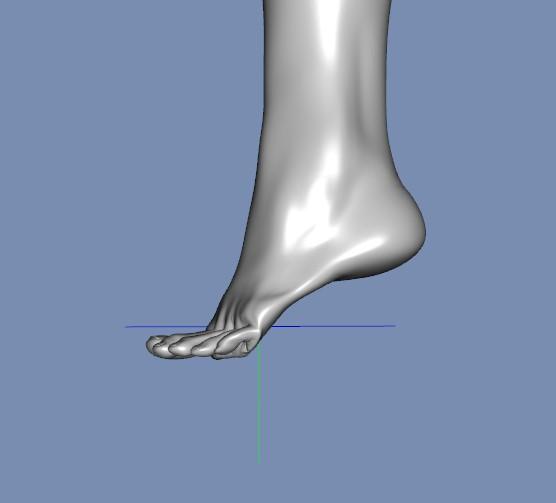
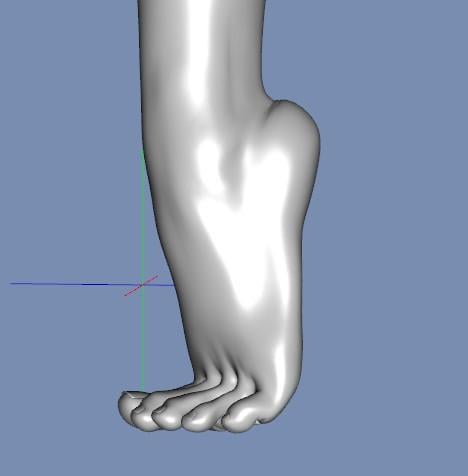
For example I made a tip toe morph that properly bends the ankle to look like a natural tip toe pose.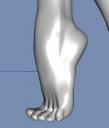
Looks pretty great right? So now everything's set no need for anymore work... that is... unless you wanted to "animate" this tip toe from a flatter foot...
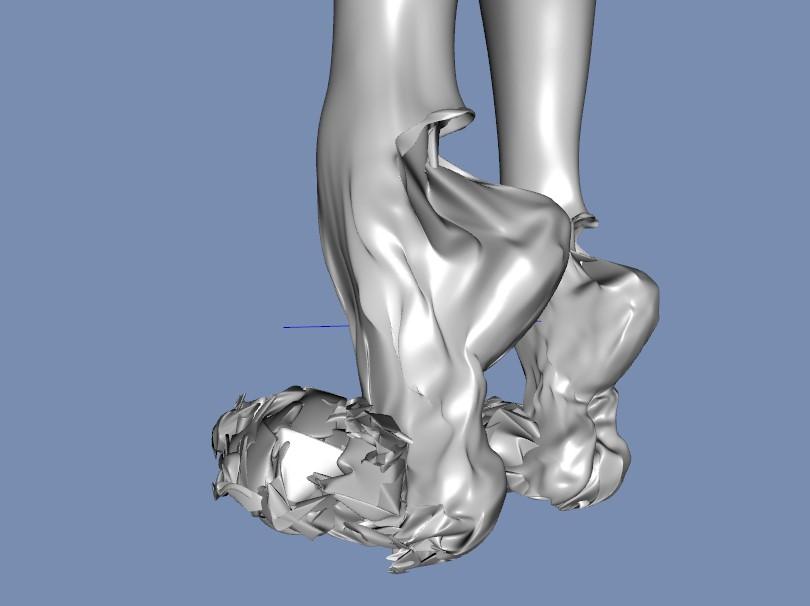
wanna see what it looks like at 50 percent?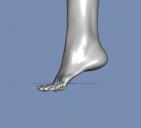
Not exactly the picture of beauty anymore is it?
"So Nec, why don't you just bend the toes then and call it a day, blah blah blah"
Have you guys seen the regular toe bend in daz?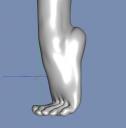
Pretty nice, if you're an ALIEN. The toe bends and well a lot of other limb and digit bends in daz leave much to be desired... so yea, there's nothing "practical" about us having to limit ourselves to those bends.
Also all morphs have been erc freezed, the melting issue in between min and max still occurs because apparently there's no way to make the morph properly rotate on an axis in daz... I could be entirely mistaken and it just isn't common knowledge, which apologies if so. Also don't even get me started on trying to apply this morph to already bent feet...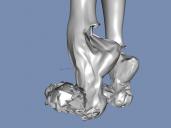 Is there a tutorial on changing the face by sculpting?
A character has a base mesh.
That can be "morphed" which means that some or all verteces are being moved to a new position. The morph is describing which verteces are moved to where.
So one base character can have multiple morphs.
All the genesis characters are base characters, and most other characters (there are some that is stand-alone) are morphs of these base characters.
Daz 3D is part of

Connect
DAZ Productions, Inc.
7533 S Center View Ct #4664
West Jordan, UT 84084Licensing Agreement | Terms of Service | Privacy Policy | EULA
© 2026 Daz Productions Inc. All Rights Reserved.