-
If Michael and Victoria had a kid, or how to transfer head morphs between G8F & G8M?
I am working on a project where I need to somehow mix morphs between two characters, one being female and the other male. I searched the forums for a few days and read every thread there probably is on the topic, but unfortunatly most of them are looking at it from a 'transgender' perspective - and not a 'two adults having a child' perspective.
So, at least theoretically speaking a "kid" between Michael and Victoria would inherit 30% of Michaels body and headshape and 70% of victoria's body and head shape if its female [they have a daughter] or vice versa if it's a boy. I would then use a tool like Genesis 8 UV Swap to apply either Victorias or Miachels texture on the 'kid' and then use the 'grow up' plugin to get the mature kid into a real kid-like body.
Where I am stuck is the headshape/morphs. I need to find a way to be able to 'apply 50% of a G8M head' to a any G8F character and vice versa.
Has anyone ever looked into this?
I'd be happy to fund development of such a mod/workaround if there still is none.
George
Sagan: A DAZ Studio to Blender Alembic ExporterWould you like a blender file with say-
A model from diffeo and a model from Sagan demonstrating the fix? I can do that rather quickly.
In the following file I purposfully imported a Sagan alembic to a file where I knew it probably wouldn't recognize the diffeomorphic. It decided NOT to mess up this time but the file will work fine for our purposes anyway.
On the diffeo version of the figure I alphabatized the materials on the shirt, pants and hair just to show it can be done. However, if you select the sagan version of the character model, then shift select the diffeo version, you should only have to hit ctrl L and select "link materials" to have Blender over-ride the materials on the Sagan model with the materials from the diffeo model. You'll notice that if you do that with the character models, the materials will look all jumbled, as the order of the materials doesn't match. However if you do it with the shirts, select Sagan, then diffeo, link materials- the transfer will work just fine.
(Alphabatizing the materials isn't hard to correct, there are arrow buttons by the materials that can do that manually, it's just a bother and I'm sure it was a bother to do it on your end. I'm really just suggesting you bypass exporting texture altogether and just don't alphabetize the material list, letting the end user link materials. It's not a bug I'm complaining about, it's a fix I'm suggesting- and an easier workload.)
https://drive.google.com/file/d/1_kVp-dp3ylrmUCXStYYmCzXoVIIx_ZiI/view?usp=sharing
Deleting part of a model persistently and distributing a scene that uses itIf the parts you want to hide belong to a figure a GeoGraft might work - you probably don't need more than a single polygon if there are going to be no holes needing capping, just load/create the mesh and run the Transerfer utility to turn it into a fitted figure, then with the Geoemtry Editor select the parts you want to hide, right-click in the Viewport>Geometry Assignment>Set AutoHide Faces for Attachments, and select the new fitted item you just made (menu names from memory). Loading the new figure will then hide the parts you specified (and, unlike a morph or transparency, will not send them to the render engine).
Celebrity Look-a-Likes for 3D figures part 3mike242910 said:
AbrahamRockwell said:
Haruchai said:
New Clone Series entry from ROMFX at Renderhub. Wania - Elizabeth Olsen
Not directly related to this morph, but does anyone know where I could find the 'Scarlet Witch' outfit that he used in a promotional render for his character (or at least the 'Crown')?
I've checked my 'regular' places but so far haven't found one (many 'Comic Book Accurate' versions, but so far no MCU version).
good question. I'm more concerned abut the outfit itself, but we have similar aims.
The only places I have seen that costume in 3D is in the game Fortnite and the mobile game Future Revolution so my guess is it's a game rip. It certainly looks game quailty in the promo pic. Probably best to see if you contact the artist direct at this point.
AOBB's head morph Violet for G8.1F based on Elizabeth Taylor. No materials nor textures.AOBB said:
I knew this was from "Who's Afraid of Virginia Woolf" the moment I looked at your render, @DoctorJellybean! That was quite a movie and Elizabeth Taylor was a really good sport for allowing herself to be turned into an old, drunk, meanspirited hag. I realize it makes perfect sense that I do a Richard Burton morph but I have already several other head morphs in mind that I want to make first. I'm not saying "no" but just that it will take me a while before I even consider making him.
BTW, I'm a big fan of the record album "War of the Worlds" that Richard Burton was a narrator on. What a voice! Epic!
Great render, right on the money, DoctorJellybean!


Thank you. It took a number of attempts to get it how I wanted it.
Celebrity Look-a-Likes for 3D figures part 3AbrahamRockwell said:
Haruchai said:
New Clone Series entry from ROMFX at Renderhub. Wania - Elizabeth Olsen

Not directly related to this morph, but does anyone know where I could find the 'Scarlet Witch' outfit that he used in a promotional render for his character (or at least the 'Crown')?
I've checked my 'regular' places but so far haven't found one (many 'Comic Book Accurate' versions, but so far no MCU version).
good question. I'm more concerned abut the outfit itself, but we have similar aims.
Sagan: A DAZ Studio to Blender Alembic ExporterThe reason I think just letting the end user link between models is better than trying to have it done in program is- well a couple fold. First off, while alphabatizing the material names isn't a bad idea itself, since ALL exports from DAZ don't use it, it makes things awkward when working with other formats. Next up, your exports of geometry, faces, UV coordinates, groups and everything else are spot on and don't even require a diffeomorphic version of the file to be in the scene. Myself I like to import diffeomorphic, attach the materials to planes or blanks and then link materials from them, deleting all of the diffeomorphic models to save space, but every change I make risks the material transfer being broken down.
If the original DAZ file is changed too much, it seems the Sagan program will eventually lose track of the materials, so the program, which is otherwise perfect, will shoot out a perfect model with weirdly placed materials- at which point the end-user has to start scrapping things or has to build each material tree themselves. I have asked and so far, there is no control to alphabetize materials in blender, otherwise I would just tell people to do that.
3D Art Freebie Challenge June+July 2022 - "The secret life of ..." - Main Thread OnlyFae3D said:
The Secret Lives of Superheroes
Even superheroes need some time off sometimes! So here's Captain Marvel, watching TV in her comfy clothes and enjoying some junk food XD
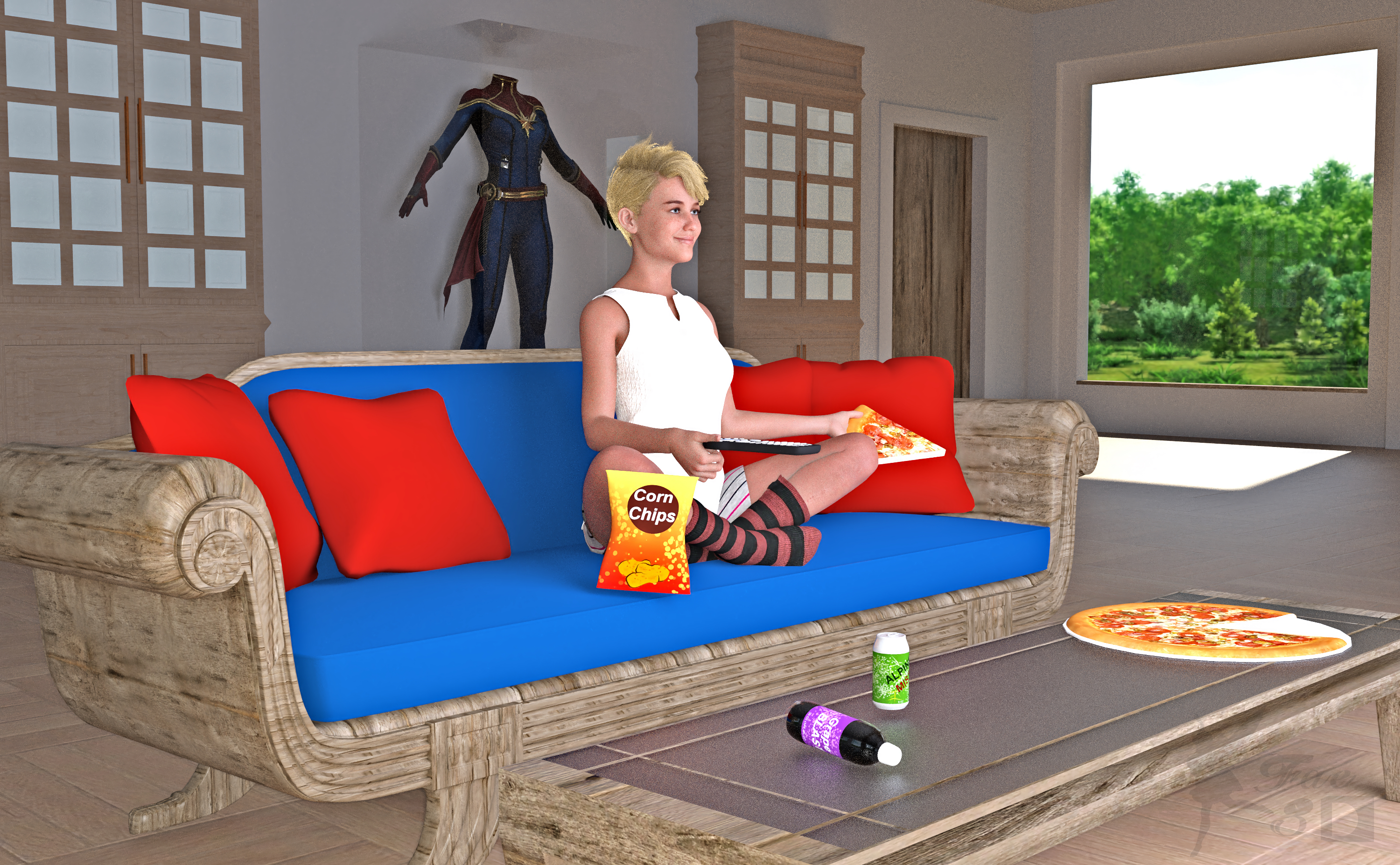
Free:
Captain Marvel (Hair and Outfit on Display) - https://www.deviantart.com/dddark898/art/Captain-Marvel-921629533
Wool Socks for Genesis 8 Female - http://www.digi-dotz.com/index.php/free-poses/daz-clothes/206-socks-for-daz-genesis-8-female?highlight=WyJzb2NrcyJd
G8F Shorts & Summer Top - https://www.wilmapsdigitalcreations.co.uk/view_product.php?id=459
25 Beach Photoshooting Poses (Lower Body Pose) - https://www.deviantart.com/hemi-426/art/25-Beach-Photoshooting-Poses-774842043
Media Remotes - https://www.renderosity.com/freestuff/items/74431/media-remotes
Toon Food (Pizza) - http://trumarcar.francemi.net/foodprops_tc.htm (scroll down almost to end)
Classic Furniture Set (Coffee Table) - https://www.renderosity.com/freestuff/items/77267/classic-furniture-set
Office Furniture Set (Bookcases) - https://sharecg.com/v/94502/gallery/21/DAZ-Studio/Office-Furniture-Set
Gas Station & Convenience Store (Chips, Sodas) - https://sharecg.com/v/91301/browse/21/DAZ-Studio/Gas-Station-Convenience-Store
Wood Shaders - https://www.renderosity.com/freestuff/items/89287/woodshader-daz3d-iray
Contemporary Loft - https://www.renderosity.com/mod/freestuff/contemporary-loft/77790
No Count:
Primitive Cubes for Door and Outfit Display Case
Primitive Cylinder for Pizza Plate
Iray Glass Shaders that came with Studio
Mooncraft’s Sleek Sofa (No longer available?)
Paid:
Bridget 8 (Head Morph and Textures) - https://www.daz3d.com/bridget-8
SY Invisilights Iray (to help light the scene) - https://www.daz3d.com/sy-invisilights-iray
ColorWerks Extreme: Hair Texture Blending for Iray and dForce Hair - https://www.daz3d.com/colorwerks-extreme-hair-texture-blending-for-iray-and-dforce-hair
Medea HD for Genesis 8 Female (Expression and Eye Color Only) - https://www.daz3d.com/medea-hd-for-genesis-8-female
I tweaked the materials and the pose. Set up and rendered within Daz Studio Iray. Postwork in Pixelmator. I’ve attached the before post render (the one that says Render) and the finished image file. Captain Marvel is ©Marvel, and ©Walt Disney Company
All The Links Check Out Plz Post To The Entries Thread
IRAY Photorealism?Paintbox said:
Masterstroke said:
Worked on some shader improvements for the pupils and added some eye sockets morphs. Now she has red eyes by the flash of a camera.

Really good! You are pushing the boundaries! I did the trick where I cover parts of the face with my hand and asked myself if it was realistic.
The good part -> the mouth/bottom part of the face. Really photorealistic. Forehead/hair is also good.
Almost there -> The nose, it seems a bit to hard edged, maybe a SSS thing perhaps?
What I miss -> The eyes seem a bit weird on the outer edges. Not sure what it needs, maybe moisture or better organic bends where skin folds meet eye?Thank you both :-)
I've been struggeling a lot with that eye ball lacrimal area. I
The lacrimals having a simple red shader, but a HD morph instead, which made them hard to cobtrol.
The more you deal with the details (e.g. the corners of the eyes, the lashes or the lacrimals), the more the details become a problem.Naming convention for saving morphs ?MCM is for "Morph Controlled Morph". It's a corrective morph triggered by using another morph, just like a JCM is a corrective morph triggered by joint movement.
Naming convention for saving morphs ?Many of the names came over from Poser, and due to how every Poser figure worked every morph was a Partial Head/Body Morph, Full Head/Body Morphs were normally Master dials in the Body.
In DS4 things are a little different, we are working with a single mesh rather than a collection of props, so technically every morphs works on the entire mesh, but we still use the old naming system for the basics.
PHM - Partial Head Morph - a morph that works on a small part of the head, something like a nose or lip morph
PBM - Partial Body Morph - a morph that works on a small part of the body, somthing like a navel morph or a calf morph
FHM - Full Head Morph - usually a character morph that reshaped most of the head
FBM - Full Body Morph - any morph that changes most of the body, like a custom sculpt for a characterThat's the standard morphs, now for the not so standard
MCM - basically used for corrective morphs for the body, an example is you dial up a breast morph while you have a character dialed in, breast morph look horrible, so you need a corrective morph so the shape looks better when that character is used.
eJCM - another corrective morph, this time for expressions.
JCM - Joint Controlled Morph, used to help the mesh "pose" better, normally works on the base shape, but can be set to only work with a specific morph.
CTRL - a Control asset, a dial that uses Formula (ERC links) to control two or more assets, which can be morphs or bones or both.
There are other variations but this post could end up as a novel if I go through them all.
pmd pluginHello,
Pardon me if this subject is considered closed, but I thought I'd take a chance. If nothing comes of it, at least folks can enjoy a trip down memory lane. The old legacy content still has some mileage left in it, I think. I still use DS3A due to lack of internet connectivity combined with my laptop limitations. Here's my challenge: I would like to buy or download the legacy version of InjectPMD utility that works in DS3 (one InjectPMD plug-in was created by DeltaX15?) if such a thing were possible.
The legacy figure I am trying to work with is Millennium Girls, Laura. I do own Laura (no longer available) and the Head and Body Morphs package (no longer available). There are still a few stand-alone injection morphs available, but there are additional products and options available that utilize the InjectPMD plug-in. The sample image shows Laura with the Tao morph by Thorne and Sarsa (no longer in store), Oriental Fantasy Dress by Lady LittleFox (no longer in store) with Sakura Textures by Anna Benjamin (still in store).
Working with legacy content can be hit and miss because certain add-on products are still available for these figures, whereas others have gone away to content heaven (RIP). I tried to snag all of the legacy content I use once I realized it was being purged. I just wasn't fast enough and my pockets weren't deep enough to get everything in time. We all try to do the best with what we have, don't we?
Anyway, I prefer a more illustrative, less photo-realistic style that the legacy content and software can produce. I use layered rendering with raster layers to achieve the end result in PSP and PS Elements. The legacy content works well with my lap top's limited resources. Thank you to everyone, especially the content creators who have worked so hard over the years to keep up with the many changes in the figures, software, and computers. That is no easy task!
Thank you for your time and kind indulgence,
Cat
Celebrity Look-a-Likes for 3D figures part 3Haruchai said:
New Clone Series entry from ROMFX at Renderhub. Wania - Elizabeth Olsen
Not directly related to this morph, but does anyone know where I could find the 'Scarlet Witch' outfit that he used in a promotional render for his character (or at least the 'Crown')?
I've checked my 'regular' places but so far haven't found one (many 'Comic Book Accurate' versions, but so far no MCU version).
Naming convention for saving morphs ?Cris Palomino said:
These docs may help. http://docs.daz3d.com/doku.php/public/software/dazstudio/4/userguide/creating_content/assembling/tutorials/start
Thanks but still only partly helpful.
What I got so far:
General naming convention:
TypeOfMorph | Vendor | Figure | Part of Figure | Left/Right if applicaple | Descriptive Name
E.g.:
JCMcgidesignG81FShldRMakeBetterBend
Question:
Is it allowed to use underscores if one intends to sell products in the DAZ shop? E.g.:
JCM_cgidesign_G81F_Shld_R_MakeBetterBend
What I understood so far:
Morph Type Description JCM morph triggered by a joint value change But what about:
Morph Type Description MCM morph triggered by another morph ? PHM ? CTRL ? ? what else ? Deleting part of a model persistently and distributing a scene that uses itIf anybody runs into this problem, Blender has a really annoying open bug:
https://developer.blender.org/T68058
where by default, it destroys the vertex order both during import AND export. So you have to explicitly open a "Geometry" disclosure triangle and tell it to keep the vertex order during import, then check a checkbox to preserve it on export. Otherwise, your morphs will be garbage.
Now that I've figured that out, I have a working approach. Basically, I morph the undesirable bits into a tiny ball about a millimeter across and hide it inside one of the parts that I want to keep.
Deleting part of a model persistently and distributing a scene that uses itMorphs also don't work, or at least not when created with Blender.
- The Blender export gets the axes wrong.
- If you literally export a model and reimport it with Morph Loader Pro, unless you specify Daz as the scale in both directions, the size changes.
- When I collapse all of the meshes but one down into a single point inside the remaining mesh (by repeatedly scaling it down, then moving the result) and import it as a morph, the result looks like Picasso. The part that isn't supposed to change collapses, the one from the other end moves into its place and ends up moved grossly distorted with extra material going in various directions, and the whole thing looks kind of like it melted. It's really unpleasant.
I'm not sure if the vertex order is changing or what's happening, but the behavior I'm seeing isn't even remotely usable. Maybe I'll see if FreeCAD can do a better job.
Also, I keep forgetting to choose the base mesh resolution, and it fails, which wasted a lot of time. :-(
Daz Original CharactersWhy are the Daz original characters so much more expensive than characters by other vendors?
For example:
Arcadia 8.1 would be $44.95 at full price.
Most of the time they'll have 30% off with Daz+ which would be $31.47
Echo HD 8.1 by Mousso is $18.95 (full price)The Daz characters don't include the HD morphs, so you'll need to spend an extra $39.95 if it's full price ($27.97 with the standard 30% Daz+ discount). So that's $84.90 at full price or $59.44 for Daz+ users (and let's not forget that we pay to get that reduced rate). Sometimes the Daz characters are discounted further, both Arcadia 8.1 and her HD morphs are 58% off for me today so the price is down to $35.66 but you have have to wait and time that to get it.
Arcadia has 5 eyes colors, 4 unusual makeup options (less useful than everyday makup options IMO), 4 eyelash options, 2 SSS options.
Mousso's Echo includes an alternative head morph, additional separate HD head + body morphs, 6 eye colors, 10 everyday makeup options (+ 10 no brow versions), 8 nail options, 8 lip options (all of which are available as both PBR and Uber), 3 blushes, fibermesh brows (with density options), peach fuzz, and other options that I can't be bothered to write. Which comes to a grand total of $18.95 if you can't wait for discount. I haven't cherry-picked Echo either, this seems to be pretty standard for Mousso, admittedly she is one of the best vendors out there and always seems to be great value for top quality products.
Even with the standard 30% off with Daz+, $59.44 vs $18.95 doesn't make any sense. Am I missing something that elevates Daz original characters beyond other vendors' characters? They seem to be sorely lacking in options, they don't include things I'd expect as standard, and they're extortionate in comparison to other vendors in the store.
Adjust rigging to shape in dress doesn't work for auto-generated height morphSo far it seems to have worked fine, I saved the morph and reloaded the coat/dress and it still works and didn't seem to break anything and it also still auto-follows, so I think everything's fine. I also did the adjust rigging to shape and ERC freeze for other shapes, such as the characters that are taller or shorter than the base figure and that worked fine too, so it appears I was right about it only working in the positve values. So if a morph has both positive and negative values, one must dial it in the positive first, then do the adjust rigging to shape and ERC freeze, at least for height morphs. Thank you for your help and I hope maybe this can help someone else too, because in all of the tutorials I've read or watched, this issue was never addressed... (at least for the ones I've followed, there may be one I hadn't read or seen, but google isn't super smart about finding relevant results when searching for tutorials or solutions for things)
Deleting part of a model persistently and distributing a scene that uses itI'm running into an issue that I don't know a good way to solve. I'm trying to develop some custom scenes for public (probably free) distribution that incorporate paid DAZ models into a more complex scene. Obviously anyone using those scenes would have to buy the underlying DAZ models to open the scene, which is fine. But distributing such a scene requires that every asset (models, materials, etc.) be either used as-is or created from scratch.
Unfortunately, I keep running into the same problem over and over: a lot of the commercially available DAZ models combine large chunks of a scene into a single object with a dozen or more materials, and futher combine all of the mesh surfaces with a similar appearance into each material. So:
- I can't delete the individual parts, because a huge chunk of the scene is in a single object.
- I can't remove undesirable parts by making their material transparent, because I would also lose parts of the scene that I want to keep.
- I can't create a custom copy of the object with removed faces, because I would have no license to distribute that modified model.
- I can't easily create custom materials presets, because either A. they use shaders or B. I would have to include parts of the original material, which would have the same copyright/licensing problem as distributing a partial copy of the model.
For example, every Daz bathroom set that I own is built in such a way that you cannot keep just the shower metal parts by themselves. Modern House 2 uses a single material for both the sink drain and the shower chrome, so you can't hide one without the other, and the whole thing is a single object. Girls Dorm Room combines the shower handles with other elements that would be inappropriate in the context where I plan to use them, again with a single material for both. Z Shower and Lavatory Environment uses a single surface for every copy of the shower, so you can't reduce the number from 5 down to 3 or increase it to 6 or whatever. And in the Z Shower set, the drains are all a single surface, so you can't even change the size of the room, because the drains are in fixed positions relative to each other even though they are on opposite sides of the room. The same is true for the lights (though it's easy to find models for lights — floor drains, not so much).
All of this would be easily fixable if the geometry editor allowed proper nondestructive editing on a per-instance basis, but instead of that behavior:
- If you hide faces/vertices, it hides them in *every* instance of an object, so you can't (for example) have two instances of the same object and hide faces in only one of them. They disappear in all other copies of that model in the same scene. They also don't stay hidden; closing and opening the file causes them to reappear.
- If you delete faces, you have to save the result as a new model, which I would have no right to distribute, so there's no good way to distribute a scene that uses an edited model.
This seems like it is the sort of thing that should be relatively easy to do, but I'm not seeing any signs that it is even possible short of making people run a script every time they open the scene to hide a bunch of faces, and even that won't work if you need an unmodified instance of the object (because hiding faces hides them in every copy).
I mean maybe, maybe it might be possible to create a script that makes a copy of the original model, deletes the undesirable faces, and saves it, so that folks obtaining the content could run that script once and close and reopen the scene... but ugh.
I have the same problem with walls of buildings in other models. For example, FG School (ignoring the problem that the walls are paper-thin) uses a shared material and object for the pillar in the cafeteria, the walls in the cafeteria, and the bottom part of the counter. So I can't fix the flaw where there is no door between the area behind the counter and a kitchen (do workers climb over the counter?) without building new counters and a new support post. (I can probably fix those with primitives, so no big deal, but you get the point.) I'm literally running headfirst into this problem over and over again.
Ideally, I'd love to see a solution that lets me show or hide the portions of a scene that fall within the bounds of another object, which could be transparent. That would solve two problems, if it were sufficiently powerful — this and the problem of filling an arbitrarily shaped object with water. Create a cylinder primitive, use a water shader, and constrain the primitive to the intersection of the interior of the container plus an invisible box that excludes the upper part of the container, and you're done. But I'm guessing there's no support for any complex nondestructive multi-object operations like that at all other than the built-in clothing avoidance algorithms.
Any better suggestions? (I mean, other than trying to find shower head and shower handle and floor drain models that aren't so hard to reuse?) Some way to morph parts of the scene out of existence, perhaps?
Saved Morph Assets Load On Default, Help!barbult said:
You probably shouldn't have memorized in the first place. That is not a normal step in morph creation and saving.
With the existance of up-to-date tutorials explaining certain functions of Daz Studio quite deminished, along with the existance of expensive Paywalled Tutorials, experimentation and self testing is all we have left for the poor common user like myself.
Daz 3D is part of

Connect
DAZ Productions, Inc.
7533 S Center View Ct #4664
West Jordan, UT 84084Licensing Agreement | Terms of Service | Privacy Policy | EULA
© 2026 Daz Productions Inc. All Rights Reserved.