-
ZDG random Daz Studio discoveries and questions.
Not a good close up of the G3F rings (yet), and there are a few more mat options for each ring style then humans have fingers, lol. There is a G3M variation of the ring set as well.
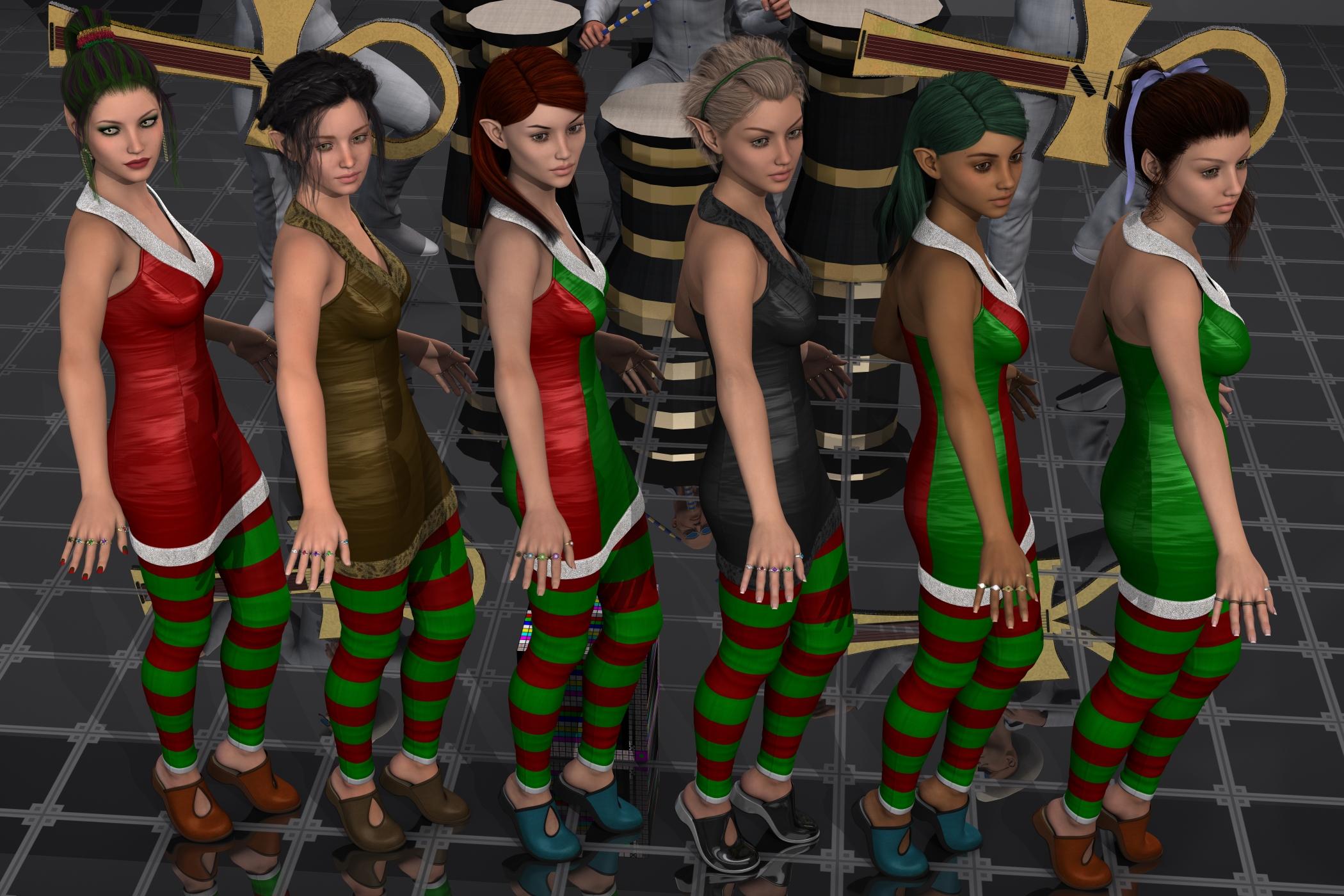
Excluding the Ankh Ankh Ra band from the Egypt bundle funny. Left to right is Yulia, Ginnifer, Livia, Vanessa, Shiloh, and Paloma. All using the same surface setting as Yulia, and with V7(or other) replaced with some amount of Izabella7. Outfit is a combination of Yulia's dress and Paloma's Keyhole style stockings and slippers.
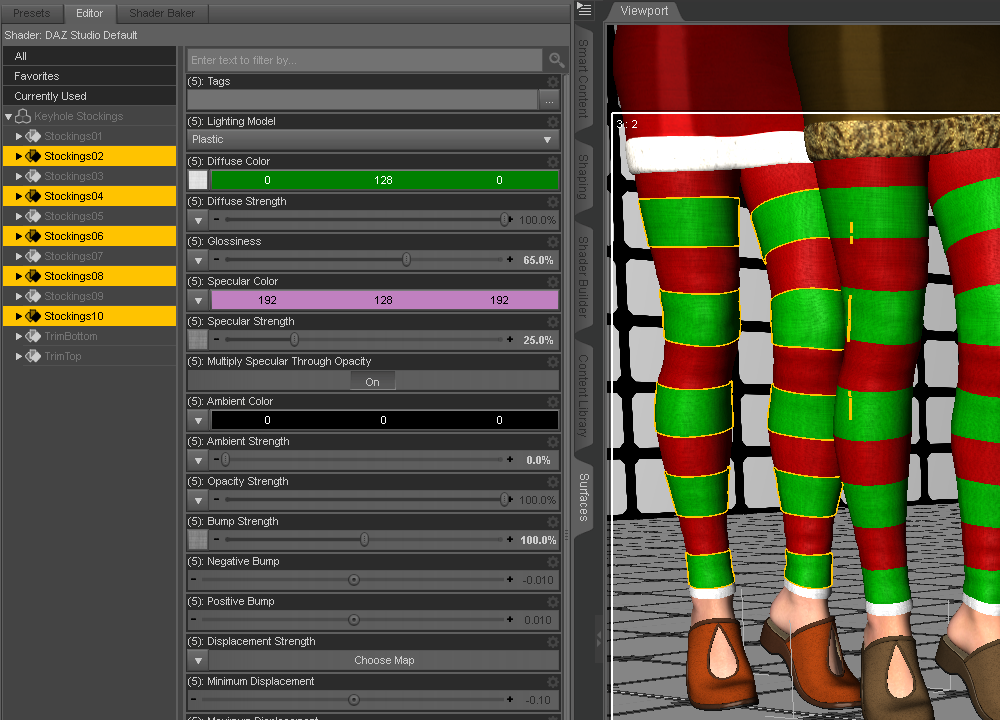
The stripes in the keyhole stockings is incredibly easy to do, just select the zones and apply whatever shader you want.
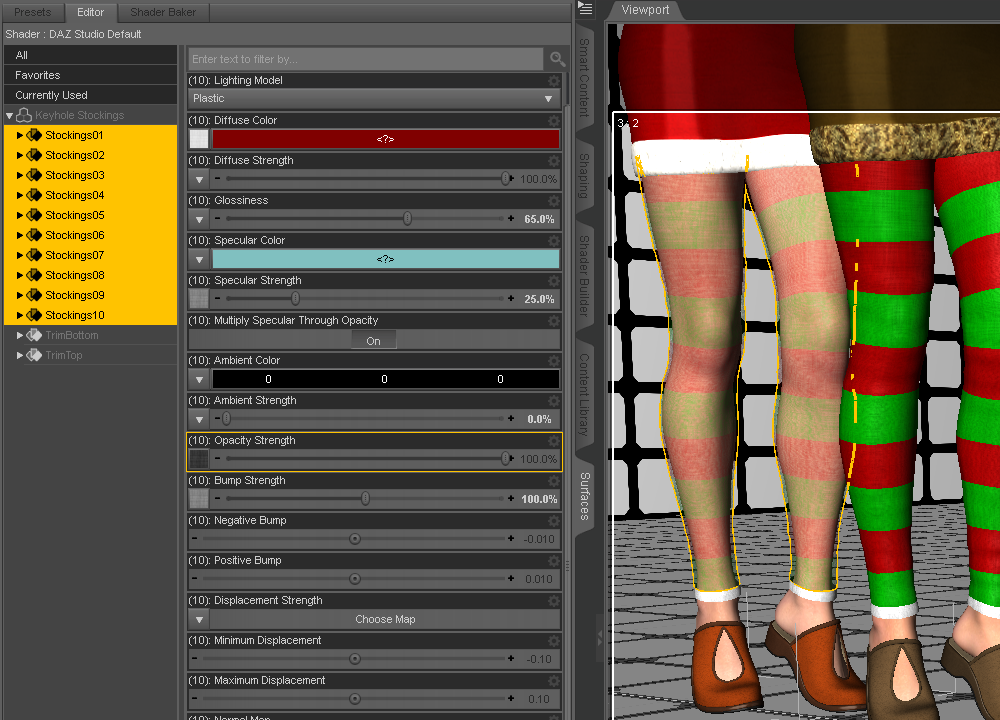
And the the keyhole stockings work perfectly fine for lace as well.
The slippers and Yulia dress are using regular 3DL settings included with the outfits. More after I adjust some poses to get the hands closer together.
N.G.S. Anagenessis II - Revolution [Commercial]That doesn´t work for me.
The only way i can get some visible veins if i use the SSS Map in Glossy Color and / or Glossy Specular. But then, the skin totally "greys/whites out". And if i try to adjust it with color, the veins will vanish again.
Nope, just use SSS map in Trans Color & play with Trans Tints. More Red Color & more Blue or Green Tint. Just check what colors Victoria 7 has on tints.
Lucian!I actually like genesis 3 line better than any of the previous lines. I do think for some of these characters like Lucian they aren't really taking much time with and it shows in the poor quality control and hodge podge of included content. If people wonder why men's stuff doesn't sell, often the reason is the quality is just not there. I can't imagine Victoria 7 being released with blue fingernails and deformed nail beds.
At any rate, love the shape and the way gen 7 males look. But like most things it is a matter of taste.
N.G.S. Anagenessis II - Revolution [Commercial]For Example i want to use Victoria 7 as my modell and hit her "Translucency High" Button, i will get visibly shining through veins on her skin with the standard DAZ Shader. The SSS Map of her (and other Modells) is used in "Translucency Color". How can i archieve this with your shader? Using the Map in the same Setting?
You have to put SSS map in translucency color. Like you always did!
N.G.S. Anagenessis II - Revolution [Commercial]For Example i want to use Victoria 7 as my modell and hit her "Translucency High" Button, i will get visibly shining through veins on her skin with the standard DAZ Shader. The SSS Map of her (and other Modells) is used in "Translucency Color". How can i archieve this with your shader? Using the Map in the same Setting?
Jepe's BeddingZ Round BedI will take another look at the poses for G3F's BeddingZ set, thank you. Other than the poses, I was just hoping for your wonderful bedding on a square bed. I thought it couldn't hurt to ask.

I completely understand your need to be different and original, and did not mean to put you on the defensive. You do really great work and I thought I'd toss out a request for a more plebeian version just in case you were open to it. Thanks so much for your response.

I think I have covered a lot of "normal" sleeping poses for G3F Victoria 7 already with her own BeddingZ set, although her bed is also round. This is a "plebeian version" IMO, otherwise - show me sample images or photos what exactly do you mean with that - I'm always open for suggestions and ideas!
Looking for an old robotHello all,
Back in the old days, when Victoria was 3, daz was selling a very nice robot character, with a 50s/60s look. It has a set of poses and a funny robodog.
I just need to findthe ref and name
Thank you
Jepe's BeddingZ Round BedI completely understand your need to be different and original, and did not mean to put you on the defensive. You do really great work and I thought I'd toss out a request for a more plebeian version just in case you were open to it. Thanks so much for your response.
I think I have covered a lot of "normal" sleeping poses for G3F Victoria 7 already with her own BeddingZ set, although her bed is also round. This is a "plebeian version" IMO, otherwise - show me sample images or photos what exactly do you mean with that - I'm always open for suggestions and ideas!
Selbsthilfegruppe DAZ Studio - Beispiele, Fragen, Diskussion und sonstiges GequatscheAllerdings kann dann einem wohl noch die Grundeinfärbung der Diffuse-Map, also des Haupt-Skin-jpg, einen Strich durch die Rechnung machen.
Manchmal sind die viel zu rot, andere Characters haben eine regelrechte Gelbsucht oder sind blaß schweinchenrosa. Das ist dann ein schwieriges Jonglieren, dies mit der Color irgendwie noch auszugleichen.
P.S.
Wie hoch soll dann die Translucency (Stärke) angesetzt werden?
Ja, das Problem hat man leider mit einigen solcher Texturen, die von Hand nachgearbeitet wurden. In dem Fall kann man dann versuchen, mittels SSS Reflectance Tint etwas von dem "zuviel Rot" herausziehen. Ein "gutes" Negativbeispiel wäre die Victoria 6 Textur mit der Bezeichnung "Belle", besonders die Gesichts-Texturen enthalten viel zuviel Rotanteil. Da funktioniert die "Anna" Textur aus dem "Victoria 6 HD Add-On" um einiges besser.
Transluzenz ist abhängig vom Hautton. Bei einem hellen Hauttyp (Marke "kaukasisch Blass") sollte der Wert für Translucency Weight zwischen 0.45 und 0.50 liegen, für etwas dunklere Hauttypen (asiatisch, indisch, südamerikanisch/hispanisch) zwischen 0.35 bis 0.45 (je dunkler der Hautton, desto niedriger), für Charaktere mit afrikanischer Abstammung bei 0.25. Der Grund dafür ist die Melaninkonzentration in der Epidermis, je mehr Melanin dort vorhanden ist, umso mehr Strahlung wird absorbiert. Dass man bei sehr hellhäutigen Europäern die großen Blutgefäße durchscheinen sehen kann, liegt daran, dass von der Hypodermis eine Menge Licht wieder an die Hautoberfläche zurückreflektiert wird. Bei dunkleren Hauttypen kommt wegen der hohen Absorption aufgrund der höheren Melaninkonzentration viel weniger Licht wieder zurück an die Oberfläche, deshalb sind dann die großen Blutgefäße weniger sichtbar.
In der Dermis sind die Hauptabsorber das sauerstoffreiche und sauerstoffarme Hämoglobin im Blut, und die hauptsächlichen Unterschiede liegen hier im Blutanteil im Gewebe (im Durchschnitt zwischen 0,01 und 1 %). Daher kann man guten Gewissens für Translucency Color für alle Volksgruppen dieselbe Farbe für dessen RGB Kanäle verwenden. Nur eben halt nicht "DAZ Dunkelrot", bei einer solchen Färbung läge der prozentuale Blutanteil ziemlich weit über 1 %.
Bei den Genesis 3 Figuren kann man in den mit "SSS" bezeichneten Texturen bei der Anwendung der realistischeren Translucency Color auch plötzlich wieder die mit Blau eingezeichneten Adern erkennen, deren Abwesenheit schon viele bemängelt hatten.
So, ich habe mal die Translucency-Werte von Arnold getestet.
Das Translucency Weight habe ich auf 0.1 gestellt, da sonst die Figur einfach nur noch rot wird.Was sofort auffiel war, daß alle sehr dunklen Stellen der Skin-Texture, z. B. die Augenbrauen, die rote Farbe der Translucency-Color annehmen, sobald hier keine Texture-Map mitgegeben wird (siehe das kleine "Kopf"-Bild im Anhang). Daher habe ich die Skin-Texture auch bei der Translucency eingesetzt und die Farbe selbst entsprechend blasser gestaltet.
Das Ergebnis seht Ihr im Anhang.Ebenfalls im Anhang: die Einstellung der relevanten Parameter.
Es dominiert natürlich weiterhin der orangene Grundfarbton der ausgelieferten Skin-Maps.
Oh, ja, ohne die Transluzenz-Maske ("...SSS_00x" benannte Texturen) wird die Haupttextur natürlich komplett durch die Translucency Color eingefärbt, also auch die Augenbrauen. Aber Ryan 7 kommt doch mit solchen (z.B. "/Runtime/Textures/DAZ/Characters/Genesis3/TweenRyan7/Ryan7_faceSSS_1001.jpg"). Sag jetzt bitte nicht, dass die diese jetzt auch komplett rot eingefärbt haben, so wie die für die Make-Up Optionen von Arabella, Eva und Gia 7. Die bisher einzige mir bekannte Figur, wo man die Färbung annähernd richtig gewählt hat, ist Olympia 7 (siehe Bildanhang).
Wenn man als Transluzenz-Maske die Diffuse-Textur verwendet (alle Vorgänger-Generationen von Genesis 3, von den alten Generation 3 Figuren [V3, M3, A3, H3] bis hin zu Genesis 2), sollte man als Translucency Color ein neutrales RGB 255-255-255 wählen, weil man sonst den Orange-Anteil viel zu hoch setzt (ist ja schon 'ne Menge an Orange in der Diffuse-Textur vorhanden). Je nach Gusto kann man auch einen niedrigeren Wert wie 253 oder 252 für jeden der RGB Kanäle nehmen, wenn man den Hautton etwas dunkler haben mag.
Wenn's etwas zu rötlich ausfällt, kann man bei den Genesis 3 Figuren auch die Translucency Color (RGB 236-255-255) der alten DS 4.8 Material Presets verwenden, die jetzt unter der Bezeichnung "Legacy" laufen (siehe die beiden V7 Render im Anhang), um zuviel Rot in der Diffuse-Textur herauszufiltern. Je nachdem, wie wenig blass man es haben mag, kann man dann den Rotwert (236) schrittweise erhöhen.
Ein Tip für das Arbeiten an Iray Shader/Material Presets: niemals ein HDRi oder Sun/Sky oder gekauftes Licht-Set verwenden. Deren Färbung kann das Aussehen der Figur maßgeblich beeinflussen. Auch wenn die Figur in diesem speziellen Licht gut und realistisch wirkt, kann die mit einem anderen Licht-Setup plötzlich unrealistisch und doof aussehen.
Profi-Fotograf AndyGrimm empfielt ein neutrales Licht mit einer Stärke von 15000 Lumen und einer Temperatur von 5000 K:
Positioniert eure Figur in Standard Pose auf XYZ 0.00, 0.00, 0.00
(Render Settings):
GENERAL Tab:
"Aspect Ratio (Global)": W: 2.00 / H: 3.00TONE MAPPING Tab:
"Film ISO" 200.00 (max.)
Alle anderen Werte: DefaultKamera:
"Focal Length (mm)": 105.00
"Z Translate": 100.00
"Y Translate": "zwischen die Augen" der Figur zielenPositioniert ein "SpotLight" an derselben Position wie die Kamera:
"Luminous Flux (Lumen)": 15000.0
"Temperature (K)": 5000.0
"Light Geometry": Disc
"Height (Diameter)": 10.00
"Width": 10.00Nicht mit der Kamera einzoomen - weil das das Licht dann näher an die Figur heranbringt! Dann kann man an den Shader Parametern herumfummeln, bis es passt. Wenn die Figur in diesem Licht gut und realistisch aussieht, wird sie es mit hoher Wahrscheinlichkeit auch in jedem beliebigen anderen Licht-Setup.
what's the tl;dr on N.G.S. Anagenessis 2 - Revolution?It works the way it does because it applies the same settings to any character. Obviously the base settings will not work on every character, and it is really silly if anyone expects it to. So sometimes it does really amazing things, and sometimes it does really weird things and you will need to tweak to fix. It all depends on the characters you intend to use it on because every skin is different. It is as simple as that, tl;dr as it gets. The price is indeed high, but this product covers multiple generations of figures. So IMO, that is fair. I also have several Iray Smart Converters, and I love them. They are more predictible than NGS, and have built in easy to use options to tweak results. The interface of the Smart Converters is also extremely detailed and helpful, explaining what each option does. These two products compliment each other nicely. Both are excellent for bringing pre-iray figures to life. Victoria and Michael 4 will look amazing with either of these. As will G1 and G2.Genesis 3 figures disappeared from my "Smart Content" folderI am a complete beginner at Daz3D, and 3D software in genersl, but have done some basic tutorials, and can load figures and pose them, with enough of it sinking in that I am starting to get really interested.
I am a retired software engineer so I know my way around PCs and Windows.
I have Daz Studio 4.9 installed with the Install Manager. I also installed the free content including Genesis 2, and Genesis 3 Starter Essentials, which showed up automatically in the Install Manager. I purchased some G3F figures from the Daz3D web site. Planning for the future, I also Purchased Victoria 4.2, having read in the forums that she is a good place to start.
A few days ago I noticed that the Genesis 3 Male and Female icons no longer appeared in my Smart Content folder, also Toulouse hair had disappeared as well. I have used these so I know they were there before. By contrast, Victoria 4.2 still appears in my smart content.
I uninstalled everything in the install manager and installed it again, including the free content. The install files are there in C:\Users\Public\Documents\DAZ 3D\InstallManager\Downloads and the files for the installed items seem to be all there, for example C:\Users\Public\Documents\My DAZ 3D Library\People\Genesis 3 Female\Hair\Toulouse Hair. I just don't see them in the Smart Content folder, nor do I see them in the Content Manager pane.
I have checked the Content Directory Manager in Edit->Preferences, and the entry for Daz Studio Formats matches C:\Users\Public\Documents\My DAZ 3D Library
Can anyone help?
I can't buy DAZ products anymore, they're all made for DAZ only? I use poser.DAZ figures can be used in Poser with a few steps and some work with materials and the like. There are numerous utilities that can help users adopt them.
I'd just like to point out something, in the interest of community spirit:
There is no reason why we, as 3D enthusiasts, can't ask creators to think about creating products for our favored applications. We all benefit from their work in one way or another. Unfortunately, customers of all types get caught up in competitive issues between manufacturers and it's not limited to smartphones, furniture, grocery stores or computer applications.
But, we can still empathize with each other. We can support each other and we can still acknowledge the strengths, and weaknesses, of our preferred hobby products without becoming partisans in a commercial struggle.
Happy rendering, all, no matter what application you like to use!
That's an ideal solution, but you'd be asking people to have to try and figure out two entirely different systems, as from my (admittedly limited) understanding, weight mapping is completely different in both programs. Among other little minute details that could potentially cause problems if you act like your product is a "one size fits all". That's like asking someone who's only familiar with making items in Hexagon to adapt their process to something like Blender or ZBrush: they theoretically could do it, but they'd have to spend even more time re-learning a new program and have to constantly switch between mindsets. And that would also be time taken away from creating things, which... less money earned. But that's mostly for things like clothes and other figure-based items. Props? Ehhh... I could see where an artist could at least try to make .OBJ versions of them, unless they have poses or other special things hidden inside them.
As for me, I've been using DS since 2011 after a (now ex) friend of mine recommended it to me for help in art references (i.e. perspective, scale, lighting). While I've entertained the idea of trying out Poser, the only reason why I think it still has some relevance today is solely because of the way it handles dynamic clothing/hair, which I gotta say, is far better than Daz. (Seriously, I've tried out even freebies and it's caused the program to crash on me) If I knew a certain plug in on a certain other site worked for Mac OS, that would be the only reason why I'd consider buying Poser.
Hell, I'd reckon if Daz stepped up its dynamic clothing game for Studio 5 and really went to town on it instead of salivating at the prospect of pushing Genesis 4/Victoria 8 (and having their dynamic stuff relegated to a small company and less than a handful of artists who actually make DS-native dynamics), then that could very well be the "death knell" of Poser as we know it. Especially given the possible number of DS users out there, too.
People would still use the program, but as the "Poser generation" gets older and older and slowly begins to stop making content for Poser, the younger Daz generation of content creators (and those from the Poser generation who've 'evolved' and adapted, like Ironman13, Aeon Soul, and Arki, to name a couple) will probably take over in due time. In which case, Smith-Micro will probably then put their eggs in the Clip Studio Paint basket (which is actually made by an outside company in Japan; S-M is the English distributor of it) and demote Poser alongside one of their other lesser known programs. I know to some bringing actual age into this is harsh and hitting below the belt and I'm sorry if it comes off as such, but that's part of the reality here.
But just because something isn't popular anymore or widely used by new adopters, doesn't mean it'll go away entirely: after all, in the video gaming world, there's still people who make homebrew games for old consoles like the NES, Genesis, and Sega Dreamcast. There'll still be people out there making content for Poser, but at the rate the market is evolving, it'll eventually be hard to come by. I mean, heck, even certain other marketplaces have realized Daz is rapidly taking over a huge chunk of the market and have adapted accordingly. Like any niche business, it's 'evolve or die'. Business 101, basically.
From what I've heard the fault is Smithmicro's. Daz was willing to work with them so they could make Poser compatible with Studio files and Smithmicro told them to go pound sand down a rat hole. So we end up with Daz Studio which can use both Poser files and Daz Studio files and Poser which can only use Poser files.
Heh, I seem to recal Nintendo saying the same thing to Sony back in the day. I wonder what happened after that...
I can't buy DAZ products anymore, they're all made for DAZ only? I use poser.Well..
I was an user of Poser PRO 2010 (in the past)..
And many fun with it with Victoria 4!
But, then came the Genesis figure.. Well.. Pain.. Can't work in my Poser PRO 2010 ...
So.. I had the choice:
1) Continue to ignore Genesis series.. and using the old stuff in my old Poser PRO 2010
2) Do the upgrade to a newer Poser PRO version.. (near from $250 USD something in that)..
3) Purchasing experimental plugins for making Genesis series work (a bit).
4) Download and install the FREE DAZ Studio ($0 USD) and start to taste the new figures.
Well, (1) was the choice I made during a long time.. But time passed, and older stuff bored me.. I wanted to play with new stuff now!
So.. (2) when compared to (3) or (4) was easy to choose from..
(4) indeed! Free app, Free figure (Genesis 1, Genesis 2 and Genesis 3 base), many great free or paid assets some weeks from the store, and .. an excellent community.
DAZ Studio was for my part A HUGE improvements in rendering and posing, and now with Iray.. It's even better than before!
I liked the SuperFly render engine, but, now, I'm so happy with my Iray renderer engine, DAZ Studio software, that I learn a lot just from using it or viewed YouTube tutorials made by DAZ.
I want just say a gigantic THANKS to DAZ.
And with recent sales, I also saw that DAZ have some amazing products in store, can we say same from Smith Micro store ?
Have fun with rendering !what's the tl;dr on N.G.S. Anagenessis 2 - Revolution?Yes, it works very nice and I am using it a lot for converting Victoria 4 and Michael 4 characters materials to iray.
Then using Cayman Studios UVs for Genesis 3, I can apply those materials to Genesis 3 female and Genesis 3 male.
Victoria 7 will not download via DIMWARNING: Network Error while downloading to file "": Error downloading http://hpcl.daz3d.com/Download/21750/IM00021750-01_Victoria7.zip?SID=2dco2a3cijgbt2g7fdps6ugq72 - server replied: Requested Range Not Satisfiable WARNING: Network Error while downloading to file "": Error downloading http://hpcl.daz3d.com/Download/340/IM00000340-01_Zebra.zip?SID=2dco2a3cijgbt2g7fdps6ugq72 - server replied: Requested Range Not SatisfiableThat is the error I get with Victoria 7 and Zebra.
Selbsthilfegruppe DAZ Studio - Beispiele, Fragen, Diskussion und sonstiges GequatscheTja,
das mit den Textures ist so eine Sache.
Ich habe den Tween Ryan 7 ergattert. Jedoch ist die Haut bei iRay wesentlich dunkler, als auf den Promos des Produktes. Sieht aus, als hätte der Knabe mindestens 3 Wochen Urlaub am karibischen Strand in praller Sonne gemacht. So dunkelbraun gebrannt ist seine / ihre Haut.
Hier der Vergleich mit Jesse-Skin und G3_Eddie.
Skydome ist Sun-Sky.
Ich hab' zwar den Ryan 7 nicht, aber das "Thomas-Anders-Syndrom"
 haben viele der Generation 7 Figuren. Das Problem ist dabei weniger in den Texturen als in DAZ's neuen Standard DS 4.9 Iray Shader begründet. Das Dunkelrot (RGB 167-0-0) im Translucency Color Kanal und das helle Gelb (RGB 255-240-215) im SSS Reflectance Tint Kanal sorgen hierbei für die ziemlich dunkle Tönung. Das Dunkelrot soll die Farbe der Dermis wiedergeben, und ist so leider total falsch.
Ausgehend von einem gemessenen Durchschnittswert von 21 Kaukasiern unter Anwendung der Formel, die Iray für die Berechnung des Absorptionskoeffizienten verwendet, erhält man einen Orangeton (RGB 217-133-114) für die Färbung der Dermis. Setzt man dann noch den SSS Reflectance Tint auf "neutral" (RGB 255-255-255 bzw. 250-255-255 [um etwas zuviel Rot herauszufiltern]) bekommt man einen viel helleren Hautton. SSS Reflectance Tint ist im Iray Uber übrigens kein separater Layer, die RGB Farbwerte hier sind reine Multiplikatoren für den Base Color Kanal.
Bei der Transmitted Color macht DAZ auch immer noch den Fehler, hier falsche Werte zu verwenden. Wenigstens sind sie aber schon mal davon ab, in einem der Farbkanäle einen Wert von 1.00 zu verwenden; der dann dafür sorgt, dass dieser spezielle Farbanteil bei einem hellen Licht, hinter der Figur plaziert, durch diese hindurchscheint, als bestünde diese aus einem Vakuum. Viele Gen 7 Figuren haben dort jetzt ein helles Rot (RGB 249-97-97) obwohl hier ein Hautton korrekter wäre. Im Fall von Victoria 7 RGB 196-155-132 mit einer Transmitted Measurement Distance von 1.00. Wem es zu Umständlich ist, für jede Figur den Farbton von der Textur abzugreifen, der kann auch einen gemessenen Durchschnittswert von den bereits erwähnten 21 Kaukasiern anwenden (RGB 205-139-110 mit Transmitted Measurement Distance 1.00).
Als Anhang zwei Victoria 7 Render, um den Unterschied zwischen dem Standard DS 4.9 Shader und einen mit den oben erwähnten Anpassungen zu verdeutlichen. Als Beleuchtung bei beiden dient J.Cade's "Painter's Lights Classical 2R", in Verbindung mit dem "Painter's Lights Studio Neutral" Render-Settings Preset. "Neutral SSS RT" steht für SSS Reflectance Tint RGB 255-255-255).
Das ist der Unterschied zwischen "über den Daumen gepeilt/geraten" und "Physically-Based Shading". Iray macht es einem so einfach, indem es die Anwendung von gemessenen Werten erlaubt bzw. sogar voraussetzt. Trotzdem arbeitet die Masse immer noch mit den (wenig bewährten) Verfahren aus der "guten, alten 3Delight Ära".
 The older generation: Victoria 2/3, Michael 2/3 and their children renders
So I thought I would help Victoria 2 come into the Studio 4 world and I created a iRay setting for one of her free texture sets. I have packaged it up and have uploaded it to Sharecg (https://www.sharecg.com/v/86560/view/21/DAZ-Studio/Creating-Victoria-2-iRay-Material-Files) if any of you are interested. It has a tutorial that will allow you to take any of the Vickie's texture sets and create an iRay material preset. You will have to download the texture zip from Arrow3D to use the preset. All of this information in included in the package. and now I give you, Victoria 2, as the Vargas Girl.
That is VERY nice! I don't usually go back as far as Victoria 2, but looking at this I may reconsider. The body has different proportions than the later Vicki models, and that sort of thing can be very useful in crowd scenes. And thanks SO MUCH for making the texture available to the rest of us.
Genesis 3 UVs for Genesis and Genesis 2 [Commercial]I've got this in the cart. Just waiting for something else I want to show up on sale... the "megagrab" is unusually skimpy this morning.
What is a megagrab?
Genesis 3 UVs for Genesis 2 Male(s) will be released shortly. It includes UV support for the Anatomical Elements and PDF documentation, as usual.
I have attached some promos which use the pistol and poses from Pistol and Poses for Michael 6 and Victoria 6 by Porsimo.
It went in the cart as soon as I read this! I can't do nudes with G3M. They just aren't that great. G2M has spoiled me with the great, um, Anatomical Elements he has. So, happy to read that I can now use some of those great G3 skins on G2M. There are just some things that G2M is much better equipped for than G3M. ;)
Lucian!I'm not seeing what Lucians theme is? Is he a vamp? A goth warrior? Aside from being release close to Lilith he doesn't seem to be her counterpart.
Someone up at the top of the thread mentioned David. Bingo. I think he could be being smuggled in as David's replacement. He's certainly being pluged into the same "young adventurer" socket which was always traditionally David's primary turf. ("Traditional" being gen3. David 5 didn't seem to have a defined role -- although he did have rather a mean face.) Can Stephanie be far behind?
Adult, but younger than Michael (i.e., not a teen): check
Slighter build than Michael: check
Supporting content heavily weighted toward adventure themes: check
I do agree he has that David-reminiscent shape, but David always looked younger and slimmer to Michael, as Stephanie always is to Victoria. Wasn't that the whole point to their characters, anyway?
Rendering more realistic eyes in IRayI like character's eyes from Godin, especial for Victoria 4.
http://posercontent.com/vendors/godin/307Thanks for the recomendation! I am tempted to buy Nora only to have her eyes sitting in my library :)
Daz 3D is part of

Connect
DAZ Productions, Inc.
7533 S Center View Ct #4664
West Jordan, UT 84084Licensing Agreement | Terms of Service | Privacy Policy | EULA
© 2026 Daz Productions Inc. All Rights Reserved.