-
3D Printing Licences - What?
somehwat a workaround to all these licenses What if you just license the main characters, and the Essential bundles ... then morph them ... or do you need license for the morphs as well? So G8 Essentials gives you a variety right out of the box . Then a few others. That way you dont need a license for 2500 products or whatever.
Let vendors sell the morphs used to create an attractive character from other character sets.Good news! Vendors are allowed to do this - which means that if they haven't, it's because they just don't want to. (Usually because they want the characters to remain their unique trademark).
It's absolutely allowable (in theory*) for products to be presets for existing controls, including those from prerequisite products. See Saiyaness's characters, for example, which almost all require that generation's respective basic Head and Body morph packs.
* The "in theory" is that Daz have to feel that a product will make enough returns to justify the effort of testing and marketing it, but too many prerequisites massively reduces the possible buyers of a product.
~~~~~
(Where Daz absolutely cannot provide permission though is when it comes to certain modifications of character skins; any edited textures would not be legally redistributable, regardless of what Daz does or does not want to do.)
How do I create a keyboard shortcut for the chain "File - Save As - Support Asset - Morph Asset"Edit>Workspace>Customise, find Save Filter(s)>Morph Asset(s) in the action list on the left, right-click on it>Change keyboard Shortcut, and then hit the desired combo. I don't see a way to assign an alt+letter option to dynamic sub-menus like Save As, that might be a good feature request.
How do I create a keyboard shortcut for the chain "File - Save As - Support Asset - Morph Asset"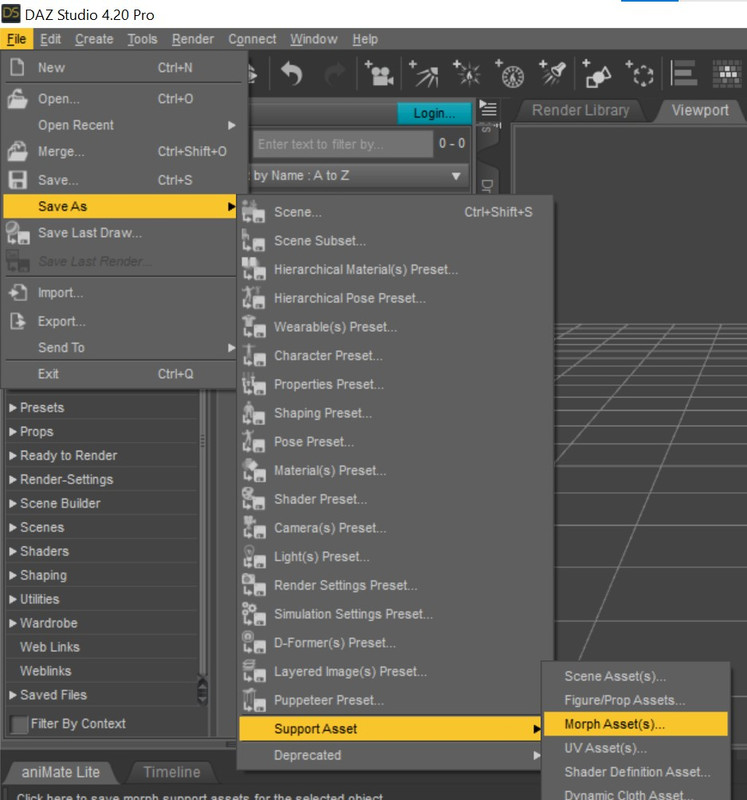
As shown in the image above, I want a keyboard shortcut for the chain of actions: "File - Save As - Support Asset - Morph Asset"
I don't see a way to do this with F3 shortcut settings... maybe I should scripts? If so, please let me know a step-by-step way to do this. Thanks a lot!
DAZ, ZBrush, GoZ. Zbrush Noob with questionsJasonWNalley said:
One thing I forgot to mention was that when I load any 8.1 character, I get a "Duplicate Formulas" error... Not sure this has anything to do with it, but I figured I'd mention it...
No, it doesn't - that means either that two characters or morph sets you have use the same names and so two ERC links may end up being between Foo and Bar (e.g. Name linked to NameBody, or name linked various joint centres to adjust the rigging). It is possible for a single property to hae the issue, e.g. by doing ERC Freeze twice in succession rather than baking back to properties between, but that is rare). Checking the log file (Help>Troubleshooting>Vi ew Log File) and searching for "Duplicate" should find the more detailed report, assuming ti is a cofnlcit then you will have to figure out which other product is using the same name and uninstall or edit one of them pending a fix, for which you should report the issue to the artists or - for products from Daz - support.
XTransfer Module 1- Genesis 3 to Genesis 8 Morph Converter (Commercial)I fiddled with this this morning to recreate the problem and found that it wasn't the Blaire figure that caused this, but the Caitlin character morph, the sequence was the same - load G3 base figure, apply Caitlin morph, favorit the Caitlin base, head and body morphs, start the XT script (which turned mouth realism to 0%), then I switch to the Favorite Morphs tab and see the Mouth Realism HD checked as linked, note that I did nothing other to that G3 base figure than apply the Caitlin character morph, nor did I check the "Visible" morphs, it was checked already when I opened the tab, this then led to the creation of the "XT Mouth Realism HD" morph being dialed at 100% by default (which I still think is a very wrong thing for the script to do, the 100% part I mean)
Note that I (completely new user of the XT script) did not check/uncheck the Visible morphs, it was checked once opened the script tab already, so I initially just continued with the default settings not realizing what is about to happen
I hope google search bots pick this up and the next person running into this issue can find the solution quickly
Zev0, thanks for the quick replies, shows that creators care for their product end users!
attached are screenshots of the settings and the result
Character loading with high SubD levelRichard Haseltine said:
Click the gear icon on the division slider in the Parameters pane and open Parameter settings, then look at the Controllers tab - is anything else set to affect the level?
Thanks Richard, did you mean the gear icon to open the morph parameter settings, as i dont see a controllers tab in there.
3D Art Freebie Challenge June+July 2022 - "The secret life of ..." - Main Thread OnlyI did figure out something, but I think it's a bit to close to old granny's pictures, sorry about that.
Old Girl's Secret Life Party Time
From the time she was a little girl Granny always did like to party, often to excess. When she married a stuffy old bugger she had to settle down, or so we thought. Now that the Old Goat is gone, and after she retired things kinda got way out of control. She sits around the nursing home moaning about him going before his time, but when she can sneak out (way to often) things really get wild. Party, party, party, and because of her newest interest, her "clients" thought it was a good idea, so they gave her a whip. But, in the mornings it's back to the nursing home and a very long sleep in. After that she sits around and bitches most of the afternoon about the old goat, then after lights out, it's here we go again.
NO COUNT ITEMS
1. Basic Starter for G8.1F - https://www.daz3d.com/genesis-8-starter-essentials
2. Wood floor - Floor - Aeon Soul - appears not to be available any more on Deviantart, Aeon Soul has moved elsewhere and it's not there (was free before)
3. Whip - can't find itPAID FOR ITEMS
1. Costume - https://www.daz3d.com/mystique-for-genesis-8-females
2. Skin textures - https://www.daz3d.com/mabel-8FREE ITEMS
1. Earrings - https://www.renderosity.com/freestuff/items/89697/earring-props
2. Mirror - https://www.renderosity.com/freestuff/items/90778/art-deco-style-mirrors
3. Hair - https://www.deviantart.com/mysticartdesign/art/Iro-878463798
4. Makeup - https://www.renderosity.com/freestuff/items/90999/dark-makeup
5. Back Tat - https://www.sharecg.com/v/89843/browse/21/DAZ-Studio/Winged-Tattoo-LIE-for-Genesis-8-Female
6. Chest Tat - https://www.renderosity.com/freestuff/items/89402/tribute-to-ceres-asteroid-belt-tattoos-for-genesis-8-female
7. Character - https://www.daz3d.com/forums/discussion/575716/aobb-s-sweetheart-and-v2-head-morph-for-g8-1f-inspired-by-marilyn-monroe-no-materials-or-textures/p1 (about half way down the page)
8. Curtain - https://www.renderosity.com/freestuff/items/91787/repost-of-old-sharecg-with-new-features-that-are-no-longer-available-there XTransfer Module 1- Genesis 3 to Genesis 8 Morph Converter (Commercial)
The userguide tells you how to remove unwanted XT Morphs. All XTransfer morphs are inside one folder in data. Simply remove it from there.
"p.s. and it wouldn't be a bad thing to fix the behavior of the script that dialed that morph in at 100% on all G8 figures"
We cannot control the behaviour of morphs if that is what they meant to do by design. Simply don't include it next time in a transfer. There is a linked section that you can uncheck morphs you don't want included when doing a transfer.
XTransfer Module 1- Genesis 3 to Genesis 8 Morph Converter (Commercial)after a bit more googling I found a post on deviant talking about Mouth realism morphs causing similar problems, and lo and behold for some reason I now have all G8 females load with a morph called "XT Mouth Realism HD" dialed to 100% loaded by default, turning it to 0 fixes the issue, so how do I get rid of it? and why does it even load on all G8 figures dialed to 100? It allso doesn't show up as "Currently used" either, since its 100% by default...
so, how to delete it from my Daz so it doesn't load on all G8 figures?
p.s. and it wouldn't be a bad thing to fix the behavior of the script that dialed that morph in at 100% on all G8 figures
p.s.s. My DAZ 3D Library\data\DAZ 3D\Genesis 8\Female\Morphs\XTransfer\DAZ 3D\Base - this is the path the offending morph was created, I deleted it and it fixed the issue, but the question still stands - why does the script create that morph in the first place, I had only dialed in the Blaire character morph and favorited it, and I was under the impression that XT creates all the associated morphs in their respective creator paths, but this one got created (and much worse, dialed to 100% by default) in the Daz folder
it's a bit too late in the day to recreate the circumstances to find out what exactly led to this, but I'm sure no morphs from XT should load themselves on all figures by default at 100%, something that definitely needs fixing
XTransfer Module 1- Genesis 3 to Genesis 8 Morph Converter (Commercial)When you load the dev G8F or G8.1F what morphs are active? Click on currently used. That will tell you what morphs are being auto dialed and if any of them are from Xtransfer. If it is from Xtransfer simply delete that morph from the Xtransfer folder in data.
XTransfer Module 1- Genesis 3 to Genesis 8 Morph Converter (Commercial)I bought Xtransfer recently and tried to convert few figures today, first couple (Imogen and Eliya) went OK, the process was:
1. load G3 basic female
2. apply the character morph, mark it as favorite
3. run the script
then I did the same with Blaire, and I noticed the teeth being rounded, ugly looking, and then to my surprise I see that ALL G8 and G8.1 characters, basic or morphed, customized and saved as presets, have this exact same problem, I tried dialing all the morphs to zero, that didn't help, it had no effect on the teeth, body/head morphs have no effect on the teeth, well, they do, but they turn them even uglier
all G3 seem to be unaffected, and G8 males are fine too, but all G8 and 8.1 are screwed up now, and I'm 100% positive it was after that Blaire conversion, the only thing I did with it was to run it the second time, I noticed that eyeballs are too small and kind of not in the right place on the converted morph, that is why I reran the script again (steps 1. to 3. like earlier), didn't help, then I loaded the orginal Blaire again and see that the problem is already there, there is a slight gap between the eyeball and the socket, nothing that a little scaling and positioning can't fix
I tried googling for a solution, but nothing useful comes up. It "feels" like some basic G8F and G8.1F shape has been altered somehow, since the problem is already present in the dev load figure, any ideas how to fix this?
One thing I have done with my Daz installation was to use the "hack" where you delete some of the Daz 8.1 expression morphs to get the older G8F head expressions working, but I had done it months ago and it didn't cause any problems right up until today I fiddled with the Xtransfer
here is a pic of how the teeth look on different figures:
I Have Made My Own Character, Can I Sell her on DAZ and How?The product you want to sell, can not include any part of someone else's work (unless it was sold as a merchant resource)
Meaning that, if your character has been made with dialing morphs, whoever buys your product must already have the same morph dials to achieve the same look - You can not include the resulting changes in mesh in your product, you can only include the value of the dial.
You cannot include someone else's skin, lipstick, hair, brows or anything else either (unless it was sold as a merchant resource)
I Have Made My Own Character, Can I Sell her on DAZ and How?https://prnt.sc/_OKjIEChnaju
I made this character by dialing morph and sculpting on Maya from G8F. She's more of a southeast woman. Which is very seldom on DAZ.But I use the skin and brow and lipstick from another character
Can I sell this and how?
What are the things I have to pay attention?
Do I have to comeout with my own skin, hair and brow?
I would to use merchant resources for products, how to I do that?Not to be discouraged, there are some products sold in the store that are character morph sets available with no textures. There might be a number of body shapes plus head shapes so people can mix 'n match making their very own character; as well as some ready to use morph character sets. Any bonus content certainly would help sell the product.
Start Saving for your 48GB 4090Ti 800watt "The Beast"Chumly said:
From Toms Hardware
Nvidia is projected to release three high-end GeForce RTX 40-series graphics cards based on the Ada Lovelace architecture later this year targeting demanding gamers. But apparently Team Green is also prepping a rather monstrous graphics board based on its top-of-the-range AD102 GPU that will carry 48GB of memory with a typical board power of 800W, clearly gunning for the top of the GPU benchmarks hierarchy and the fastest of the best graphics cards.
Hardware leaker @Kopite7kimi dubbed Nvidia's flagship GeForce RTX 40-series graphics card 'The Beast' without attributing a model name to it, but normally Nvidia would call it GeForce RTX 4090 Ti or Titan. This board is said to carry a GPU with 18,176 CUDA cores (up from 16,384 CUDA cores in case of the GeForce RTX 4090) as well as 48GB of GDDR6X memory featuring a 24 GT/s data transfer rate (up from 24GB of memory at 21 GT/s in case of the RTX 4090).Price is expected to be "Above" $2000
Yeah, if they keep going in this direction, desktop/worstations employing "5000", "6000", etc., series cards will be built into special motherboards or have some kind of external solution using specialized port(s)(something like Thunderbolt?). The cards keep getting more power hungry, bigger, and heavier & it reaches a point where you can't plug such massive cards into your average PCIe slots that we currently use for our graphics cards.
I would expect the price to be above $3000, and with inflation in mind, I would venture up to $4000. Make no mistake, Nvidia is going to make you pay for that extra "oomph".
How to fix Genesis 8.1 eyes?https://www.daz3d.com/genesis-8-female-head-morphs has an Eyes Size morph. This is a pretty generic package of morphs that is required by a lot of other products. There is a corresponding package for Genesis 8 Male. These products also work on Genesis 8.1.
A new category of Standalone Prop called FF Fully Functional Daz OriginalI had the door-bolt retracting as the handle turned ... and nobody noticed, lol.
That's awesome.
You know, there's this shirt and a different products' pants, had a dial for wrinkles....a morph that made the shirt/pants wrinkle. Something like that is incredible.
I have a pair of shorts that have a pulled down and pulled up morph. Things like that remain little bonuses that I discover while I'm working...
I don't think there's a way to catalog or find products with lots of features like that - probably have to ask on the forum then see if I own it lol.
------
Speaking of bolts, it'd probably be good to have at least one "Locks" product that has locks open, closed/locked and broken variants and a turnable dial for combinations....
Even a safe would work...bolt cutters.....I mean are there even scissors in the store that open and close?
All sorts of door bolts would be another release - with the door bolts like apartments with the chain.....Bolts like a cellar door...Medieval with the big swinging bar....
-------------
There are times when 100% replicating real functionality is both difficult and reduces DS functionality
Good point. Didn't think of that.
Store custom morph in custom content directory ?When you save the morph asset there is a drop-down list at the top of the options dialogue which allows you to specify which content directory to use.
How to fix Genesis 8.1 eyes?You can use the Joint editor to adjust the bone's centre point once you have the scaled mesh as a morph - but note that there are several bones that affect the eye socket, for the eyelids etc., and thsoe would probably need adjusting too.
Daz 3D is part of

Connect
DAZ Productions, Inc.
7533 S Center View Ct #4664
West Jordan, UT 84084Licensing Agreement | Terms of Service | Privacy Policy | EULA
© 2026 Daz Productions Inc. All Rights Reserved.