-
not accept login and password
And you are using the same email and password as for the site itself? You don't have to log in - you can get your serial number from your account or from Install manager (via right-click) and enter it directly and you can install content through Daz Central/Install Manager.
"Download Failed" in Install Manager AND Daz CentralI am having difficulty updating Daz Studio and installing the Daz to Blender Bridge, and everything else. I have even tried to download an update for a product that I purchased, and got the same result.
Would this be attributed to an issue inside my computer? My other PC downloads and updates files wihtout any issue.
I have tried restarting my PC. I have AVG Internet Security, and I wonder if this was the problem.
Any ideas or solutions would be appreciated.
Thank you.
Error in morph loaderHi everyone! I'm not an expert, but it's not the first morph I create. I'm probably doing something silly wrong.
I have a shirt (left image) that I quickly edited to show you what happens to me (right image, the central part is narrower)
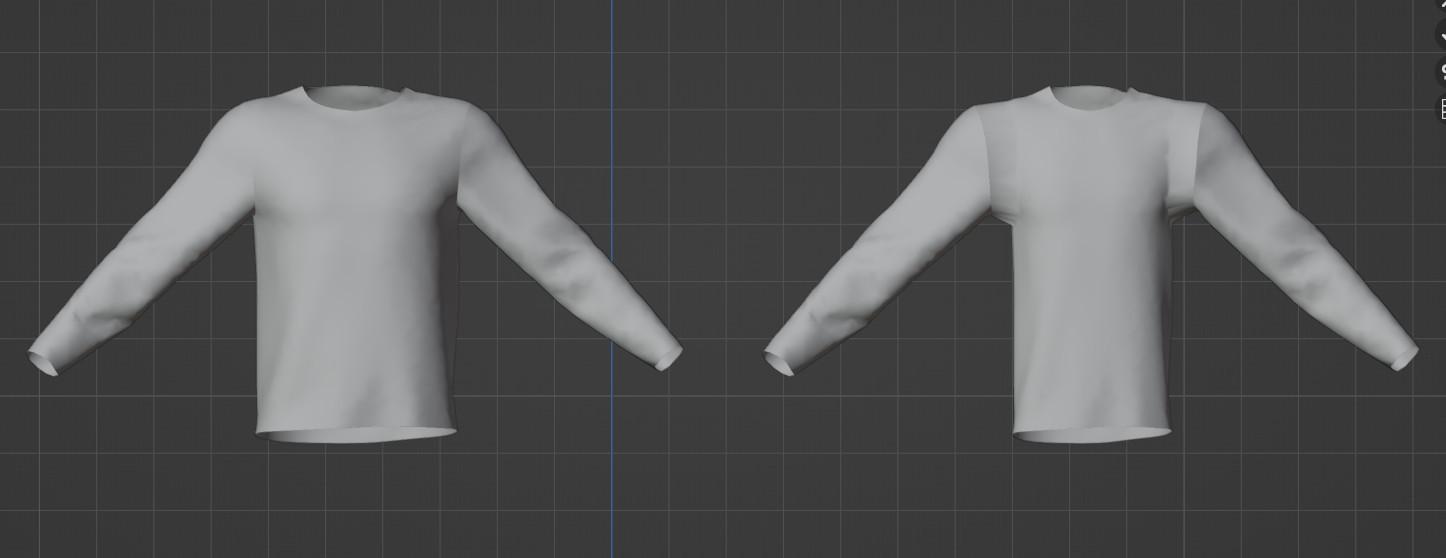
I imported the t-shirt into daz (left image)
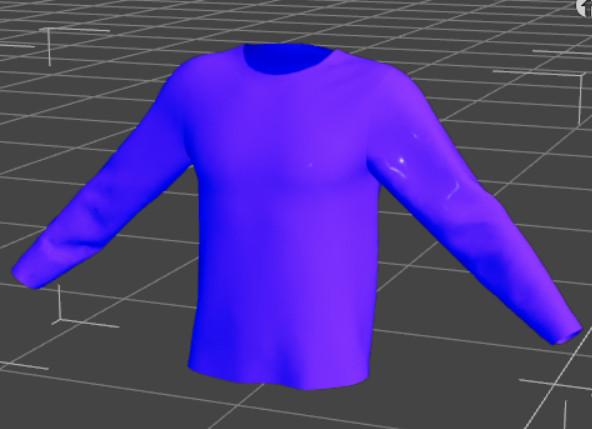
With morph loader I imported the model in the right image, I set it to 100% and this is the result:

Why? thank you
Moving my libraryI did this a couple of years ago. I made this thread about it, and linked to another that gives step-by-step instructions
https://www.daz3d.com/forums/discussion/332926/moving-daz-assets-from-one-drive-to-another
I don't use Daz Central, so there may be extra steps to take if you do.
Moving my libraryDaz Studio doesn't care where your content directories are, or what theya re called, as long as it is told about them. If you install through Daz Central or Install manager those do record the full location, starting from the drive, and so should ideally be updated (if you use Install manager and keep the zips after installing you can just change the destination, then select things in the installed tab and use the right-click menu to reinstall using current directories).
Anatomical elements on adult G8 and G8.1 modelsLike frank0314 said with "Pro G8 bundle" you get the actual genitalia that will show up in the anatomy section of DAZ Studio. It is important to know you only get these in the adult versions of G8 Pro like Victoria 8 Pro and Michael 8 Pro, if you buy a teenage Pro bundle (like Teen Raven Pro) it will NOT contain the (anatomy section) actual genitalia. Practically speaking you only need two adult versions of G8 Pro (1 x male and 1 x female) to cover your entire G8 library; in essence you would have to do the same for G3 (should you use that) that comes with its own adult versions of G3 Pro. Daz Victoria Pro and Daz Michael Pro are your safest bets but other DAZ adult Pro’s should work too but I stick to what I know. G8 can be forced to work on G3 but some weird problems can occur that I'll leave to your imagination. I was delighted when I finally had the adult male and female G8 and G3 Pro versions.
As for the anatomical elements ("a.e.") that many figures that you buy in the DS shop have, it has already been explained, these contain the materials that will provide the "skin" of the actual genitalia; so first you would apply the genitalia from the central Anatomy section, this will result in a "Genesis 8 Female Genitalia" or "Genesis 8 Male Genitalia" node in your figure (and a metal like outline of the selected genitalia); and then you select this node and double click anatomical elements from your figure, and the metal like outline of the selected genitalia will be covered with skin material identical to the rest of your figure. Some skin materials, often with “full” in their name cover both the figure and the a.e. in one go.
A substantial amount of figures that you buy in the DS shop have no anatomical elements*; you can still give them the actual genitalia from the central Anatomy section; you can subsequently try (the skin material) from the anatomical elements of a different figure but you'll find that almost always there is an annoying color difference. The easiest (but radical) solution for this is to apply the Materials --> (skin) MAT from a figure like Michael 8 (that has the anatomical elements) on the (gender corresponding) figure that has no anatomical elements, then follow up by adding the actual genitalia from the central Anatomy section and then applying the Michael 8 anatomical elements to the newly formed "Genesis 8 Male Genitalia" node. With this simple workaround you can give any ('human') Gen8 figure genitalia.
* whereas some signature figures have both Male Anatomical Elements and Female Anatomical Elements like the wonderful Catty.Obviously using a different skin on a figure will also change the look of that figure, sometimes quite dramatically. There are cases in which the end result is (surprisingly) way better than the original figure, sometimes it just looks different. The good news is you can cycle through your entire library of Gen8 figures that have anatomical elements and apply their skins and a.e. to your figure. until you come up with a result that you like. As for makeup, unless you use L.I.E. material usually you can only use the stuff that came with your a.e. "donor" figure, if you use the makeup of your original figure it may look bad.
As for the shape and other attributes of genitalia, the DAZ shop has some products that provide a few sliders for that, like zev0 "Shape Shift". A website like Renderotica has stuff that either works with the official DS anatomical elements/anatomy (but you still would have to have a Pro bundle [see above] and a figure with a.e.) and it also has products that provide 'exotic' proprietary solutions (often no DAZ Pro bundle required). In my experience the official DS stuff, enhanced with a couple of sliders will suit most purposes. Quite a few Renderotica products turn out to be a waste of money, esp. color options are often woefully inadequate.
Some DS developers provide their figures with "Genital hair" and usually you can apply that material to almost any other ('human') DS figure within the same gender and generation, so it pays to look for that when browsing the materials of a figure you want to buy so you build a small collection of that particular resource (unfortunately most look exactly the same apart from color aspects, but there are a few different shapes to be found).
Arch Bridge and Other Bridges. New: Cable Stayed.Yeah, texturing is going to be a challenge. I think the bridge is around the 280m (920ft) length mark. I may be wrong, as I'm not on my modelling machine to check, but it's in that order of size. It seems a pretty nice size to set up a USXT landscape for with a height map. I think I could cope with just doing a hight map for an imagined landscape like that. Just need to check if GIMP can export 16bit monochrome png's, because I know my preferred image editor (Paintshop Pro 5 from a CD on the front of the 'PCPlus' magazine in the year 2000) can't. An 8 bit monochrome png would be awful, giving steps of about 50cm for a 125m altitude range.
I may well have to take some of the seamless CC0 textures on PolyHaven and tile them into bigger textures. Then do editing to try to remove some of the more obvious repeats and put on dirt and staining in the right places etc etc. I'll try to avoid textures more than 16k pixels wide Well, 8k or less will be the target as I think PSP5 has a relatively small size limit too. May have to write my own program to stitch images together in the way I want if PSP5 can't do it, as I don't know enough about GIMP to be able to do it there, and my patience with GIMP's smart alec way of doing things is very limited. I will have to do some calculations of block sizes vs pixel sizes and the like. As the sides of the bridge are mostly going to be seen from a distance, there doesn't have to be too much detail, certainly not on the central arch... unless someone wants an image from a boat. Doh. Will have to think on it.
I suspect texturing the bridge is going to test my minimal photo editing skills to beyond breaking point, but we'll see. I might learn something other than the most likely lesson of 'Don't try this again.'.
Regards,
Richard
DIM Sorting Incorrectly?Richard Haseltine said:
Daz is looking into this issue.
The issue has been identified, and is/was being corrected on the servers. Once that is done everything should go back to normal (which I suspect means the ordering in Connect will still be off, but DIM/Daz Central should be good)
DIM Sorting Incorrectly?DAZ TEAM... Here are the 2 issues that still need fixing and a possible solution:
1. DIM
Ready to Download tab --> Products
Sort Order: (Order Date: Recent First)
PROBLEM: DIM is listing the products I purchased on September 21st and September 22nd before the new products that I purchased today and every day after September 22nd.
POSSIBLE TIP TO A SOLUTION: If I hover over any of the products from Sept 21-22 that are incorrectly showing at the top of the list, the Pop-Up shows
Order ID: --- Unknown ---
All of the other products that display correctly have an Order ID number. This Order ID Number is what is missing from the Daz Database on September 21st and 22nd and needs to be added by the DAZ TEAM.2. PRODUCT LIBRARY
Products
PROBLEM: All products are displaying correctly except purchases from September 21st and September 22nd
Products from those 2 days only display the Black Swirls and no product info or download links
POSSIBLE SOLUTION: Most likley this has to do with the same problem as DIM... the products purchased from these 2 days are missing the ORDER ID number.NOTE: Users using Daz Central are also experiencing the disordered items problem.
Luna HD Morph Trouble (Solved)Having some issues with Luna HD
https://www.daz3d.com/luna-hd-for-genesis-81-female
Attached images are Luna morph 100% vs 0%
Looks like som random morph is causing it, but when I revert back to base Genesis 8.1 the issue with lashes is gone.
Also Body and Face morph looks like a 'Light' version from the product images. Setting morph limit off and exceeding 100% Only deforms it even more.
Tried Installing with DIM first. Then uninstalled and used Daz Central. Nothing changed.
Kinda curious if anyone else had this issue too? Impossible to find anything with Daz' amazing forum search! :D
Thanks for any help you can give!Is there any way to use PowerPose Face with 8.1 figures?benniewoodell said:
Anytime you open Daz and it's saying you're missing a character, for whatever reason you didn't install it through DIM yet or whatever, you know that box that comes up when you turn it on, do not install it that way as Daz might put the dummy files back into the folders. I had bought Kento 8.1 and did a shot for a scene, sent it to my other computer to render and I had forgotten to install it. That box came up so I clicked it knowing I needed the character and the power pose wouldn't work after that, I had to go and find the files again in the cloud folders I believe is where they got reinstalled. So just keep that in mind, don't install through smart content or Daz Central and they won't show back up in those folders.
Yeah, I will keep an eye on those dummy files.
I had some issues like that in the past; now, all that I install using DIM is Daz Studio and starter essentials; those dummy files must also come with the starter essentials...
I manually install characters, hairstyles, clothes, props, and everything else; it is safer that way.
Daz Central - items all out of orderI launched my DazCentral this morning and everything is all jumbled. While it says the items are listed in decending dates, they are not. I have items from years ago at the top of my list intermixed with recent purchases. Anyway to restore this?
Edit: Each time I lauch it, it has new items listed as my most recent purchase. Again, these are from numerous different orders all jumbled together.
Is there any way to use PowerPose Face with 8.1 figures?Anytime you open Daz and it's saying you're missing a character, for whatever reason you didn't install it through DIM yet or whatever, you know that box that comes up when you turn it on, do not install it that way as Daz might put the dummy files back into the folders. I had bought Kento 8.1 and did a shot for a scene, sent it to my other computer to render and I had forgotten to install it. That box came up so I clicked it knowing I needed the character and the power pose wouldn't work after that, I had to go and find the files again in the cloud folders I believe is where they got reinstalled. So just keep that in mind, don't install through smart content or Daz Central and they won't show back up in those folders.
Daz Install Manager (DIM) Not Showing Latest Purchases For DownloadIt looks like something is propagating through all the products in Daz's database, a few hours ago I had about 100 products that had no order number or date associated with them, in either DIM or the product list on the website under my account. (I don't know anything about Daz Central, but I like to sort DIM by order date so that's why I noticed this issue. Maybe Daz Central doesn't show products with no order number for some reason?)
But I just checked again now, and those pruducts from before have the correct order info in both My Account and DIM. However, another set of products that were fine a few hours ago now have no order data. The products range from things I bought in 2011 to things I bought last week, so there's no rhyme or reason except that it must be some process that's going through every product in the database. But it's probably a temporary problem.
Forum issues?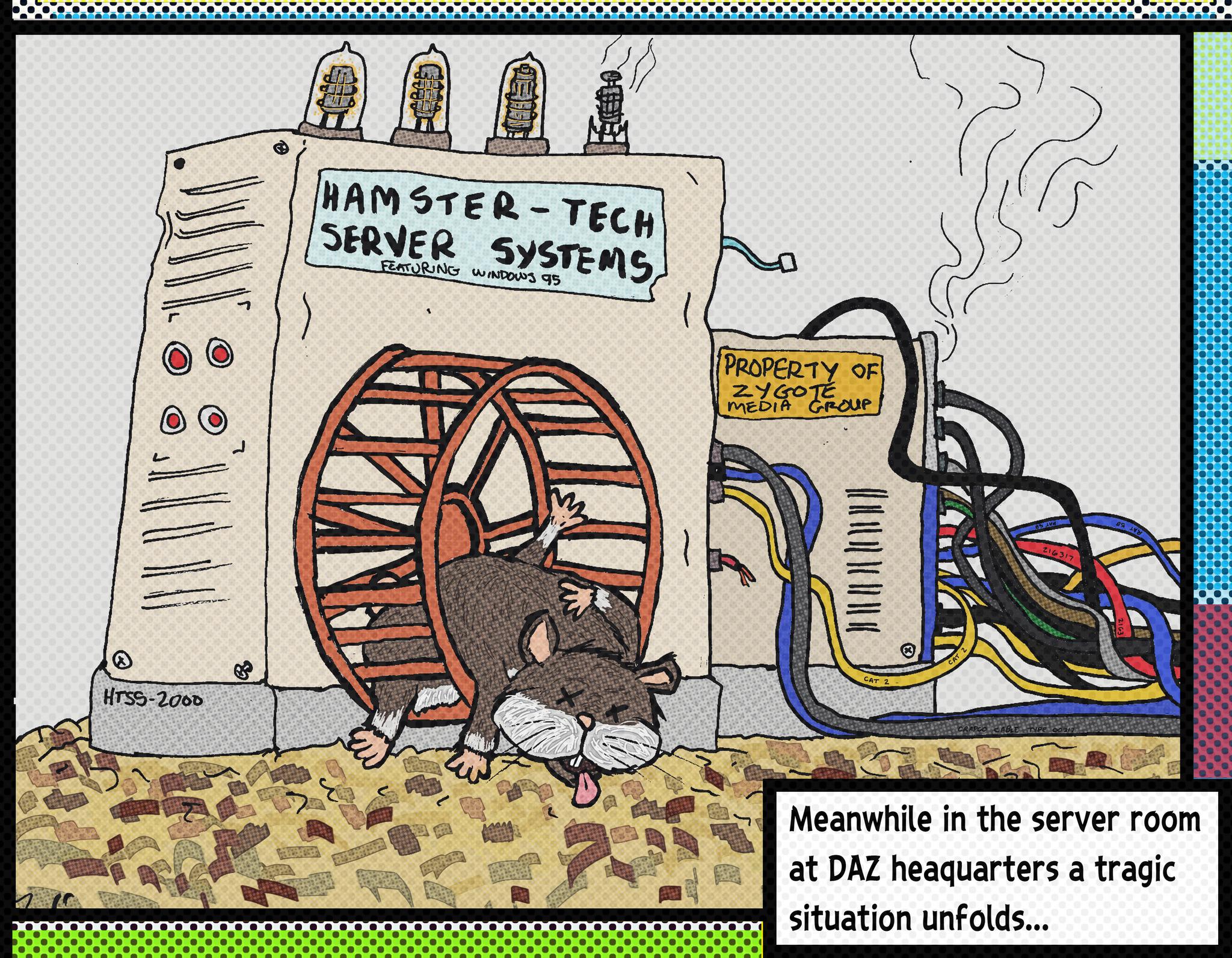
Clearly some of you have never heard of the story of Server Hamster...
Poor little Bert was never the fastest hamster, nor was Bert the smartest hamster, but Bert had something other hamsters at Hamster Depot didn't...
Bert had three extra toes on his left foot and a really weird looking patch of missing fur in the shape Guatemala on his back... But that's not what made Bert different... it wasn't even his strange odor or his spontaneous narcolepsy whenever he heard loud noises...Bert had heart.
Well, technically 3/4 of a functional heart, but Burt had spunk and determination which nothing, not even his chronic flatulence or his lazy, much larger right eye could interfere with.
From the moment he was eaten by his mother and subsequently spit out, he was determined to become the best hamster ever... to show everyone that by underestimating or trying to eat him, they were wrong and one day they'd wished they had gotten to know him or had treated him better.Bert was dead set on being adopted by a nice school teacher who would make him the class pet and that he'd teach all the little children about the true meaning of determination and courage... and that generations of little children would grow up to be better people for having known Bert.
But no matter how much Bert tried, he was never adopted... not even by the evil mad scientist who wanted hamsters to experiment on.Bert was heartbroken, but he persevered.
Every time someone came by his Hamsterarium, he'd run on the exercise wheel as fast as he could... usually he'd fall off or get his head jammed in between the bars, but he sure did put on a show... yet always after he'd wake up from one of his narcolepsy episodes he'd inevitably experience while putting on a show, it was the other more handsome or less drippy hamsters with no missing fur in the shape of any Central American nation that were chosen.
Bert was always rejected.
But he never stopped trying.
Then one day one of the hamster wranglers that worked at Hamster Depot was passing by and spotted Burt... he bent down and looked right at him!
"This is it!!" thought Bert... "Someone called in an order for a spunky hamster with courage and determination!!"... "I've got a home!!"
Bert started doing his signature hamster dance knowing it might trigger his narcolepsy, but regardless, he'd have to risk it.The hamster wrangler shook his head and winced and started putting on some rubber gloves... "That's odd..." thought Bert.
But undeterred, he continued doing his little hamster dance so the hamster wrangler wouldn't grab the wrong hamster.The hamsters wrangler opened the hamsterarium reached right for him and picked him up.
Bert was overjoyed!
The hamster wrangler held him up and examined him... "Ugh, what's that weird cheese smell?"
Burt blushed a bit, he was proud of his odor and no one ever complimented it before.He held Bert up by the scruff of his neck turning him all around... "Yup... just as I thought... missing patch of fur the shape of Nicaragua, leaky orifices and uncontrollable seizures... Terminal Deranged Hamster Syndrome...
"Wait... What?" thought Bert, "that was dancing, not a seizure and it's Guatemala, not Nicaragua!..."
But it was too late... the wrangler shook poor Bert a little to see if any parts would fall off and then said "Sorry little fella, but it's the hamster compactor for you... we can't have diseased hamsters like you infecting all the other handsome hamsters"...
And with that he tossed Bert into a bucket labeled "Hamsters For Compacting".
Burt landed with a squishy thud... he lay there in abject sadness... his tiny drippy weird smelling soul crushed like a spoiled grape under the wheel of a shopping trolley in the grocery store.
He lay there for hours awaiting compaction... maybe it was better this way he thought... "Who wants a drippy, smelly hamster who keeps falling off his exercise wheel?"... "I'm probably more useful as a fine paste used in cosmetic products"... "I was a fool for thinking I'd ever amount to anything"...
The hamster wrangler came by two more times with customers looking for "adorable hamsters"... Bert heard the other hamsters being adopted and silently cried at the bottom of the compaction bucket.
The wrangler passed by one more time and looked down at Bert... "Oops, sorry... I didn't forget about you... I'll be back for you as soon as I take care of this next customer..."
Burt cried uncontrollably... he barely heard the wrangler and the customer talking over his hysterical sobs...
"Well, they told me to pick up a new hamster... the adorable ones keep dying", said the new voice... "But these ones are all too expensive... are you sure there is nothing cheaper?"
"No, that's it, those are the cheapest entry level hamsters we have... they are sold as is, no warranty or repairs... fairly disposable actually"...
Bert sobbed harder... he wasn't even "disposable quality"!
"Okay, I guess that's it... the cheap bastards won't spring for a halfway decent hamster, I guess we'll just have to use a diseased sewer rat to power our servers... it's the worst case scenario, but they are determined not to spend money on their forums, so..."
The voice paused... Bert looked up at the strange face staring down into his death bucket...
"What's going on with that one?" the voice asked.
"Oh... he's got deranged hamster syndrome... he's not for sale." said the wrangler to the customer with the strange face.
The man with the strange face replied "So does that mean he's free?"
"No, no it doesn't... but you know what... I'm busy and turning on the hamster squasher takes five minutes for it to warm up... you know what, you can have it... just get it out of here now", said the hamster wrangler.
Before Bert knew it he was snatched up and dropped into a mostly empty Starbucks matcha green tea latte cup and taken away.
After a long journey in the cup holder of a high mileage late nineties Saturn SL sedan, Bert was brought into a janky old brick building way across town and brought down into the basement into a dark room that smelled of mildew and burning electrical insulation.
The man with the strange face dumped Bert out on a table littered with old scratch-off lottery tickets and Settebello Pizzeria menus.
He took an old sweat sock and dabbed off the whipped cream and green tea from Bert’s fur and grabbed him by the scruff of the neck.
He then carried Bert over to a old machine made of yellowing beige plastic and dented up metal… on the side was a hamster wheel with a handsome looking hamster laying dead on the wheel.
The strange faced man picked up the dead hamster and unceremoniously tossed it in the recycling bin far across the room.
It landed with a muffled "thump".
“Damn, I was aiming for the trash bin”, he said… and without a proper greeting or introduction, he tossed Bert on the wheel.
“Well, you know what to do…” said the man.Bert knew exactly what to do... he ran... he ran with all his three quarters of a functional heart, he ran as fast and as best as he could... he ran because he knew who he was... he was now the Server Hamster.
And with that Bert began his origin story as “Server Hamster".
Bert started running and hasn't stopped... aside from when he falls off the wheel or has a seizure or gets his head stuck in the bars.
But Bert has a purpose and he'll never give up... because he finally has a home and he's gonna show everyone he's the best damn hamster ever.So now you know… the forums are wonky because they are powered by a spunky, funny smelling, drippy hamster with a patch of missing fur the shape of Guatemala, who frequently has narcoleptic episodes whenever someone slams a door or the water cooler compressor turns on, or even if someone sneezes on the third floor… the servers may freeze, they may falter and really suck because of it, but they always come back because of plucky and courageous Server Hamster… or as we know him…
Bert.
Arch Bridge and Other Bridges. New: Cable Stayed.I have had an interesting time creating filigree tracery to use on the bridge, and added another pair of walkway rooves. I think I have worked out how to model the roof tiles. Will have to try it out soon. Need to add some more on the ends of the central walkways, then I'll be ready to start converting it to DS.


In some ways, this makes me long for the elegant simplicity of a Cable Stayed Suspension Bridge. Never thought I'd say that...
Regards,
Richard.
DIM sorting has suddenly failedI'm still having issues with DAZ central on Windows, everything is showing the same date and item order changes everytime I open the app. Which is nice.
The items I bought yesterday were there and installed ok but I had to do a search to find them.
Daz Central [disordered]My Daz cental has suddenly become very unorderly, items are all over the place old items appearing in the middle of latest stuff, is this just me?
DIM Sorting Incorrectly?There were massive issues of the sorts when DAZ updated their store a while back, never really got fixed properly but I learnt to live with it by sorting bypurchase day in Central. However, not sure what happens this time around but it's getting concerning and frankly hard to deal with. I have a large collection of items accumulated over the years. Daz doesnt offer the best content mamangement to start with, but in the state things are today, it's just impossible to be productive. Takes more time to look for products than to create anything. Everytime I re-open Daz Central, the order is now different! Slot machine content management is NOT a solution! Daz, please fix and improve QA. thx.
UltraSceneryXT - large terrain/landscape generatorTrouble said:
I tried reading through this thread but 31 pages is too much. I've attached an image from ultrascenery and you can see there is no ground material. Didn't do anything special. Loaded the landscape and applied a preset to it. Saved the maps created in their seperate folder under documents. There are no error messages and no matter which preset I use I get the same ground. Even changing the terrain mat doesn't change the render results.
Any suggestions? btw, I installed through DAZ central, uninstalled, installed with DIM, uninstalled and installed manually and nothing changes.
Thanks
People have reported incompatibilities between nvidia 1.7.0 vMaterials and DS 4.20. If you have vMaterials installed, update to nvidia 2.0 vMaterials for use with the current version of Iray in DS.
You didn't mention what version of DS you are using or what graphics card and driver you are using. That info may be helpful if the vMaterials issue doesn't solve your problem.
Daz 3D is part of

Connect
DAZ Productions, Inc.
7533 S Center View Ct #4664
West Jordan, UT 84084Licensing Agreement | Terms of Service | Privacy Policy | EULA
© 2026 Daz Productions Inc. All Rights Reserved.