-
Would a hair basemesh purchased elsewhere be easily usable in Daz Studio?
felis said:
Hair usually have a haircap. That haircap matches the head, so when you use it on a morphed character it will still fit.
In order to use a third party hairmesh, you might be able to scale it to match the character and then parent it to the head.
If you want to use it as a generic hair, you need to use transfer rigging, but then it must fit the character before you do that.
Thank you for your help! Now that I understand a bit more of the process I think it's a bit beyond my current ability.
Are there any "smart" ways of making an asymmetric imported G8F model symmetric in Blender?tayloranderson2047 said:
Richard Haseltine said:
tayloranderson2047 said:
Richard Haseltine said:
Do not upload files with Daz (or other content) in them unless you have permission. I have removed the attachment.
Well that blender file was created by myself... Anyway I will be careful next time.Did it not contain a version of Genesis 8 Female?
It does contain an imported obj from the mesh of G8F. But since that morph was created by myself, I don't know why it violates the rules here. I thought Daz Studio and G8 figures are free resources.Free to use in the ways permitted by the EULA does not mean free to distribute. Morphs are shared as .dsf files, which contain only the changes in position of the vertices but not the base shape.
Genesis 8 Female Slow Loading - DIM Doesn't Fully Delete Figures.RiverSoftArt said:
jukingeo said:
Catherine3678ab said:
jukingeo said:
.... edited ...I had attempted what you instructed above, however, when I navigate to that specific folder, I had only found one morph in the morph folder, so it has been stored elsewhere. BTW, my main file storage isn't on the C drive, it is on a separate drive and yes, I did use that drive letter to navigate to the location you show above and the morphs aren't there. So I don't know what is going on. I just know that characters that I have (attempted) to delete using the DIM, didn't work. Annissa was one of the characters I deleted and I had navigated to the Belladonna folder (the character's creator), and it shows that isn't there, yet the morphs show up when I load a Genesis 8 character and they operate shaping the figure to the Annissa body and head. So that is telling me it wasn't deleted. Any advice on how to proceed from here?
Thanks,
Geo
My content is not on the C drive either.
You will have to find where the morphs really were installed. When DIM uninstalls products, it is only checking the folders where it would have put them. If Daz Connect for example, put them somewhere else, DIM wouldn't know that.
If you manually download any particular folder, unzip it, then you can see all the files it contains. Look for them in your real content's location, and delete them. n.b. all the smart content meta tags would also need to be cleared up. [check in the Support folder under Runtime as well as DIM's meta data].
Also there is this folder, a cache, that requires to be manually dumped now and then:
C:\Users\16132\AppData\Roaming\DAZ 3D\dson\cache\data
n.b. I hope you realized that "content" and "My Library" refer to the same folder. The Company changes the name it uses over the years. So where I was saying "My Library" because in the setup here, it is indeed "My Library" - maybe it's "Content" on your computer?
For the character you mentioned these are the places to check through:
\Content\People\Genesis 8 Female\Characters
\Content\data\Belladona
\Content\data\DAZ 3D\Genesis 8\Female\Morphs\Belladona\Annissa
\Content\data\DAZ 3D\Genesis 8\Female Eyelashes\Morphs\Belladona
\Content\data\DAZ 3D\Genesis 8\Female Genitalia\UV Sets\Zev0\Skin Builder 8
And also the Manifest.dsx and Supplement.dsx [meta data that tells DIM its status]
\Content\Runtime\Textures\BelladonaHello,
Sorry I didn't get back to you soon on this, but yeah, I have been discovering that my daz downloads are all over the place. It was first on the c drive when I realized that it was quickly filling up. Then it was moved to the D drive, then from there I bought a new hard drive and it went to the H drive. Now it is going back to "D" as I installed a new larger hard drive for D and E. While I have moved the files over completely, as you have said, the name changed. So I have both a My Library and also a Daz 3D Library folder. So the data folder was duplicated and that is about a 100gig of stuff there. So that was one problem. Then I have noticed that if you create your own morph, it loads a TON of other morphs in my own folder that I created. Just one full body morph took up about 6 gig of info. Of course no one warned me about that when I created it. So I got rid of that.
I had to manually delete a lot of stuff, but yet it only freed up about 20 gig on my hard drive. I am very much contemplating on blasting the entire install of Daz on my system and starting over. I just don't know of a good way to do that as I do use Daz every day. But it is running very slow, especially when loading Genesis 8 female figures.
Thanks,
Geo
If you are just worried about the slow loading of G8 figures (and not how much space they are taking), you should check out my product: https://www.daz3d.com/turbo-loader-for-genesis-8-and-81
It is both really. While I have given my computer an additional 2 terrabyte HD, I am really only gaining another 500gig due to the install of an additional operating system. That 500gig will be used up quickly. So the issue is two fold, not only am I experiencing slow loading times for Gen 8 characters, but they are also taking up quite a bit of space on the HD.
I will take a peek at that link though. If I can solve one problem now, that is a start.
Are there any "smart" ways of making an asymmetric imported G8F model symmetric in Blender?
It does contain an imported obj from the mesh of G8F. But since that morph was created by myself, I don't know why it violates the rules here. I thought Daz Studio and G8 figures are free resources.Richard Haseltine said:tayloranderson2047 said:
Richard Haseltine said:
Do not upload files with Daz (or other content) in them unless you have permission. I have removed the attachment.
Well that blender file was created by myself... Anyway I will be careful next time.Did it not contain a version of Genesis 8 Female?
How to fix this after transfer utiliy?Ok, I've managed to apply the morph for the cloth.
I zeroed the backhead morph copied by DAZ from the source.
And I use the value of 100% for the cloth morph.It looks normal now.
Eyes negative coordinates after conversionHow did you transfer the morph? It looks to need some joint centre adjustments - e.g. Edit>Figure>Rigging>Adjust Rigging To Shape, then use ERC Freeze to link the changes to the morph.
Genesis 8 Female Slow Loading - DIM Doesn't Fully Delete Figures.jukingeo said:
Catherine3678ab said:
jukingeo said:
.... edited ...I had attempted what you instructed above, however, when I navigate to that specific folder, I had only found one morph in the morph folder, so it has been stored elsewhere. BTW, my main file storage isn't on the C drive, it is on a separate drive and yes, I did use that drive letter to navigate to the location you show above and the morphs aren't there. So I don't know what is going on. I just know that characters that I have (attempted) to delete using the DIM, didn't work. Annissa was one of the characters I deleted and I had navigated to the Belladonna folder (the character's creator), and it shows that isn't there, yet the morphs show up when I load a Genesis 8 character and they operate shaping the figure to the Annissa body and head. So that is telling me it wasn't deleted. Any advice on how to proceed from here?
Thanks,
Geo
My content is not on the C drive either.
You will have to find where the morphs really were installed. When DIM uninstalls products, it is only checking the folders where it would have put them. If Daz Connect for example, put them somewhere else, DIM wouldn't know that.
If you manually download any particular folder, unzip it, then you can see all the files it contains. Look for them in your real content's location, and delete them. n.b. all the smart content meta tags would also need to be cleared up. [check in the Support folder under Runtime as well as DIM's meta data].
Also there is this folder, a cache, that requires to be manually dumped now and then:
C:\Users\16132\AppData\Roaming\DAZ 3D\dson\cache\data
n.b. I hope you realized that "content" and "My Library" refer to the same folder. The Company changes the name it uses over the years. So where I was saying "My Library" because in the setup here, it is indeed "My Library" - maybe it's "Content" on your computer?
For the character you mentioned these are the places to check through:
\Content\People\Genesis 8 Female\Characters
\Content\data\Belladona
\Content\data\DAZ 3D\Genesis 8\Female\Morphs\Belladona\Annissa
\Content\data\DAZ 3D\Genesis 8\Female Eyelashes\Morphs\Belladona
\Content\data\DAZ 3D\Genesis 8\Female Genitalia\UV Sets\Zev0\Skin Builder 8
And also the Manifest.dsx and Supplement.dsx [meta data that tells DIM its status]
\Content\Runtime\Textures\BelladonaHello,
Sorry I didn't get back to you soon on this, but yeah, I have been discovering that my daz downloads are all over the place. It was first on the c drive when I realized that it was quickly filling up. Then it was moved to the D drive, then from there I bought a new hard drive and it went to the H drive. Now it is going back to "D" as I installed a new larger hard drive for D and E. While I have moved the files over completely, as you have said, the name changed. So I have both a My Library and also a Daz 3D Library folder. So the data folder was duplicated and that is about a 100gig of stuff there. So that was one problem. Then I have noticed that if you create your own morph, it loads a TON of other morphs in my own folder that I created. Just one full body morph took up about 6 gig of info. Of course no one warned me about that when I created it. So I got rid of that.
I had to manually delete a lot of stuff, but yet it only freed up about 20 gig on my hard drive. I am very much contemplating on blasting the entire install of Daz on my system and starting over. I just don't know of a good way to do that as I do use Daz every day. But it is running very slow, especially when loading Genesis 8 female figures.
Thanks,
Geo
If you are just worried about the slow loading of G8 figures (and not how much space they are taking), you should check out my product: https://www.daz3d.com/turbo-loader-for-genesis-8-and-81
How to fix this after transfer utiliy?When running transfer utility, you should use the same character you modelled towards as source for transfer utility, with Reverse Source Shape From Target checked (if not the default shape). Then the clothing shouldn't change shape.
I have used the same character now (G8F with bakchead morph).
Used transfer utility + Reverse Source Shape From Target
But the clothing shape wasn't revert back completely.
I think the reason is, in the process,
first, the geometry of my cloth tried to comform with the original shape of G8F head.
Then DAZ added the backhead morph to the cloth, but only affect some part of the geometry,
living the curvy back behind.
That's my conclusion after checking the hidden parameter.So, in this case, making the orignal shape morph of the cloth is the answer?
Announcing: Daz Deals Browser Add-on IIOverdrawn said:
tombraider4ever said:
Overdrawn said:
tombraider4ever said:
Overdrawn said:
tombraider4ever said:
Just tried this again, and now I only get the BigBlueHat again, it pops up a window after I type in dazdeals, what u wrote, and it says the correct thing but above it it says BigBlueHat. I think it might be your username and click and in the transfer window it says ONLY @bigbluehat, not Dazdeals, wtf is this? if I am going to donate I want it to say clearly dazdeals. Please reply if u are both those names, the bigbl.... and dazdeals. Thanks in advance. Seriously confused here.
Sorry for the confusion! If you check the addon stores you'll find that BigBlueHat is the developer publishing the extensions...aka me. :) I'll setup a dedicated PayPal donate page soon to make things more clear.Can't get out of the qoute winow again, sorry, hope you see this reply anyway, I click enter again again again and nope, still in the window. Annoying bugg.Thank you so much for the reply, and for setting up a special donate page so it will be more clear that it goes to the right place. When u say blue hat is u I belive you of course , it's just paypal is messing w my head w the transferring window sometimes showing only bluehat and sometimes only dazdeals. So I'll wait 4 the donate page, and if it's possible: could you set it up so we can write our email adress, if it doesn't show autmatically I mean, so we know 4 sure u know we have donated so we can get your amazing shopping helper . Thank you so much again 4 making it possible 4 me to donate so you can keep giving us this shoppinghelper, I can't go back to shop "normally" after this, scroll endlessly to spot those tiny yellow hearts, I need all the time I have to make my art and manage my fanart pages. So I'll rather make Daz art than spend hours shopping here.
 Totally understand that surprises aren't always fun--especially on the InterWebs...
Here's a dedicated donation link for PayPal preferring folks: https://www.paypal.com/donate/?hosted_button_id=N75A9F8QGJHTS
Hopefully that allays any concerns about validity. :)
Thanks for your support!
Managed to get out of the qoute box, thanks for the info on that!
Thank you so much for setting up that page, I really appreaciate it!
Two questions though: 1. 50$ is for a years subscription, right? the paypaly alternative doesn't say subsription, but it counts as one just the same as the other credit card alternative, right? 2. How do you find out that I donated, do you see the email adress it's from somehow? and will it say somewhere on the daz deals page that I, after paying 50$ have a years subscription payed? and the date, so I know when it's time to renew, don't want to be without your excellent shopping helper even 4 a day. Thanks for your patience w my insecurty about payment through paypal and in advance for answering these, hopefully  , last questions . Thank you so much for your excellent work on making the Daz shopping experience so much better! Yes. We'll make sure to map what's done in PayPal into the subscription data. Our goal with all of this is to make sure we can all keep using the extension in the future, so you're not alone. :)
Sounds Great, Thanks for the reply and Thanks again 4 setting up that paypal page
, I will donate 50$ for a ys subscription as soon as I can  . Eyes negative coordinates after conversion
Hi guys,
I converted one of my favourite characters from G2F (actually a Victoria6 morph) to G3F and then to G8.1F: everything looks ok but I have a strange problem when moving the eyes of the character or applying an expression to her face.
It seems that the movement/pose is applied with negative parameters, so that if for example in the original expression she should look up, after the applying she looks down; If the eyes should be crossed inward, they become outward and so on.It's not only about the eyeballs rolling in the wrong direction since also the eyelids move the opposite (when looking up the upper eyelid should open more but it closes, and the opposite when looking down), I attach a screenshot to understand better.
I guess it's something happened during the conversion but I can't figure out how to reset this behavior.Is Diffeomorphic reliable enough for commercial production purpose?Padone said:
Then diffeomorphic is specific to blender and not targeted to game engines. So you may also try the daz bridge for UE and see if it works better for you.
Understand that Diffeomorphic is made specific for Blender renders not for game engines, that's why it imports with multires or subdivision modifier and not bake the HD mesh, since 3D software can't handle high poly models.
Daz bridge does very nice job exporting baked HD mesh and rebuild the materials, plus it gives a nice Daz skeleton retargeter for UE5, and those features are done automatically in just a few clicks. Would be perfect if it can merge geograft and transfer the morphs for some special types of games.
Although Daz to Unreal is very useful and dummy proof, it's most suitable for quick rendering in Unreal. For game production purpose I have to use Diffeomorphic to import textures into Blender. There're too many layers of textures need to be merged for game performance, and editing UV coordinates of surfaces / material slots that share the same texture to avoid overlapping. The rendering process in Unreal is very different from 3D modelling software though the shading calculation methods are similar, so the shaders need to be rebuilt in Unreal. It would take a few weeks for me to setup the material process, after that the character materials can be easily modified and swapped.
AIUTO...CHI CONOSCE L’ITALIANO? PARTE TREDICISe lo fai con Genesis e figli, vedrai i morph cambiare posto.
Announcing: Daz Deals Browser Add-on II
Yes. We'll make sure to map what's done in PayPal into the subscription data. Our goal with all of this is to make sure we can all keep using the extension in the future, so you're not alone. :)tombraider4ever said:Overdrawn said:
tombraider4ever said:
Overdrawn said:
tombraider4ever said:
Just tried this again, and now I only get the BigBlueHat again, it pops up a window after I type in dazdeals, what u wrote, and it says the correct thing but above it it says BigBlueHat. I think it might be your username and click and in the transfer window it says ONLY @bigbluehat, not Dazdeals, wtf is this? if I am going to donate I want it to say clearly dazdeals. Please reply if u are both those names, the bigbl.... and dazdeals. Thanks in advance. Seriously confused here.
Sorry for the confusion! If you check the addon stores you'll find that BigBlueHat is the developer publishing the extensions...aka me. :) I'll setup a dedicated PayPal donate page soon to make things more clear.Can't get out of the qoute winow again, sorry, hope you see this reply anyway, I click enter again again again and nope, still in the window. Annoying bugg.Thank you so much for the reply, and for setting up a special donate page so it will be more clear that it goes to the right place. When u say blue hat is u I belive you of course, it's just paypal is messing w my head w the transferring window sometimes showing only bluehat and sometimes only dazdeals. So I'll wait 4 the donate page, and if it's possible: could you set it up so we can write our email adress, if it doesn't show autmatically I mean, so we know 4 sure u know we have donated so we can get your amazing shopping helper . Thank you so much again 4 making it possible 4 me to donate so you can keep giving us this shoppinghelper, I can't go back to shop "normally" after this, scroll endlessly to spot those tiny yellow hearts, I need all the time I have to make my art and manage my fanart pages. So I'll rather make Daz art than spend hours shopping here. Totally understand that surprises aren't always fun--especially on the InterWebs...
Here's a dedicated donation link for PayPal preferring folks: https://www.paypal.com/donate/?hosted_button_id=N75A9F8QGJHTS
Hopefully that allays any concerns about validity. :)
Thanks for your support!
Managed to get out of the qoute box, thanks for the info on that!
Thank you so much for setting up that page, I really appreaciate it!
Two questions though: 1. 50$ is for a years subscription, right? the paypaly alternative doesn't say subsription, but it counts as one just the same as the other credit card alternative, right? 2. How do you find out that I donated, do you see the email adress it's from somehow? and will it say somewhere on the daz deals page that I, after paying 50$ have a years subscription payed? and the date, so I know when it's time to renew, don't want to be without your excellent shopping helper even 4 a day. Thanks for your patience w my insecurty about payment through paypal and in advance for answering these, hopefully , last questions . Thank you so much for your excellent work on making the Daz shopping experience so much better! Duplicate formulas2022-08-02 18:08:56.266 [INFO] :: Loaded morph deltas: 0m 0.11s - /data/DAZ 3D/Genesis 8/Female/Morphs/TMLI/Demona/FHM Demona.dsf
2022-08-02 18:08:56.272 [INFO] :: Loaded morph deltas: 0m 0.1s - /data/DAZ 3D/Genesis 8/Female/Morphs/FenixPhoenix/HD Face Staples and Stitches for Genesis 8 Female/FSSF S04 Staples.dsf
2022-08-02 18:08:56.300 [INFO] :: Loaded morph deltas: 0m 0.25s - /data/DAZ 3D/Genesis 8/Female/Morphs/Angel - Wings/Diane/AW - Diane Tween Body.dsf
Those three files are likely the cause of your issue, to show in the log as loading deltas on a base G8F, means they have a non zero "value" in the DSF file. As a result every time you load G8F/G8.1F or any character based on them, then those three morphs are going to be loaded fully dialed up in all of them.Remedy - uninstall the products those files are part of, or figure out how to edit said files and change the "value" to 0.
EDIT
2022-08-02 18:08:56.324 [INFO] :: G:/Jessica/DAZ Content/data/Daz 3D/Genesis 8/Female/Morphs/Alter3go/Anya/Anya head.dsf (14410,630): Unexpected character
2022-08-02 18:08:56.325 [INFO] :: Error loading morph deltas: /data/Daz 3D/Genesis 8/Female/Morphs/Alter3go/Anya/Anya head.dsf
2022-08-02 18:08:56.326 [INFO] :: Operation failed
2022-08-02 18:08:56.356 [INFO] :: G:/Jessica/DAZ Content/data/Daz 3D/Genesis 8/Female/Morphs/Alter3go/Anya/Anya body.dsf (19068,7206): Unexpected character
2022-08-02 18:08:56.357 [INFO] :: Error loading morph deltas: /data/Daz 3D/Genesis 8/Female/Morphs/Alter3go/Anya/Anya body.dsf
2022-08-02 18:08:56.357 [INFO] :: Operation failed
This Anya character would also cause issues if it worked, basically it's a broken product, it has a bunch of errors earlier in the log, but those I've listed means it's trying to load the morphs, but it looks like someone tried a spot of manual editing and made a mess of things.
How to fix this after transfer utiliy?When running transfer utility, you should use the same character you modelled towards as source for transfer utility, with Reverse Source Shape From Target checked (if not the default shape). Then the clothing shouldn't change shape.
If you select your clothing in the scene tab, then in parameters enable 'show hidden' and select currently used, then you can see some projected morphs autogenerated (if not already existing for morphed characters) to adjust your clothing to your morphed character.
For creating a morph, I would suggest you save your clothing. Then export it unmorphed into your modelling app, and then do adjustment there. You can only move verteces. For both exsport and import you must keep vertex order checked, and you can then load it with morph loader pro.
You can then dial the autogenerated morphs back, and dial your new morph in, or you can when saving the morph use the same name as the autogenerated, as it then will be used intead of the autogenerated.
I remember that Sickeyield has a video on generating morph, but couldn't find it right now. Here is a text version https://www.deviantart.com/sickleyield/journal/Tutorial-Requested-Loading-Morphs-in-DAZ-Studio-450007378
Genesis 1 chest scale sliders with Ds 4.20variations of this happened to me a couple of times.
you have some morphs mixed in that are reacting to each other.
My genesis 3 females misshaped when put in a pose.
find your genesis morph folder my daz library>data>daz 3d>genesis>base>morphs>daz 3d>base
theoretically something in there is weird
---
if you've ever programmed trouble shooting says take out half the files and see what happens ... if it's still weird take out another half ... if it goes away switch the out half (with the problem) with the in half which is okay
then take half out of the ones you know include the bad one etc.
---
the daz 3d folder that holds the gensis base morphs has a lot of other stuff so you may have to take them out of the path to trouble shoot.
In the case of my gen3 females not males it was somekind of issue with freak (as in the character Freak) morphs in the wrong place.
--
my other issue was my base genesis figure decided it was not base genesis but preteen julie. since g1 was to supposed to morph either male and female my male character were a little surprised to have man-boobs.. I don't think I ever found the problem despite reinstalling all the base sets and just opened my base character based on genesis and for the boys turned the julie body moprh and chest morph down to zero and locked them so they can't be called (without locking them the next time I loaded the character Daz put it back.
Since Julie is a preteen ... it's not uber noticable that the body includes Julie as well as Justin.
but Mr Mouth in the picture shows a bit more chest development then he should. Whereas preteen Julie is right for female cat.
---
richard probably has some ideas of what to look for.
How to fix this after transfer utiliy?@felis
Mmm... I modeled the cloth toward G8F with the backhead.
https://prnt.sc/9dl_ceNQRYCw---
On DAZ3D I use G8F together with the backhead morph + my character morph.
----
But, I 've also tested by uysing G8F with the backhead morph only.
But still there's a curve behind the head after Transfer Utility.
https://prnt.sc/a0OmAQ6uyzz0---
How the cloth looks like originally before transfer utility (G8F with the backhead morph.):
https://prnt.sc/607I76A3qvno--
How to create morph for the cloth?
I used morph loader, using the same OBJ of the cloth. But it say geometry did not match...
Are there any "smart" ways of making an asymmetric imported G8F model symmetric in Blender?"Also please don't change the mesh since I need to import it back to Daz."
There is no quick or 'smart' button way that I know of, but utilizing an advanced work-flow will allow you to symmetrize the mesh to send back to DS as a morph target.
Symmetry fixed :
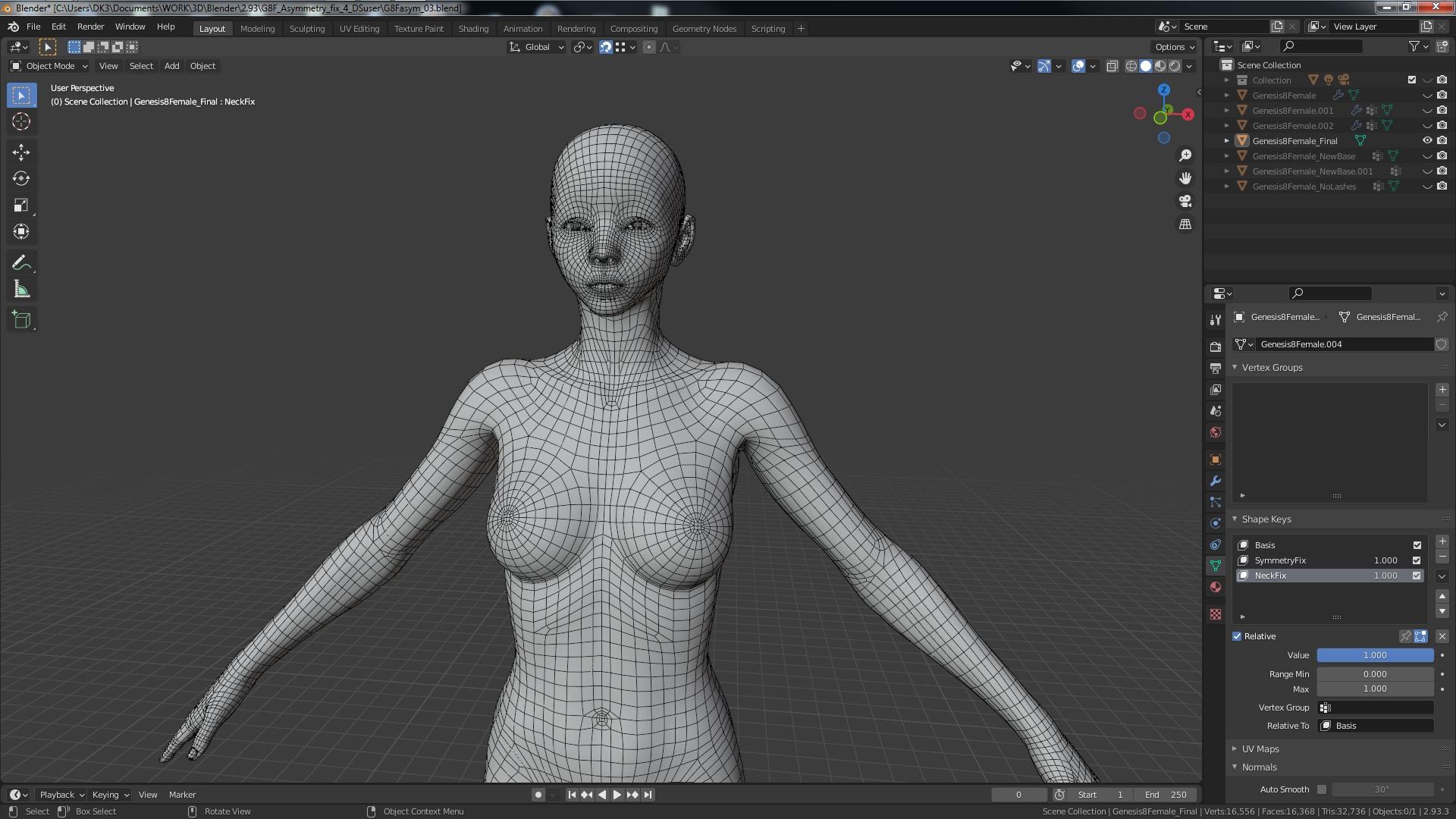
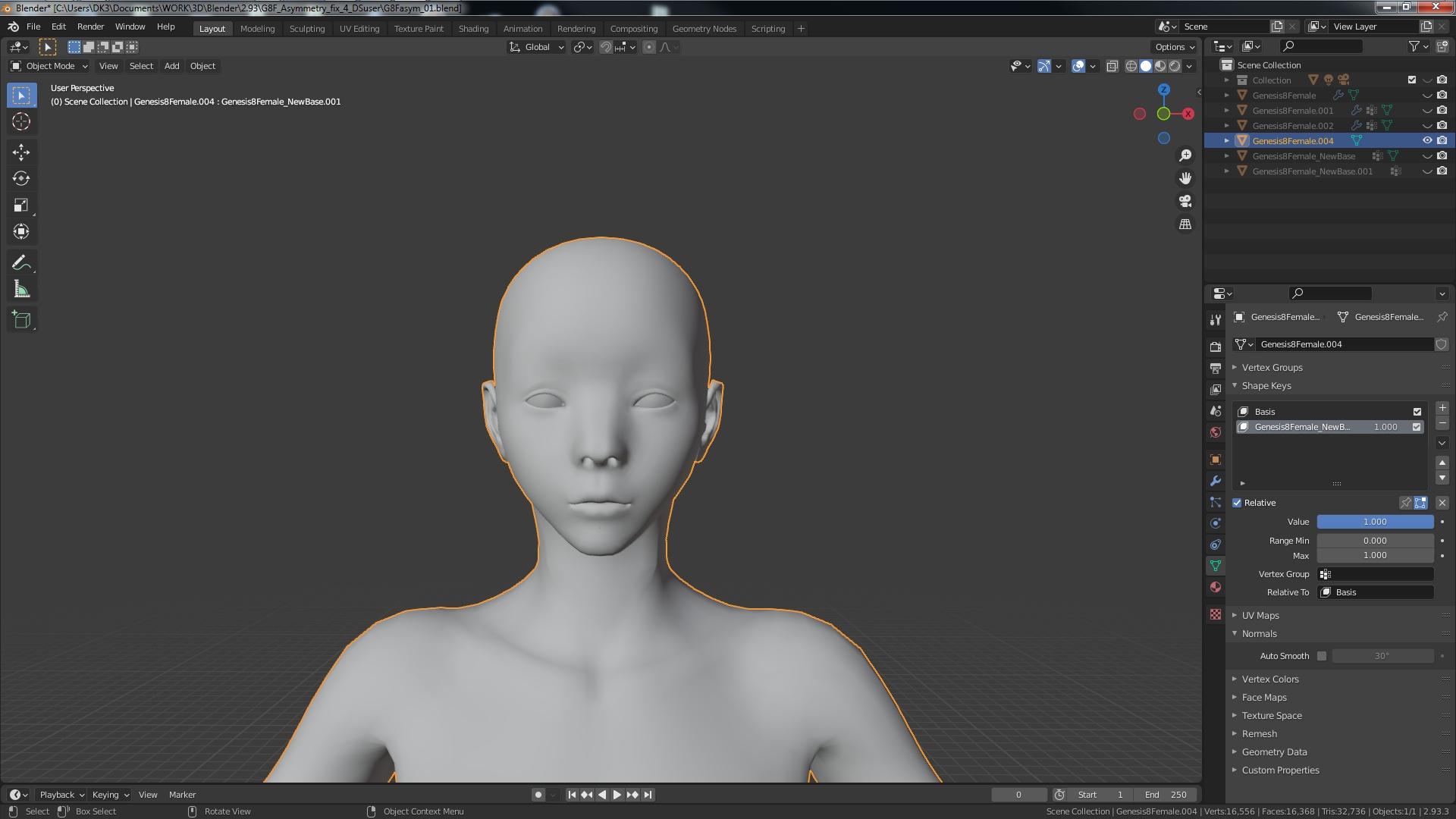
* Let me know if you would like a write up of what you need to achieve this...
And Richard, it is not a professional (purchased) mesh. It looks like his attempt at creating a morph target that got away from him on the default G8F that everyone already has available with DS.
Don't worry, I deleted the file.
* EDIT : Nevermind -- Editing the post fixed the images not opening up in a new window as set...
Is Diffeomorphic reliable enough for commercial production purpose?Have been using Daz and Diffeomorphic to develop an indie game, and I want to achieve AAA quality using workflow that has multi layers:
Meshes: Daz - Diffeomorphic - Transfer morphs in Blender using Diffeomorphic - Merge geograft in Blender using Diffeomorphic - Export with Send to Unreal
Textures: Daz - Diffeomorphic - Make HD maps in Blender - Collect new textures in Unreal and update
Animations: Mocap files - Retarget animations in Blender to Daz skeleton with Autorig Pro - Export with Send to Unreal
I wouldn't mind if Diffeomorphic becomes a paid plugin like Autorig Pro. Because free plugins tend to not update and thus break the pipeline.
Transfer from one computer to another.I recently moved my Daz studio from one computer to another and I transferred all the files 100% along with a manifest files and also the app data files so that everything that I had and done would transfer along with it. The problem is is I have quite a bit of content but for some reason about 65% of my content is not showing up in the smart content area. I know that I can find it in the content library but the older I get the worst my eyes get. And it's easier to find stuff in smart content. So my question is why is my smart content not showing up like it should I've tried redownloading the met data but it's not working and it worked fine on my other computer. Any help would be appreciatedDaz 3D is part of

Connect
DAZ Productions, Inc.
7533 S Center View Ct #4664
West Jordan, UT 84084Licensing Agreement | Terms of Service | Privacy Policy | EULA
© 2026 Daz Productions Inc. All Rights Reserved.