-
any facegen users around? could really use some help...
Toobis said:
Catherine3678ab said:
It does take some practice to learn where to place the dots in order to get the desired results. The mesh in FaceGen is not, AFAIK, the Genesis mesh, so exactly how it translates over to the Genesis* mesh is normally a little different. If you can use also a profile image in FaceGen, that may help.
After making the morph on the Genesis* try dialing in or or out various morphs that you probably have collected lots of, for the various face muscles. When you find the right formula, the additional changes can be saved using a shaping preset. Remember the skin texture will also help make the image look more like the person.
Before exporting out from FaceGen, there's an option to keep the eyes round. For me, that's a must do. I do not use FaceGen to make eye textures ;-)
Yes I see what you saying. It does appear to be hit and miss sometimes with other faces I've tried. Any chance you could attempt the face I am trying to do currently then put a pic of the the final outcome for G8F here? you could use the first main face picture on the attached image I posted. I just want to study how you may do it if its not too muich trouble. I'd REALLY appreciate it :)
Normally I would oblige but today is HOT so I'm not running the computer more than a few minutes.
n.b. The forum glitch is hiding your image from some including here on Firefox. IF you would "edit" your first post, put a few spaces somewhere and save the edit, then hopefully your image will reappear.
eta: There is a post somewhere in here where I did upload images showing where I put dots. Can't find it right now of course. [see post below]
Help identify a character... (SOLVED)Taoz said:
The original eyebrows which can be seen vaguely on promo 4 seem to match Mika 7, but the morph is a bit different I think, and the eyes are not the original ones either.
I think you are right, I have been looking for a Aiko 7, or Mika 7 based character but it may actually be Mika 7 with a different skin. The vulcan like brows threw me but the the facial expression was a dead give away. Thanks
Help identify a character... (SOLVED)The original eyebrows which can be seen vaguely on promo 4 seem to match Mika 7, but the morph is a bit different I think, and the eyes are not the original ones either.
Consistency with 8.1 expressions in Parameters?The problem is that at no time has DAZ come out with "this is how you make content for DS4", as a result there are no hard rules on it, so most have had to make it up as they went, which is why there is no consistency.
What PerttiA is getting at is that DAZ added dummy morph assets to G8.1 to stop it from loading DAZ own G8 morphs. The whole setup is pretty half-assed tbh, any product that adds correctives for G8 expressions doesn't work right in G8.1, and of course it doesn't block 3rd party expressions from showing up.
What most don't realise is that what G8.1 loads is based on the contents of a small "addon" DSF file.
I don't have a lot of content for G8, so my "addon" file has been heavily modified, it now has multiple lines rather than one pointing to the "Morphs" folder, as a result G8.1 only loads the G8 morphs I want it to load.
any facegen users around? could really use some help...Why aren't you using the face texture that FaceGen creates? A picture of a person using heavy makeup or a lot of shadows isn't going to transfer over well without the face texture.
any facegen users around? could really use some help...Catherine3678ab said:
It does take some practice to learn where to place the dots in order to get the desired results. The mesh in FaceGen is not, AFAIK, the Genesis mesh, so exactly how it translates over to the Genesis* mesh is normally a little different. If you can use also a profile image in FaceGen, that may help.
After making the morph on the Genesis* try dialing in or or out various morphs that you probably have collected lots of, for the various face muscles. When you find the right formula, the additional changes can be saved using a shaping preset. Remember the skin texture will also help make the image look more like the person.
Before exporting out from FaceGen, there's an option to keep the eyes round. For me, that's a must do. I do not use FaceGen to make eye textures ;-)
Yes I see what you saying. It does appear to be hit and miss sometimes with other faces I've tried. Any chance you could attempt the face I am trying to do currently then put a pic of the the final outcome for G8F here? you could use the first main face picture on the attached image I posted. I just want to study how you may do it if its not too muich trouble. I'd REALLY appreciate it :)
Inject HD Shape By Xin (Steps Please?)You have to import the FACS on the HD mesh, not on the base mesh. If you use multires you can delete the base mesh so to avoid confusion.
Anyway, to be precise those are not the full HD morphs. That is, HD morphs get both a base morph for the base geometry (div2.dsf) and a full morph for the HD geometry (div2.dhdm). With multires you use the base HD morphs. To get the full HD morphs you have to use the HD addon by Xin.
Consistency with 8.1 expressions in Parameters?Making the G8 base expressions (and any expressions that are using them) work on G8.1 requires removing dummy/placeholder expressions that are installed to G8.1 morph folders - These dummy/placeholder expression files have no other function than to prevent the base G8 expressions from loading.
The dummy/placeholder files are located in;
...\Data\DAZ 3D\Genesis 8\Female 8_1\Morphs\Daz 3D\Base Pose Head\ (255 files, can be more if you have additional DAZ expression packs)
...\Data\DAZ 3D\Genesis 8\Female 8_1\Morphs\Daz 3D\Expressions\ (24 files, can be more if you have additional DAZ expression packs)
...\Data\DAZ 3D\Genesis 8\Male 8_1\Morphs\Daz 3D\Base Pose Head\ (255 files, can be more if you have additional DAZ expression packs)
...\Data\DAZ 3D\Genesis 8\Male 8_1\Morphs\Daz 3D\Expressions\ (24 files, can be more if you have additional DAZ expression packs)Please make sure you are removing the files from G8.1 morph folders and not G8 morph folders.
Note 1; If you are logging in to DS and letting DAZ Connect (within DS) to install/update your content, you may have these also in an other location that has "\Data\Cloud\" in it's path
Note 2; Do not remove any files from "FACS" or "FACSExpressions" foldersHow to change the iris size?murgatroyd314 said:
I generally use the Iris Size morph from the Genesis 8 Female Head Morphs pack
Hey, thanks for your response! I actually own this but can't fing this "Iris Size" morph. Is this the actual morph name?
any facegen users around? could really use some help...if it continues to bug you .. I've been please with Headshop and it's on sale at times
---
didn't mess with dots etc... just loaded the picture and told it to go.
biggest problem is it doesn't produce a head morph but a full body morph
so you can't just apply it to a character that otherwise is set the way you like but have to morph the body to what you want.any facegen users around? could really use some help...It does take some practice to learn where to place the dots in order to get the desired results. The mesh in FaceGen is not, AFAIK, the Genesis mesh, so exactly how it translates over to the Genesis* mesh is normally a little different. If you can use also a profile image in FaceGen, that may help.
After making the morph on the Genesis* try dialing in or or out various morphs that you probably have collected lots of, for the various face muscles. When you find the right formula, the additional changes can be saved using a shaping preset. Remember the skin texture will also help make the image look more like the person.
Before exporting out from FaceGen, there's an option to keep the eyes round. For me, that's a must do. I do not use FaceGen to make eye textures ;-)
Announcing: Daz Deals Browser Add-on III just donated 50$ + the fee to cover the transfer for a pro 1 year subscription
 , I hope you got it, and see that I have paid, I have the text: You are subscribed until ! but no expiration date, so I'm guessing you are still working on getting the paypal subcription date to show correctly. If it's possible, could you check that the transfer went through correctly and that I'm listed as as a 1 y pro subcription? so I know, until the date is fixed. If the date shows later it would be great so I know in good time when it's time to pay again, can't stand a single day without daz deals
 . Is there a way to read the contents of a .duf file
PerttiA said:
If you save a character/morph as morph asset, and there are dialed in morphs included in getting the right shape, all the dialed in morphs will be saved into your folder.
Saving something as an asset is an easy way to mess up ones content libraries and break the base characters that are used by everything.
I usually save a character as a "scene" and all the .duf files of new characters I create are in there. Those files are backed up to the current month and are VERY recent. THAT is why I thought that was enough and didn't know there was more to it that that. When I thought of the Morphs folder, I thought that was just the stored morphs that load up each time a Genesis (which is usually Genesis 8 Female) figure is loaded up. So I didn't back that folder up as regularly.
Now I am worrying that for those older version 4.15 files, that those figures are now permanently "damaged". Anything older, version 4.12, and my current stuff from the past couple months seems to be OK with my restoring the data/DAZ 3D/jukingeo folder this morning. But again, it was an older version that I had backed up last year, so it isn't current.
I am really afraid that it is lost, unless I happen to find another copy among the six data/DAZ 3D folder threads I found. This is also just the beginning as I still have to deal with my hard drive issue as either I have to create space on it, or I have to move it all to a larger drive once again.
Edit: I had loaded up another character that was affected by the "jukingeo folder disaster" as I am calling it now. In studying the files Daz is looking for, I had noticed something:
2022-08-06 16:10:53.355 Could not resolve : "/data/DAZ 3D/Genesis 8/Female/Morphs/jukingeo/Product/PHMNoseTipDepth.dsf"
2022-08-06 16:10:53.355 Could not resolve : "/data/DAZ 3D/Genesis 8/Female/Morphs/jukingeo/Product/PBMShouldersSize.dsf"
2022-08-06 16:10:53.355 Could not resolve : "/data/DAZ 3D/Genesis 8/Female/Morphs/jukingeo/Voluptuous Toned Body/RFMC_NoseTip Details 01.dsf"
2022-08-06 16:10:53.355 Could not resolve : "/data/DAZ 3D/Genesis 8/Female/Morphs/jukingeo/Product/PHMJawlineDepth.dsf"
2022-08-06 16:10:53.355 Could not resolve : "/data/DAZ 3D/Genesis 8/Female/Morphs/jukingeo/Product/PHMMouthHeight.dsf"
2022-08-06 16:10:53.355 Could not resolve : "/data/DAZ 3D/Genesis 8/Female/Morphs/jukingeo/Product/eCTRLEyesSideSide.dsf"
2022-08-06 16:10:53.355 Could not resolve : "/data/DAZ 3D/Genesis 8/Female/Morphs/jukingeo/Voluptuous Toned Body/xPBMTrapeziusSuperior.dsf"
2022-08-06 16:10:53.355 Could not resolve : "/data/DAZ 3D/Genesis 8/Female/Morphs/jukingeo/Voluptuous Toned Body/Vas Hands Basic.dsf"
2022-08-06 16:10:53.355 Could not resolve : "/data/DAZ 3D/Genesis 8/Female/Morphs/jukingeo/Product/PHMNoseDepth.dsf"
2022-08-06 16:10:53.355 Could not resolve : "/data/DAZ 3D/Genesis 8/Female/Morphs/jukingeo/Product/PHMPhiltrumWidth.dsf"
2022-08-06 16:10:53.355 Could not resolve : "/data/DAZ 3D/Genesis 8/Female/Morphs/jukingeo/Product/PBMRectusOuterDetail.dsf"
2022-08-06 16:10:53.355 Could not resolve : "/data/DAZ 3D/Genesis 8/Female/Morphs/jukingeo/Voluptuous Toned Body/xPBMErectorSpinaeLateral.dsf"
2022-08-06 16:10:53.355 Could not resolve : "/data/DAZ 3D/Genesis 8/Female/Morphs/jukingeo/Product/PHMCheeksSink.dsf"
2022-08-06 16:10:53.355 Could not resolve : "/data/DAZ 3D/Genesis 8/Female/Morphs/jukingeo/Product/PHMNoseHeight.dsf"
2022-08-06 16:10:53.355 Could not resolve : "/data/DAZ 3D/Genesis 8/Female/Morphs/jukingeo/Voluptuous Toned Body/Blaze Lashes.dsf"
2022-08-06 16:10:53.355 Could not resolve : "/data/DAZ 3D/Genesis 8/Female/Morphs/jukingeo/Product/PHMNoseWidth.dsf"
2022-08-06 16:10:53.355 Could not resolve : "/data/DAZ 3D/Genesis 8/Female/Morphs/jukingeo/Product/PHMJawDefine.dsf"
2022-08-06 16:10:53.355 Could not resolve : "/data/DAZ 3D/Genesis 8/Female/Morphs/jukingeo/Product/PBMNeckSize.dsf"
2022-08-06 16:10:53.355 Could not resolve : "/data/DAZ 3D/Genesis 8/Female/Morphs/jukingeo/Voluptuous Toned Body/RFMC_Cheekbones Heights.dsf"
2022-08-06 16:10:53.355 Could not resolve : "/data/DAZ 3D/Genesis 8/Female/Morphs/jukingeo/Product/PBMNipples.dsf"
2022-08-06 16:10:53.355 Could not resolve : "/data/DAZ 3D/Genesis 8/Female/Morphs/jukingeo/Voluptuous Toned Body/xCTRLBiceps.dsf"
2022-08-06 16:10:53.355 Could not resolve : "/data/DAZ 3D/Genesis 8/Female/Morphs/jukingeo/Product/PHMEyesAngled.dsf"
2022-08-06 16:10:53.355 Could not resolve : "/data/DAZ 3D/Genesis 8/Female/Morphs/jukingeo/Product/PBMLegsLength.dsf"
2022-08-06 16:10:53.355 Could not resolve : "/data/DAZ 3D/Genesis 8/Female/Morphs/jukingeo/Product/PHMEyesAlmondOuter.dsf"
2022-08-06 16:10:53.355 Could not resolve : "/data/DAZ 3D/Genesis 8/Female/Morphs/jukingeo/Product/PBMCollarboneDetail.dsf"
2022-08-06 16:10:53.355 Could not resolve : "/data/DAZ 3D/Genesis 8/Female/Morphs/jukingeo/Voluptuous Toned Body/xCTRLDeltoidsAnterior.dsf"
2022-08-06 16:10:53.355 Could not resolve : "/data/DAZ 3D/Genesis 8/Female/Morphs/jukingeo/Product/PHMNoseBridgeSlope.dsf"
2022-08-06 16:10:53.355 Could not resolve : "/data/DAZ 3D/Genesis 8/Female/Morphs/jukingeo/Voluptuous Toned Body/RFMC_Eyelids Upper Depth.dsf"
2022-08-06 16:10:53.355 Could not resolve : "/data/DAZ 3D/Genesis 8/Female/Morphs/jukingeo/Product/EJDemonCM Devil Cheekbones.dsf"
2022-08-06 16:10:53.355 Could not resolve : "/data/DAZ 3D/Genesis 8/Female/Morphs/jukingeo/Voluptuous Toned Body/RFMC_Eyelids Lower Mid Depth.dsf"
2022-08-06 16:10:53.355 Could not resolve : "/data/DAZ 3D/Genesis 8/Female/Morphs/jukingeo/Product/PHMJawAngle.dsf"
2022-08-06 16:10:53.355 Could not resolve : "/data/DAZ 3D/Genesis 8/Female/Morphs/jukingeo/Voluptuous Toned Body/Vas Arms Lower All Front.dsf"
2022-08-06 16:10:53.355 Could not resolve : "/data/DAZ 3D/Genesis 8/Female/Morphs/jukingeo/Voluptuous Toned Body/xCTRLTeresMajor.dsf"
2022-08-06 16:10:53.355 Could not resolve : "/data/DAZ 3D/Genesis 8/Female/Morphs/jukingeo/Product/PHMLipLowerSize.dsf"
2022-08-06 16:10:53.355 Could not resolve : "/data/DAZ 3D/Genesis 8/Female/Morphs/jukingeo/Product/PHMJawHeight.dsf"
2022-08-06 16:10:53.355 Could not resolve : "/data/DAZ 3D/Genesis 8/Female/Morphs/jukingeo/Voluptuous Toned Body/xCTRLLatissimus.dsf"
2022-08-06 16:10:53.355 Could not resolve : "/data/DAZ 3D/Genesis 8/Female/Morphs/jukingeo/Product/PHMFaceYoung.dsf"
2022-08-06 16:10:53.355 Could not resolve : "/data/DAZ 3D/Genesis 8/Female/Morphs/jukingeo/Product/PHMNoseBridgeWidth.dsf"
2022-08-06 16:10:53.355 Could not resolve : "/data/DAZ 3D/Genesis 8/Female/Morphs/jukingeo/Product/PHMMouthWidth.dsf"
2022-08-06 16:10:53.355 Could not resolve : "/data/DAZ 3D/Genesis 8/Female/Morphs/jukingeo/Voluptuous Toned Body/xCTRLTricepsLongHead.dsf"
2022-08-06 16:10:53.356 Could not resolve : "/data/DAZ 3D/Genesis 8/Female/Morphs/jukingeo/Voluptuous Toned Body/RFMC_Lacrementals Width.dsf"
2022-08-06 16:10:53.356 Could not resolve : "/data/DAZ 3D/Genesis 8/Female/Morphs/jukingeo/Product/PHMEyesWidth.dsf"
2022-08-06 16:10:53.356 Could not resolve : "/data/DAZ 3D/Genesis 8/Female/Morphs/jukingeo/Product/PBMStomachLowerDepth.dsf"
2022-08-06 16:10:53.356 Could not resolve : "/data/DAZ 3D/Genesis 8/Female/Morphs/jukingeo/Voluptuous Toned Body/xCTRLAllBack.dsf"
2022-08-06 16:10:53.356 Could not resolve : "/data/DAZ 3D/Genesis 8/Female/Morphs/jukingeo/Voluptuous Toned Body/RFMC_Lacrementals Detail Enhanced.dsf"
2022-08-06 16:10:53.356 Could not resolve : "/data/DAZ 3D/Genesis 8/Female/Morphs/jukingeo/Voluptuous Toned Body/xCTRLSternoMastoid.dsf"
2022-08-06 16:10:53.356 Could not resolve : "/data/DAZ 3D/Genesis 8/Female/Morphs/jukingeo/Product/PBMLineaAlbaDepth.dsf"
2022-08-06 16:10:53.356 Could not resolve : "/data/DAZ 3D/Genesis 8/Female/Morphs/jukingeo/Voluptuous Toned Body/RFMC_Lacrementals Angle Down.dsf"
2022-08-06 16:10:53.356 Could not resolve : "/data/DAZ 3D/Genesis 8/Female/Morphs/jukingeo/Product/PHMNoseRidge.dsf"
2022-08-06 16:10:53.356 Could not resolve : "/data/DAZ 3D/Genesis 8/Female/Morphs/jukingeo/Product/PHMChinDepth.dsf"
2022-08-06 16:10:53.356 Could not resolve : "/data/DAZ 3D/Genesis 8/Female/Morphs/jukingeo/Voluptuous Toned Body/xPBMTrapeziusInferior.dsf"
2022-08-06 16:10:53.356 Could not resolve : "/data/DAZ 3D/Genesis 8/Female/Morphs/jukingeo/Voluptuous Toned Body/Vas Feet Sides.dsf"
2022-08-06 16:10:53.356 Could not resolve : "/data/DAZ 3D/Genesis 8/Female/Morphs/jukingeo/Voluptuous Toned Body/xCTRLInfraspinatus.dsf"
2022-08-06 16:10:53.356 Could not resolve : "/data/DAZ 3D/Genesis 8/Female Body Favorites/Genesis8Female.dsf"
2022-08-06 16:10:53.356 Could not resolve : "/data/DAZ 3D/Genesis 8/Female/Morphs/jukingeo/Voluptuous Toned Body/xPBMErectorSpinae.dsf"
2022-08-06 16:10:53.356 Could not resolve : "/data/DAZ 3D/Genesis 8/Female/Morphs/jukingeo/Product/SCLChestDepth.dsf"
2022-08-06 16:10:53.356 Could not resolve : "/data/DAZ 3D/Genesis 8/Female/Morphs/jukingeo/Product/PHMJawCurve.dsf"
2022-08-06 16:10:53.356 Could not resolve : "/data/DAZ 3D/Genesis 8/Female/Morphs/jukingeo/Product/PHMEyesAngledInner.dsf"
2022-08-06 16:10:53.356 Could not resolve : "/data/DAZ 3D/Genesis 8/Female/Morphs/jukingeo/Product/PBMNipplesDepth.dsf"
2022-08-06 16:10:53.356 Could not resolve : "/data/DAZ 3D/Genesis 8/Female/Morphs/jukingeo/Product/PHMEyelidsSmooth.dsf"
2022-08-06 16:10:53.356 Could not resolve : "/data/DAZ 3D/Genesis 8/Female/Morphs/jukingeo/Voluptuous Toned Body/Vas Arms Lower All Back.dsf"
2022-08-06 16:10:53.356 Could not resolve : "/data/DAZ 3D/Genesis 8/Female/Morphs/jukingeo/Product/PHMJawCornerWidth.dsf"
2022-08-06 16:10:53.356 Could not resolve : "/data/DAZ 3D/Genesis 8/Female/Morphs/jukingeo/Product/PHMNoseTipWidth.dsf"
2022-08-06 16:10:53.356 Could not resolve : "/data/DAZ 3D/Genesis 8/Female/Morphs/jukingeo/Voluptuous Toned Body/RFMC_NoseTip Angle Down.dsf"
2022-08-06 16:10:53.356 Could not resolve : "/data/DAZ 3D/Genesis 8/Female/Morphs/jukingeo/Product/PHMEyesInnerDepth.dsf"
2022-08-06 16:10:53.356 Could not resolve : "/data/DAZ 3D/Genesis 8/Female/Morphs/jukingeo/Product/PHMPhiltrumDepth.dsf"
2022-08-06 16:10:53.356 Could not resolve : "/data/DAZ 3D/Genesis 8/Female/Morphs/jukingeo/Voluptuous Toned Body/RFMC_Eyes Narrow Vertical.dsf"
2022-08-06 16:10:53.356 Could not resolve : "/data/DAZ 3D/Genesis 8/Female/Morphs/jukingeo/Voluptuous Toned Body/RFMC_NoseTip Creased.dsf"
2022-08-06 16:10:53.356 Could not resolve : "/data/DAZ 3D/Genesis 8/Female/Morphs/jukingeo/Product/PHMEyesHeight.dsf"
2022-08-06 16:10:53.356 Could not resolve : "/data/DAZ 3D/Genesis 8/Female/Morphs/jukingeo/Product/PBMCostalAnglePointed.dsf"
2022-08-06 16:10:53.356 Could not resolve : "/data/DAZ 3D/Genesis 8/Female/Morphs/jukingeo/Product/PHMNoseRidgeWidth.dsf"
2022-08-06 16:10:53.356 Could not resolve : "/data/DAZ 3D/Genesis 8/Female/Morphs/jukingeo/Product/PHMNoseFleshSize.dsf"
2022-08-06 16:10:53.356 Could not resolve : "/data/DAZ 3D/Genesis 8/Female/Morphs/jukingeo/Product/PHMNoseTipRound.dsf"
2022-08-06 16:10:53.356 Could not resolve : "/data/DAZ 3D/Genesis 8/Female/Morphs/jukingeo/Product/PHMEyesAngledOuter.dsf"
2022-08-06 16:10:53.356 Could not resolve : "/data/DAZ 3D/Genesis 8/Female/Morphs/jukingeo/Product/PHMFaceRound.dsf"
2022-08-06 16:10:53.356 Could not resolve : "/data/DAZ 3D/Genesis 8/Female/Morphs/jukingeo/Product/CTRLCheekbonesSize.dsf"
2022-08-06 16:10:53.356 Could not resolve : "/data/DAZ 3D/Genesis 8/Female/Morphs/jukingeo/Voluptuous Toned Body/xCTRLDeltoidsPosterior.dsf"
2022-08-06 16:10:53.356 Could not resolve : "/data/DAZ 3D/Genesis 8/Female/Morphs/jukingeo/Product/PHMEyelidsFoldDown.dsf"
2022-08-06 16:10:53.356 Could not resolve : "/data/DAZ 3D/Genesis 8/Female/Morphs/jukingeo/Product/PHMCheeksDepth.dsf"
2022-08-06 16:10:53.356 Could not resolve : "/data/DAZ 3D/Genesis 8/Female/Morphs/jukingeo/Voluptuous Toned Body/RFMC_Eyes Lower Inner.dsf"
2022-08-06 16:10:53.356 Could not resolve : "/data/DAZ 3D/Genesis 8/Female/Morphs/jukingeo/Product/CTRLBreastsNatural.dsf"
2022-08-06 16:10:53.356 Could not resolve : "/data/DAZ 3D/Genesis 8/Female/Morphs/jukingeo/Product/eCTRLEyesUpDown.dsf"
2022-08-06 16:10:53.356 Could not resolve : "/data/DAZ 3D/Genesis 8/Female/Morphs/jukingeo/Product/PHMEyelidsLowerHeight.dsf"
2022-08-06 16:10:53.356 Could not resolve : "/data/DAZ 3D/Genesis 8/Female/Morphs/jukingeo/Voluptuous Toned Body/Vas Feet Top All.dsf"
2022-08-06 16:10:53.356 Could not resolve : "/data/DAZ 3D/Genesis 8/Female/Morphs/jukingeo/Product/PHMLipUpperSize.dsf"
2022-08-06 16:10:53.356 Could not resolve : "/data/DAZ 3D/Genesis 8/Female/Morphs/jukingeo/Voluptuous Toned Body/xCTRLTeresMinor.dsf"
2022-08-06 16:10:53.356 Could not resolve : "/data/DAZ 3D/Genesis 8/Female/Morphs/jukingeo/Product/PHMEyesSize.dsf"
2022-08-06 16:10:53.356 Could not resolve : "/data/DAZ 3D/Genesis 8/Female/Morphs/jukingeo/Voluptuous Toned Body/RFMC_Eyelids Upper Raise.dsf"
2022-08-06 16:10:53.356 Could not resolve : "/data/DAZ 3D/Genesis 8/Female/Morphs/jukingeo/Voluptuous Toned Body/RFMC_Eyes Upper Outer.dsf"
2022-08-06 16:10:53.356 Could not resolve : "/data/DAZ 3D/Genesis 8/Female/Morphs/jukingeo/Product/EJDemonCM Devil Nose 02.dsf"
2022-08-06 16:10:53.356 Could not resolve : "/data/DAZ 3D/Genesis 8/Female/Morphs/jukingeo/Voluptuous Toned Body/RFMC_Cheek Upper Fuller.dsf"
2022-08-06 16:10:53.356 Could not resolve : "/data/DAZ 3D/Genesis 8/Female/Morphs/jukingeo/Product/PHMNostrilWingHeight.dsf"Going towards the end of each path line, the .dsf files it is calling for are NOT deleted files. Those are still on my system, but again, I didn't know that Daz created this file substructure and that saving a .duf file wasn't enough. But I am wondering if it is possible to restablish these file links. The only thing is that I worry it might be very time consuming. Sadly though, I was under the misconception that the Voluptuous Toned Body path just contained an 11gig morph. When I saw that, I found it alarming and it is the main thing that motived me to remove it. I mean it is inside the MORPH folder. I just didn't know that Daz was stuffing vital information every time I created a new character in the jukinge/VoluptuousTonedbody folder.
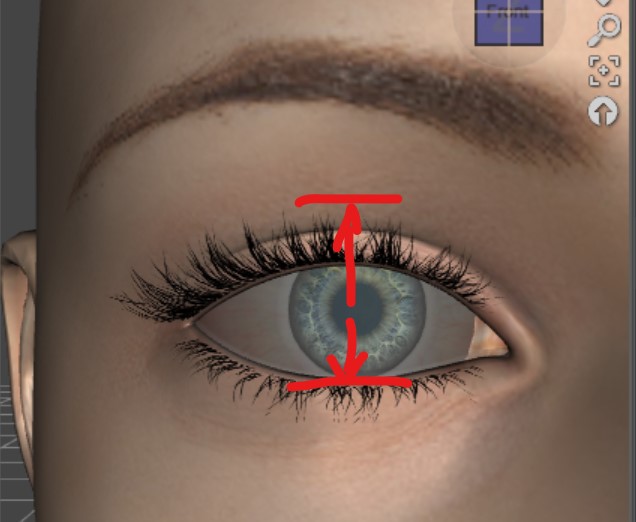
Are there any G8F/G8M morphs (in any packages) that can make eyes thinner along Y direction?Richard Haseltine said:
That would create a problem when using up-down rotatiosn on the eye, I'd think, and certainly when mixing up-down and side-to-side. I can't recall seeing such a morph, though it if exists I'd think on of the Handspan Studio/Thorneworks morph resource kits was most likely to have it.
I haven't tried Twizted Detailed Face Morphs for Genesis 8 and 8.1 Female | Daz 3D yet. Maybe there is a morph as such there. The author doesn't show a complete morphs list, though. If anyone has used this and it does contain a morph adjusting the Y direction (or X direction), please let me know.
There is a "Eyes Wider" in The Look Face Morph Resource for Genesis 8.1 Females | Daz 3D. Maybe we can use that to make eyes wider and scale down the whole eyes size.
Is there a way to read the contents of a .duf fileThe name of the content directory doesn't matter, nothing Daz Studio puts in a .duf file relating to files in a content diectory cares what the content directory is called or where it is located, all it records is the location within the content directory (starting at data or Runtime usually). My Daz 3D Library is the default for Install Manager and appeared alongside Install Manager - My Library is still the default for user files.
When you save a morph asset the content directory to use iss et at the top of the options dialogue, then the Author and Product entries determine the folder names to use within the figure's Morphs folder (and when saving a figure or prop those determine the folder names within the root data folder).
Is there a way to read the contents of a .duf fileIf you save a character/morph as morph asset, and there are dialed in morphs included in getting the right shape, all the dialed in morphs will be saved into your folder.
Saving something as an asset is an easy way to mess up ones content libraries and break the base characters that are used by everything.
Is there a way to read the contents of a .duf filePerttiA said:
If you see gibberish in the text editor, that means the file is compressed and can be opened with 7-Zip (Open Archive). Notepad++ is free and very good text editor for looking at the contents.
But... You don't get any more information within the file, as the paths inside the file are still relative.
If you search your drives for the missing files with Windows Explorer, does it find them and are they located in a content library that you have specified in Content Directory Manager?
7-Zip did work and I could read something, but it is still very convoluted and I cannot make out too much. However, I did see that it is still making vague references as there is no drive letter and it starts the folder hierachy with the data folder. However, I managed to find which directory that started with data/DAZ 3D that was missing the jukingeo folder, which was my personal folder. I thought that folder only contained custom morphs that I had made myself. Since it was 11gig, I removed it and that was the problem as it seems that the folder also contained references to just about every earlier character I created with version 4.15 (which I am still on). While I did make a recent backup, it wasn't from this folder as I thought that my files were elsewhere. This is the big problem I am having with Daz Studio's directory structure and what makes things worse is that they changed it roughtly around the time of version 4.12. The folder used to be called My Library and now it is called My DAZ 3D Library. Well, once I had found out what happened, I did use the latest backup I had on hand, which sadly was from about November of 2021. For the most part, it did work, and many of my older 4.15 characters have been restored, or at least mostly restored. There are still some that are missing quite a bit of info. I...didn't know that personal stuff was stored in that morph folder outside of custom morphs I made. Here is one of my newer characters I created and the message that has come up for it:
data/daz 3d/genesis 8/female body favorites/genesis8female.dsf
data/daz 3d/genesis 8/female/morphs/jukingeo/product/fbmbodybuilderdetails.dsf
data/daz 3d/genesis 8/female/morphs/jukingeo/product/pbmnavel.dsf
data/daz 3d/genesis 8/female/morphs/jukingeo/product/pctrlrhandgrasp.dsf
data/daz 3d/genesis 8/female/morphs/jukingeo/product/phmmouthrealism_hd_div2.dsf
data/daz 3d/genesis 8/female/morphs/jukingeo/voluptuous toned body/rfmc_neck folds.dsf
data/daz 3d/genesis 8/female/morphs/jukingeo/voluptuous toned body/xctrlbiceps.dsf
data/daz 3d/genesis 8/female/morphs/jukingeo/voluptuous toned body/xpbmadamsapple.dsf
The ones that have the folder "voluptuous toned body" was one of my custom morphs. Now what follows after is weird as the .dsf files are NOT custom morphs. Further, I have not used the Voluptuous Toned Body morph that I created in a VERY long time. Yet this was from a fairly recent character I created. Now moving up to the second item from the top, the file there is fbmbodybuilderdetails.dsf. That is the morph that came with Daz Studio. Also, the last one is part of a known package that I have downloaded and I have used that morph often. Now, why are they in my jukingeo folder instead of being referenced by that the artist that created it's folder?
I think I should have delved deeper into why my jukingeo folder was using up 11 gig of space as I figured it was just my custom morphs. Now I am not sure what I am going to do. But worse, I am curious to why Daz stored just about ALL my character morph adjustements in the data/daz 3d/genesis 8/female/morphs/jukingeo/voluptuous toned body path. Thankfully because I did have that backup from 2021, and restored the jukingeo folder back to My DAZ 3D Library folder, many of the broken links have been fixed, but not all. I am wondering if some of the data is linked elsewhere. That is the problem with how the log file reports the issue is that I cannot see the full path and I was hopeing that looking into the .duf file would help me but it doesn't.
This is really a big convoluted mess as I am trying to figure things out to create more space on my hard drive to remove figure packages in the hopes of speeding up loading times for Genesis 8 Female figures. I know there is stuff that is duplicated and I been carefully trying to remove what is not needed, however, what is going in in the morphs/jukingeo folder took me by surprise. I don't get why the .duf file is moving a copy of the morph to the jukingeo folder when, by right, it should be referencing it from the artist's folder.
Another thing that dawned on me was that since I had deleted the main /data/DAZ 3D/Genesis 8/Female/Morphs/jukingeo folder, and that was where all my character morphs were seemed to be stored. Where is Daz storing the new characters I created?
I am not sure if any of this is making sense, as I am finding it difficult to grasp myself.
Thanks,
Geo
Are there any G8F/G8M morphs (in any packages) that can make eyes thinner along Y direction?That would create a problem when using up-down rotatiosn on the eye, I'd think, and certainly when mixing up-down and side-to-side. I can't recall seeing such a morph, though it if exists I'd think on of the Handspan Studio/Thorneworks morph resource kits was most likely to have it.
Are there any G8F/G8M morphs (in any packages) that can make eyes thinner along Y direction?Are there any G8F/G8M morphs (in any packages) that can make eyes thinner only along Y direction but at the same time, do not change the length of eyes along X direction (or any other places)?
If so, please let me know if any packages contain such a morph
 Varied expression for Daz Dog 8
Decided to make some expressions for Daz Dog 8 that are not realistic, but ARE hopefully great to use.
Note-will not work with following morphs and might affect custom morph mixes:-Oso Fox
-Pitbull
-Demon DogDaz 3D is part of

Connect
DAZ Productions, Inc.
7533 S Center View Ct #4664
West Jordan, UT 84084Licensing Agreement | Terms of Service | Privacy Policy | EULA
© 2026 Daz Productions Inc. All Rights Reserved.