-
Uh oh, i've somehow saved the base g8.1 with a morph applied
I think at the time i had a g8.1 in scene and a g8.1 with an FBM applied (it may just have been the one g8.1 with morph applied though) i went to save the project and may have merge? Now every time i load a g8.1 base it has the base head and the morphed body. Same for the dev load too. I have uninstalled and installed gen8 essenitals with no luck.
I do have a g8.1 obj at base resolution, could i apply that somehow with morph loader and just replace the base g8.1 with a character preset of that? That doesnt sound like a great solution though.
[Released] Turbo Loader for Genesis 8 and 8.1 [Commercial]AnotherUserName said:
AnotherUserName said:
AnotherUserName said:
RiverSoftArt said:
AnotherUserName said:
RiverSoftArt said:
AnotherUserName said:
Hi all,
How do you remove morphs from the TLManager? I have some products that are no longer in my database but still show up in the list of morphs.
Hmmm, that is something I hadn't thought about. I would enable ALL morphs (or reset Content directories), clear the list, and then rescan.
No, that didnt work. Any other suggestions? Feature for a new version?
If you cleared the list and rescan and they showed up, that means the morphs are still there. They should show up. You would have to delete the morph files for them not to be found.
Yah theyve already been deleted from my ssd. Im wondering if im on the current version though. Ill check version numbers and re-install if I have to.
Ok, so to rehash, the morphs had been deleted from my ssd previous to this issue. I have reinstalled TL. I have enabled/disabled all my morphs and re-scanned in TL. The morphs still show up. As an experiment, I enabled all of the mystery morphs to see what would happen if I tried to load them onto my g8f. TL completes the process with no errors and states "0 morphs enabled (0 failed), 0 morphs disabled (0 failed). I load my g8f and she is completely blank, no morphs at all. I exit, re-launch, and load the test figure. She loads fine, no errors, still no morphs. I re-launch TL and the mystery morphs are still listed and still checked as enabled.
My database is on an external ssd. I just located the TL cache in C:ProgramData:Daz 3d:Turbo Loader. All of the morphs im trying to get rid of are still listed in the cache. I read about an option in the documentation to refresh the cache but I havent seen it in TL.
Are the morph files on disk? Did you CLEAR the morph list before rescanning? (usually you do not do this, but since you have enabled all morphs, this is safe). If you have cleared the morph list and the files are not on disk, there is no way that they would be detected in a new scan.
Mid-way through 2022 a new Sales Thread:Report Issues Here "There's Always Another Sale™"Ati said:
https://www.daz3d.com/addy-stella-for-genesis-8-female
Description says: "Addy Stella for Genesis 8 Female is a beautiful woman with fair skin and golden hair." The what's included section doesn't mention any hair, though. So is that included or is it not?
I wouldn't expect it, as it says "You will get SSS skin, head morph, body morph, custom open smile, custom closed smile, custom teeth, custom eyelashes, custom long nails, 21 eye makeup with lip gloss, 21 eye makeup with lipstick, 8 eyes, 2 eyelashes materials, 20 nail polish colors, 3 nail art designs, and french fingernails and toenails" and no hair is mentioned.
There is Lyla by Addy, who is "a lovely brunette", also without a hairstyle included. Of course the attributes might relate to the eyelashes/brows. Or it's just a different wording, because the PA wanted to change the previous "is a young female..." descriptions.
[Solved] Need help pJCM problemSo I just learned that after Transfer Utility
pJCM of my G8F also transfered to the cloth, which often make our cloth geometry looks bad/streched badly.We can fix that by making the pose triggering certain pJCM,
export the cloth outside, fix the geometry,
Import it back using morph loader pro.But...but... this happened and I dont know how to fix it...
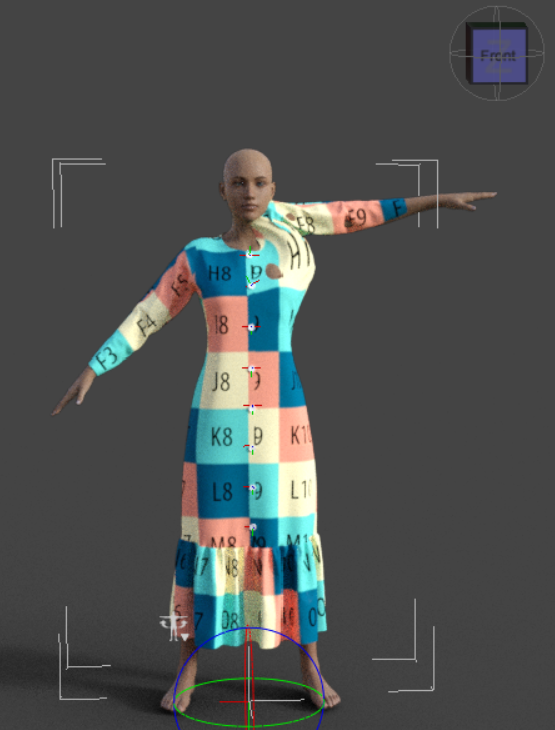
It should be like this.
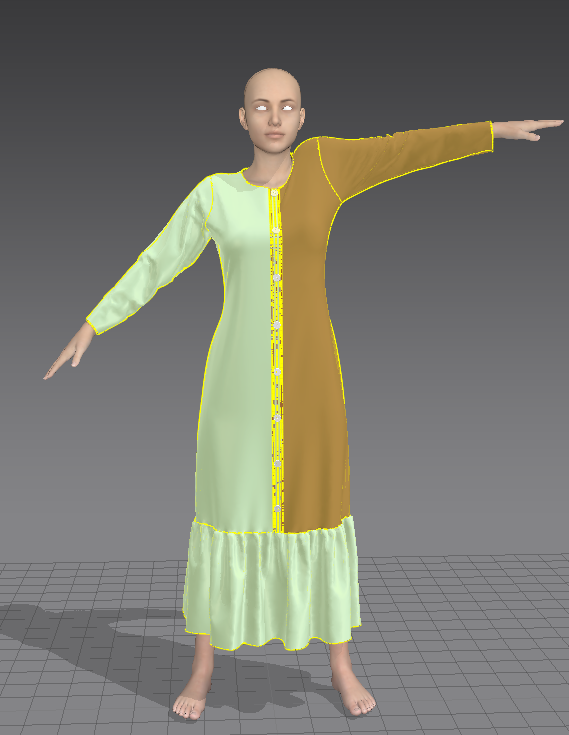
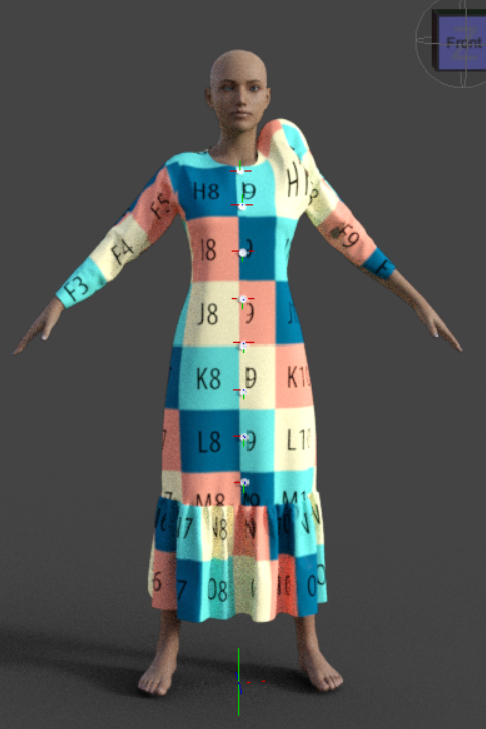
These are the settings I used
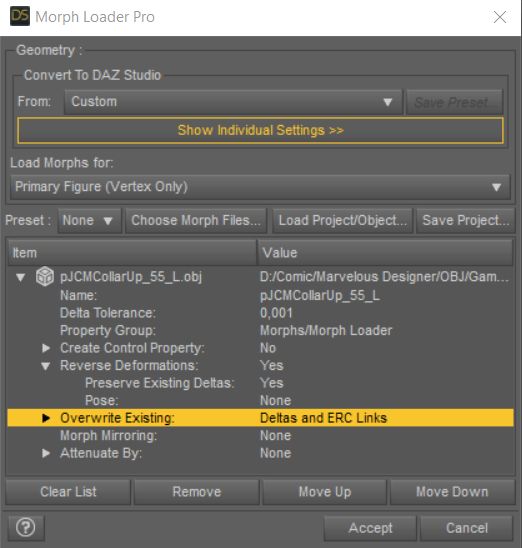
I tried to reload it over and over again, but not working.
And what does 'p' on pJCM stands for?
Solution: Overwrite Existing: Deltas onlyDiffeomorphic DAZ Importer Version 1.5.1joaohenriques said:
I'm using Diffeo for the merge geocrafts function so I can export to Unreal a single mesh.
At the moment I have a almost perfect solution... Diffeo to Blender, apply Morphs to both meshes and then merge geocraft, finally, use the official Blender to Unreal from Epic to export.
its 99% complete... I have a rigged character with all the morphs and 90% of the materials correct! the problem are the materials from the geocrafts (in the case the genitals), I always get the material UV connected to the torso and not the the actual maps of the Genitals (for example Golden Palace or even the official Daz genitalia). I've tried to move the UDIM to layers 2 like in the tutorials from Diffeo, and also the merge UV layers but nothing... I believe its sometrhing to due with the fact that the correct UVs of the genitals are in fact inside that have there one UVmaps but I cannot understand how to use them in unreal... was anyone able to do this?
The new Diffeomorphic version 1.6.2 still doesn't import custom geograft UVs (Those that use geoshells to get materials), however the official Victoria 8 genital map and its UV can be imported, for this reason I have to switch to Victoria 8 genital and create new genital maps for different characters.
Padone said:
@Intycert You have to export the HD version for HD teeth to work fine, otherwise you get the base resolution version of the teeth, that's the same you get in daz studio if you disbale the HD morph.
Most geografts use shells to get their own uv map and mix the geograft material with the figure. DIffeo converts shells to material layers that are not supported by unreal. I know blender gets some baking features and you may try baking all the materials to a single layer, that's probably what unreal is expecting. But I don't know how good this will be, never did it myself.
As a side note, if you're looking for fast rendering you will get a much better material support with eevee. While if you're making a game pay attention to the daz eula because it requires a separate purchase of the interactive licenses, that's usually not viable as a cheap solution. Unless your game uses sprites instead of 3d but in this case I don't see what unreal is good for.
The version 1.6.2 with Single Principled material import option, Diffeomorphic attaches the genital UV to the torso and does not import the geoshell material. Attached images below showing imported Golden Palace maps which are not usable, and the Victoria 8 maps which are correctly imported. (The bump maps were used instead of the skin textures for demonstrating purpose)
Teen Boy characters for G8MIn addition to Growing Up, the Lithe morph (from Genesis 8 Male Body Morphs) is useful for making the boys less buff.
Do people still use JCM for their Dforce clothing?PerttiA said:
felis said:
To my knowledge, if you want to sell here in Daz store there must be some morphs. No idea of actual requirements.
Fitting morphs to Characters are of no use (other than wasting space and resources), when one never uses those premade characters
If you're hoping to sell a product to people who do use those characters though, it is good to make them. If the FBMs are "never" going to be used, it is a simple thing to delete those morphs from the clothing's data morph folder.
[Released] Turbo Loader for Genesis 8 and 8.1 [Commercial]AnotherUserName said:
AnotherUserName said:
RiverSoftArt said:
AnotherUserName said:
RiverSoftArt said:
AnotherUserName said:
Hi all,
How do you remove morphs from the TLManager? I have some products that are no longer in my database but still show up in the list of morphs.
Hmmm, that is something I hadn't thought about. I would enable ALL morphs (or reset Content directories), clear the list, and then rescan.
No, that didnt work. Any other suggestions? Feature for a new version?
If you cleared the list and rescan and they showed up, that means the morphs are still there. They should show up. You would have to delete the morph files for them not to be found.
Yah theyve already been deleted from my ssd. Im wondering if im on the current version though. Ill check version numbers and re-install if I have to.
Ok, so to rehash, the morphs had been deleted from my ssd previous to this issue. I have reinstalled TL. I have enabled/disabled all my morphs and re-scanned in TL. The morphs still show up. As an experiment, I enabled all of the mystery morphs to see what would happen if I tried to load them onto my g8f. TL completes the process with no errors and states "0 morphs enabled (0 failed), 0 morphs disabled (0 failed). I load my g8f and she is completely blank, no morphs at all. I exit, re-launch, and load the test figure. She loads fine, no errors, still no morphs. I re-launch TL and the mystery morphs are still listed and still checked as enabled.
My database is on an external ssd. I just located the TL cache in C:ProgramData:Daz 3d:Turbo Loader. All of the morphs im trying to get rid of are still listed in the cache. I read about an option in the documentation to refresh the cache but I havent seen it in TL.
[Released] Turbo Loader for Genesis 8 and 8.1 [Commercial]AnotherUserName said:
RiverSoftArt said:
AnotherUserName said:
RiverSoftArt said:
AnotherUserName said:
Hi all,
How do you remove morphs from the TLManager? I have some products that are no longer in my database but still show up in the list of morphs.
Hmmm, that is something I hadn't thought about. I would enable ALL morphs (or reset Content directories), clear the list, and then rescan.
No, that didnt work. Any other suggestions? Feature for a new version?
If you cleared the list and rescan and they showed up, that means the morphs are still there. They should show up. You would have to delete the morph files for them not to be found.
Yah theyve already been deleted from my ssd. Im wondering if im on the current version though. Ill check version numbers and re-install if I have to.
Ok, so to rehash, the morphs had been deleted from my ssd previous to this issue. I have reinstalled TL. I have enabled/disabled all my morphs and re-scanned in TL. The morphs still show up. As an experiment, I enabled all of the mystery morphs to see what would happen if I tried to load them onto my g8f. TL completes the process with no errors and states "0 morphs enabled (0 failed), 0 morphs disabled (0 failed). I load my g8f and she is completely blank, no morphs at all. I exit, re-launch, and load the test figure. She loads fine, no errors, still no morphs. I re-launch TL and the mystery morphs are still listed and still checked as enabled.
[Released] Turbo Loader for Genesis 8 and 8.1 [Commercial]RiverSoftArt said:
AnotherUserName said:
RiverSoftArt said:
AnotherUserName said:
Hi all,
How do you remove morphs from the TLManager? I have some products that are no longer in my database but still show up in the list of morphs.
Hmmm, that is something I hadn't thought about. I would enable ALL morphs (or reset Content directories), clear the list, and then rescan.
No, that didnt work. Any other suggestions? Feature for a new version?
If you cleared the list and rescan and they showed up, that means the morphs are still there. They should show up. You would have to delete the morph files for them not to be found.
Yah theyve already been deleted from my ssd. Im wondering if im on the current version though. Ill check version numbers and re-install if I have to.
NOA 8.1I like the head morph quite a lot, especially with the promo expressions, but NOA way am I touching this ridiculous deal.
ShadowBox 24 present FREEBIES # series
ShadowBox 24
presentsFREEBIES # series:
Creating SBH for the Genesis figures only
REVIVAL FREEBIES:
Will be focusing on those forgotten figures like Apollo Max, Miki2, Antonio 1.2, Pippin, NoNameDoll , James and Generation 4......for now!-------------------------------------------------------------------------------------------------------------------------------------------
W.I.P SBH Hair & Brow for GF8.1 | Daz 3D
Who would believe that I would be doing this a couple of months ago! ....lol :-)
Kick starting this series is FREEBIES # 1 Harlow Set Hairs, inspired by AOBB fantastic Jean Harlow headmorph for GF8.1, which can be found here [https://www.daz3d.com/forums/discussion/583801/aobb-s-babyface-for-g8-1f-head-morph-based-loosely-on-jean-harlow-no-materials-nor-textures but for now the Freebie ad is completed and I tying-up loose ends with "Read Me" T&C EULA etc ....... and THEN the final process is the P A C K A G I N G ! - which I am dreading.
But, once the dreaded packaging is done I will submit zip to DS forum for testers to test before going live via Renderosity.
BUT before I head off.....I want to double check about SBH materials, am I allowed to distribute the SBH default materials with these Duf hairs or do I have make my own?
EDIT: I seem to be having trouble uploading image to the Forum, I'll head over my Gallery and post the Ad there.
Barbz
Can I get some assistance with Turbo Loader?Can I get some assistance with Turbo Loader?
This is what I think happened...
I use Turbo Loader to subtract a few morphs from my Gen 8 and 8.1 load up of figures.
Then, I had to move to a new computer drive, so I reinstalled all of my Daz products onto a new drive and folder setup.
There were no previous content folders left from the old install when I reinstalled my Daz models. Yea I lost a lot of user saved data.
Now (i think) Turbo Loader is thinking my files are elsewhere and I get errors that morph are missing every time I load an old project that uses them.
I also get errors that I am using identical formula names, something like that, which I never used to get before.
My content folder is a mess now.
Does anyone know the best way to fix this?
I have a 4TB M.2 drive so even with all of my morphs loading (100s) it is still a reasonable time to load figures (about a minute)
and I do not mind the wait because my scenes only have an average of about two figures anyway.
Any help on getting these error message to cease would be very helpful.
I have tried to reinstall only the products that Daz cannot locate, and this has not stopped the messages from coming back.
Thanks in advance for any help regarding this issue
[Released] Turbo Loader for Genesis 8 and 8.1 [Commercial]AnotherUserName said:
RiverSoftArt said:
AnotherUserName said:
Hi all,
How do you remove morphs from the TLManager? I have some products that are no longer in my database but still show up in the list of morphs.
Hmmm, that is something I hadn't thought about. I would enable ALL morphs (or reset Content directories), clear the list, and then rescan.
No, that didnt work. Any other suggestions? Feature for a new version?
If you cleared the list and rescan and they showed up, that means the morphs are still there. They should show up. You would have to delete the morph files for them not to be found.
AOBB's head morph The Legend for G8.1M based on Humphrey Bogart. No materials included.AOBB said:
@marble - DS, Zbrush or ZbrushCore, used to use 3ds max but Autodesk killed all permanent licences, so now - a little bit of Blender.
Thanks - I was wondering how close you could get with just the morph packs available for DAZ Studio but I suspected that you were using your sculpting skills in another application. I only have Blender - ZBrush is way out of my financial reach - but I might have a go too. I'll probably end up with a character that looks nothing like the original face but one that I can use in my renders anyway. I love making new characters for my stories but so far I have relied on the custom morphs so sculpting would be a whole new artistic venture for me.
I'm sure that I and others here would appreciate any tips from the master.
 Celebrity Look-a-Likes for 3D figures part 3
@Haruchai, did you consider adding TotoCandy1 to the list?
his morphs are almost exclusively based on more or less well-known individuals. i started a list in order to keep track of the prices for the different morph bundles he sells.
Teen Boy characters for G8MBrothers Bundle has three different ages, you can use Growing Up or on any figure you want, along with Boys, Young Boys or Teen Boys, or M3D's Teen 8 HD shapes. There's also Lucas and Landon and their add-on characters.
Other characters:
https://www.daz3d.com/nick-for-genesis-8-male
https://www.daz3d.com/justin-hd-for-genesis-8-male
https://www.daz3d.com/jeremy-for-genesis-8-male
https://www.daz3d.com/greg-for-genesis-3--8-male
https://www.daz3d.com/leon (standalone character, not a G8 morph, but might meet your needs)
https://www.daz3d.com/trevor-for-genesis-8-male
https://www.daz3d.com/teen-jamie-hd-for-genesis-8-maleAOBB's head morph The Legend for G8.1M based on Humphrey Bogart. No materials included.Maybe you explained in one of your threads but I might easily have missed it ... do you use the morph sliders in DAZ Studio or sculpt in Blender or ZBrush?
[Released] Turbo Loader for Genesis 8 and 8.1 [Commercial]RiverSoftArt said:
Leticia said:
I just want to second the request for a method to add a product in the morph list to the filtered list without needing to manually retype the name. Especially since it's case sensitive, I've been having a very frustrating time with that. "Oh, it's female(s) not female. Oh, the with is capitalised. Oh..."
I'd also like the option to completely exclude a content library.Otherwise, still figuring out my best workflows with Turbo Loader but desperately need it. I have 37000+ morphs for Gen 8 female, Turbo Loader tells me, and only about 10k less for Gen8 male, and it can be pretty much impossible to work sometimes. (About 25 minutes this morning to load an bog standard Genesis 8 Basic Female.)
Not remotely Turbo Loader's fault but I find it somewhat disheartening to find random products that Turbo Loader finds as 'included' in a scene that I definitely did NOT dial up on a figure (such as that completely out of the box Genesis 8 Female this morning). Daz quality control is... better than some other sites out there, but it's not everything it's supposed to be, clearly.
Ok, I have been struggling for where I would put a button to add a product to the Filtered Product list. I have decided in the next update that what I will do is add the name to the Add Filtered Product Name text box when you double-click on a product name. Then, you can click the Add button to actually add it.
I will consider adding an exclude Content Library function.
That would be awesome.
Are the Daz body morphs merchant mesources?
You can't use other people's morphs to bake into your morph to sell. Other people's morphs that aren't listed as merchant resources aren't to be used to bake into morphs for selling.hansolocambo said:Mellone said:
Have you any tips for character creation
It would take 5 pages to answer that in depth. But basically, you can :
Do that in ZBrush with Layers, in Blender with Shape Keys, or in any other 3D modeling app that manages morphs. Basically you import the deafult Genesis 8 (no SubD) in one of those apps. You define a first morph for that Genesis 8 base. Then you make your morphs/modifications on different layers (ZBrush) or Shape Keys (Blender). Being sure that you don't modify in ANY way the polycount and vertices position of the base Genesis mesh.
When done, you import back your custom Genesis in DAZ with morph Loader Pro. Dissociate head and body with D-Former. Create FHM and FBM sliders (head and body) and a third slider (CTRL) that controls them both. Tons of tutorials on the subject.
Mellone said:
Can I use the basic morphes in Daz for G8 and these products as Merchant Resources?
Yes indeed you can. That's the easy way (but way less precise control that you'd get doing it by hand in a 3D modeling/sculpting app).
Use your installed bundles, Merchant Resource or not. With DAZ sliders, put 30% of this head, 25% of that other head, 60% of that body, etc. Also use body and head morphs bundles to modify nose, chin, ribs, muscles, breast, feet, etc. This way you create a morph made out of multiple other characters and/or morphs bundles. When you're happy with the result, all vertices being in a position that doesn't exist anywhere else : this morph becomes your own creation.
Mellone said:
Do you know any videos, tutorials or have tips [...]
Best one (in my humble opinion) being :

Many written tutorials around. Hard part being to find the rare good ones :
https://www.laylo3d.com/creating-characters-and-morphs-for-daz-3d-figures-using-zbrush-goz/
DAZ being an app used by tons of amateurs, there are sadly tons of inaccurate statements in forums, videos, etc. This makes it hard and time consuming to skim through junk info and extract only what's correct and necessary.
Personal advice : open a Word document. Take notes, make tests. And patiently write down your own workflow. It takes time to get used to the "right" and clean way of doing things in DAZ, especially on the content creation side. But it's strongly advised as, by doing so, you understand DAZ under the hood and suddenly see things so much more clearly.
Daz 3D is part of

Connect
DAZ Productions, Inc.
7533 S Center View Ct #4664
West Jordan, UT 84084Licensing Agreement | Terms of Service | Privacy Policy | EULA
© 2026 Daz Productions Inc. All Rights Reserved.