-
Daz Studio 6 Beta - version 6.25.2026.14722! (Updated May 28, 2026)
"Scroll down to “Release Channel Tags” and confirm that the “Public Build” box is checked off. If it’s not, click to check it off. Then hit “Accept”."
Various people read that as "box needs to be not checked".If someone comes up with a script or howto "import as many settings from DS4 as possible so I have all my content libs and workspaces" etc please let me know.
Help in converting clothing to fit Toon ElephantDo you know Blender or have Mesh Grabber ?
With Blender: you can simply export Toon Elephant and Tutu to OBJ files, import them into Blender, make Tutu well fit on Elephant. Export Tutu to OBJ and import it into DS. Rig Tutu to Elepant with Transfer Utility.
With Mesh Grabber: similarly but just make Tutu well fit on Elepant in DS. Rig it with Transfer Utility.
I don't have that product but made a quick example with another one, by making the fit in Blender ~~
Daz 2025 smart content data?stripe6499_9253833ae8 said:
junkgoshere said:
I may be a litttle wrong so someone more knowledgeable please chip in:
In your Daz 4.23, on the Smart Content Tab, click on the top right menu button, and Content DB Maintenance, Export User Data, then on 2025 same process but select Import User Data and find your 4.23 save file (UserData) default saves in your content directory.
Ahah! Export works fine but the import process is a little different, (duh Daz). You right click on the Samrt Content tab and then select Content DB Maitainance.... it opens a dialogue box and you check the box that says Re-Import Metadata. Dunno why it couldn't just have an Import User Metadata option on the tab, but 4.23 and 2025 are both the same. Maybe something for the Devs to think about. Thank you for pointing me in the right direction.
There are several options in that dialogue, perhaps consolidated theer to avoid clutter (and accidentally clicking on reset database)
How to share metadata ?Thank you all for your answers.
Crosswind > My idea was to share the dsx/dsa and a picture (either one of the promo renders used with permission from the vendor, or a render I created myself) through Daz forums, to let people who have the same products enjoy metadata without the head scratching involved to create them.
Richard > So in a way, the easiest way to create and share metadata about products who transfered from Renderosity would be to create their metadata as if they were products from Renderosity so this way, I don't have any link with the limited metadata created automatically by DIM ?
NorthOf45 > I didn't know that and what I did with with some products was using the Content DB Editor for what was common to the various figures for which a product was made or the elements easy to identify as such, and to create metadata from the Content Library for elements harder to identify from the Content DB Editori tools.
As an example, for the Umbrelli girls products, all metadata related to material presets were done from the Content Library, because this way, I know I only was changing metadata for 3Delight mats/Iray mats.
Then, I opened the Content DB Editor to ask Daz to update the dsx/dsa files. I don't remember if I had the checkbox you spoke about check or not but it seems to have worked so far.
I don't have Content Package Assist. I have a simple Bash script to take care of the freebies I'm creating myself but I would have to upgrade it to be able to take care of metadata done from products for other sources.
Daz 2025 smart content data?junkgoshere said:
I may be a litttle wrong so someone more knowledgeable please chip in:
In your Daz 4.23, on the Smart Content Tab, click on the top right menu button, and Content DB Maintenance, Export User Data, then on 2025 same process but select Import User Data and find your 4.23 save file (UserData) default saves in your content directory.
Ahah! Export works fine but the import process is a little different, (duh Daz). You right click on the Samrt Content tab and then select Content DB Maitainance.... it opens a dialogue box and you check the box that says Re-Import Metadata. Dunno why it couldn't just have an Import User Metadata option on the tab, but 4.23 and 2025 are both the same. Maybe something for the Devs to think about. Thank you for pointing me in the right direction.
The Mac FAQI've installed a previous version of Daz3D in the past years, using DazCentral. I finally got around to playing with it and it was working fine, when launched via DazCentral. I see a note in DazCentral that it is discontinued soon. Today I installed Daz Install Manager in order to try out the new Alpha, and when all was said and done I didn't see any of the actual app launchers in my Applications. After some searching, I realized they got installed into /Users/myUserName/Daz 3D/Applications/DAZ 3D and /Users/myUserName/Daz 3D/Applications/DAZStudio6 64-bit Public Build ... I wasn't sure how to proceed, so I dragged the .app bundles into my real Applications folder. I then realized both versions of Daz have the same app name and I was hoping to use them side-by-side so I renamed DAZStudio.app to DAZStudio-old.app so that they could live side by side... when I opened (what I presume is the new alpha) from laucher, it opened up find and said it found an existing content directory and offered to import it -- i said no, becauuse I want to keep them separate. It then prompted me with the login window, and I put my login info in and clicked connect, but then I got a daz quit unexpectedly error. I also noticed in the DIM window opened that it has a popup that says "Install Manager has lost connection to the DAZ 3D store: Maximum allowable connections exceeded. The "DazCentral" account will now be set to Offline mode. To return to Online mode, click "DazCentral" to login and try again." ... I feel like I'm lost in the weeds., and confused about whether DIM is even installing things properly. What am I doing wrong here?
Daz Studio 6 Beta - version 6.25.2026.14722! (Updated May 28, 2026)Hi all, trying to import layouts, toolbars, actions, menus which were just exported from DS Public BETA. To no/limited avail: The menus e.g. appear, but only the first level hierarchy, not the actions in them. Will ALPHA be backwards compatible in this regard? Thanks!
Daz 2025 smart content data?I may be a litttle wrong so someone more knowledgeable please chip in:
In your Daz 4.23, on the Smart Content Tab, click on the top right menu button, and Content DB Maintenance, Export User Data, then on 2025 same process but select Import User Data and find your 4.23 save file (UserData) default saves in your content directory.
Saving out a prop correctly?Why not just turn it into a figure? Export as OBJ with each part having a unique name, import into Figure Setup and continue as with any stand-alone figure.
Daz Studio 6 Beta - version 6.25.2026.14722! (Updated May 28, 2026)I know this is an Alpha, so I'm not surprised that the Papagayo lip synch script doesn't work nor will it most likely unless it's updated. What *did* surprise me is that I'm able to load my .wav file and hear it while I animate. Awesome. So, six of one, half a dozen of the other. Overall, the ability to hear the audio is more important, but I won't say "no" to an automatic lip sync tool.
Further, it *looks* like I'm able to output a .mov file, but the file seems too small and can't open or convert at all, so unless I'm missing something, I still need to output frames. Too bad, now that I can import audio and hear it while I animate, being able to output a single file with both audio and video again would be super sweet.
The Mac FAQI know this is an Alpha, so I'm not surprised that the Papagayo lip synch script doesn't work nor will it unless it's updated. What *did* surprise me is that I'm able to load my .wav file and hear it while I animate. Awesome. So, six of one, half a dozen of the other. Overall, the ability to hear the audio is more important, but I won't say "no" to an automatic lip sync tool.
Further, it *looks* like I'm able to output a .mov file, but the file seems too small and can't open or convert at all, so unless I'm missing something, I still need to output frames. Too bad, now that I can import audio and hear it while I animate, being able to output a single file with both audio and video again would be super sweet.
Daz Studio 2025 (6.25.2025.x) - NVIDIA Iray 2024/2025Iray 2024.1.1 , build 381500.4681
Added and Changed Features
- General
- Updated general libraries:
- SQLite 3.49.0
- OpenSSL 3.1.8
- OpenImageIO 2.5.13.1 (with OpenJPEG 2.5.3, OpenEXR 3.2.4, libPNG 1.6.46, boost 1.87, libsharpyuv 0.1.1, libwebPdecoder 3.1.10 and libLZMA (libXZ) 5.6.3) (MDL-1637)
- c-Blosc 1.21.1 (with zstd 1.5.7)
- Curl 8.12.1
- OpenVDB10.0.1 (with zstd 1.5.7 and Imath 3.1.x)
- CUDAToolkit 12.8 Update 1
- Updated general libraries:
- Iray Photoreal & Iray Interactive
- Removed obsolete disable-optix-prime option.
- Material Definition Language (MDL)
- The compiler now obeys the target_material_model annotation when used on material presets. This allows to make a target material from a preset, even if the original material is not. This implements user expectations.
- AxF importer
- Optionally read data via IReader instead of opening the file via the AxF SDK (if file is not found via the SDK) in order to support the bridge.
Fixed Bugs
- Iray Photoreal & Iray Interactive
- Properly handle material indices when converting an on-demand mesh to a triangle mesh during tessellation.
- Improved error reporting and failure handling when allocating OptiX AI denoiser state, scratch memory and tensor size (nvbugs 5131117).
- Clampcurve exponent of df::*custom_curve() to zero.
- Iray Photoreal
- Fixed guided sampling data loss if the guidance master device changes before all devices participated in rendering (nvbugs 5068610).
- Fixed segmentation fault after disabling device(s) when using guided sampling (nvbugs 5090563).
- Improved guidance synchronization on multi device setups (improves performance, stability and fixes a bug if devices are removed/readded) (nvbugs 5153593).
- Fixed a loss of photons in caustic sampler scheduling if all photon paths in flight were extremly short.
- Fixed cluster rendering support with auto_caustic_sampling enabled (nvbugs 5061539).
- Fixed various other minor issues with auto_caustic_sampling enabled (nvbugs 5061539).
- Improved robustness for section planes if the camera direction is (almost) parallel (nvbugs 4217436).
- Fixed convergence estimate runs on reset (nvbugs 5002094).
- Improved performance for inhomogeneous volume scenes.
- Fixed a rare timing based bug in the scheduler (e.g. when picking on remote hosts).
- Improved messaging if some devices are not used for rendering. Before, these were just silently ignored (nvbugs 5184859).
- Material Definition Language (MDL)
- MDL1.10Language Specification
- Fixed minor typographic errors and improved wording.
- Improved the handling of invalid re-use of names of DB elements eligible for garbage collection. As a consequence, some of these uses are considered safe now. See "Database Access" in the API reference documentation for details.
- Fixed export of MDL modules with animated and/or uvtile textures if the texture file exists already. Now we generate a unique filename (as for plain textures and other resources) instead of unconditionally overwriting an existing file.
- Fixed entity resolver returns only a file name (without the directory) when resolving UDIM sets on disk. (MDL-1647)
- Fixed wrong error message "index of declarative types must be uniform" that was issued by the compiler if the index of an declarative array access was a constant. (MDL-1648)
- Fixed wrong error messages issued that a (constant) array cannot be converted into a uniform array. (MDL-1648)
- Fixed missing backend support for implicit conversion between declarative structs of the same category in default argument, causing a crash when target code is generated. (MDL-1640)
- Fixed missing type import causing assertions in debug build.
- Added missing support for the hidden argument of the decl_cast intrinsic function.
- Fixed several problems with the auto import of entities in MDL, most of them now visible by the user, but causing assertions in debug builds. (MDL-1624)
- Fixed core compiler not recognizing several declarative properties, causing missing errors when declarative types are used inside non-declarative functions, especially in combination with declarative structs defined in the ::df module (bsdf_compoments and alikes). (MDL-1622, MDL-1634)
- Fixed pre-calculated arrays not being properly stored in texture results (HLSL/GLSL). (MDL-1623)
- Fixed NaNs being generated by sqrt(+inf) for the native backend. (MDL-1639)
- Fixed crash when compiling functions with derivative arrays as parameters. (MDL-1649, nvbugs 5137450)
- MDL1.10Language Specification
Daz Studio 2025 (6.25.2025.x) - NVIDIA Iray 2024/2025Iray 2024.1.0 beta, build 381500.1577
Known Issues and Restrictions
- In order to support the new range of Blackwell GPUs the CUDA Toolkit 12.8 has been used for compilation. Thus the minimum driver branch required to run Iray on NVIDIA GPUs is now R570. Note that drivers from R565 and above also feature vastly improved OptiX AI denoising. Drivers from R555 and above also feature a 25 percent reduction in memory consumption for instance acceleration structure builds on all GPUs Turing (sm7.5) and above.
Added and Changed Features
- General
- Support for Blackwell GPUs.
- Updated general libraries:
- Curl 8.11.0
- FFmpeg-lgpl-7.1-381376
- libx264 (stable-20240409-31e19f92-382520 - rebuilt with MacOSX Target 10.15)
- IndeX Direct (now comes without NVRTC, which also implies without LLVM)
- CUDA Toolkit 12.8 beta
- Iray Photoreal & Iray Interactive
- Support added for up to four texture space coordinate projectors (previously limited to one).
- Support added for up to four texture spaces for (approximate) displacement (IRAY-1814).
- Iray Photoreal
- Added new heuristic auto_caustic_sampling to automatically switch the caustic sampler on/off over time.
- Material Definition Language (MDL)
- MDL 1.10 Language Specification
- Updated version to 1.10.
- Changed of diffuse_reflection_bsdf to improved Oren-Nayar model by Fujii and added parameter multiscatter_tint.
- Corrected description of multiscatter_tint parameter in sheen_bsdf.
- Added parameter f82_factor to standard distribution function modifiers directional_factor and color_custom_curve_layer.
- Added standard distribution function modifier microflake_sheen_bsdf.
- Added standard distribution function modifier coat_absorption_factor.
- Extended rules for the distribution function normal form with new BSDFs.
- The public API requires now C++ 11. All code paths for C++ 03 have been removed.
- The performance of the module builder has been improved.
- When exporting textures, the gamma value is now exported as metadata (if supported by OpenImageIO and the underlying image file format).
- With MDL 1.10, a new lookup table for the "Microflake Sheen BSDF" was introduced. If not yet supported, integrations need to handle these new 3D RGB textures.
- Added support for MDL 1.10.
- Added expression promotion for default arguments of imported entities: Before this release, an exported entity was bound to the language versions that are supported by the used types in its signature and the called entities in its default arguments; The last restriction is now partly lifted: The compiler can now promote expressions from MDL version N to MDL version M if N > M. This allows to import entities from older MDL versioned modules in to newer ones, even if they use expressions in its default arguments that are not available in the new version. The compiler rewrites those expressions with an equivalent expression for the current version (just as it is done in the internal representation).
- Note that this works only for imports from older modules, imports from newer modules to older modules still might be filtered out if default expressions does not exists in the older version, because there is not always a downgrade path.
- Note further that this is supported for all MDL versions, not only MDL 1.10 now, so exports can create code that is not accepted by older versions of the MDL SDK/compiler.
- Both, CPU and GPU bakers, implement a new method IBaker::bake_texture_with_constant_detection(). This method is an improved version of bake_texture() that detects constant textures.
Fixed Bugs
- General
- Fixed material updates for dynamic material arrays.
- Iray API
- Public headers now need to use C++11.
- Cleanup and improved code generation for (D)VectorX usage.
- Iray Photoreal & Iray Interactive
- Fixed color shifted colors for some texture lookups on Hopper GPUs
- Fixed direction computation for planar projectors (incl. decals) (nvbugs 4923995).
- Reduced energy loss for Oren-Nayar diffuse BRDF by switching to the improved qualitative model (notable only for high roughness).
- Fixed sporadic wrong rendering of integer based auxiliary buffers (e.g. material ID) (nvbugs 4874969).
- Iray Photoreal
- Fixed missing material textures update, e.g. when changing light flags, potentially leading to a crash (nvbugs 4985899).
- Fixed regression with the ground fog decay rate (related to nvbugs 4186133).
- Fixed a hang up in the scheduler if there were errors on kernel launches.
- Fixed a scheduler corruption issue, visible e.g. when rendering auxiliary buffers for many iterations (nvbugs 4934526).
- Implemented ambient occlusion auxiliary-buffer support for volumes (which is not fully comparable to AO on solid surfaces, but at least similar).
- Fixed extreme corner case handling in light source sampling.
- Fixed potential issues when handling integer based auxiliary buffers.
- Iray Interactive
- Fixed extreme corner case handling in light source sampling (related to nvbugs 3460122).
- Material Definition Language (MDL)
- base.mdl: Avoid undefined behavior by skipping tangent updates when this would cause a division by zero. (MDL-1450)
- Fixed IExpression_factory::create_direct_call() to support temporary references as arguments.
- When creating MDLEs of variants, the ::anno::origin annotation now points to the variant itself, not to its prototype.
- Fixed wrong error message when a material and sub types are used as parameters for declarative functions.
- Functions used inside default argument expressions of struct constructors are now auto-imported.
- Fixed several conditions under which an auto-import of default arguments has failed.
- Fixed missing state usage information for distribution functions and for all functions compiled in single-init mode. (MDL-1550)
- Fixed handling of material parameters and read-only data constants requested as derivative values by functions. (MDL-1600)
- Fixed distiller implementation to enable distilling with the MDL core library (libmdl_core).
Daz Studio 2025 (6.25.2025.x) - NVIDIA Iray 2024/2025Iray 2024.0.4, build 377400.3959
Added and Changed Features
- General
- Updated general libraries:
- Curl 8.10.1
- OpenImageIO 2.5.13.1 (featuring updated OpenJPEG 2.5.2, libtiff 4.7.0 and libjpeg turbo 3.0.4)
- SQLite 3.46.1
- IndeX Direct (now comes without NVRTC, which also implies without LLVM)
- Updated general libraries:
- Iray Photoreal & Iray Interactive
- Added missing support for displacement approximations on on-demand meshes.
- Material Definition Language (MDL)
- Implemented folding of ::tex function calls with invalid textures on the DAG. (MDL-1506)
- Added "max_const_data" backend option to limit the size of global constants in the generated code when the “enable_ro_segment” option is enabled. Larger constants are put into read-only data segment. The default is “1024” bytes, which corresponds to the old behavior. (MDL-1531)
Fixed Bugs
- Iray Photoreal & Iray Interactive
- Fixed handling of OpenGL canvases on non-CUDA devices.
- Properly handle specular phase functions in LPEs.
- Implemented additive color correction for thin-film modified custom curves (as multiplicative fails for normal-reflectivity = 0 (ior = 1)) (OMPE-20454).
- Fixed issues with multiscatter-enabled glossy BSDFs, resulting in energy gain with high roughness and multiscatter enabled.
- Iray Photoreal
- Fixed a regression when rendering images with less than 4096 pixels.
- Fixed a potential deadlock in the improved scheduler (windows platforms only).
- Fixed potential issues/corruption when using CPU rendering with enabled caustic sampler (nvbugs 4890529).
- Useless memory if rendering on a single device only.
- Fixed an issue where memory allocation failed unnecessarily.
- Fixed an issue if the master device is different from the actual rendering devices.
- Fixed several problems if rendering devices are switched.
- Fixed lost work after a recoverable device failure, potentially also causing a deadlock.
- Improved guided sampling with spectral rendering enabled.
- Improved consistency of sampling with the firefly filter option on or off.
- Improved interactivity for scene (camera/geometry) changes.
- General performance improvements of the improved scheduler.
- Improved performance for smaller resolutions and/or camera changes (i.e. navigating a scene).
- Improved multi-device balancing and performance.
- Fixed invalid alpha values for some volumetric light source scene setups.
- Fixed non-working toggling of the convergence estimate.
- Fixed an issue in (the rare) case convergence estimates were decreasing, no more updates would happen.
- Fixed multiple importance sampling regression introduced in 2024.0.3 (nvbugs 4865629).
- Material Definition Language (MDL)
- libbsdf: Fixed issues for df::thin_film over df::custom_curve_layer and df::directional_factor with normal reflectivity approaching zero. (OMPE-20454)
- Allow material sub structs to be used inside a declarative struct and declarative functions. (MDL-1540)
- Improved error message in case a select operator cannot be executed because of the left hand-side type was not imported. (MDL-1511)
- Fixed wrong HLSL/GLSL read functions used for shadow copies of function parameters. (MDL-1529)
- Fixed crash when compiling a function which receives a material parameter but doesn’t use the state (GLSL backend with rodata segment disabled). (MDL-1530)
- Avoid undefined behavior with "%" operator for negative values for GLSL by implementing “a % b” as “a- (a / b) * b”. (MDL-1179)
- Report when a standard library module is imported with a weak relative import names from a module in a search path root. This is needed because standard library modules are loaded from a high-priority search path and would shadow any relative import. This will trigger a warning for MDL versions between 1.6 and 1.9, and an error for MDL versions greater than 1.9.
Daz Studio 2025 (6.25.2025.x) - NVIDIA Iray 2024/2025Iray 2024.0.0, build 377400.1437
Known Issues and Restrictions
- The improved scheduler implementation does not yet allow for network rendering to be employed. It may be available in the next release again though. Please let us know if your product or end users rely on this functionality.
- The MDL compiler does not correctly handle the import of MDL 1.9 modules into MDL 1.8 with respect to the material.ior field. Constructions like the following are illegal but currently cannot be detected:
mdl 1.8; import module19::M; export material N() = let { material o = module19::M; } in material(ior: o.ior); - Not really a restriction, but please revisit the respective Iray SDK integration code:
"Background rendering" refers to Iray Photoreal performing work outside of the scope of the IRender_context::render() function. This was introduced in 2012 to improve overall rendering efficiency.
Iray 2024.0.0 extends the situations in which background rendering is active somewhat, to further improve efficiency. Because internal jobs require an active transaction to execute, closing the rendering transaction on the application side will cancel background rendering. Most importantly, note that this is similar to calling IRender_context::cancel_render() with mode CANCEL_AND_CONTINUE. Applications which are experiencing slow/sluggish interaction should ensure that IRender_context::cancel_render is called with mode CANCEL_AND_RESTART when making changes, and before closing the rendering transaction.
In general, applications cannot assume that Iray Photoreal rendering is idle unless the render function has returned with a non-zero value.
Added and Changed Features
- General
- Updated general libraries:
- OpenImageIO 2.5.12.0 (updated libtiff 4.6.0t and libxz 5.6)
- Updated general libraries:
- Iray Photoreal
- Added support for varying IOR (e.g. textured inputs).
- Added matching CPUcounterpart for the improved/adaptive subdivision scheme.
- Added new option attribute enable_tessellation_of_undisplaced_meshes. If enabled, tessellation approximations are applied to triangle- and poly-meshes also in the absence of a displacement function (nvbugs 4706813,4703623).
- Material Definition Language (MDL)
- Added backend option "libbsdf_flags_in_bsdf_data" to enable use of the new "flags" field in the BSDF data structures for libbsdf. The flags can be used to restrict generated sample, evaluate, pdf and auxiliary functions to only calculate reflections, transmissions or both.
Fixed Bugs
- Iray API
- Fixed a problem where export operations failed to create multiple intermediate directories.
- Avoid quadratic runtime behavior when looking up a leaf object during leaf object projector updates, along with other attribute update optimizations (nvbugs 4706018).
- Iray Photoreal & Iray Interactive
- Improved quality of the new triangle subdivision scheme further.
- Avoid wobble-ish artifacts for bitmap based displacement.
- Improved performance of the new triangle subdivision scheme by up to 40 percent.
- Run subdivision surface displacement after tessellation so it can run GPU accelerated, too.
- Added support for adaptive displacement tessellation for subdivision surfaces and freeform surfaces, too.
- Added a check for the validity of the environment function orientation matrix. This fixes missing environments (nvbugs 4576372).
- Iray Photoreal
- Fixed reading invalid states, which could potentially lead to artifacts (nvbugs 4688893).
- Fixed a numeric issue resulting in crashes, if there are only volumetric light sources in the scene.
- Fixed issues in CPU enabled caustic sampler.
- Fixed a sampling regression of the 2024.0 beta, when using the caustic sampler, some non caustic paths got completely lost.
- Fixed a problem in the caustic sampler leading to way too bright volume/SSS materials, which better matched rendering without the caustic sampler, but incorrectly so (nvbugs 4712806).
- Fixed ground fog blue-ish outlier pixels.
- Fixed issues if there are only uniform emissive volumes and CPU rendering is active.
- Fixed too dark rendering for volumetric light sources.
- Fixed a sampling issue when there are both geometric and volumetric lights.
- Fixed a sampling issue for direct light sampling in volumes.
- Improved handling of device failures, especially during scene loading.
- Don’t stop an active rendering while doing picking.
- Fixed scheduler issues after closing transaction(s) or cancel.
- Reduced memory usage during idle time, if guided sampling or caustic sampler are enabled.
- Moved more scheduler-merging code to the GPU where possible, improving interactive performance.
- Iray Interactive
- Correctly render material ids into the respective AOV buffer, if the white mode is enabled (nvbugs 4534728).
- Material Definition Language (MDL)
- Fixed performance regression for materials using base::transform_coordinate() or base::lookup_volume_coefficients() in some cases.
- Fixed assignments to wrong struct members for GLSL/HLSL in rare cases.
- Fixed 3-argument df::tint() function using shading normal instead of geometry normal to differentiate between reflection and transmission.
- Fixed derivatives not being calculated when they were "hidden" in a call in the arguments of a user-defined function which does not use derivatives.
- Fixed a null pointer reference when parsing crafted LLVM bitcode metadata. (CVE-2023 46049).
- Disabled MI_MDL_HLSL_LOAD_MODULE environment variable to avoid loading unwanted LLVMmodules.
- Fixed a crash in IValue_resource::get_file_path() if no valid resource is set.
- Fixed a logic error when creating filenames for resources during MDL export (unnecessary counter suffix and/or overwriting existing files).
8.1 Clothing on 8Another way to solve the situation is to edit the metadata to Genesis 8 (Female or Male depending on the gender for which the clothes were made) to the allowed Compatibility.
I don't know if there is side effect and it'll not make products based on geoshell work on the incorrect figure, due to surfaces changes between G8 and G8.1
Free Toon Characters coming July 1st, early download available nowStill waiting on permission to include clones with the Omnitoons, and waiting to check on rigging as well. Ten business days down...
If permission to use clones is denied, people might have to make their own clothing clones or make their own clothing.
Here's a quick and only lightly-detailed example of how to make clothing from any figures. There are much better video tutorials on Youtube that you can check out for more details. This sample will use the female base Omnitoon figure.
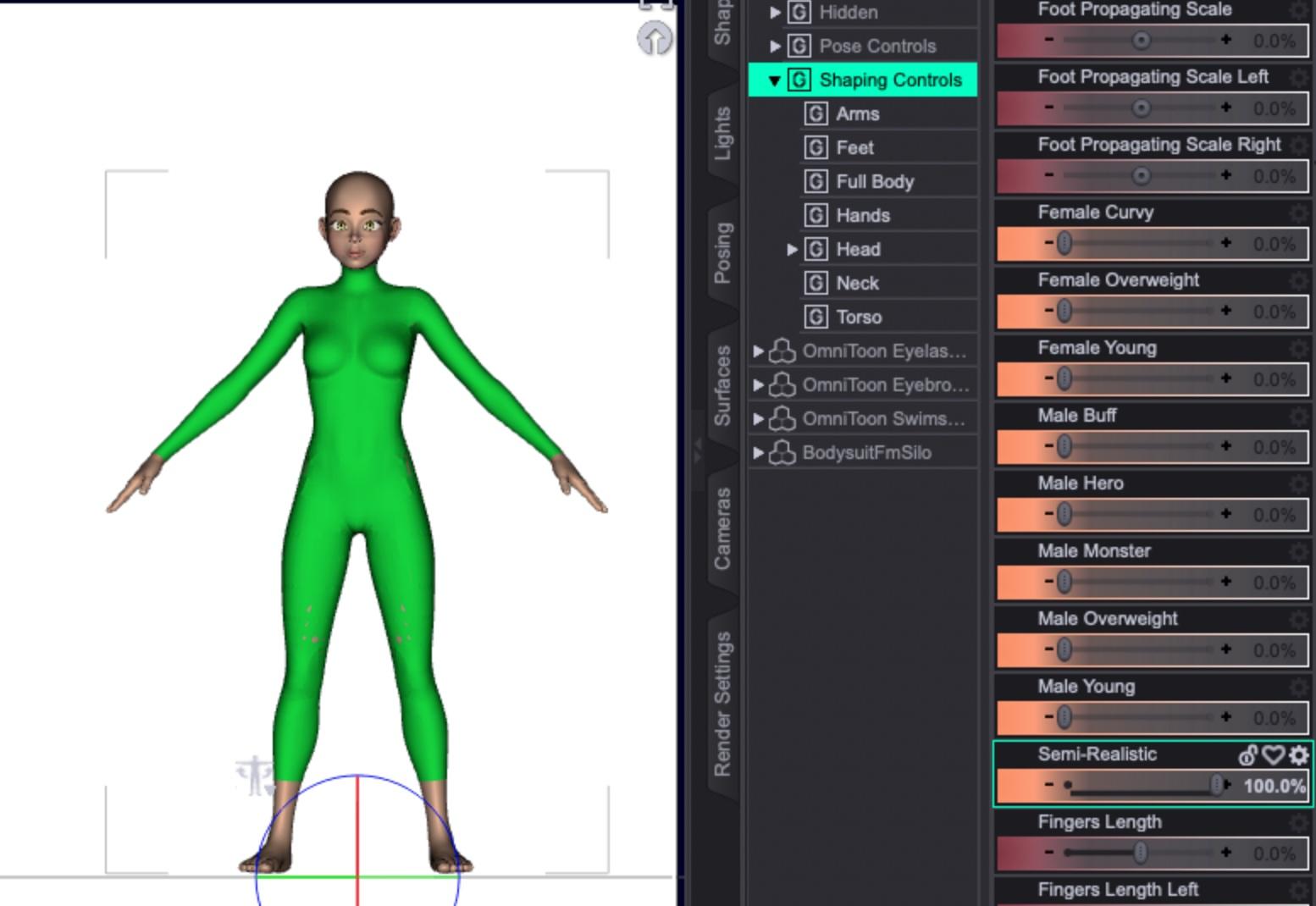
First, load the female figure into a new scene, select the character, and make a standard geoshell:

I generally unparent the geoshell and move the actual character off to the side. I find this makes it easier to select and delete the character once we move to a modelling program, and by moving the character the geoshell stays in place.
Many people keep the character in place so that in the modeller they'll be able to get a better idea of how their clothing will fit and work. Because I'm just doing a basic bodysuit, I'm only going to want the geoshell. Use the base model without any morphs applied.
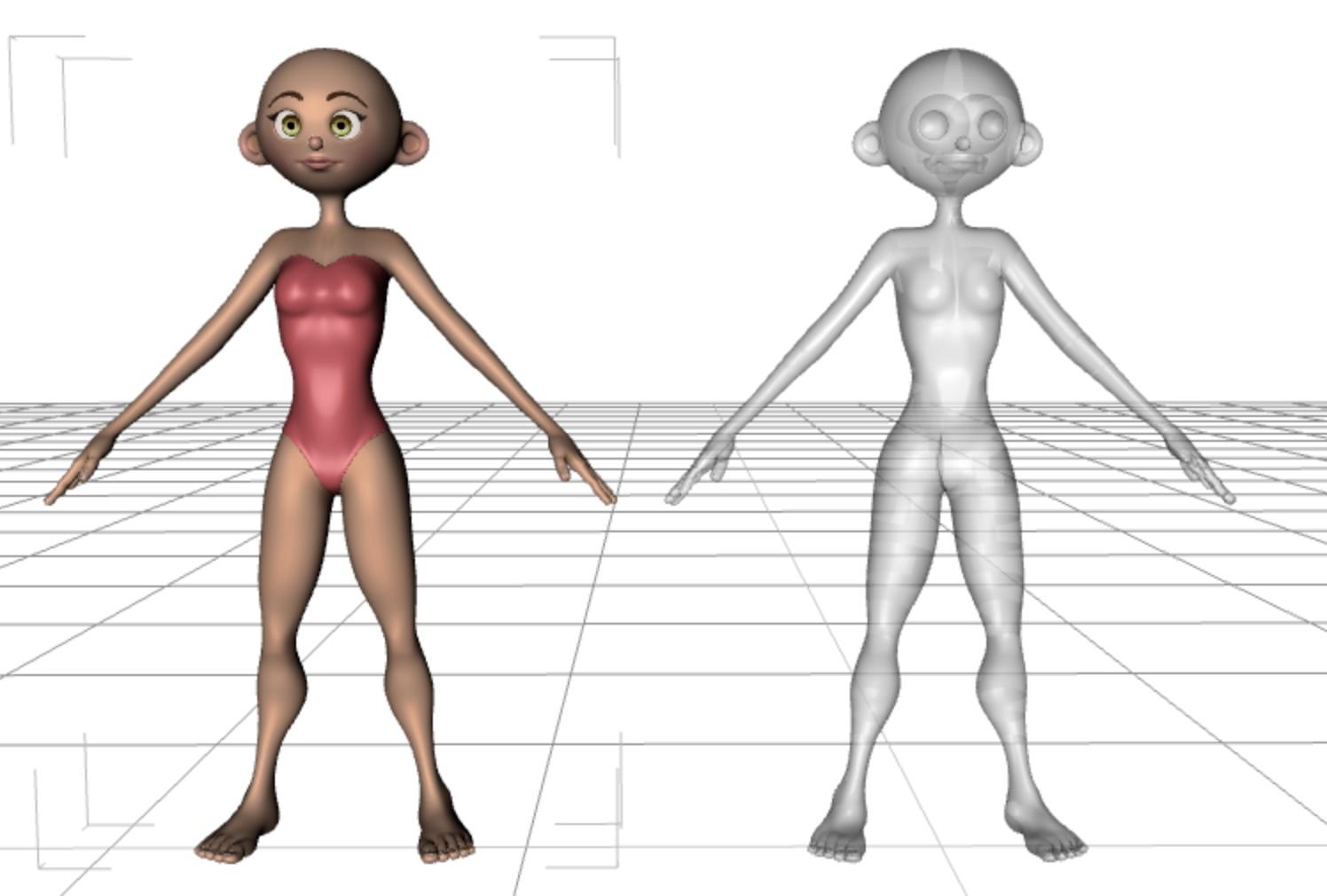
Export the scene in either .obj or .fbx format, either will work fine. It's important to note the settings you use, as you want to duplicate them when importing the geoshell back into DAZ Studio.
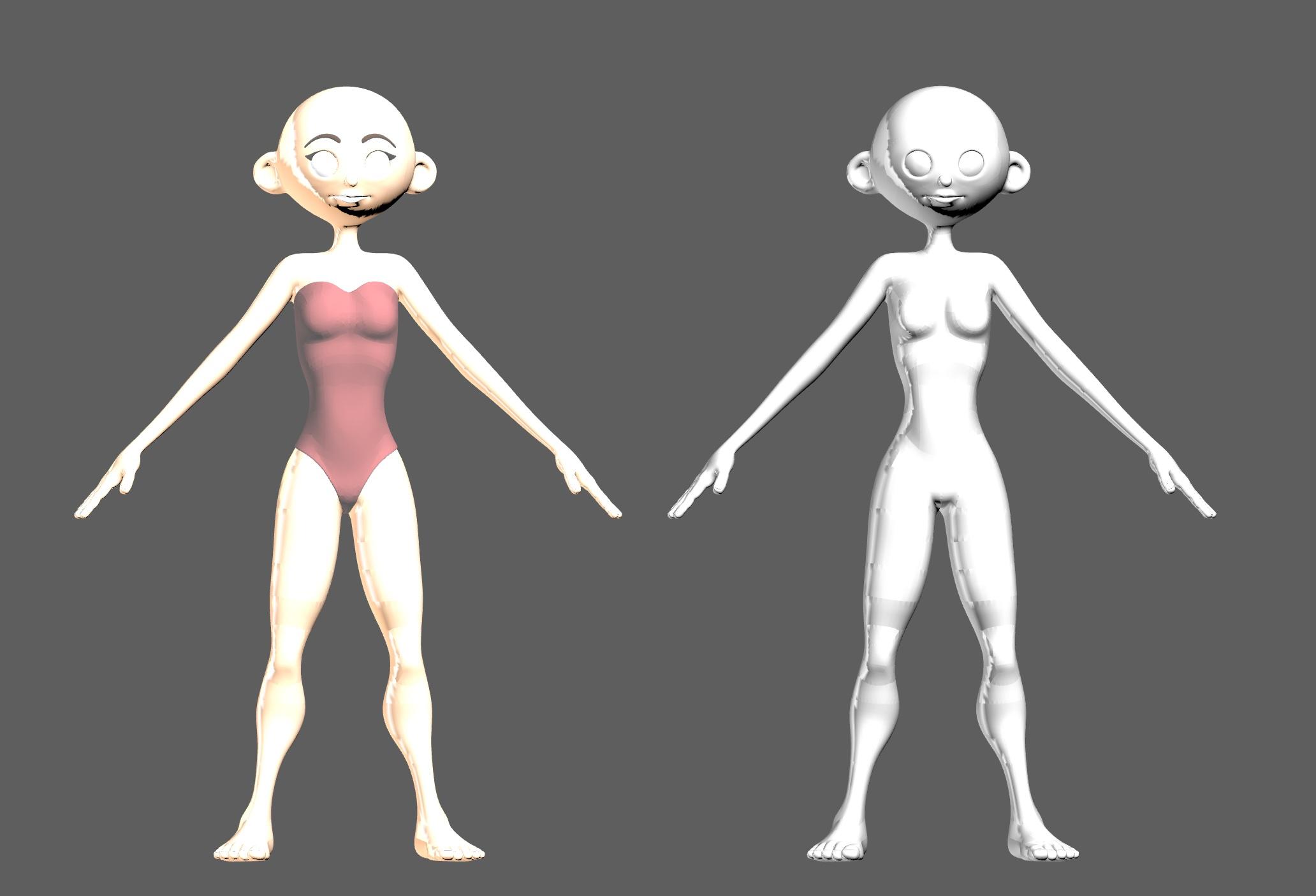
As mentioned, since I'm just making a basic bodysuit, I select the actual character and delete it.
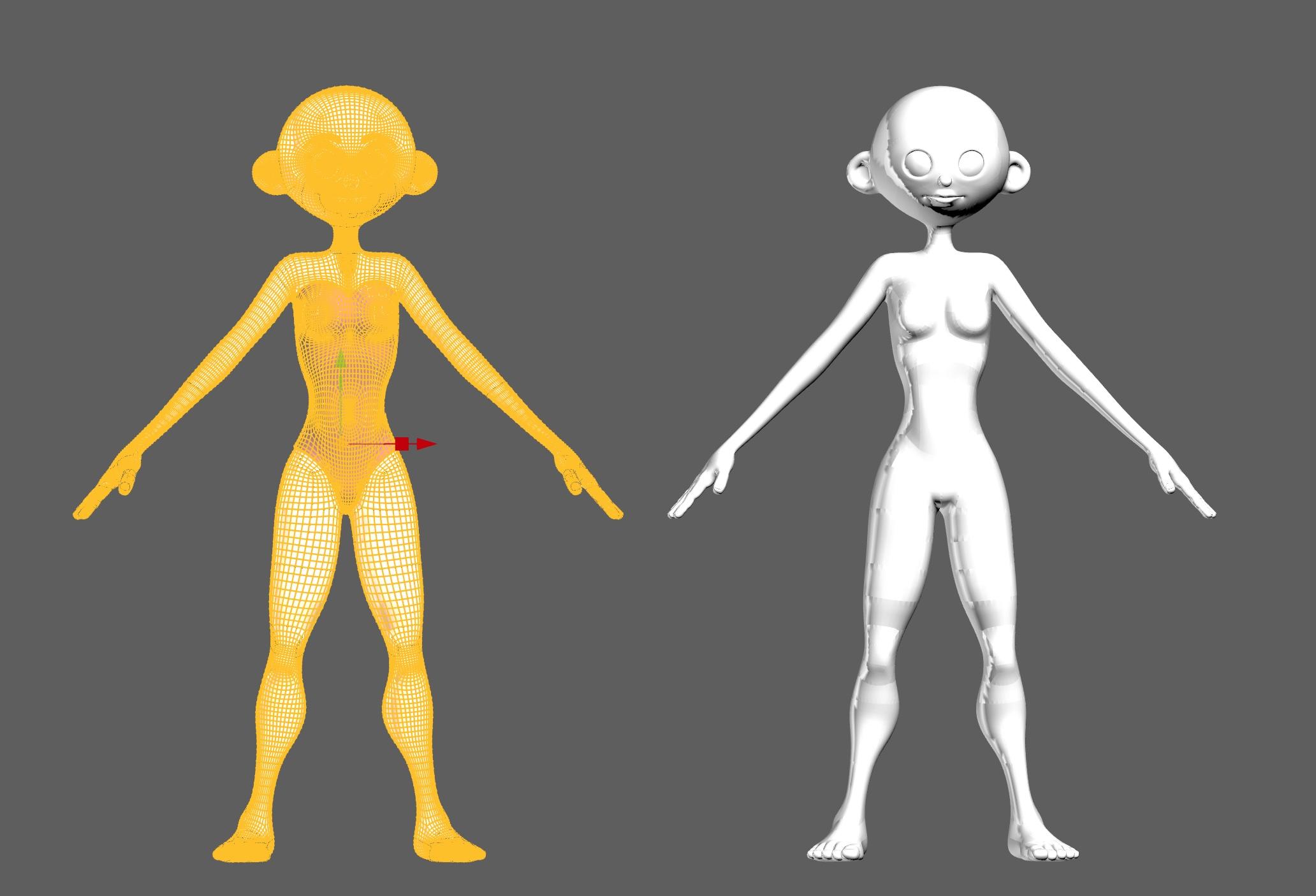
Once we have just the geoshell, I select and cut any parts I don't want, like the head, hands and feet. At this point, if you just want a shirt or pants, you can delete everything that's not part of the clothing you want. Here is where you can also edit your clothing to punch it up with details like trims, piping, seams, wrinkles, etc. As well, you can select parts of the clothing to create new shader or texture zones. When we're done, export the clothing as an .obj or .fbx file, whichever format you exported from DAZ Studio.
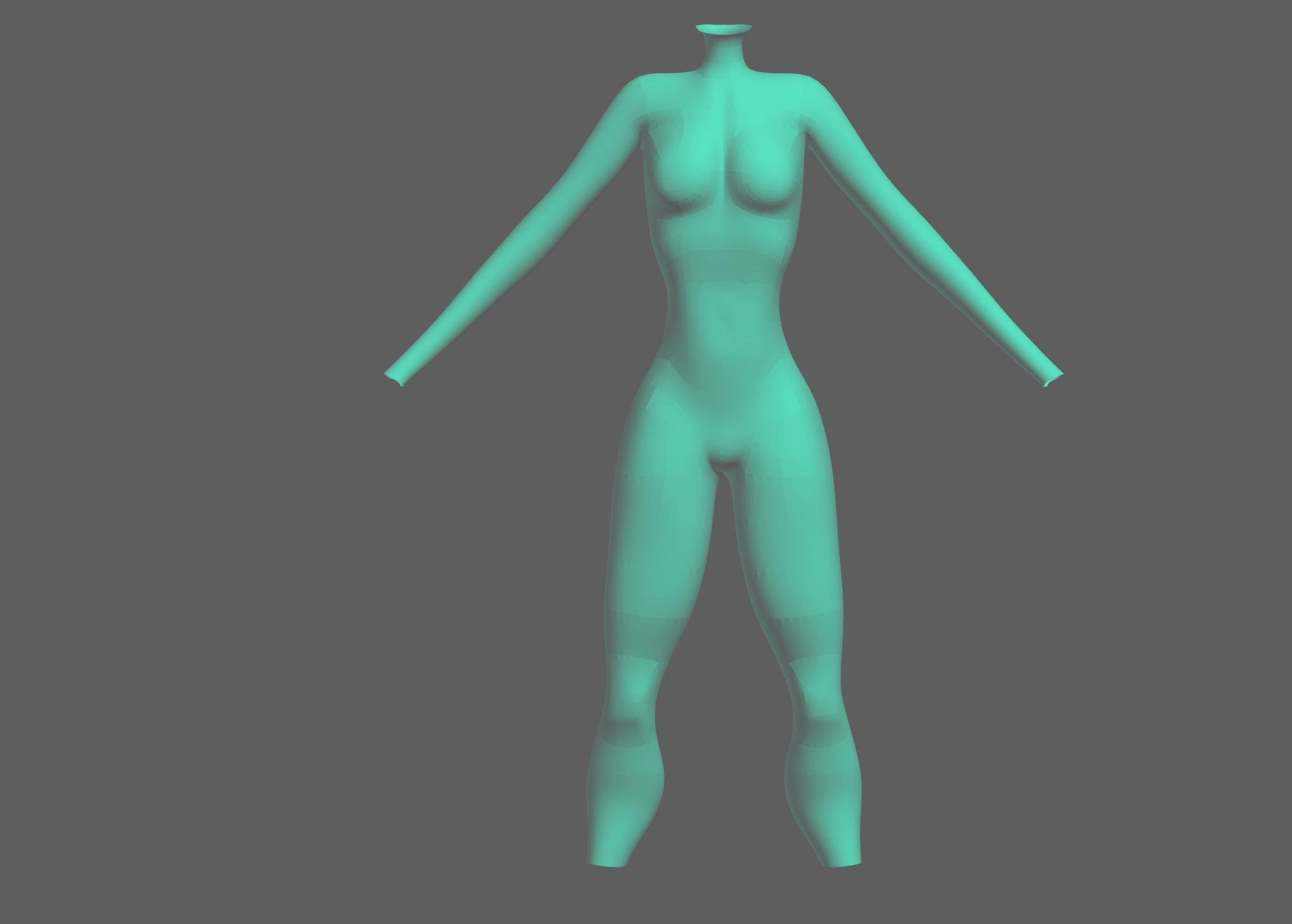
Back in DAZ Studio, delete the geoshell and move the base female back to the zero point.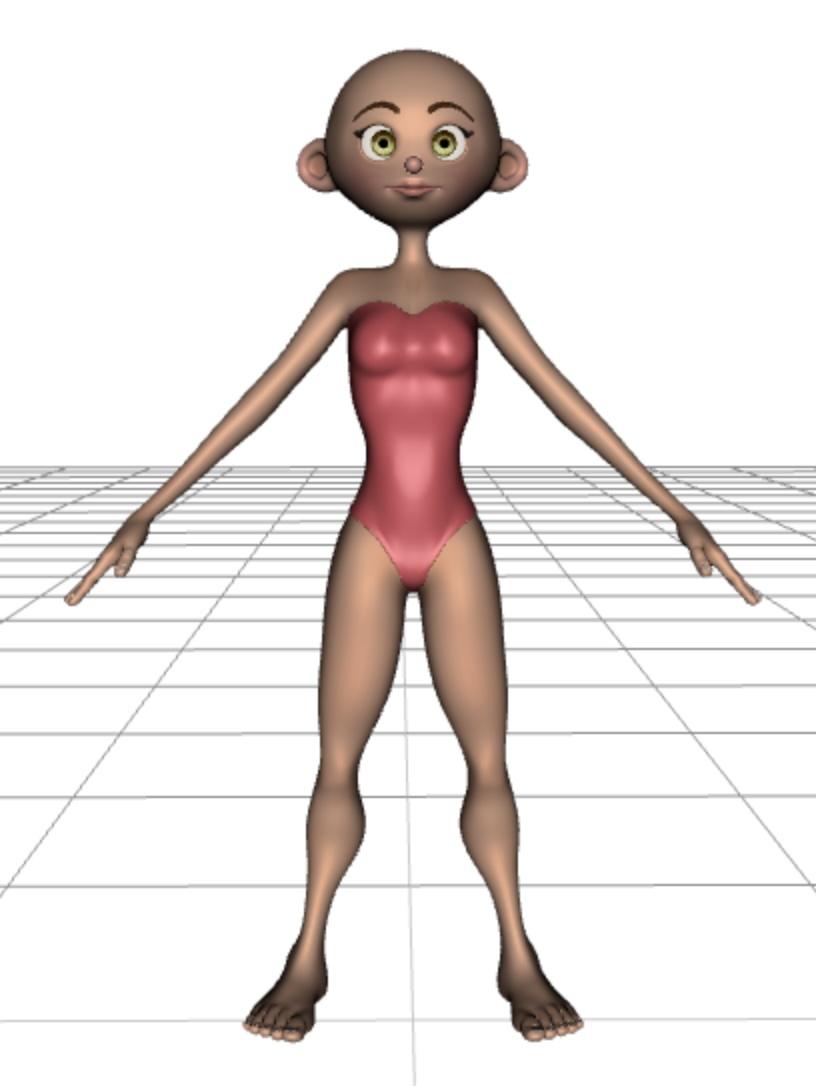
Import the edited clothing file using the same settings you used to export the file originally (e.g. 1 in = 1 cm)
Once you've imported it, select the bodysuit and apply the DAZ Ubershader to it to make it view and render properly.
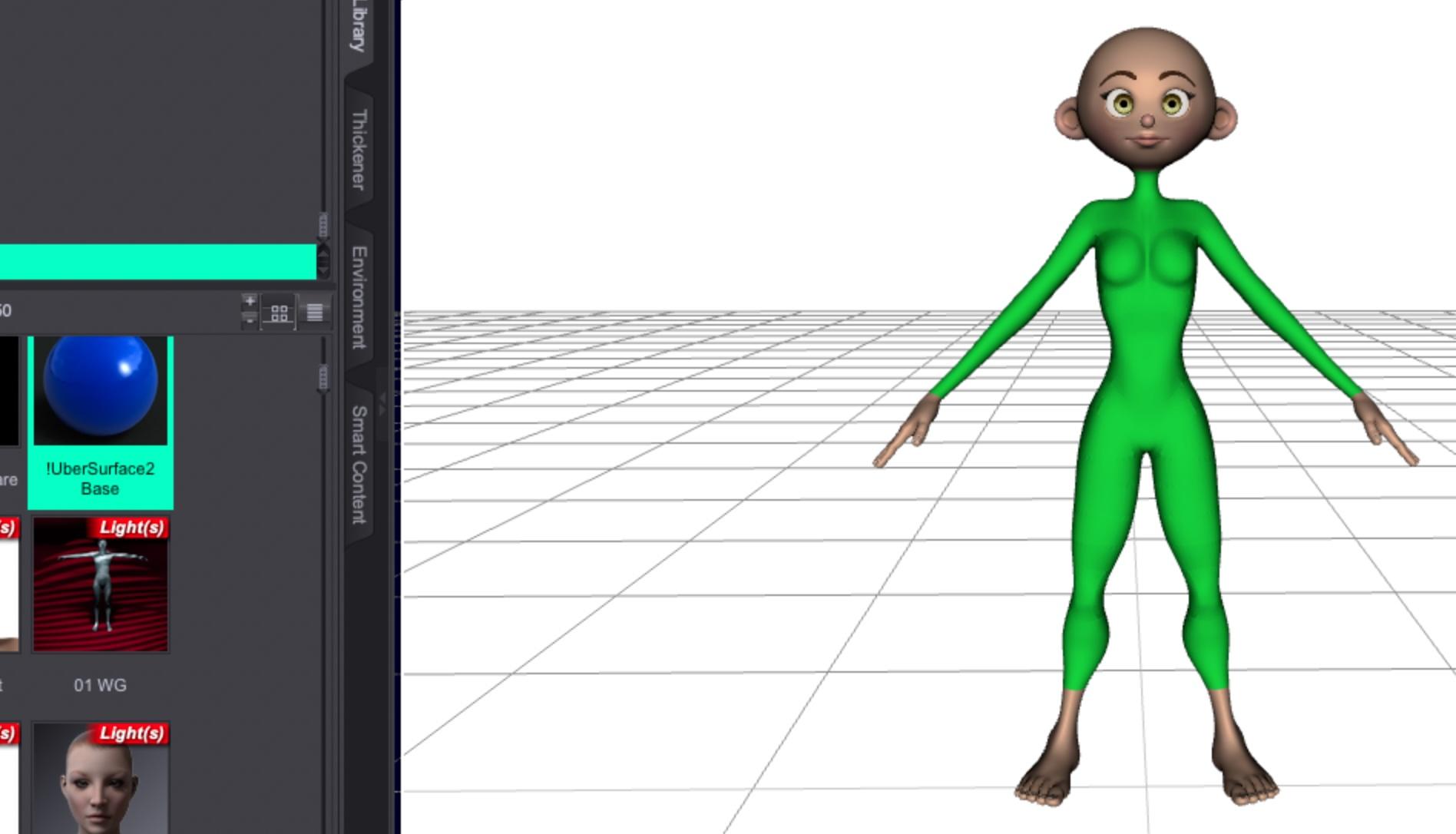
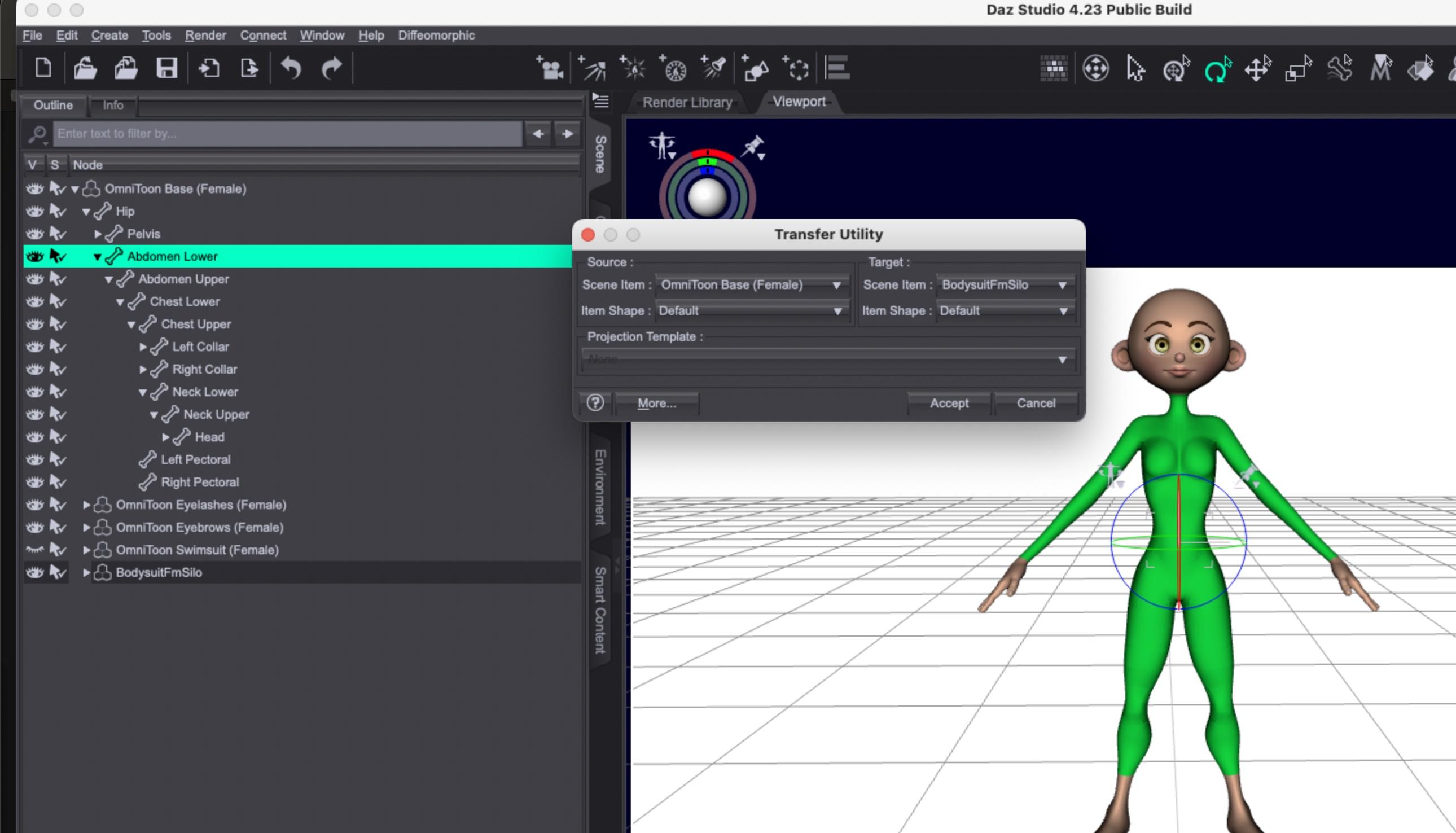
Using the Object Transfer Utility under the "Edit" menu, you can select the Omnitoon character and the bodysuit and transfer the rigging info.
If you find you run into any issues with body poke-through, you can experiment with adding a smoothing modifier.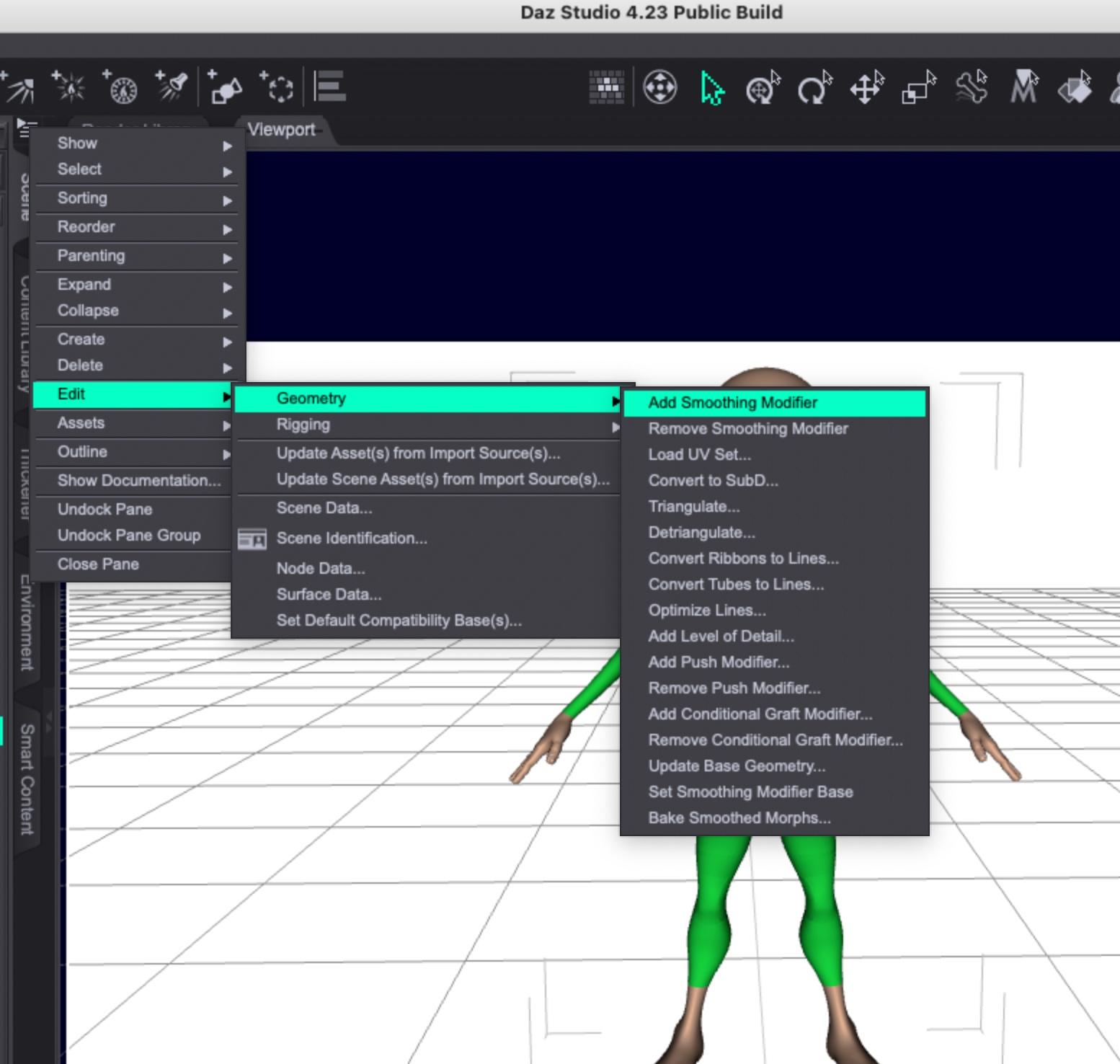
Once you've used the transfer utility, you should be able to apply morphs to the Omnitoon and the bodysuit should match it. Some very extreme morphs might require smoothing or, easier in some instances, hiding the body part poking through the clothing.
Here's the Young morph applied:
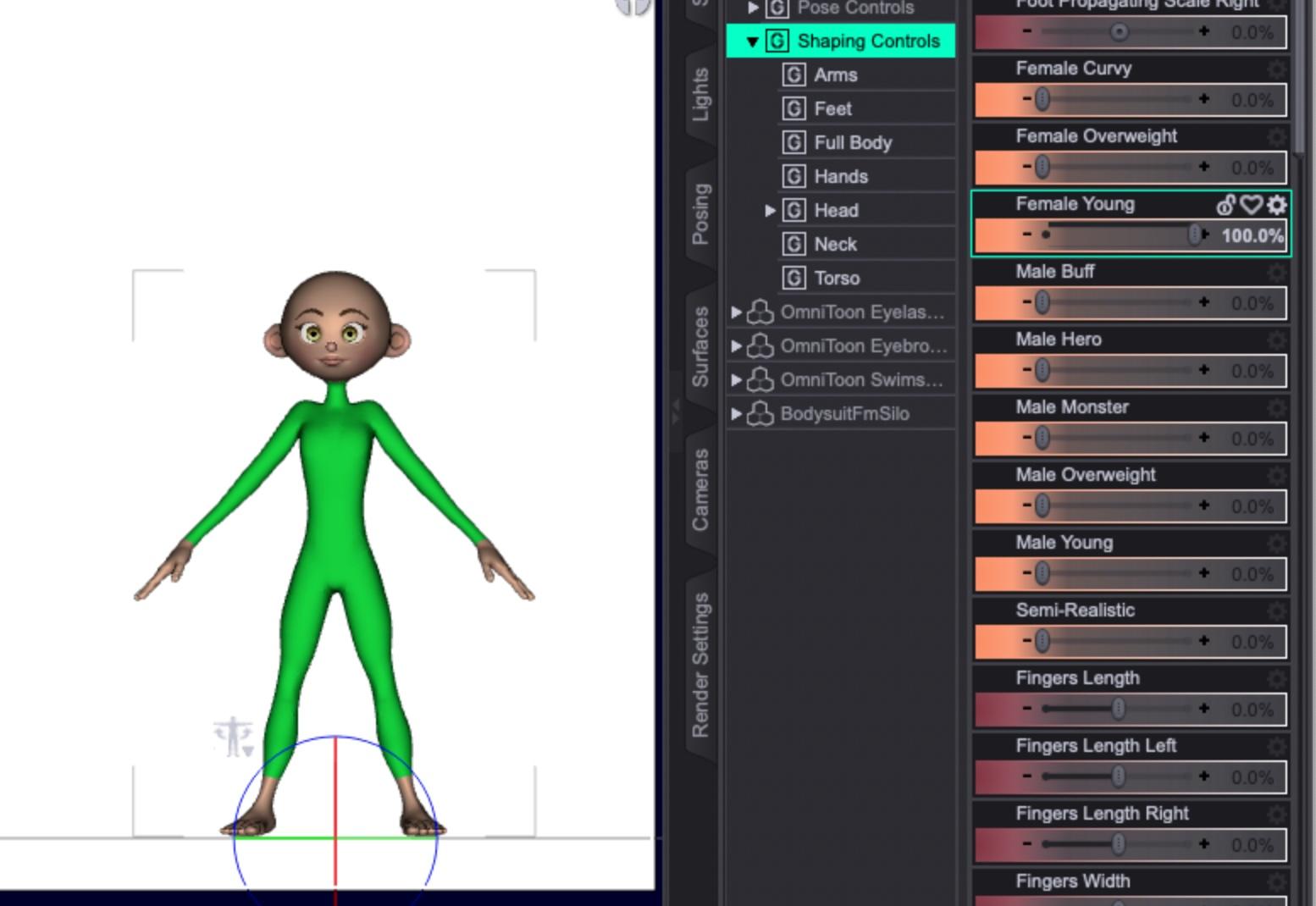
Curvy:
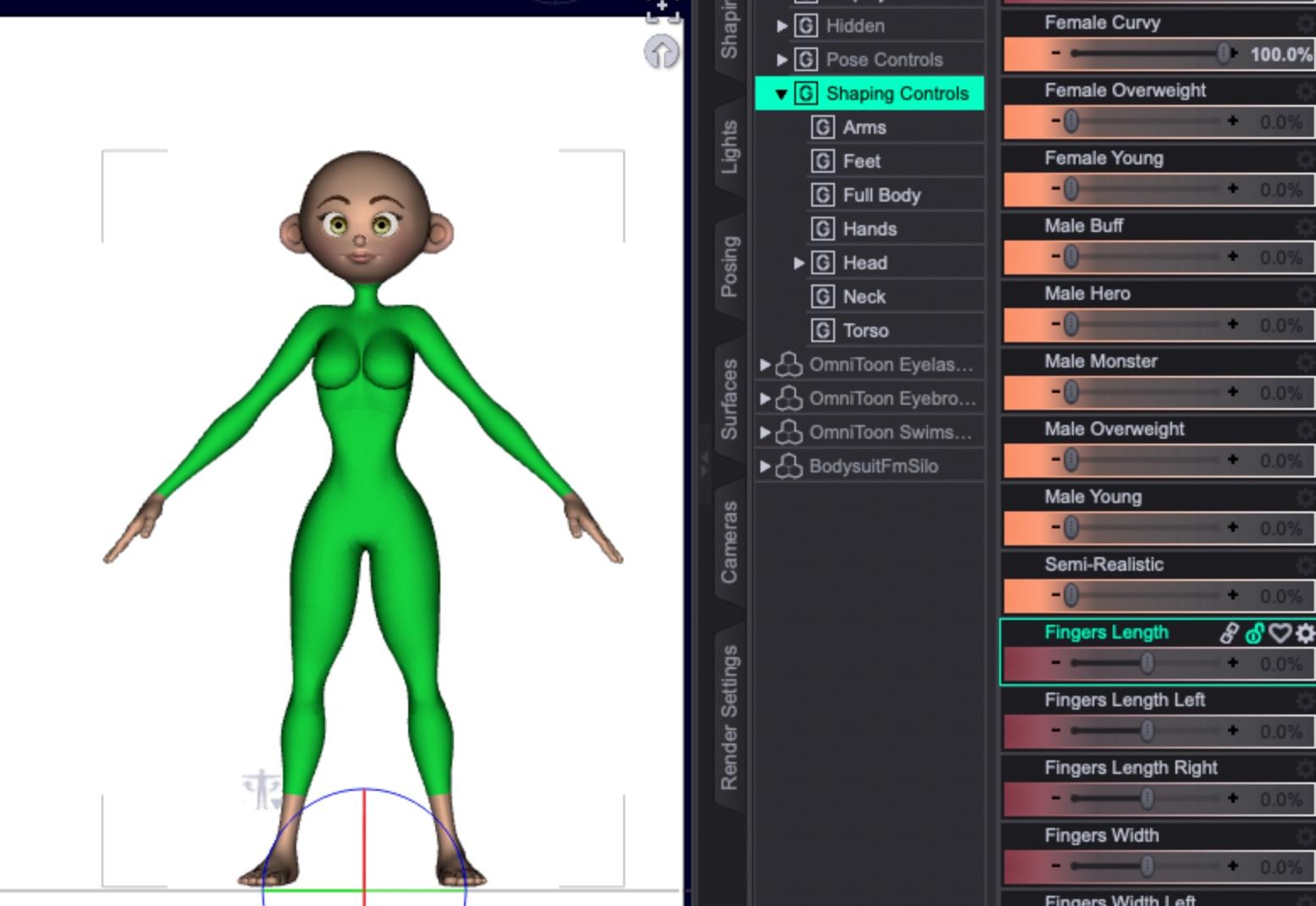
Overweight:
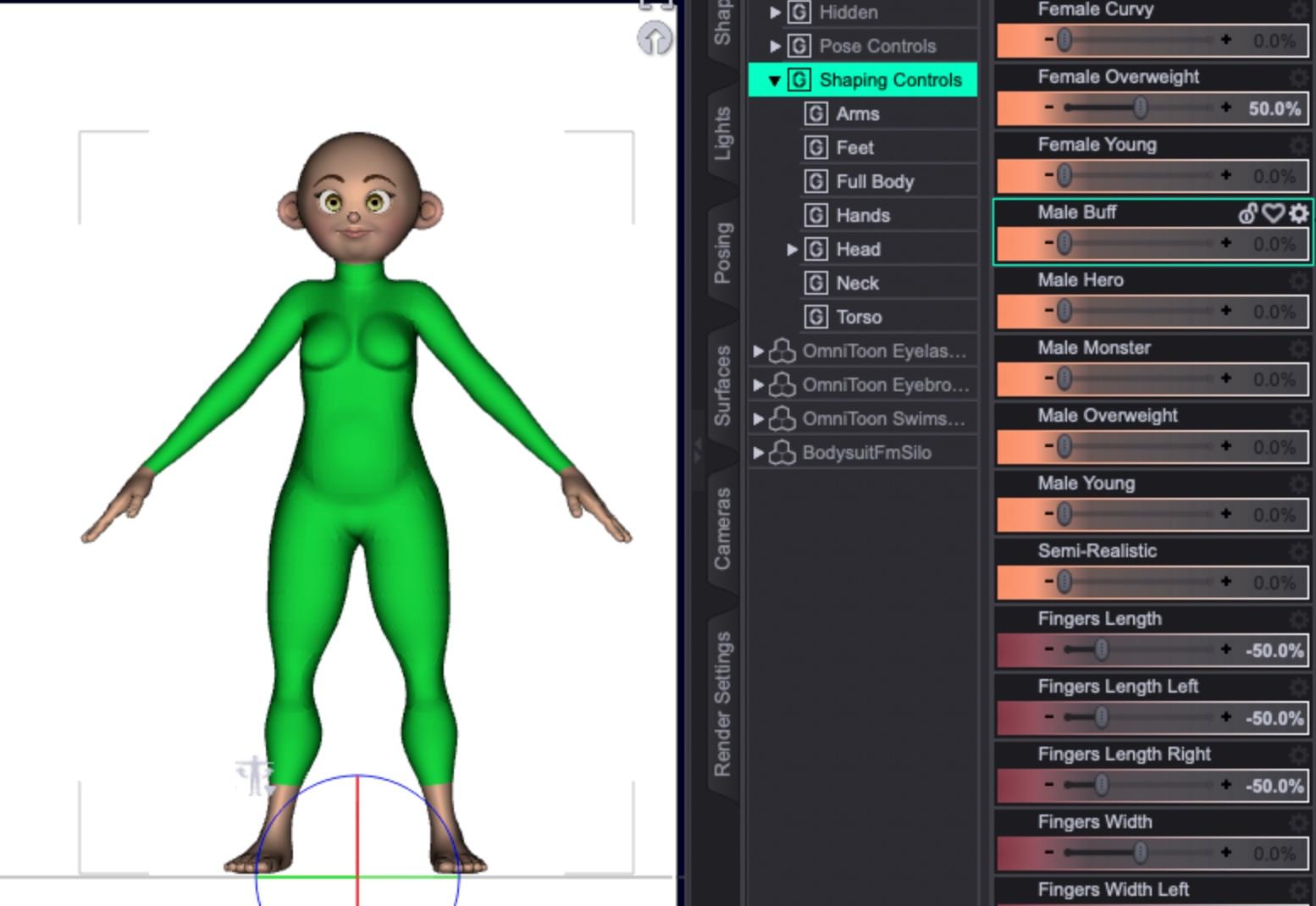
And semi-realistic, to try out a few.
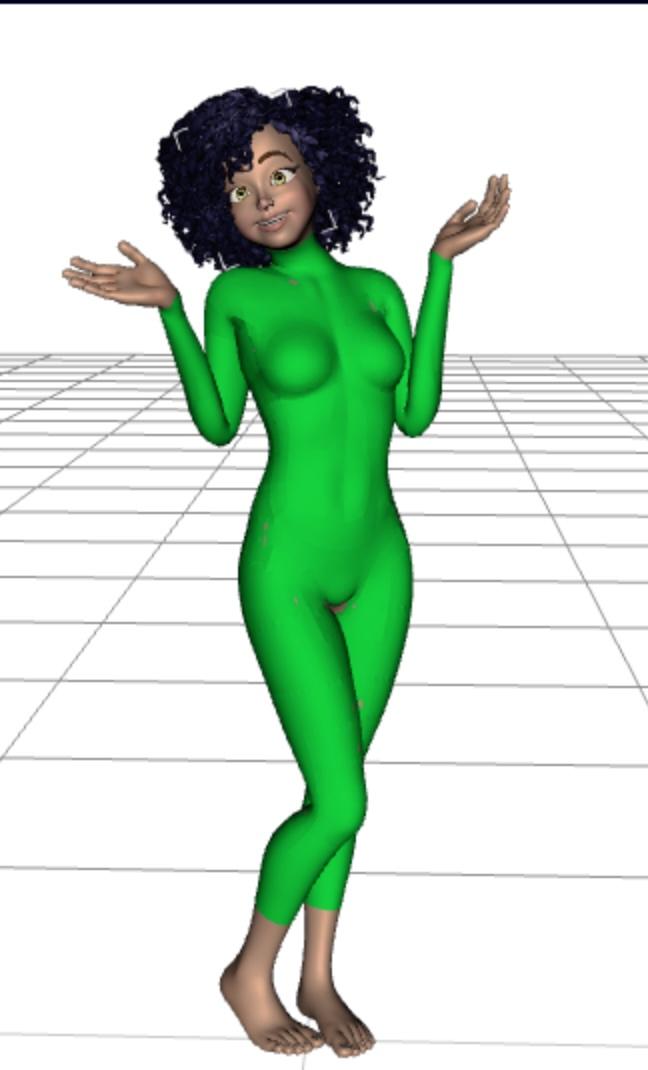
If I'm allowed to distribute the model without re-rigging, you can get close results using Genesis 8 poses:
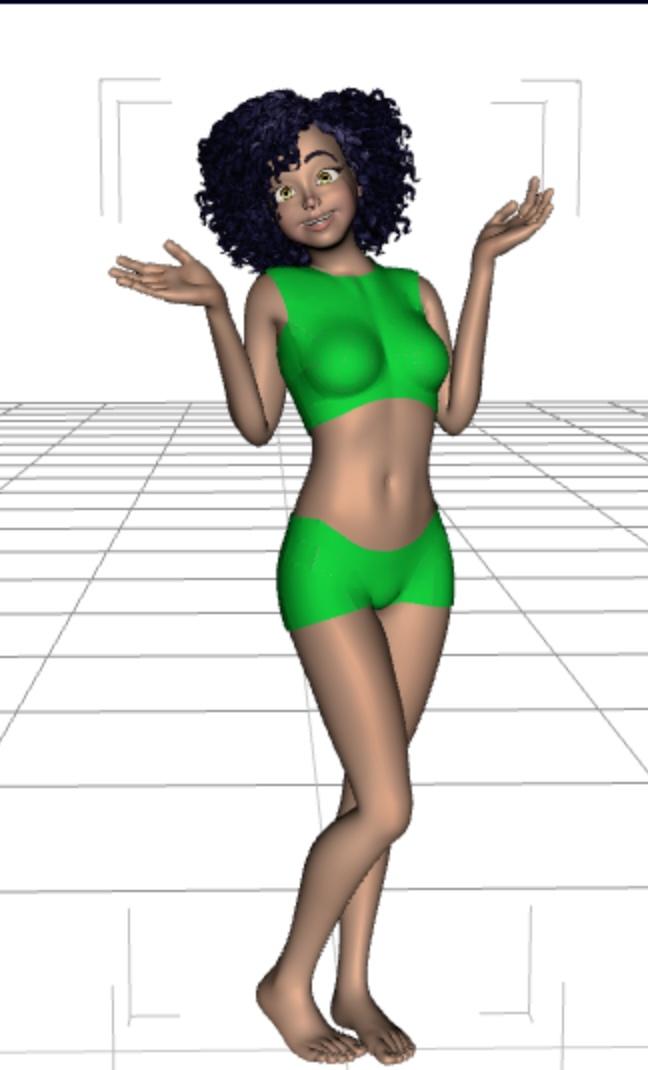
And if you just need some quickie custom clothing, you can just hide parts of the bodysuit:
 Daz to Unreal import not working...
A year or two ago I was able to export a daz character to unreal and I remember it being pretty simple. Im following the direction of a youtuber
I downloaded an older Unreal engine, 5.3, because higher versions are not available in the bridge.
I click Send to Unreal and it seems to work as far as Daz,and I have Unreal open, a blank 3rd person map, and the YT guy said it should just import to Unreal but it doesnt.
Any idea about the import, is there something else you need to set up in Unreal?
Daz did create dtu and fbx files so I tried to import those into my map.
And I do see the files appear as new square files in the UR directory, but the character does not appear in map viewport the character.
Which it did for the YT guy (but his automatic import worked and mine did not). Any idea what im doing wrong?
Are there good directions for this anywhere?
Thanks
SOLVED - Carrara Not Loading getting MCX errorsPlease check whether a Carrara.dat file is present in the Carrara8.5 folder ( parent folder of the Extensions folder ) It contains metadata for mcx files. Check its size and properties.
BTW On what OS are you running? Win10 / 11? 32/64bits?
Parameter Locks for Daz StudioMaterial locking could be only limited, since chnaging the shader used would change the properties (it isn't possible to mix shaders as such, though if they import into Shader Mixer something close could be achieved). Most properties can be locked - click the padlock icon on the slider so it looks closed.
Daz 3D is part of

Connect
DAZ Productions, Inc.
7533 S Center View Ct #4664
West Jordan, UT 84084Licensing Agreement | Terms of Service | Privacy Policy | EULA
© 2026 Daz Productions Inc. All Rights Reserved.