-
Diffeomorphic DAZ Importer version 1.6.0 released
catmaster said:
I had the same bug saying the database needs to be scanned again, that was fixed in recent commits, try download the most recent Diffeomorphic: https://bitbucket.org/Diffeomorphic/import_daz/downloads/
https://bitbucket.org/Diffeomorphic/import_daz/commits/
Fixes for issue 1176:
1. Load Action does not fail if not character if found when scanning database.
2. Convert Morphs To Shapekeys has option how to name shapekeys.
3. Transfer Animations recognizes both kinds of naming conventisions.I had a relatively new version. I download the newest dev one now and tried it. I still get a error and I can't find ways to generate a file for G8F, I only have one for G81F but when I try to load expressions on G81F it says G8F is missing.
Diffeomorphic DAZ Importer version 1.6.0 releasedI had the same bug saying the database needs to be scanned again, that was fixed in recent commits, try download the most recent Diffeomorphic: https://bitbucket.org/Diffeomorphic/import_daz/downloads/
https://bitbucket.org/Diffeomorphic/import_daz/commits/
Fixes for issue 1176:
1. Load Action does not fail if not character if found when scanning database.
2. Convert Morphs To Shapekeys has option how to name shapekeys.
3. Transfer Animations recognizes both kinds of naming conventisions.Torian 8.1Ildanach said:
caravelle said:
Ildanach said:
caravelle said:
Luckily, I was able to use my DO coupon on him. $13 - that's a nice price. But without HD, of course. Because I liked Torian 8.1 so much, I took the MetaMixer addon right away ;-D
What is the benefit of buying the base model shape AND the metamixer? I assumed the metamixer was for if you didn't have the base model. I've not used it before, so this is a genuine question, not a criticism.
Ildanach, with MetaMixer you only use the head/face of a character - without the morphs of the body.
But can you not do that already with the base model? It has a separate head morph that doesn't change the body
The metamixer add-on divides the head morph into around 68 separate partial morphs. You want the character to use Floyd's nose, Michael's left ear, and old Jeb's right ear, the Metamixer add-on's will make that possible.
Diffeomorphic DAZ Importer version 1.6.0 releasedI got a question about "Scan Morph Database". I never really tried it so far and wanted to look into it now. When I select G81F or G8F for example and scan it, afterwards it still says it requires a G8F scan?
Diffeomorphic DAZ Importer version 1.6.0 releasedLevon777 said:
Question: How do you get morphs to work for clothing as well as the model? Most morphs only seem to change the models body, but the cloths stay as is.
You need to transfer the morphs to the mesh. The easy import offers to that automatically when importing but if you have to do it manually you select the cloth, then shift select the body mesh as active selection and then you transfer the morphs.
*Released!* Natural Eyes 9 For Genesis 9 {Commercial}https://www.daz3d.com/natural-eyes-9-merchant-resource-for-genesis-9
A comprehensive Merchant Resource for the Genesis 9 figure.
*48 Iris Texture Maps in a Transparent png Format*
*2 Sclera maps*
Corresponding Normal, Bump, and Displacement Maps
Left, Right, and Full Material Settings For Each Eye Style
Material Settings For the Tear
8 HD Iris morphs for Each Eye
2 Lacrimal Morphs
3 Settings to Change Translucency
3 Settings to change SSS
3 Settings to change the SubD
A 12 page Comprehensive PDF with Directions and Explanations
And of course.. the best part.. I left for last!
An improved shader set up that makes these render FAST :)
TIPS & TRICKS - I'll add more as I think of them!
Youtube Video How To : https://youtu.be/uZUUZ7P6774
- Sclera Natural and Sclera Aged works best with most skin colors. If they are still too bright, You can change the diffuse color(not the map) to a slightly darker shade on the Eyemoisture Left and Eyemoisture Right.
- Sclera Bright options are designed for paler complexions.
- Due to the design, the irises end up looking smaller. Some people like that, some don't. Dialing the iris size up about 35% brings it back to the same size as V9's. The iris size is a standard morph and is on G9, not the eyes.
- If you do adjust the size of the irises, they may intersect with the tear. I have included a Tear Move Out Morph for this.
- If the irises look too dark - Add the sss option. Always start with the SSS Higher. This is usually enough.
- If the irises look too smooth - This could be a couple of things. It may need to render longer, or it may need some subd (make sure if you use the option I provided that you have the eyes selected in the scene before you use this),
- If the eyes look took glowy/not natural - Play with the translucency options. If they still look too bright change the translucency value manually AND/OR change the translucency color (not the map) from white to a darker gray on the Eye Left and Eye Right surfaces..
- If the limbal ring isnt dark enough - Try using one of the eye reflection adjustments - Medium or Beauty
- If the eyes look too dry or are not reflecting enough: This is a lighting thing. Try adding more lighting that accentuates the eyes. Rotate your HDRI etc.
- The add limbal ring option - This imo, doesn't look all that great , but I felt it was a great way for all of you to learn how to adjust coloring etc in LIE, and get your hands dirty :)
- Iris inset morph - This is something that you will probably fiddle with a bit. I don't think you even need it unless you are doing a side shot, or dont want to use the hd irises (which already have some inset in them). It's just an extra option for those that need or want it.
- If the iris colors are not saturated enough for you, select the Eye Left and Eye Right Surfaces and change the Diffuse Overlay Color(not the map) to a more saturated color that represents the eye color you are going for. Ex. If you want the iris more blue, select a blue shade.
- If the eyes are being difficult to light: sleet the Eye Left and Eye Right, and change the Diffuse Overlay value to 90%
Need help with making outfit for genesis2!!chamco0531 said:
Hi, I really need help with making an outfit for genesis2 female.
I'm making an business suit for this particular character, and it looks okay when I fit it to the gen 2 female base mesh, but it keeps deforming when I apply the morph for that particular character.
Is there any tips and tricks to avoid this? I want to make sure this outfit looks best when the morph is applied. There should be a way, since outfit sold in the DAZ market don't suffer from this kind of problem, I wonder how they do it!
I think content creation for clothes is a complex process. Using the built-in Transfer Utility to autorig clothes will be imperfect, particularly for clothing that is fitted loosely to the base mesh. This is because Transfer Utility will transfer weights or whatever based on nearby geometry at time of Transfer, so the auto transfer works better for tightly conforming clothing.
If you are morphing the character too, that can mess with clothing, so some outfits will have additional morphs that can be dialled in manually or kick in automatically, driven by the morphs applied.
If you are making soft-clothing content for yourself, it's much easier to just make or buy clothing for marvelous designer and drape it in Marvelous Designer than it is to try and make something for Daz Studio that requires rigging and weighting and morph correction and so on.
Edit: Some quick fixes in Daz Studio like dialling in fit helper corrective morphs or editing the mesh with mesh grabber could help, but depends on the extent of the fitting issue you are experiencing
Need help with making outfit for genesis2!!I would imagine they create custom morphs for some of the characters.
This is done by sending a base resolution version of the outfit to a modeller with the shape you want to create.
Any modeller can do this. I normally use zbrush and I ensure the outfit isn't fitted to the character as that way the original outfit will go to the modeller. I dial in the character I'm creating the morph for and once I've changed the resolution to base on the outfit I send them both to zbrush.
Need help with making outfit for genesis2!!Hi, I really need help with making an outfit for genesis2 female.
I'm making an business suit for this particular character, and it looks okay when I fit it to the gen 2 female base mesh, but it keeps deforming when I apply the morph for that particular character.
Is there any tips and tricks to avoid this? I want to make sure this outfit looks best when the morph is applied. There should be a way, since outfit sold in the DAZ market don't suffer from this kind of problem, I wonder how they do it!
Genesis 9 Coming Soon! Preorder Victoria 9 HD TodayNo, not at all.
The pre-order bundle should be the pro bundle + extras for pre-ordering.If the pre-order bundle has less content and incomplete anatomy, then there is no reason to purchase the pre-order.
Just wait for the pro-bundle and get the gens, nipples, navel, and what ever else is in the that bundle.I'm assuming that the gens, nipples, and navel won't split into separate "morph bundles" at additional cost.
Though with the current information we have it looks like that maybe the case as a few posts have hinted that nipples and navels will be HD morphs so most likely part of a separate bundle or bundles.
How to do tubes and cables in DazSo we have amazing assets like Eve 3022.... but how do we do those cables?
I'm guessing I'd have to roundtrip to and from a modeller like Blender (or use Ron's brushes in post which is sub-optimal in far too many ways).
Just hoping there's some arcane magic incantation for doing it in Daz...
Genesis 9 Coming Soon! Preorder Victoria 9 HD TodayThe waiting is killing me, the only reason I don't pre-purchase this outright is that I'm also waiting 'til the accompanying morph packs come out as well! Can't wait to drag G9 into ZBrush! :) :D
CARRARA CHALLENGE #64: Old egypt..... WIPDiomede said:
Updated G2F Egypt Dress Freebie - Rigged Conforming Figure
See attached zip file.
I used the transfer utility in Daz Studio to rig the dress OBJ that I posted earlier in the thread. Genesis 2 Female. See the ZIP file attached. It is in Daz Studio format, so copy to a content folder. Shaders are Iray, sorry. But it is just a diffuse map which you will probably replace anyway. Note that I did this on my laptop so I am just hoping that the data file folder has everything one needs. First time adding a Studio content folder on this device. I still recommend using VWD for Carrara renders, but not necessary. Conform to your G2F. Pose. Use your VWD. I recommend selecting the collar mat zone and 'nailing' to the collision object. Let me know if there are any problems. If there is, I suspect it will be the data files.
Enjoy for any renders/animations of any use, but don't redistribute the assets.
Thank you for the Egyptian dress, there's only a little problem, your .duf file can't find the Texture. But I had no problem to fix it.
CARRARA CHALLENGE #64: Old egypt..... WIPDiomede said:
Updated G2F Egypt Dress Freebie - Rigged Conforming Figure
See attached zip file.
I used the transfer utility in Daz Studio to rig the dress OBJ that I posted earlier in the thread. Genesis 2 Female. See the ZIP file attached. It is in Daz Studio format, so copy to a content folder. Shaders are Iray, sorry. But it is just a diffuse map which you will probably replace anyway. Note that I did this on my laptop so I am just hoping that the data file folder has everything one needs. First time adding a Studio content folder on this device. I still recommend using VWD for Carrara renders, but not necessary. Conform to your G2F. Pose. Use your VWD. I recommend selecting the collar mat zone and 'nailing' to the collision object. Let me know if there are any problems. If there is, I suspect it will be the data files.
Enjoy for any renders/animations of any use, but don't redistribute the assets.
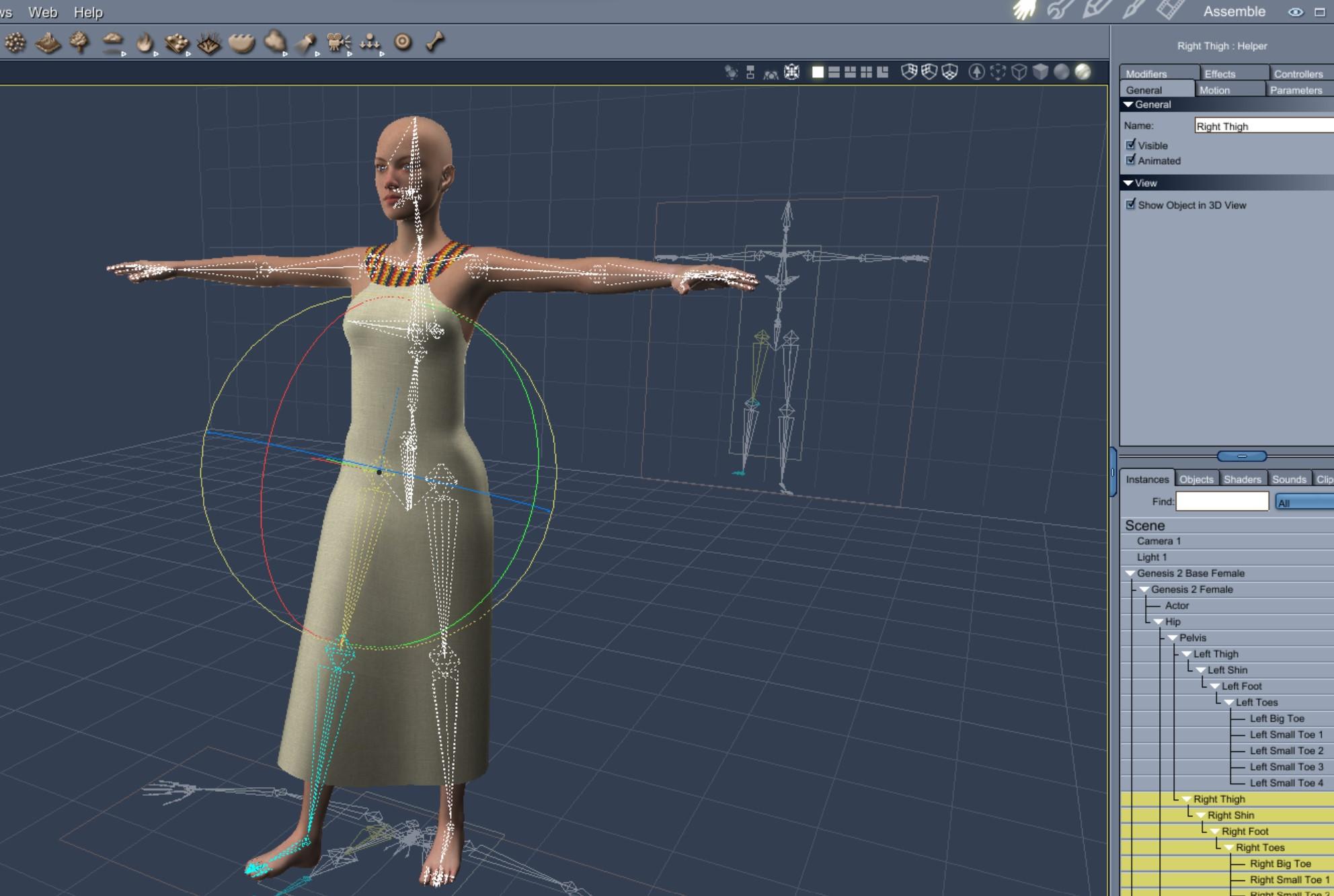
Woohoo another freebie !!!
Will DAZ allow us to easily use morphs from G/G2/G3/G8/G8.1 on G9?I would like to transfer all my toon morphs from Genesis 3, Genesis 8, & Genesis 8.1 to Genesis 9. Even though I know there will likely be some toon products for Genesis 9. Or maybe not, don't really know the comparitive sales figures for a Moouse lady vs a toon product. For convenience sake more than any actual technical or artistic reason.
Having Trouble Rendering Hair Amara Braids in CyclesI'm having trouble rendering the Amara Braids in Blender Cycles. I'm using the DazToBlender bridge to transfer the character and hair and leaving nodes setting as they were.
My first render the braids were very shiny and with no detail. I added some roughness to the braids on the second render and that helped with the shine but they still seem to lack detail.
I've used some other iRay hair products that transfer nicely so not sure if there's something I'm missing or if anyone has suggestions on a better node setup.
Thank you
[Released] Bone Minion for Generation 4 Poses [Commercial]MustangMike said:
I am having a problem with the Bone Minion losing "connection" with the target character. Read the PDF and watched your vid on uTube. The conversion process will work for several pose conversions and then become unresponsive. The Minion will assume the pose to be converted but the target character does not respond.
I have tried closing and opening DS and clean reboot with very spoty results. Sometimes Bone Minion will work once and then freeze, sometimes it will do 20 in a row flawlessly and then freeze.
Any ideas or solutions to my problem? Great idea and when it works I love it.
Mike
Are you sure it is not just a pose that doesn't change the hip? If the hip bone is not changed, DS won't alert the script to the pose. However, you can always use the Apply changes script to transfer the pose to the target figure too.
To be sure, you can also post the log and I can see if it crashed.
Genesis 9 Coming Soon! Preorder Victoria 9 HD TodayFixme12 said:
Can some one explain what come's with G9 Base.
- Do we finally get HD morphs & tools to build new genesis figures as community or is the HD morph stuff PA only "again"?
Ability to create HD morphs would bea feature of DS, not of the figures. Nothing has been said by Daz so far about that.
- Do we get Gen included in base V9 or only in pro bundle? I prefer a full complet figure, without clothes and hair i mostly don't need or find somewhere else.
The gens have only been included in bundles since Genesis 1 and I doubt it will change (I might be wrong though).
- Do we need to buy external morphs for muscles and new bone rig or will there a muscle & bodyphysics system in dazstudio 5?
Daz Studio 5 is not coming at the same time as G9, and no one beside the people working on the project knows what's included in it (beside changing the version of Qt framework).
Genesis 9 Coming Soon! Preorder Victoria 9 HD TodayFixme12 said:
Can some one explain what come's with G9 Base.
- Do we finally get HD morphs & tools to build new genesis figures as community or is the HD morph stuff PA only "again"?
- Do we get Gen included in base V9 or only in pro bundle? I prefer a full complet figure, without clothes and hair i mostly don't need or find somewhere else.
- Do we need to buy external morphs for muscles and new bone rig or will there a muscle & bodyphysics system in dazstudio 5?
We don't know any of that yet. Only Daz knows.
Genesis 9 Coming Soon! Preorder Victoria 9 HD TodayCan some one explain what come's with G9 Base.
- Do we finally get HD morphs & tools to build new genesis figures as community or is the HD morph stuff PA only "again"?
- Do we get Gen included in base V9 or only in pro bundle? I prefer a full complet figure, without clothes and hair i mostly don't need or find somewhere else.
- Do we need to buy external morphs for muscles and new bone rig or will there a muscle & bodyphysics system in dazstudio 5?
Daz 3D is part of

Connect
DAZ Productions, Inc.
7533 S Center View Ct #4664
West Jordan, UT 84084Licensing Agreement | Terms of Service | Privacy Policy | EULA
© 2026 Daz Productions Inc. All Rights Reserved.