-
Selbsthilfegruppe DAZ Studio - Beispiele, Fragen, Diskussion und sonstiges Gequatsche
Hallo Daybird,
Um Inhalte im Smart Content korrekt anzeigen zu lassen, muss man zuallererst ein Produkt erstellen und dieses dann mit dem Content DB Editor kategorisieren und Abhängigkeiten festlegen. Die Prozedur ist insgesamt etwas zeitaufwendig, und je nach Anzahl der Objekte eines Produkts auch manchmal ermüdend. Wenn man aber schon ein paar Produkte hinter sich hat, geht einem das später dann schon etwas fixer von der Hand. Für das Victoria 3.0 Ultra Catsuit Produkt eine kurze Beispielanleitung:
1. VORBEREITUNG
Zuallererst muss man für jedes Kleidungsstück (jeden beliebigen Gegenstand) eine sog. "Compatibility Base" anlegen, damit einem dann später im Smart Content dafür die Materialien/Shader korrekt angezeigt werden können.
Dazu lädt man das betreffende Kleidungsstück in die Szenerie (mit oder ohne die Figur), selektiert dieses im "Scene Tab" und öffnet dann mit Linksklick das Optionsmenü (die vier weißen waagerechten Linien mit dem nach rechts weisenden Dreieck). Dort wählt man den Eintrag "Edit" und "Scene Identification...". [BILD 1]
"Node Name:", "Label:" und "Scene ID:" lässt man so, wie sie sind. Unter "Content Type:" legt man dann die Art des betreffende Gegenstands fest. Im Fall der Ultra Catsuit ist das "Follower"/"Wardrobe"/"Full-Body". [BILD 2] (Für Schmuck, Gürtel, Handtaschen, Rucksäcke oder ähnliche Gegenstände, die nicht direkt am Körper getragene Kleidungsstücke sind, wählt man den Eintrag "Attachment", und dann die Region, wo dieser getragen wird).
Als nächstes linksklickt man dann auf die drei kleinen weißen Punkte hinter "Compatibility Base". [BILD 3] Daraufhin öffnet sich ein Fenster mit einer Auflistung aller bereits vorhandenen "Compatibility Base"s. Mit einem Rechtsklick in das Fenster wählt man dann den Eintrag "Create New Root Compatibility Base" und in das aufploppende Fenster gibt man dann einen Namen ein. [BILD 4]
Es empfielt sich da, dort immer den Artikelnamen des Produkts im DAZ Shop einzugeben. Beinhaltet das Produkt mehrere verschiedene Kleidungsstücke/Gegenstände, ist es am sinnvollsten, dafür für jedes mit einem Rechtsklick auf die gerade eben erstellte "New Root Compatibility Base" den Eintrag "Create New Sub-Compatibility Base" anzuwählen, und dann den Namen des Kleidungsstücks/Gegenstands (Shirt, Pants, Belt, etc.). In meinem Fall habe ich als "Root Compatibility Base" den Namen "Victoria 3.0 Ultra Catsuit", und als "Sub-Compatibility Base" "V3 Cat Suit" gewählt. Damit ist sichergestellt, dass, wenn irgendwann einmal ein mit diesem Produkt verbundener Artikel auf dem Markt geworfen wird, ich dessen Inhalte dann einfach und unkompliziert dort hinzufügen kann.
(Gut, in diesem konkreten Fall eher ziemlich unwahrscheinlich, aber man kann ja nie wissen...
 ).
).Diese Prozedur wiederholt man dann solange, bis alle Kleidungsstücke/Gegenstände ihren eigenen Combatibility Base Eintrag erhalten haben. Unter "Preferred Base" kann man noch die jeweilige Zielfigur angeben (V3, V4, Genesis...), man kann das Feld aber auch blank lassen.
2. PRODUKT ERSTELLEN
Dazu geht man in das "Content Library" Tab und sucht dort nach den User Files für das Produkt. In meinem Fall fand ich die unter "Poser Files"/"Figures"/"V3 Morphing Closes" für die Cat Suit und "Poser Files"/"Pose"/"!MAT V3 Cat Suit" für die Materialien. Nach einem Rechtsklick auf den Ordner den Eintrag "Create a Product from..." [BILD 5] gibt man dann den Namen für dieses Produkt ein. Dafür nehme ich dann immer den, unter dem das im betreffenden Shop zu finden oder auf der Webseite aufgelistet ist. Auch diese Prozedur wiederholt man, bis man alle Ordner, die User Files enthalten, abgearbeitet hat. Dabei vergibt man immer denselben Namen, woraufhin dann immer ein Hinweis erscheint, dass das Produkt bereits existiere, und die Frage, ob man diese Dateien diesem Produkt hinzufügen möchte, welche man mit klick auf "Yes" beantwortet.
3. PRODUKT EDITIEREN
Nachdem man nun alle User Files Dateien dem Produkt zugewiesen hat, muss man zuguterletzt noch die Abhängigkeiten festlegen und Kategorien für den Smart Content zuweisen. Dazu geht man im Content Library zur "Products" Kategorie und hangelt sich zum gerade eben erstellten Produkt durch. Hat man das dann endlich nach tagelanger Suche gefunden, markiert man dieses und klickt wieder auf das Optionsmenü-Icon (die vier weißen waagerechten Linien mit dem nach rechts weisenden Dreieck). Dort wählt man dann den Eintrag "Content DB Editor..." aus, woraufhin sich (schon) wieder ein schickes Fenster auftut. Dort kann man dann eingeben, ob es sich um ein Produkt aus dem DAZ 3D Shop handelt ("Store:"), eine Artikelnummer [SKU] eingeben ("Token:"), sofern vorhanden, und den Namen dessen, der den Mist verzapft hat aber zu faul war, passende Metadaten mitzuliefern ("Artists:").

Mit einem Rechtsklick irgendwo in das Feld "Files:" und der Option "Add From Directory (Recursive)..." kann man dann noch die zugehörigen Dateien mittels des übergeordneten Dateiordners hinzufügen. Ist aber kein muss. [BILD 6]
Den wichtigstenTeil erledigt man unter dem Reiter "Assets". Hier finden sich die Objekt-Dateien der Kleidung und der Materialien. Nun geht es um die korrekte Zuweisung. Ich markiere alle MAT Dateien im oberen Teil des Fensters, und danach auch im unteren Teil. Als "Type" setze ich "Preset"/"Materials" bzw. "Follower"/"Wardrobe"/"Full-Body" (für die Cat Suit). In DS 4.9 kann man das für die Materialien noch weiter ausführen mit einer Angabe zum dazugehörigen Renderer, RSL steht für 3delight, MDL für Iray. Mit dieser Option wird dann zu dem Icon der betreffende Schriftzug hinzugefügt, so dass man nicht mehr herumraten muss, für welchen Renderer dieses Material denn gleich nochmal gedacht ist. Unter "Files / Categories" wird dann die Smart Content Kategorie zugewiesen. Für Materialien "Default/Materials/Wardrobe", für die Cat Suit "Default/Wardrobe/Full-Body". [BILD 7]
***Durchhalten! Gleich geschafft.
***Damit man beim Anwählen einer Figur/Bekleidung/sonstwas im Scene Tab auch was im Smart Content Tab angezeigt bekommt, muss man nun noch flugs die Abhängigkeiten zuweisen. Das erledigt man unter dem "Compatibility" Reiter. Wieder wähle ich erst im oberen, dann im unteren Teil des Fensters alle Materialien aus, und mit einem Rechtsklick dann die Option "Add Compatibilities to Selected File(s)". [BILD 8]
Es öffnet sich dann das bekannte Fenster mit der Compatibility-Liste. Hier wähle ich nun die "V3 Cat Suit" der "Victoria 3.0 Ultra Catsuit" aus und klicke auf "Accept". [BILD 9] Das Gleiche mache ich für die cr2's der Cat Suit, nur brauche ich hier ja die passende Figur zur Garderobe, daher wähle ich dafür unter "Generation3" den "Victoria 3" Eintrag. (Die Einträge für die verschiedenen Charaktere der Millennium Figuren finden sich unter "Generation1" bis"Generation4" (Victoria, Michael, David, etc.), die Genesis Figur(en) unter "Genesis", usw. Bei denen wird dann nur noch nach "Female"/"Male" unterschieden.)
Je nach Gutdünken kann man für die Dateien noch "Tags" zuweisen (z.B. "victoria 3, cat suit"), damit man das Zeuch über die Suchleisten im Content Library und Smart Content Tab leichter ausfindig machen kann, und als Jugenschutzmaßnahme unter "Audience" festlegen, welcher Altersgruppe (Children,Teens, Adult) das angezeigt werden darf. Hab' ich aber noch nie probiert, da mein Rechner ohnehin mit 'ner FSK 18 Freigabe läuft.
Hat man alles zugewiesen, nur noch auf "Accept" klicken und man bekommt den Hinweis, dass die Metadata Support Files unter "./Runtime/Support" erstellt wurden. Klick auf "Okay" und... fettich. Wenn man bis zum bitteren Ende durchgehalten und alles richtig gemacht hat, bekommt man nun beim Anwählen von "Victorial 3" in der Szenerie im Smart Content unter "Wardrobe"/"Full-Body" die "V3 Cat Suit" angezeigt, und die MAT Files unter "Matrials"/"Wardrobe" beim Amwählen der Cat Suit. [BILD 10]
Eine Auflistung der offiziell von DAZ 3D verwendeten "Content Typen" und "Kategorien" im Textformat befinden sich im Installationsverzeichnis von DAZ Studio ("C:\Program Files\DAZ 3D\DAZStudio4 \resources" bzw. "C:\Program Files (x86)\DAZ 3D\DAZStudio4\resources" [für die 32 Bit Version].
Wenn man für seine selbstgebastelten Metadata-Dateien ganauso wie für die offiziellen ein Vorschaubild für das Produkt erstellen möchte, kann man sich ein Bild vom jeweiligen Shop mit "Speichern unter..." herunterladen und mittels Windows Paint mit "Größe ändern" und der Option "Pixel" auf 114x148 skalieren, nötigenfalls links und rechts ein klein wenig abschneiden, besonders beim RMP. Abspeichern als JPEG und genauso benennen wie die .dsa- bzw. .dsx-Datei in "./Runtime/Support".
Aufgrund einer Macke in den neueren DAZ Studio Versionen muss man aber erst noch mit "Content DB Maintenance..." und "Re-Import Metadata..." (dort bis auf das betreffende Produkt alle Haken entfernen, sonst dauert's / überschreibt etwaige Anpassungen) diese nochmals importieren, damit das Bild auch angezeigt wird.
Viel Spaß beim Basteln
Euer Arnie
GwenniliHi.
I have a question regarding this product http://www.daz3d.com/gwennili-hd-for-victoria-7. ;
It seems that the author didn't specify what is the name of that white hair. Does someone know what is that hair? I mean the white hair on main promo picture.
Novica & Forum Members Tips & Product Reviews Pt 7Breaking news... from the Smithsonian Institute, shown is a rare photo from its archived collection of foreign dignitaries, Prince Parker of Obindabi and Princess Finley. The never-before-seen image from 1947 is one of the few in existance of the couple, notorious for avoiding photographers. The photo is estimated to be worth $187,512.72 Anyone wishing to purchase the image can pay cash to Novica, Curator of the museum who denies stealing the image but somehow has it in her possession. Authorities are not investigating, because anyone stupid enough to pay that amount deserves to be ripped off.
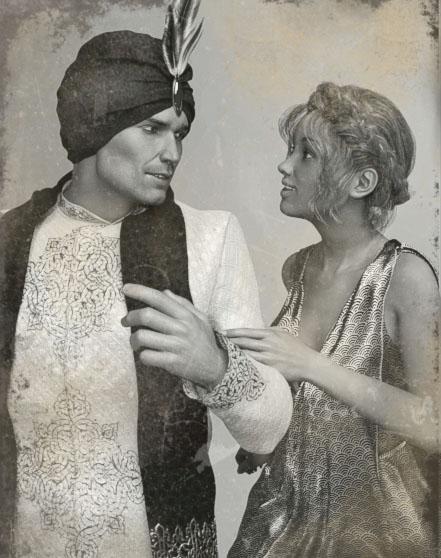
Parker is wearing Arabian Prince Outfit (Gen3M) with his sweetheart FWSA Finley HD (V7) (she's so dainty next to him, what a cute couple!) wearing Anjou Hair and Hellenic (Gen3F) using Destiny Gardens Iray Fabrics of Asia Shaders.
LMAO! Great story and GREAT render!!!
I agree! Made me snicker, and thank you so much for posting this. :) Well done!
Show Us Your Iray Renders. Part VGreat portrait! Excellent character shaping, shader work and a lovely, subtle expression. The only critique (and it's a minor one that I'm always struggling with myself) is that the eye shaders look a little too glassy and the scleras are a little too pure white. Super work.
Rafmer said:
Another portrait using Genesis 3 UVs on my Genesis 2 muse :)
No postwork in this one.
Thanks for your comment and feedback! I will look into her eyes. I always thought that Victoria 7 scleras were too dark, so now that I am using a new shader I may be overdoing it.
Novica & Forum Members Tips & Product Reviews Pt 7Breaking news... from the Smithsonian Institute, shown is a rare photo from its archived collection of foreign dignitaries, Prince Parker of Obindabi and Princess Finley. The never-before-seen image from 1947 is one of the few in existance of the couple, notorious for avoiding photographers. The photo is estimated to be worth $187,512.72 Anyone wishing to purchase the image can pay cash to Novica, Curator of the museum who denies stealing the image but somehow has it in her possession. Authorities are not investigating, because anyone stupid enough to pay that amount deserves to be ripped off.
Parker is wearing Arabian Prince Outfit (Gen3M) with his sweetheart FWSA Finley HD (V7) (she's so dainty next to him, what a cute couple!) wearing Anjou Hair and Hellenic (Gen3F) using Destiny Gardens Iray Fabrics of Asia Shaders.
LMAO! Great story and GREAT render!!!
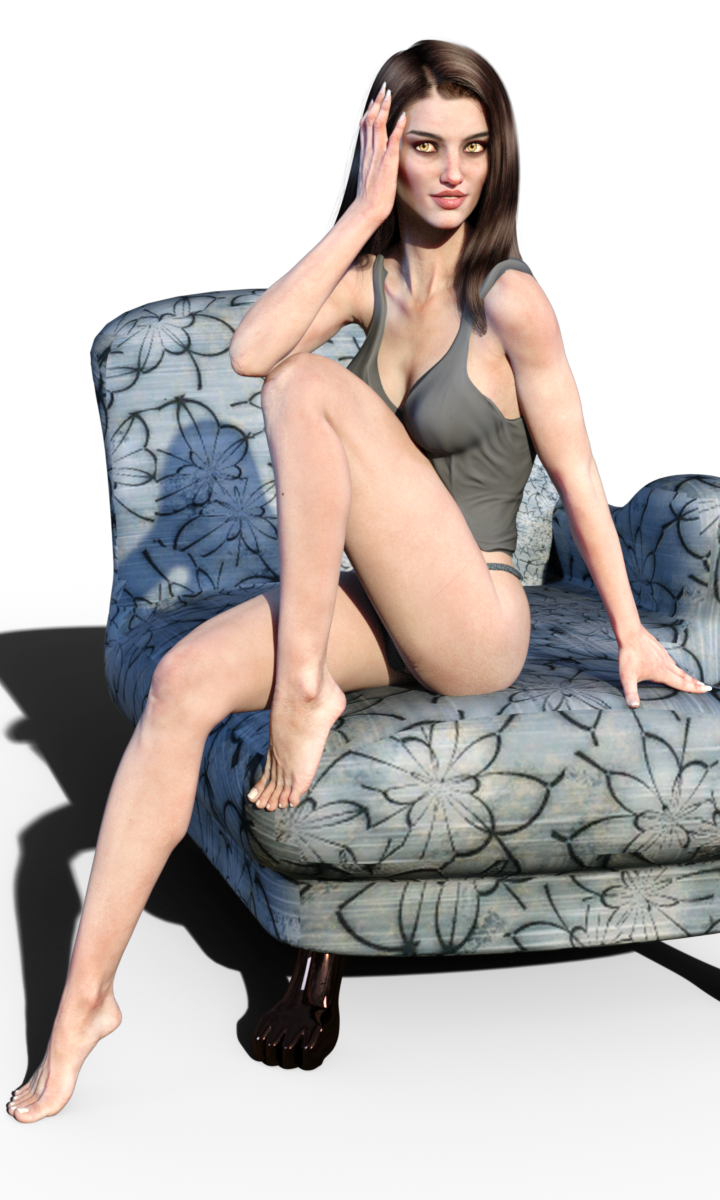
Realistic feet. Thoughts?For realistic looking feet (and realistic hands and knees and elbows etc) I HIGHLY recommend Gwennili HD for Victoria 7!
I think she's incredible! Just crank each of her Normal Maps up from 1 to 2 and it gives some amazing detail!
Here she is with my custom skin shader - I've also pushed her Bump Maps up from 1.5 to 2 and then turned off limitations for the Normal Maps and moved them from 1 to 2.

 Novica & Forum Members Tips & Product Reviews Pt 7
Breaking news... from the Smithsonian Institute, shown is a rare photo from its archived collection of foreign dignitaries, Prince Parker of Obindabi and Princess Finley. The never-before-seen image from 1947 is one of the few in existance of the couple, notorious for avoiding photographers. The photo is estimated to be worth $187,512.72 Anyone wishing to purchase the image can pay cash to Novica, Curator of the museum who denies stealing the image but somehow has it in her possession. Authorities are not investigating, because anyone stupid enough to pay that amount deserves to be ripped off.
Parker is wearing Arabian Prince Outfit (Gen3M) with his sweetheart FWSA Finley HD (V7) (she's so dainty next to him, what a cute couple!) wearing Anjou Hair and Hellenic (Gen3F) using Destiny Gardens Iray Fabrics of Asia Shaders.
Semicharm's Splendiferous Symposium of Superfluous odditieS [updated 12~26~16]Forgot to mention that the Candy Cane Elf outfit has versions for Victoria 4, Dawn and Cookie. Santa Baby should work with all of them, but there's an error in the Cookie version. I notified EI about it, but he never got back to me.
Expressions for Victoria 7Ok I dont know if I am missing something, but how do I get Victoria 7 expressions to show up? I have been trying and trying to figure it out :( So sorry if this is a stupid question lol I added a pic of what I am getting for her expressions. I would aprciate any help please! Thanks Emily
Does anyone know where I can find hair styles like these?Maybe Adriana Hair for image number 2?
http://www.daz3d.com/adriana-hair-for-genesis-2-and-3-female-s-and-victoria-4
Infinite Insanity - There's ALWAYS Another Sale! (Daily Sale Talk)I guess the super sale is over~
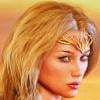
http://www.daz3d.com/gwennili-hd-for-victoria-7 so which hair is the Ciri hair from the main promo? There are a bunch credited but none seem to match.
Hi,
For the hair, it's Hr-151 by Ali:
Or here - her own store is 50% off right now which means $4.25 for this hair:
Thanks for that, would never have known about it otherwise. $5 and under is such a sweet spot for impulse purchases~
Infinite Insanity - There's ALWAYS Another Sale! (Daily Sale Talk)I guess the super sale is over~
http://www.daz3d.com/gwennili-hd-for-victoria-7 so which hair is the Ciri hair from the main promo? There are a bunch credited but none seem to match.
Hi,
For the hair, it's Hr-151 by Ali:
Or here - her own store is 50% off right now which means $4.25 for this hair:
Should I invest in Genesis, G2 or G3 stuff? Best packages?First of all: welcome!
Second: something I see a lot around me (on other fora) is that some people seem to think that "old" also implies "obsolete". And I'd like to debunk this myth right before it might possibly start :)
Personally I'd start by going over some Daz original base models. For example: Victoria, Stephanie, Aiko, Michael, Hiro, etc. Then check what appeals the most to you and which you'd use in your sceneries. After you sorted that out then a good start (in my opinion) is a starter or pro bundle. This gets you a a nice selection of items to start off with. For example: when I started with this I got quickly hooked on Riley for Stephanie 5. It's still one of my favorite figures to date. Anyway, I ended up picking up the Stepahnie 5 Starters bundle which, next to some clothing and poses (and a hair preset) included the Riley model. Even though Riley is based on Genesis it's still a figure I use a lot.
But of course: eveyrone is different and there really isn't a solid "one size fits all" way to start here. Apart from, as mentioned above, focussing on starter bundles if possible. Because that often gets you a solid way to get started in a certain genre or field. And also opens up a lot of avaialble freebies. A lot of free models out there are based on existing "base models" (such as Stephanie, Victoria, Aiko, etc.).
Hope this can help too.
Gwennili HD for Victoria 7If anyone has this I would like to know if the scars can be dialed in separately.
I'm gonna get her but I hope there is a scarless version.
This is taken form the product:
Details
Gwennili (Celtic for the Swallow) is the apprentice the lone hunter Gwenbleiz.
Gwennili includes a custom HD character for Victoria 7. She come with several makeups (with and without scars). It includes a L.I.E. "Skin Dirt" preset that can be used on every character that use the Genesis 3 Female UV.
So I'm going to stick my neck out and say they can be used separately.
Infinite Insanity - There's ALWAYS Another Sale! (Daily Sale Talk)I guess the super sale is over~
http://www.daz3d.com/gwennili-hd-for-victoria-7 so which hair is the Ciri hair from the main promo? There are a bunch credited but none seem to match.
Hi,
For the hair, it's Hr-151 by Ali:
Thank you!
She looks super good.
Infinite Insanity - There's ALWAYS Another Sale! (Daily Sale Talk)I guess the super sale is over~
http://www.daz3d.com/gwennili-hd-for-victoria-7 so which hair is the Ciri hair from the main promo? There are a bunch credited but none seem to match.
Hi,
For the hair, it's Hr-151 by Ali:
Gwennili HD for Victoria 7Whhhhhaaaaat!? Wow! Amazing detail work on this character!
Why did I spend all my Christmas money BEFORE Christmas! lol She looks AH-MAY-ZING!
I hope you guys that get her post renders of her! PLEASE!? She looks so good and I want to see some "average joe" renders of her to see if she looks as good as the promos. :)
Infinite Insanity - There's ALWAYS Another Sale! (Daily Sale Talk)I guess the super sale is over~
http://www.daz3d.com/gwennili-hd-for-victoria-7 so which hair is the Ciri hair from the main promo? There are a bunch credited but none seem to match.
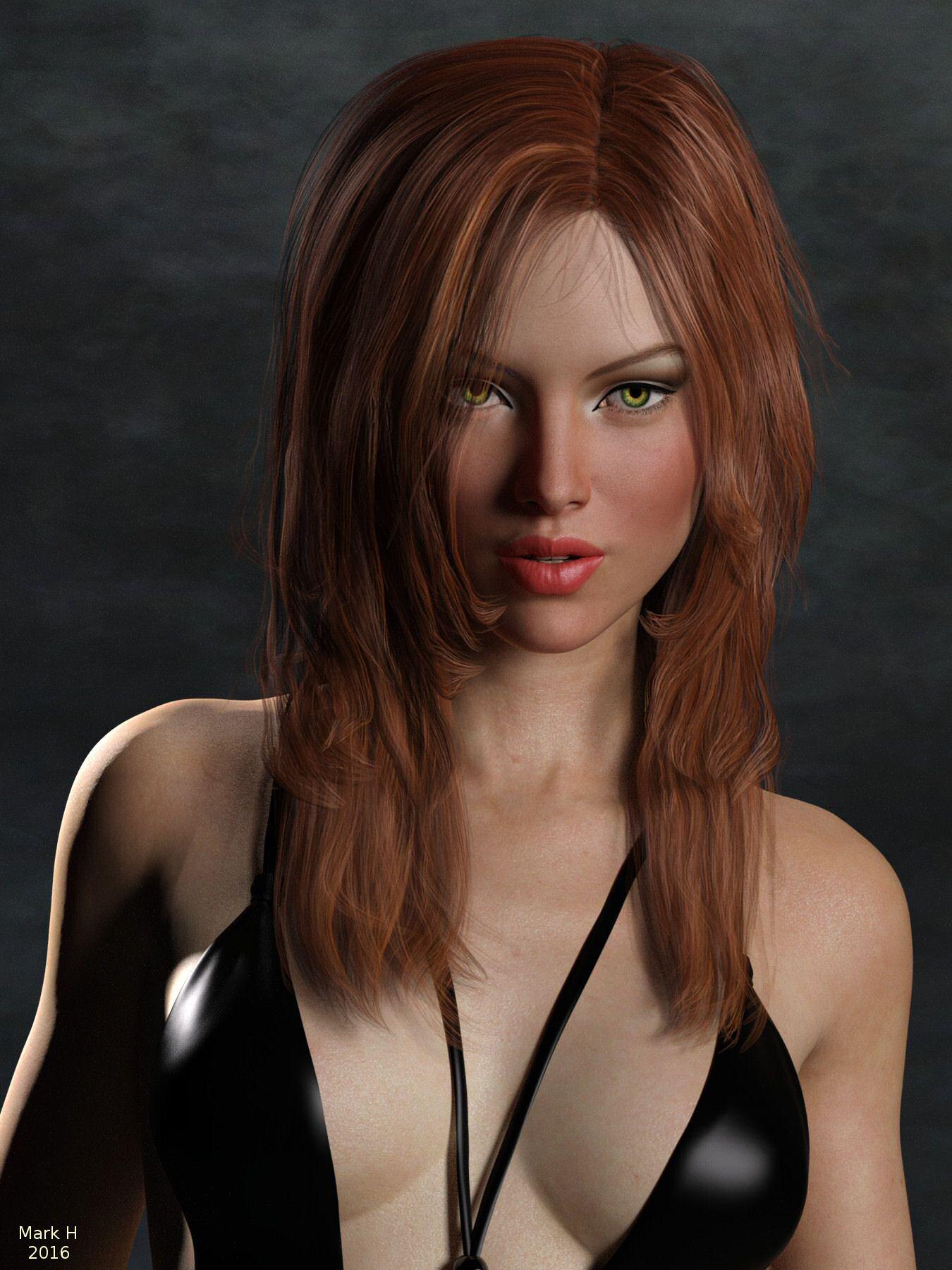
N.G.S. Anagenessis II - Revolution [Commercial]I've been trying to get the V7 Merchant Resouce Pale Sking maps to work with the NGS Anagenessis 2 Iray shaders. In this image I used:
Victoria 7 Merchant Resource - Pale Skin
N.G.S. Anagenessis 2 - Revolution
Iray Lipgloss and Lipcolors for Genesis 3 Female(s) by outoftouch at Rendo
Seema Hair for Genesis 3 Female(s)
Monokini for Genesis 3 Female(s)
InaneGlory's Photo Studio - Point and Shoot Iray
The NGS Anagenessis with the Bright preset script and with the blues turned down in the glossy color a bit. Maybe need to adjust a bit more.
 My WIP and Reviews
Haven't posted. In a while. Lately I've been trying to get the V7 Merchant Resouce Pale Sking maps to work with the NGS Anagenessis 2 Iray shaders.
Victoria 7 Merchant Resource - Pale Skin
N.G.S. Anagenessis 2 - Revolution
Iray Lipgloss and Lipcolors for Genesis 3 Female(s) by outoftouch at Rendo
Seema Hair for Genesis 3 Female(s)
Monokini for Genesis 3 Female(s)
InaneGlory's Photo Studio - Point and Shoot Iray
The NGS Anagenessis with the Bright preset script and with the blues turned down in the glossy color. Maybe need to adjust a bit more.
Daz 3D is part of

Connect
DAZ Productions, Inc.
7533 S Center View Ct #4664
West Jordan, UT 84084Licensing Agreement | Terms of Service | Privacy Policy | EULA
© 2026 Daz Productions Inc. All Rights Reserved.