-
Remember, "There's Always Another Sale™" (Report sales errors here.)
Doesn't work for me, either... how long does the flash sale last? (No, I know there's no answer to that). Shoot, I have a cart full of Pestryakov. If we have to pick from the Debut New... that isn't much selection today. :-(
The Official aweSurface Test TrackI'm probably missing something, but when selecting the figure and the surface and doubleclick the Uber to Awe script I get an error message, and nothing else happens. Copied from the log file:
<anonymous>()@/Users/Shared/My DAZ 3D Library/Shader Presets/wowie/AWE ShadingKit/Utility Presets & Scripts/AWE Transfer Uber.dsa:25
2019-46-25 15:46:54.057 Error in script execution: /Users/Shared/My DAZ 3D Library/Shader Presets/wowie/AWE ShadingKit/Utility Presets & Scripts/AWE Transfer Uber.dsaAre you trying to run the script with the iray uber shader applied or after you've applied AWE Surface? The script should be run after applying AWE Surface.
Ah, yes I tried with IRay Uber, I'll have another go, tks:)
Yup it works if you convert to awe first. Tried to find some info on what the script actually does... ahem...simply put, why would I want to use it?

Hmm, the problem with this conversion is the ground, being an mdl shader mixer network with multiple diffuse overlays.
Nothing I can really do about Shader Mixer shaders.
Technically, you can bake them out into a texture, then just plug the resulting output as diffuse map. Or just your own texture map.
Now Andrey Pestryakov was kind and generous to make a 3DL version of it:) So the plan is to use aweSurface for everything but the ground, and illuminate the ground with AoA lights, we'll see how that turns out...
Using any delta lights (spot/point/distant) is going to raise render times considerably. I'd recommend using the freebie point/spot/distant light I made instead, since you can use light linking with them. Basically, set them up so they will not light any AWE Surface applied materials. They will still light Shader Mixer 3delight shaders. Never tried such a scenario though, it's all path traced area lights for me.
Good call, will try that;)
Btw,


Left : Current Hotfix. Right : Next Update.
The original color/spec texture have some noise applied. This is without any diffuse/spec texture. The update is slower, but not by much. In this example it's 4 min 44.93 secs compared to 3 min 59.67 secs. 8x8 pixel samples, 1024 irradiance samples.
Nice, much cleaner loooking
 Question about rendering Sun-Sky Only Environment Mode
I make my promo images on a transparent background like yours.
Then I save the image in .tiff so that there is no gray strip on the horizon, and in the 2d editor I add a sky picture to the background and adjust the brightness/contrast.
Thank you for your reply, Mr. Pestryakov. That's helpful.
Question about rendering Sun-Sky Only Environment ModeI'm trying to figure out how to render scenes in the Sun-Sky Only Environment Mode. In the promo images for a product like Andrey Pestryakov's Low Tide set, I see in the background of different camera angles that there is a blue sky with clouds. But when I render this set in Daz Studio, the lighting changes, but I can only see the grey default background, as you can see in the screenshot I've attached to this post. There are other products I own, mostly from Andrey Pestryakov, that have a sun-sky render setting preset similar to the one in Low Tide. If Daz Studio on my computer is rendering the Sun-Sky Only Environment Mode properly, then what is the purpose of having a render setting without a background? Am I rendering this properly? It's difficult to find another render setting from another product that can complement this set. I'll appreciate anyone's help.
Why is "ground" so difficult to make photorealistic?It's a question I have pondered too. There are other packages where the ground texture is 'difficult' (as in the link in the OP's post), but the ground is relatively easy to disguise with real polygons & the performance doesn't seem to suffer seriously. I know 'FlowScape' is without the rendering performance of DS, but in its native state it doesn't do a bad job of vegetation. Imported DS figures, that's another story, but the scenery ain't bad:

[That image went into my gallery at 1980 * 1018 & now seems to be limited to the size above, not sure why.]
Anyway, that scenery took under an hour to create, and it was 'rendered' at a mere 60 frames a second. I do wish DS had similar capability, with its much better renderer. On the image above there were several hundred trees out of shot, all with foliage, thousands of bushes, thousands of grass clumps and thousands of flowers, along with hundreds of loose rocks and dropped branches (I wasn't sure where I was going to plonk the figures, so opted to vegetate the whole landscape and select the best location afterwards). Despite that polygon load from the thousands of plants loaded and the 2 G8F OBJ figures, the PC responded no nore slowly than it does with DS showing three figures 'rendering' in texture mode.
Movement in the FS scene was vastly quicker than in DS when Andrey Pestryakov's Pine Grove ( https://www.daz3d.com/pine-grove ) scene is loaded and displayed in texture mode, despite the fact the Pine Grove has far fewer trees an individual bits in it. I have not done a polygon count on the FS image above, as there is no means to export from it [yet - the developer is responsive & is being asked regularly] but it looks to be a great deal higher in polygon count. Even if there are 10 'leaves' per polygon, the trees alone in the scene would contribute millions of polygons, and that's ignoring everything else.
I suspect there is an issue with DS [and Poser? (The reason I say Poser is that Jefferson AF seems to aim for both DS & Poser, and may be wanting to use the same models on both platforms if possible)] that means it doesn't handle large polycounts as well as the game engines, so slows down more when heavily loaded. This in turn affects the vendors, who are trying to get a balance between detail and usability. It seems to me the trend has been for the 'optimum point' to have been biased in favour of usability in preference to detail. If DS could handle large poly counts better, then the optimum point would shift towards more detail.
Regards,
Richard.
Edited to add the full size image as an attachment.
The Official aweSurface Test TrackHmm, the problem with this conversion is the ground, being an mdl shader mixer network with multiple diffuse overlays.
Nothing I can really do about Shader Mixer shaders.
Technically, you can bake them out into a texture, then just plug the resulting output as diffuse map. Or just your own texture map.
Now Andrey Pestryakov was kind and generous to make a 3DL version of it:) So the plan is to use aweSurface for everything but the ground, and illuminate the ground with AoA lights, we'll see how that turns out...
Using any delta lights (spot/point/distant) is going to raise render times considerably. I'd recommend using the freebie point/spot/distant light I made instead, since you can use light linking with them. Basically, set them up so they will not light any AWE Surface applied materials. They will still light Shader Mixer 3delight shaders. Never tried such a scenario though, it's all path traced area lights for me.
Btw,
Left : Current Hotfix. Right : Next Update.
The original color/spec texture have some noise applied. This is without any diffuse/spec texture. The update is slower, but not by much. In this example it's 4 min 44.93 secs compared to 3 min 59.67 secs. 8x8 pixel samples, 1024 irradiance samples.
The Official aweSurface Test TrackHere is a render using the arealight and light categories:
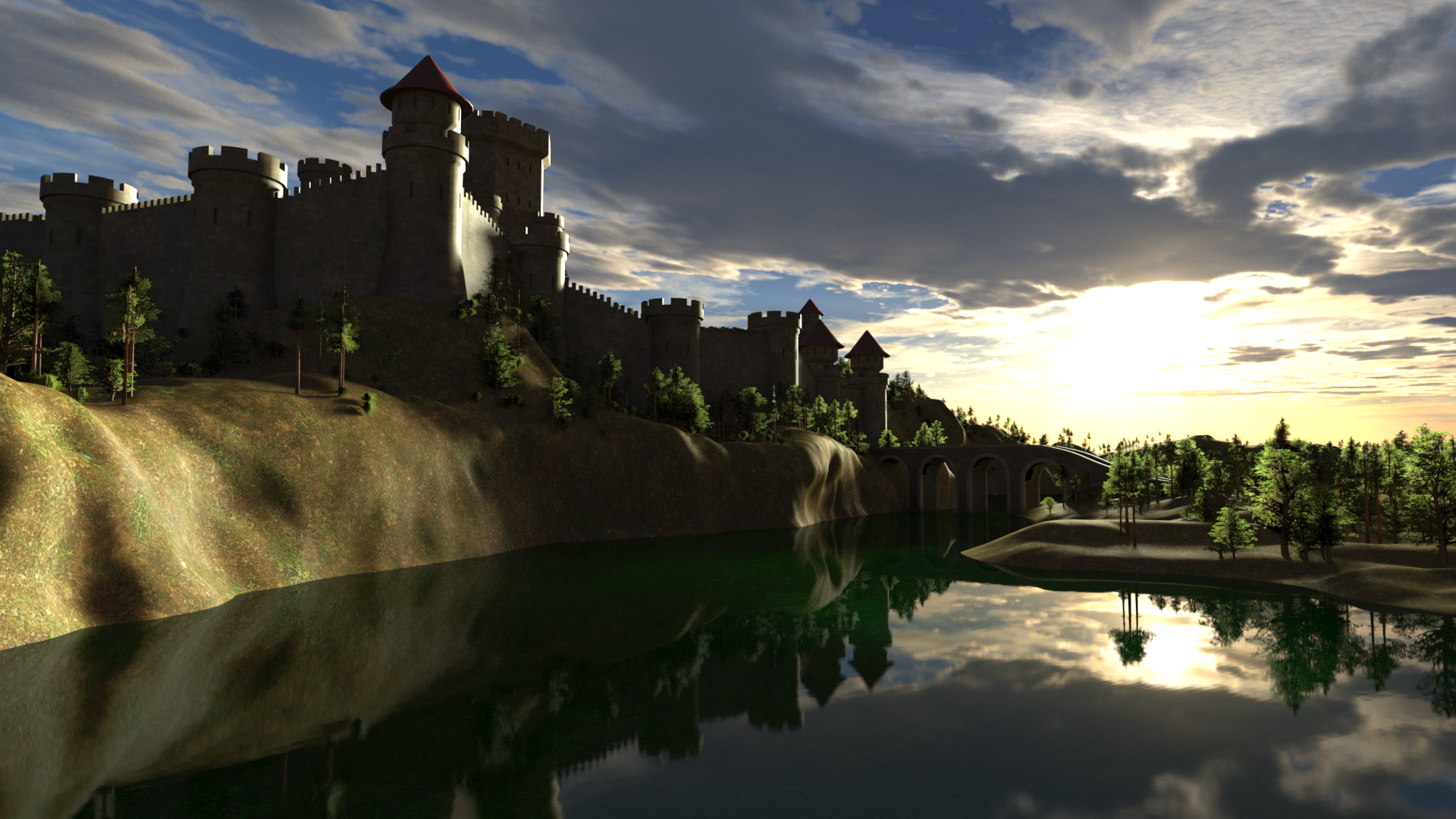
Hmm, the problem with this conversion is the ground, being an mdl shader mixer network with multiple diffuse overlays. Now Andrey Pestryakov was kind and generous to make a 3DL version of it:) So the plan is to use aweSurface for everything but the ground, and illuminate the ground with AoA lights, we'll see how that turns out...
Medieval Lands to 3DL?I think tileability will be very noticeable even at 8k resolution if we don't use texture blending.
Unfortunately, yes!
 And aweSurface doesn't support diffuse overlays (yet), so that's why I had to put this project on hold until I find a way.
I made shader ground material for 3Delight - Medieval Lands - Ground 3Delight Material.zip
I recall that the detail is focused in the central part, the farther the more blurry tiling. Therefore, 5 ground materials were created, in each of the bottom different parameters of tiling and bump strength.
Thank you very much Andrey, you rock
Medieval Lands to 3DL?I think tileability will be very noticeable even at 8k resolution if we don't use texture blending.
Unfortunately, yes!
And aweSurface doesn't support diffuse overlays (yet), so that's why I had to put this project on hold until I find a way.I made shader ground material for 3Delight - Medieval Lands - Ground 3Delight Material.zip
I recall that the detail is focused in the central part, the farther the more blurry tiling. Therefore, 5 ground materials were created, in each of the bottom different parameters of tiling and bump strength.
Oh woow! Thank You So Much! Can't wait to have a go at it
Medieval Lands to 3DL?I think tileability will be very noticeable even at 8k resolution if we don't use texture blending.
Unfortunately, yes!
And aweSurface doesn't support diffuse overlays (yet), so that's why I had to put this project on hold until I find a way.I made shader ground material for 3Delight - Medieval Lands - Ground 3Delight Material.zip
I recall that the detail is focused in the central part, the farther the more blurry tiling. Therefore, 5 ground materials were created, in each of the bottom different parameters of tiling and bump strength.
Medieval Lands to 3DL?I use scripted pathtracing with aweSurface in 3DL, which is a shaderbuilder shader, so in this case, having a 3DL shader network wouldn't really help much either. So I will probably just find some nice 8k PRB tileable maps and go from there:)
I think tileability will be very noticeable even at 8k resolution if we don't use texture blending.
Unfortunately, yes!
And aweSurface doesn't support diffuse overlays (yet), so that's why I had to put this project on hold until I find a way.Medieval Lands to 3DL?I use scripted pathtracing with aweSurface in 3DL, which is a shaderbuilder shader, so in this case, having a 3DL shader network wouldn't really help much either. So I will probably just find some nice 8k PRB tileable maps and go from there:)
I think tileability will be very noticeable even at 8k resolution if we don't use texture blending.
Medieval Lands to 3DL?Hello everyone! :)
I just saw this topic today. I was very interested and fascinating to read it. :)
I want to tell you, if you have any questions about sets, please contact me directly, I am present on the forum.
Hi, and tks for chiming in:) Good to know, I have a couple of your sets, and I like them, this one (the ground) was a struggle though;) Still haven't found a way to make it look descent.
Let's discuss the shader Iray. Yes, of course layers are mixed in this material, but custom shader it is not displayed entirely in the material editor. You need to use the Shader Mixer to watch it.
Yes I noticed, and as I said, it was quite an impressive sight:) Unfortunately impossible to re-create with RSL shaders.
I stopped supporting 3Delight a long time ago because I didn’t really like the water and lighting in it, as well as the duration of the render.
In general, creating a ground for 3Delight is possible, but it will take some time, because I need to remember which nodes are used there, etc.
I use scripted pathtracing with aweSurface in 3DL, which is a shaderbuilder shader, so in this case, having a 3DL shader network wouldn't really help much either. So I will probably just find some nice 8k PRB tileable maps and go from there:)
This is the current state of the project.
Flowscape And Daz Studio - So Many Backdrops!I agree with you on that. Instead, it seems better at the generation of backdrops, which is slightly more limiting. Taking figures into it is mildly disappointing as the rendering is like stepping back in time in terms of quality, and posing impossible. However, on a positive side, it's possible to create your own backdrops, it is enjoyable to do, and the program costs less than a single Andrey Pestryakov scene, which means if you get one or two uses from it, it probably has paid for itself.
Regards,
Richard.
Medieval Lands to 3DL?Hi Sven
If you slide the cut out opacity setting back and fourth you will notice that each of ground mat has its own region there are 5 ground mat and 5 regions 1 for each map, the mask in the iray render I believe is used as a displacement map & for and the normal map I believe that would replace the bump maps normally used in 3dl. thatss what I used but you will need to manully set dial settings. The 5 regions of the ground are covered by its own set of maps 1 difused, 1 normal , and 1 mask. and it appears to me that is used covers each of 5 area of the ground model. that is how i approached it when i converted it so there should be a 1 map each for each of the 5 ground region, then the extra details load their own maps
I am also just guessing here . but the I think the "PG-matGroundL4-C & PG Pine Grove maps are used for the extra details when you load them . it didn't look like it ws set up as a lie overlay to me. you can always ask Andrey Pestryakov for clarification
But but...the IRay set loads with identical settings for the ground regions, except for the tiling, they all share the same diffuse map and the same normal map, I can't see anything else being used
 Ok, I'll go have a check to see if I can figure it out, tks!Medieval Lands to 3DL?
Hi Sven
If you slide the cut out opacity setting back and fourth you will notice that each of ground mat has its own region there are 5 ground mat and 5 regions 1 for each map, the mask in the iray render I believe is used as a displacement map & for and the normal map I believe that would replace the bump maps normally used in 3dl. thatss what I used but you will need to manully set dial settings. The 5 regions of the ground are covered by its own set of maps 1 difused, 1 normal , and 1 mask. and it appears to me that is used covers each of 5 area of the ground model. that is how i approached it when i converted it so there should be a 1 map each for each of the 5 ground region, then the extra details load their own maps
I am also just guessing here . but the I think the "PG-matGroundL4-C & PG Pine Grove maps are used for the extra details when you load them . it didn't look like it ws set up as a lie overlay to me. you can always ask Andrey Pestryakov for clarification
Easy Environments: Winter Bridge (Daz Studio) [Commercial]A quick test render using Andrej Pestryakov's Medieval Lands as a backdrop. The effort put into the stonework really shows, it looks absolutely amazing.
Cheers,
Alex.
Tropical Lagoon artifacts in renders (SOLVED)In DS 4.11, the work of Iray Optimization has changed.
If artifacts appear on the coastline during rendering in DS 4.11, then in the render settings you need to set: Render Settings -> Optimization -> Instancing Optimization -> Speed
When for DS 4.10: Render Settings -> Optimization -> Instancing Optimization -> Memory
Wow! That's a significant change.
Tropical Lagoon artifacts in renders (SOLVED)Andrey Pestryakov's https://www.daz3d.com/tropical-lagoon has lovely promos, but when you render a scene there are artifacts, in the form of lines in the sand for both the low res and high res versions.
It would not be too hard to fix these in post, but it's disappointing to see them at all in the high resolution version. I guess I'll keep the product, but other people on a tight budget may want to think about it.
Or maybe someone just dragged something up the beach?
EDIT to add that the scenes seem to work better using the lighting provided by the vendor. See my other image, two posts down this page.
 Image quality.
I am totally fascinated by Andrey Pestryakov's Medieval Lands so much so that I went ahead and purchased it, however I am most disappointed in my resultant image quality (See att) The picture is very flat and without detail and I am unable to zoom into the back-ground. I am obviously doing something wrong or, I need an additional item or, whatever. The attached image is pre-render using outdoor lighting at 200%, not good I think you'll agree. Even the water does not show with any clarity. It would be helpful if someone could tell me where I've gone wrong with this and perhaps suggest how I might correct it.
Thank you so much.
Daz 3D is part of

Connect
DAZ Productions, Inc.
7533 S Center View Ct #4664
West Jordan, UT 84084Licensing Agreement | Terms of Service | Privacy Policy | EULA
© 2026 Daz Productions Inc. All Rights Reserved.