-
Winged circlet or helmet
The Gem, its moulding, and its back plate are all conveniently separated, so you are really free to do whatever you want. I exported it to Blender and back with just some arbitrary change, and copied the materials over to the new model one at a time. There's probably a better way to do this in DS.
I forgot to convert to base res, so I couldn't use Morph Loader Pro, but I'm sure it would have worked fine.
Edit: And I just noticed that the PA apparently texture painted some changes after affixing the gem, and so there is a dark region under the gem once it is removed... So some work on the textures would be necessary.
Questions about MetaMixer--Plusinquire said:
And I could work with any figure, without using one of those MetaMixer heads or presets? Or, any combination of three heads, without using one of the MetaMixer heads? Are these two points correct?
If that's so, it's much like the morph brush in Poser, maybe even better, which I've been saying we needed for a long time.
I don't think I understood your second question well enough, but yes to the first one. MetaMixer Toolkit and its add-on, MetaMixer - PLUS, has a set of universal built-in morphs which work independently of the facial presets. Keep in mind though that PLUS is an add-on so you will need the MetaMixer Toolkit in order to be able to use it properly.
As far as your morph brush analogy you are correct. My initial intention was to create something similar but had some major hurdles with the SDK which seems to be outdated. Just having predefined morphs gave me the same level of control I wanted to have, so I went with that instead.
Questions about MetaMixer--PlusAnd I could work with any figure, without using one of those MetaMixer heads or presets? Or, any combination of three heads, without using one of the MetaMixer heads? Are these two points correct?
If that's so, it's much like the morph brush in Poser, maybe even better, which I've been saying we needed for a long time.
dForce Item disappearingI have creating clothing in Marvelous designer, imported the OBJ->Transfer Utility->Add Dynamic dForce Modifier and simutaled. (I am still learning and no expert)
I made a pair vintage nightgown bloomers and brought them in using the above process. The garment behaves well when adjust body shapers and applying poses.
Simulation: To keep the test simple, I am simulating current frame, with simulte from memorized poistion off. I see the the spring messages scrolling by and as soon as it starts "Stabilizing the Simulation" the garment vanishes. I have had them 'explode' before when there are too many collisions, but this one just disappears.
I did use remesh in Marvelous Designer, though I have not taken it into ZBrush yet for zRemesh or Retop. As the garment is loose, thin material, there are a fair amount of wrinkles between the legs.
Any ideas?
Show us your Blender Rendersnevermind, i think i fixed it.
Now just have to fix the deformed morph.For posterity, i just stole/repurposed jcade's shader from this thread.
The big announcement on September 21, 2022 - place your bets!I also played with the Squishy Human morph, and wasn't too impressed...too many dforce explosions. Hopefully if Gen 9 is going to incorporate soft body, they take that into account.
Is it possible to achieve such levels of realisticity simply with Daz Genesis 8 figure?Basically Genesis 2 is indiginous to Daz Studio and no other software out there or game engine has the technology to use it properly. Genesis 3/8/8.1 can be used in other softwares easily.
I can not speak on the game engines.( I dont use them)
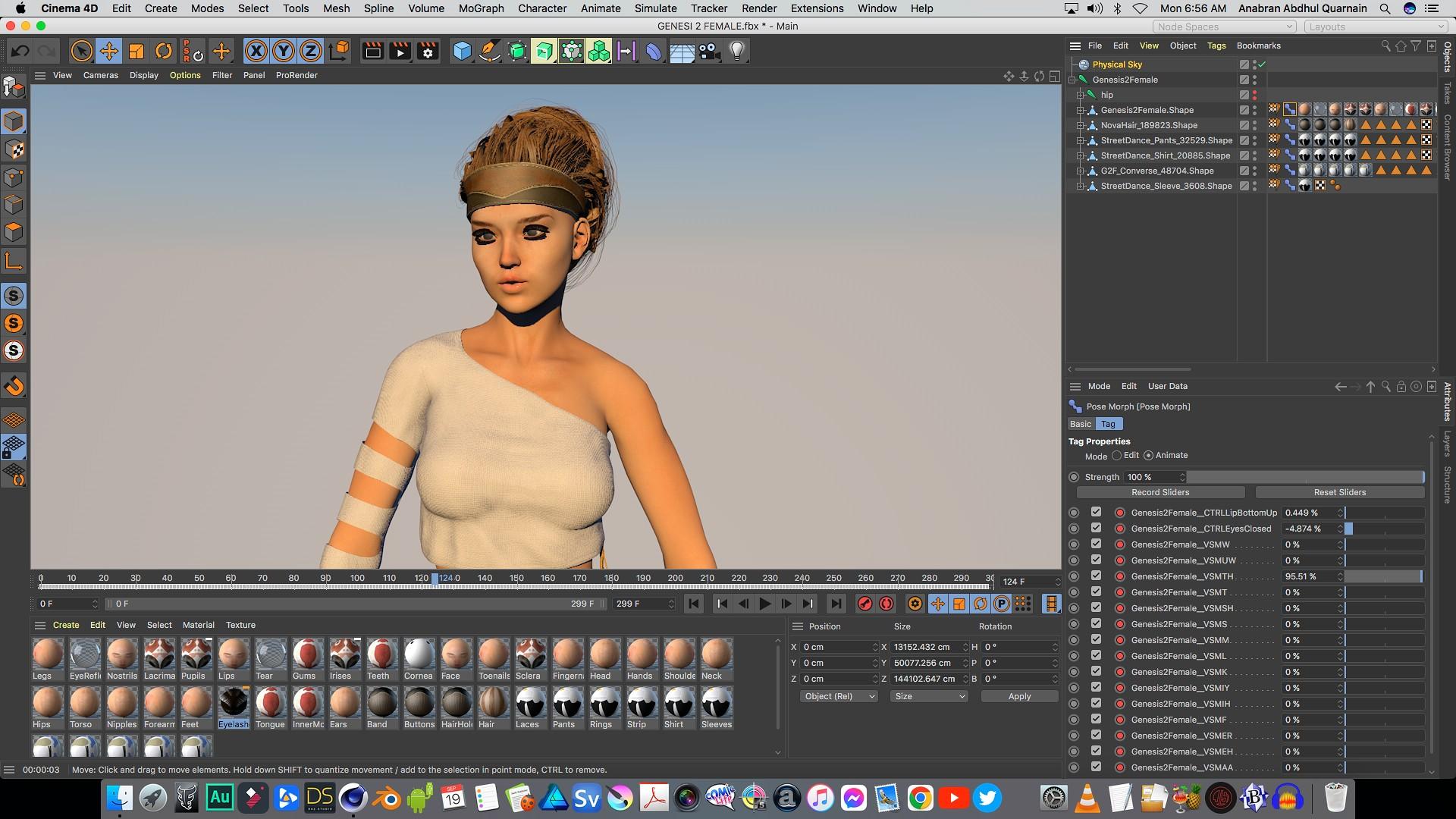
However here is the Genesis 2 female imported in to Maxon C4D as a straight FBX with body and facial animation intact
Here is the Genesis 2 female imported into Blender as a straight FBX with body and facial animation intact.

Here is the Genesis 2 female imported into Blender via Diffeomorphic converted to rigify
ready for key framing or mocap retargeting.
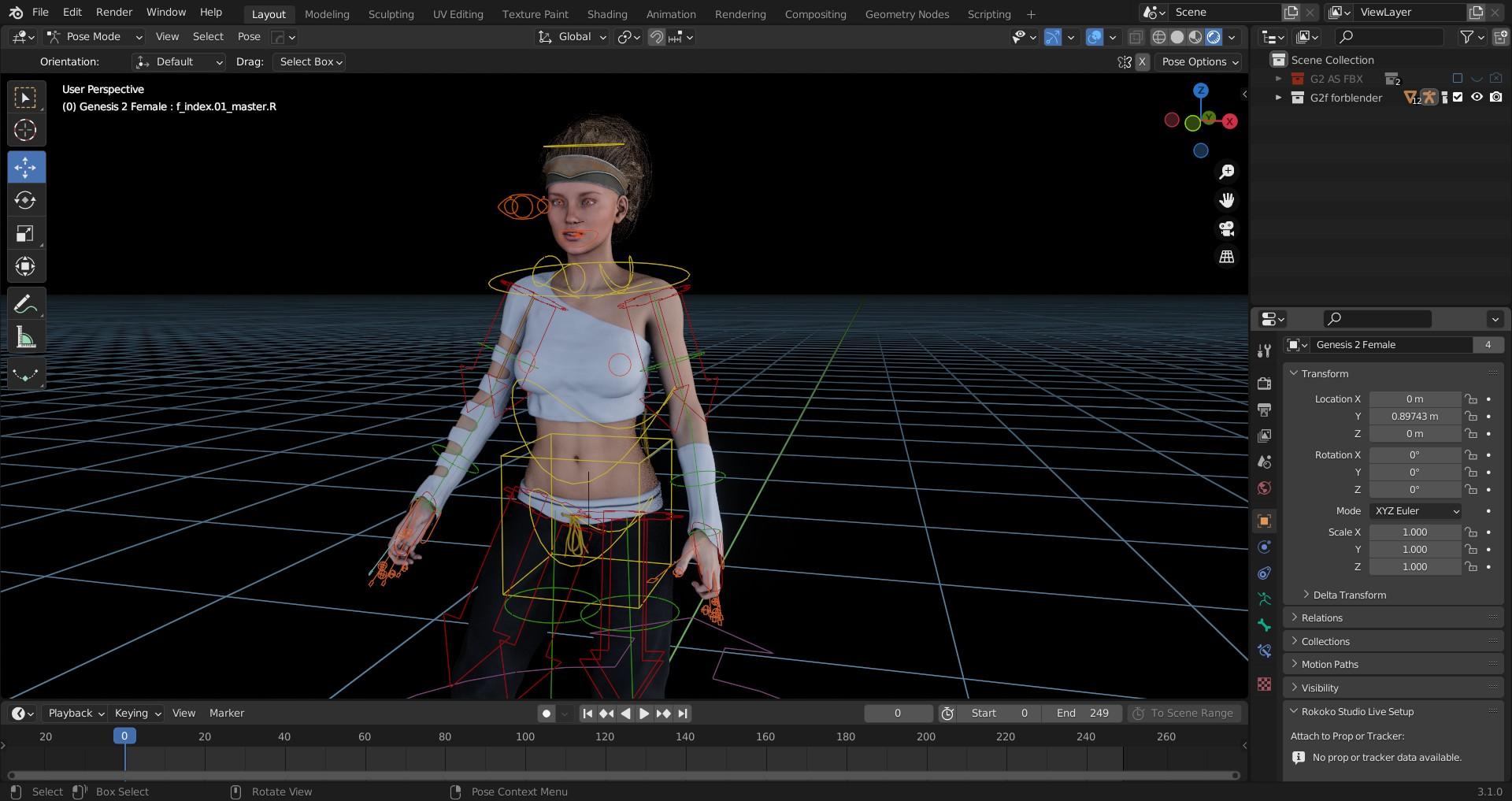
The only difference between G2 and G3,8, in other applications, is the lack of the FACS face rig because G2 Never had a face rig .
However her morph based visemes transfer to external applications for use of Daz generate facial & lipsync data (mimic,Anilip2 ).
[Released] OBJ Companion [Commercial]Artini said:
Can one make correction morph for the clothes on the posed characters
or one need to use character always in the default pose?
It is much easier to spot pokethrough on the posed character.
Both are possible and useful.
If you just want to fix something quickly in a finished scene, you can make a morph for the clothes on a posed character.
But if you want to make a morph that is generally useful (e.g. a new character morph or some other morph that you want to save as a morph asset so it becomes usable every time you use an asset), I would recommended using the default pose.
[Released] OBJ Companion [Commercial]Can one make correction morph for the clothes on the posed characters
or one need to use character always in the default pose?
It is much easier to spot pokethrough on the posed character.
Semi-realistic cats: Experiences with "Zeus" and "Mars"?Here at daz they have a number of toon cats some are fairly old though and originally designed for Poser so it would require some work to get them nice in DS
https://www.daz3d.com/catalogsearch/result/?mature=true&q=toonanimal+cat
The toonanimal cat has a couple of expression morphs that can be found in the head
The Cat which I don't have the texture on was a freebie for Poser not sure if it's still around but it would make a great evil cat
I've always wanted a toon morph for the Hivewire cat. There is a great one for their horse.
[Solved] How to align the bones with the body after a custom body morph?I created a custom morph, which include the body height.
Now she is shorter, but the bones are not. How to scale it to fit it?
https://prnt.sc/2uyfZFTtCPhi
Questions about MetaMixer--PlusThe add-on ads the ability to move poligons around similar to a sculpting program but through PowerPose. It also has the feature of creating asymmetrical morphs. It's an add-on for the Toolkit itself and not specific to any figure.
In the attached image I'm using MetaMixer - PLUS by itself to only move the top of the nostrils around, make some asymmetrical morph, play around with the shape of the ear, and sculpt some lips. I did not use any MetaMixer presets of other characters.
Can we straighten a distortion of a cloth after wore by a character?1. Is this from morphing or posing? If it's morphing then really you need a custom morph to match the figure morph.
2. Didn't you ask this before? It looks to be the simulation taking up the slack, if there is much more space than is needed for the minimum offset then the model will close up that space as it simulates and the result will be that it can hang lower.
3. Didn't you ask this before too? Modelled thinckness you can't fully, but you can turn the edge to make it look thick and use a dForce addon to hold it in place - Mada has posted a link to her video on this several times in various threads. If you want the fabric to behave as if it was stiffer then it's a mixture of adjusting the surface settings (and possibly the simulation settings as a stiffer surface may well need longer to settle and more iterations to diffuse the energy) and mesh resolution (a sparser mesh will seem thicker).
Keep part of original clothing shape when character morphedOk, so I thought I would have a go at making some clothing for G8F in blender. . . Starting off with something simple like a button dress.
1. Knocked up something pretty quick in blender for testing and saved as .obj file
2. Imported into Daz, converted prop to figure, added SubD and smoothing modifier. . . . ok so far
3. Transfer utility from G8F to Button dress and fitted. . . still looking decent.
So, pretty decent results so far for a first time effort I'm thinking (Picture 1). . . and on the verge of deciding whether to go deeper, like making it fitting better, adding creases etc and sorting out materials etc... But before I do...

4. Tested out some basic poses. . . Hip bend, arms up/down/forward, legs sitting etc. . . all seems great and I'm almost impressed with myself.
5. Dialed in my own charcter morph to G8F (Picture 2). . . and WHOAH. . . whats happened to the Buttons... All mishapen and distorted. . . oh ohhh..

Now, I soon realised its because the character Morph also morphs the dress to fit. . . But I dont want the actual buttons to change. . . how do I keep the buttons their original shape??
Thanks
Celebrity Look-a-Likes for 3D figures part 3magikhs said:
Dang! I really, really, reeeally could use a good January Jones (Betty Draper in "Mad Men", Emma Frost in "X-Men: First Class"...) face morph.
Can't believe there isn't one already out there, literally like anywhere. :(
If we are throwing names out there, Rosario Dawson.
The big announcement on September 21, 2022 - place your bets!Havos said:
Zev0 has not had a huge number of releases in the past year or so (at least not by his usual prolific standards), mostly some scripting stuff done with partners. I guess, if it is Genesis 9, then he will have been set to work sometime ago on his various morph packs to get them ready for Genesis 9, so it could be the wait for these may not be as long as in the past.
The lack of releases had more to do with updating to 8.1 and Bitwelder's schedule than anything else.
[Released] Turbo Loader for Genesis 8 and 8.1 [Commercial]RiverSoftArt said:
Sevrin said:
thd777 said:
Sevrin said:
So let's say I load a character with Turbo Loader and decide I want a little bit of Monica in my life, except Monica is currently exiled. How do i best go about adding her in?
Open Turbo Loader script, activate the Monica morph(s). Delete your current Genesis character and load it again. The morph will now be available and you can dial it in to your taste.
ciaotd
Yeah, that's what I though. If I've already done modifications on my character that kind of sucks.
Use TLM to add the monica morphs. Load ANOTHER G8F, which will load Monica morphs as well. Delete it. Work on your original character.
Thank you.
Create and export prop animationSet a key frame on the first frame, go to the last frame you want it to be pulled back, dial the morph the 100% (or however far you want), and then export. The second key frame sets automatically.
Create and export prop animationHi!
I have the bow from Dark Sisterhood Bundle
It doesn't seem to have bones but it has a draw morph, how can I create an animation in DAZ based on that morph and export it as FBX?
[Released] Turbo Loader for Genesis 8 and 8.1 [Commercial]Sevrin said:
thd777 said:
Sevrin said:
So let's say I load a character with Turbo Loader and decide I want a little bit of Monica in my life, except Monica is currently exiled. How do i best go about adding her in?
Open Turbo Loader script, activate the Monica morph(s). Delete your current Genesis character and load it again. The morph will now be available and you can dial it in to your taste.
ciaotd
Yeah, that's what I though. If I've already done modifications on my character that kind of sucks.
Use TLM to add the monica morphs. Load ANOTHER G8F, which will load Monica morphs as well. Delete it. Work on your original character.
Daz 3D is part of

Connect
DAZ Productions, Inc.
7533 S Center View Ct #4664
West Jordan, UT 84084Licensing Agreement | Terms of Service | Privacy Policy | EULA
© 2026 Daz Productions Inc. All Rights Reserved.