-
Gender face transformation (G8M -> G8F)
You can use the Transfer Utility built in to DAZ Studio. Attached below are some tutorials I made on other forums showing how to use it. Fairly straightforward once you get thru it once. TD
How can I use Victoria 8.1 for example for a base mesh to sculpt a morph in blenderWhen you import the morph back into DS with morph loader, make sure to use the "reverse deformation" option so that the morph you create is only the delta between your final shape and the V8.1 shape. Otherwise the V8.1 shape will be applied twice.
HeadShop 13: I wasn't expecting perfection but....really?info_b3470fa520 said:
Yes, we care.
Comment 1: Do not expect a child photo to look like a child when applied to a woman's head. Solution: apply "Growing Up" morph in Studio to make the head about 10 year old. The HeadShop Tutorial (under the Help menu) explains this process in Chapter 3, Advanced Operations.
Good luck!
The image in the OP is not a photo, nor likely intended to be a child, but rather a stylized painting.
HeadShop 13: I wasn't expecting perfection but....really?Yes, we care.
Comment 1: Do not expect a child photo to look like a child when applied to a woman's head. Solution: apply "Growing Up" morph in Studio to make the head about 10 year old. The HeadShop Tutorial (under the Help menu) explains this process in Chapter 3, Advanced Operations.
Good luck!
How can I use Victoria 8.1 for example for a base mesh to sculpt a morph in blenderI tried it so far and the morph just comes in misshapen.....I sculpted the nose in blender then brought it back in and it kind of caved in the face a little bit it still loaded...
How can I use Victoria 8.1 for example for a base mesh to sculpt a morph in blenderI normally sculpt a morph in blender by bringing in a base mesh that I set to base resolution and set the subdivisions all the way down to zero for render and viewport ....how could I do the same thing with the character that I bought off the store like Victoria 8.1... I'm not attempting to resell these characters or do anything weird like that... but for my own research I need to know how to be able to take a character that I've already sculpted and morphed in daz studio and bring her into blender and then sculpt a morph and then bring that morph back into daz studio with morh loader pro
Projection Morph Manager (Commercial)Can you give an example of what morph and on what item it is not showing?
Does anyone know what schoolgirl (double pigtails) hair product is used in P3D Fabienne promo?sunnyjei said:
pds said:
sunnyjei said:
https://www.daz3d.com/turbulent-pigtails-hair-for-genesis-8-and-81-females
The ones there are really long but maybe there is a morph (or hand editing in the settings) for the length.
Tizzalicious did a render here: https://www.daz3d.com/gallery#image=1239656 using them shortened....
Original product:
Thank you for such a quick reply. I saw those, but based on the hair ties and the description wherein Outoftouch says, "Please note that this hair is created to be long. You will get a couple of morphs to shorten the pigtails and/or the front, but even with these options applied, the hair will still stay relatively long..." I figured it was a different product than what P3D used. Definitely looks very similar. I don't know how easy it would be to edit the geometry of the OOT product to get the tails to shoulder length or shorter, but it might work.
Read the description? ME??? :D something I definitely should do more often as I have been surprised more than once both good and bad because I saw the promo and straight to cart. Could be something from the other store and the bands look a little bit different but wasn't for sure if it was because the promo size was small. As far as the length- because she DOES have length modifiers I would assume you could turn off limits and keep going as short as you like. The pigtales in P3d definitely don't look as thick so maybe that is why there is a note in the description? (Though I think it looks a bit more realistic in P3ds assuming it is the same). At least it is currently on sale and if you hate it you can always get a refund but hopefully someone else can chime in and confirm or give you the right product. Good luck, hope you find it/one that works!
I did see that the OOT product is currently on Flash Sale and debated picking it up to test shortening the tails...I just hate having to return stuff =D
Does anyone know what schoolgirl (double pigtails) hair product is used in P3D Fabienne promo?pds said:
sunnyjei said:
https://www.daz3d.com/turbulent-pigtails-hair-for-genesis-8-and-81-females
The ones there are really long but maybe there is a morph (or hand editing in the settings) for the length.
Tizzalicious did a render here: https://www.daz3d.com/gallery#image=1239656 using them shortened....
Original product:
Thank you for such a quick reply. I saw those, but based on the hair ties and the description wherein Outoftouch says, "Please note that this hair is created to be long. You will get a couple of morphs to shorten the pigtails and/or the front, but even with these options applied, the hair will still stay relatively long..." I figured it was a different product than what P3D used. Definitely looks very similar. I don't know how easy it would be to edit the geometry of the OOT product to get the tails to shoulder length or shorter, but it might work.
Read the description? ME??? :D something I definitely should do more often as I have been surprised more than once both good and bad because I saw the promo and straight to cart. Could be something from the other store and the bands look a little bit different but wasn't for sure if it was because the promo size was small. As far as the length- because she DOES have length modifiers I would assume you could turn off limits and keep going as short as you like. The pigtales in P3d definitely don't look as thick so maybe that is why there is a note in the description? (Though I think it looks a bit more realistic in P3ds assuming it is the same). At least it is currently on sale and if you hate it you can always get a refund but hopefully someone else can chime in and confirm or give you the right product. Good luck, hope you find it/one that works!
Celebrity Look-a-Likes for 3D figures part 3sunnyjei said:
magikhs said:
Here's another classic beauty that I'd like to see, as there isn't a morph (to my knowledge) out there rn:
...
 Also: Erin Moriarty. Let's see a proper Starlight!
And last but not least:
..
Not sure if this one has been posted but there is one Starlight at least- here @ https://www.renderhub.com/redmagnet/starlight-character-for-genesis-8-1
Plus Celebrity Series 109 from AdamThwaites.
Does anyone know what schoolgirl (double pigtails) hair product is used in P3D Fabienne promo?sunnyjei said:
https://www.daz3d.com/turbulent-pigtails-hair-for-genesis-8-and-81-females
The ones there are really long but maybe there is a morph (or hand editing in the settings) for the length.
Tizzalicious did a render here: https://www.daz3d.com/gallery#image=1239656 using them shortened....
Original product:
Thank you for such a quick reply. I saw those, but based on the hair ties and the description wherein Outoftouch says, "Please note that this hair is created to be long. You will get a couple of morphs to shorten the pigtails and/or the front, but even with these options applied, the hair will still stay relatively long..." I figured it was a different product than what P3D used. Definitely looks very similar. I don't know how easy it would be to edit the geometry of the OOT product to get the tails to shoulder length or shorter, but it might work.
Celebrity Look-a-Likes for 3D figures part 3magikhs said:
Here's another classic beauty that I'd like to see, as there isn't a morph (to my knowledge) out there rn:
...
Also: Erin Moriarty. Let's see a proper Starlight!And last but not least:
..
Not sure if this one has been posted but there is one Starlight at least- here @ https://www.renderhub.com/redmagnet/starlight-character-for-genesis-8-1
Does anyone know what schoolgirl (double pigtails) hair product is used in P3D Fabienne promo?https://www.daz3d.com/turbulent-pigtails-hair-for-genesis-8-and-81-females
The ones there are really long but maybe there is a morph (or hand editing in the settings) for the length.
Tizzalicious did a render here: https://www.daz3d.com/gallery#image=1239656 using them shortened....
Original product:
HeadShop 13: I wasn't expecting perfection but....really?Just bought HeadShop 13 and tried it out on an "easy" image; i.e. no head rotation, mouth essentially closed. I wasn't expecting perfection, but this isn't even close!
I can only assume that I'm doing something wrong.
The source pic (left, below) is 1600x1600 pixels, so should be plenty large enough.
HeadShop places autodots on the source image in all the right places to identify eyes, nose, mouth etc. The image on the right of the HeadShop screen looked vaugely (very vaugely) like the source picture so I made no further adjustments or changes and exported the morph on to G8f.
The rendered result isn't even vaugely similar to the source image. I expected that at least the general head shape would be similar, but as you can see, it is not.
What am I doing wrong? Would anyone from DAZ or Abalone LLC care to comment?
Making Just Wet raincoat longerThe best would be to make a new morph in Blender or another modeling program, but while it seems easy to me now, it took me months to learn how to do it properly. I had to read and watch many tutorials and experiment a lot before I could do a good job. And I'm still learning.
Otherwise the Mesh Grabber plugin could help you, but I don't own it, maybe someone else can give advice?AIUTO...CHI CONOSCE L’ITALIANO? PARTE TREDICISiamo in periodo elettorale?

Scherzo ovviamente, io penso e spero che l'annuncio riguarderà il DS 5; con la possibilità di fare dei bei face transfer, benché odiati, aggiornati alla Gen 8.1.
A proposito, Sta scritto nel Genesi 8.1: "Dio si ricordò di Noè, di tutte le fiere e di tutti gli animali domestici che erano con lui nell'arca. Dio fece passare un vento sulla terra e le acque si abbassarono".
Please clarify something for me - a new Blender userThank you very much @Padone . It sounds like transfer to Blender is the end for most cases, except animation and morph adjustment. But I feel the result of Blender Cycles render is worse than the iray render.
Another thing I want to ask is, if I made a shoes or belt in Blender, how to bind bones or rig it so that the object can be auto weared in DAZ on a figure, like a normal DAZ asset? Do I need to transfer a basic DAZ G8 figure to Blender first to do the rig?
Clenched eyes morph for G8 figuresI sought a clenched eyes morph, one with stressed-looking crinkles all 'round. I want 'em for females and males. I grabbed Alive when it had a discount day, hoping it could deliver clenched eyes while still preserving some freedom to morph the mouth. Not sure that'll work, but the eyes looked promising.
Well, it's a fine product for its intended purpose, but I couldn't morph the eyes and keep the mouth independent. I need something else.
Question: Anyone know where I can find a clenched eyes, or better yet, clenched eye morphs for the G8 figures? I've pored through pages of shop searches and countless "Real Appendicitis Expressions for Mullywox 8.1" products and found not one respectable clenched eye.
[edit=7] I'm getting something close to the effect I want from Alive HD under certain conditions. Combining morphs with similar eyes but dissimilar mouths gives me some mouth shape freedom, as long as the shapes are in the grimace family. So Kasia Dolan can express her displeasure at her roommate for using up her phone's battery and not putting it on the charger... again, but if I want her eyes clenched while she strains to blow out too many birthday candles, that's a mouth shape I can't get.
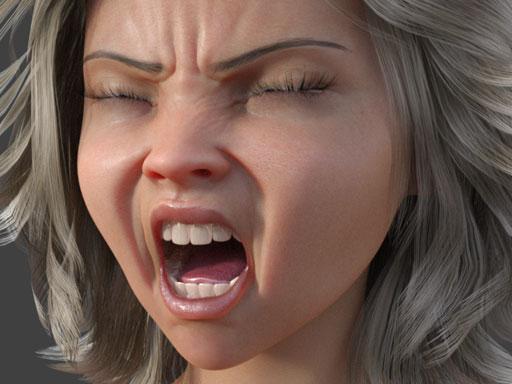
Plus, I got nothing for the G8 males. [/edit]
If you can help, thanks sincerely, and thanks for reading either way.
(Edited a lot. This isn't about a particular product after all.)
Hallelujah!
DiscipleFace match to body issue (Face transfer)Hello everyone!
I used a photo transfer of one of my 3D models, the face came out great! However the body is a little off in coloring in terms of the highlights of the face, should I edit the body to match the face with highlights or is it better to tweak the face?
My friend does textures so I guess it's what makes it more balanced because otherwise he's going to be wearing bodysuits.
 All morphs for all content suddenly gone
All the morph files are there, but it's not just that hair, but all figures, objects, everything, even just base Genesis 8. I can look through the content library and load new figures/props/etc. but they all come out like that
edit: Just uninstalled and reinstalled Daz, nothing
For reference, attached is what I get in the parameters pane when I just load base Genesis 8 and nothing else
Reinstalled the CMS and Genesis 8 Base from DIM, still nothing
edit: Uh, just started working correctly again, not sure what happened. Maybe the CMS needed time to refresh, I don't know
Daz 3D is part of

Connect
DAZ Productions, Inc.
7533 S Center View Ct #4664
West Jordan, UT 84084Licensing Agreement | Terms of Service | Privacy Policy | EULA
© 2026 Daz Productions Inc. All Rights Reserved.