-
Genesis 9 Coming Soon! Preorder Victoria 9 HD Today
nonesuch00 said:
For the giant $50 extra on the Victoria 9 Pro Bundle I would totally expect the typical introductory Genesis 9 Female Head Morphs, Genesis 9 Female Body Morphs, and Genesis 9 Female Expressions to be included in that Victoria 9 HD Pro Bundle.
The base morph packs have not been part of the Victoria and Michael bundles since Genesis 1, so I highly doubt it.
Is there any way to use PowerPose Face with 8.1 figures?PerttiA said:
If you have updated the PowerPose templates, you need to remove the dummy files that are installed with Genesis 8 Starter Essentials to get the same functionality in PowerPose for G8.1 as you have for the G8
Making the G8 base expressions (and any expressions that are using them) work on G8.1 requires removing dummy/placeholder expressions that are installed to G8.1 morph folders - These dummy/placeholder expression files have no other function than to prevent the base G8 expressions from loading.
The dummy/placeholder files are located in;
...\Data\DAZ 3D\Genesis 8\Female 8_1\Morphs\Daz 3D\Base Pose Head\ (255 files, can be more if you have additional DAZ expression packs)
...\Data\DAZ 3D\Genesis 8\Female 8_1\Morphs\Daz 3D\Expressions\ (24 files, can be more if you have additional DAZ expression packs)
...\Data\DAZ 3D\Genesis 8\Male 8_1\Morphs\Daz 3D\Base Pose Head\ (255 files, can be more if you have additional DAZ expression packs)
...\Data\DAZ 3D\Genesis 8\Male 8_1\Morphs\Daz 3D\Expressions\ (24 files, can be more if you have additional DAZ expression packs)Please make sure you are removing the files from G8.1 morph folders and not G8 morph folders.
Note 1; If you are logging in to DS and letting DAZ Connect (within DS) to install/update your content, you may have these also in an other location that has "\Data\Cloud\" in it's path
Note 2; Do not remove any files from "FACS" or "FACSExpressions" foldersYou are my savior!
I wish you happiness and wealth!
Thank youGenesis 9 Coming Soon! Preorder Victoria 9 HD Todaymogaremolby said:
Artini said:
nonesuch00 said:
I'm looking forward to this Victoria 9 & company. The expressions are so extremely improved and the way fat looks too.
Yes, I am looking forward to Victoria 9 and Genesis 9 items, too.
I like expressions a lot, especially animated.
It is a pity, that Daz is not willing to reveal a details of the V9 bundle.
I also wonder, how and if Victoria 9 will transfer to Unity using Daz to Unity bridge.
Anyhow, great work on this new generation of the figures - well done.
You mean unreal engine? Daz3d figures since G2 have always work will with unity even without A bridge. True you had to put some work in to fix it. But their were tiny problem. And usually take a minute or two to fix baby less. but unreal engine was a complete nightmare to bring a Genesis figure into unreal. Even with the Unreal bridge it still a pain.Yes, I hope that it will happen, because I use mostly Unity besides Daz Studio.
I have seen a similar quality and animated smiling character in Unity store, that costs over $200.
With Genesis 9 in Unity, I hope to have a similar quality characters to work with.
Zenty Cool Hairstyle Male Model info?MAC-X said:
I'm in love with the male character they are mainly using in the Zenty Cool Hairstyle promos. Does anyone know what the chacters name is and if he's available here? Thanks!
It's a custom morph of the PA who made the hair and isn't available.
genesis 9/victoria 9 8k maps and lower graphic cardscatmaster said:
Oversimplifying = Uglification. There are already unisex mannequins and lots of free base models available online, without detailed customization support and the differences between opposite sexes, those models would not be attractive and have no advantages over other competitors. Evolution of species has favoured opposite sexes over unisex, that's something worth learning from the nature mechanisms.
This is a fundamentally invalid argument on multiple levels. 3D models are not subject to the laws of nature, and those mechanisms are only useful when they apply. You can use a single slider to make default G8F look indistinguishable from default G8M, same with previous generations; the original Genesis was unisex, and do you think that Victoria 5 doesn't look like a woman and Michael 5 like a man?
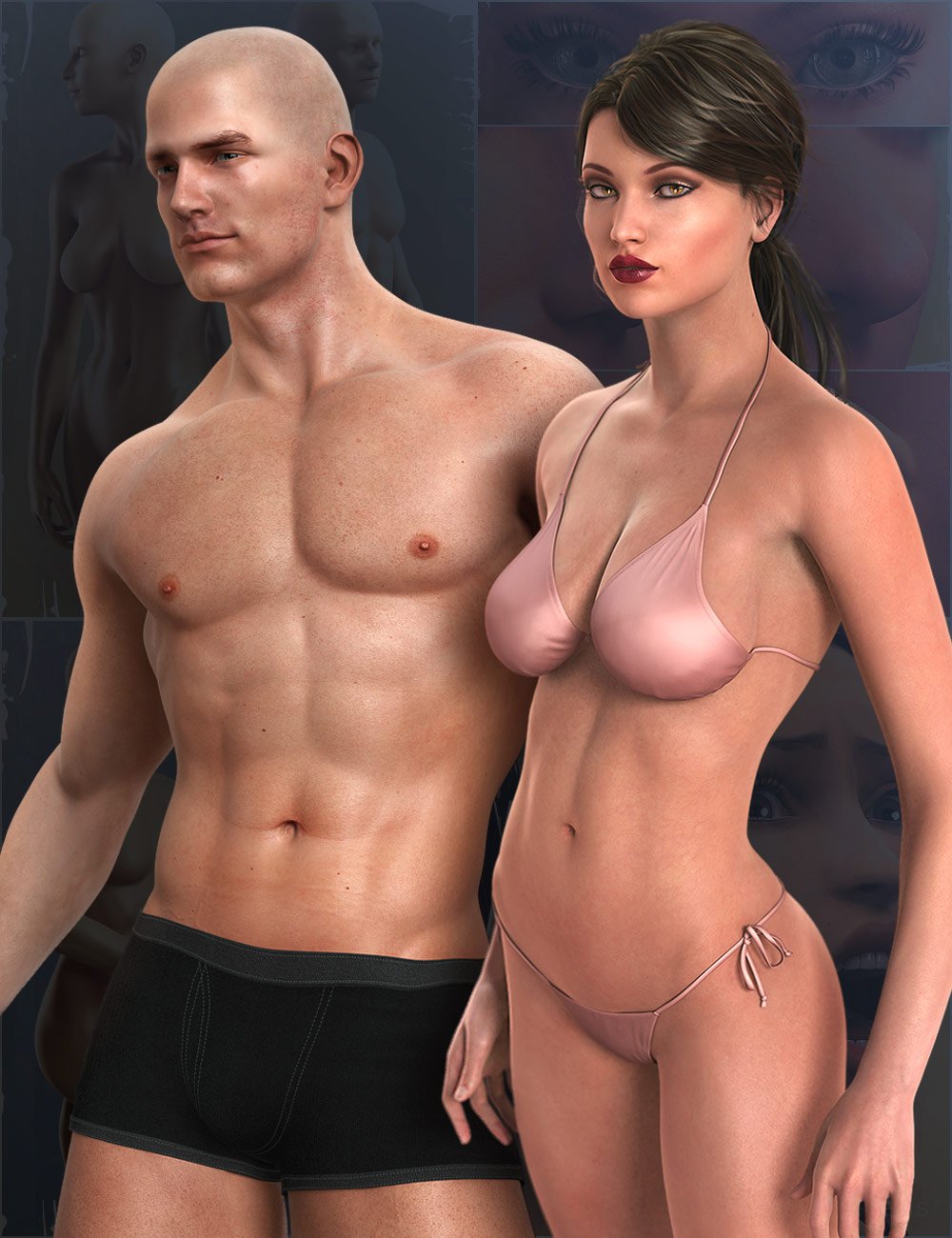
A base figure is exactly that: a BASE upon which to build morphs, and G9 was made to facilitate morph creation. G9 DOES have detailed customization support. If default G9 isn't attractive to you, there's nothing stopping you from making it look exactly the way you want it to, and in fact it would be easier to do with G9 than previous generations.
Even making Daz to paid software would be far better than pushing such unexciting G9 for quick money, if Daz really needs more money there are always options to switch to subscriptions for more professional features, as ditching G8 for G9 would be technically moving backwards and become less attractive to MetaHuman or other alternatives, unless G9 comes with more exciting features which I haven't found from the disclosure.
Why do you keep assuming that Daz is only releasing G9 to make money? You have your own reasons for wanting to stay with G8? Go ahead and do that, but you not wanting G9 doesn't invalidate the advances that G9 offers. What are you basing the latter part of that quote on? How is it "moving backwards"? Why would G9 be "less attractive to MetaHuman"?
G8 system still has lots of potential and needs improvements. The current official bridges can't even handle geografts, and consider integrating this feature that'd be much desired for Unreal users: https://www.daz3d.com/forums/discussion/590086/showcase-bringing-daz-figures-to-life-in-ue5#latest
Moving from G8 to G9 does not implicate anything about the bridges, and ironically, geografts are one of the big benefits of a unisex mesh because now you'll be able to put any geograft on any figure.
genesis 9/victoria 9 8k maps and lower graphic cardscatmaster said:
Oversimplifying = Uglification. There are already unisex mannequins and lots of free base models available online, without detailed customization support and the differences between opposite sexes, those models would not be attractive and have no advantages over other competitors. Evolution of species has favoured opposite sexes over unisex, that's something worth learning from the nature mechanisms.
There's another reason I prefer improving the G8 system rather than switching to G9 system, because I've invested a lot into the G8 ecosystem, custom morphs, geografts, face generating plugins, 3D body scan plugins, material generating plugins, rigging plugins, lots of very useful plugins from Zev0, and those bridges for other software which support G8 / G8.1. Because of the ecosystem Genesis 8 characters have grown to be widely used beyond image rendering purpose.
Even making Daz to paid software would be far better than pushing such unexciting G9 for quick money, if Daz really needs more money there are always options to switch to subscriptions for more professional features, as ditching G8 for G9 would be technically moving backwards and become less attractive to MetaHuman or other alternatives, unless G9 comes with more exciting features which I haven't found from the disclosure.
G8 system still has lots of potential and needs improvements. The current official bridges can't even handle geografts, and consider integrating this feature that'd be much desired for Unreal users: https://www.daz3d.com/forums/discussion/590086/showcase-bringing-daz-figures-to-life-in-ue5#latest
I feel as though you misunderstood what I said. As in "oversimplification" was what I did to the technical explanation, and has exactly nothing to do with the coming figure.
Further, it's fairly trivial to say that your statements about unisex meshes are not true. PIXAR developed that kind of tech years ago. They put out a scientific paper on it.
As for the bridges: That's a different thing altogether. As in, it's a thing they give away for free. Daz has long been known for putting the money maker first, all the time, every time. There are other tools that can do those kinds of things, easily. Professional tools. Daz already has a nice niche user base of hobbyists. The changes to G9 seem to be about INDUSTRY standards. And the industry doesn't need the bridges. I'm NOT a pro, and I don't really need the bridges. I know how my tools work. Even in light of the limits in the bridge, I wouldn't have issues with the geograft thing. If I were attempting to port G8 to Unreal, it wouldn't be a problem. What they don't already automate, I could write a script to handle, most likely. I'm pretty sure pros who actually know programming and the like wouldn't have a problem.
I need to underline, here, that you are comparing what the industry does now to Genesis, an 11 year old product. How old is that in Computer? Windows XP was the world dominant OS. It was only that year that Windows 7 took the crown. Top GPUs had a massive 1.5ish GB of VRAM. No one would believe you if you told them what was going to happen starting in about December of 2018. I hadn't turned 40, yet. 11 years is a looooooong time in computer tech.
Also: Most game devs don't need the whole model, all naked and stuff. They use clothing. The stuff under gets deleted. I'm not saying that there aren't... er, use cases... out there. But geografts aren't really an industry issue with most of the seams being hidden and all.
My point in all of this is not to "win." I'm just making a point about how things actually are. Art is art. Tools are tools. V4 is still huge, and that's great for art. If you want to make games on G8, it's not gonna be an issue (if you're willing to learn how to use all the tools). Gaming PC speed will make up for much of the losses. G9 is going to be better suited to the bleeding edge, where superior performance is a must have, not the indie scene. Of course, it shouldn't be harder to use for indie devs, but it won't break games if they skip it.
You not buying in isn't going to break Daz. Everyone always announces they aren't getting on the change wagon with each new generation. Then all the cool stuff is on the new figures and people get over it. So I'm not trying sell to you. I'm just trying to be informative. If I just had an opinion, I'd say nothing, and just watch the drama. But the idea that the geometry is the bottom line has been dead for a long time. Daz's own Multiresolution tech demonstrates that. Genesis 3 showed that by having a lower poly count. If the new mesh is a technical failure it will because Daz dropped the ball, not the concept. I might offer any number of complaints about how they do technical things over there, but I haven't seen them drop the ball on a figure since ever. They haven't pleased most of the people all of the time, sure. But the very reason people know about the technical side drawbacks of Genesis is because a lot of users, I was one of them, liked the cross type nature of Genesis.
They had to explain to people like us why G2 was split up. And we didn't like that. We went on to demonstrate that the fundamental structure of G2,3, and 8 are the same across the sexes, with only minor differences in the chesticle region. My strangely popular morph transfer fiasco was based on that fact at the start. The differences are largely invisble at present. I did write that script. I could prove, with relative ease, that know could tell the difference between G8F and G8M without access to the wireframe.
Is it possible to bake face Bone rig animation to shape key animation with diffeo?The papagayo animations rely on morph names and should work both on G1 G2 with facial shapekeys and G3 G8 with facial bones. So if you convert the bones to shapekeys I guess you should be able to import papagayo on shapekeys, if you use the same names.
I am not using papgayo which only exports. “MOHO” .dat files( like lipsyncontizer)
I am talking about effecively importing animated pose files base soley based on morphs as was done with G1,G2 and the ,millenials of the past
before face bone rigs came with G3
Here is an example of a G8 male re-rigged with Auto rig pro
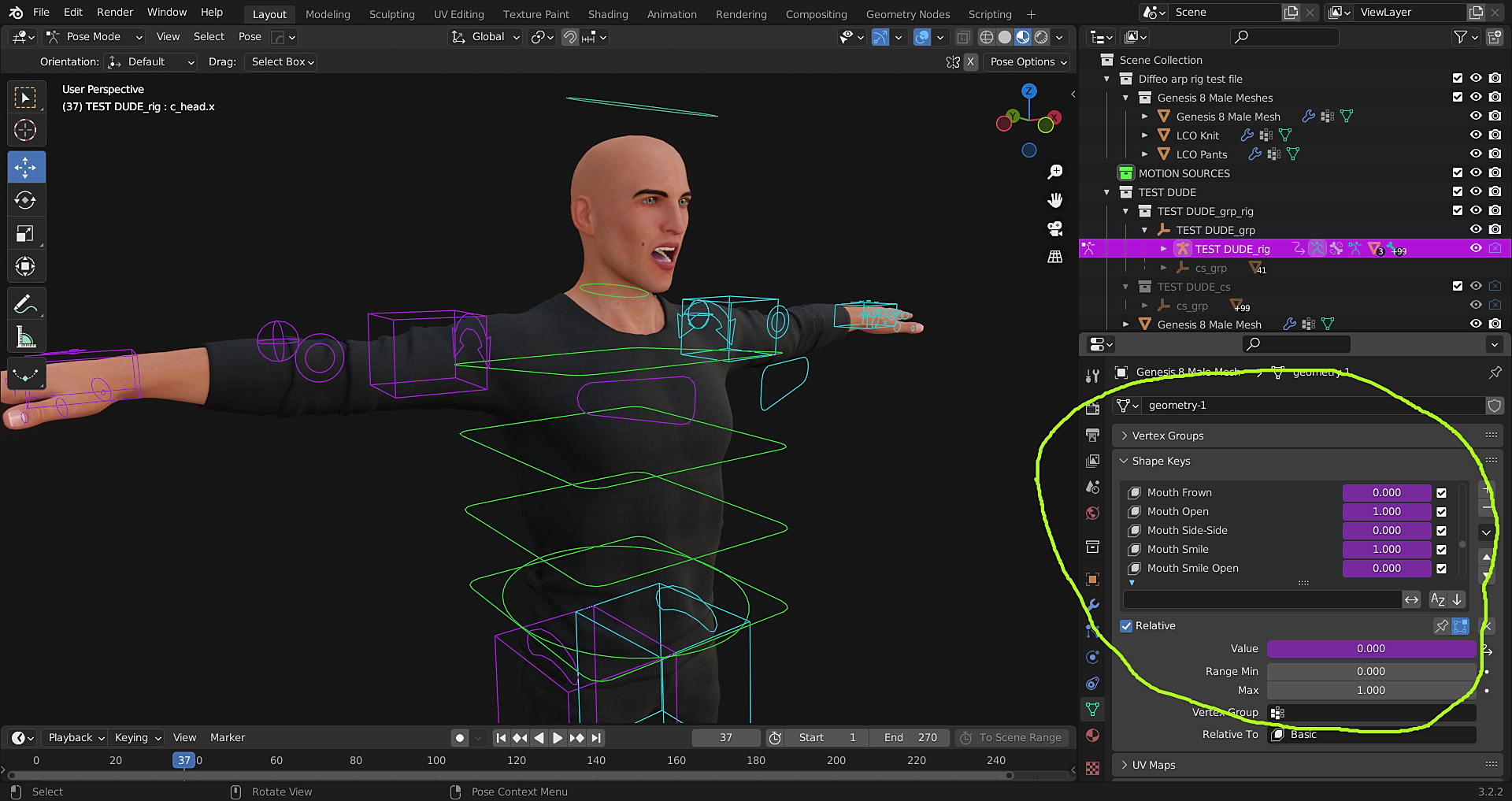
Except his face mesh contains ALL of the Daz phonemes and expressions as blend shapes.
I have even assigned Drivers to them.
They could be manually hand keyed
However I as hoping for a way to just import a pre animated.duf file, exported from Daz studio ,that was created with mimic basic or Anilip 2.
can Victoria 8.1 skin be used on G8F?catmaster said:
G8F currently has better compatibility than G8.1F, most geografts that I purchased have better compatibility with G8F, and because of different face controls G8.1F expressions can't be applied to G8F.
When I create new characters from body scans or reference images I'd like to create G8F versions, which can be used by both G8F and G8.1F, whereas the G8.1F versions can't be used by G8F characters.Making the G8 base expressions (and any expressions that are using them) work on G8.1 requires removing dummy/placeholder expressions that are installed to G8.1 morph folders - These dummy/placeholder expression files have no other function than to prevent the base G8 expressions from loading.
The dummy/placeholder files are located in;
...\Data\DAZ 3D\Genesis 8\Female 8_1\Morphs\Daz 3D\Base Pose Head\ (255 files, can be more if you have additional DAZ expression packs)
...\Data\DAZ 3D\Genesis 8\Female 8_1\Morphs\Daz 3D\Expressions\ (24 files, can be more if you have additional DAZ expression packs)
...\Data\DAZ 3D\Genesis 8\Male 8_1\Morphs\Daz 3D\Base Pose Head\ (255 files, can be more if you have additional DAZ expression packs)
...\Data\DAZ 3D\Genesis 8\Male 8_1\Morphs\Daz 3D\Expressions\ (24 files, can be more if you have additional DAZ expression packs)Please make sure you are removing the files from G8.1 morph folders and not G8 morph folders.
Note 1; If you are logging in to DS and letting DAZ Connect (within DS) to install/update your content, you may have these also in an other location that has "\Data\Cloud\" in it's path
Note 2; Do not remove any files from "FACS" or "FACSExpressions" folderscan Victoria 8.1 skin be used on G8F?it's not a one click but it's not that complicated either, if I can do it

sadly my explaining stuff to others usually confuses people, a good tutorial is what I read
(I find video tutorials difficult and frustrating and prefer written documentation and the DAZ documentation is what I used, everyone is different there, some need a visual demonstration that's why I cannot really recommend one)
it looks like much documentation is missing as are images from other peoples tutorials
this site can be very frustrating
I will link a few
are for other figures but the method the same
https://www.deviantart.com/sickleyield/journal/Tutorial-The-Map-Transfer-Utility-368686796
https://www.daz3d.com/forums/discussion/184696/tutorial-from-map-transfer-to-material-presets/p1
Can you only have one Content Set active at a time in the Content Directory Manager?DrunkMonkeyProductions said:
Nope, one directory set at a time.
That's not going to change anytime soon either.
One of the problems with DS is that it can't load morph data after an asset is loaded. This has existed, AFAIK, since it's inception, and can't be fixed without massively breaking the software.
For anybody that's going to say the previous generations didn't have this problem and bring up 'powerloader', no, it worked exactly the same, the only difference is that genesis moves that to a 'behind the scenes' operation.
Most previous generation morph packs came in two varieties, those that required the DzCreateExPFiles script to be run, which added the channels to the base figure, or used the PBMCC/PBMDC slots already present in the figure.
If you tried to load an asset without having run the script, it wouldn't work.
The PBMCC/PBMDC, createed all sorts of fun with different assets being assigned to the same channels.
Was always fun to turn Victoria 4 into an escher painting when loading conflicting morph packs.
A script could add a new morph channel and populate it, at least in principle (and so could a plug-in), so it would be potentially possible to read in new morphs. It would not, I think, be a practical way of doing the task and might not be ideal from a peformance view.
Can you only have one Content Set active at a time in the Content Directory Manager?Nope, one directory set at a time.
That's not going to change anytime soon either.
One of the problems with DS is that it can't load morph data after an asset is loaded. This has existed, AFAIK, since it's inception, and can't be fixed without massively breaking the software.
For anybody that's going to say the previous generations didn't have this problem and bring up 'powerloader', no, it worked exactly the same, the only difference is that genesis moves that to a 'behind the scenes' operation.
Most previous generation morph packs came in two varieties, those that required the DzCreateExPFiles script to be run, which added the channels to the base figure, or used the PBMCC/PBMDC slots already present in the figure.
If you tried to load an asset without having run the script, it wouldn't work.
The PBMCC/PBMDC, createed all sorts of fun with different assets being assigned to the same channels.
Was always fun to turn Victoria 4 into an escher painting when loading conflicting morph packs.
Installing Rendo G8 Characters into StudioI'm old school. I extract to a folder and then transfer it across to my content folder and then I categorise. I've looked at smart content but I find for me that I like to have the categories set up the way that makes sense to me.
It's not a hard or onerous task takes less than 10 mins if you include categorising.
Splitting HD head/body morphs without expensive tool?Pendraia said:
This is the one I was looking for

It introduces the new morph tools.
Thank you for the link, for future reference!
Splitting HD head/body morphs without expensive tool?This is the one I was looking for
It introduces the new morph tools.
Splitting HD head/body morphs without expensive tool?The product in question already has separate head and body morphs. I just stumbled on it, though, as it didn't show up in my Parameters search. The more I examine it, the more beautiful and versatile it is, especially since, for a "toony" character, her muscular anatomy is actually more correct and convincing than most other muscle morph packs. And her face can run the gamut from cute to flat-out gorgeous. What a product!
You are exporting morph controllers that directly control other morph...Have you got the hidden files showing? MCM's which are morph control morphs are often hidden.
On the parameters tab, top right hand corner is an icon like a play button with lines.
Top option is preferences for hidden files to show tick the top option which is Show Hidden Parameters.
Hope it helps.
Edited to add I notice in your second image it has jcm's that are hidden
Is there any way to use PowerPose Face with 8.1 figures?PerttiA said:
If you have updated the PowerPose templates, you need to remove the dummy files that are installed with Genesis 8 Starter Essentials to get the same functionality in PowerPose for G8.1 as you have for the G8
Making the G8 base expressions (and any expressions that are using them) work on G8.1 requires removing dummy/placeholder expressions that are installed to G8.1 morph folders - These dummy/placeholder expression files have no other function than to prevent the base G8 expressions from loading.
The dummy/placeholder files are located in;
...\Data\DAZ 3D\Genesis 8\Female 8_1\Morphs\Daz 3D\Base Pose Head\ (255 files, can be more if you have additional DAZ expression packs)
...\Data\DAZ 3D\Genesis 8\Female 8_1\Morphs\Daz 3D\Expressions\ (24 files, can be more if you have additional DAZ expression packs)
...\Data\DAZ 3D\Genesis 8\Male 8_1\Morphs\Daz 3D\Base Pose Head\ (255 files, can be more if you have additional DAZ expression packs)
...\Data\DAZ 3D\Genesis 8\Male 8_1\Morphs\Daz 3D\Expressions\ (24 files, can be more if you have additional DAZ expression packs)Please make sure you are removing the files from G8.1 morph folders and not G8 morph folders.
Note 1; If you are logging in to DS and letting DAZ Connect (within DS) to install/update your content, you may have these also in an other location that has "\Data\Cloud\" in it's path
Note 2; Do not remove any files from "FACS" or "FACSExpressions" foldersOh my God...
Thank you! Thank you so much for that information; let me give you a little bit of context...
I'm a enthusiast game developer, and recently, I decided to use Genesis 8.1.
I have many Genesis 8 based characters; took the time to save Genesis 8 shape present and applied them to Genesis 8.1; evrything was going smooth until it was time to work with face poses and expressions.
Something very simple like opening and narrowing their mouth to simulate talking was a nightmare... Genesis 8.1 was missing many basic poses, like "Mouth Open" and "Mouth Wide-Narrow", it was very difficult to recreate their usual expressions.
I just deleted the dummy files and now I can use the morphs and face poses I know, and love!
The Daz forums are filled with VERY valuable information...
Thank you kind sir, or ma'am!
Can we go backwards?Drogo Nazhur said:
I understand that everybody wants the latests and greatest but can we, maybe, please get some NEW characters for G3 and maybe even G2?
GenerationX2 can transfer characters from Gen3 and back between generations, and there is a freebie floating around called GenNext that can do cross gender G8 and from G8 to G2/G3 so using these you could theoretically get every character made for 8 back as far as Genesis 1.
I've actually used this trick to port a character back to genesis 2 from G8 because I needed him to wear a specific set of armor that absoluely refused to port to G8 without turning into complete and utter garbage, so instead I just sent the character back instead.
Toon AnimalsHow about a general cartoon type morph for Horse 2 and Dog 8?
Heck, a set for Big Cat 2 and Dragon 3* wouldn't be unwelcome.
I know Dragon 3 has a cartoon morph but it's a very specific character.
One for Housecat wouldn't go amiss, but I know it's based on 20 year old technology...
Genesis 9 Coming Soon! Preorder Victoria 9 HD TodayYes, I need a list of what's going to be in the 2 products. The Victoria 9 HD product vs the Victoria 9 HD Pro Bundle product is important to know. $30 vs $80 is a very substantial difference in price for what could wind up being an oh so typical bundle of the typical generational Genesis introductory fashion model poses, a couple of hairs that are marginally different or even just reworked refits of old products, one bikini babesque fashion clothing outfit, and one mean mad fighting chick outfit.
For the giant $50 extra on the Victoria 9 Pro Bundle I would totally expect the typical introductory Genesis 9 Female Head Morphs, Genesis 9 Female Body Morphs, and Genesis 9 Female Expressions to be included in that Victoria 9 HD Pro Bundle. I'm not sure about the HD morph because the Victoria 9 HD product standalone seems to imply HD is standard now.
Daz 3D is part of

Connect
DAZ Productions, Inc.
7533 S Center View Ct #4664
West Jordan, UT 84084Licensing Agreement | Terms of Service | Privacy Policy | EULA
© 2026 Daz Productions Inc. All Rights Reserved.