-
Wear Them All
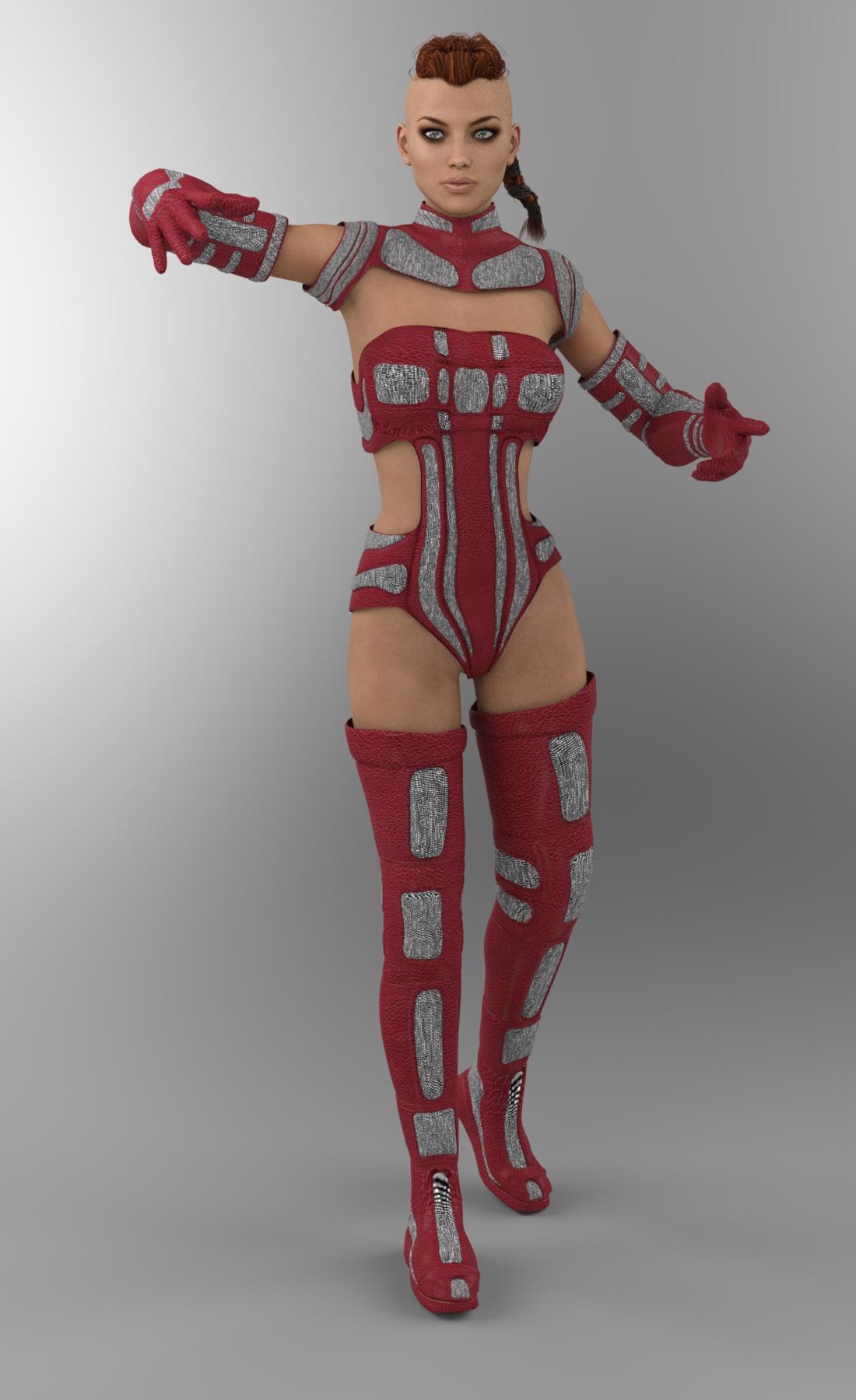
just a quickie: this is Victoria 7 wearing TechnoMaelstrom for V3. Just put the default iray shader on the clothing. I have added smoothing to each piece - the boots are at 8 with smoothing set to generic. The rest of the pieces have smoothing at 4-6 or so, nothing huge.
It's really going to depend on the original outfit - I've had a no go with some, and others worked beautifully.
very quick render: (click for larger)
 Novica & Forum Members Tips & Product Reviews Pt 8
Better add this one to the list:
Generation 3
Wear Them All - Autofit Clones Expansion for Genesis 3 Male(s) and Genesis 3 Female(s) - autofit David 3, Stephanie 3, Freak 3, Hiro 3, Aiko 3, Victoria 3, Micheal 3, Kids 4 outfits to Genesis 3 male and female
(I've been playing with it for a couple of weeks, and having so much fun LOL )
Novica & Forum Members Tips & Product Reviews Pt 8Okay, I'm not sure if these were dueling products (aka, "mine does it faster") or if one helps the other. Please read the descriptions and help me out here. I haven't finished the descriptions because I'm not sure if the second one converts all the way through to Genesis 2 Females, OR converts files so the FIRST product can be used. EDIT: It says the first product is required to use the second one, so instead of doing the first one by one by hand, the second one is a helper.
Victoria 4 for Genesis 2 Females Use Victoria 4 textures, morphs and clothing on Genesis 2 Females.
V4 Skins Auto Converter For Genesis 2 Female(s) Reads V4 texture files .ds .dsa .PZ2 and converts them,
Novica & Forum Members Tips & Product Reviews Pt 8Genesis 2
Genesis 3 UVs for Genesis 2 Male(s) - lets you use Genesis 3 textures on Genesis 2 figures
Legacy UVs for Genesis 3: Victoria 6 - lets you use Victoria 6 textures on Genesis 3 Female
Legacy UVs for Genesis 3: Genesis 2 Male and Michael 6 - lets you use Genesis 2 Base Male and Michael 6 textures on Genesis 3 MaleGenesis
Legacy UVs for Genesis 3: Genesis Pack - lets you use Michael 5, David 5, Stephanie 5 and Aiko 5 textures on Genesis 3
Legacy UVs for Genesis 3: Victoria 5 - lets you use Victoria 5 textures on Genesis 3 FemaleM4
Legacy UVs for Genesis 3: Michael 4 - lets you use Michael 4 textures on Genesis 3 Male
V3
Legacy UVs for Genesis 3: Special Edition - Victoria 3 - lets you use Victoria 3 textures on Genesis 3 Female
Novica & Forum Members Tips & Product Reviews Pt 8Genesis 2
Genesis 3 UVs for Genesis 2 Female(s) -
K4 (?)
Kids 4 UVs for Genesis 2 Male(s) and Female(s) - 2014 Christmas Giveaway item - includes morphs - let you use Kids 4 textures with Genesis 2Genesis
Generation 5 UV Bundle for Genesis 2 Male(s) - contains the UV Sets for David 5, Freak 5 and Hiro 5 to be used with Genesis 2
Generation 5 UV Bundle for Genesis 2 Female(s) - contains the UV maps for Stephanie 5 and Aiko 5 for Genesis 2
Genesis 2 Female Clone for Genesis - lets you fit Genesis 2 Female clothing to GenesisV4
V4 Skins Auto Converter for Genesis 2 Female(s) - reads V4 texture files (.DS, .DSA and .PZ2) and converts to Genesis 2
Wear Them All - Autofitting Clones and Clothing Smoothers for Genesis 3 Female(s) - autofit clones to fit Genesis 2 Male, Genesis, Victoria 4 and Michael 4 clothes to Genesis 3 Female(s)
Wear Them All - Autofitting Clones and Clothing Smoothers for Genesis 3 Male(s) - autofit clones to fit Genesis 2 Female, Genesis, Victoria 4 and Michael 4 conforming clothes to Genesis 3 Male(s)Novica & Forum Members Tips & Product Reviews Pt 8@Novica, is this what you mean?
Generation 4
Wear Them All - Autofitting Clones and Clothing Smoothers for Genesis 3 Female(s) - Autofit Victoria 4, Micheal 4, Genesis and Genesis 2 Female clothing to Genesis 3 Female (also contains cleaveage smoothers/fixers)
Wear Them All - Autofitting Clones and Clothing Smoothers for Genesis 3 Male(s) - Autofit Victoria 4, Micheal 4, Genesis and Genesis 2 Female clothing to Genesis 3 Male (also contains bulge fixers/chest smoothers/fixers)
Genesis 2
Genesis 3 Female for Genesis 2 Female(s) - autofit Genesis 3 Female clothing to Genesis 2 Female
Genesis 3 Male for Genesis 2 Male(s) - autofit Genesis 3 Male clothing to Genesis 2 Male
Novica & Forum Members Tips & Product Reviews Pt 8Here's a list of some of the utilities to work across different generations. It will be in the Reference post of this thread (the second post.)
It doesn't matter if you are going from a higher generation to a lower one, or a lower to the higher- this list will put the product in the LOWEST generation involved. This is because some of these products can involve multiple generations as options.
Generation 3
GenX AddOn Gen3 Bundle Transfer morphs for Victoria 3, Michael 3, Stephanie 3 Petite, David 3, The Freak 3, Aiko 3, and Hiro 3 to Genesis and Genesis 2.GenX2 AddOn Gen3 Kids Transfer base shape of Laura, Luke, Maddie, and Matt, using GenX2, to Genesis and Genesis 2. (see Genesis Generation X2 for requirements for using Genesis 2.)
Legacy UVs for Genesis 3 Special Edition: Victoria 3 Use Victoria 3 textures on Genesis 3 Females.
Generation 4
Genesis Generation X2 For Generation 4, Genesis, Genesis 2 to transfer morphs between the generations.
GenX2 also translates poses or expressions with morph values and morph injections or shaping presets to be used with the transferred morphs. (Must have GenX2 AddOn For Genesis 2 to use Genesis 2, and to transfer morphs between the two Genesis 2 figures (Male/Female.)Wear Them All- Autofitting Clones And Clothing Smoothers For Genesis 3 Females
Autofit Victoria 4, Michael 4, Genesis and Genesis 2 Female clothing to Genesis 3 Female (also contains cleaveage smoothers/fixers)Wear Them All- Autofitting Clones And Clothing Smoothers For Genesis 3 Males
Autofit Victoria 4, Michael 4, Genesis and Genesis 2 Female clothing to Genesis 3 Male(also contains bulge fixers/chest smoothers/fixers)Michael 4 For Genesis 2 Males Use Michael 4 textures, morphs, and clothing on Genesis 2 Males. Note: the UVs can also be applied to Genesis 2 Female.
Legacy UVs For Genesis 3: Michael 4 Use Michael 4 textures on Genesis 3 Males.
Victoria 4 for Genesis 2 Females Use Victoria 4 textures, morphs and clothing on Genesis 2 Females. See the next product if you want to avoid manually doing the process.
V4 Skins Auto Converter For Genesis 2 Female(s) Reads V4 texture files .ds .dsa .PZ2 and converts them for you so you don't have to do them one by one. It's a "speed it up helper" for the Victoria 4 For Genesis 2 Females.
Generation 4 Legacy Shapes for Genesis 2 Male(s) Use the shapes of Genesis Basic Male, Michael 4, Hiro 4, and The Freak 4 on your Genesis 2 Males.
Generation 4 Legacy Shapes for Genesis 2 Female(s) Use the shapes of Genesis Basic Female, Victoria 4, Stephanie 4, Aiko 4, and The Girl 4 on Genesis 2 Females.
Kids 4 UVs for Genesis 2 Male(s) and Female(s): Check your Product Library, it was a limited time freebie at Christmas and not available in the store. Many thanks to Draagonstorm. Includes the Kids 4 textures and custom boy and girl morphs
Genesis
Genesis 2 Male and Female Base UVs for Genesis Use any textures made with the Genesis 2 Male or Female Base on Genesis.
Victoria 6 and Michael 6 UVs for Genesis Use any textures based on the Victoria or Michael 6 on Genesis.
Generation 5 UV Bundle for Genesis 2 Male(s) Contains the UV sets for David 5, Hiro 5, and Freak 5. (Michael 5 already comes with Genesis 2.) If any of your Generation 5's require the Michael 4 UVs, you must own Michael 4 for Genesis 2 Males. (see description under Generation 4)
Generation 5 Legacy Shapes for Genesis 2 Male Shapes include Genesis (1) Basic Male, Michael 5, Michael 5 Hero, David 5, Hiro 5, Freak 5, Freak 5 SuperFreak, and Young Teen Justin. Additional head shapes are included for Michael 5 (two additional heads), David 5 (three additional heads), Freak 5 (six additional heads), and Young Teen Justin (one additional head
Generation 5 UV Bundle for Genesis 2 Female(s) Contains the UV sets for Aiko 5 and Stephanie 5. (Victoria 5 already comes with Genesis 2.) If any of your Generation 5's require the Victoria 4 UVs, you must own Victoria 4 for Genesis 2 Females.
Generation 5 Legacy Shapes for Genesis 2 Female(s) Shapes for Genesis (1) Basic Female, Victoria 5, Victoria 5 SuperModel, Stephanie 5, Stephanie 5 Curvy and Model Bodies, Aiko 5, and Young Teen Julie. Additional head shapes are included for Stephanie 5 (two additional heads) and Young Teen Julie (three additional heads). Put the shapes on Genesis 2 Females.
Genesis 2 Female Clone For Genesis Use Genesis 2 Female clothing on Genesis.
Legacy UVs for Genesis 3: Genesis Pack Use Michael 5, David 5, Stephanie 5, and Aiko 5 textures on Genesis 3.
Legacy UVs for Genesis 3: Victoria 5 Use your Victoria 5 textures on Genesis 3 Female.
Genesis 2
GenX2 AddOn for Genesis 2 So GenX2 can be used with Genesis 2. Now, it's possible to transfer morphs from Genesis and supported Poser figures to Genesis 2 Male and Female. In addition, morphs may be transferred from Genesis 2 to Genesis or between the Male and Female version of Genesis 2
Genesis 2 to Genesis 3 Pose Converter: Convert your Genesis 2 poses to Genesis 3. (Male and Female)
Pose Builder for Genesis 3 Mix and match Genesis 2 and Genesis 3 poses.
Genesis 3 Female For Genesis 2 Female(s) Autofit Genesis 3 Female clothing to Genesis 2 Females.
Genesis 3 Male For Genesis 2 Male(s) Autofit Genesis 3 Male Clothing to Genesis 2 Males.
Genesis 3 UVs For Genesis 2 Female(s) Use Genesis 3 textures on Genesis 2 Females
Genesis 3 UVs For Genesis 2 Male(s) Use Genesis 3 textures on Genesis 2 Males
Legacy UVs for Genesis 3: Victoria 6 Use Victoria 6 textures on Genesis 3 Females.Legacy UVs for Genesis 3: Genesis 2 Male and Michael 6 Use the Genesis 2 Base Male and Michael 6 textures on Genesis 3 Male.
Genesis 2 Legacies For Genesis 3 Male: Heroes Shapes for Michael 6, Gianni 6, Darius 6, Lee 6, and Scott 6, as well as an optimized version of the Genesis 2 Base Male, to put on Genesis 3 Male.
Genesis 2 Legacies for Genesis 3 Female: Stylish Shapes for Giselle 6, Keiko 6, Lilith 6, and Ninive 6, as well as an optimized version of the Genesis 2 Base Female, to put on Genesis 3 Female.Genesis 2 Legacies for Genesis 3 Female: Beauties Shapes for Olympia 6, Monique 6, Mei Lin 6, and Gia 6, as well as an optimized version of the Genesis 2 Base Female.
Genesis 2 Legacies for Genesis 3 Female: Classics Shapes for Victoria 6, Aiko 6, Stephanie 6, and The Girl 6, as well as an optimized version of the Genesis 2 Base Female.
Genesis 3
Genesis 3 UV Swap: Male and Female Base Put the female textures on the male, and the male on the female.
GenX2 AddOn For Genesis 3 Now, it's possible to transfer morphs from Genesis, Genesis 2, and supported Poser figures to Genesis 3 Male and Female. Read the description for more information.
Finding this HairHi All,
Not sure what you call this hair style. But, it is cool and reminds me of the 50's and 40's Loretta Young like. But unable to find something
like it in the store. https://www.daz3d.com/selene-for-victoria-4 @Ravenhair would you happen to remember the hair type?
Thank you,
Joseph
Novica & Forum Members Tips & Product Reviews Pt 8
I've been playing around with moving generation 3 (V3, M3) figures, characters, skin maps and content to Genesis 3. If I can get a clone shape, morphs, materials and clothes from Victoria 4 to work fine with Genesis 3... Heck.. Genesis 3 MALE...
The idea that any one generation is that much superior to any other generation seems to be just a matter of subjective opinion and personal preference, to me. But... I have focused a lot of my DAZ purchases toward utilities that make that kind of cross generation flexibility practical - and that wasn't always cheap.I'm trying to lean toward utilities also. I'm hoping to have time soon to really play with some of the things I've bought (and conquer GenX) and figure out what I need still. Is there a master list of such utilities somewhere or ones that you would recommend? I own all of GenX, except the GenX AddOn Gen3 Bundle, which I have wishlisted. I own quite a few auto-fit clones and have wish-listed those of Sickleyield that I don't have yet, I have some UV stuff and have wishlisted Cayman Studio's products, I have Wear Them All. Sometimes it's hard to tell which products overlap and which you really need.
Okay, I must quit avoidance behavior... I think I need more caffeine to deal with the "real world" today...
Novica & Forum Members Tips & Product Reviews Pt 8I use both G2 and G3 interchangeably and frequently - and I think all the complaints about either tend to be by people who haven't really gotten involved in the generation they DON'T like, whichever generation that is.
The complaints above are all true - but I've got a list of complaints about G2, also. G3 characters can have this "latex" quality to its skin - and a few vendors have more trouble with this than others. On the other hand, some of the G3 characters have the most realistic skin maps without a lot of fussing of any characters I've ever used. In general, you can move just about any thing anywhere and get anything to work with any generation with enough preserverence. Poses, props, clothes. There are a lot of different techniques, methods and utilities to help getting there. Where gaps exist in G2 *and* G3 - that can be the deciding factor leading someone to decide to go with the OTHER generation instead.
I've been playing around with moving generation 3 (V3, M3) figures, characters, skin maps and content to Genesis 3. If I can get a clone shape, morphs, materials and clothes from Victoria 4 to work fine with Genesis 3... Heck.. Genesis 3 MALE...
The idea that any one generation is that much superior to any other generation seems to be just a matter of subjective opinion and personal preference, to me. But... I have focused a lot of my DAZ purchases toward utilities that make that kind of cross generation flexibility practical - and that wasn't always cheap.hi can someone tell me where i can get this outfit in this pic thanksLooks like it's kit-bashed and then reshaded.
The top looks like it's from this bikini: https://www.daz3d.com/hongyu-s-bikini-2-for-victoria-7
The shorts and vest, I don't know.
feet poke through shoes, need help fixing this...Feet on all my models will poke through nearly every shoe item I own. I need help fixing this:
specific example: OOT Open Toe Pumps for G3F on Victoria 7; the open toe portion is fine, but two toes stick out the inside of the shoe just behind the cut out toe of the shoe.
I have tried the following: turning off auto fit - shoes end up someplace other than the feet. Increasing the number of fit iterations to a high number and waiting... zero change
changing V7 foot size. auto fit follows the change so the problem remains, with auto fit off - bye bye shoes.
With this type of shoe, turning off V7's toes won't work because you are supposed to see the toes in an open toe shoe!
NOTE: the above is just ONE EXAMPLE of a problem I have with most shoes in my runtime, it is not OOT's fault. It is some trick I don't understand how to accompllish.
thanks
Triss Merigold from the Witcher 3 requestIs export FBX with morphs broken with GF3 / V7 ?Hi Asymptote
So you are getting this when you animate in DS, then export everything, including animations, to 3ds Max?, and are you using G3F/Victoria only, have you tried with others?
I don't use 3ds max, but I do use Motionbuilder a lot.. and I don't see any of these issues, however, I only export the character then animate in MB. I'll have to test to see if I get the same thing. I know that as morphs are used, they automatically get baked, and might be that they are getting interference with your export list..
I'll do a test and report back
Ok, I believe that animation export is broken, I didn't try with Victoria, but with one of the characters I'm working with, Tamara for G3F by 3d Universe.. here's my animation in Studio (by exporting the fbx character, no animation to MB, then animate face and body, then importing fbx back into Studio and saving as a .duf properties preset)
https://bryan_steagall-hotmail.tinytake.com/sf/MTUwNTMxN181MjU4MzE2
and here's the same file, exported from Daz studio with animation and everything, to MB.. I didn't see the extra morphs or files, but the animation is hilariously broken
https://bryan_steagall-hotmail.tinytake.com/sf/MTUwNTMyNl81MjU4MzI1
and, when exported without morphs, everything works ok.. interesting. I did know that the morphs in G3F, especially the facial morphs, get written back to the facial bone rigging, but hadn't actually tested it.. (all the animation originally was done on the morphs themselves in MB, then applied to the morph channels when saving the fbx as a .duf), the file that I exported without morphs actually wrote the animation on the bones when exported..
G3F/ Victoria 7 FBX export with animationHi Asymptote
So you are getting this when you animate in DS, then export everything, including animations, to 3ds Max?, and are you using G3F/Victoria only, have you tried with others?
I don't use 3ds max, but I do use Motionbuilder a lot.. and I don't see any of these issues, however, I only export the character then animate in MB. I'll have to test to see if I get the same thing. I know that as morphs are used, they automatically get baked, and might be that they are getting interference with your export list..
I'll do a test and report back
Keep Calm : There's always another Sale (Daily Sale Talk)Seems to me the next "event" sale will be the PA Festival in September, followed immediately by the PC Anniversary Sale. Lots of daily sales in the meantime. Some of those can be better than the event sales, especially when vendors are featured in more than one current sale where a purchase is required to get the discount. Those can stack and create some really sweet discounts.
I just can't help think that the next sale promo is, 'Get Your Genesis 4 Female' in conjunction with, 'with these new features' here.
But Genesis x has always been a free release. It is only the characters that go with it that DAZ has been charging for. Did you maybe mean a "Get your Victoria 8" ?
Mystery HairLooks like this one:
https://www.renderosity.com/mod/bcs/samira-bob-hair-for-victoria-4-and-genesis-3-females/116521/
Figure Metrics upgradesThanks both of you....I'll try the ticket. I assumed that the Daz folks read this section as well. But, it might be best to try a direct approach.
Figure Metrics was really my main reason for buying Measure Metrics. It helps a lot when emulating real people to be able to plug in stats and get at least a close approximation of the body type for a new character. This is particularly helpful in Daz because there is no other point of reference to tell you about how your character is sized in relation to others. Victoria is modeled after the runway type girl...whereas females come in so many more shapes and usually shorter heights.
Anyway, I think these upgrades could make a great product even better.
Carrara CharactersSo why try and compete with Daz Studio figures?
Do something entirely original! That's kind of why I brought up 3DU's Generation Toons. Not to say to make Toon figures, but to put it out there that, at the time, Generations didn't have a whole lot of competition in that field.
I would bet that Vyusur's Dino would make a LOT of sales. maybe not compareable to, say Victoria 7, but possibly more than something else, like a spider or something. Look for gaps in what's currently available.
Then, instead of just having the figure, have it come with it's own scene presets. Make a Carrara-specific figure release something much more than what other offering are getting the user. For example, the Dino could come with a small outdoor scene with some trees and a drinking pond (?)
Sorry I am late to conversation but just wondering will DAZ not make money with Carrara CAR files with FBX models like spider etc; those models will also be licensed and sold through DAZ only. It will probably encourage people to try Carrara as well. It will also be nice if we can buy licensed music, sounds with more focused animations etc. in DAZ Store for use in indie games and indie movies etc. Just a thought.
MimicMolly's Renders & WIPsI have a two saved scenes that I need to render, but was busy today (being Sunday and all).
Speaking of WIPs, I have this little project which involved getting Hivewire's Dawn (SR1)'s textures usable for Genesis (all). Since I don't have any type of plug-ins and stuff, I'm doing it by mixing it with a merchant resource texture in GIMP. I'm using Sensual Skin Resource for V5. That way, I don't have to worry about visible seams. But upon looking at it, it seems like Dawn would've looked better in Stephanie 5 UVs because of the longish face in the texture. I'm doing this, simply because I liked that golden tone of the skin texture and I don't have many skins like that.
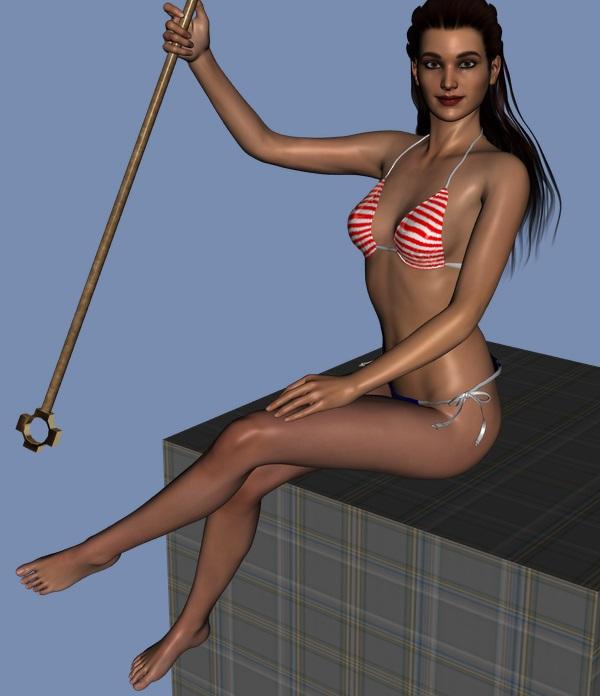
Unfortunately, the diffuse texture I have only looks good on Victoria 5. On everyone else, the makeup looks weird and the eyebrows too thick. Whereas on Victoria 5, everything is close to perfect. I plan on making the bump maps and specular maps eventually...or DAZ soon.
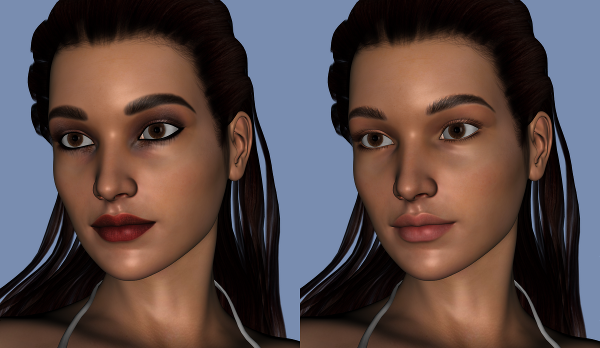
Items used were a random cube with shaders from Sulptural Genesis Ultra Fun Kit, Pure Hair: Fantasy, and String Bikini for Victoria 6 but with shaders from Spex for Genesis. The staff is the Magus staff from the Genesis Starter Essentials.
Daz 3D is part of

Connect
DAZ Productions, Inc.
7533 S Center View Ct #4664
West Jordan, UT 84084Licensing Agreement | Terms of Service | Privacy Policy | EULA
© 2026 Daz Productions Inc. All Rights Reserved.