-
Meaning of hidden morph prefixes and morph types.
Damn great question as it's one of the things that is still very blurry to me. Couldn't have asked it any better. Hope someone will make all of that clear.
The few I know about :
MCM I guess is... for example a morph that is so different from the main Genesis (like a horse made from the Genesis) that most Daz default morphs (mouth open, eyes closed, etc.) won't work perfectly with it. MCM are extra morphs that will correct some usual sliders so that their result looks ok on Genesis morphs shapes a bit out of the ordinary). You play with eyes closed slider on your Genesis-horse, and eyes close fine because the MCM does its work in the background.
PBM is a partial body morph. It usually is the body morph of a custom character. Or only specific things such as fat thighs, bigger ribs, etc.
PHM is a partial head morph. It usually is the head morph of a custom character. Or only specific things such as large nostril or pointy ears.
CTRL is usually a slider, in the case of a custom character, that will control both PBM and PHM. In the case of eyelids for example, you have Eyelid Lower Up Down for each eyelid to control them separately. And a third CTRL that will move both Eyelid sliders together.
Naming conventions are mostly there to help a content creator organize his work. Many bundles other than Daz Original bundles use the same kind of corrective morphs without respecting that specific naming convention. Given that those sliders are hidden, what's important is that they do their job properly. The way they're named is meaningful to the content creator more than anyone else.
Meaning of hidden morph prefixes and morph types.Hi,
Here I have 2 related questions that are straight forward to answer by anyone that have the knowledge.
1) I tried looking the Documentation center, but couldn't find anything (if even in there). I am trying to understand a bit better the nature of the different type of morphs you can find in the hidden directory. I am already familiar with "JCM" meaning "Joint Corrective Morph" which are morphs that correct specific joints rotations and sometime only activating when in multiplication with a character figure. I also know that "MCM" is a "Morph Corrective Morph", but I am not sure of the specifics about this one.
The currently mysterious ones I came by are: eJCM, pJCM, PBM, CTRL, pCTRL. Any other important ones I missed?
2) Some clarifications about the morph types in parameter setting of a morph. Most are Modifier/Shape. I get that these ones are taken into account when you restore the shape of the figure; same principle for the Modifier/pose type; does it serve any other purpose? I wondering about the uses of the other types like: [ ]/generated, [ ]/corrective, [ ]/utility, etc.
Sorry for the very "grocery list" type of question :L. I feel I should know this by now, but I never came accross the right ressources. This would help me understand what does what to the figure, if I need to desactivate some of them, fix them sometime. Also to have the right prefix when I create my own corrective morphs.
Thanks in advance
How can save and sell my morphs?HD morphs based on the subdivided mesh can only be created by Daz PA
Only way around for non PA (Published Artist), is to export the Genesis already subdivided (preferable as subdivision algorithm might sligthly differ from an app to another) or subdivide it in any 3D modeler. One can then sculpt HD details, bake them on the low poly Genesis using UDIM compatible apps such as Substance Painter, to export an height map.
Once loaded in Daz > Surface Tab > Displacement Strength, and once defined a SubD Displacement Level, the height map will push and pull the wireframe, ending up in an effect as precise as a PA SubD. It's the only sad workaround (the vast majority) of normal users have access to.
As long as one shapes the Genesis low poly (in anything, even a horse) then sculpt on a high poly version of that morph, it's possible to generate any precise HD detail on the Genesis or a custom morph of it
Differences and drawbacks :
- Genesis SubD appears in the viewport even in shaded mode. Displacement appears only when rendered.
- Subdivision at the Surface level (SubD Displacement Level) seems to compute slower than Daz's Genesis SubD.
I made for example very detailed braces for Genesis. I sculpted a brace in ZBrush and duplicated it on each tooth. Then I baked that detail on the face UDIM using Substance Painter. Painted all that to make it look nice and exported : albedo (diffuse), metalness, roughness, normal map and height map. With a SubD Displacement of 4, those braces look great of the Genesis teeth. Without having to add geometry and weight it on the Genesis bones.
Only frustration is having to go through baking to get "HD" details. (ಥ﹏ಥ)
How can save and sell my morphs?
Same answer to the umpteenth time this question's asked (please use the search engine a bit) :
https://www.laylo3d.com/creating-characters-and-morphs-for-daz-3d-figures-using-zbrush-goz/

Read/Watch those tutorials, write down a clean step by step workflow in a clean Word document. All you need to know is already on the net. And especially in the 2 links I gave hereabove.
Help with new freebiefelis said:
Rigging heals is a little troublesome.
Did you use reverse deformation when transfer rigging.
Maybe look at this

Oh, this is really helpful - thank you! I'll give it a look. No, I didn't use reverse deformation because I didn't know it existed
 Genesis 8.1 SubD 5
This is not Daz Studio arbitrarily doing anything - it is that something is, by default, set to have the value at 5. It may be that the base value has changed, but more likely a morph is linked to the level value and increasing it. I think there was a thread on this a few weeks ago.
Double Tails Hair for Genesis 3 & 8 Females... Option to remove neck hair.The "Adjust Neck" Dial is only intended to match the character's neck shape, Anyway the neck hair is too transparent and there's no length morph for it.
But you can remove it by dialing the Cutout Opacity of the "BackUnder" Surface to zero.
Not my favorite hair, with such a poor set of morphs and the ugly neck hair.
How can save and sell my morphs?Hello there.
I am interested in selling character morphs, I do this in daz studio goz and zbrush, I save my work in daz studio as a morph, the doubt I have is that I have no idea what is the procedure to follow to do it.
How should I save these new characters, how can I save high levels (4) what is the procedure to upload them to my gallery and sell them etc.
If someone can guide me with my doubt I would appreciate it.
Regards.
Looking for male gen 8 SHIRTI'm not sure about DZ G8M Topz 3, since I don't own it. I just checked Q Suit and the shirt doesn't have any wrinkles around the waist, but the tails are pretty short. The Checkerd Shirt outfit has pretty short tails as well, so might not work for what you want. There is also this: https://www.sdebstore.com/collections/outfits/products/suitwell-pack-g8m which has a morph to open the collar. Here's a quicky test render of the three: Q Suit, Checkered Shirt, and Suit Well:
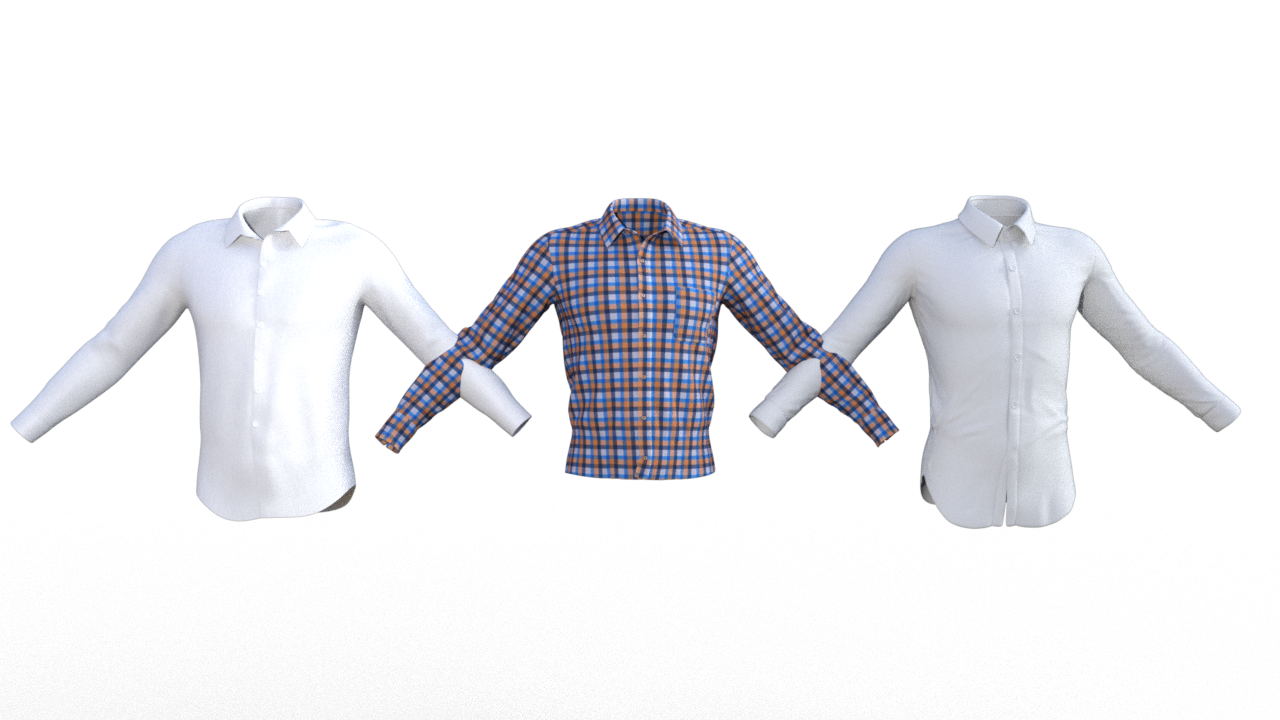
Edited to add: Here's Suit Well with the collar open.
 Is it possible to bake face Bone rig animation to shape key animation with diffeo?
@wolf359 Again, if you convert the morphs to shapekeys using the morph names, then you can load the mimic animations directly on the ARP rig. That is, diffeo will load the daz animation on the custom rig, using the morph names to match the keyframes in the duf file.
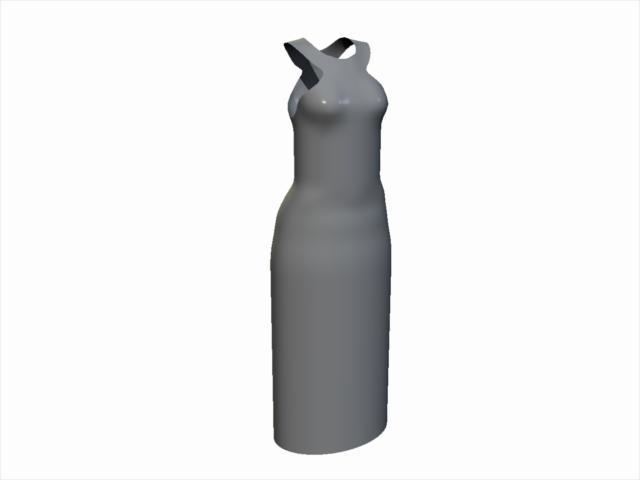
CARRARA CHALLENGE #64: Old egypt..... WIPYet One More Freebie - Egyptian Collared Dress for G2F
Same issue - the shader texture maps are missing. This is just a static prop dress that fits the default G2F. You can use VWD on it as is. If so, I recommend 'nailing' the collar in place. You could also import it into that free plugin, Daz Studio, and use the transfer utility to make it a conforming figure. You could even use Carrara's softbody physics.
See attched zip file in next post with the music pic.
 Exporting clothing from Blender to Daz causes seems in mesh after Transfer Utility
felis said:
Maybe add an image of what you are seeing in Daz Studio.
But your clothing is separate objects, and to avoid seems you might need to weld them
So I am only working with the pants right now. I figure if i cant get that working i will move on to the rest of the outfit. This is what the pants look like AFTER the transfer utility has been used. Beofor the transfer uitility they look like one piece. In Blender to the best of my limited understanding, this is two pieces, the little pouch on his hip and the pants themselves but it does not look in blender like there are seams anywhere. Anyway I hope this helps and hope you or someone can assist me further.
Looking for male gen 8 SHIRTSo I'm actually getting some armpit pokethrough with the generic auto-fit for the shirt, but I know I've solved that in the past (possibly with turning off surfaces). Honestly it's been a while since I've done much in Studio at all so my skill set is a little rusty, I am sure the fixes are easy once I take the time to remind myself about them.
Either way, this is mainly to show the hem. I also dialed in the most open morph for the shirt, it goes all the way to being completely buttoned up for ties, and opens a little to a lot, with separate morphs for left and right sides available for some variety.
Finding rogue morphs?I threw together this script to find rogue morphs that have been turned on, that shouldn't be on. Basically, load the default male or female character into the scene, and select it. Under normal circumstances, the base character shouldn't have any morphs turned on.
The reason why these rogue morphs don't show up under "Currently Used" in the parameter panel, is because their default value is equal to their current value, however this value may not be zero. This is the gotcha that might be messing up your installation.
It can also be used to dump a list of all "currently used" morphs, but it won't dump all "currently used" properties, as it only searches for morphs, and not something like on/off boolean properties. I originally wanted a script to list all "currently used" properties, morph or not, but I didn't find such a script in my searches. But, I did find this one.
What to do if you find a rogue morph? Still figuring that out. If the morph belongs to a recently installed product that doesn't belong to Daz, then it definitely shouldn't be turned on. Might have to edit the data file to set the morph default value to zero.About that Victoria 9 HD Bundle pre-order contentI'm guessing the launch bundle will be decided by what's gone through QA on the appointed date and how they want to split not safe for school vs anatomical stuff, and if the morph packs are bundled separately. There's no rush. Starter essentials will be a thing. The pre-launch has already gone from 51 to 62% for plat club members, it'll go lower.
Help with new freebieRigging heals is a little troublesome.
Did you use reverse deformation when transfer rigging.
Maybe look at this
How can I use the skin texture exported from Character Creator 4?CC4 has a Daz UV Transfer under SkinGen tools, granted I never successfully transfer CC4 skin textures to Daz3D (otherwise I won't ask the question here), but I believe that's what it does: To transfer CC4 to Daz3D compatible UV mapping.
AIUTO...CHI CONOSCE L’ITALIANO? PARTE TREDICIKainjy said:
@Tiziano
anche io sto lasciando molto indietro i character... avere tanti morph non ci fai nulla, sopratutto se sono degli stessi autori che riutilizzano sempre le solite proporzioni e dunque se togli i capelli i personaggi si somigliano tutti molto.
Adesso un character lo prendo solo se mi dà qualcosa di "particolare" (tipo mi aggiunge la coda o ha delle cicatrici sul corpo, oppure ha inclusi capelli/barba e pelurie varie ecc..), preferisco infatti avere varietà di oggetti piuttosto che una serie di morph che si differenziano per qualche cm sul seno e sui glutei.
Il mega pack ha un bel po' di ambientazioni (il bar, la stazione spaziale, ...) ma ha anche veicoli (biciclette e moto) ma sopratutto asset utili come gli arredi per il salotto e il cestino da pic-nicConcordo, ormai i morph li prendo solo se sono gratis, anche perchè di solito non li uso per nulla, al massimo uso le skin. Vado pazzo invece per le ambientazioni, specie spaziali.
Export Blender morph to Daz (when not in A pose)Please put the Viewport into a non-textued Drawstyle if you need to show a nude figure.
It might be better to use OBJ in both directions, but if that isn't possible try saving an OBJ both before and after you sclupting, load the before OBJ onto a zeroed figure as a morph with no Reverse Deformations, then apply it, and finally load the after as a morph with Reverse Deformations. That should subtract the form you have in Blender, leaving just the edits.
Export Blender morph to Daz (when not in A pose)I'm wondering if it's actually the difference in Blender's orientation which is messing with things. In summary I:
- pose the figure in Daz and save the posepreset.duf
Image removed
- send the figure to Blender using the official bridge and scult a bump on the head. Notice here how Blender has fiddled with the rotation/orientation of the figure, which might be the problem

- export from blender as a .obj, and import to Daz as a morph with the posepreset.duf provided

- apply this morph in Daz which successfully applies the bump at 100%, but the character is pulled into a different 'flipped' orientation/position as a result of the morph being applied. This means pose controls no longer work, for example changing the neck 'bend' will morph the character into a giraffe
Image removed
I'm trying to find a solution which prevents the pose controls etc from breaking, which probably wouldn't occur if Blender hadn't shuffled the orientation/rotation of the figure. The alternative of course would be to get the character back into the Daz default 'A' pose in blender (with the bump) so that it can be imported as a simple morph.
The reason I need to first pose the character in order to apply the morph, is because I'm actually using softbody physics in Blender (which rely on the pose).
Mid-way through 2022 a new Sales Thread:Report Issues Here "There's Always Another Sale™"winmath said:
Good pricing for Genesis 9 head and body shapes! Only $3849.22, discounted from $9999.99!
Yes, these have been commented on - they are merchant resources for use by PAs (who get a substantial discount, I believe) though others are free to buy them (not that they are much use without an advance copy of the base figure). There will no doubt be non-Merchant Resource morph packs for the rest of us at a more normal price when Genesis 9 arrives.
Daz 3D is part of

Connect
DAZ Productions, Inc.
7533 S Center View Ct #4664
West Jordan, UT 84084Licensing Agreement | Terms of Service | Privacy Policy | EULA
© 2026 Daz Productions Inc. All Rights Reserved.