-
Installing 200 Plus Head Morphs
Ahhh...okay.
I thought those were the base expression morphs that came with the character. I guess the Genesis 3 morphs package doesn't include head/face morphs? And this package just gives expression morphs, not shaping morphs (like lip thickness, nose size, etc.).
I guess I was spoiled by the Victoria morphs that included everything.
So is there a morph package that includes shaping morphs?
Thanks much for the help.
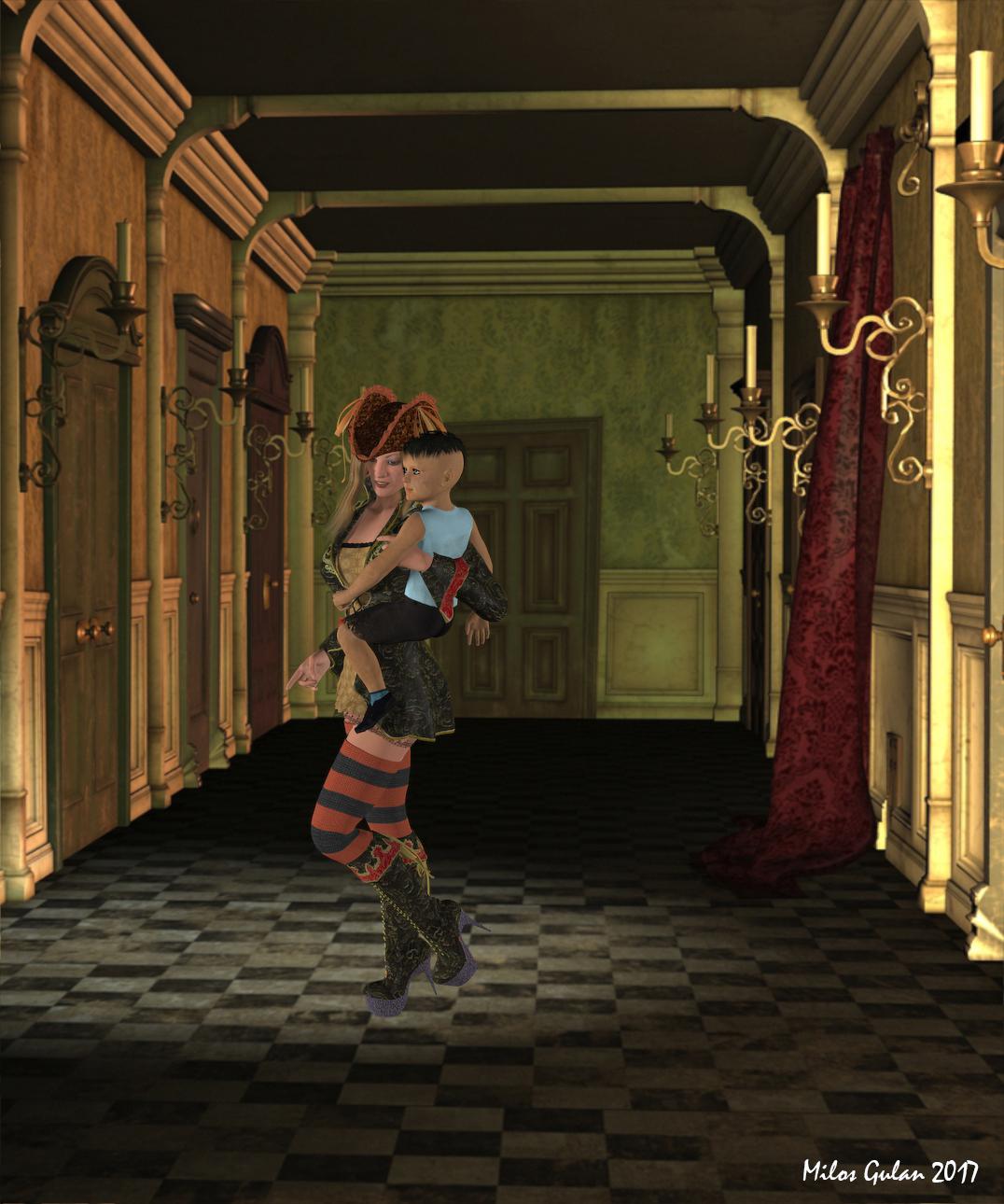
3D Art FREEBIE CHALLENGE-MAY 2017- MAY FLOWERS BRINGS MOTHER'S DAY CELEBRATIONS-Main ThreadFantasy Momma
*******
Here is my entry, just a try to make something fantasy like, inspired by Hillary Duff
*******
Done with Daz Studio 4.9
Items marked with an asterisk require registration.
Not Counting: Victoria 4, Genesis 1
Freebies:
1.)* Hilary for V4/A4 *UPDATED 1/22/2011*
2.) Textures for Lassie of the Seas (Red-black)
3.) Textures for Lassie of the Seas (Ocaso for LotS, Hat Only)
4.)* Buccaneers, Textures for Lassie of the Seas (Dress only)
5.) Thrashed Again for Kids 4 Skateboarder (clothes and Genesis child texture)
7.) Thigh-Length Stockings for V4, A4, and G4
8.)* Striped Stockings for LDStockings - Poser
9.)* 10 Backgrounds
10.)* Render Profiles for DAZ Studio 4.5 (Rendered on Insane)
Inactive links:
1) Darby V4 by vyktohria (texture only)
Paid:
3) Skateboarder for The Kids 4
ALL LINKS CHECK OUT PLZ MOVE TO ENTERIES THREAD
Conforming Genesis 2 and 3 clothing to Genesis 1 & Gen X questions.https://www.daz3d.com/genesis-2-male-clone-for-genesis
https://www.daz3d.com/genesis-2-female-clone-for-genesishttps://www.daz3d.com/genesis-3-male-clone-for-genesis
https://www.daz3d.com/genesis-3-female-clone-for-genesisYou could also AutoFit from male to female within a generation, and you could have gone in steps (AutoFit Victoria 4 to Genesis, AutoFit that to Genesis 2 Female (or Male), AutoFit that to Genesis 3 Male) to use a later figure. The issues are textures, especially the Genesis 3 textures as the layout of the maps has changed meaning it isn't possible to simply use a remap; Cayman Studios has made some backward-compatibility add-ons but I can't recall what they cover.
Pose Randomizer [Commercial] - Compatible with Genesis 8 FemalePose Randomizer was designed to work with Genesis 8 Female. It won't show up in Smart Content because the metadata for Genesis 8 Female didn't exist at the time, but it has been coded for and tested with the new figure.
Unlock the infinite potential lurking inside your expensive pose collection! Pose Randomizer is a pair of scripts for creating new poses and enhancing existing ones. Pose Randomizer works by selectively randomizing the bone orientations of your Figures and Characters. It is designed to work with any character... from Victoria 4 to Genesis 3, from Horse to Dragon, Male or Female... anything with bones!
- Designed for any Character or Figure... from Victoria 4 to Genesis 3, from Horse to Dragon... anything with bones
- Works with entire figures or Sub-Trees of the bone hierarchy
- Create new looks for your poses with just one click
- Give just a hint of imperfection to your poses to make them look more realistic and less "posed." Life isn't perfect, your poses shouldn't be either
- Selectively control which parts of the body are affected (Genesis - Genesis 3 only, though may work with other characters)
- Settings are automatically saved and restored
No poses are included with the package.
V4 clothing save as G3F script?The one thing with converting V4 footwear is that some will refuse to work properly, and others will take a lot of tinkering to get it to fit right.. With items like that when the autofit option comes up select the "Not Supported" option and and leave the second option as is.. Since if you select Victoria 4 in the fit option it can really screw up the shoe mesh, similar things can happen with V4 clothing as well..
GenX2 Update / Genesis 3 Add-On [Commercial]I was told in the Commons to try posting this to this thread.
GenX2 - from Aiko 4 to Genesis 2 Female?
I'm able to transfer Aiko 4 and the characters made for her to Genesis 1 with no problem.
I fail every time I try to transfer Aiko 4 (or any of the 4th generation figures or characters) to Genesis 2 Female or Male.
Should the SOURCE figure be Victoria 4, or Aiko 4?
With the transfered morphs, do I need to transfer all the morphs of Aiko 4, and Victoria 4, and Morphs++, and the Base Morphs, and the character for Aiko 4's morphs? Or just some of them?
My target figure is Genesis 2 Female.
For the GenX2 SHAPE i am not given the choice of Aiko 4 - only V4 Clone, V4 Legacy, V4 Shape. What should I choose? I'm using Gen 4 Iconic Shapes for Genesis . ( https://www.daz3d.com/gen-4-iconic-shapes-for-genesis ) I have the V4 shape and the A4 shape. Which do I use? Is this considered a Clone or a Legacy or a Shape?
Thanks!
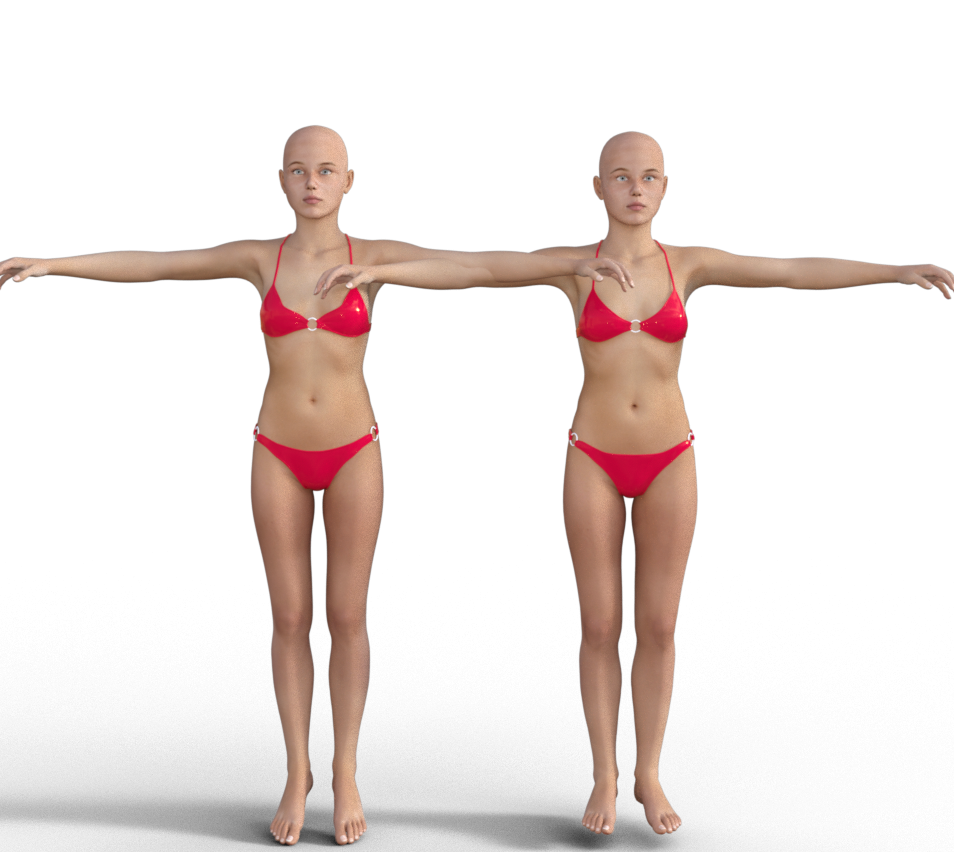
I have the originals stephanie 4 and victoria 4. Stephanie is transferred successfully selecting stephanie in "Load Figure". Automatically victoria 4 is set as source. Power loader was triggered then I check only stephanie morph.
G2F stephie at left, original stephie at right.
 Victoria to Poser 11??
The figure in your screenshot doesn't look like Victoria 4.
Upgrading to 4.9 and how do I rig for V4?You "update" by installing the current version - there aren't patch installers.
Victoria 4 uses legacy rigging - to start with, you need an OBJ for the clothing with the groups for the bones - do you have that?
3D Art FREEBIE CHALLENGE-MAY 2017- MAY FLOWERS BRINGS MOTHER'S DAY CELEBRATIONS-Main ThreadFantasy Momma
*******
Here is my entry, just a try to make something fantasy like, inspired by Hillary Duff
*******
Done with Daz Studio 4.9
Items marked with an asterisk require registration.
Not Counting: Victoria 4, Genesis 1
Freebies:
1.)* Hilary for V4/A4 *UPDATED 1/22/2011*
2.) Textures for Lassie of the Seas (Red-black)
3.) Textures for Lassie of the Seas (Ocaso for LotS, Hat Only)
4.)* Buccaneers, Textures for Lassie of the Seas (Dress only)
5.) Thrashed Again for Kids 4 Skateboarder (clothes and Genesis child texture)
7.) Thigh-Length Stockings for V4, A4, and G4
8.)* Striped Stockings for LDStockings - Poser
9.)* 10 Backgrounds
10.)* Render Profiles for DAZ Studio 4.5 (Rendered on Insane)
Inactive links:
1) Darby V4 by vyktohria (texture only)
Paid:
3) Skateboarder for The Kids 4
Knittingmommy's LaboratoryI started this yesterday and ended up staying up until the early morning hours working on this render. I started by using what merchant resources I had and used SimTenero Randomizer until I got a morph that I loved. I cleaned it up a bit and fine tuned the morph. Then I used Skin Builder 3 to make her skin. I really like how she turned out. Then, I set up the scene which included using VWD to drape both her hair and her dress. The hair was interesting because it has two parts. It's Medea Hair for Genesis 2 and it has an Add-on piece that I wanted to use. So, I draped both pieces individually selecting the piece I wasn't draping as a collision. It worked fairly well, I think. Isidora Dress is a great dress to work with and has a ton of morphs, but I think draping it gave it so much more realism. I love how it pools at her waist and on the floor.
Although I took some breaks, overall this project was started a little after 9 pm and I hit the render button one last time just before 7 am this morning. I was up all night with this one, but I just couldn't stop until it was rendering. I love how it turned out. I did a little bit of postwork in Gimp. The only thing I regret about this particular pose is that you can't really see her face very well. I'm rendering another image with a different camera angle for a closeup of her face. I didn't change the pose any because, frankly, I'm too tired now after only about 4 hours of sleep to go redrape the hair and the dress! I think she's one of my favorite characters that I've created so far so I'll definitely be rendering her again. For a complete list of everything used, check out the gallery link.
Nayeli
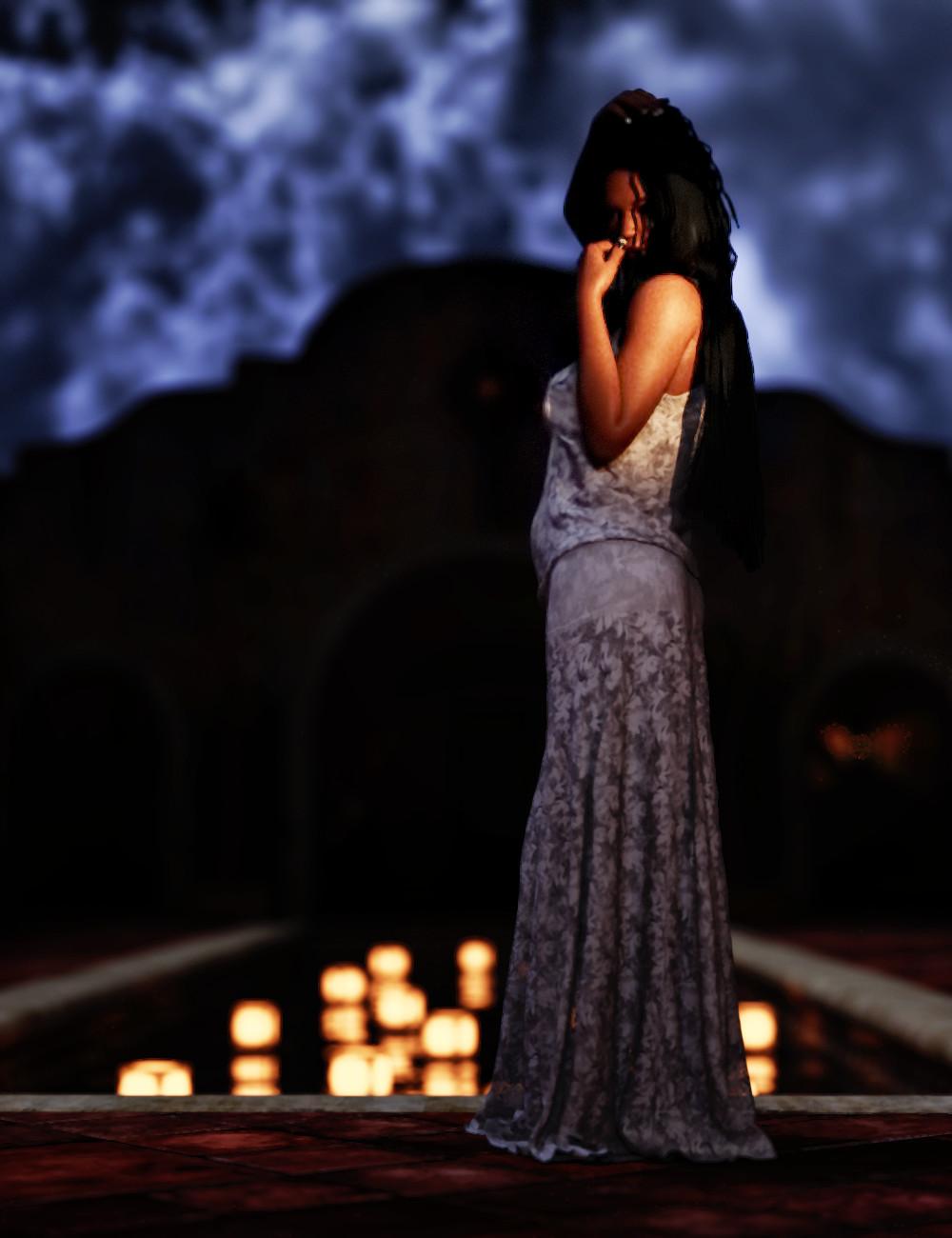
Gallery Linklove this scene, especially the lights in teh water, beautiful
Knittingmommy's LaboratoryWith referrence to your comment about getting the colour close to the one you want. Wouldn't it be nice to have a colour picker built into Studio that would allow the user to match a colour in the scene and change something else in the scene to the same colour without trying to guess? Open the colour picker, click on the colour you want and then click on the surface you want to be the same colour.
@Fishtales There is a Color Picker for DAZ Studio. I have it. It's by Draagonstorm. I've used it a few times. I find it kind of clunky to work with and it uses the print screen function to grab a screen capture. Unfortunately, it stopped working when I installed a print screen utility. I'm using Lightshot. It's free and very easy to use. I'm guessing they both call the same function because, whenever I use the Color Picker, my screen capture program gets called instead now so I can't use the color picker script.
I love my screen capture program and use it often as I use it for screen captures for my tutorials so I can't get rid of it. I have been trying out a few of the color picker add-ons for my browsers since that is usually where I am when I'm looking for color inspiration. I use color palettes a lot online, but not all of them give the RGB or Hex Codes. I find it's fairly easy to use the color pickers in the browser to get the code for a color and then input that into DS. However, some color pickers are better than others. I'm still looking for one that I like for Firefox. I think the one I use in Chrome is the best, but it doesn't seem to be available for Firefox. I might have to do a review of color pickers sometime and let everyone know which ones I find to be the most useful for DS.
Agree with Sandy... Carrara has an eyedropper to do just that... as does any paint program I've ever used.
KM, Can you not save your color settings out then load them on to other object, shader domains, in Studio?
@wgdjohn I'm not quite sure what you mean. I don't think I ever got as far in Carrara to use a color picker so I'm not sure how it works. Other than saving material presets, I'm not sure of any other way to save color settings in Studio. You mean like save out a color palette for use later? I'm not sure that is a feature in Studio. If it is, I've never seen it. I can save colors as shader presets in studio, but I'm not sure that's what you mean.
I started this yesterday and ended up staying up until the early morning hours working on this render. I started by using what merchant resources I had and used SimTenero Randomizer until I got a morph that I loved. I cleaned it up a bit and fine tuned the morph. Then I used Skin Builder 3 to make her skin. I really like how she turned out. Then, I set up the scene which included using VWD to drape both her hair and her dress. The hair was interesting because it has two parts. It's Medea Hair for Genesis 2 and it has an Add-on piece that I wanted to use. So, I draped both pieces individually selecting the piece I wasn't draping as a collision. It worked fairly well, I think. Isidora Dress is a great dress to work with and has a ton of morphs, but I think draping it gave it so much more realism. I love how it pools at her waist and on the floor.
Although I took some breaks, overall this project was started a little after 9 pm and I hit the render button one last time just before 7 am this morning. I was up all night with this one, but I just couldn't stop until it was rendering. I love how it turned out. I did a little bit of postwork in Gimp. The only thing I regret about this particular pose is that you can't really see her face very well. I'm rendering another image with a different camera angle for a closeup of her face. I didn't change the pose any because, frankly, I'm too tired now after only about 4 hours of sleep to go redrape the hair and the dress! I think she's one of my favorite characters that I've created so far so I'll definitely be rendering her again. For a complete list of everything used, check out the gallery link.
Nayeli
Gallery LinkStunning, KM. Seriously.
Thank you, @DarwinsMishap. It's nice to know that the staying up late paid off. She was just one of those projects that grabs at you and you can't stop until it's finished.
You are such an amazing 3D Artist KM, all your renders are truely amazing!!!!
Thanks, @Saphirewild. I'm not sure I'd go that far. I do still have some serious flops. But, I think I'm getting better. :)
Genesis 3 - Seraphim Wings vs Feathered Wings for AllAt the bottom of every forum page is a link to the license agreement that applies to all products (except a celebrity clone of Anna Marie Goddard for Victoria 3) sold at DAZ 3D.
Knittingmommy's LaboratoryI started this yesterday and ended up staying up until the early morning hours working on this render. I started by using what merchant resources I had and used SimTenero Randomizer until I got a morph that I loved. I cleaned it up a bit and fine tuned the morph. Then I used Skin Builder 3 to make her skin. I really like how she turned out. Then, I set up the scene which included using VWD to drape both her hair and her dress. The hair was interesting because it has two parts. It's Medea Hair for Genesis 2 and it has an Add-on piece that I wanted to use. So, I draped both pieces individually selecting the piece I wasn't draping as a collision. It worked fairly well, I think. Isidora Dress is a great dress to work with and has a ton of morphs, but I think draping it gave it so much more realism. I love how it pools at her waist and on the floor.
Although I took some breaks, overall this project was started a little after 9 pm and I hit the render button one last time just before 7 am this morning. I was up all night with this one, but I just couldn't stop until it was rendering. I love how it turned out. I did a little bit of postwork in Gimp. The only thing I regret about this particular pose is that you can't really see her face very well. I'm rendering another image with a different camera angle for a closeup of her face. I didn't change the pose any because, frankly, I'm too tired now after only about 4 hours of sleep to go redrape the hair and the dress! I think she's one of my favorite characters that I've created so far so I'll definitely be rendering her again. For a complete list of everything used, check out the gallery link.
Nayeli
Gallery LinkStunning, KM. Seriously.
Things you may not know about Genesis and DAZ Studio 4Guys, I am such a NOOB. And I apologize for that, but I CANNOT find the answer to my question.
Will Genesis 3 Mods work on Victoria 7/Michael 7? Specifically, will "HFS Fantasy Shapes for Genesis 3 Bundle (Female and Male) work on the Victoria 7 and Michael 7?
In other words, do the new models retrofit to old Mods?
Thank you all
The Name 7 are all sahpes/textures/UV sets for the base Genesis Female/male, so yes morphs will work - though having the name 7 shape mixed in with the other shape may sometimes look off so you have to look at the particular results and perhaps tweak your settings.
Victoria to Poser 11??Thanks....
It is Victoria 4. I just installed the latest update to Poser 11 (not pro), and the latest content.
I have reloaded and see the new content in Poser, but still no Vicky...
She shows up in Daz Studio... not in PoserWhere is the "poser installer" not finding it...??????????
thanks again.,...
Victoria to Poser 11??I'm a poser user.
I have the Daz Studio, Daz Downloader, etc.I need to get Victoria to Poser 11 (I don't use Daz)
Trying to get Vicky into the runtime folder for Poser 11 doesn't work even after I authorizedd Total access... I am the owner, sole user, administrator etc. of this computer
Absolutely clueless how to do this..Is there a link to a Daz to Poser for dummies?
I just can't use Daz Studio...
ThanksNew Anatomical Elements issueNo. Log in to your account and go to the download section. There you will find several .zip files. If you are using the latest version of DAZ Studio, download and install the version that has 4.9.3.166 in its filename. Also install the two files that are named Update_(date).zip. They add additional morphs.
In my runtime folder I found the genital maps for Eva 7. If I bought the genitals on one account, can I buy the update for Eva 7 on another account, install it into DS and expect it to work? The real question is: just bc i found a folder for Eva 7 (and Victoria 7), does that mean that update itself would resolve the issue regardless of what account was used on the same 3rd party website to purchase the gens and then the gens update? I am tempted to purchase the whole product again but wanted to hear your input first if you'll indulge....ty
Greeble City Blocks 4 and iRadiance (same complaints)I LOVE THESE TWO, but.......
I place DimensionTheory in the same box as Stonemason.
Brilliant products (genius craftsmanship), but genrally lacking in the marketing/pitch/product listings.
His City blocks number 4 is out and it's a main store listing, BUT! He's got no product description. How does that happen?
Where's the link to collect them all? (Or do I not see it cause I own them already?)
I don't care if it's 4 and if you're curious- you can go search for 1 and read about that. lol
That leads me to a million questions.....
1) What's the scale? Can I put people around those buildings? Or are they for far shots and distant skyline shots only? Are they blurry up close?
2) Are there presets or do I have to ALWAYS piece them together myself? etc etc...
3) Are there night and day materials? Or is that a 'surface' thing? Are those lighting presets?
iRadiance 2 has a thread asking some basic questions..basic as in WHAT IS THIS?
I had the same exact questions and once the product page offers little explanation, I figure it must be for advanced users and move on.
"Also new to Volume 2 are a collection of 25 HDR texture based color profiles."
That sounds great. I would love to see it in action first.
I watched the video 4 times this morning (and I watched it last time you had a similar product) and I still have no idea what this is.
Mostly, Daz marketing for products seems to be "Hey, if it's in our store, it must work and be cool- so buy it and trust us, you'll put it to use eventually".
Greebles 4.....
So many times I've bought something and figure I'll figure it out AFTER I OWN IT. lol
What's needed are actual reasons to buy it. That I can understand before I buy it.
Seems simple enough.
1) What scenario do I use this or what problem does it solve?
Dark indoor scenes with poor lighting? I dunno. Outdoor with washed out backdrops? I dunno.
Is this better than loading a lamp prop and pointing it at the face of my character? I dunno.
What gap does this fill that ghostlights or point lights or...whatever- wouldn't suffice?
Video says low-res jpegs for the comparisons....do many Daz products have low-res backdrops? Is that a thing or is that like onlyapplicable if I grabbed some free HDRI jpegs off the net?
For a video, why not show someone OPENING DAZ and then using this product IN DAZ and showing a real example of the product in use...
Let me see the workflow....let me see how difficult or easy this is....to use, by ...me...a user....lol
Extra points for showing a well known Daz product that everyone should have like...like... Level 19.
Show Victoria 7 with a plain render and boring light and then WAMMO you use iRadiance and create something really emotive.
I know somewhere in the daz forum-assisted manual there's a section explaining HDRIs.
But I have more product-specific questions. What do I see BEFORE I render? Do the lights show up as anything -or a jsut rough boxed-shaped props in texture-shaded view?
Can I see how the light *might look before render?
How is this with render times? Shorter than godrays and ghostlights?
What happens if I use several in one scene?
How large can I scale them up? Can I use them to light a giant area- like an entire living room? Can I get film-noir like results -
with super heavy shadows on my character's face?
Oh and the Read Mes link to no additional information.
I wish someone would get involved and really market the better vendors in the store.
You both deserve a lot more support. And you know what? - if it wasn't for the other thread asking more questions, I was ready to ignore this product too.
Now, it's in the wishlist for Friday night too.
Novica & Forum Members Tips & Product Reviews Pt 8Charlotte Hair (Gen3F) Teagan (G3F) 9 to 5 Dress Outfit
FWSA Teagan (V7) was part of that bundle. (I have enough G3F to last me a lifetime!) She somes with a corset.
Just wanted to show how different you can make Charlotte Hair- don't be afraid to undo the parameters. (Particularly to make it more triangle shaped instead of a bowl cut/rounded look.) I did use the round bangs so it wasn't straight across, that's a very nice option. Use those thin strands for the bangs- they don't show up in the viewport, even with Iray viewing- but they make a difference in the final render. Want this look? Use Slosh's hair shaders, low shine, and if you're using Chocolate you'll need to darken the Diffuse to a darker blue.
Look at the store promo- the main one- then compare to what you can do if you unlock some of the parameter sliders! (You will NOT get this look if you don't!) Attached are the screenshots of the settings. You will know if you have to click the cog and turn off the limits. If not shown, the settings were NOT CHANGED. Edit- I added this to the References in the second post of this thread, so you can find it easily. It's under Tip: Charlotte Hair.
Main Store Promo: Cute for kids or exotic look.
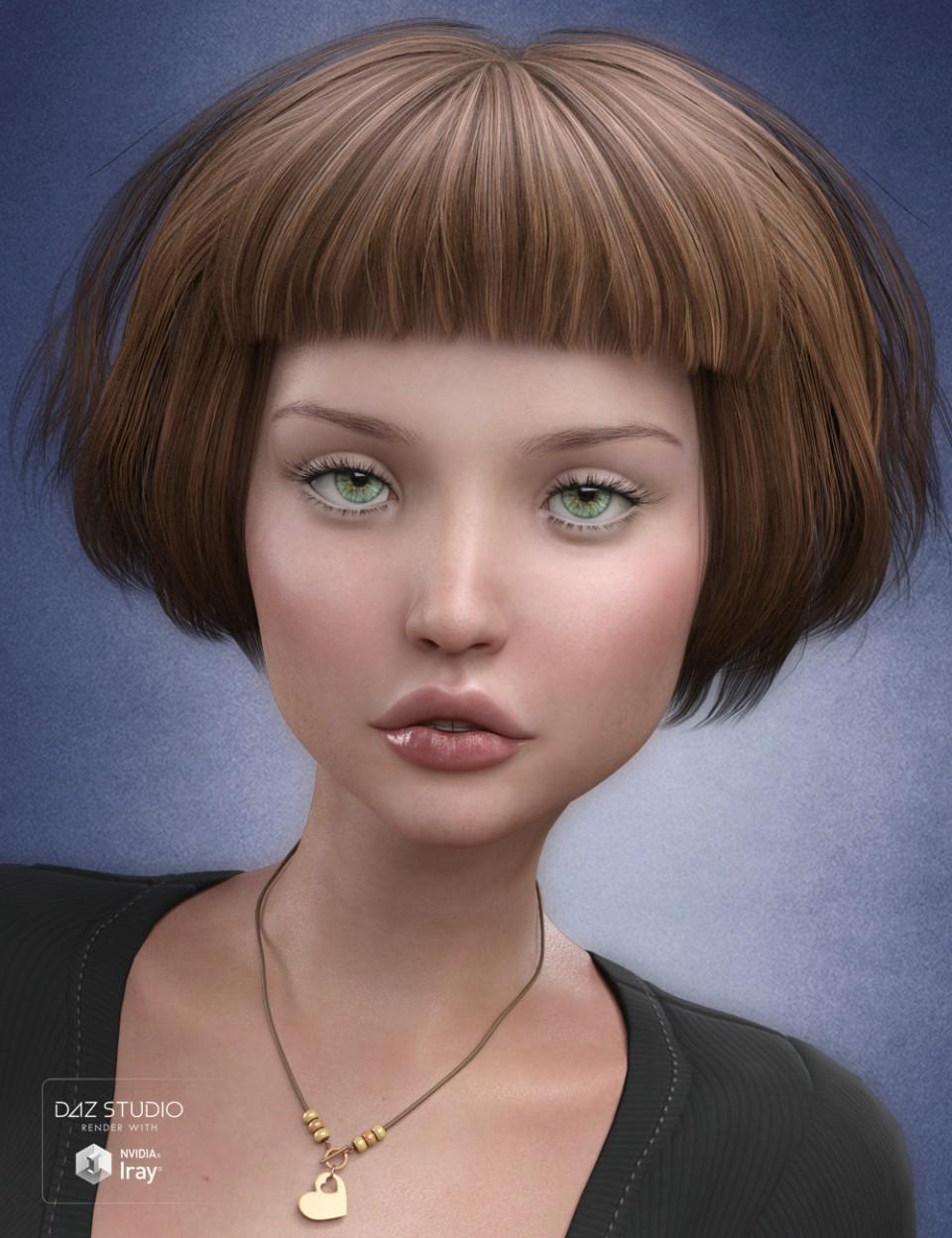
Tweaked. Can be a good business look, modern short hair, good for kids or adults.
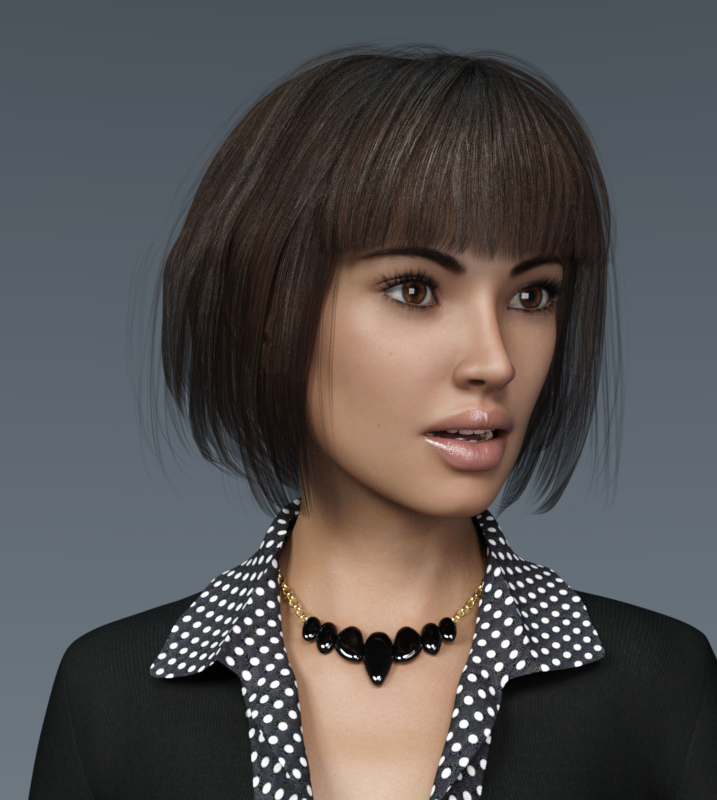
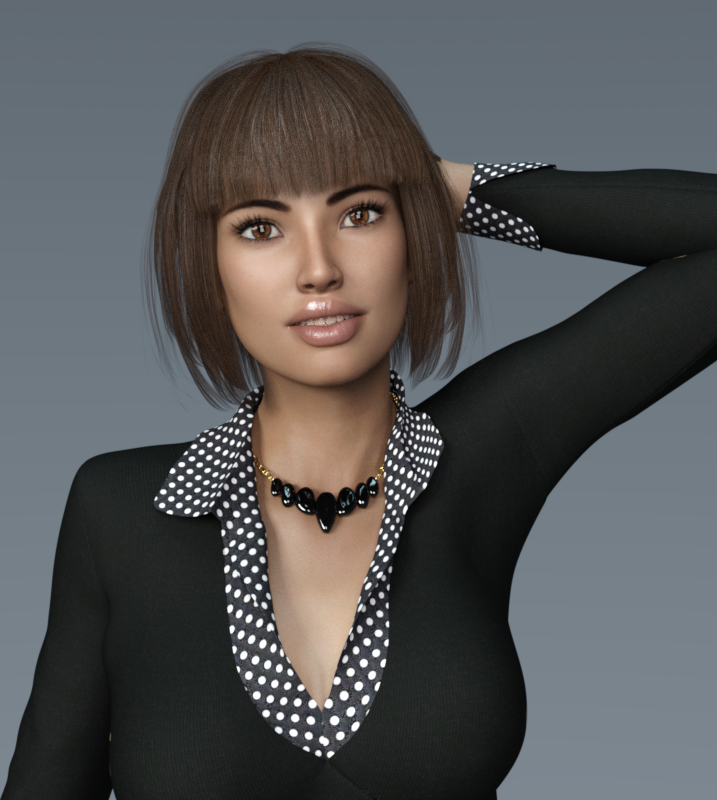
You can click to enlarge.
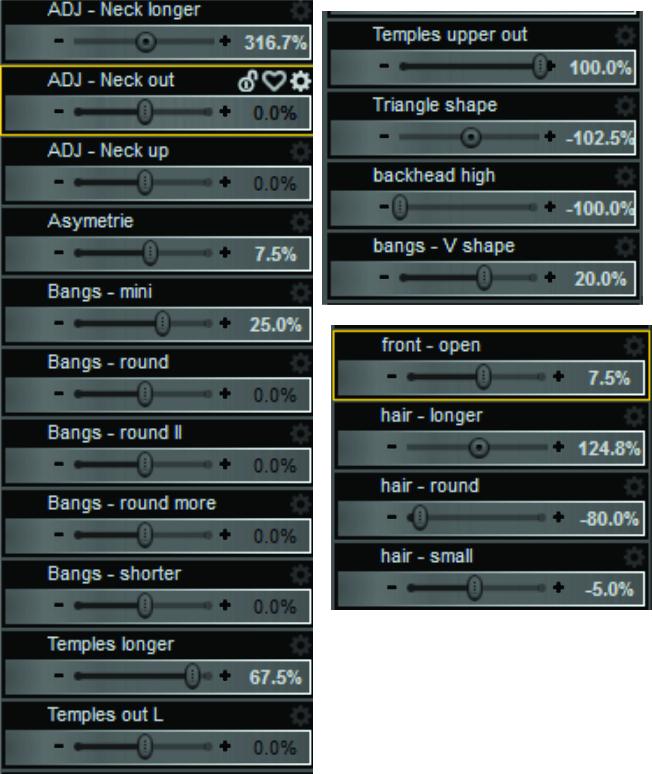 Knittingmommy's Laboratory
I started this yesterday and ended up staying up until the early morning hours working on this render. I started by using what merchant resources I had and used SimTenero Randomizer until I got a morph that I loved. I cleaned it up a bit and fine tuned the morph. Then I used Skin Builder 3 to make her skin. I really like how she turned out. Then, I set up the scene which included using VWD to drape both her hair and her dress. The hair was interesting because it has two parts. It's Medea Hair for Genesis 2 and it has an Add-on piece that I wanted to use. So, I draped both pieces individually selecting the piece I wasn't draping as a collision. It worked fairly well, I think. Isidora Dress is a great dress to work with and has a ton of morphs, but I think draping it gave it so much more realism. I love how it pools at her waist and on the floor.
Although I took some breaks, overall this project was started a little after 9 pm and I hit the render button one last time just before 7 am this morning. I was up all night with this one, but I just couldn't stop until it was rendering. I love how it turned out. I did a little bit of postwork in Gimp. The only thing I regret about this particular pose is that you can't really see her face very well. I'm rendering another image with a different camera angle for a closeup of her face. I didn't change the pose any because, frankly, I'm too tired now after only about 4 hours of sleep to go redrape the hair and the dress! I think she's one of my favorite characters that I've created so far so I'll definitely be rendering her again. For a complete list of everything used, check out the gallery link.
Nayeli
Gallery LinkDaz 3D is part of

Connect
DAZ Productions, Inc.
7533 S Center View Ct #4664
West Jordan, UT 84084Licensing Agreement | Terms of Service | Privacy Policy | EULA
© 2026 Daz Productions Inc. All Rights Reserved.