-
No "Coming Soon" Gen 9 stuff from PAs?
I would have thought there would be some teaser threads from PAs about the cool Gen 9 stuff they have been working on....
Has Daz required Radio Silence? I would have thought they would want a bit more buzz building up.
Somebody has to be working on Morph Converters, Clothes, Poses, Expressions etc etc.... c'mon, lets see emGenesis 9 Coming Soon! Preorder Victoria 9 HD TodayPerttiA said:
TheRetiredSailor said:
I think making judgements about G9 at this point is like watching a 30 second trailer for a movie and deciding the movie's ending is no good. The procuct should be out before long, even with "DAZ soon."
The 30 second trailer has already shown us the lowres geometry of the chest that would look fine on a barn door, but is severly lacking for a human chest details. We have also been lead to believe, the details will be HD morphs that can only be done by DAZ and DAZ PA's, not by us ourselves.
Sure, someone on the other stores will make a geograft, but that's not the same.
Maybe I'm not getting it because I was never satisfied with morphs alone on the chest area, but I always figured the geografts were at least partially a solution to the fact that we've never been able to customize the geometry there at the level of detail PAs are capable of. There are some third-party morph packs I can think of that have sculpted details, but they're pretty uniformly just the nipple area pulled out and basically indistinguishable from each other to me. I wish we had access to HD tools and all, and it does suck for anyone who was really getting into morphing those areas on their custom shapes, but most vendors I've seen don't. There's only so much you can do, even with the dedicated topology there.
Clothing Morphs appear under G8F ActorAhh - never mind, I see why now.
That particular clothing item does not have an "Actor" parameter subset so those morphs appear under the parent figure. If I unparent the skirt, the morph parameters are also unparented. So I created a new subset named "Actor" for the skirt and moved the morphs into that.
Clothing Morphs appear under G8F ActorI use Blender to create clothing morphs. I noticed something today that I have not noticed before and that is the morphs for the clothing appear in the parameters for the G8F actor as well as for the clothing item (see attached screen shot).
I have a Blender Export preset that I have used for a long time because I can't remember the export settings in either direction. I use Morph Loader Pro to import. If I delete the clothing from the scene the morphs under G8F also stop appearing in the parameters. Am I right in thinking that those morphs should only appear under the clothing and not under G8F as well?
 Need help fitting/transferring an obj file
That explains it. I've only seen transfer utility do that on a couple of occasions. I wonder why it did that? What options did you use in autofit?
I didn't know that the fitting room could do that... but poser tends to make my brain turn to mush.
Need help fitting/transferring an obj fileSorry it took so long for me to get back to you. Yes, in a way, it is a new mesh. The one with all the "islands" or holes is after I applied the Transfer Utility to the original mesh. When I went back to use Hexagon instead of the Transfer Utility, then most of the issues went away.
Unfortunately, it is still not perfect, because the Hexagon only fixes things for that particular pose. As you can see by the previous screenshots, when I pick another pose, then the elbows are now un-matched.
Also, I have hidden the fingers of the mesh because they were not aligning with the G8M figure as well. Not only that, but with certain poses, sometimes the fingers would grow to the size of "Edward Sizzerhand" size - very strange
I wish Daz had a "fitting room" like Poser, where you could select the figure and have it calculate the size of the clothing to match the figure
Getting Genesis 8 poses to work with non-Genesis figuresIt is possible to write a script to do the transfer, but the person writing the script really needs to have both characters.
I have done a scripts that bi-directionally transfer poses between V3 & G3/G8 and also V4 & G3/G8. It is a bit of a slog to write but not very hard, You need all the bone names in their correct case and do a best guess assessment of how different bones behave in relation to near-equivalent G8 bones. To see the sort of thing I did, take a look here: https://poserdazfreebies.miraheze.org/wiki/G8F_Pose_Transfer_To_Glamorous_Vickie_3_Script. GV3 has a T pose and feet that are bent 45 degrees more than G8F's, along with no pelvis bone etc, so all the sorts of conversion actions needed for the werewolf are already done in this character. The things that need doing & checking are described peripherally in this post: https://www.daz3d.com/forums/discussion/446941/g8f-pose-transfer-to-aiko-3-victoria-3-gv3
Now, you may have seen earlier in thais post that I said 'the person writing the script really needs to have both characters'. I am afraid I don't have the werewolf and it's not something I would want, but if you PM me, we might be able to find a way of exchanging enough information for me to do something useful. If I were to do it, I'd add one stipulation, that I can release the pose transfer script as a freebie at some point so others can use it too.
Regards,
Richard.
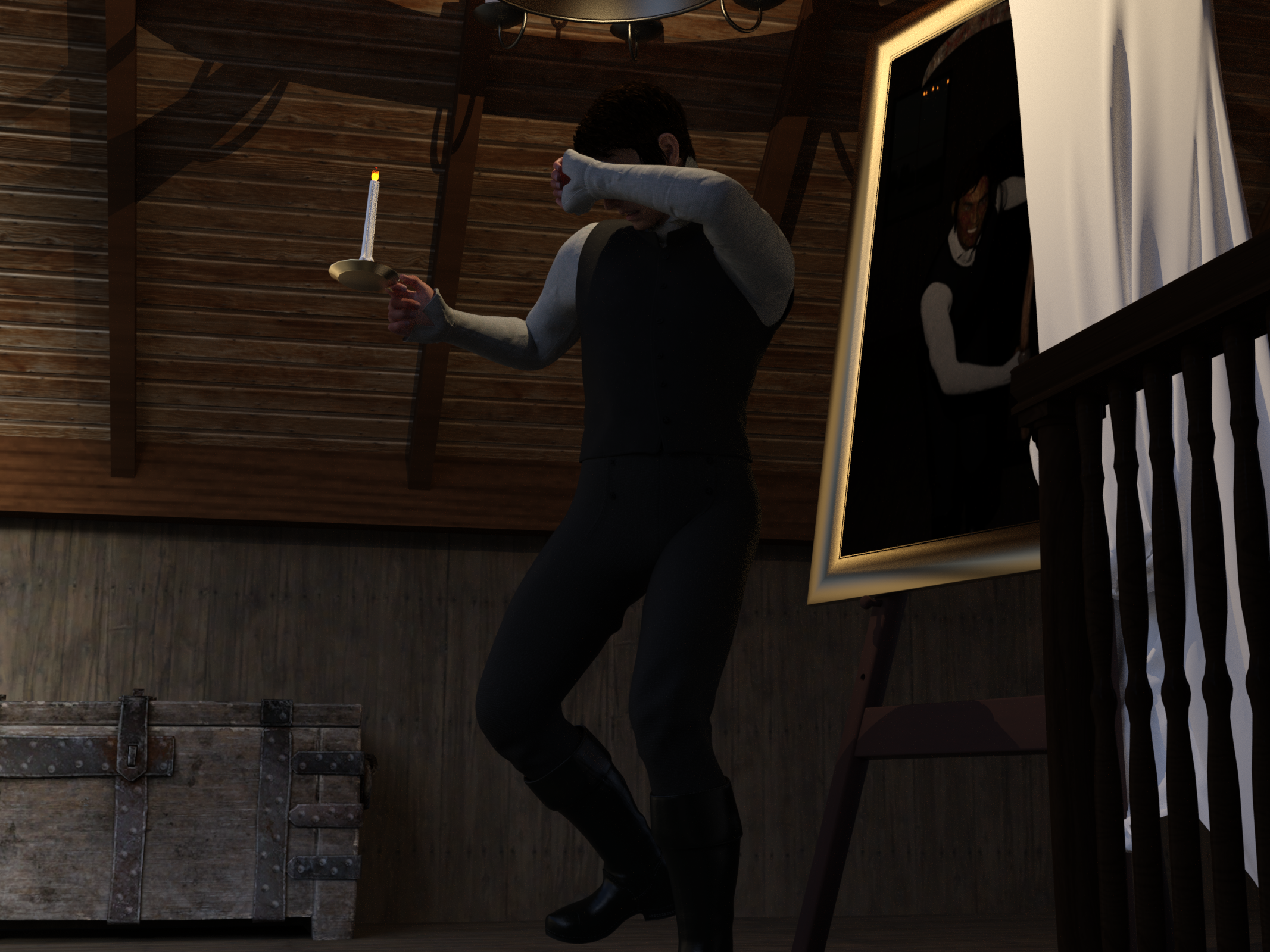
Freebie Challenge October 2022-"Horror Movies!" -Entries Thread OnlyThe Picture of Dorian Gray
If you don't know it, it's based on the Oscar Wilde story about a handsome young man who has his portrait painted; he doesn't like it and he curses it. He wishes that he will be young forever and that the painting will age instead. From then on, he sees the painting change for the worse every time he does something wrong, but he himself doesn't grow older or uglier. Eventually he hides it in the attic. With every sin, the painting gets uglier and scarier. Yet he can't destroy it or let anyone see it, lest he become hideous and scary himself. It's a good movie (1945) but an even better book. This is my take. I realize the portrait doesn't change to include weapons, but it does make him look much more sinister.
No count: G8M, Daz shaders, Daz primitives (planes for sheet and painting)
Paid: Ichabod outfit for Genesis Males
Free:
- The Attic -selfish plug here :-)
- Anton face morph
- Testing hair
- Walther 2.0 - skin
- Props - Stable Builder - candle and chandelier
- Allen Art Free Jewelry Shaders - shaders for picture frame, candle, chandelier
- Viking Age Props - chest
- Merlin's Free Scythe
- G8M Big Evil Smile
- Green and vein skin for G8M
- Rectangular mirror
- Easel
- HDRI lighting
 Freebie Challenge October 2022-"Horror Movies!" -Entries Thread Only
The Exorcist
This render is inspired by the 1973 supernatural horror movie, The Exorcist.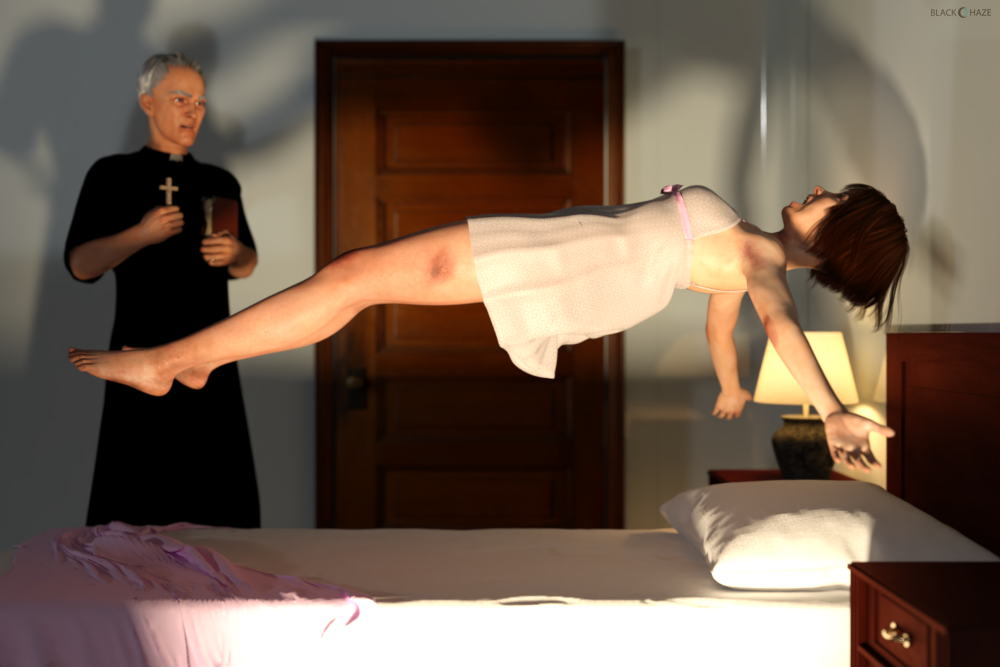
- Aiko 3 Reimagined for G8F
https://www.deviantart.com/tritiumcg/art/Aiko-3-Reimagined-for-G8F-861367761
- Jo Evans - Full Head and Body Morphs for G8F
https://www.deviantart.com/tritiumcg/art/Jo-Evans-Full-Head-and-Body-Morphs-for-G8F-859276366
- Transgender Genesis 8
https://www.deviantart.com/agentunawares/art/Transgender-Genesis-8-723851486
- Elderly Woman - Head Morph for G8F
https://www.deviantart.com/tritiumcg/art/Elderly-Woman-Head-Morph-for-G8F-854449238- Chameleon ROse2 for Genesis 8 Female by zoro_d (skin material)
https://www.renderosity.com/freestuff/items/85859/chameleon-rose2-for-genesis-8-female
- Rough Textures for G3F and G8F
https://www.deviantart.com/noone102000/art/FREEBIE-Rough-Textures-for-G3F-and-G8F-804353596- Buzzed Nape Short Bob for G8F
https://elleque.net/?p=8460
- So-oldier Hair for G8M by squarepeg3d
https://www.renderosity.com/freestuff/items/81424/hair-so-oldier-hair-for-g8m
- OnFleek for Genesis 3 & 8 Female(s)
http://shop.aprilsvanity.com/onfleek-for-genesis-3-8-female-s.html- Plush Lingerie for Genesis 8/8.1 Female by Tiboza
https://www.renderosity.com/freestuff/items/90893/plush-lingerie-for-genesis-881-female
- Free Lace Iray Shaders by adarling97
https://www.renderosity.com/freestuff/items/84697/free-lace-iray-shaders
- Clerical Garb by mjc26250
https://sharecg.com/v/82699/browse/21/DAZ-Studio/Clerical-Garb
- Erte inspired dforce dress for G8F - #3 by perlk
https://www.renderosity.com/freestuff/items/92127/erte-inspired-dforce-dress-for-g8f-3
- Old Book by Bonnyb1234
https://www.renderosity.com/freestuff/items/88625/old-book- Bed with dForce Blankets by sadrielxv
https://www.renderosity.com/freestuff/items/88392/bed-with-dforce-blankets
- Interior Door Game-Ready by AlirezaSadeghi
https://www.turbosquid.com/3d-models/free-max-model-interior-door/612776
- Round Windows Minikit by PixelSploiting
https://www.renderosity.com/freestuff/items/88401/round-windows-minikit-dufobj
- Simple table lamp 03 by Moin3D
https://www.renderosity.com/freestuff/items/90732/simple-table-lamp-03Freebie Challenge October 2022-"Horror Movies!" - Main ThreadDhivael said:
The Exorcist
This render is inspired by the 1973 supernatural horror movie, The Exorcist.- Aiko 3 Reimagined for G8F
https://www.deviantart.com/tritiumcg/art/Aiko-3-Reimagined-for-G8F-861367761
- Jo Evans - Full Head and Body Morphs for G8F
https://www.deviantart.com/tritiumcg/art/Jo-Evans-Full-Head-and-Body-Morphs-for-G8F-859276366
- Transgender Genesis 8
https://www.deviantart.com/agentunawares/art/Transgender-Genesis-8-723851486
- Elderly Woman - Head Morph for G8F
https://www.deviantart.com/tritiumcg/art/Elderly-Woman-Head-Morph-for-G8F-854449238- Chameleon ROse2 for Genesis 8 Female by zoro_d (skin material)
https://www.renderosity.com/freestuff/items/85859/chameleon-rose2-for-genesis-8-female
- Rough Textures for G3F and G8F
https://www.deviantart.com/noone102000/art/FREEBIE-Rough-Textures-for-G3F-and-G8F-804353596- Buzzed Nape Short Bob for G8F
https://elleque.net/?p=8460
- So-oldier Hair for G8M by squarepeg3d
https://www.renderosity.com/freestuff/items/81424/hair-so-oldier-hair-for-g8m
- OnFleek for Genesis 3 & 8 Female(s)
http://shop.aprilsvanity.com/onfleek-for-genesis-3-8-female-s.html- Plush Lingerie for Genesis 8/8.1 Female by Tiboza
https://www.renderosity.com/freestuff/items/90893/plush-lingerie-for-genesis-881-female
- Free Lace Iray Shaders by adarling97
https://www.renderosity.com/freestuff/items/84697/free-lace-iray-shaders
- Clerical Garb by mjc26250
https://sharecg.com/v/82699/browse/21/DAZ-Studio/Clerical-Garb
- Erte inspired dforce dress for G8F - #3 by perlk
https://www.renderosity.com/freestuff/items/92127/erte-inspired-dforce-dress-for-g8f-3
- Old Book by Bonnyb1234
https://www.renderosity.com/freestuff/items/88625/old-book- Bed with dForce Blankets by sadrielxv
https://www.renderosity.com/freestuff/items/88392/bed-with-dforce-blankets
- Interior Door Game-Ready by AlirezaSadeghi
https://www.turbosquid.com/3d-models/free-max-model-interior-door/612776
- Round Windows Minikit by PixelSploiting
https://www.renderosity.com/freestuff/items/88401/round-windows-minikit-dufobj
- Simple table lamp 03 by Moin3D
https://www.renderosity.com/freestuff/items/90732/simple-table-lamp-03All The Links Check Out Plz Post In The Entries Thread!
is possible to turn a non G8 figure into a G8 Character Morph?Or you might settle for something like Lycan that's already a G8 morph, and use the fur from, say, Reynard.
is possible to turn a non G8 figure into a G8 Character Morph?Ok, so the exact situation is that I want to create my ideal werewolf character.
I want to combine certain aspects of these two characters with some other G8 morphs to create my character (not intending to sell it, but if that's a possibility, yay!, for now I need it for art inside my novel)
Manitou
- https://www.daz3d.com/manitou
HH Werewolf
- https://www.daz3d.com/hh-werewolf
So, is it possible to make these into morphs for G8?
Please keep in mind I BARELY understand the technical aspects of the art.Anatomical elements on adult G8 and G8.1 modelsHaving expressed my appreciation for Catty 8.1 in this thread, it turns out that I can’t get her "Male Anatomical Elements" to look normal and the usual parameter/morph sliders won't work (apart from one or two exceptions).on those genitalia.
Let me explain: Catty 8.1 like Nishi and Hans 8.1 and a few others has two types of anatomical elements:
01 Female Anatomical Elements
02 Male Anatomical ElementsOn applying the "Genesis 8 Male Genitalia" from the central Smart Content "Anatomy" section on the Catty figure, the (sometimes 'dreaded') "Auto-Fit" popup appears asking you "What figure was the item originally designed for?". It's obvious that according the system Catty is a female figure. Within the autofit dialog you (basically have to) choose "Genesis 8 Male" which results in the figure getting the "Genesis 8 Male Genitalia" node (so far so good) that you apply one of two "Male Gens" materials to from the Catty figure. However, the end result does not quite look like the usual "Genesis 8 Male Genitalia" (let's say it is anatomically odd) and like I said the usual parameter/morph sliders won't work (apart from one or two exceptions) on those male genitalia. Products like "Transgender Shapes for Genesis 8" and "Genesis 8 UV Swap: Male and Female Base" don't seem to have any impact on this particular problem.
My question: How do you get the "Male Anatomical Elements" to look 'normal' with a figure like Catty that pretty much uniquely have their own Male and Female Anatomical Elements?
Genesis 9 Coming Soon! Preorder Victoria 9 HD TodayGordig said:
Padone said:
@jeylien The HD merchant resource doesn't exist for G1-G81 because it is not needed for those figures.
You've never seen merchant resources for previous generations, but that doesn't mean they didn't exist. We weren't meant to see the G9 merchant resources, either.
I think this is new - previous generations required that the end user own the morph packs directly, I guess for users exclusively populating their scenes with Daz characters they will now be more optional
Freebie Challenge October 2022-"Horror Movies!" - Main ThreadThe Exorcist
This render is inspired by the 1973 supernatural horror movie, The Exorcist.- Aiko 3 Reimagined for G8F
https://www.deviantart.com/tritiumcg/art/Aiko-3-Reimagined-for-G8F-861367761
- Jo Evans - Full Head and Body Morphs for G8F
https://www.deviantart.com/tritiumcg/art/Jo-Evans-Full-Head-and-Body-Morphs-for-G8F-859276366
- Transgender Genesis 8
https://www.deviantart.com/agentunawares/art/Transgender-Genesis-8-723851486
- Elderly Woman - Head Morph for G8F
https://www.deviantart.com/tritiumcg/art/Elderly-Woman-Head-Morph-for-G8F-854449238- Chameleon ROse2 for Genesis 8 Female by zoro_d (skin material)
https://www.renderosity.com/freestuff/items/85859/chameleon-rose2-for-genesis-8-female
- Rough Textures for G3F and G8F
https://www.deviantart.com/noone102000/art/FREEBIE-Rough-Textures-for-G3F-and-G8F-804353596- Buzzed Nape Short Bob for G8F
https://elleque.net/?p=8460
- So-oldier Hair for G8M by squarepeg3d
https://www.renderosity.com/freestuff/items/81424/hair-so-oldier-hair-for-g8m
- OnFleek for Genesis 3 & 8 Female(s)
http://shop.aprilsvanity.com/onfleek-for-genesis-3-8-female-s.html- Plush Lingerie for Genesis 8/8.1 Female by Tiboza
https://www.renderosity.com/freestuff/items/90893/plush-lingerie-for-genesis-881-female
- Free Lace Iray Shaders by adarling97
https://www.renderosity.com/freestuff/items/84697/free-lace-iray-shaders
- Clerical Garb by mjc26250
https://sharecg.com/v/82699/browse/21/DAZ-Studio/Clerical-Garb
- Erte inspired dforce dress for G8F - #3 by perlk
https://www.renderosity.com/freestuff/items/92127/erte-inspired-dforce-dress-for-g8f-3
- Old Book by Bonnyb1234
https://www.renderosity.com/freestuff/items/88625/old-book- Bed with dForce Blankets by sadrielxv
https://www.renderosity.com/freestuff/items/88392/bed-with-dforce-blankets
- Interior Door Game-Ready by AlirezaSadeghi
https://www.turbosquid.com/3d-models/free-max-model-interior-door/612776
- Round Windows Minikit by PixelSploiting
https://www.renderosity.com/freestuff/items/88401/round-windows-minikit-dufobj
- Simple table lamp 03 by Moin3D
https://www.renderosity.com/freestuff/items/90732/simple-table-lamp-03huge time loss on loading G8f for 'Formula output property not found'About 30% of that log is "bugs" that need what I class as minor surgery to fix.
The rest is split between files you can probably safely delete, and files you can't touch without breaking the product.
If a product is a morph or expression for G8 then expect it to have "required" products that aren't listed.
question about Facegen head formatIf I'm not mistaken, you could load the .fbx into Blender, export out an .obj file. Then load the .obj file into FaceGen and let it morph away any of the target Genesis figures you select.
Moving Morphs from Centuar 8 to Centuar7Hmmmm been struggling with this most of the day Gen3 Centaur does have the "male centaur additive " and that is just the centaur horse body , and if I unparent the Genesis8 male Centaur body from the Genesis8 male ,then delete the Genesis8 male,eyelashes and Geoshell ,drop the resolution on both bodies to base ,........ then I have 2 centaur bodies that look the same ,so does that mean I could then ,apply a shape to the G8horse body ,export it ,then import that shape as morph on the G3 horse body ?
Genesis 9 Coming Soon! Preorder Victoria 9 HD Todayjeylien said:
In the livestream yesterday (I wasn't able to watch live, so watching now!), people were talking about the Merchant Resource versions of the G9 morphs, and while I can see those in the store, I never saw any merchant versions of the Daz head & body morph sets for Genesis8, so I was wondering, did that ever exist? (If so, could somebody give me a link or tell me where to go for that?) Though I currently couldn't afford them, I would've gotten the merchant version in the past if I'd known that was available. Glad it's an option with G9 now though, and I guess I'll just have to work more and save up more and upgrade sooner than I'd planned!
Oh the PAs do NOT pay that much lol ... anytime Daz3D puts a super silly high price on items, that is to DETER people from buying it/them.
Only PAs can buy the Merchant Resources for these basic morphs AFAIK.
You would have to contact Daz3D via the help support ticket system and talk with them about any licenses available [such as for merchant resource use] of their morphs by non-PAs.
What we all can do is make and sell or share Shape Presets [as those require the end user to also own the morph packages] -- if mixed in with our own morphs, they MUST be dialed out of the morphs we share [free or $]. [last I read, I do not speak for the company, I just read [too] many posts.]
Genesis 9 Coming Soon! Preorder Victoria 9 HD TodayIn the livestream yesterday (I wasn't able to watch live, so watching now!), people were talking about the Merchant Resource versions of the G9 morphs, and while I can see those in the store, I never saw any merchant versions of the Daz head & body morph sets for Genesis8, so I was wondering, did that ever exist? (If so, could somebody give me a link or tell me where to go for that?) Though I currently couldn't afford them, I would've gotten the merchant version in the past if I'd known that was available. Glad it's an option with G9 now though, and I guess I'll just have to work more and save up more and upgrade sooner than I'd planned!
Daz 3D is part of

Connect
DAZ Productions, Inc.
7533 S Center View Ct #4664
West Jordan, UT 84084Licensing Agreement | Terms of Service | Privacy Policy | EULA
© 2026 Daz Productions Inc. All Rights Reserved.