-
Adding Pose Categories
There is likely a better way so it's best to wait for wiser heads to answer, but when I'm creating metadata for poses set and I don't find the correct category (even when they are used by products sold here who are using it, 'Default/Poses/By Region/Partial Body/Upper' I write thee name
 ), what I'm doing is setting a category I don't use anywere else and then, I'll edit the dsx file with the metadata, search and replace that category by the one I wanted.
Once the dsx file is saved, I'll delete the product from the medatata (Content Library > Products > Right click on the product name and then Delete), before reimporting the product (Right clicking on the Content Library tab with the Content Library open, then Database Maintenance > Reimport Metadata, then I unselect everything then I select the product I want to reimport) and tadaaaa, I have the category I want.
If an easier way exist, I'm interested too
 Obj imports without any textures after recent update
You can make a copy of the file before doing anything to it. The advice was to open the .mtl file in a text editor and look at it, not to change anything. My advise has been so assign the textures manually in Daz Studio in the Surfaces tab , not to assign them manually in a text editor. Assigning textures to a few material slots in the Surfaces tab should only take a few seconds. If you have hundreds of textures then it is going to take a long time however.
You claim that you are exporting your files from blender correctly. How do we know this unless you check the .mtl file? If you are not going to check the .mtl file, have you at least imported the exported .obj file back into Blender, and seen that the textures are appearing? if they are not appearing in other software besides Daz Studio, then it would suggest the .mtl file is not being written correctly when exporting from Blender, not that there is issue with Daz importer.
You also did not state which version of daz studio has the problem. "Recent update" means what exactly, the alpha?
Just to repeat: an obj will not import all textures correctly into Daz Studio. some texture maps will not be included in the .mtl file (e.g., Normal maps) and some will be allocated to wrong slots on the Iray Uber shader upon import. Therefore obj is not a good option for automatic assignment of ALL textures. An alternative to obj is .fbx or the Blender to Daz bridge.
barbult's take on the lives of Jack and RichardAugust 2023 - This starts another story about Jack and Richard. I rendered this image for a Daz+ Inspiration Contest. Those contests require the use of at least one of the week's new Daz+ releases. At the time, I had no idea that this render would become a lead-in to a Jack and Richard story.
I decided the new spurge plants make good seaweed. They look surprisingly great under water, even though that was not the PAs intent. I also learned that it is hard to make an octopus fist.
The Specimen Escapes
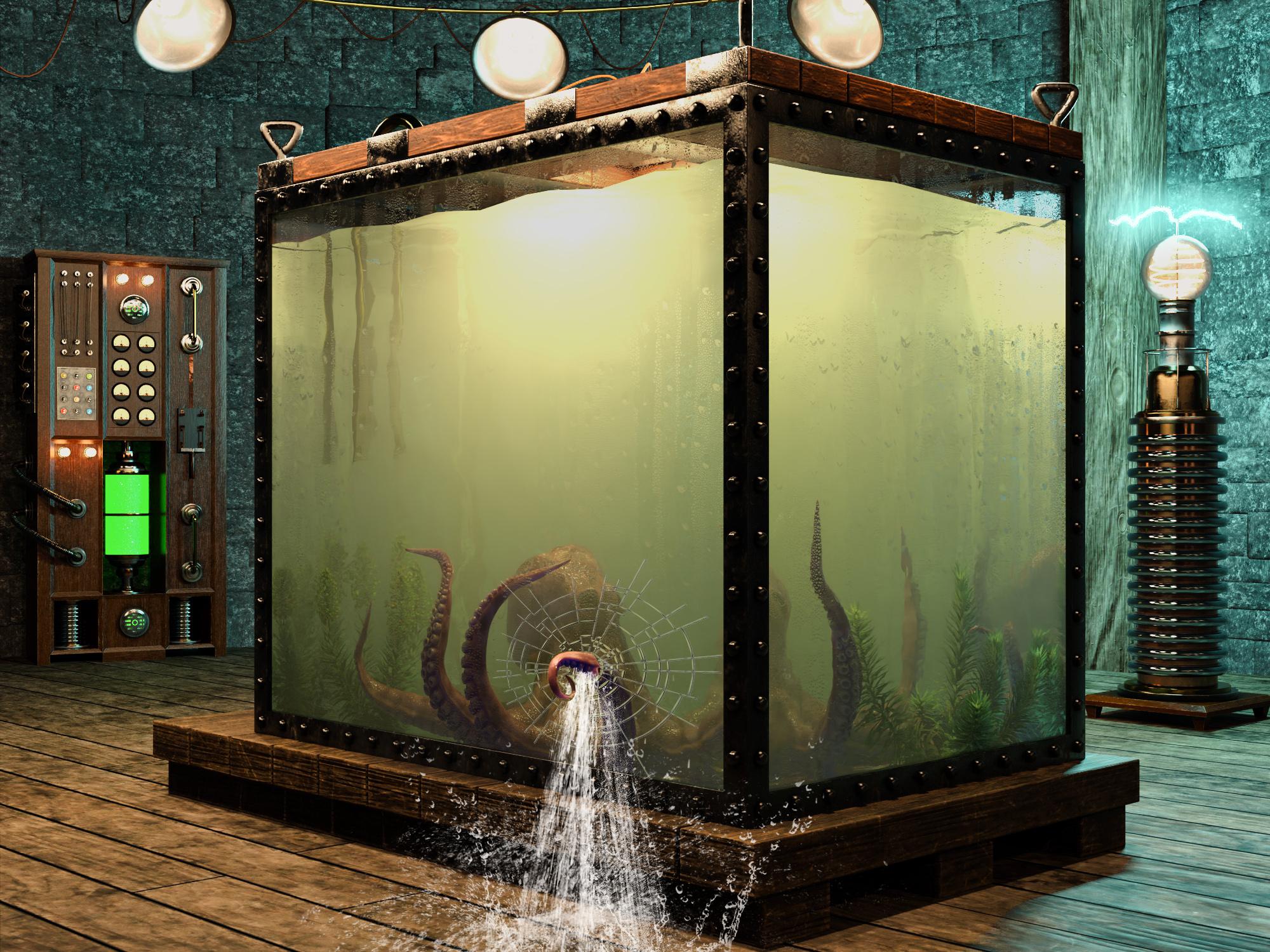
Item Used: Mediterranean Flowering Spurge Plants
Some Reader Comments:
junk: Dang that is such an incredible image! I love images that get you wondering. about what happens next. Plus such a creative use of the plant as seaweed.What Came Next
(Thanks to junk for the inspiration!)
Public Service Announcement [braaaap braaaap braaaap]: The Specimen is on the loose! Keep a watchful eye. Report any sighting to your nearest species control agency. Do not venture out. Stay safe.
The lab is flooded. The equipment has shorted out and is starting to rust. Only the solar powered lighting remains functional. Nature's flora and fauna are establishing a renewed foothold. The spurge is thriving!
Qualifying Item - Mediterranean Flowering Spurge PlantsOblivion
Having arrived early in the Daz Meeting Room for the unveiling of Genesis 10, Jack and Richard pulled out the Nine Men's Morris board to play a few rounds. Oblivious to the threat outside the window, they continued to play. Richard was ahead 8 to 2. Nine Men's Morris is Richard's favorite game, because he is sure it is named for his great uncle "Nine Lives Morris".
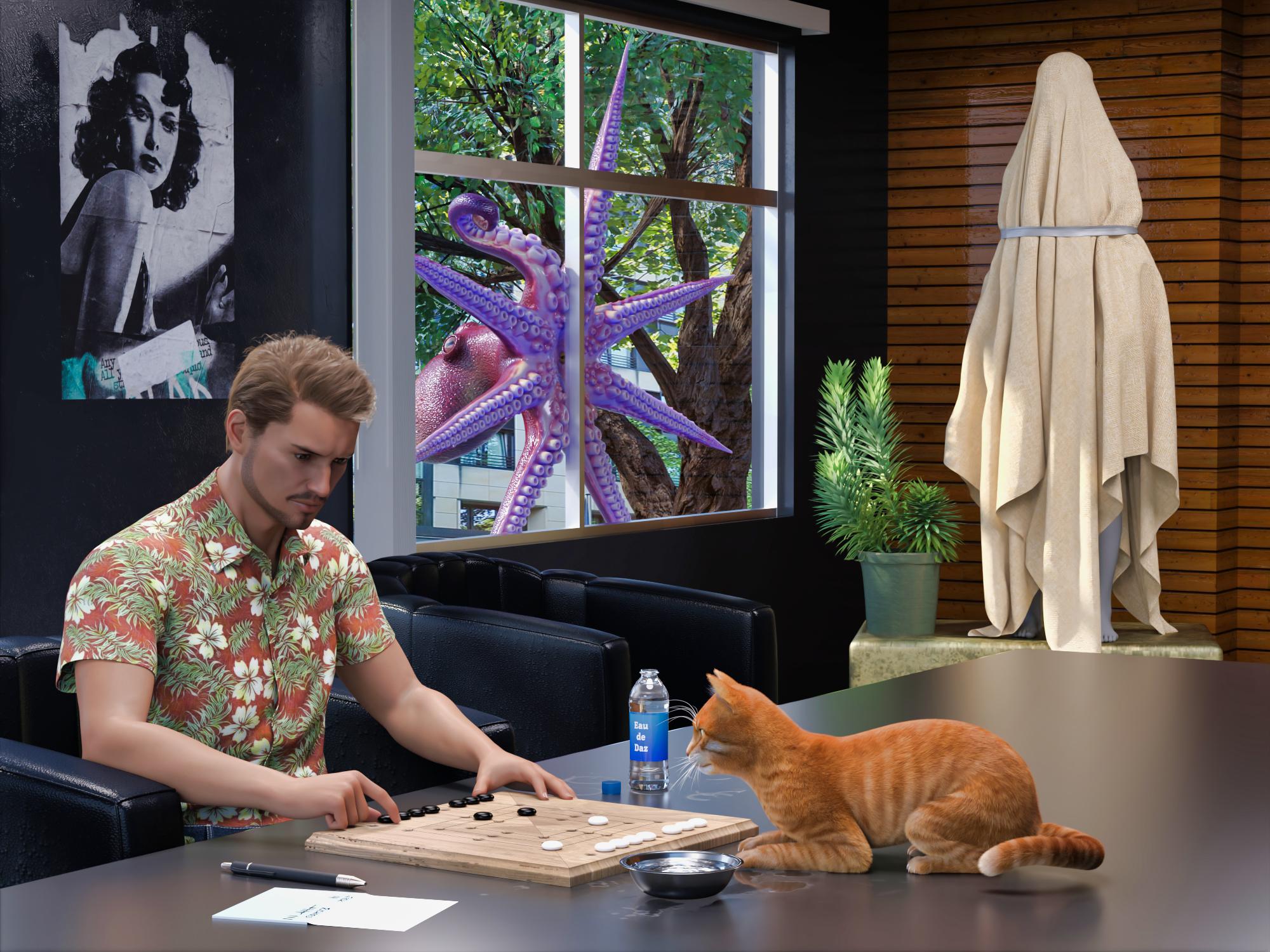
Items used:
English Village Pub GamesSome Reader Comments:
Richard Haseltine: Ah, seafood. (I hope.)
Lilwolff: "I spy with my lil eye and it is pink and purple" Along with new cast member. Wonderful fun barbult!
barbult (back to Richard): Alright, my path is clear. Something or someone will become food in an upcoming render.

Richard Haseltine: Ulp. Is it too late to suggest it might be part of my underground railroad for the unjustly imprisoned?
barbult (back to Richard): Yup, too late! The die is cast. Your future is predefined. Good luck on your underground railroad, though. Have you designated a second in command? You know, just in case... I'd suggest that Jack is not a good choice, 'cause, well, you know...
Well, I'd better get to rendering. Hm... "rendering". That has to do with cooking fat out of something. Well, let's not go there!Lunch?
The specimen peered through the Meeting Room window. "Ah...see...FOOD!"
It smashed through the glass, trashed the room, and snatched its prey, faster than the blink of a human eye.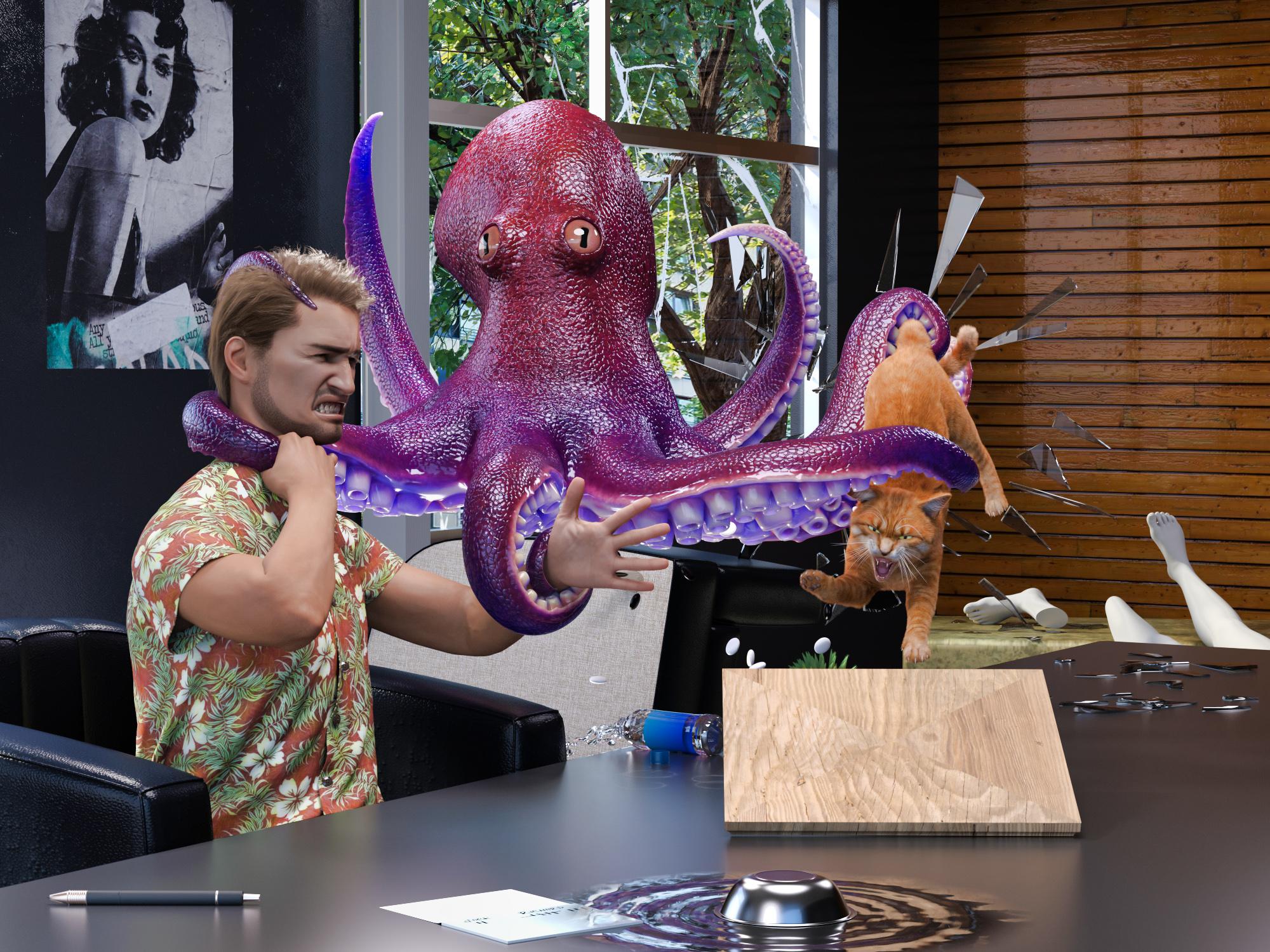
Item Used Pure Masculine Expressions for Genesis 9
Just to demonstrate my commitment to continuing this story: I had to create a whole new "Jack". Old Jack was G8. To use the new G9 expressions, I had to create a G9 Jack. To keep the continuity, I wanted to use the same skin. I own the Legacy UVs for the female, but not the male, and the male set was not on sale at the time. So...I used the G8 UV Swap and Map Transfer to create a set of G8F maps for my G8M skin and saved it as a Material Preset that I could apply with the Legacy UV for the female UV. Then I tried to dial a G9 character similar to the old G8 character, but I wasn't completely happy with it, so I manually converted the G8M character shape to G9. Then I discovered that the shirt didn't autofit very nicely to G9. Since it was something I made in Marvelous Designer, I loaded up the old G8M project and a G9 avatar and refit the shirt to G9. Then I had to export it as OBJ, and import it to DS, and run the transfer utility, and retexture it, and reattach buttons. Then, I could work on the scene! Whew.
Some Reader Comments:
Richard Haseltime: That's an impressive effort - though i am not entirely sure I appreciate it.
barbult (back to Richard): Cats have nine lives (as your great uncle Morris would remind you). Certainly, you must have a few left. I'd say that Jack is the one who should be most concerned. He has only one life to live. (Oh, I hear old soap opera music playing now.)
Richard Haseltine: I was a litle concerned about what might happed with today's releases after Jack had been chugging throat linctus (he claimed).
barbult (back to Richard): He'll be needing something pretty strong after the next episode.Rob to the Rescue
(This render introduced Rob (rbtwhiz), Daz developer, to the cast of characters. Why is he a shark? Well, Joe Quick released Jawsome Quickstrike HD shark for Genesis 9 that week, so I just had to use him. And Rob's avatar does have kind of a fish tail on the end of his hair, so...)
Just then, Rob arrived in the Meeting Room for the ceremonial unveiling of Genesis 10. He encountered a horrific site! Yes, Genesis 10 lay shattered and exposed on the Meeting Room floor! A tear fell from Rob's eye.

Oh, one more thing... "Untentacle my colleagues, you slimy specimen!", screamed Rob, brandishing the sword he was going to use to remove the cover from Genesis 10. "You destroyed my Genesis 10! You and I are going to have it out here and now!"
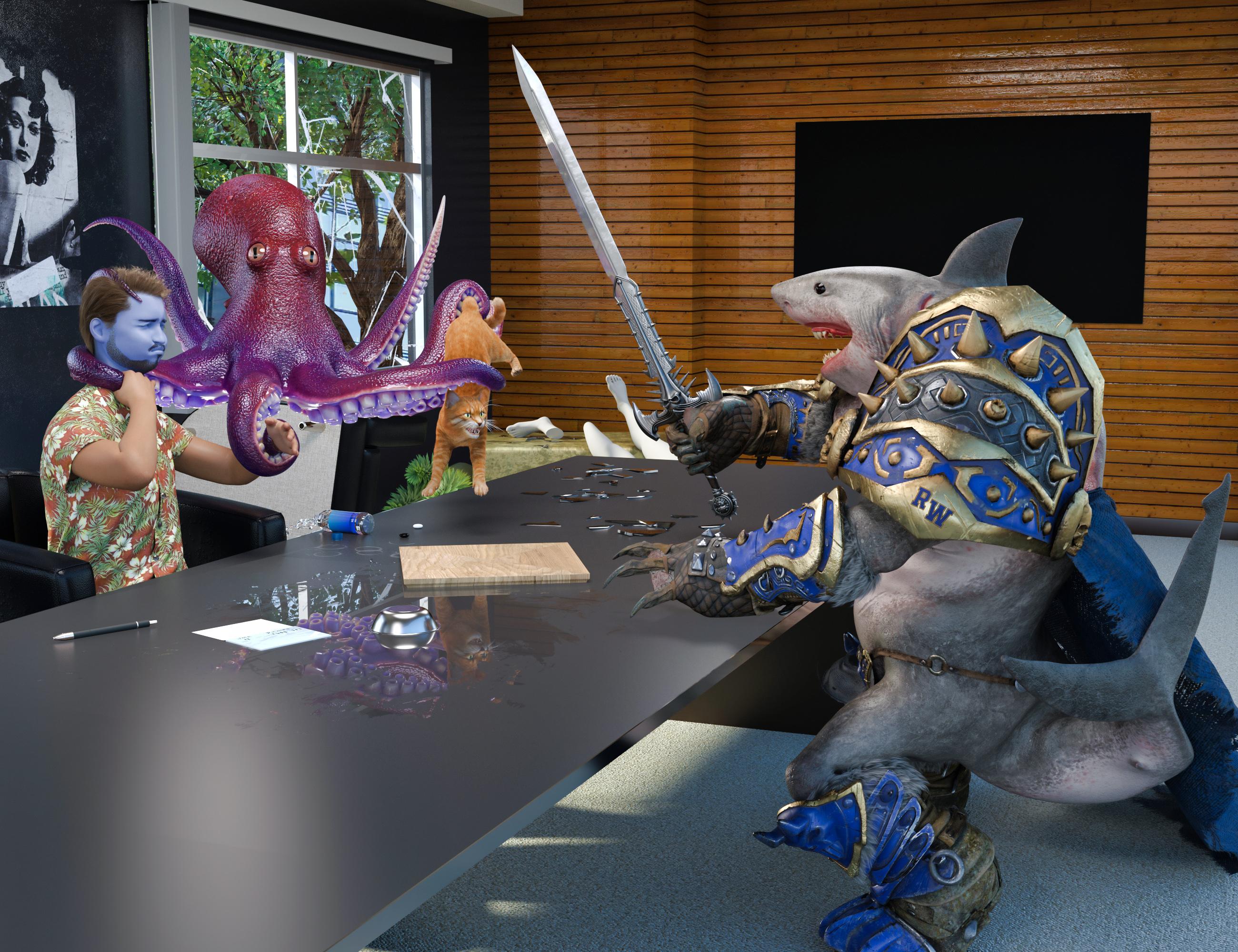
Items Used:
Jawsome Quickstrike HD Shark for Genesis 9 (Rob)
Pure Masculine Expressions for Genesis 9 (Jack and Rob)
Some Reader Comments:
Richard Haseltine: Phew! Though I think Jack wants CPR, ideally from VictoriaX.
barbult (back to Richard): Oh, dear Richard. Sit down. I am painfully sorry to be the one to break this news to you, but VictoriaX is not a living, breathing, human being, capable of performing CPR. (This is like telling a child that Santa Clause is not real. ) Besides, I believe Jack is a married man and father. Being publicly caught in a lip lock with VictoriaX would not be good for those relationships. It is rather catty of you to suggest such a thing! No. No. We can't go there. Jack's medicine will have to come from elsewhere. The still is already cranking out a new batch. Edit: Oh, I realize what's going on here! You are still mad at Jack's wife for banning you from their house because of the hat construction mess. You are trying to break up their marriage by hooking Jack up with VictoriaX. Bad cat! Bad! It won't work. Jack is too honorable.
Ah, Seafood
The specimen was multi-armed, but Rob was more heavily armed, with a battle sword and teeth - lots of teeth - big jagged saw tooth teeth, and he hadn't had lunch yet.
Slash, slash, chop, chop, chop, slice, slice, chomp (yum, that head was tasty!)...
"Bon appetite, fellas", said Rob, as he sped away on his motorcycle to go finish Daz Studio 5.
Jack wanted nothing to do with it, as he chugged his throat linctus (so he claimed), but Richard dug right in. "Ah, seafood!", he exclaimed.The End
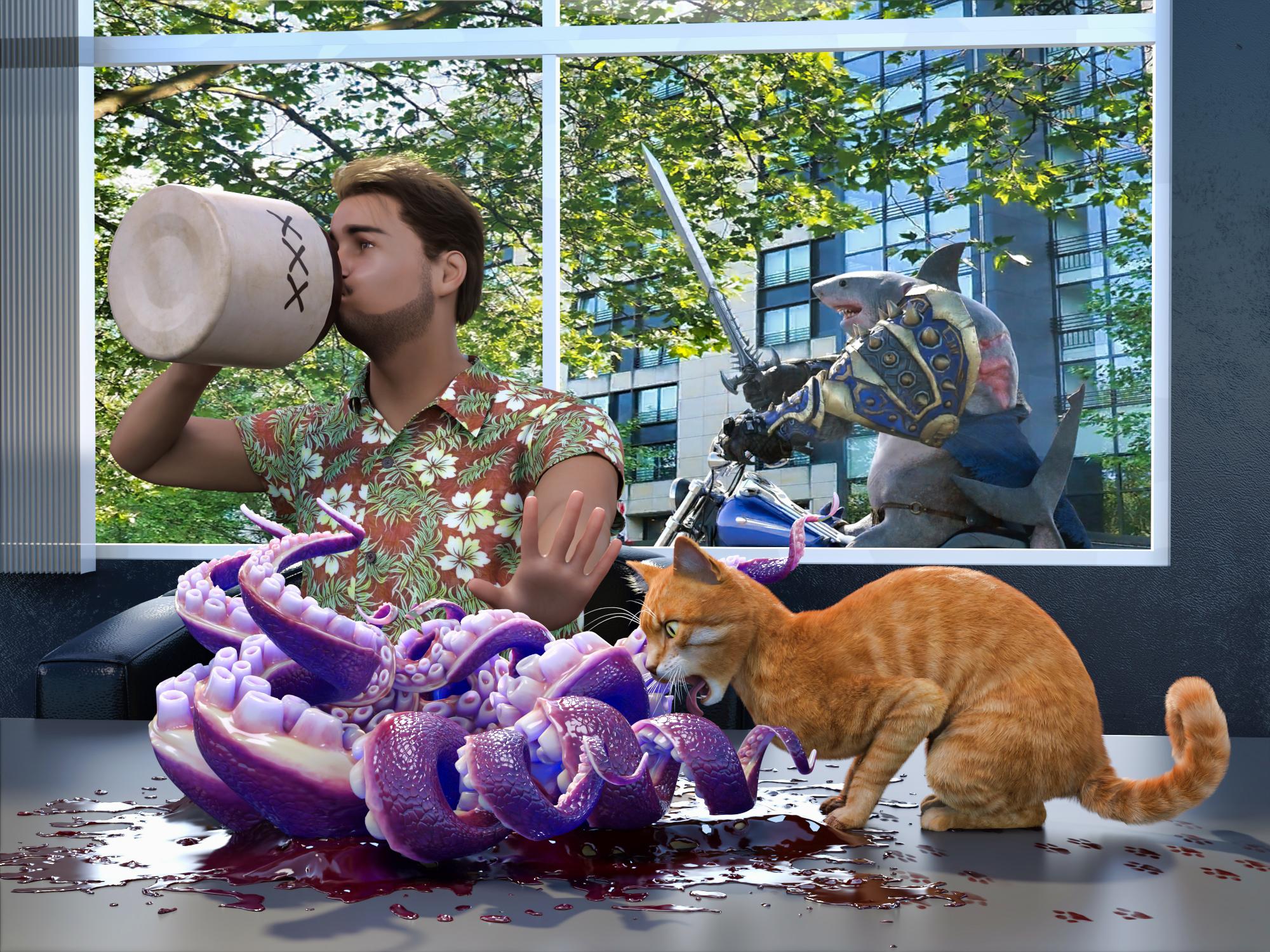
Yes, our guys have survived another harrowing adventure by the skin of their teeth. How long can luck like this last?
Items used:
Jawsome Quickstrike HD Shark for Genesis 9 (Rob)
Pure Masculine Expressions for Genesis 9 (Jack and Rob)
Some Reader Comments:
Richard Haseltine: Alas, poor escaped specimen (/sheds a tear, sincerity not guaranteed)
barbult: Thank you for all your entertaining responses that drove the story along, Richard.
Richard Haseltine: It's a cat's business to cause trouble.Interested in learning how to create an add-on through scriptingPadone said:
prompt: dear AI, please write a converter from daz studio to blender for windows, having a duf file as input and a blend file as output, of course all the daz features have to be converted as best as possible, or approximated otherwise, then please write a detailed description of the limitations if any, thank you.
reply (very smart AI): dear Sir, you better use diffeomorphic

I love it! I couldn't resist asking ChatGPT "What is the Diffeomorphic DAZ Importer, and who is this wise-cracking Italian guy, Padone?" It knows you, bro. :)
The Diffeomorphic DAZ Importer is a powerful and widely respected add-on for Blender, developed to import characters, props, and animations from DAZ Studio into Blender while preserving as much detail and functionality as possible. It enables Blender users to take full advantage of DAZ Studio’s high-quality Genesis figure models—especially the Genesis 3, 8, and now 9 series—within Blender's more sophisticated rendering and simulation environments, like Cycles, Eevee, cloth physics, and rigging workflows.
Who Is Padone?
Padone (a pseudonym, clearly meant to sound like "padrone"—Italian for "boss") is a key contributor to the Diffeomorphic project. He’s known in the Blender and DAZ user communities for:
-
Maintaining and developing the add-on.
-
Writing extensive documentation on https://diffeomorphic.blogspot.com.
-
Providing support on forums like DAZ3D, Blender Artists, and GitHub.
-
Having a dry, occasionally sarcastic sense of humor that people either enjoy or find bewildering—hence the “wise-cracking” vibe.
He is a technically adept coder with a deep understanding of both DAZ Studio's and Blender’s internal structures. His posts often reflect a strong opinion about good design practices, clean rigs, and avoiding the “DAZification” of Blender (i.e., not dragging in DAZ’s clunky setup just for the sake of it).
In essence, Padone is part tech-wizard, part community curmudgeon, and fully committed to making DAZ-to-Blender workflows viable for serious artists and animators.
I'm moving my DAZ Studio content to an 8TB drivebshugs1525871 said:
I had moved my library to a NAS. The drives are HDD, but the RAID array makes up for most of that lag. Currenlty using 1GB ethernet, but hope to increase it to 10GB soon.
Tomhip said:
I am in middle of migrating my DAZ installation to a new 4TB SSD drive on a new PC :D
Decided to do the crazy thing and instead of copying the old 2TB Library to install everything from scratch and curate things that go in this time.
Originally when I have started with DAZ I went thorough a phase of installing every single freebie I would find, be it form DAZ or other sites. Cleaning this up now would be next to impossible.
Decided on strategy of first instaling all things that I own on third party sites and clean folder structure up as these can be prety random. Then install things required for models i frequently use. Next will be slow installation of props/envs that I know are good and will use again.
The improvement in loading times is crazy. Will see how long it lasts.
Hey there! I recently reinstalled my OS and Daz and am thinking about doing this. Can you give any hints or tools you used to do this? I'd really love to streamline my hard drive but I have thousands of Daz store products and thousands more third-party/free products. Did you do everything manually? What folder structure did you insist on? Do you use metadata or just the Content Library?
Any help would be appreciated! I still have my original, bloated library but would love to reduce search time and clear out crappy props and Akio3 dresses I'll never use.It all was manual work really.
I tend to use Smart Content for all the DAZ Store items but for third party they most often do not have any metadata so I moved them all to folders whwre I could easily find them. The only thing that has to be installed in fixed place is Runtime and Data folders. Everything else like poses, clothes etc can be freely moved around.
In my old system I could never find these items as they were burrined in sea of DAZ Store items. Also many products come with typos or some non standard structure making them hard to find.
Hair converter add-on for BlenderHello
This is a great tool and the instruction are very clear, But dont knnow why i am able to install the add on but not able to convert the obj into hair.
I have tried to install the add on in differnt version of blender 2.8, 2.9. 3.2. 3.6. 4.2, 4.4 and so. In all on them I am getting the same error "conversion failed". The only diffence I do is I created a hair cap out of the head geometry of teh model.
I first exported the hair and other assets as obj from daz3d and imported into blender.
then I create a head cap from the Head geo itself and them I select the hair and the head cap Geo and when I press on convet hair I get conversion failed message.
Can u kindly help me like what i could be doing wrong.
Should I import another hair cap from another files and try them,
or is there anything that I am missing.I'm moving my DAZ Studio content to an 8TB driveI had moved my library to a NAS. The drives are HDD, but the RAID array makes up for most of that lag. Currenlty using 1GB ethernet, but hope to increase it to 10GB soon.
Tomhip said:
I am in middle of migrating my DAZ installation to a new 4TB SSD drive on a new PC :D
Decided to do the crazy thing and instead of copying the old 2TB Library to install everything from scratch and curate things that go in this time.
Originally when I have started with DAZ I went thorough a phase of installing every single freebie I would find, be it form DAZ or other sites. Cleaning this up now would be next to impossible.
Decided on strategy of first instaling all things that I own on third party sites and clean folder structure up as these can be prety random. Then install things required for models i frequently use. Next will be slow installation of props/envs that I know are good and will use again.
The improvement in loading times is crazy. Will see how long it lasts.
Hey there! I recently reinstalled my OS and Daz and am thinking about doing this. Can you give any hints or tools you used to do this? I'd really love to streamline my hard drive but I have thousands of Daz store products and thousands more third-party/free products. Did you do everything manually? What folder structure did you insist on? Do you use metadata or just the Content Library?
Any help would be appreciated! I still have my original, bloated library but would love to reduce search time and clear out crappy props and Akio3 dresses I'll never use.more....Wacky Modelling ~ In Carrara ~LoL. Makes that building look small. Where's King Kong? Right now I seem to be torture testing Carrara. We will see how it goes! Looking a bit scary. Seriously, taking Carrara forever to import this lamh obj, OMG!
Using a Genesis 9 clone on Genesis 8 or Genesis 3Hi all,
I read an interesting post on how to get a single morph from a Genesis 8 figure to work on a Genesis 9 figure by using a Genesis 9 clone on a Genesis 8 figure: This is what the post said:
"The way of using Clone is simple. Main steps: Dial G9 Clone on G8, import G9 Base OBJ and rig it on G8 with Transfer Utility, dial an HFS Hand Morph on G8, export rigged G9 to OBJ and import it to G9 Base figure as a Morph."
So where do I find this Genesis 9 clone for Genesis 8? And is there also a Genesis 9 clone for Genesis 3? The morph I want to carry was originally made for Genesis 3, and I transferred it to Genesis 8, but I think it would be better to transfer the original one straight from Genesis 3 to Genesis 9 if possible.
Thanks a lot,
Kind regards,
MeDaz Bridge Support Is Here!michalstangel said:
Hello,
When I send character into Blender via Bridge morphs are unfortunately added only to main mesh, but missing on Eyelashes, Hair and Clothing meshes (as you can see on attached file). It seems that sometimes small percentage of morphs go through and I have FBMBodybuilderSize on Eyelashes (which seems to be irrelevant) and EyeClosed. But no expressions like Wink HD, Weight or anything else. Clothing is completely blank. Tested with Genesis 8-1 and 8 figures.
My target platform is Unity and till now I've been using classic workflow. Export FBX from DAZ (loading desired morphs through csv there), Import FBX to Blender. Run my Python script to get rid of same materials. And save as FBX and import to Unity. It works fine and all morphs/blendshapes on all meshes are preserved. However this workflow has one flaw. It messes bone rotations a bit. So Bridge looks like a nice alternative if I would be able to preserve all morphs.
Not sure how it works but maybe add some option to Import settings to not interfere with morphs on meshes and leave it as it is, if Blender might be just your transit station where you don't need to set them through sliders?
Whats it gonna take?wolf359 said:
dont' know the whole story, but for whatever reason they split up and went their own ways.
Here is the story.
Daz Decided it was better to base their business model on a figure format that Daz owned (Genesis ,DSON) made for a platform they owned (Daz studio)
Rather than allow an external platform(Poser) to be the single point of failure for their business.
Posers owners failed to create their own native figures ,of a quality that vendors wanted to support, choosing instead to crowd source new poser figures from various third parties.
Reallusion figured out a way to import Genesis figures into their eco system .
A single developer figured out a way to import genesis figures into Blender ,with JCMs, via diffeomorphic.The owners of Poser have adopted Laffemme & Lahomme as the included Defualt figures for poser.
Daz Studio base software and figures are free so everyone has access.
Interestings. So you're saying technically its up to the content creators and they could still upload with a Poser format option if thye wanted to? Its not "banned" from the DAZ store like I thought?
Ive been told its not going to change because of the people in charge, not content creators. So now im a bit confused on what the whole story might be. Also not trying to add any drama here if its a sore spot topic.
For me personally the environment are the most useful to me (love Stonemason stuff). I would think that is much less of a problem to use in Poser. Even if obj format was an optional download I could still use in Poser too.
I was disappointed after purchasing a newer Stonemason releases to find that the only format is DAZ Studio. So now if I were to use it i have to go through painstaking exports/conversions. Most of his stuff has been in multiple formats.
But in general, overall, I just wanted to see more unity between the two like it used to be since they're so similar. I wouldn't expect it to be a requirement that everyone create compatible formates for both. Just an option. Like if creators wanted to add Poser format its not hurting anyone to do so.
As an animator, Poser is the tool of legend. Animating in DAZ...seems like they did not design it for that and sounds like the devs won't be improving it. I want to be able to get things in Poser format. Just sad to see things not supporting it here. (old assets still do) Anyway...i can dream, and hope.Whats it gonna take?wolf359 said:
dont' know the whole story, but for whatever reason they split up and went their own ways.
Here is the story.
Daz Decided it was better to base their business model on a figure format that Daz owned (Genesis ,DSON) made for a platform they owned (Daz studio)
Genesis came in Poser 4, befoe that we had three major versions of DS using paramteric rigging.
Rather than allow an external platform(Poser) to be the single point of failure for their business.
Posers owners failed to create their own native figures ,of a quality that vendors wanted to support, choosing instead to crowd source new poser figures from various third parties.
Reallusion figured out a way to import Genesis figures into their eco system .
A single developer figured out a way to import genesis figures into Blender ,with JCMs, via diffeomorphic.The owners of Poser have adopted Laffemme & Lahomme as the included Defualt figures for poser.
Daz Studio base software and figures are free so everyone has access.
Julian 9windli3356 said:
Question on Jill and Daz prime exclusive characters, so I know you will need to join daz prime to get them, but once you unsubscribe, do you still own this character or it just disabled itself rom metadata base?
Once you're no longer a Premier member you don't have access to premier-exclusive characters anymore.
Julian 9Question on Jill and Daz prime exclusive characters, so I know you will need to join daz prime to get them, but once you unsubscribe, do you still own this character or it just disabled itself rom metadata base?
Whats it gonna take?dont' know the whole story, but for whatever reason they split up and went their own ways.
Here is the story.
Daz Decided it was better to base their business model on a figure format that Daz owned (Genesis ,DSON) made for a platform they owned (Daz studio)
Rather than allow an external platform(Poser) to be the single point of failure for their business.
Posers owners failed to create their own native figures ,of a quality that vendors wanted to support, choosing instead to crowd source new poser figures from various third parties.
Reallusion figured out a way to import Genesis figures into their eco system .
A single developer figured out a way to import genesis figures into Blender ,with JCMs, via diffeomorphic.The owners of Poser have adopted Laffemme & Lahomme as the included Defualt figures for poser.
Daz Studio base software and figures are free so everyone has access.
shout out to AurelioI didn't want tp start a new thread but all their sets are almost impossible to export to other software
obj or FBX
(iClone only exception I have had work)
because they explode if exported, cannot unparent parts with or without parenting in place
scripts like Instances to objects and Evrironment splitter result in a mess of scattered props
they actually load from the duf file in Carrara but cannot be saved
I am just baffled
and now yet another issue...
I was actually content to use Mexico city in DAZ studio but all the parts are instanced and are no complete buildings I can save to use separately
(hence trying the environment splitter)
and just checked, same can load not save issue in Carrara which is a shame as I have a duplicate track instance placeholders trick I use there on instanced stuff which only has the master object as mesh
I can however import it albeit without instances, into Twinmotion
Updated both OS and Daz, cannot view content nowfelis said:
Can you give an example of a product you have installed?
All those products in the greyed out examples have been installed when I had Windows 7. Now they appear greyed out in both Smart Content AND the Content Library.
EDIT:
Okay, I did some playing around with the directory path and found out I needed to go further in, although I don't recall having to do that with the prior verision. At any rate, take a look at the revised path on the attached file...With that, I did a database reset and reimported the metadata again. This time it worked! However, all is still not well in paradise. While entire scenes are loading, I have noticed that quite a bit of the character morphs are not applied. So, I am not sure what else is wrong.
Geo
LOCAL USER ProblemBigMac said:
Dear Mr. Haseltine,
thank you very much for your letter. I tried to do everything as you described, but unfortunately I couldn't find the menu (Content Library Options Menu > Content DB Maintenance). Perhaps it's because I'm using a Mac, and there's a different name for it. I don't know what the problem is. Could you please be so kind and show me where the menu is (Content Library Options Menu > Content DB Maintenance), I would be very grateful.
Thank you, and I wish you all the best.
BigMac
Richard means go to the Content Library pane and click the "hamburger" menu button (that little square with horizontal lines and a triangle arrow in the upper left corner). Then the "Options Menu" will open. In that popup menu, you will find Content DB Maintenance. When you select Content DB Maintenance, a dialog will open with many options. Be careful in there!. Follow the rest of Richard's instructions to import your previously exported User Data. Don't import all product data, because you said that is already working for you.
Updated both OS and Daz, cannot view content nowfelis said:
You get the grey icons because of Daz Connect (installing from inside of Daz Studio). It is 2 different installation methods, there will place files in 2 different locations. I will not recommend to installing with both methods, as it will frequently give problems.
But back to your content. If the database wasn't running when you installed it doesn't have the metadata for your content to show. You should be able to find it in the Content Library, as it uses the physical location to navigate.
Actually, it is the same thing with the content library, it shows greyed out selections and when I click on one, it says "Install....(whatever the item is)."
In order to get your content into Smart Content, you should re-import metadata. When you are in Smart Content click the 4 bars in a corner (the burger menu) and select Content DB Maintenance. And in there select Re-Import Metadata. You will then get a list of all that it can see installed, and you can let it all be ticked and click Accept. It will take a while, but as I assume you have rather few products, it should be quick (for someone with thousands of products it might take over an hour).
I had already done a database reset and a reimport of the metadata when nothing showed up. Now, there is something there, but, as I said, it is greyed out and asking to install the items. The issue is that even though I am directing Daz Studio to where the content is, for some reason, it isn't linking up to it and showing it in the Smart Content or Content Library. It is showing everything greyed out and asking to install each item.
Thanks,
Geo
RTX Pro 6000 (Blackwell) selling for $11,000+ (retail)Gordig said:
RexRed said:
A Daz V2025 to Omniverse bridge would be of interest to me. One that would also export Ultra Scenery, VDBs all manner of hair, transparencies and figures (with no baking of shaders) etc...
As far as I'm aware of, DS has no ability to generate VDBs outside of Mesh to Volume, so you should just be able to import your Daz VDB products directly into Omniverse.
The gist is, a bridge that would export the whole scene, like Diffeomorphic. I am almost done paying for the FXJanga suite (Embergen etc...). Even Diffeomorphic does not know what to do with VDBs (Blender), some metal textures/marble (shaders), dual lobe hair, fire/transparencies, glass, and the figure materials often do not export well (while Ultra Scenry is completely out of the question)... etc.
Even manual exports as FBX do not really work.
Perhaps the new Nvidia rendering engine (standard) will make importing/exporting across programs/platforms more doable.
Daz 3D is part of

Connect
DAZ Productions, Inc.
7533 S Center View Ct #4664
West Jordan, UT 84084Licensing Agreement | Terms of Service | Privacy Policy | EULA
© 2026 Daz Productions Inc. All Rights Reserved.