-
Genesis 9 Coming Soon! Preorder Victoria 9 HD Today
Whats the differencw between erotic and porn lol?beregar said:Havos said:
I am another one a bit perplexed over the obession with the issues around nipple/navels. When I buy a character, either from here, or any other store, I primarily look at the head and body morph, and the skin quality. I can't recall even once that the shape of the navel/nipples altered my buying choice in the slightest. If third party characters don't come with customised versions of these body parts, that would not bother me at all. I accept that some buyers will be concerned about this, but I suspect they would be a minority.
I'm not exactly sure why anyone would be perplexed over it considering how often Genesis characters are used for nude renders... whether artistic, erotic or outright porn. I'd wager the folks who do at least some nude renders outnumber the folks who don't. I mean considering how common consumption of "adult material" is all around the world and the fact that 3D art is rather safe way to explore even more questionable fantasies, you would be hard pressed to not see such use being common. There are entire sites dedicated to 3D porn. Ergo, nipples talk.
I'm pretty sure most of the folks who are "perplexed" about this actually realize it but for some reason are still perplexed.
 Genesis 9 Coming Soon! Preorder Victoria 9 HD Today
Havos said:
I am another one a bit perplexed over the obession with the issues around nipple/navels. When I buy a character, either from here, or any other store, I primarily look at the head and body morph, and the skin quality. I can't recall even once that the shape of the navel/nipples altered my buying choice in the slightest. If third party characters don't come with customised versions of these body parts, that would not bother me at all. I accept that some buyers will be concerned about this, but I suspect they would be a minority.
I'm not exactly sure why anyone would be perplexed over it considering how often Genesis characters are used for nude renders... whether artistic, erotic or outright porn. I'd wager the folks who do at least some nude renders outnumber the folks who don't. I mean considering how common consumption of "adult material" is all around the world and the fact that 3D art is rather safe way to explore even more questionable fantasies, you would be hard pressed to not see such use being common. There are entire sites dedicated to 3D porn. Ergo, nipples talk.
I'm pretty sure most of the folks who are "perplexed" about this actually realize it but for some reason are still perplexed.
Morph is moving the target prop way out of positiongabrielsj said:
For those who visited this post looking for a solution, just unfit the prop/accessory or cloth and apply the Morph Loader, then fit again
thanks very much.Sloved my pronlem.
Daz Studio Iray - Rendering Hardware BenchmarkingRichard Haseltine said:That isn't an explanation of anything, Iray does not use all featues of the card and there is no reason to expect it to push the power draw to the maximum.
Not exactly. Iray makes FULL use of a supported GPU's internal processing resources (including Tensor cores when ai denoising/upscaling is active) - hence why you see ~100% GPU activity during rendering. The reason for the markedly lower power draw than - say - 100% GPU activity during gaming is because of the lack of outside-of-gpu processing needed on the card's part to do it's thing. Game rendering necessitates maintaining a constant stream of fresh data coming from the CPU over the PCI bus that the GPU has to unpack and integrate into it's processing pipeline. And that sort of constant high bandwidth data transfer takes real watts to accomplish.
Once Iray finishes loading in scene data and starts the actual rendering process, the high bandwidth work is done. Hence the lower watts observed. And why those watts will never be as high as seen in gaming. No matter how optimized Iray is for running on specific generations of Nvidia hardware. Unfortunately those reduced wattage numbers aren't something that you will be able to turn into a rendering performance uplift with some hidden performance tweak later on.
Tighter fitting clothes.You could create your own custom morphs. Just export the clothing item as an OBJ and then import it into a 3D modeling software like Blender and then make your modifications and then create a morph out of the modified OBJ using the Morph Loader Pro in DAZ Studio. Then just dial the morph until the fits is perfect. I do this a lot with clothing for the Genesis 8 Female figures that I import into Unreal Engine. Here I have a G8F character whose pantyhose mesh kept poking through the dress. I fixed the poke through by making custom morph for the dress.
 Commercial Airliner Interior [Commercial]
If I can make one small suggestion, a morph for the materials in the seatback pocket to move them around a bit. Since the seats are repeating, have 40+ seats with the air sickness bag, magazine, safety card in the exact same position looks a little odd. Something that would either change the order of the items or maybe separate them apart further would be great for breaking up the similarities between seats so it looks less like a duplicated prop.
Looks great and agree with the others that this has been long overdue.
Merging Geograph from Daz character with DiffeomorphicJCMs are not preserved if not using the G8 skeleton, the post processing animation blueprint provided by DazToUnreal bridge doesn't work for other skeletons.
The advantage of using UE4 skeleton in Unreal 5 is that animations and animation blueprints can be used out of the box, by assigning them with the identical UE4 skeleton of the imported characters, with additional bones like face rig and breast bones which don't affect the hierarchy, also lots of store bought assets, blueprints and plugins are based on UE4 skeleton and very difficult to modify them to use other skeletons. The new UE5 mannequin skeleton hasn't been adopted by most asset vendors because it's buggy and over complicated.
There are two methods used as alternatives for the JCMs:
Create custom JCMs based on UE4 skeleton, there's new plugin under development with similar feature, not sure what skeleton would be used by the plugin.
https://www.daz3d.com/forums/discussion/590086/showcase-bringing-daz-figures-to-life-in-ue5#latestMod the Unreal engine source by changing one of the engine shading code files, to use dual quaternion skinning mechanism as supported in Blender with Preserve Volume option of Armature SkinBinding modifier, and rebuild custom Unreal engine from source using the free version Visual Studio Community 2019, and modding Unreal engine isn't more difficult than modding Skyrim. I've not rebuilt the new UE5.1 from source, would try it after completing the framework of the game development and updating the project from UE5.0 to UE5.1.
https://www.daz3d.com/forums/discussion/134926/adding-dual-quaternion-support-to-unrealengine4-images-inside#latestEdit: Changing the Unreal engine mechanics seems to be impossible to not break the engine, would prefer they include this feature in the official builds or as engine plugin so that the plugin error would not mess up other components of the engine.
----------------------------------------------------------------------------------------------------------------------------------
Experimented more and found some missing steps of the rig converting process, that it needs to transfer weights of the unneeded bones, and then delete those bones before converting to UE4 skeleton:
Transfer weights: pelvis -> hip, neckUpper -> neckLower, lCarpal1-4 -> lHand, rCarpal1-4 -> rHand, lMetatarsals -> lFoot, rMetatarsals -> rFoot
Delete bones: pelvis, neckUpper, lCarpal1-4, rCarpal1-4, lMetatarsals, rMetatarsals
Convert the G8.1 rig to UE4 rig with AutoRig Pro QuickRig extension.
The other steps as demonstrated with the images are correct.-----------------------------------------------------------------------------------------------------------------------------------
After importing new character with converted UE4 skeleton, assign this new UE4 skeleton to existing animations linked to standard UE4 skeleton: https://dev.epicgames.com/community/learning/tutorials/8kO6/share-animations-between-skeletons
For other meshes to use the skeleton and its linked animations, right click it and select Skeleton -> Assign Skeleton.Landing Legs for your air and space ships that don't got none.Includes a flying saucer with the legs already attached - as a study example. But you can use the flying saucer in yr renders.
The legs morph. Retract / Extend, Bend, Adjust Foot Angle, and so on.
Making this landing leg useful for lot's of things means it can also be complicated.
So read the instructional pictures and consult the file called "Picking The Attachment Method.txt".
Get it at Sharecg.
Generation 3 Aiko and Hiro Appreciation ThreadEthin said:
Aubrie Morph Preset for A3 now up at sharecg.
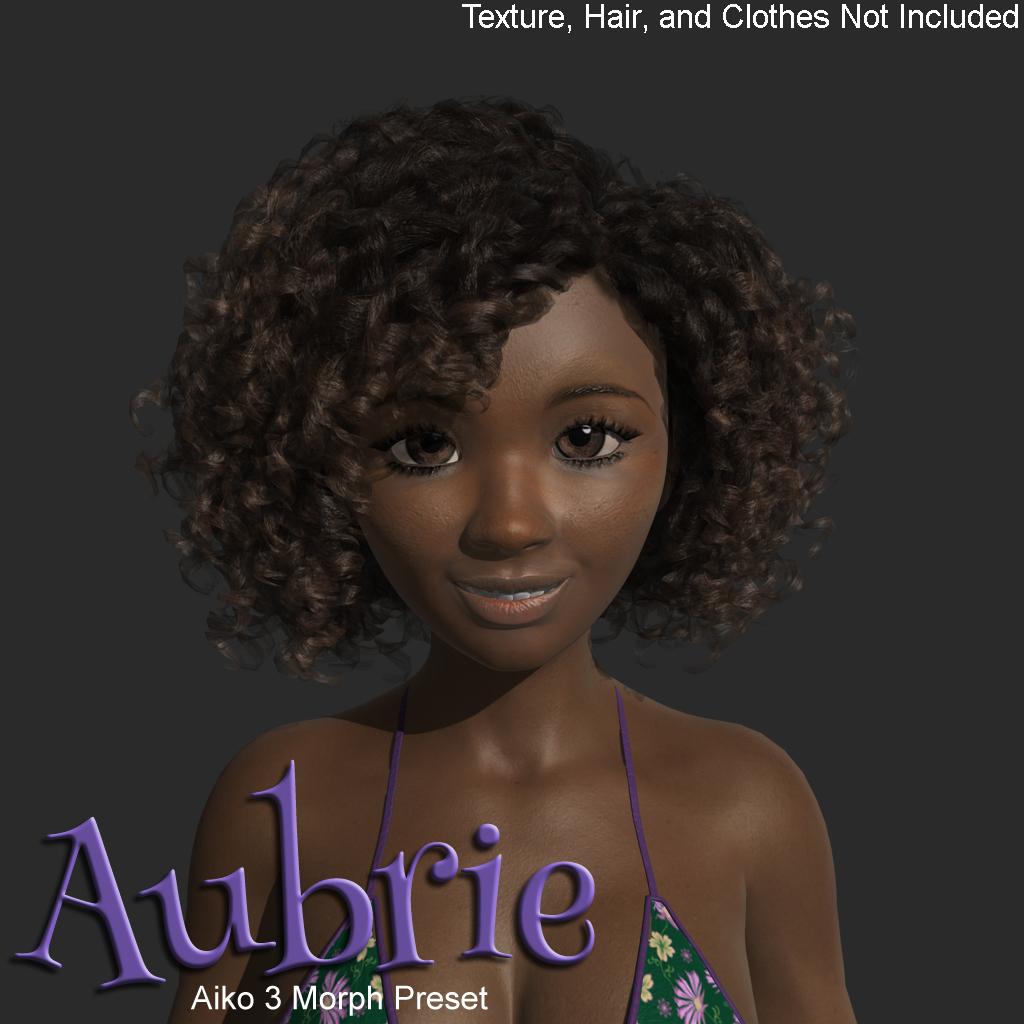
She's very cute! Thanks!
Generation 3 Aiko and Hiro Appreciation ThreadBejaymac said:
Pendraia said:
Just wondering has anyone tried weightmapping Aiko3?
I did, a very long time ago, but she was extremely user unfriendly.
Custom Tri-Ax weightmaps (which were really rough), custom Regions so she had an Actor for displaying morphs, a couple of clones (V3 & M3), and I was about half way through rebuilding her morphs when I abandoned the project.
I quickly realised a few things, I'd never get permission to release her, none of the existing Poser content would work with her, and that Poser figures should be left as Poser figures.
Ah that's sad. I've had some luck converting figures like Hein and Gnobbit. I suspect however that the Daz figures are way more complex. I've also discovered that clothing I made for the triax figure using transfer utility seems to work on the cr2. Not quite sure why that would happen. So do the poses created in ds. I've even been able to export clothing to cr2.
How to modify only certain body parts without influencing the others?Shape Splitter will allow you to spawn a morph that affects only part of the model, but only for Sd morphs not for HD morphs.
Generation 3 Aiko and Hiro Appreciation ThreadAubrie Morph Preset for A3 now up at sharecg.
Aubrie Morph Preset for A3Texture, Hair, and Clothes Not Included!
Requirements:
Aiko 3 Base - 3D Anime Girl
Aiko 3 Morphs and Maps
Kioki [Solved] Cape missing?
GlenWebb said:
Wow glad you found it. I just figured it was similar enough it might have been made by the same PA/PAs. I've used the cape quite a bit but did not recall it having a high collar.
The high collar might be due to the character's morph, elongated neck and other such (I added clothing after making the figure).
Thank you againAOBB's Sweetheart (and v2)head morph for G8.1F inspired by Marilyn Monroe. No materials or textures.Mark OREZ said:
AOBB said:
@Mark_OREZ - thank you for posting your artwork. Very nice mood and I also thank again @perlk for her "diamonds". They are really coming in handy, aren't they?

Edit: I commented on your work in the gallery (which I usually don't do) and gave you a "like"!
Thank you AOBB for your comment and like on the gallery. Just like you've written before, I know you usually don't do this, so I specially appreciate it and it goes straight to my heart.
Again I can't tell you how much I'm happy with your sweetheart morph. I know it's a passion for you, what a great thing you did here !
And of course the Diamonds from @perlk are just perfect. They are more than handy I would say they are obvious as soon as you have them. I know it was a request from you and it was a good idea very well made and executed by @perlk
The image below is my tribute to @perlk. It's an iteration on my WIP which wont appear on the gallery. This image has colors and I like the shining of the diamonds and that special color they give. Kudos to @perlk. Best diamonds ever.

Thank you AOBB and perlk and salutations to everyone viewing/reading.
How did I miss this?!?!? I am honored, and she is so gorgeous!
Daz Studio 4.21[.0.x] Pro, General Release!Is there up-to-date documentation for the new (and old) FBX export settings? The environment I'm trying to transfer to Unreal as an FBX is exploding, with parented things like windows and doors scattering, which wasn't happening before.
Im Getting Boneless elbow when transferring From daz to C4dhi friends, as the title says im getting rounded elbows when i transfer my file to c4d, i tried fbx and C4d Bridge and both gave the same results. Please help, here are the options im using.
Anyone Else Seeing Improved Load Times?Regarding load times, as mentioned elsewhere my load times are back to what they were a number of versions ago.
Everyone agrees that the more morphs and characters in a generation/gender you have, the longer the load times. I've used Riversoft Art's scripts to remove unused morphs, and it did help, but I turned them all back on again as having hundreds of character and shaping morphs turned off did help with load times, but it removed the ability to tweak new characters by testing different morphss. All of my morphs are currently "on".
However, I suspect that the number of morphs is not the *only* factor in load times.
For me, load times skyrocketed a few versions back, overnight. This held true for even Genesis 1 load times. This wasn't solely because of an increased number of characters or morphs in the first generation of Genesis, because at the time I wasn't buying any of that generation. As well, people started complaining about the increased times all at the same time.
Something else fairly subtle happened then as well. I was using a fair number of Genesis 3 toon characters (up to 20 in a scene) and was using Genesis 1's Hiro 5 and Hitomi anime eyebrows on my characters, who were using 3DUniverse's ToonGen2 materials (which had no eyebrows). When I (very slowly) loaded my Genesis 3 characters, none of the eyebrows worked anymore.
My thought at the time was that the programmers had probably added a decimal place or two in their calculation formulas, which would account both for the greatly-increased load times as well as shifting things like the eyebrows. Moreover, I couldn't delete and re-fit the eyebrows.
Fast-forward to "now". I did load tests on October 7th and found that loading the G3-filled scene took just under 18 minutes, while loading the same scene using custom toon characters too almost exactly one minute.
Today, the G3 scene took just under two-and-a-half minutes, while the custom toon version loaded in about 22 seconds. The only things different are the character base models, the G3 having multiple external character/morph sets while the custom toons don't. The bridge set, clothing and custom props are identical. I think the difference in the new load times between the two scenes details the difference in load times the external morphs take.
Moreover, I've reopened the older scene with twenty G3 characters and all of the Hiro5 and Hitomi anime eyebrows are now back in place.
Are anyone else's experiences similar?
EDIT: I forgot to add that I'm now using version 4.21.0.5.
Merging Geograph from Daz character with DiffeomorphicThis explains the Blender FBX export options to export FBX for UE5 (general understanding from their source code of current version):
Transform
Forward: Y Forward (FBX Object +Y axis = Blender Global Forward(-Y), UE5 Asset Editor uses FBX +Y as forward direction)
Up: Z Up (FBX Object +Z axis = Blender Global Up(Z))Armature
Primary Bone Axis: Y Axis (FBX Bone +Y axis = Blender Bone Local Primary/Forward(+Z), UE5 Asset Editor uses FBX +Y as bone local forward direction)
Secondary Bone Axis: X Axis (FBX Bone +X axis = Blender Bone Local Secondary/Up(+Y))
Armature FBXNode: root (Create FBXNode name = Blender Armature name, UE5 uses FBXNode as root bone if there isn't any root bone named "root" so the FBXNode should be named "root", if there is already a root bone called "root" then set the FBXNode option to Null)-----------------------------------------------------------------------------------------------
Attached the process of converting the G8.1 rig to UE4 Rig for UE5 after it's imported with Diffeomorphic, for more details refer to AutoRig Pro documentation.
This method preserves original G8.1 weight map and additional face rig for G8.1 morphs to work correctly. It needs to change the Daz A pose to Unreal A pose, tweak the IK bones and delete the extra pelvis bone after converted and reimported to Blender for further editing.
Simpler method is to auto rig and skin the character as posted in previous posts, but that doesn't generate good skin weights for different body proportions.
----------------------------------------------------------------------------------------------------------------------------------
Experimented more and found some missing steps of the rig converting process, that it needs to transfer weights of the unneeded bones, and then delete those bones before converting to UE4 skeleton:
Transfer weights: pelvis -> hip, neckUpper -> neck, lCarpal1-4 -> lHand, rCarpal1-4 -> rHand, lMetatarsals -> lFoot, rMetatarsals -> rFoot
Delete: pelvis, neckUpper, lCarpal1-4, rCarpal1-4, lMetatarsals, rMetatarsals
Convert the G8.1 rig to UE4 rig with AutoRig Pro QuickRig extension.
The other steps as demonstrated with the images are correct.4.21.0.5 - warnings in log - what do they tell me ?Formula target property not found:
^^^^^ Basically that means that a file in product A is trying to create an ERC link with a file in product B, and it either can't find it any where, or it's at a different location.
In the two samples you've posted, Zev0's product is looking for Victoria 8's head morph, and as that is the correct pathway, file name and asset ID for V8's head morph, that means you either don't own her or don't have her installed.
Daz 3D is part of

Connect
DAZ Productions, Inc.
7533 S Center View Ct #4664
West Jordan, UT 84084Licensing Agreement | Terms of Service | Privacy Policy | EULA
© 2026 Daz Productions Inc. All Rights Reserved.