-
No thread on Michael 9. Really?
Petra said:
algovincian said:
Petra said:
Hylas said:
@Petra: I love it!

He has lady-hips, though?
I think it is the T.shirt.
Very cool image, @Petra! Are you suggesting that it's because the tshirt is designed to fit over a pair of pants? Or is it just something that happens to clothing when dialing in the base masculine morph on G9 (meaning he doesn't actually have larger hips - it's just the way clothes fit that makes him look like he has larger hips)?
- Greg
He also has Toon Heroes dialled in and that might also contribute to the look of the hips.
I need to bring the scene back up and take his clothes off to see.
True. Thanks for responding, and please don't go through any trouble. I can run some tests myself using just plain G9 once my machine is done training a network.
- Greg
ETA: Just DLed and installed DS on another idle box and tried dialing in the base masculine morph on G9 while it was wearing the Every Day 2 shirt (both the G8F and G8M versions of the shirt). Did not notice this issue, so you're probably right.
Out of curiosity, what shirt is that?
License question for gaming contentI just want to be sure not to violate any copyright, that's why i am asking.
To use a 2d model as reference is not an exact 1 to 1 copy of the original, it will be different as i would still go through the full process of sculpting, modeling, do retopology for a low poly model, do own UV Mapping for that figure, create own textures, own bones and own rigging at the end.
So the figure will get details that won't be on the reference or original figure as it is bound to it's limitation of morph targets and sliders.
Reference images are not easy to find and for many high res reference photos/scans you also have to pay money. All my Daz Figures are already paid and i am allowed to use them for rendering images or doing movie animations. Reference would be a 2d image of the figure and only be there for the sculpting out of a box to an independent character.
For what i am planning i want to create my own assets, props and characters, i don't want to use paid assets or anything as there are games out there with purchased assets and people thinking it's taken from this or that game but at the end it's just free or paid assets, that's one of the reasons why i don't want to use already created content from others.
For V4 for example, it would be +50$ for interactive licence, if i use Sapes++ it would be additional 50$ for the shapes++, if i would use a mix between different figure morphs like from Grace, Helena and Angel (about 5% of each morph) that would be another +50$ for each, using elite body shapes would be another 50$. These alone would be 300$ just for interactive licence which would be too much to spend for me to be able to use these within a game and there would still be the textures to be used. If i than would also use hair and clothes, that would be even more than which i can't and don't really want to afford, that's also the whole point of creating everything on my own just using reference images set up in Daz or Carrara, the end figure will still differs from the Daz figure, Textures also won't be possible to reuse as it will have it's own UV Mapping.So my question was just if i violate any copyright doing it that way or if the images are allowed to use them for whatever you wish to do with them.
No thread on Michael 9. Really?algovincian said:
Petra said:
Hylas said:
@Petra: I love it!
He has lady-hips, though?
I think it is the T.shirt.
Very cool image, @Petra! Are you suggesting that it's because the tshirt is designed to fit over a pair of pants? Or is it just something that happens to clothing when dialing in the base masculine morph on G9 (meaning he doesn't actually have larger hips - it's just the way clothes fit that makes him look like he has larger hips)?
- Greg
He also has Toon Heroes dialled in and that might also contribute to the look of the hips.
I need to bring the scene back up and take his clothes off to see.
Saved Custom Morph Changes Reverting BackRichard Haseltine said:
It sounds as if the chnages are not being saved to the saem content directory as the original, and that the one with the chnages is later than the one with the original - Daz studio therefore finds and loads the old one first. The new morph worked because it is going to the same directory both on first save and update. If that is the case, find the older .dsf files and remove them.
I'm afraid that's not the case. I have performed a thorough manual search through my directories. These morphs only exist in one of them. And I've saved and resaved with extra vigilance more many times already. I assure you, I'm saving them all to the right directory.
No thread on Michael 9. Really?I for one am super-stoked that it will be easier for me to use male armor on my female warriors...because honestly...they're sick of scraping the botton of the barrel and having to kitbash around metal bikinis and boob plate. Male armor made for male base figures never worked quite right across the chest area when trying to covert using the cross-figure resource kit. Never. Now hopefully...they will! I just need a way to transfer my custom G8 skins over to G9.
pupils won't morphDaventaki said:
Do they work on a default G8M?
I'm glad you had me check that. The morphs do work on the default G8M. But when I applied the desired eye color from the Frogol set, it overrode any morph. Ideas on a workaround? Finding another 3DL red-eye like that will be crazy..
Related question ... Most of my cool eye sets are for iray, but because I can't get LAMH to work as it should in iray, I had to convert everything to 3DL. Do the tools I have that note iray, as well as, 'Daz Studio Geoshell Presets (.DUF)' ... would they also convert to 3DL? What render engine is 'Daz Studio Geoshell Presets' for?
Or do I save myself the stress and choose another eye set?
License question for gaming contentRichard Haseltine said:
Chris Fox Art said:
I know that i can purchase an interactive license to be able to use a figure within a gaming engine and as morphs have also an additional interactive license option, am i right that i should order for example interactive license for V4 and for the morphs to be able to use my own V4 characters with a gaming engine?
You need an Interactive License for every product that you use to build the data for your game. You do not need an Interactive License to include 2D renders (animated or still) of the content.
Another question about that is, i am wondering if the license is for the figure, morph and the mesh? And could i use just the figure as reference to recreate my own Version of it?
For example, exporting a morphed figure after converting to primitive and than vertex modeler again, it becomes it's own mesh (with all morphs applied that they are native within the figure.)As above, you need a license for the things you use. The amount of post work you do is not relevant, if you are using the content to generate the 3D and/or texture data you need an Interactive License.
If i then export it as fbx or obj it already is an own figure but if i then retopologize the figure to a lower poly model, nothing from Daz Content remains and it's an own figure with an own mesh and own rigging (if i do it for that mesh), my question here is should i still need a licence as the base reference was created with a Daz figure, even if my recreation is a completely new one with own mesh, bones and rig?
Yes, as above - if you can do the work without using the Daz content then do so, if you use the Daz content then you are bound by the Daz license.
Just wondering, sculpting anatomy raf is hard to find and Daz figures (or at least my own morphed characters) would be great to be used as reference. So i would for example load it into Carrara, make screenshots in T-Pose for Front, Side and Back, load the images within Carrara and than model around those images, or the easier way load the model, than retopologize and have my own mesh already.
I'm working on my own game and don't want to run into any kind of copyright violation.So if i get it right than, if i use any Daz relevant content within a Game engine i need the interactive licence. If i set a figure with morphs applied in a T-Pose and render front, side and back to use these just as reference image, sculpt an own model out of the reference, create custom textures and shaders for that so that it's a complete new model independent from any Daz content itself i am not bound to Daz licence as it's an own independent figure with own mesh, own shading/textures and rigging?
No content from Daz Store will be used inside the engine at the end.Saved Custom Morph Changes Reverting BackIt sounds as if the chnages are not being saved to the saem content directory as the original, and that the one with the chnages is later than the one with the original - Daz studio therefore finds and loads the old one first. The new morph worked because it is going to the same directory both on first save and update. If that is the case, find the older .dsf files and remove them.
UltraScenery - new territory [Commercial]paulawp (marahzen) said:
Great! I can't wait to get this desert set. And that's a much more convincing G9 guy than I've generally seen so far in my limited tinkering with G9. I have that new body morph kit in my cart and this helps encourage me to get it.
The Morph sets are a game changer, lots of asymetry in the head morphs which is what makes the difference between a doll like image or a real life person.
License question for gaming contentChris Fox Art said:
I know that i can purchase an interactive license to be able to use a figure within a gaming engine and as morphs have also an additional interactive license option, am i right that i should order for example interactive license for V4 and for the morphs to be able to use my own V4 characters with a gaming engine?
You need an Interactive License for every product that you use to build the data for your game. You do not need an Interactive License to include 2D renders (animated or still) of the content.
Another question about that is, i am wondering if the license is for the figure, morph and the mesh? And could i use just the figure as reference to recreate my own Version of it?
For example, exporting a morphed figure after converting to primitive and than vertex modeler again, it becomes it's own mesh (with all morphs applied that they are native within the figure.)As above, you need a license for the things you use. The amount of post work you do is not relevant, if you are using the content to generate the 3D and/or texture data you need an Interactive License.
If i then export it as fbx or obj it already is an own figure but if i then retopologize the figure to a lower poly model, nothing from Daz Content remains and it's an own figure with an own mesh and own rigging (if i do it for that mesh), my question here is should i still need a licence as the base reference was created with a Daz figure, even if my recreation is a completely new one with own mesh, bones and rig?
Yes, as above - if you can do the work without using the Daz content then do so, if you use the Daz content then you are bound by the Daz license.
Just wondering, sculpting anatomy raf is hard to find and Daz figures (or at least my own morphed characters) would be great to be used as reference. So i would for example load it into Carrara, make screenshots in T-Pose for Front, Side and Back, load the images within Carrara and than model around those images, or the easier way load the model, than retopologize and have my own mesh already.
I'm working on my own game and don't want to run into any kind of copyright violation.Getting on the 9 train, or notOso3D said:
Also depends on the ethnic mix where you are.
Now that it's finally out, I wanted to show my corgi mouth... no HD. The entire corgi? No HD. (Toward the 'you have to have HD to do anything')
Here's a basic morph for the mouth:
I'm glad you can make a corgi out of it. That's great! Really, it is, I have no need to comment further in this thread.
No thread on Michael 9. Really?algovincian said:
Petra said:
Hylas said:
@Petra: I love it!
He has lady-hips, though?
I think it is the T.shirt.
Very cool image, @Petra! Are you suggesting that it's because the tshirt is designed to fit over a pair of pants? Or is it just something that happens to clothing when dialing in the base masculine morph on G9 (meaning he doesn't actually have larger hips - it's just the way clothes fit that makes him look like he has larger hips)?
- Greg
Mike 9...no lady hips ;)
 Genesis 8 or 8.1 shapes on genesis 9?
Very helpful. Is there a way to transfer just a single morph, such as a chin morph or something, without getting the entire figure?
License question for gaming contentI know that i can purchase an interactive license to be able to use a figure within a gaming engine and as morphs have also an additional interactive license option, am i right that i should order for example interactive license for V4 and for the morphs to be able to use my own V4 characters with a gaming engine?
Another question about that is, i am wondering if the license is for the figure, morph and the mesh? And could i use just the figure as reference to recreate my own Version of it?
For example, exporting a morphed figure after converting to primitive and than vertex modeler again, it becomes it's own mesh (with all morphs applied that they are native within the figure.)If i then export it as fbx or obj it already is an own figure but if i then retopologize the figure to a lower poly model, nothing from Daz Content remains and it's an own figure with an own mesh and own rigging (if i do it for that mesh), my question here is should i still need a licence as the base reference was created with a Daz figure, even if my recreation is a completely new one with own mesh, bones and rig?
Just wondering, sculpting anatomy raf is hard to find and Daz figures (or at least my own morphed characters) would be great to be used as reference. So i would for example load it into Carrara, make screenshots in T-Pose for Front, Side and Back, load the images within Carrara and than model around those images, or the easier way load the model, than retopologize and have my own mesh already.
I'm working on my own game and don't want to run into any kind of copyright violation.Getting on the 9 train, or notTimbales said:
SF-Design's https://www.daz3d.com/body-morph-kit-for-genesis-9 did what I had hoped it would and made G9M's chest better looking to me. I have found Skin4 has creases baked into the texture I'll need to photoshop away if he's going to be without a shirt. Hopefully they aren't there on M9's texture, too.
The PAs that do characters are brilliant texture artists, yet I'm just a user of textures, not a texture artist, (I mean where does one even GET the raw materials!?) so as a person that strives for realism in their art it can get tiring de-creasing/de-highlighting the textures, but the good news is, that it has given me a real appreciation for texture artists!
Looking at it from a stylistic perspective, it makes sense because the artists use their skill to contour the details instead of relying on pictures alone, as artists crave self-expression, so we as artists love to add ourselves even into our tools, so I don't want to discourage an artist's way of making texture art, which is a respected art form in itself, as they aren't concerned with realism as much as artistic expression, so kudos.
Back in the day posette/V2/4 and poser were perfectly suited for non-realistic textures/renders due to the limits of the time as the industry was just getting started, so contouring was and still is a stylistic technique that is needed as the skill itself requires knowledge of the human figure, even if the contours are non-existent within the texture.
Now we're in a different age, where Daz characters are as real as any model can get, and while the same techniques have changed little, the sources for the skin textures have, and there are some that are less than ideal for realism than others so the creases, highlights, and contours are going to remain which is perfectly fine, but it would help us a lot if we had an alternative source.
The only issue then is where will those that want realism going to get their textures; I propose that either Daz lifts its strict nudity policy, so we can feature the textures on the characters with thongs and pasties at least, so we can actually see the texture on the characters, or better yet, have a category that only features textures much like with hair and clothing, that way every texture, for both realistic and stylised, can be purchased!
That way, as a category itself, we will inevitably have more textures to choose from, giving each character sold, and each PA selling their wares a separate stage in which to perform their best work, I mean we already have highly skilled texture artists doing clothing/hair, why not the most important thing a character needs; the texture themselves!
I'd also like to add my apologies to the PAs due to my last post on the subject as I was too irritated and hasty, so it came off pretty bad, which was not my intention… One should never post when irritated.
NOTE: When I mention realism, I mean realistic models and textures, not rendering techniques, as rendering is a different beast altogether!
Saved Custom Morph Changes Reverting BackAn additional detail: I've created a new morph and it was saved perfectly well. Then I reloaded Gen 9, modified the new morph and resaved it. And the changes were perfectly saved. It's the exact same process and the only difference I can see is the time of morph's initial creation. I don't see how that should matter though.
UltraScenery - new territory [Commercial]Martinjfrost said:
My Final Fling with playing with the desert stuff before i go off to deal with a wicked queen, seven dwarfs and a whole bunch of giant forest animals...... I wanted to give Michael 9 HD a go, had fun creating the character using the new morphs, much easier to get something convicing quickly. On the ultrascenery side, i made complete terraine material incluidng dry river beds etc, and also more adventures with stone textures. Quite content with the results. Dust effects and sky replaced in photoshop using canvases.
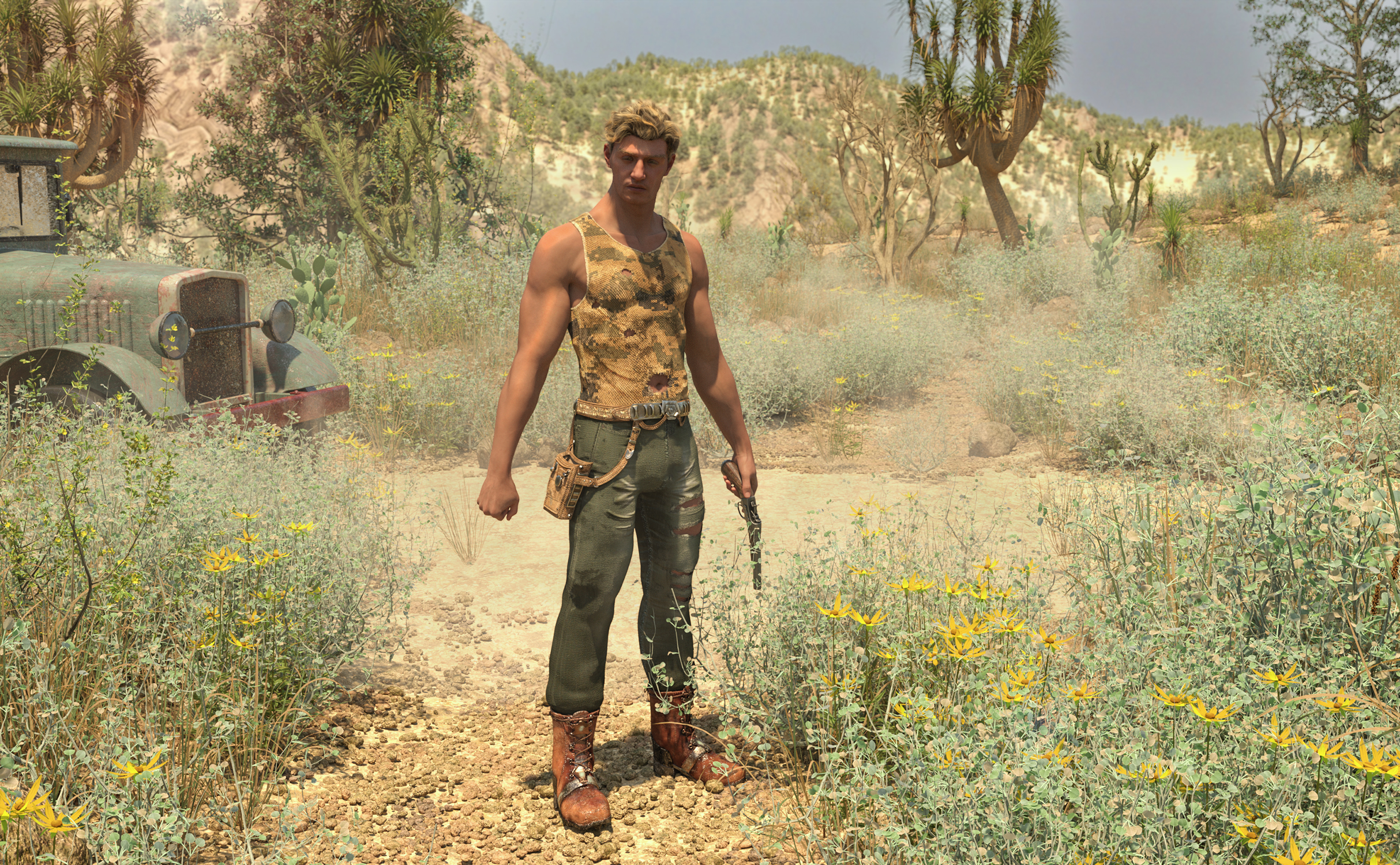
Great! I can't wait to get this desert set. And that's a much more convincing G9 guy than I've generally seen so far in my limited tinkering with G9. I have that new body morph kit in my cart and this helps encourage me to get it.
AOBB's Luminous v4 for G8.1F (aka Audrey Hepburn). No materials nor textures included.You may be able to adjust the y-scale on the neck segments of G8 to achieve a similar effect as the Neck Length morph AOBB was refering to.
No thread on Michael 9. Really?Petra said:
Hylas said:
@Petra: I love it!
He has lady-hips, though?
I think it is the T.shirt.
Very cool image, @Petra! Are you suggesting that it's because the tshirt is designed to fit over a pair of pants? Or is it just something that happens to clothing when dialing in the base masculine morph on G9 (meaning he doesn't actually have larger hips - it's just the way clothes fit that makes him look like he has larger hips)?
- Greg
Saved Custom Morph Changes Reverting BackI have a weird issue (when do I not, really?) with my custom morph set I've made with Genesis 9. I created these morphs a while ago, I saved them, they've been properly saved, I assure you. Now I'm fixing some of them, resaving the changed morphs, but the applied changes revert back everytime I reload G9. I started doubting myself, suspecting I might not be saving them properly, perhaps the morph files remain unchanged. But I checked the dates of modifying the files in the folder, and they match. The files were updated one way or another, so why do I not see the fixed morphs in the viewport? Is this just my issue, or have others stumbled upon it as well?
Daz 3D is part of

Connect
DAZ Productions, Inc.
7533 S Center View Ct #4664
West Jordan, UT 84084Licensing Agreement | Terms of Service | Privacy Policy | EULA
© 2026 Daz Productions Inc. All Rights Reserved.