-
How to achieve the Desaturated Rembrandt Style?
If it is the colour effect that you're going for - then what you want to do is have the content in your scene to be in colours of tan, beige, brown, grey, black, muddy darkish blues, greens, orange/browns, - that would be the colours of the background or room, and the colours of the clothing and hair - you don't want bright pink or blazing red or saphire blue, or emerald green. You want darkish colours to begi with. The lighting is called LOW KEY lighting - which basically means "not bright". Then after you render your scene. Import it into virtually any image editing sofware, ad you want to DESATURATE THE COLOURS, LOWER THE CONTRAST, and apply a colour effet - like SEPIA, or TOBACCO, which gives you that old fashioned mafia look, or old west saloon look. And you'll end up with the kind of image you are describing.
Obj imports without any textures after recent updaterichardandtracy said:
It sounds as if you could do with a script to run (when or after) importing an obj file to apply an uber shader to the object,
Importing an obj to daz applies an uber shader by default so a script wouldnt need to do that when it's already default behaviour of the obj importer
re-read the .mtl file, 'find' or 'ask help to find' the texture required and apply them wherever sensible in the appropiate surface shader.
Well, the OP doesnt need to do any of that and it would be a moot point if the .mtl file they have exported from Blender does not even contain texture references.
The OP still has not bothered to confirm if their .mtl file has texture references in it, therefore it would be pointless to have a script that reads an .mtl file for texture references which may or may not even be there.
Their first step is to establish they are exporting their obj and mtl from Blender with texture freferences before jumping to the conclusion that the issue is the obj importer in Daz Studio. (Hint: it isnt).
I think this would speed things up for anyone who wanted to do this and could save a fair bit of time all round.
Daz obj importer already has an option to read material file on import, so there doesnt need to be a new script created to do the exact same thing. One could just import the obj again and click read material file
I only have a very rudimentary grasp of scripting (as shown how few commands I actually used in my Pose Transfer Scripts), so probably definitely can't do it at the moment. I have quite a few poses to catch up on creating after 8 months without a DS compatible PC, and then I may be in a position to start learning what I need. I won't make any promises because I'm not sure I will ever be able to do it, but I will look at what I need to learn and see if I can do it.
It would be a waste of your time as mentioned above.
And I only ever do freebies, because I'm someone who has a tiny budget, too..
Regards,
Richard
To save anyone reading this time in future. The issue the OP is facing is probably not with the obj importer. That is a presumption fallaciously built into their question.
There are multiple steps in the process (1. importing fbx with embedded textures to blender, 2. exporting to obj without unpacking textures first, then 3. importing to daz studio as obj). The problem could be any step in that chain and the likely culrpit is obviously step 2, so that should obviously be assessed first before jumping to conclusions about a faulty obj importer.
If 2 is the point of failure, then the question becomes how to export fbx with embedded textures to obj so it writes mtl file correctly.
Free Toon Characters – Released Early!Elor can correct me if I'm wrong (I haven't worked much with metadata to date) but I don't believe you'll have to update things for the base package update.
bridge from daz to Bryce 7Martinal - yes, it works both ways. I used it with Bryce 6 and 7, and with Studio 2, 3 and 4 in the past but very seldom I use the bridge now. Adjusted arms and legs, etc from a person in Studio works fine and sending it over to Bryce. However, for material and textures the results are unsatisfying. When I need something from Studio in Bryce, I export the object as obp and import it in Bryce, then I work on the materials. I seldom used Studio to render, I use Studio objects to render them in Bryce.
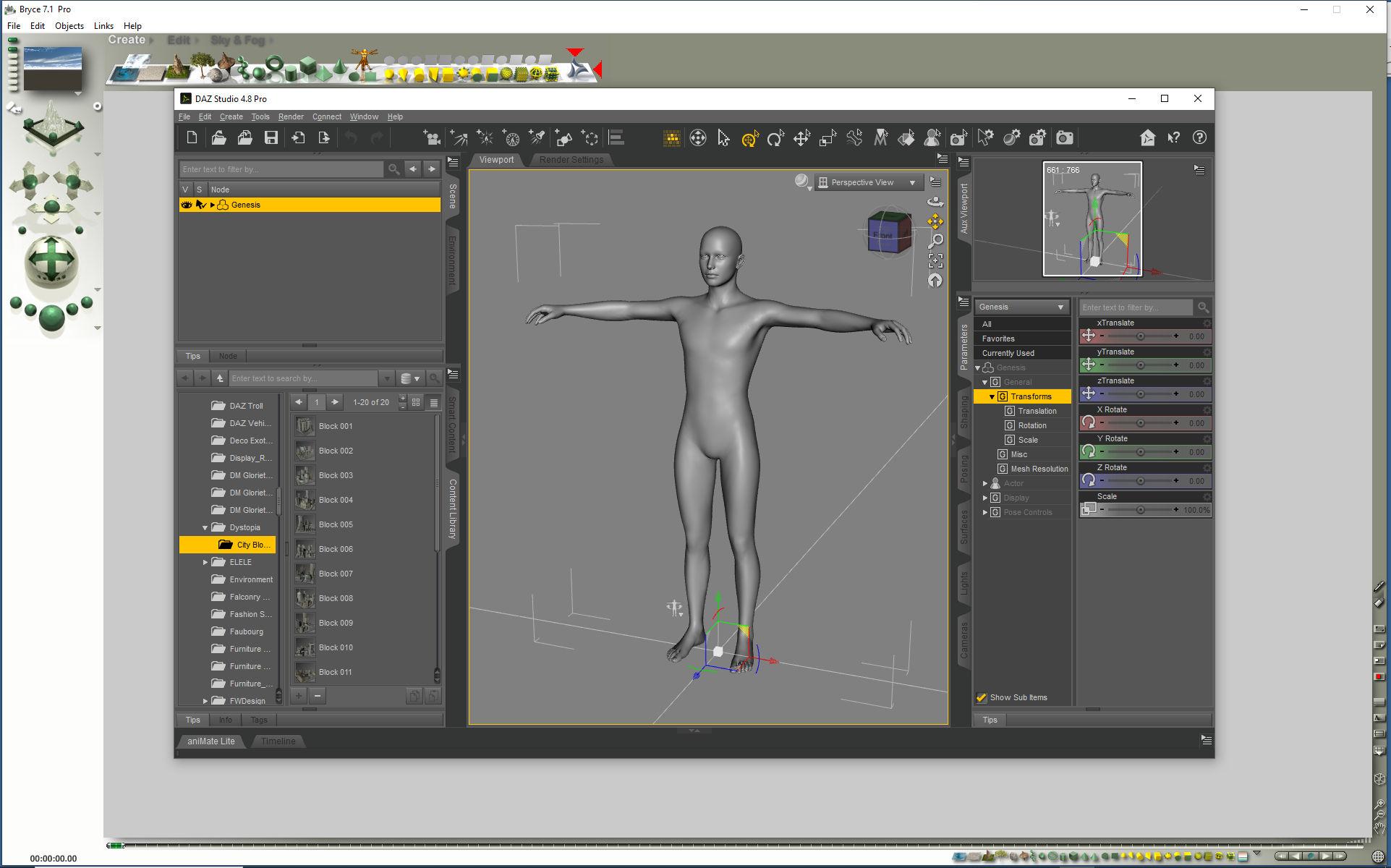
Image B+S shows Bridge from Bryce to Studio. Click on image for full size. In Bryce, select Create than you see on top right the Studio sign (enhanced here with 2 red arrows).
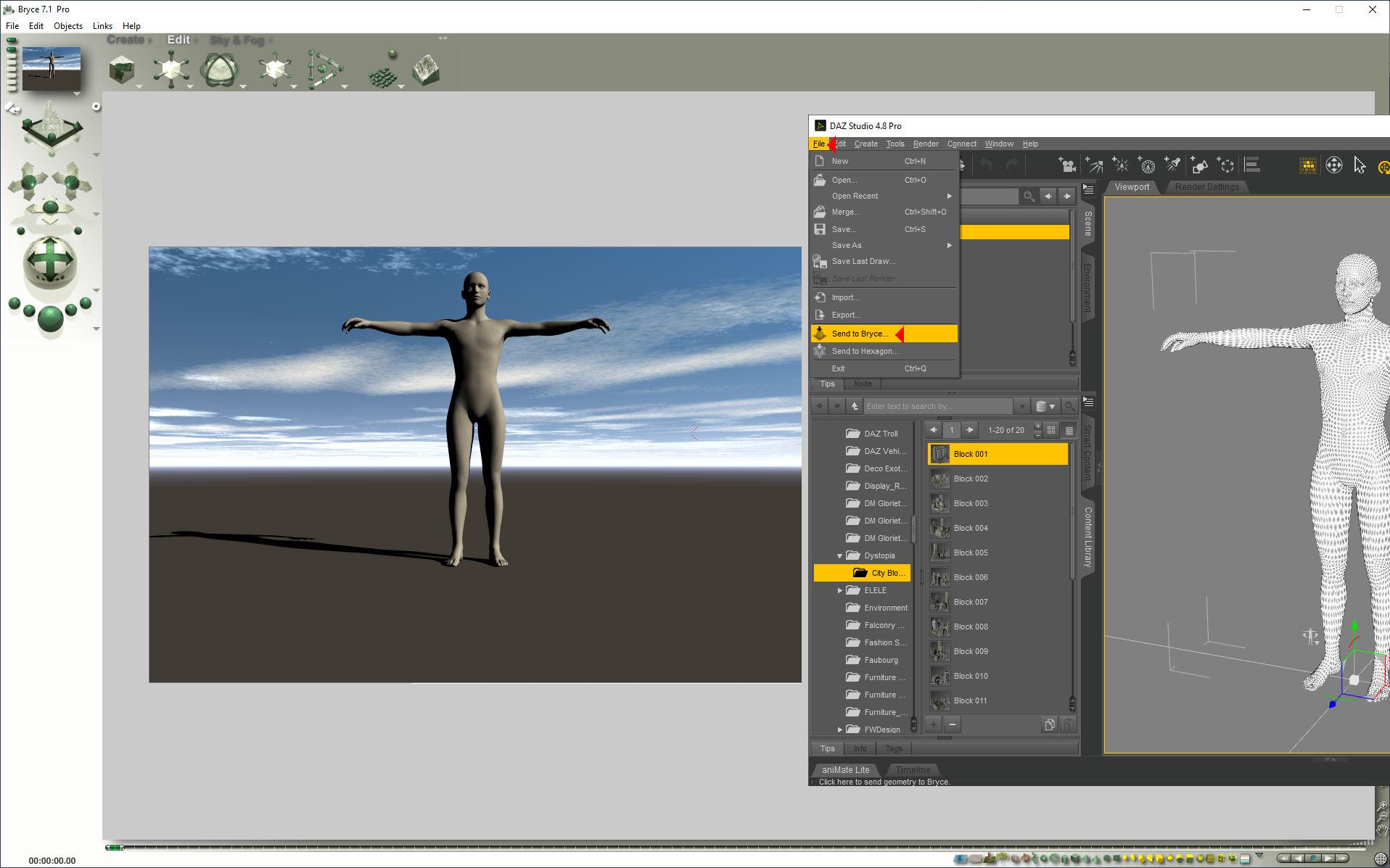
Image S+B shows Bridge from Studio to Bryce. Click on image for full size. Select object in Studio, click on File and below send to Bryce and after a moment, it will appear.
Does a saved figure/prop .duf file contain geometry?oddoneout said:
So the .duf file would not work without the .dsf file, even if the user owned the original v4 poser figure dress (with the original .obj file in their runtime)?
Therefore the duf file with the .dsf could not be distributed to people who did not purchase the original V4 poser figure dress otherwise they would be getting it for free?
Is there any way of distributing refits of V4/M4 clothing, that have been put through the transfer utility or autofit and then modified, so that they can only be used by people that have purchased the clothing?
Even though this is 12 years old, I ran across it whilst looking for something else (a way to save two prop/figure assets with the same geometry without a new DSF geometry being made for them, but I found a workaround). So anyway...
I don't know why Richard gave a wrong answer. He usually knows all the stuff. But... It's easy to do. Not the most 100% user friendly, but them's the breaks.
1: Make a Poser file that has the dress as just a prop. Do not include the geometry. Make sure the prop is pointing at the geometry, and not storing it in the pp2 file as customGeom.
2: Load your changes as a morph. Set it to 1 and memorise.
3: Instruct for users to load this prop into Poser (after all, they HAVE Poser and they HAVE the original item). It will load in referencing the original geometry and apply the morph you gave it.
4: Give them instructions to export this to a new OBJ, no world transformations and no groups. DAZ doesn't need the groups for clothes.
5: Tell them to import the OBJ into DAZ Studio, use the transfer utility to make it conform to the new figure, save it as a prop/figure asset with certain parameters, and THEN install your DUF file, which you'll make sure points at the DSF geometry created when they save it out.
It's tedious. But it's easy.Instant Rain did not work anymore (solved)2025-05-30 14:28:47.193 [WARNING] :: \src\sdksource\cloud\dzcloudtasknotifier.cpp(203): Invalid file header for encrypted file: "G:/Renderordner/DAZ content database/Applications/Data/DAZ 3D/My DAZ 3D Library/data/cloud/1_80174/props/dreamlight/iray/instant rain/instant rain load prop.duf.enc"
2025-05-30 14:28:47.193 [ERROR] :: Open Stream Error - No stream for CloudFile: G:/Renderordner/DAZ content database/Applications/Data/DAZ 3D/My DAZ 3D Library/data/cloud/1_80174/props/dreamlight/iray/instant rain/instant rain load prop.duf.enc
2025-05-30 14:28:47.193 [ERROR] :: Open File Failed - Could not read asset information: /props/dreamlight/iray/instant rain/instant rain load prop.duf
2025-05-30 14:28:47.720 [INFO] :: Prepare asset load (merge): /Props/Dreamlight/Iray/Instant Rain/Instant Rain Load Prop.duf
2025-05-30 14:28:47.720 [INFO] :: Locking viewport redraw...
2025-05-30 14:28:47.720 [INFO] :: Viewport redraw locked.
2025-05-30 14:28:47.820 [VERBOSE] :: Native format content directories: 6
2025-05-30 14:28:47.820 [VERBOSE] :: Poser format content directories: 6
2025-05-30 14:28:47.821 [VERBOSE] :: Other import format content directories: 1
2025-05-30 14:28:47.821 [INFO] :: Begin asset load (merge): /Props/Dreamlight/Iray/Instant Rain/Instant Rain Load Prop.duf
2025-05-30 14:28:47.821 [WARNING] :: \src\sdksource\cloud\dzcloudtasknotifier.cpp(203): Invalid file header for encrypted file: "G:/Renderordner/DAZ content database/Applications/Data/DAZ 3D/My DAZ 3D Library/data/cloud/1_80174/props/dreamlight/iray/instant rain/instant rain load prop.duf.enc"
2025-05-30 14:28:47.821 [ERROR] :: Open Stream Error - No stream for CloudFile: G:/Renderordner/DAZ content database/Applications/Data/DAZ 3D/My DAZ 3D Library/data/cloud/1_80174/props/dreamlight/iray/instant rain/instant rain load prop.duf.enc
2025-05-30 14:28:47.821 [ERROR] :: Open File Failed - Could not read file: /Props/Dreamlight/Iray/Instant Rain/Instant Rain Load Prop.duf
2025-05-30 14:28:47.821 [WARNING] :: Error loading asset: G:/Renderordner/DAZ content database/Applications/Data/DAZ 3D/My DAZ 3D Library/data/cloud/1_80174/props/dreamlight/iray/instant rain/instant rain load prop.duf.enc
Operation failed
2025-05-30 14:28:47.893 [INFO] :: Unlocking viewport redraw...
2025-05-30 14:28:47.893 [INFO] :: Viewport redraw unlocked.
strange error messiages when importing two different fbx assets into blender 3.6TheMysteryIsThePoint said:
Why are you using such an old version of Blender? You are asking for things like what you are experiencing. This is not DAZ and you can easily run multiple versions of Blender side by side and revert if you choose to. No reason to not be using 4.4. The FBX importer seems better, though I don't use it often.
Second, since FBX is proprietary, the Blender guys had to essentially reverse engineer it, and so it never worked robustly. But there is an addon called Better FBX Import which is preciselt that. It might work better for you.
I use the old version of blender because when I import posed Daz figures into the newer versions it either doesn't import the poses right or any attached props don't import attached to the characters. I use diffeomporphic because some objects have emissives. Also how expensive is that plugin? If it's not anything crazy price it's probably worth a try. I don't want to spend bookoo amounts of money if it turns out not to be what i need after all.
Free Toon Characters – Released Early!Thanks also to Elor for the metadata. :)
Is there a way to load a set or a scene without the timeline ?I think it is simply the creator doesn't render animations and likely hasn't even looked at the timeline setting up their scene which is obviously not at frame 0 when they did it
or they import all their props at one then go to another frame to move them into place again not expecting anyone to render animation
99% of people only render still images
Object now distorts when parented. Did not used to do that. (Solved!)In my OP I was wrong. Actually all of the objects do distort when parented to a figure (person). But the magnitude of their distortion appears to be proportional to their distance from the (0,0,0) scene origin. so an object attached to ankles does not distort as much as an object attached to the wrists.
The objects are all rope loops that were originally from a free set authored by someone else. I merged them individually into an empty scene. Then I exported them as obj files and opened them in hexagon to try to get rid of rigging, set their origins to their centers, and to align their axes with the primary x-, y-, and z-axes of an empty scene. Then I use "import" to bring them into the scene. When I look at the object with the joint editor, there are no bones but some clusters of small white circles on them. I have no idea what those are.
One other strange thing: If I try to move one of them using the sliders they move in the wrong directions. For example if I increase the y translation, it moves it moves up but away from the y-axis (i.e. it moves in x and z, too) and rotates relative to its pose at the origin. This is independent of the coordinate system selected in the tool parameters. However if I drag on the coordinate frame attached to the object (using the universal tool), it moves like I expect it to (drag the y-axis pointer and it moves only in the y-direction and does not rotate.I suspect those two behaviors are related. How can I make these loops static objects centered on the origin that I can move correctly with either the sliders or the attached coordinate frame. And parent to a figure without distortion?
Thank you, Richard!
Daz Install Manager (DIM) 1.4.1.87, Now Available! (*UPDATED*)Sometimes it's just a metadata update to go along with the recent release version or beta of DS, or it was fixing or adding in metadata.
Free Toon Characters – Released Early!Hello,
If someone wants metadata for their Webboids, here the ones I created with a small text file explaining how to install them. Everything should be labelled as official products are labelled (at least the ones I have with similar items in them) and the easiest way to find them in Smart Content is to search for 'Webboids'.
No icon because I don't have the content to create one myself but there is a '380x494' placeholder JPEG picture.
How to export an Obj with displaced mesh intact from Daz Studio?Squishy said:
Headwax said:
What I would like to do is export the obj from studio with the displacement embedded into the mesh.
the short answer is, D|S cannot do this. some other apps can do it, e.g. blender or zbrush or maya or rhino, but this is not treated as an import/export feature. I don't know anything about cararra but that kind of import/export dialogue has never referred to what you want to do with converting a displacement map to hard geometry that I have ever seen, skinning refers to weight mapping and rigging.
thank you Squishy for that. Much obliged! It only works in Carrara if you have 'show displacement in 3d view" ticked. Perhaps Carrara is referring to the displacement as a morph, which is silly as you have a choice of subdivision which would change the geometry of the mesh and nullify the morph. Thanks again. Cheers :)
How to export an Obj with displaced mesh intact from Daz Studio?Headwax said:
What I would like to do is export the obj from studio with the displacement embedded into the mesh.
the short answer is, D|S cannot do this. some other apps can do it, e.g. blender or zbrush or maya or rhino, but this is not treated as an import/export feature. I don't know anything about cararra but that kind of import/export dialogue has never referred to what you want to do with converting a displacement map to hard geometry that I have ever seen, skinning refers to weight mapping and rigging.
How to export an Obj with displaced mesh intact from Daz Studio?OBJ objects can come in with a super basic material with most of the channels (like Displacement) unavailable. When you import an OBJ file (or all sorts of other import formats) you will generally need to apply a base shader for the render engine you're using (e.g. Iray, you need the Iray UberShader) - select your object in the hierarchy and on the Materials pane, select your material, and go to the Presets tab -> Shaders -> Iray -> apply the !Iray Uber Base shader. This should add all the channels you're not seeing.
NB: you generally will want to do this for every object you import to D|S, even if you exported/imported from D|S itself
Strand-Based Hair Edit PleaseI personally would love a way to turn polylines into editable strandbased hair albeit without simulation abilities
since apparently nobody will buy DAZ hairs if they allowed that in spite of the fact we all happily buy every other product even though Blender exists
if that were possible, I could use Zbrush, Carrara, Poser hairs or polygon hairs converted to lines in the editor, I already CAN import them and turn them into curves so it's not replacing anything
just giving a starting point from software I find easier to work in as I suggested before,
LAMH is even easier to use than that editor
Strand-Based Hair Edit PleaseLeana said:
Gordig said:
Leana said:
Most strand-based hair available in the store has been converted to dForce Hair, and AFAIK once that's done it's not editable as strand-based hair anymore.
Once exported to another program, "dForce" hair is fully editable. I don't know everything that's involved in the process of making something dForce hair, but I suspect the inability to edit it is a choice.
Yes but once exported it's not dForce hair anymore, it's "whatever kind of hair the other program uses"

I'm not a PA so I've never used the conversion tool, but my guess is that the conversion somehow "freezes" the hair into something it can apply the dForce properties to, hence why it's not editable anymore.
Maybe worth bearing in mind that this is a product suggestion thread. The OP is not asking Daz/PAs to cure an incurable illness, they are simply making a product suggestion for more user controls, which other software have implemented. The fact that these controls are exposed to users in other software suggest they are not impossible to implement but of course may be infeasible for Daz if they have limited development resources to spend on this.
At the moment the SBH Editor has one big limitation which is that it only generates hair guides at vertices on the haircaps. For example, in the SBH Editor, you ostensibly cant have a guide strand anywhere you want on the mesh surface, it is only at the vertex positions, which is not a limitation of other grooming software like Blender and XGen. Im pretty sure the dForce Hair Modifier does not have that limitation either. So I see that as a potential issue with the SBH Editor that they would need to work around were they to allow people to import any random dForce SBH guides in the SBH Editor.Most of the dForce Hair Modifier settings seem completely paramaterised, with their dependencies being only the guide strands and surface mesh, so in this hypothetical scenario I dont think reapplying the dForce settings would be the development bottleneck. Instead the more difficult part is probably getting the guides into the SBH Editor in the first place.
The SBH Editor is now in viewport anyway in DS 2025, according to what I read (?), so maybe Daz are moving towards making it more integrated. Meshgraber can allegedly see/move the hairs, so maybe this request will be a reality anyway.strange error messiages when importing two different fbx assets into blender 3.6Why are you using such an old version of Blender? You are asking for things like what you are experiencing. This is not DAZ and you can easily run multiple versions of Blender side by side and revert if you choose to. No reason to not be using 4.4. The FBX importer seems better, though I don't use it often.
Second, since FBX is proprietary, the Blender guys had to essentially reverse engineer it, and so it never worked robustly. But there is an addon called Better FBX Import which is preciselt that. It might work better for you.
Object now distorts when parented. Did not used to do that. (Solved!)I have an object in a .obj file. When I import it into Daz Studio (4.22-4.24). It looks fine. When I parent the object to a figure's forearm, its shape distorts. Yes. I am using parent in place. I've also tried not checking that box. Same thing happens. It is as if parent in place is ignored when checked, This did not used to happen with this same object. I have several such objects. Parenting them in place leaves their shapes unchanged. Only one of them distorts when parented. It is an object without bones. It has not been rigged. How can I prevent the shape distortion from occuring upon parenting it?
List of Products Used - script [Commercial]barbult said:
Linwelly said:
Richard Haseltine said:
barbult said:
Linwelly said:
ok I don't seem to get any further with this, might have to return the product then
I could never get it to work either. I even reset the database and reimported metadata, but it still didn't work. I did return it.
I saw the link in the thread further up, I'm not sure how I apply that, do I download and place it in scripts in DAZ like products from offsite?
Yes, that's right.
or for a quick test just drag the downloaded file into the DS Viewport.
Daz 3D is part of

Connect
DAZ Productions, Inc.
7533 S Center View Ct #4664
West Jordan, UT 84084Licensing Agreement | Terms of Service | Privacy Policy | EULA
© 2026 Daz Productions Inc. All Rights Reserved.