-
Extreme Closeup: Makeup for Genesis 3 Female(s) (Commercial - it's here!)
works well on faces created in headshop too
took me a bit but found this tutorial
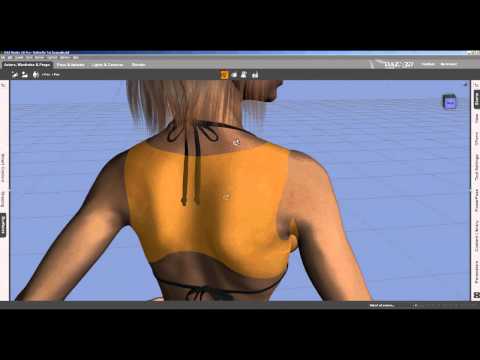 it covers adding a tattoo using lie but princibles the same couldn't find where dim installed your product so just created a folder elsewhere to try this out and it worked just had to select face and base colour to bring up the head and love how easy it is just selecting your texture for lips or whatever and daz puts it in right place thought I'd have to line it up or something so I'm liking these new makeup options
You have to make sure that the UVs are identical in size or they wont just simply line up.
The pack should be installed in 'materials/genesis 3 female' in your product library.
You just click the option you want from the menu and it will apply it to the character.
aaaaah found it it's under the submenu femenine thanks makes it so much easier was looking in iray submenu and its submenu for feminine and other sections
Glad you found it. If you have any other queries, please feel free to PM either of us here on the forum.
thank you
Some characters for V4 dont showI totally get your frustration, Kenneth - my "deeply hooked" 3-weeks-in was only a few weeks AGO and my head is still spinning too, with stuff that makes no sense. I started a thread about HeadShop that I can't even respond to because it's so frustrating. No offense to the good people trying to help there; it has nothing to do with them. (Note to anyone happening to follow it: I'm working on it, and I'll get back to it. This other issue came up in the course of trying to work around Head Shop.) I came across your thread trying to figure out my own invisible-Victoria-character dilemma (Michael 4 really, but same difference).
I get the sense that DAZ is trying to protect us adults from our own prurient interests, forcing us to start with pre-dressed figures. (Somebody should mention to them that maybe they've already let that particular cat out of its bag!) Normally if I want to remove a clothing item from my scene, I just select it in the Scene tab and click "delete." Not so with M4/V4. There's nothing to select! (If I could load him again, I'd take a screen shot and show you what I mean. But if I could do that, I wouldn't even be here lol) How do I get rid of it? Is it some sort of Material setting? Because I'm not seeing that either. Personally, I think they ought not treat us like we were 5. That's what the government's for!
I've already used Michael a few times, and I still can't figure out how to get him into a scene. I'm told the Smart Content tab keeps your most curently used files ready to use again, but as you can see in the first image below, that's not working out so well for me. I haven't even loaded anything else since him. You can also see in the second image, searching for "Michael" in either the Content Library tab in the left pane, or the Smart Content tab in the center, yields no results. Can anyone explain this to me? He's not in Content Library/DAZ Studio Formats/My DAZ 3D Library/People/Michael 4. (And neither is Victoria 4 in her respective directory!) There's only one way I think I was able to get him before... but check out the Content Library tab in the third image.
There are supposed to be two more directories. One should give me an alphabetical listing of all the Products I have, and the other is supposed to list things by Category. Both have disappeared. AGAIN. What am I inadvertently clicking, to make this happen? How do I get them back? The pane menu in the upper right corner has no hint. But if I could open the M tree under Products, I could select Michael 4 there and add him to the Smart Content tab. Then I could go there and add him to the scene.
If DAZ were trying to make its software as complicated to use as humanly possible... would they have designed it any differently? I think not.
Now, I know I can learn this. So can you, Kenneth. I taught myself Visual Basic for [Microsoft] Applications programming, very successfully. I also taught myself Arcview for creating GIS maps. I'm still getting familiar with GIMP. I had no prior background in any of it. I know how you feel, truly. But consider this advice, please:
Give yourself at least a good six weeks before you have a meltdown and chuck it all... like I'm doing with HeadShop!
Is HeadShop9 supposed to do this?It might help the nerves if you practiced morphing just for the sake of morphing rather than trying to make that perfect character right off the bat.
It isn't short hand, it is really just that simple [I know, hard to believe anything is simply with this program lol ...] ... once the morph was "made", zeroing it does not delete it, any more than changing the value to 40 or 30 etc. As others have said, one is simply zeroing the morph to SAVE "just that morph". Then you can dial it back in and carry on.
I do not recommend saving characters or subscenes or scene files with any "work in progress" morphs, clothing, etc. Why is because all kinds of things get saved all over the place and in the event of wanting to delete something, it can be "fun [not]" to locate all the pieces for deletion. Once morphs are "saved", clothing items being created are "saved" [I don't think this one applies to your situation but other people read these posts too], then saved scenes AFAIK just save references to the created files.
IF a morph is dialed in 100%, and saved that way, yes ... ALL figures based on the same model [i.e. G2M] would load with that morph 100% dialed in. This is not usually a desired thing to do.
.........................
In using Headshop, or any of the other creation tools, the workflow is very basically 2 steps. One is to create and save just those creations. The second step is to take those finished creations and apply them to the character being created. Then yes, save as Character Preset, or Scene Sub-set [I prefer this one, "merge" into existing scenes] etc.
................
btw - figures being morphed are normally 'without clothing' ... it is possible that Headshop is confusing 'the bones' if you have clothing fitted to the figure ... try morphing with no clothes.
Is HeadShop9 supposed to do this?I have Headshop but haven't used it much but I think I understand what you are wanting to do
This is how I save things in Daz.
To load your character without having to do it again you can click
File - Save As - Character Preset
At this point You also get the option to include the materials in the preset so if you are using the headshop materials then you will want to check off both shape & material settings.
Before you make the preset its easiest to save the Headshop morph you have created as a slider so you won't need to keep opening headshop or importing it as an object just to use it.
To do that change the Headshop morph slider from 70% to Zero - Your character is then looking like the basic GM2
Click on File - Save As - Support Asset - Morph Asset
A box appears check off the top box (G2m) & check off the morph you created in Head Shop which I think is in the Morphs section - Hit accept
This saves the new settings as a slider for the head shape you created which you can access at any time from parameters in Daz.
Once its saved then go to the slider you reduced to zero & put it back to 70% or where you had it before so that the GM2 will again look like your character
Save him as a character preset & you have him whenever you want him plus you have the slider so you can use it to mix in with other characters you create if you want to
Hope that helps :)
Is HeadShop9 supposed to do this?...Still having a hard time with this. It's made worse by the fact that every time I try it costs me another 500 mouse clicks (because, it's worse than I thought when I wrote it before. Every item of clothing has its own node structure - for reasons I don't understand - and HeadShop very thoughtfully toggles every single one of THEM Invisible for me also. Each garment has its top-level Invisible toggle, but the item remains invisible until I drill down and toggle the corrseponding node: left foot for left shoe, for example).
So I have two questions before I chuck it all.
1) Please forgive my ignorance, Patience, but I have to remind you that I don't understand the shorthand you and all the tutorial-makers use: "If you want to keep this morph, ZERO the morph and save it."
...ummmm... "ZERO" means "reset to zero," yes? I've just written a 1,000-page Word document, and you're telling me to select all, delete, and then save my work as a .doc file. With all due respect... the instruction makes NO SENSE. Please help me understand your meaning...
2) What do I do about HeadShop making everything invisible? Can anyone offer a solution?
You are not deleting it, you are setting it back to the 'start' value. Like Mike said, saving it without 'zeroing' it means that is the value that is used as the default load value. If that value happens to be 1, then the morph is saved as fully on. The only thing to do, would be to dial it off, instead of dialing it in.
Is HeadShop9 supposed to do this?...Still having a hard time with this. It's made worse by the fact that every time I try it costs me another 500 mouse clicks (because, it's worse than I thought when I wrote it before. Every item of clothing has its own node structure - for reasons I don't understand - and HeadShop very thoughtfully toggles every single one of THEM Invisible for me also. Each garment has its top-level Invisible toggle, but the item remains invisible until I drill down and toggle the corrseponding node: left foot for left shoe, for example).
So I have two questions before I chuck it all.
1) Please forgive my ignorance, Patience, but I have to remind you that I don't understand the shorthand you and all the tutorial-makers use: "If you want to keep this morph, ZERO the morph and save it."
...ummmm... "ZERO" means "reset to zero," yes? I've just written a 1,000-page Word document, and you're telling me to select all, delete, and then save my work as a .doc file. With all due respect... the instruction makes NO SENSE. Please help me understand your meaning...
2) What do I do about HeadShop making everything invisible? Can anyone offer a solution?
Character creation tutorial please!if a unique character was created using various morphs and skins using zevo/draagonstorm's skinbuilder pro that allows you to create colour wise unique skin tones with or without tan lines, eye colours, makeup/nail colours, nipple and pubic hair colours for g2 ladies is that ok as freebie or resell skins/characters? they mention that as a merchant resource as well asa you said the other addons like freckles, moles, aging resources they and others have. Then there is always faceshop/headshop and other like programs of course with those you gotta have that persons permission really of whose face you use, though if you don't import photos faces and create a likeness of a real person the other ways sculpting and using merchant stuff it's different I don't know but there is a lot of famous lookalike characters lots use zbrush very expensive so those other ways cheaper alternative but maybe not as good. There are also websites such as 3dscans.sk (they have substes too) where you can purchase stock photos to create real skins to import use in your creations of course you still need zbrush or whatever but I think this is where a lot of the top skin creators get there stuff quite a few use the same skins at least body wise I've got think 3 or 4 skins of some older ladies and notice the body skin used was the same same scars and markings in same places but they still made the body shapes different
Skin Builder for Genesis and Genesis 2 Female(s) is not a merchant resource, and can not be used for freebies or resale.
You can use Save and Share for Skin Builder to create recipe cards to share or sale, but the user has to own Skin Builder for Genesis and Genesis 2 Female(s) to use the recipe cards.
Character creation tutorial please!if a unique character was created using various morphs and skins using zevo/draagonstorm's skinbuilder pro that allows you to create colour wise unique skin tones with or without tan lines, eye colours, makeup/nail colours, nipple and pubic hair colours for g2 ladies is that ok as freebie or resell skins/characters? they mention that as a merchant resource as well asa you said the other addons like freckles, moles, aging resources they and others have. Then there is always faceshop/headshop and other like programs of course with those you gotta have that persons permission really of whose face you use, though if you don't import photos faces and create a likeness of a real person the other ways sculpting and using merchant stuff it's different I don't know but there is a lot of famous lookalike characters lots use zbrush very expensive so those other ways cheaper alternative but maybe not as good. There are also websites such as 3dscans.sk (they have substes too) where you can purchase stock photos to create real skins to import use in your creations of course you still need zbrush or whatever but I think this is where a lot of the top skin creators get there stuff quite a few use the same skins at least body wise I've got think 3 or 4 skins of some older ladies and notice the body skin used was the same same scars and markings in same places but they still made the body shapes different
FaceShop is now called HeadShop - Shipping at DAZ (Commercial)Headshop?
I bought this 'product' a few months back, I've tried and tried and tried to get it to add 'look-a-like' faces for weeks, I've read the instructions until I'm sick of reading, I've watched the tutorials until my eye were almost bleeding.... it's rubbish!
It will not give you anywhere near 'look-a-like' faces, at best and if you don't let it load up headshop textures, it will give you some new faces to play with. They will still need to be altered once in DAZ but I have at least been able to make some pretty pleasing ones.
Can I make a figure that looks like 'XY or Z' ?.... No you can't.
Is it easy to use? ... No, the UI is awful.
Is it worth buying?..... No chance!
I AGREE Bugs still not fixed
A 'Headshop' that will actually work....I'd love someone to make a 'Headshop' that worked and added look-a-like faces on to DAZ characters.
FaceShop is now called HeadShop - Shipping at DAZ (Commercial)Headshop?
I bought this 'product' a few months back, I've tried and tried and tried to get it to add 'look-a-like' faces for weeks, I've read the instructions until I'm sick of reading, I've watched the tutorials until my eye were almost bleeding.... it's rubbish!
It will not give you anywhere near 'look-a-like' faces, at best and if you don't let it load up headshop textures, it will give you some new faces to play with. They will still need to be altered once in DAZ but I have at least been able to make some pretty pleasing ones.
Can I make a figure that looks like 'XY or Z' ?.... No you can't.
Is it easy to use? ... No, the UI is awful.
Is it worth buying?..... No chance!
I'm looking for tutorials about how to creat real figures!!!I don't have this product, but from the description of it, I'd say this is supposed to help with this kind of creation:
http://www.daz3d.com/headshop-9It's cool,Thanks for your comments
I'm looking for tutorials about how to creat real figures!!!I don't have this product, but from the description of it, I'd say this is supposed to help with this kind of creation:
http://www.daz3d.com/headshop-9Is HeadShop9 supposed to do this?Truly, Patience, thank you for attempting to answer a few of my questions. Maybe your being in a hurry is at fault for this, but I'm afraid I don't know what specific questions some of your comments were responding to. :(
But I get the sense I didn't explain the glasses issue adequately, so here it is again with pictures. The glasses took a lot of work to morph, so I hope I don't have to delete them from the DS scene, work with HeadShop, and then recreate them from scratch afterward. But here's what happens:

You can see, the glasses are parented to the head. But I don't want to work around them in HeadShop, so I go to the SPEX2 "node" in the left pane (these ARE called "nodes" in DAZ Studio, are they not?) and toggle them off:

Now, with the head selected and the glasses not, I open HeadShop and get the following dialog box:

If the glasses weren't selected before opening HeadShop - and they weren't - they can't be selected at this stage. And I'm just noticing now, HeadShop has shifted the selection in DAZ for me, away from the head and up to the top-level node: the figure. Let me know if you see something wrong with the selections here, but I believe they're exactly as you suggested. And here's how HeadShop opens:

That's why I theorized that maybe I sould at least unparent the glasses before trying to work in HeadShop. Notice that the hair is also visible at the right, when it was invisible in the Studio. At any rate, I can't work with this, so I close HeadShop. And - poof! -

HeadShop has toggled off ALL the nodes for BOTH figures... except, as you can see, a handful of finger nodes. Four handfuls, to be precise. The others are off camera here. As far as I know, I need to toggle each node individually to make the figures visible again. More or less 160 mouse clicks, just because I opened HeadShop. So I'm afraid I must ask again:
Is this how HeadShop is supposed to work? Or, am I doing something wrong?
And if I may ask for some clarification about one comment: "One of the re-arranging dots is just for the skin texture ... the other re-arranging dots set is for morphing."
Which one is for texture? And, what happens when I reposition it?
I do hope the longer explanation is more informative; I should've put pictures in the first post. Please accept my apology for that. Thank you again for your time.
John A
Is HeadShop9 supposed to do this?? finger nodes?
Um, select "head" "face" "lips" from D/S's plugin of Headshop with G2 figure ... no glasses or anything.
Dots on one side, re-arrange on other.
Sorry in a hurry here ... but no, there is no "profile" thing working yet ...
One of the re-arranging dots is just for the skin texture ... the other re-arranging dots set is for morphing.
Once you've sent it back to D/S, if you like the morph, "save" it.
You will find the "textures" in some folders it makes ... find the best one to use as a starter for making your own using a photo editor or painting program ... whichever.
For technical support he likes people to call him.
Daz3D does have a 30 day money back guarantee.
Is HeadShop9 supposed to do this?Hi. I'm fairly new to 3D modeling. I started using DAZ Studio 4.8, both free and Pro Beta, about two months ago (on a Windows 8, 64-bit-PC). I took my first stab at using HeadShop today - and I might never attempt it again. It was a decidedly unfriendly experience. But I'm trying to keep an open mind here. These are a few of the problems I encountered:
1) Autodots. Granted, I figured out where to position the dots representing the pupils, the center of the mouth, and the ends of the mouth. I'm fairly confident I can guess at a few others in those areas. But otherwise, the tool would be a lot easier to understand if I knew what the remaining dots were supposed to represent. The upper arc, for example... should it follow the top of the skull, or the hairline? Probably not the outer edge of the hair...? Where do I look up specifically what each point is meant to correspond to? (The tutorial videos didn't mention it.) I assume I should unparent the glasses on the figure's head before Shopping it... but maybe not necessarily?
2) Still on the autodots... the "SmartDot" tool button seems to do nothing except toggle the Autodots, same as the "Autodots" button. Is it supposed to do anything else? Can I add more dots to the photo if I want?
3) "Profile" tab. Again, the videos are silent on this question. I don't get it. On the "Front" tab, at least I have the benefit of using a reference photo to align the points. On the Profile tab... what? I adjust the line according to my imagination? I don't get the point of a side-by-side comparison of identical images.
4) Since the videos said I could export at any time, I saved and exported my work before messing with the Profiles tab. Before the HeadShop window closed, it said I had exported successfully. But then when the program returned focus to Studio, an "unexpected error" message appeared with no other information. What's more, ALL except a handful of finger nodes on BOTH figures in my scene were toggled Invisible. I tried a multiple selection to turn them all back on at once - no luck. I had to click the mouse button 160 times to make both figures completely reappear with clothing and all parented objects. HeadShop did this to me twice today. Is it supposed to?
Thanks for your patience in reading this...
John A
Saving a new characterAt this point I would just like to say sorry, sorry to me, sorry to you and sorry to headshop. When creating a figure in headshop, contrary to what the tutorial vid shows, always change the name in the material field, even though it say's not to worry about it, If you do not, you will, like me, keep creating figures that all have the same material name and end up with, like me, a patchwork quilt of shite. I cannot believe that I didn't see it before, my tail is well and truely between my legs and I hang my head in shame. I fart in my general direction!!!
Saving a new characterIt's just headshop. So to ask the obvious then. How do you save a character? A character that is as stand alone as Genesis or Victoria say?
Saving a new characterdo you have this problem with programs other than headshop?
also do you know where your morphs are saved in the data folder? are you sure it's saving them to different files?
Also when you save the morph asset, are you only checking the morph you created?
Saving a new characterI see you say you are naming them different, but where are you naming them? When the morph is loaded in DS?
I hve lots of custom morphs/characters. No issues. My guess is you aren't renaming the right thing.
When you send from Headshop to daz, it triggers the Morph Loader Dialog box right?
Daz 3D is part of

Connect
DAZ Productions, Inc.
7533 S Center View Ct #4664
West Jordan, UT 84084Licensing Agreement | Terms of Service | Privacy Policy | EULA
© 2026 Daz Productions Inc. All Rights Reserved.