-
Michael 4 Support folder could not be found
Mostly that error is down to instalaltion, but yours appears to be OK. it may be worth uninstalling and reinstall, just to be sure everything is in the correct place.
I just uninstalled and reinstalled the base Michael 4 content. It didn't fix it. It seems to be installed correctly. Is it possible there's some sort of requirement that isn't installed by DIM?
Michael 4 Support folder could not be foundC:\Users\Public\Documents\My DAZ 3D Library\Runtime\Libraries\Character\Daz People\Michael 4 is the figure you are loading?
Yes. I just double checked it too and I'm fairly sure that's the only location for it.
Michael 4 Support folder could not be foundC:\Users\Public\Documents\My DAZ 3D Library\Runtime\Libraries\Character\Daz People\Michael 4 is the figure you are loading?
Michael 4 Support folder could not be foundIt's looking for /Runtime/Libraries/!DAZ/Michael 4, in the content directory you are loading from.
C:\Users\Public\Documents\My DAZ 3D Library\Runtime\Libraries\!DAZ\Michael 4 is full of files, so... ?
Michael 4 Support folder could not be foundIt's looking for /Runtime/Libraries/!DAZ/Michael 4, in the content directory you are loading from.
Michael 4 Support folder could not be foundThis happens with all my M4/V4 people. I've checked my content manager, and I have the poser content folder set right. I have a two folders actually - one for Daz downloads (DIM installed) and one for non-Daz downloads. Everything else, including clothes for these figures, loads fine.
Where is UTC ?Michael 2 isn't G2M, and Michael 3 isn't G3M, just for the record (in case someone reads and thinks "cool, I can use this to convert textures from Genesis 2 to Genesis 3). M2&3 came before Michael 4, and before Genesis 1.
Sure, just I'm curious about Millennium 1 & 2 figures and want to see how could be Michael 2.0 textures in 2018 (Iray + NGS Anagenessis 2).
Where is UTC ?Michael 2 isn't G2M, and Michael 3 isn't G3M, just for the record (in case someone reads and thinks "cool, I can use this to convert textures from Genesis 2 to Genesis 3). M2&3 came before Michael 4, and before Genesis 1.
Who's the Best Avatar Creator?One of my proudest creations from the Dial a Face series was Cardinal Richelieu for M4. He was a combination of Morphus (extremely necessary for the nose and cheek jowls) and Morphs++, usually with the M4 Aged texture. I successfully imported him to G3M with GenX and because he's a fairly unusual face he's probably gotten more play time than most of the other dial a face characters.
Here's a picture of the M4 version, I will try to edit this post and put something up for the G3M version later.
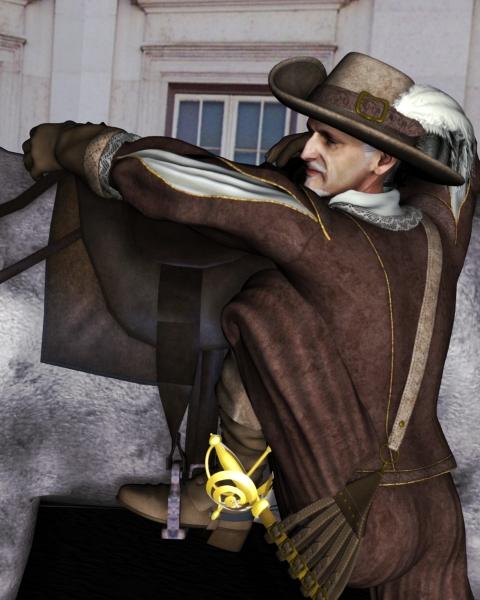
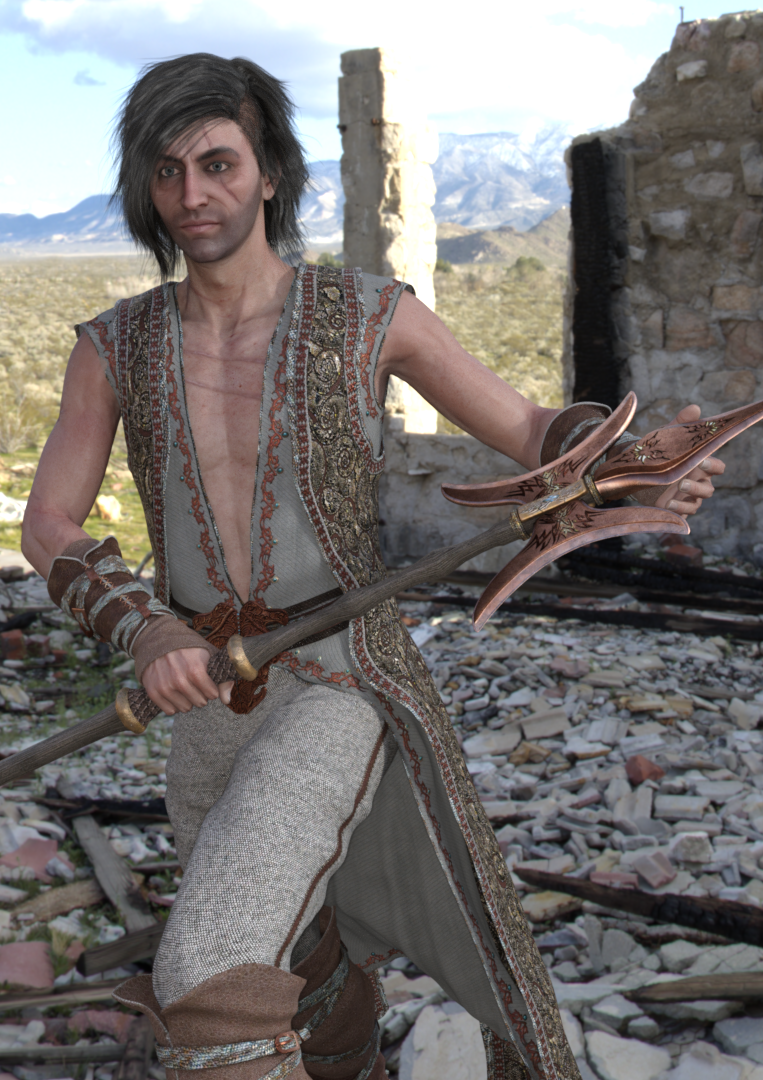
And here is G3M Richelieu, with Gwenbleiz and Elijah mixed in:
 V4 clothing to Genesis
For V4 to Genesis 1 autofit clone is already included in G1 base.
For later figures you can either do it in steps using autofit clone from previous generation included in each base (convert from V4 to G1 then convert the result from G1 to G2F and so on), or purchase a V4 clone for the target figure to do it directly:
- V4 to G2F: https://www.daz3d.com/victoria-4-for-genesis-2-female
- V4 to G3F: https://www.daz3d.com/wear-them-all-autofitting-clones-and-clothing-smoothers-for-genesis-3-female-s
- V4 to G8F: https://www.daz3d.com/sy-victoria-4-and-michael-4-clones-for-genesis-8
Will Historical Hair for Genesis 8 and 3 work in Car 8.5 on M4 without too much mucking around?Versailles Tail may be betterer for you and a DO
Compatible Figures:
Victoria 4, Michael 4, Aiko 4, Victoria 4 Elite, The Girl 4, Hiro 4, The Freak 4It's what I used on my Cpt Cook
but yes, I reckon the other one will work with some adjustments
Versailles Tail may be betterer for you and a DO
Compatible Figures:
Victoria 4, Michael 4, Aiko 4, Victoria 4 Elite, The Girl 4, Hiro 4, The Freak 4It's what I used on my Cpt Cook
And, it's a Daz Original. Time to start using your credit.

ah thank you both I already had it but I couldn't remember what it was called!
I was searching 'medeival' rococo, roccocco, rococcoo, hair etc'
now whye didnt I think to search for 'tail'
just what I need - I'm doing a series of work set in c.1831
Will Historical Hair for Genesis 8 and 3 work in Car 8.5 on M4 without too much mucking around?Versailles Tail may be betterer for you and a DO
Compatible Figures:
Victoria 4, Michael 4, Aiko 4, Victoria 4 Elite, The Girl 4, Hiro 4, The Freak 4It's what I used on my Cpt Cook
And, it's a Daz Original. Time to start using your credit.
Will Historical Hair for Genesis 8 and 3 work in Car 8.5 on M4 without too much mucking around?Versailles Tail may be betterer for you and a DO
Compatible Figures:
Victoria 4, Michael 4, Aiko 4, Victoria 4 Elite, The Girl 4, Hiro 4, The Freak 4It's what I used on my Cpt Cook
but yes, I reckon the other one will work with some adjustments
sy-victoria-4-and-michael-4-clones-for-genesis-8LOL
FSMC doesn't like it because they only wanted to use it on skimpy clothing, and it was made for heavier coverage clothes. If you want to use it on bikinis, no, it's not going to work great, but it's great on long sleeves, pants and skirts (i.e. the things that are shown in the promos).
Mind you, Valzheimer does a great product, I'm not arguing with that.
I "don't like it" because it doesn't work as advertised. Maybe a change to the name of the product is in order since it only says "SY Victoria 4 and Michael 4 Clones for Genesis 8" which implies it works on all clothing, not just the types shown in the promos or specialized clothing items.
To add to this, the reason these clones do not fit the clothing well is because the shapes do not actually match V4 and M4. They are extremely distorted. This means they will only work for clothing where you don't care if it remains the same distance from the body in the fit as it was in the original. It also means they cannot be used to transfer morphs. This may work for some people. For the vast majority, a "clone" shape is understood to actually line up with the original figure.
I said it in a previous thread, and I'll say it again: the purpose of the distortions is to achieve specific movements of the cloth. Moving verts one way in a clone moves them the opposite in the garment.
Yeah, that's...what I said. Because the clone shape is distorted, parts of the clothing that would originally have been close to the body will NOT be close to the body on the fit. The clones push out parts of the clothing. This looks "okay" on clothing where you can't see how it lines up with the body, especially loose clothing. On tight clothing and low coverage clothing it does not look okay.
Getting priced out of this hobbyI'm a fan of the 'less than $10 rule' too. If it's more than $10, I'll probably pass on it unless it's a super useful morph kit with lots of options or something.
As for the 40% off sales on artists back catalogs, yeah that doesn't move me. 60% maybe, 70% possibly, and if it's higher than 70%, yeah then I'm looking real hard at the stuff in that sale. I'd say that 70% off fast grabs, I probably only take advantage of those maybe 5% of the time, as most of the stuff doesn't interest me.
If something falls below $5, then it's definitely on my radar, and if I can grab it for as low as 40 cents down to even 7 cents... like in the last blowout sale, well let's just say I have a lot of pre-Genesis stuff thanks to those sales. And Free...yeah free with no strings (prereqs), well who doesn't love that?
The ONLY reason I'll consider 30% off on a new item is the dynamics of a sale built around said item (i.e what killer deals can I get if I buy that item). Otherwise, unless it's real cheap, yeah not gonna move me at all. It'll show up in the back catalog eventually (with rare exceptions), and I can wait.
Along those lines, yeah there's the 'buy 5 to get 10 free sale', but that sorta kinda works out to 2/3rds off of everything if you think about it. I preferred the 'get 3-4 pro bundles for free' with the pro bunles sale (they dropped it to two in the last few sales, then went this bogo thingie route), but buy pro get 10 free is better than nothing I guess.
When picking my 10 free items in the BOGO sale, I sorted price high to low, and worked from there. 'Cuz otherwise those items were out of my comfort zone. But of course the last couple of items were mainly 'fillers' to hit the 10 item mark.
I definitely feel for you really really loyal Daz customers that already have all/almost all of the stuff offered as freebies in sales. There needs to be alternate options in that case, even if it's a lowly 'extra 10% off coupon' or something... Setting up the store to detect such instances might be a pain though. Detecting 3-4 pro bundles was possible with the early G8 pro sales, so maybe there's a simple way to add a 'counter' that checks out how many freebies are being made available to you Or not...
Also, NEVER buy Plat Club at full price if you can avoid it. It goes on sale often enough, you just have to be patient. I wish I could have grabbed it for 50% off the second time around, but 30% off was better than nothing (you see, Aiko 8 had just come out, and I had already missed out on Edward...) Not sure if 30% off Plat Club memberships in sales is the new norm, but it seems like it.
So yeah, I feel for you newer people (not that I've been there that long myself, slowly creeping up on a year and a half here). My advice to you is that you don't NEED Genesis 8, the earlier generation figures work just fine. Sales happen in the Daz store often enough, so be patient. And take advantage of the freebies out there (ShareCG, PoserDazFreebies, Rendo, HDRIHaven, etc.), just pay attention to the usage rights on those freebies when you are pondering whether to download them.
Heck, some people are STILL releasing Victoria 4/Michael 4 era stuff (mostly elsewhere) for Poser, which works pretty well in Daz. And waiting on the next killer sale is an excellent time to learn new things in Daz while you patiently wait for the next awesome sale.
The '14% cash back' (Prime) at that other store is a fairly strong motivator for me when looking at sales there... a similar thing here would be cool, but if it hasn't happened by now... just saying that it's a simple, easy way to reward regular customers. Oh, and they have end dates on all of their sales over there too. Makes pre-planning a bit easier...
That 14% reward thing helped convince me me to pull the trigger on Poser 11 recently (it was on sale). I'm now trying to learn Poser in my spare time, but in the meantime at least I can test stuff I'm making in Poser as well as Daz for compatability. Daz Studio is my go to, but it's good to broaden your horizons occasionally.
Like others in this thread, I'm hoping that we'll see more new stuff priced more reasonably in the future, but as long as enough people are willing to pay higher prices, well there's no incentive for Daz to NOT charge higher prices.
In the meantime, the prevailing advice is to take advantage of the killer sales when you can, and don't feel bad about passing on the ones that aren't floating your boat. And don't be afraid to broaden your horizons, there's lots of other stuff out in other corners of the 'net there that'll work in Daz, either out of the box or with a some fairly easy adjustments. As for stuff that is here, It'll most likey go on sale again eventually at some point, or just maybe it'll eventually become a Plat Club item...
sy-victoria-4-and-michael-4-clones-for-genesis-8LOL
FSMC doesn't like it because they only wanted to use it on skimpy clothing, and it was made for heavier coverage clothes. If you want to use it on bikinis, no, it's not going to work great, but it's great on long sleeves, pants and skirts (i.e. the things that are shown in the promos).
Mind you, Valzheimer does a great product, I'm not arguing with that.
I "don't like it" because it doesn't work as advertised. Maybe a change to the name of the product is in order since it only says "SY Victoria 4 and Michael 4 Clones for Genesis 8" which implies it works on all clothing, not just the types shown in the promos or specialized clothing items.
To add to this, the reason these clones do not fit the clothing well is because the shapes do not actually match V4 and M4. They are extremely distorted. This means they will only work for clothing where you don't care if it remains the same distance from the body in the fit as it was in the original. It also means they cannot be used to transfer morphs. This may work for some people. For the vast majority, a "clone" shape is understood to actually line up with the original figure.
I said it in a previous thread, and I'll say it again: the purpose of the distortions is to achieve specific movements of the cloth. Moving verts one way in a clone moves them the opposite in the garment. Pushing the inner thighs out reduces triangulation in skirts; yanking the toes up and forward reduces hemline chunking in longer garments; making a ridge in the underbust helps de-rigdify looser shirts and coats in that area. Having a clone that looks just like the figure it's for is not the way to achieve the best fit.
I honestly don't understand the level of acrimony with this one. The Ultra Templates have a power of ten more returns (8% for UT vs. .08% for the V4 and M4 clones for G8) and not one single angry forum complaint.
Well they work fine for me, so we are not all unhappy!
Thanks for the info about the somewhat distorted look of the clone, but if that creates better fits than that is the most important thing, particularly with the triangulation issue, which kills the look for so many dresses/tunics. When I used your clone the dress looked fine.
I have my own V4 morph for morph purposes which is without the distortions. Whilst mine looks better for morphing, yours is definitely better for fitting.
sy-victoria-4-and-michael-4-clones-for-genesis-8LOL
FSMC doesn't like it because they only wanted to use it on skimpy clothing, and it was made for heavier coverage clothes. If you want to use it on bikinis, no, it's not going to work great, but it's great on long sleeves, pants and skirts (i.e. the things that are shown in the promos).
Mind you, Valzheimer does a great product, I'm not arguing with that.
I "don't like it" because it doesn't work as advertised. Maybe a change to the name of the product is in order since it only says "SY Victoria 4 and Michael 4 Clones for Genesis 8" which implies it works on all clothing, not just the types shown in the promos or specialized clothing items.
To add to this, the reason these clones do not fit the clothing well is because the shapes do not actually match V4 and M4. They are extremely distorted. This means they will only work for clothing where you don't care if it remains the same distance from the body in the fit as it was in the original. It also means they cannot be used to transfer morphs. This may work for some people. For the vast majority, a "clone" shape is understood to actually line up with the original figure.
I said it in a previous thread, and I'll say it again: the purpose of the distortions is to achieve specific movements of the cloth. Moving verts one way in a clone moves them the opposite in the garment. Pushing the inner thighs out reduces triangulation in skirts; yanking the toes up and forward reduces hemline chunking in longer garments; making a ridge in the underbust helps de-rigdify looser shirts and coats in that area. Having a clone that looks just like the figure it's for is not the way to achieve the best fit.
I honestly don't understand the level of acrimony with this one. The Ultra Templates have a power of ten more returns (8% for UT vs. .08% for the V4 and M4 clones for G8) and not one single angry forum complaint.
sy-victoria-4-and-michael-4-clones-for-genesis-8Well I just autofit the same dress as divamakeup (cocktail dress 2 for V4), onto G8F using https://www.daz3d.com/sy-victoria-4-and-michael-4-clones-for-genesis-8 (ie the clones mentioned by the OP) and it autofits very well and all morphs are retained.
Diva, did you check the top level of the item for the morphs? Autofit of poser items often places the morphs at the top level, ie directly under then item itself, rather than in the morphs tab. That is what I am seeing for G8F.
I tried it again and these morphs are not with the Wear Them All fit dress but are with the "Leap Frog" Wearable Preset method:

That's with the Wear them all clones onto G3F. I don't have SickleYield's V4 clone for G8F (though I do have quite a few of her other products and I love them all!).
sy-victoria-4-and-michael-4-clones-for-genesis-8LOL
FSMC doesn't like it because they only wanted to use it on skimpy clothing, and it was made for heavier coverage clothes. If you want to use it on bikinis, no, it's not going to work great, but it's great on long sleeves, pants and skirts (i.e. the things that are shown in the promos).
Mind you, Valzheimer does a great product, I'm not arguing with that.
I "don't like it" because it doesn't work as advertised. Maybe a change to the name of the product is in order since it only says "SY Victoria 4 and Michael 4 Clones for Genesis 8" which implies it works on all clothing, not just the types shown in the promos or specialized clothing items.
To add to this, the reason these clones do not fit the clothing well is because the shapes do not actually match V4 and M4. They are extremely distorted. This means they will only work for clothing where you don't care if it remains the same distance from the body in the fit as it was in the original. It also means they cannot be used to transfer morphs. This may work for some people. For the vast majority, a "clone" shape is understood to actually line up with the original figure.
sy-victoria-4-and-michael-4-clones-for-genesis-8Well I just autofit the same dress as divamakeup (cocktail dress 2 for V4), onto G8F using https://www.daz3d.com/sy-victoria-4-and-michael-4-clones-for-genesis-8 (ie the clones mentioned by the OP) and it autofits very well and all morphs are retained.
Diva, did you check the top level of the item for the morphs? Autofit of poser items often places the morphs at the top level, ie directly under then item itself, rather than in the morphs tab. That is what I am seeing for G8F.
Daz 3D is part of

Connect
DAZ Productions, Inc.
7533 S Center View Ct #4664
West Jordan, UT 84084Licensing Agreement | Terms of Service | Privacy Policy | EULA
© 2026 Daz Productions Inc. All Rights Reserved.