-
G8F/M Pose Transfer to G9
richardandtracy said:
I saw yesterday that a number of people were suffering from a small number of G9 poses being available. So, can I offer a 4575 line script to transfer poses to G9. You need to have the pose applied to G8F, and it is then transferred to G9 by the script. You need to select the hip of each appropriate character. The script makes a guess as to which is which in the scene, but you need to confirm or correct the choices.
G8F and G9 are very similar, so the poses convert pretty well. The biggest problem preventing immediate use of G8 poses is that the bone names are quite different, and a few bones have different zero settings. I used about 1700 lines of code to get the face rig to transfer, something I've not done in any previous transfer script. This is one area where not everything has a 1:1 equivalence, so I have tried to make it work as well as possible - if anything G8F has more bones in the face than G9. In the lips & eyelids I've had to average up to 3 G8F bone dial values to go into one G9 parameter dial. Not everyone wants the face rig pose to come over with the body pose, so the face rig pose transfer is optional with a checkbox. The head, ears and eye poses always transfer with the body pose.
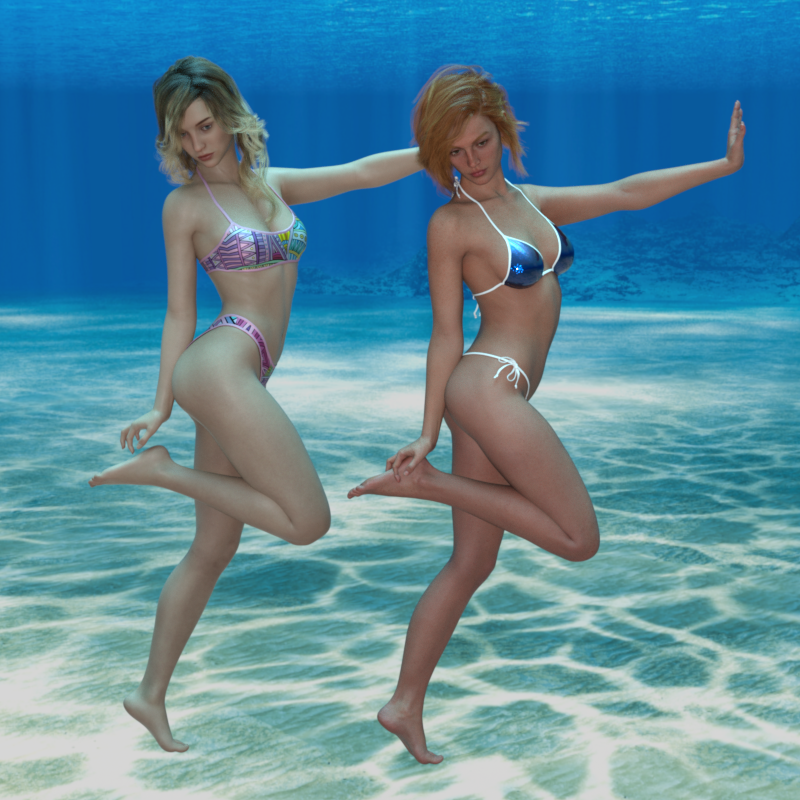
I do hope it's useful until someone like RiversoftArt can come up with a pose transfer that doesn't need G8F to be open.
Pose shown: BBarbs freebie 'Just Elegant 07' from Renderosity, Characters CHB Milan and V9. Background is Namtar3D's underwater HDRI available somewhere on this forum and at Renderosity.
The image shows that the pose has transferred properly, but due to different limb lengths between the characters, V9's right fingers are embedded in her heel. This is something that you would have had to deal with between two G8 characters and is not something the script can cope with. Allen Art reports below that it works with male figures. I've not tested it but can't see any reason why it wouldn't.
Regards
Richard
Thank you SOOOO much! I have spent so much money on my G8 characters and nothing works correctly with G9. This scriipt made me fell a little better.
morphing a geograft asset in custom poseI am certain I used to be able to do this in oder versions of DS, as I have actual blender files with posed geografts.
My old workflow used to be
1. activate the geometry selection tool so as to separate the base figure from the geograft.
2. hide posed base figure and export obj of the geograft asset "in situ"
3. make edits in blender and export obj
4. morph loader pro, reverse deformations=yes
Profit.
But this doesn't work anymore - DS complains that my morph obj has the wrong vertex count. I've searched the forum and found the most relevant thread here. The proposed workflow in the last post there also does not work, same complaint (plus additional complaints about mismatching ERC's).
I'm stuck now, and a little bit desperate - how can I make a geograft morph that is *not* in the default, unparented, unfitted state?
Standard Morphs for Genesis 9?--- SOLVED!Are you thinking of something like "Body Morph Kit for Genesis 9"?
https://www.daz3d.com/body-morph-kit-for-genesis-9
There are also separate new products for expressions and heads.
Standard Morphs for Genesis 9?--- SOLVED!I'm hoping that we'll get the standard morph dials for Genesis 9. I'm used to using the regular morph dials for my previous generations. Are they going to give us those morphs? So far, the morphs I have for Genesis 9 don't do the things I want them to do.
SereneNight’s Sci-Fi Fun Thread 3nonesuch00 said:
Serene Night said:
Okay, so just trying to dial Boyd up using the morphs I have in Genesis 9. It won't be fully Boyd yet, due to a lack of muscle and several facial morphs, I can't convert yet. But we are close/r
The pecs are super annoying. Michael 9's morph causes the current weird upper chest groove.
Reminds me of Dudley Doright if you've seen that cartoon.
LOL! That is why Boyd wears the goatee. You are not supposed to see the chin dimple.
SereneNight’s Sci-Fi Fun Thread 3Serene Night said:
Okay, so just trying to dial Boyd up using the morphs I have in Genesis 9. It won't be fully Boyd yet, due to a lack of muscle and several facial morphs, I can't convert yet. But we are close/r
The pecs are super annoying. Michael 9's morph causes the current weird upper chest groove.
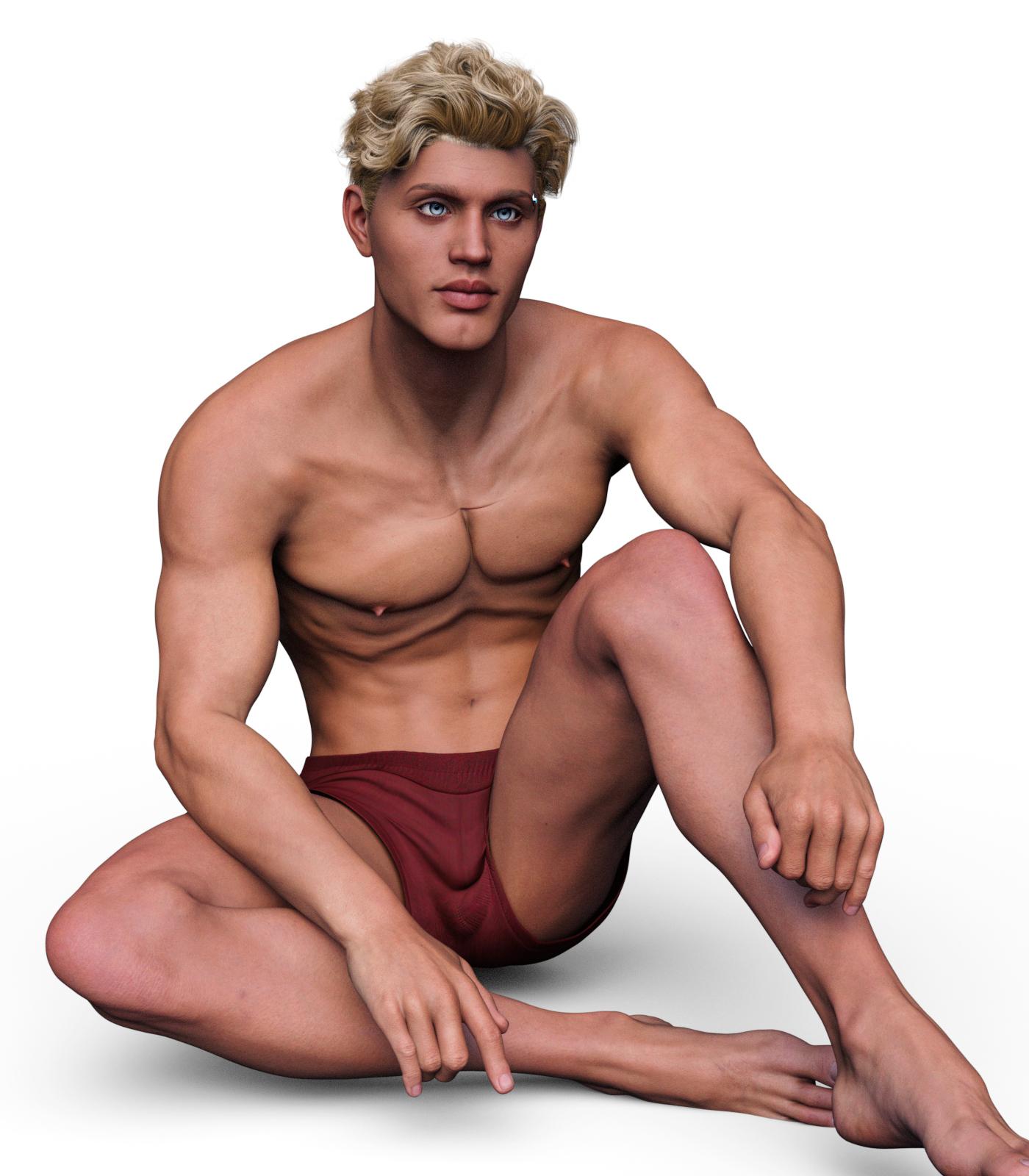
Reminds me of Dudley Doright if you've seen that cartoon.
No thread on Michael 9. Really?leemoon_c43b45a114 said:
I didn't use Michael 9 at full strength, and I mixed a tiny bit of Toon Heroes and Growing Up in with him. There's also some physique shaping going on with various morph add-ons. Hair is the dForce Ultimate Buzzcut Hair, pants and boots are from The King's Guard Outfit, and the vest is from the dForce Dark Assassin outfit (with the shirt opacity turned off.)
Lee

He looks really cute Lee. Reminds me a bit of Hiro 4 Realistic.
No thread on Michael 9. Really?leemoon_c43b45a114 said:
I didn't use Michael 9 at full strength, and I mixed a tiny bit of Toon Heroes and Growing Up in with him. There's also some physique shaping going on with various morph add-ons. Hair is the dForce Ultimate Buzzcut Hair, pants and boots are from The King's Guard Outfit, and the vest is from the dForce Dark Assassin outfit (with the shirt opacity turned off.)
Lee
Love your version of him, Lee!
Modifications have been restartedThese morph are pre-existing morphs, and I'm using tiem ago, it was now that make this problem. I add the log file.
No thread on Michael 9. Really?leemoon_c43b45a114 said:
I didn't use Michael 9 at full strength, and I mixed a tiny bit of Toon Heroes and Growing Up in with him. There's also some physique shaping going on with various morph add-ons. Hair is the dForce Ultimate Buzzcut Hair, pants and boots are from The King's Guard Outfit, and the vest is from the dForce Dark Assassin outfit (with the shirt opacity turned off.)
Lee
I really like this, and I'm convinced to pick up the Toon Heroes morphs now. :D
SereneNight’s Sci-Fi Fun Thread 3carrie58 said:
Reinstall Toon Heros for G9 the fix is in !!
That was fast!
As far as dialing in masculine morphs that is a confusion. I installed some of AOBB's femine and masculine head morphs for Genesis 9 and noticed they looked odd. So I asked AOBB and she said I am not supposed to dial in the base feminine or base masculine heads for G9 for her morphs.
I think base morphs are supposed to be for those that only make head morphs or body morphs but not the other. Plenty of head morphs have been offered in the store with no body morph included, likewise body morphs with no head morphs included. So those base shapes are meant to be used in that way. PAs are supposed to start with the "middle of the road base androgynous model" when they make a product, or at least that's what's been happening with DAZ Originals.
Importing blender animations for propsYou can import a vertex cache animation with obj and morph loader. Don't know if there's a plugin to automate this.
edit. Found this.
Shouldn't both sex promos for G9 become standard?benniewoodell said:
Oso3D said:
Like, the Michael 9 promos don't show feminine versions of Michael 9... that's not the product.
But there's two promos showing feminine versions of Michael 9 though.
Yes - but its up to the PA if they want to render it or not - its not a standard feature. The hair mentioned in this article is a great example - its clearly not a female hairstyle even though it would fit on the female base. Its extra hours work to set up a promo render which imo is a waste of time, same as setting up a render with one of the males in a bikini. Can it be done? yes... Should it? that's debatable, its really not serving a purpose other than showing it fits on the shape.
Spending more time adds to the price, especially if you keep track of how much you're getting paid per hour spent on a product.
I'm going to toss another thought into the pile. Its a unisex base yes - which you can make anything you want on. M9 has none of the masculine morph in it. V9 has none of the feminine morph in. They're sculpted from scratch. The feminine and masculine morphs are there as a starter base morph - but they're not a base figure like Genesis 8 male and Genesis 8 Female. So which female and which male are you going to show it on? the starter genders? M9? V9? What if the PA doesn't own them.
With the base shape set up the way it is, its very easy for something to fit on pretty much anything, including the corgi. In the end its going to be up to the PA to show the vision they had when creating the item.
SereneNight’s Sci-Fi Fun Thread 3Okay, so just trying to dial Boyd up using the morphs I have in Genesis 9. It won't be fully Boyd yet, due to a lack of muscle and several facial morphs, I can't convert yet. But we are close/r
The pecs are super annoying. Michael 9's morph causes the current weird upper chest groove.
Shouldn't both sex promos for G9 become standard?Mada said:There's a couple things to keep in mind here :)
PAs don't have to support both genders if they don't want to. As long as it fits on the gender they designed it for and advertise for - that's good enough.
The morph projections works pretty well for the opposite gender on the G9 mesh, so as a rule if it fits on the base shape it will fit reasonably well on both genders
BUT if the product wasn't designed with the other gender in mind there's no reason to expect the PA to support all the shapes.So if there HAS to be a standard then I would say yes - have one promo on the base shape, and a promo to show off the gender it was created for. If it works on the other gender, great - that's a bonus - show it off by all means, but its not required.
Hi Mada, looking forward to see your work for G9
I doubt any PA would want to blatantly label any item as 'G9F' / 'G9M' exclusive, as it kills the whole purpose of advertising G9 as a unisex base.
I know it's not fair to say that a lot of G9 clothes released before M9 are clearly (or should I say mainly) for the female base of G9, so I won't. I still look forward to see how clothes and hair look on both sexes though. Some may find it odd / outrageous / absurd but as a customer being advertised that G9 is unisex base I sure want to see for myself before buying
No thread on Michael 9. Really?I didn't use Michael 9 at full strength, and I mixed a tiny bit of Toon Heroes and Growing Up in with him. There's also some physique shaping going on with various morph add-ons. Hair is the dForce Ultimate Buzzcut Hair, pants and boots are from The King's Guard Outfit, and the vest is from the dForce Dark Assassin outfit (with the shirt opacity turned off.)
Lee
AOBB's Luminous v4 for G8.1F (aka Audrey Hepburn). No materials nor textures included.@crp - thank you for your render!
 I'm glad you like the morph.
  I still think Luminous' nose is too big, so if you want to rerender the image with DOF, then you might use this opportunity to decrease her nose and slim its ridge a bit (if you have the morphs). Anyway thank you again for posting your image here. Great fun!
  AOBB's Luminous v4 for G8.1F (aka Audrey Hepburn). No materials nor textures included.
Great morph. Thank you for this!
Tried to recreate this pic, but I think the eye material I used is too light & I have to add DOF obviously:
https://www.imdb.com/name/nm0000030/mediaviewer/rm1247654657?ref_=nmmi_mi_all_sf_24
 Genesis 8 or 8.1 shapes on genesis 9?
Thanks. I'll give it a shot. I want to remake specific characters whose faces combine morphs. I can transfer the morphed head. But I find I may want to adjust some morph strengths which don't work as well on 9. Eye morphs in particular since the eye structure is so different.
I agree about the muscle morphs. That would be a big project but genesis 9 male does need them. Badly.
SereneNight’s Sci-Fi Fun Thread 3Serene Night said:
Mike 9 does not need the Masculine morphs, his base figure does not come with them.
his base figure is Genesis 9 which does come with a Masculine morph tho
Daz 3D is part of

Connect
DAZ Productions, Inc.
7533 S Center View Ct #4664
West Jordan, UT 84084Licensing Agreement | Terms of Service | Privacy Policy | EULA
© 2026 Daz Productions Inc. All Rights Reserved.