-
AIUTO...CHI CONOSCE L’ITALIANO? PARTE TREDICI
Ruthven said:
Credo che l'aspetto più positivo di G9 sia proprio, per chi come RawArt fa creature, la comodità nel poter offrire sia la versione maschile che femminile senza dover fare il doppio lavoro. E ovviamente, per chi le usa, di non dover comprare 2 figure se gli servono entrambi i sessi.
Ragazza, sono stati gli stessi PA a volere a tutti i costi i sessi separati dopo G1. Dicevano che era difficile creare abiti e accessori a causa della forma, che era problematico creare morph, che era faticoso creare le pose. E adesso è una gran festa che "finalmente abbiamo la figura unica". La memoria fa cilecca...

Tutto quello che fai con G9 lo facevi già con G1 anni e anni fa, per questo ancora non lo mollo.
 Oltretutto non mi perdo nulla, posso avere tutte le nuove figure per G9 sul mio caro G1 che ha tutti i pezzi attaccati addosso.
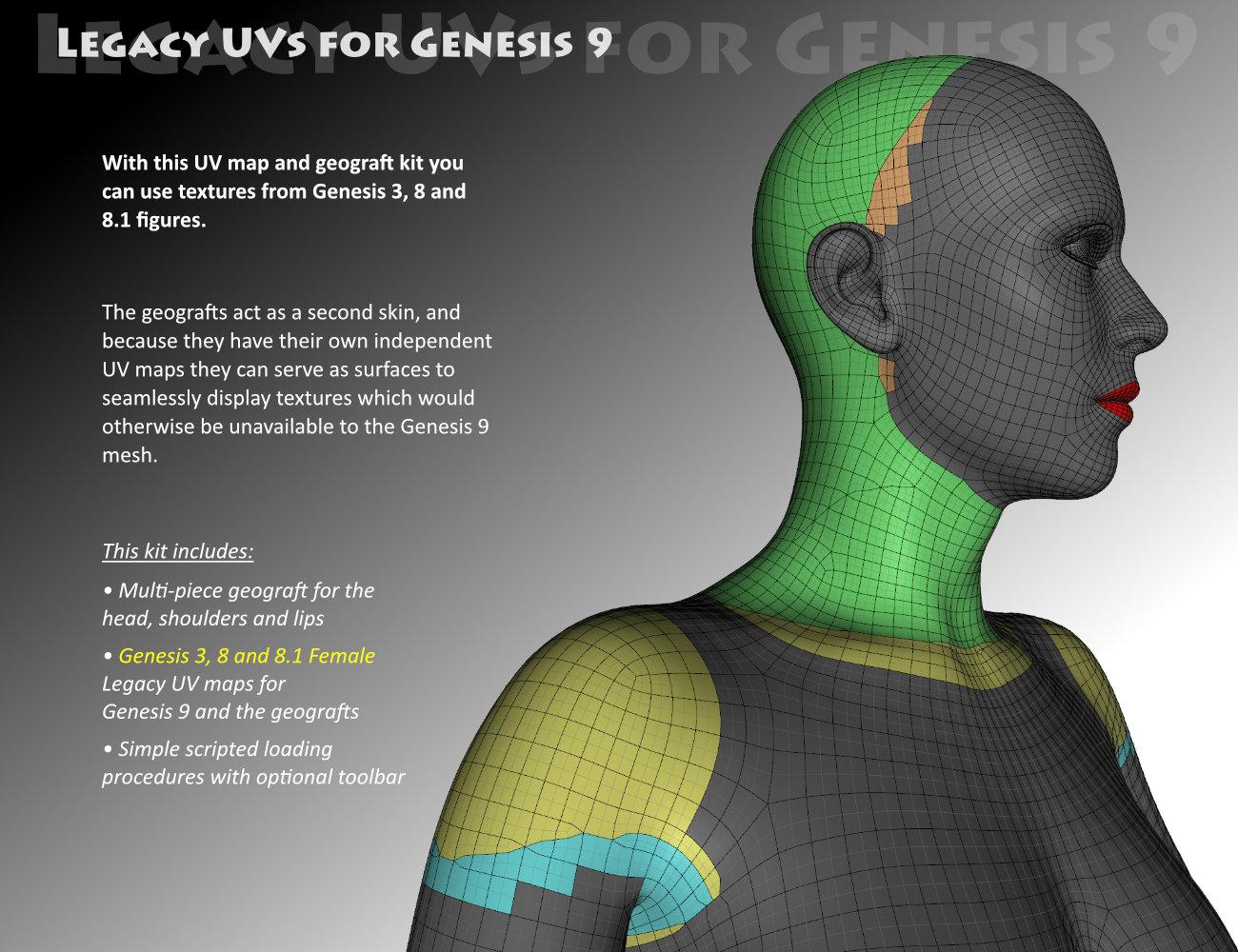
  Legacy UVs for Genesis 9 [Commercial]
Update: 12 May 2023
Released today: Legacy UVs for Genesis 9: Classic Edition - Victoria 4
https://www.daz3d.com/legacy-uvs-for-genesis-9-classic-edition--victoria-4Update: 26 January 2023
Released today: Legacy UVs for Genesis 9: Genesis 3,8 and 8.1 Male
https://www.daz3d.com/legacy-uvs-for-genesis-9-genesis-3-8-and-81-maleUpdate: 25 November 2022
Released today: Legacy UVs for Genesis 9: Genesis 3,8 and 8.1 Female
https://www.daz3d.com/legacy-uvs-for-genesis-9-genesis-3-8-and-81-femalePDF User Guide:
http://docs.daz3d.com/lib/exe/fetch.php/public/read_me/index/87928/87928_legacyuvsforgenesis9userguide.pdfOriginal Post: 22 November 2022
Legacy UVs for Genesis 9: Genesis 3,8 and 8.1 Female will be released shortly.
This will work in the same way as previous "Legacy UVs" releases for previous generations. The geografts with their own UVs will carry the textures that the main mesh cannot due to the incompatible inter-generational mappings. A script will load the geografts, create new Surface Selection sets so that the old surface names can be recognised by the new mesh, and select Genesis 9 and the geografts so that they are ready to take the legacy textures. Then the "Apply UVs" icon will set the appropriate UVs.
Now it looks like the majority of material presets for Genesis 3, 8 and 8.1 are Hierarchical Material presets, which means that they will not work on Genesis 9, so you will have to re-save these as ordinary Material presets before applying them to Genesis 9. Of course, once the MATs are on Genesis 9 you can save a new Hierarchical preset for Genesis 9 for extra convenience, if you wish.
I have included two separate UVs for the Anatomical Elements, one which carries the Torso/Body textures, and one which carries Anatomical Elements textures for characters which have them. The script will, by default, apply the Torso/Body UVs. If you want to use the AE UVs you will have to apply these separately and then set the UVs manually.
I should add that the Genesis 3 UVs included are for the "Base Female", not for the Daz Original 7-series characters, which have their own UVs. The vast majority of ordinary Genesis 3 characters use the Base Female UVs, but if you want to use the 7-series textures on Genesis 9 you can use the Map Transfer facility to convert them to Base Female.
The PDF includes further detailed information for further eventualities.
 Finished and in Freebies *Please Delete Thread*
zombietaggerung said:
Do you perhaps have a more toony skin you could put on this morph? Because as it stands right now, it's a bit......frightening.
Your not wrong lol, still trying different things.
Finished and in Freebies *Please Delete Thread*Do you perhaps have a more toony skin you could put on this morph? Because as it stands right now, it's a bit......frightening.
Knittingmommy's LaboratoryIceDragonArt said:
Knittingmommy said:
Playing around with a couple of new things. Used Victoria 9's skin, but the eyes textures are from Natural Eyes 9 for Genesis 9 which I'm in love with. Seriously good textures. The figure is one I created using Face Morphs Kit for Genesis 9. I had a lot of fun with that. I started with Victoria 9 and dialed her back to 75% and added in a little bit of VYK Sydney for Genesis 9 at 15% and then adjusted the nose, cheeks, mouth, and brow until I got something I liked.

LOVE this!
Thanks. I had fun with her. I have fun with each new morph kit I get though. I think it satisfies the part of me that loves puzzles while being creative at the same time.
Any model similar to the Dracthyr on WoW?JoeQuick said:
I feel like you could adjust the chest width and shoulder size as well
I've got such a shipload of different morph packages in my runtime, that I only wanted to give help using the most basic morphs everyone should have available... I think I could easily change the length of each limb, the neck, the size of the head itself, muscles of the legs/arms etc.. etc.. etc... to give Drago quite a change... Alas, I don't want to, because I like his look
 Knittingmommy's Laboratory
Knittingmommy said:
Playing around with a couple of new things. Used Victoria 9's skin, but the eyes textures are from Natural Eyes 9 for Genesis 9 which I'm in love with. Seriously good textures. The figure is one I created using Face Morphs Kit for Genesis 9. I had a lot of fun with that. I started with Victoria 9 and dialed her back to 75% and added in a little bit of VYK Sydney for Genesis 9 at 15% and then adjusted the nose, cheeks, mouth, and brow until I got something I liked.
LOVE this!
[Released] ManFriday's Mesh Grabber [Commercial]New meshgrabber problems. For some reason, my MG changes are not saving with a model or a scene. When I reload tthe scene, the changes are gone. This just started. Also, the undo function is not working. Is anyone else having these problems?
Update. I opened a new scene. I put a 1m x 1m plane primitive in it. Then I used MG to grab the center vertex an pull it up until the plane became a mound or a hill shape. Then I saved it as a scene. Then I reloaded it. The morph was gone. just a flat plane again.
I've tried loading files that worked before and all the deltas are gone. This will be devastating to my work if I cannot get it fixed. Years of work and many thousands of MG tweaks all lost.
This happens with either 4.16 or or 4.21. I have both installed in different locations and they have been working with MG just fine for months (although 4.21 is extemely slow at rendering compared to 4.16).
The logs may offer a clue to one of you who understands the inner workings of the program better than I. When I open either version of DS I get 35 messages like this one:
2022-11-21 16:38:55.510 [WARNING] :: ..\..\..\..\..\src\sdksource\general\dzcorefactories.cpp(892): Duplicate GUID (d29504f2-0be0-41bf-8acc-ae321515f6f8) passed to DzCoreFactories::addClassFactory(): MgModifier <-> MgModifier
There are numerous other plugin errors having to do with avcodec-58.dll, avformat-58.dll, and avutil-56.dll like this one:
2022-11-21 16:38:55.540 [WARNING] :: ..\..\..\..\..\src\pluginsource\DzIrayRender\dzneuraymgr.cpp(369): Iray [ERROR] - PLUG:PLUGIN :: 0.0 PLUG plug error: Library C:\Program Files\DAZ 3D\DAZStudio4.21\libs\iray\avcodec-58.dll: symbol "mi_plugin_factory" not found.
and others like this:
2022-11-21 16:38:55.560 [WARNING] :: ..\..\..\..\..\src\pluginsource\DzIrayRender\dzneuraymgr.cpp(369): Iray [ERROR] - PLUG:PLUGIN :: 0.0 PLUG plug error: Library C:\Program Files\DAZ 3D\DAZStudio4.21\libs\iray\swresample-3.dll: symbol "mi_plugin_factory" not found.
Then finally I get to
2022-11-21 16:38:55.919 [INFO] :: Creating Main Window...
2022-11-21 16:38:55.919 [INFO] :: Creating Viewport Manager...
2022-11-21 16:38:55.954 [INFO] :: Successfully created OpenGL viewport for Viewport1.
...Then I create the plane, use MG on it, save the scene file, and close DS.
There are no other erros reported in the log file until just before its end.
2022-11-21 16:38:57.415 [INFO] :: Json Parser (1,1): Syntax error - expected '{' or '['
2022-11-21 16:41:45.423 [INFO] :: Saved image: K:\Daz 3D\DAZ 3D Library\Scenes\mg test.duf.png...
2022-11-21 18:02:08.601 --------------- DAZ Studio 4.21.0.5 exited ------------------
2022-11-21 18:02:08.601 ~Then I restart DS get all the same errors as above. When I load the file the log shows
2022-11-21 18:03:12.104 [INFO] :: Json Parser (1,1): Syntax error - expected '{' or '['
2022-11-21 18:03:22.536 [INFO] :: Prepare asset load (open): /Scenes/mg test.duf
2022-11-21 18:03:22.536 [INFO] :: Locking viewport redraw......
022-11-21 18:03:22.587 [INFO] :: Creating modifiers...
2022-11-21 18:03:22.588 [WARNING] :: ..\..\..\..\..\src\sdksource\fileinput\dzassetdaz.cpp(6496): User property instance not created.
2022-11-21 18:03:22.588 [WARNING] :: ..\..\..\..\..\src\sdksource\fileinput\dzassetdaz.cpp(1729): Modifier not created: MF_MeshGrabModifier!
2022-11-21 18:03:22.588 [INFO] :: Processing scene data...
2022-11-21 18:03:22.588 [INFO] :: Sorting property groups...
2022-11-21 18:03:22.588 [INFO] :: Setting up follow targets...
2022-11-21 18:03:22.588 [INFO] :: Finalizing scene data...So the MG realted errors are showing in the log file. But I do not know why. Nor do I know how to fix them, I hope one of you can help me here.
Getting on the 9 train, or notmaikdecker said:
Leana said:
vrba79 said:
kyoto kid said:
...well as I feared pretty much al the new releases cheracter/clothing/pose wise are now for G9 save for a couple G8/G9 ones.
I'm just speculating, but I think PAs are given incentive to drop the old like a hot potato.
Yes, it’s called "getting more sales from content for G9".
You're sure it's not "Getting sales for stuff that was already done for G8 but can be done now again for G9 with little effort for people who just want to jump on the train"? 'Cause that what it looks like to me and as it looked already when G3 was upgraded to G8 and G8 to G8.1...
Innovation and new ideas are not really often to be found here in DAZland, imho. Many if not most PAs are happy to deliver variations of the same old products, adjusted for new figures for the reason "they sell", which of course is a valid argument, but still leads to boring products.
Of course many customers don't seem to mind to buy the same products with minor adjustments to their older counterparts, even though the reason to do so isn't quite really obvious to me, but others don't. Both is okay imho. I would still prefer to see more compatibility and real technical advancement from a new generation of figures. When there isn't, I can just go on to wait for the old stuff in my wishlist getting reduced to a price that makes it impossible for me to not buy it, while all the new stuff can be safely ignored. Kinda win-win for me

...an interesting observation. I have a lot of clothing content dating back to Gen3. I also have the "Wear Them All" utility which included clones back to Gen3. I've successfully fitted A3 clothing to G3F characters with only minor adjustments needed. I have noticed the trend to "reissue" old clothing and hair content.
For example Mall Girl, which was originally released for G1 in the Young Teens 5 Pro Bundle was re-released for G3 at a higher price.. Likewise the Annabelle Dress, originally released for V4, was updated for G2F, again at a slightly higher price. I never purchased the updates ad the originals work just fine.
One older clothing that I did repurchase whne it was released for G3 was 3D Wizard's updated Jeanz only because it included more fitting and morph capability than the original as well as fits for G3M. (the original was released for A3, V4 and M4, all as separate products). If there is a significant change like this than yes, I consider it worth purchasing again. With G8 the transfer to G3 became more problematic due in part to the change in defaulyt pose along with a wider use of hierarchal materials which do not transfer over in the autofit. There are workarounds but I find them "clumsy" to deal with..
As to hair content, I have been manually fitting and parenting hair for many years as it is fairly simple and preserves styling movement morphs that could be lost in autofit (many Gen4 hairs fit to the neck bone and since G2 that was divided into upper and lower segments causing the morphs to sometimes be lost as the fit target changed). Autofit would also sometimes distort the mesh resulting in a "kink" at the base of the neck and often in the back of longer hair.
The one reason I bought into G8 a bit was because of the more interesting and unique characters offered outside of the usual Daz core "stable". I only have V8 because she was free as a loyalty bonus.
Issue with AJC College Times Outfit for Genesis 8 and 8.1 Malespseudocritic said:
felis said:
Richard Haseltine said:
SDwitch to the Joint Editor tool, in the Tool settings pane click the icon at top-left for Vertex Mode, and, with the trousers selected, see if there are any entries in the main area under Rigidity Groups. If there are, click the + next to them and see which areas light up.
Shouldn't it be Geometry Editor?
It was indeed Geometry Editor, and there wasn't anything next to Rigidity
 I've never done a morph in ZBrush before—for anyone who has, is that something relatively easy to do and would it even work for the item if it deforms using existing but non-supported morphs? I may just use it without altering the gens area, but I do prefer it for a more realistic look. Thank you everyone for your help so far
 You might try exporting the troublemaking sweatpants without the trouble making morph dialed in as an obj and then reimporting the obj in the Morph Loader Pro with the character's morph fully dialed in and that will transfer the morph to the pants so you dial it there. At least that's how I think how to could more easily fix it.
Clothing/extracts made in zbrush posing in DAZ?I'm not sure what you mean, if you are wanting to make clothes for a Genesis figure or other natively rigged figure then use the Transfer Utility - Edit>Figure>Transfer Utility), set the Source to the figure and the target to your mesh from ZBrush, it is better to use the zeroed figure as the object to model around if you can
UVs gone madHi guys,
I am having a strange trouble. The UV layout looks fine at a glance, but if you load the mesh in Zbrush and turn "Morph UV" on, you'll see that each UV square is separated from the rest.
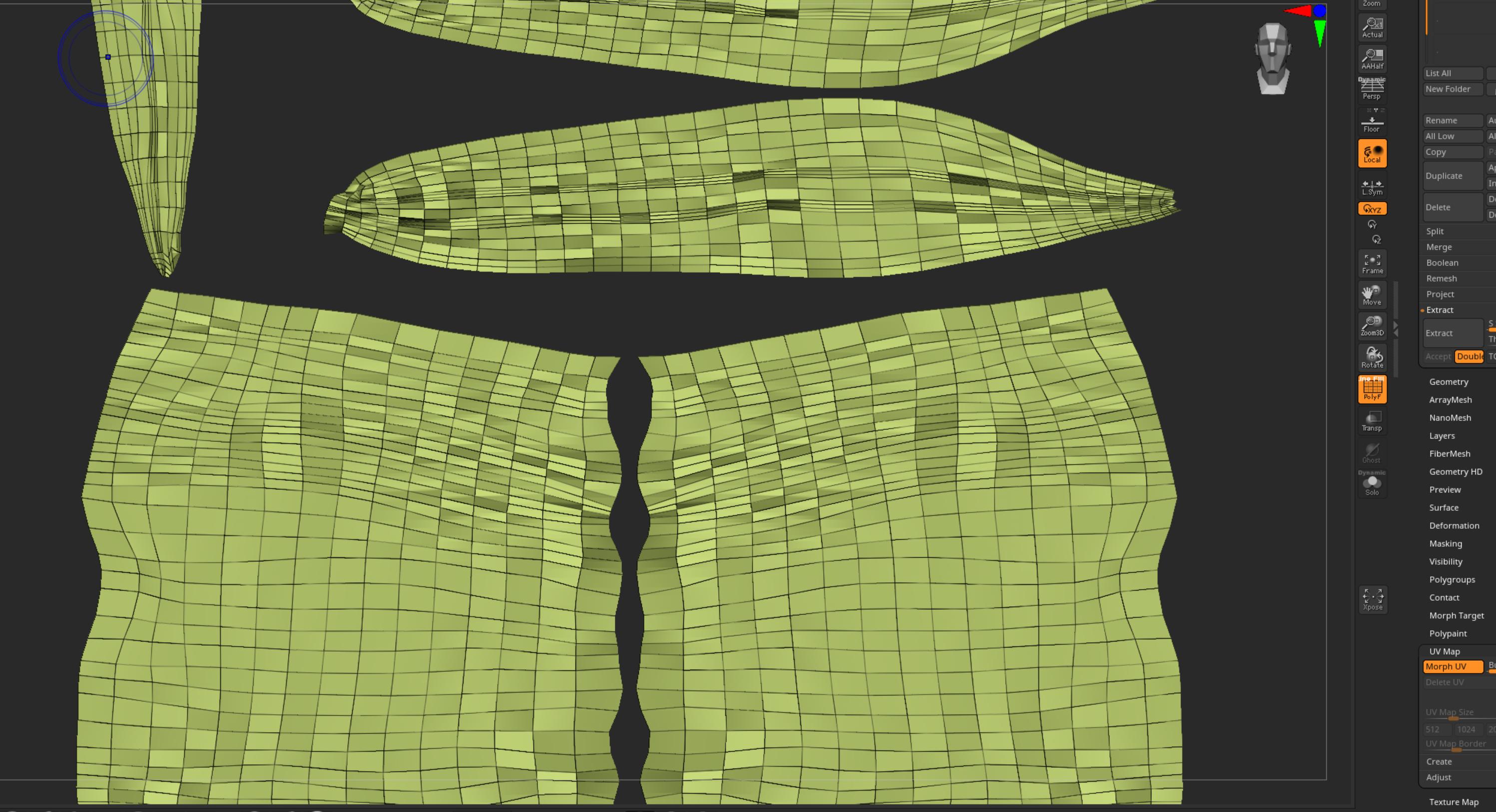
As a result, when I make an ID map based on polygroups, I get this wierd result.
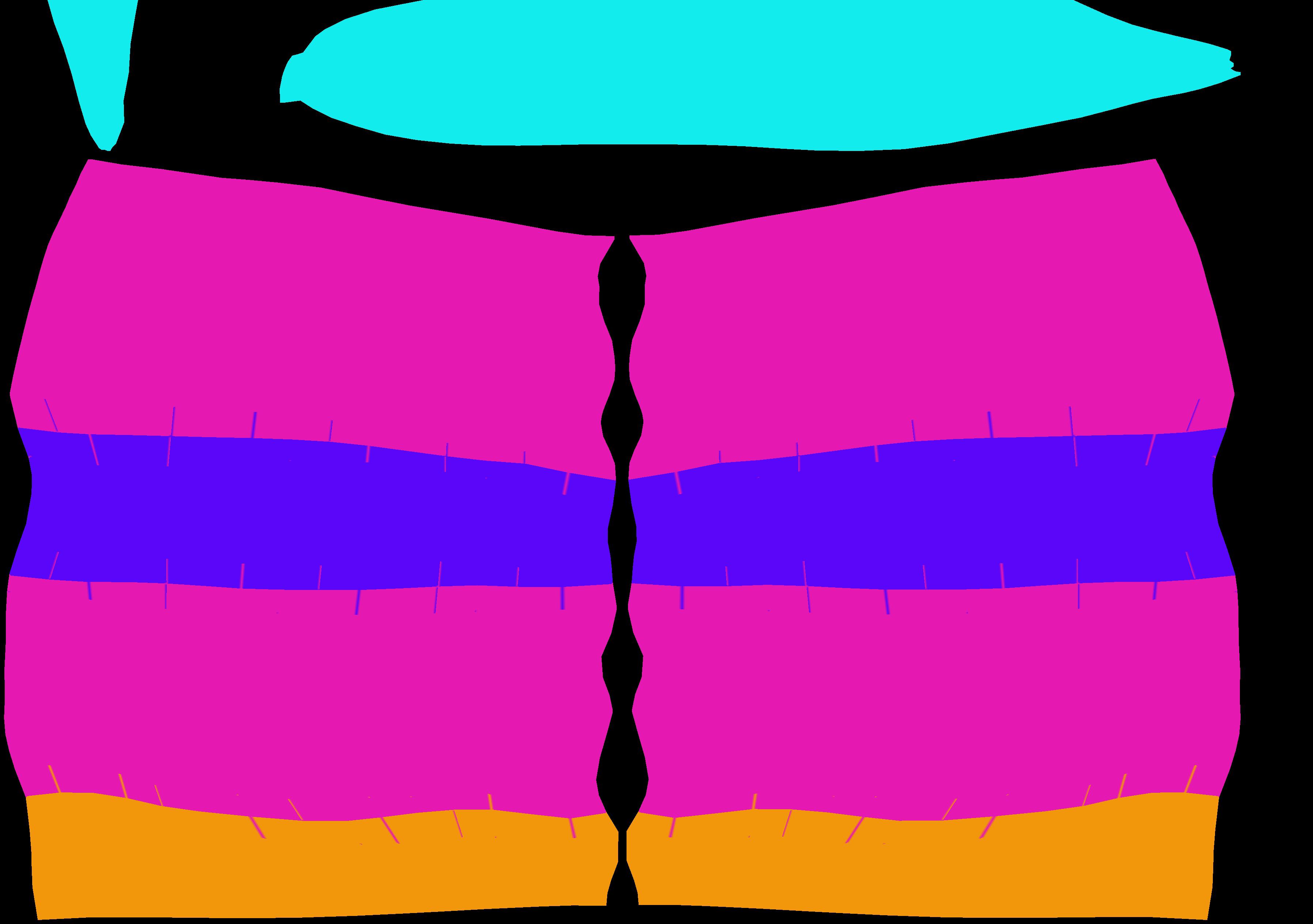
Is there a quick fix for this problem?
Shouldn't both sex promos for G9 become standard?terranullis said:
when g9 was first announced, i was fairly enthusiastic. but now i don't see the point for the reason this thread has been created.
if clothes or characters are going to be made for "feminine" or "masculine", it's the same thing as having the separate genders. it's just now more confusing.
some g8f clothes don't fit g8f when they have small breasts, and some don't fit properly when they have large breasts. i can see with g9 that male clothing might look warped on feminine g9 and female clothing might warp on masculine g9. correct me if i'm wrong, because i haven't used it much as there's not many clothes out strictly made for g9 so i'll give it the benefit of the dout. i'm not trying to be judgy, but i'd still be a bit surprised if this got "fixed" for g9 (i know it's often the result of PA morphs).
but if things ARE made separately (masculine vs feminine) - well, i just don't see the point of making things confusing by having one "figure" when you still buy clothing for the different genders anyway.
it feels like when tablets were released and they had SIM cards in them so you could use them to make calls. you COULD use it as a phone. or you COULD use it as a tablet. but in the end, you never carried it around with you because your phone fit in your pocket easier so it became more of a gimmick in the house than anything. and then collected dust.
i bought the g9 stuff, but i tend to slide back to g8.1 at the moment. i feel like it'll collect dust for a while.
It’s definitely not the same weight on disk, or the same amount of clicks until you have the asset adjusted to the figure. Each extra click that is applied goes to the stack of interruptions of the creative flow. It adds double work when converting a garment of the previous generation. Add all the morphs that will never have an equivalent in the other gender and add the others for which you will pay only once. So, I am surprised that there are still doubts about the technical differences between having separated or unified genders.
As for the issue of obligatory renders, it is a question of time and the type of artistic inspiration of the PA. Some are fascinated by rendering hairstyles in both sexes, others will love adjusting to the real world, and others will only be inspired by the gender in which they decided to make their product.
Of course, it is also matter of the customers to buy or not to buy a product on which they want to be 100% sure what it looks like in their favorite morph before making the purchase. If this is so crucial to sales success, the PA that makes extra renders will inform those who don’t, how wonderfully increased their sales by these extra, or if on the other hand, it is a waste of time for the PA and also this removes from the hand of customers a certain amount of products per year that will not be made because time was missed in renders that actually most of customers are not asking for.
How do I get Genesis 9 into Blender or Zbrush for content creation?Blender
Set Up Blender Units. Unit System : Metric System ; Length : Centimeters.
- Daz > Export as obj > Import in Blender > Create a Shape Key for the base/default shape > Create 1 shape key per custom morph > export those shaped Genesis as obj > Import in Blender with Morph Loader Pro
ZBrush
Install GoZ for DAZ Studio , Configure GoZ in ZBrush (specifiy the path to Daz). Then :
- Daz > File Send to ZBrush > Create a Layer for the base/default shape > Create 1 layer per custom morph > Tool GoZ to send the morph back to Daz as a morph slider.
N.B : Blender saves everything in the .blend file. Whereas ZBrush saves necessary files in a temporary folder (C:\Users\Public\Pixologic\GoZProjects\Default\My_Object.goz)
If ZBrush is amazing for creating morphs, this system of temporary files is terrible : you'll be able to work on your morph just fine, but if you sleep on it and work a day later, even opening the same Daz file and the same ZBrush file, you might end up with some issues (scaling, morph not conform, etc). I'm less used to Blender's sculpting tools, but it feels, with my "short" Blender experience, to be a way more stable and pro solution to create Daz morphs. On top of that ZBrush tends to weld vertices without asking if you're ok. And it's very easy to end up with a morph that won't work. Whereas Blender always respects the original topology.
I can't advise more one than the other. I used ZBrush for about 6 years, outstanding app really and ultra useful for Daz. I used Blender for only about a year... All I know is that the more I use Blender, the less I feel the need to go back to ZBrush.
Medieval Market Stall01: more fitting vegetables?maikdecker said:
felis said:
You can build an object with internal geometry, a la the dForce Add-On, and then they will kind of keep there shape. In general a low-poly object keep its shape better than a high-poly.There is to my knowledge no parameter setting that really simulates a rigid object.
&
MelissaGT said:
I'm fairly confident with dForce when it comes to hair and clothing...but I still have never been able to make solid objects reliably fall without deflating. I suppose I will have to buy something like that just to look at the dForce surface settings.
Check out the How To Use dForce thread, and there the #s 26. Dropping an Object onto a Surface and 63. Momentum Transfer (linked on the first page of the thread) which might give you some further ideas how to manage to dForce things without squishing them (too much).
Also remember with gravity turned to 0 moving the box/basket/whatever UP to catch the static (but dForced) carrots in a timeline will catch them like pokemons... probably (haven't tried it myself, but from my experience it should work).
#26 is as I said, low poly objects are better at keppeing their shape, and as there is used a low poly bounding box as carrier of the object, you will never get the objects to stack.
#63 is the best setting I have found for keeping an object in shape, but it will still deform more or less, depending on the situation, and is used in a zero gravity environment, so you won't get object to stack that way.
Medieval Market Stall01: more fitting vegetables?felis said:
You can build an object with internal geometry, a la the dForce Add-On, and then they will kind of keep there shape. In general a low-poly object keep its shape better than a high-poly.There is to my knowledge no parameter setting that really simulates a rigid object.
&
MelissaGT said:
I'm fairly confident with dForce when it comes to hair and clothing...but I still have never been able to make solid objects reliably fall without deflating. I suppose I will have to buy something like that just to look at the dForce surface settings.
Check out the How To Use dForce thread, and there the #s 26. Dropping an Object onto a Surface and 63. Momentum Transfer (linked on the first page of the thread) which might give you some further ideas how to manage to dForce things without squishing them (too much).
Also remember with gravity turned to 0 moving the box/basket/whatever UP to catch the static (but dForced) carrots in a timeline will catch them like pokemons... probably (haven't tried it myself, but from my experience it should work).
Issue with AJC College Times Outfit for Genesis 8 and 8.1 Malesfelis said:
Richard Haseltine said:
SDwitch to the Joint Editor tool, in the Tool settings pane click the icon at top-left for Vertex Mode, and, with the trousers selected, see if there are any entries in the main area under Rigidity Groups. If there are, click the + next to them and see which areas light up.
Shouldn't it be Geometry Editor?
It was indeed Geometry Editor, and there wasn't anything next to Rigidity
I've never done a morph in ZBrush before—for anyone who has, is that something relatively easy to do and would it even work for the item if it deforms using existing but non-supported morphs? I may just use it without altering the gens area, but I do prefer it for a more realistic look. Thank you everyone for your help so far Prop Creation in 3DS Max - Best PracticesFirst you create some object in any 3d application. Then export it to obj format. Launch Daz Studio and import this object into the program. Details (for Blender) here:
Your prop is in the Daz Studio now. Morphs for it are created in the same 3D application (the object is morphed by the tools of your program). Then the morphed object is also exported to obj file.
But now you don't import the object into Daz Studio as usual. You have to transfer it using the Morph Loader Pro plugin (with your prop active in the scene, of course). Details at the end of this video:
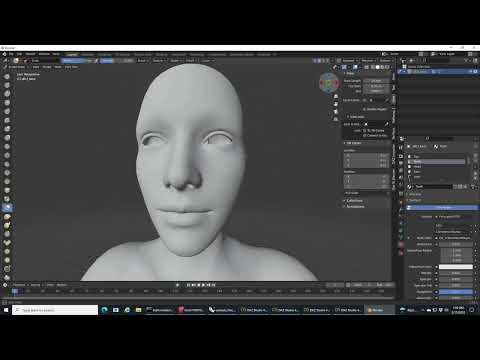
That is, the first obj file is your prop, and the second is its morph. The number and order of vertices must be unchanged, otherwise the Morph Loader will not accept the morph object and will report an error in the log file.
AIUTO...CHI CONOSCE L’ITALIANO? PARTE TREDICIMi pare una scemenza comunque, anche se non ti serve che si vedano non c'è bisogno di rimuoverli per venderli separatamente, basta il morph apposito che c'è sempre stato su tutte le figure.

E poi i morph HD prendono un mucchio di risorse.
Fai te a decidere se spendere venti dollari o giocarti due giga di VRAM ( e avere render neri sotto IRay causa sforamento) per avere l'ombelico sulla tua ragazza in bikini.
 Any model similar to the Dracthyr on WoW?
To get the figure even a bit "less bulky" you can use the following basic settings:
- Lithe 100%
- Thin 100%
- Drago HD 50%

If you also own some morph packs (Body Morphs for G8M for example), there's dedicated adjustments possible for shoulder width, neck length and whatevers..
Or you try to contact a PA or something able to design a figure that gives you 100% what you want.
Daz 3D is part of

Connect
DAZ Productions, Inc.
7533 S Center View Ct #4664
West Jordan, UT 84084Licensing Agreement | Terms of Service | Privacy Policy | EULA
© 2026 Daz Productions Inc. All Rights Reserved.