-
A question about footwear that hides the toes.
nabob21 said:
Well I'm definitely in over my head now!

I buy shoes for the figure that needs them. My theory is that, for glove and shoes, work with the 'prop' - exporting that out to work with in Hexagon or whatever to make them fit the desired figure, then bring them back into D/S and make a new figure/prop figure of them - being careful to save to different folders, not to overwrite existing.
Some morph the feet to fit the shoes and use the shoes as a prop figure [won't bend].
Heels are more labour intensive as a little TLC with the weight maps is required if being used as a 'fit to' figure. There's a good video or two over on YouTube that covers this matter.
Diomede's Notepad, Sketchpad, and Chilling PadUse the Transfer Utility - Genesis 9 is the Source - the Shirt is the Target
In this example, I am not doing any smoothing. I modeled to the base mesh so there is no need to reverse to source.
In this example, I also avoid the transfer utility default of parenting the mesh just to make extra sure that the mesh stays in its default location. In this simplest example, I am avoiding smoothing and reverse deformations and parenting to make extra sure that when the mesh for the add-on is imported that none of the vertexes for the main garment have been moved.
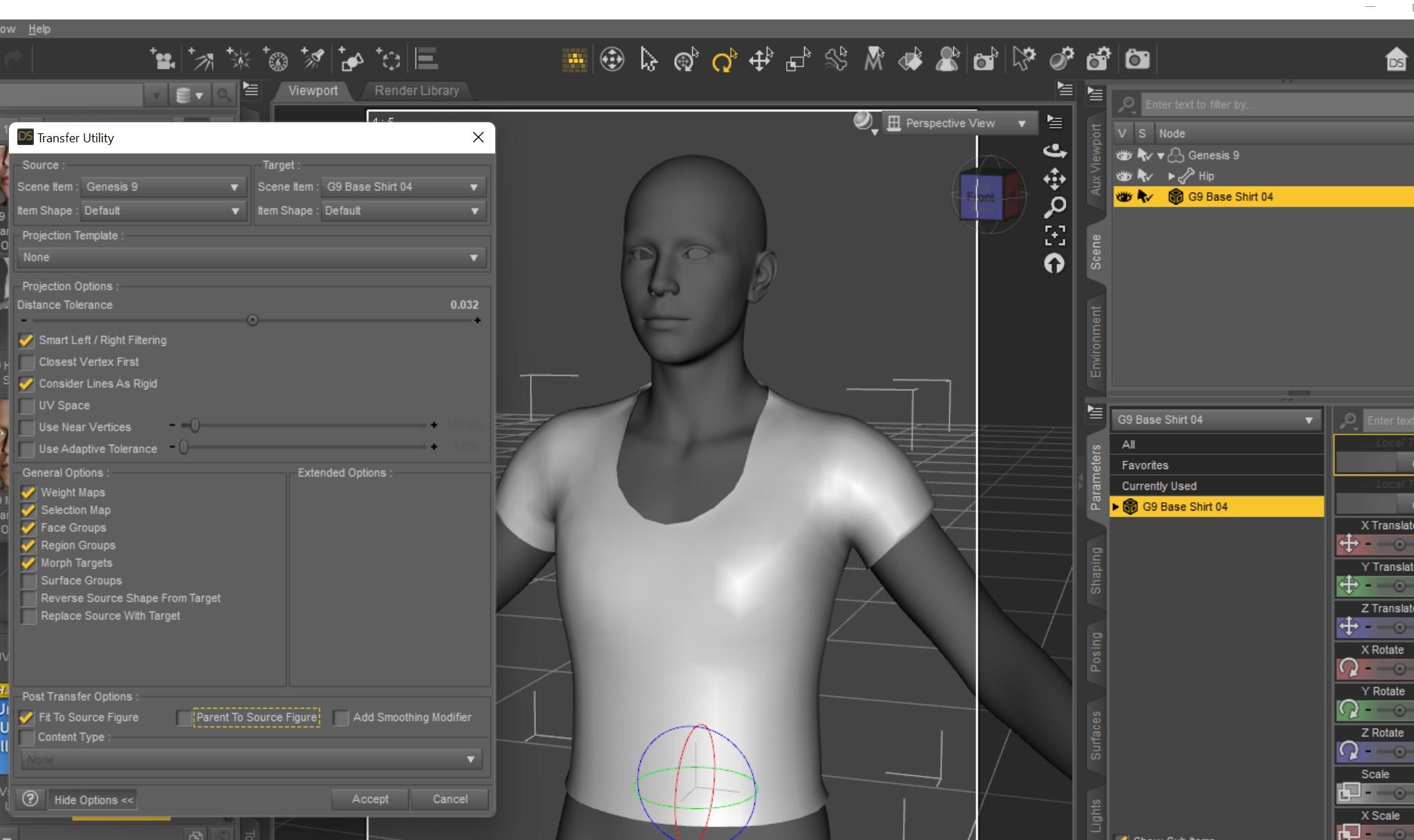
The result should be that the shirt is now a conforming garment that fits Genesis 9 base.
 Desperately seeking child sitting on mother's lap pose for G8F
I checked my library based on a few I remembered with a mother and child, one is for Gen 3 F and Gen 2 F, which could be moved up. Another might morph your characters, so be careful. The other is for Tobyn and G8F. None have exactly what you describe but have poses close to it and the child and parent might be moved with and then adjusted with PowerPose.
https://www.daz3d.com/oreschnick-poses-mothers-and-their-daughters-poses
https://www.daz3d.com/z-guardian-angel-shape-and-poses-for-genesis-8-female
https://www.daz3d.com/a-mothers-love-for-tobyn-8
You also might check Rendo's freebie section.
Freebie Challenge NOV 22 - "Thieves, Robbers, and Fraudsters all around!" - Main Thread3D Art Freebie Challenge November 2022 "Thieves, Robbers, and Fraudsters all around!"
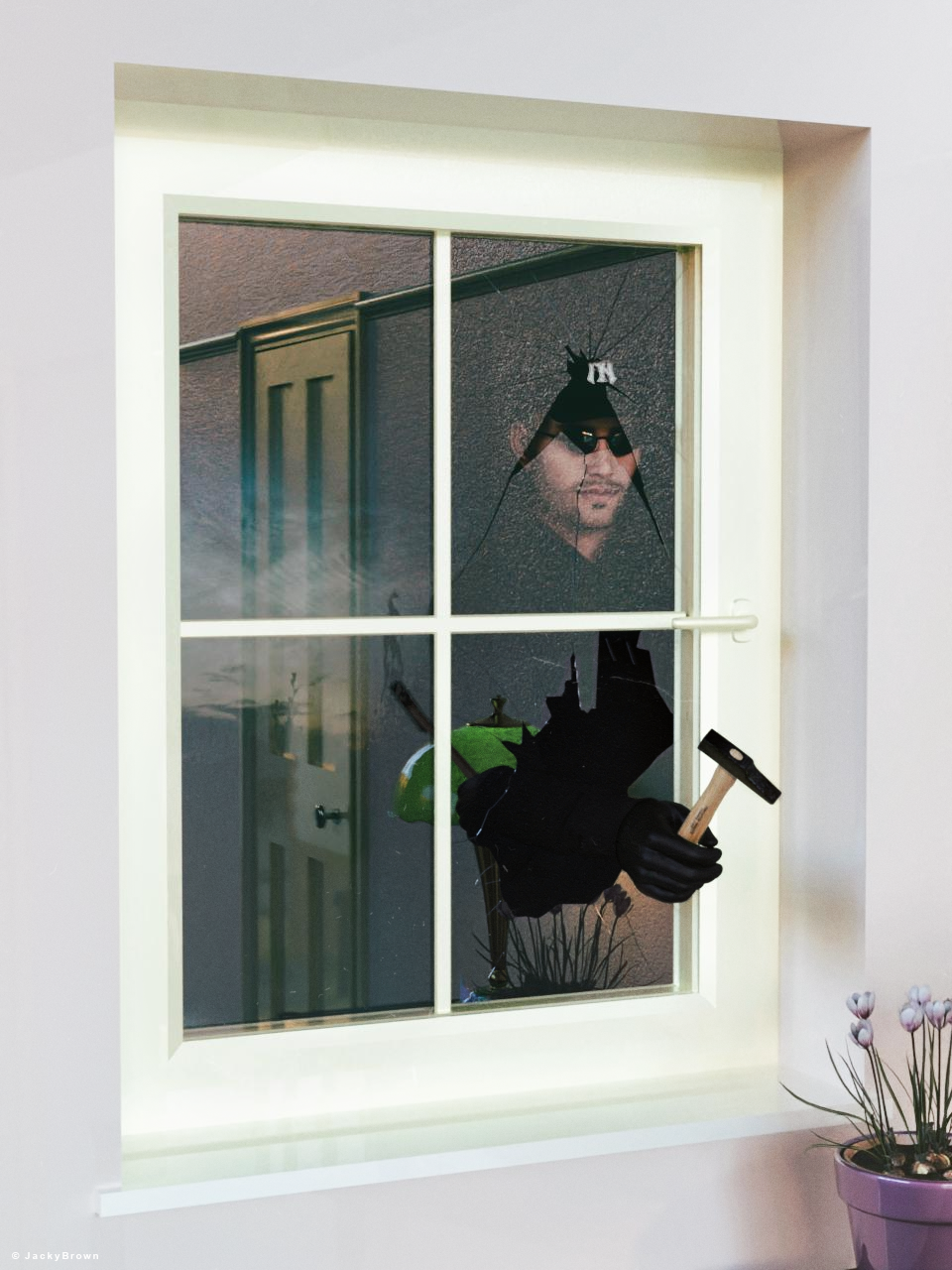
"The Burglar"
[Best watched at full size for details.]Starring: Walther 2.0 by Ruslanomar
The tale:
Burglar, a person who commits burglary.
Burglary, entry into a building illegally with intent to commit a crime, especially theft.So technically, a person who breaks in is not a thief as long as they don't steal anything. However, the burglar does deprive (steal) the resident's sense of security at the time of the break-in...
Non-Motion Picture Soundtrack:David Bowie - Breaking Glass (© 1977) https://www.youtube.com/watch?v=RI0o7y1wbzE
COUNTABLE FREEBIES: (Alphabetic order)#01! Boudoir Lamp by AllenArt
https://sharecg.com/v/95417/gallery/21/DAZ-Studio/Boudoir-Lamp **#02! Crocus by Xfrog inc.
https://www.cgtrader.com/free-3d-models/plant/other/xfrogplants-crocus **#03! Dante DMC5 Free Stubble for Genesis 8 Male by InTheFlesh
https://sharecg.com/v/94752/gallery/21/DAZ-Studio/Dante-DMC5-Free-Stubble-for-Genesis-8-Male **#04! EA Sidecut Hair for Genesis 3 & 8 Female(s) by EichhornArt
https://www.renderosity.com/freestuff/items/82972/ea-sidecut-hait-for-genesis-3-amp-8-femela-s- **
[Skullcap used]#05! Fiberhair Goatee Beard for Genesis 3 Male by RedzStudio
https://www.renderosity.com/freestuff/items/75957/fiberhair-goatee-beard-for-genesis-3-male **#06! G8M Walther 2.0 by Ruslanomar
https://sharecg.com/v/97276/gallery/21/DAZ-Studio/G8M-Walther-2.0 **#07! Hammer (.obj) by offrench
https://www.renderosity.com/freestuff/items/52734/hammer **#08! Iray car related shader presets 'megapack' by Tom2099
https://www.deviantart.com/tom2099/art/Iray-car-related-shader-presets-megapack-539622361 **#09! Kiara Interior HDRI by Poly Haven
https://polyhaven.com/a/kiara_interior#10! Little Rose by klausdbg
https://www.sharecg.com/v/87286/gallery/5/3D-Model/Little-Rose **
[Flower pot]#11! New Walther 2.0 tanned skin + hair system by Ruslanomar
https://sharecg.com/v/98463/browse/21/DAZ-Studio/New-Walther-2.0-tanned-skin-%2B-hair-system **#12! Police Gloves for Genesis 8 by zoro_d
https://www.renderosity.com/freestuff/items/82851/police-gloves-for-genesis-8 **#13! Rigged Wall and Door Prop (Corrected) by richardandtracy
https://www.renderosity.com/freestuff/items/87514/rigged-wall-and-door-prop-corrected **#14! Serving Table 01 (.fbX) by Nichgon
https://sketchfab.com/3d-models/serving-table-01-ff4433c1d5974ed6b9fdecba6d8a3126 **#15! Shattered Glass (.obj) by Spacebones
https://sharecg.com/v/66942/gallery/5/3D-Model/Shattered-Glass **#16! "STRONG" for G8M Character Morph & Pose by Mar3D
https://www.renderosity.com/mod/freestuff/strong-for-g8m-character-morph-amp-pose/82833 **#17! SY 200 Morphs for Genesis 8 Head and Body by SickleYield
https://sharecg.com/v/91888/view/21/DAZ-Studio/SY-200-Morphs-for-Genesis-8-Head-and-Body **#18! UV remapped dforce G8M Jeans by perlk
https://www.renderosity.com/freestuff/items/90916/uv-remapped-dforce-g8m-jeans **#19! Wild Star Glasses for Genesis 8 by zoro_d
https://www.renderosity.com/freestuff/items/89848/wild-star-glasses-for-genesis-8 **#20! Window component (.obj) by 3DHaupt
https://www.sharecg.com/v/80846/related/5/3D-Model/Window-component **
NO-COUNT ITEMS:--- Hoodie for G3M by Tab
++ Surf's Up Hat from Surf's Up Outfit and Board for G2M by Sarsa [Customized texture]PURCHASED/PAID FOR ITEMS: None 100% Freebies
*1 E-mail address required
** Registration required
#x! Countable Items (Bold ones are used by me for the first time I think.)
--- No longer available freebies
++ Free with DAZ Studio (or the Essentials)
$x. Purchased/Paid For Item
Rendered with DAZ Studio 4.10.0.123 (nVidia Iray)Other free software used: GIMP v2.10.32 and Irfanview 4.60
Postwork: used the AltaLux Image Enhancement Filter (Effect) by Stefano Tommesani that comes with Irfanview and some filters (oa) that come with GIMP. Also used mcjDenoise (https://sites.google.com/site/mcasualsdazscripts9/mcjdenoise) and mcjLut by mcasual (https://sites.google.com/site/mcasualsdazscripts9/mcjlut) with the free FilterGrade Cinematic LUTs Pack (https://filtergrade.com/free-cinematic-luts-video-editing/).
"The Burglar"
Genesis 9 disappearing eyes after renderWouldn't surprise me if it was. The eyes and mouth have been a real pain to work with for this figure. They don't respond like other conforming figures and move with the morphed mesh. You have to adjust them by hand and then set up control properties so that they morph when you dial up your character. There's probably a shortcut/easier way, but I haven't figured it out yet.
OBJ Clothes will not fitRichard Haseltine said:
Please put the Viewport in Smooth Shaded drawstyle if you are shwoing a nude figure.
RAMWolff is correct - the Transfer Utility will ignore any transforms applied to the Target object.
My bad!
OBJ Clothes will not fitPlease put the Viewport in Smooth Shaded drawstyle if you are shwoing a nude figure.
RAMWolff is correct - the Transfer Utility will ignore any transforms applied to the Target object.
OBJ Clothes will not fitOkay..I have been going crazy here. I purchased a dress from turbosquid https://www.turbosquid.com/3d-models/3d-model-ancient-greek-woman-dress-1916472 and I am trying to make it fit onto G8.1 but NOTHING I do makes it fit at all. I import it as an object, at which point the dress shows up at around knee level, I move it up, as you can see in picture two - it does not fit. I then use Transfer Utility to try to make it fit - it goes back to around knees and now I cannot move it at all. I have tried rigging it, I have tried the transfer utility, I have tried adding dforce - nothing makes this dress fit. At my wits ends now. Also I am COMPLETELY new to Daz/Blender/3D so if this is an easy fix forgive the ignorance.
AIUTO...CHI CONOSCE L’ITALIANO? PARTE TREDICIImago said:
Ruthven said:
Credo che l'aspetto più positivo di G9 sia proprio, per chi come RawArt fa creature, la comodità nel poter offrire sia la versione maschile che femminile senza dover fare il doppio lavoro. E ovviamente, per chi le usa, di non dover comprare 2 figure se gli servono entrambi i sessi.
Ragazza, sono stati gli stessi PA a volere a tutti i costi i sessi separati dopo G1. Dicevano che era difficile creare abiti e accessori a causa della forma, che era problematico creare morph, che era faticoso creare le pose. E adesso è una gran festa che "finalmente abbiamo la figura unica". La memoria fa cilecca...

Tutto quello che fai con G9 lo facevi già con G1 anni e anni fa, per questo ancora non lo mollo.
Oltretutto non mi perdo nulla, posso avere tutte le nuove figure per G9 sul mio caro G1 che ha tutti i pezzi attaccati addosso. 
Ma questa cosa me la ricordo bene; però penso che probaiblmente ci siano state differenze tra artisti che sviluppano personaggi "normali" e, soprattutto, abbigliamento, e quelli appunto come RawArt che fanno creature sci-fi/fantasy. Anche a me poteva andar bene rimanere su G1, magari semplicemente migliorandola. Personalmente. come già detto in passato, sto usando soprattutto G2 perché ne preferisco la mesh più dettagliata. Poi apprezzo di G3 e G8 il rigging del viso, una cosa che per le espressioni penso sia preferibile ai morph, perché credo dia la possibilità di avere un controllo più personalizzato e più fine.
Legacy UVs for Genesis 9 [Commercial]background said:
Will the Genesis 9 HD morphs work on the geografts parts?
No. As far as I know geografts still do not auto-follow HD morphs, though they will follow the morph at standard resolution.
AIUTO...CHI CONOSCE L’ITALIANO? PARTE TREDICIImago said:
Ruthven said:
Credo che l'aspetto più positivo di G9 sia proprio, per chi come RawArt fa creature, la comodità nel poter offrire sia la versione maschile che femminile senza dover fare il doppio lavoro. E ovviamente, per chi le usa, di non dover comprare 2 figure se gli servono entrambi i sessi.
Ragazza, sono stati gli stessi PA a volere a tutti i costi i sessi separati dopo G1. Dicevano che era difficile creare abiti e accessori a causa della forma, che era problematico creare morph, che era faticoso creare le pose. E adesso è una gran festa che "finalmente abbiamo la figura unica". La memoria fa cilecca...
Tutto quello che fai con G9 lo facevi già con G1 anni e anni fa, per questo ancora non lo mollo.
Oltretutto non mi perdo nulla, posso avere tutte le nuove figure per G9 sul mio caro G1 che ha tutti i pezzi attaccati addosso. Perchè ti "dimentichi" che è il pubblico a comprare ;) e sembra che l'unica figura piaccia parecchio, forse troppo. Per i morphs ci sono, come ti hanno spiegato ma vengono furi solo come HD perchè in caso di nudo li usi e lì la figura ha bisogno di un dettaglio maggiore ;) - Io in tanti anni fai conto che non ho mai usato questi tipi di morph, ne parti "al riparo dal sole" - Ho sempre considerato le figure proprio come delle action figure in 3d. Io le toglierei propio fosse per me le parti anatomiche non manifeste :D
Legacy UVs for Genesis 9 [Commercial]Zicon said:
Can this be used to convert textures to G9 with Map Transfer? Do the geografts have the compatible UVs to make this work?
Zicon, this does not convert textures. It enables existing textures, via new UVs, to be used on Genesis 9. If, for example, you have the Monique 7 texture you can convert that using the Map Transfer facility in DAZ Studio to a Genesis 3 Base Female texture. You can then use this product to put that texture onto Genesis 9. The geografts are an essential part of this and they have all the necessary UVs for the task.
I will post a link to the PDF giving more complete details on the day of release.
Here is a link to a tutorial about how to use the Map Transfer:
https://www.daz3d.com/forums/discussion/95701/tutorial-converting-custom-genesis-2-uvs-to-genesis-3Legacy UVs for Genesis 9 [Commercial]Can this be used to convert textures to G9 with Map Transfer? Do the geografts have the compatible UVs to make this work?
AIUTO...CHI CONOSCE L’ITALIANO? PARTE TREDICIRuthven said:
Credo che l'aspetto più positivo di G9 sia proprio, per chi come RawArt fa creature, la comodità nel poter offrire sia la versione maschile che femminile senza dover fare il doppio lavoro. E ovviamente, per chi le usa, di non dover comprare 2 figure se gli servono entrambi i sessi.
Ragazza, sono stati gli stessi PA a volere a tutti i costi i sessi separati dopo G1. Dicevano che era difficile creare abiti e accessori a causa della forma, che era problematico creare morph, che era faticoso creare le pose. E adesso è una gran festa che "finalmente abbiamo la figura unica". La memoria fa cilecca...
Tutto quello che fai con G9 lo facevi già con G1 anni e anni fa, per questo ancora non lo mollo.
Oltretutto non mi perdo nulla, posso avere tutte le nuove figure per G9 sul mio caro G1 che ha tutti i pezzi attaccati addosso. Legacy UVs for Genesis 9 [Commercial]Update: 12 May 2023
Released today: Legacy UVs for Genesis 9: Classic Edition - Victoria 4
https://www.daz3d.com/legacy-uvs-for-genesis-9-classic-edition--victoria-4Update: 26 January 2023
Released today: Legacy UVs for Genesis 9: Genesis 3,8 and 8.1 Male
https://www.daz3d.com/legacy-uvs-for-genesis-9-genesis-3-8-and-81-maleUpdate: 25 November 2022
Released today: Legacy UVs for Genesis 9: Genesis 3,8 and 8.1 Female
https://www.daz3d.com/legacy-uvs-for-genesis-9-genesis-3-8-and-81-femalePDF User Guide:
http://docs.daz3d.com/lib/exe/fetch.php/public/read_me/index/87928/87928_legacyuvsforgenesis9userguide.pdfOriginal Post: 22 November 2022
Legacy UVs for Genesis 9: Genesis 3,8 and 8.1 Female will be released shortly.
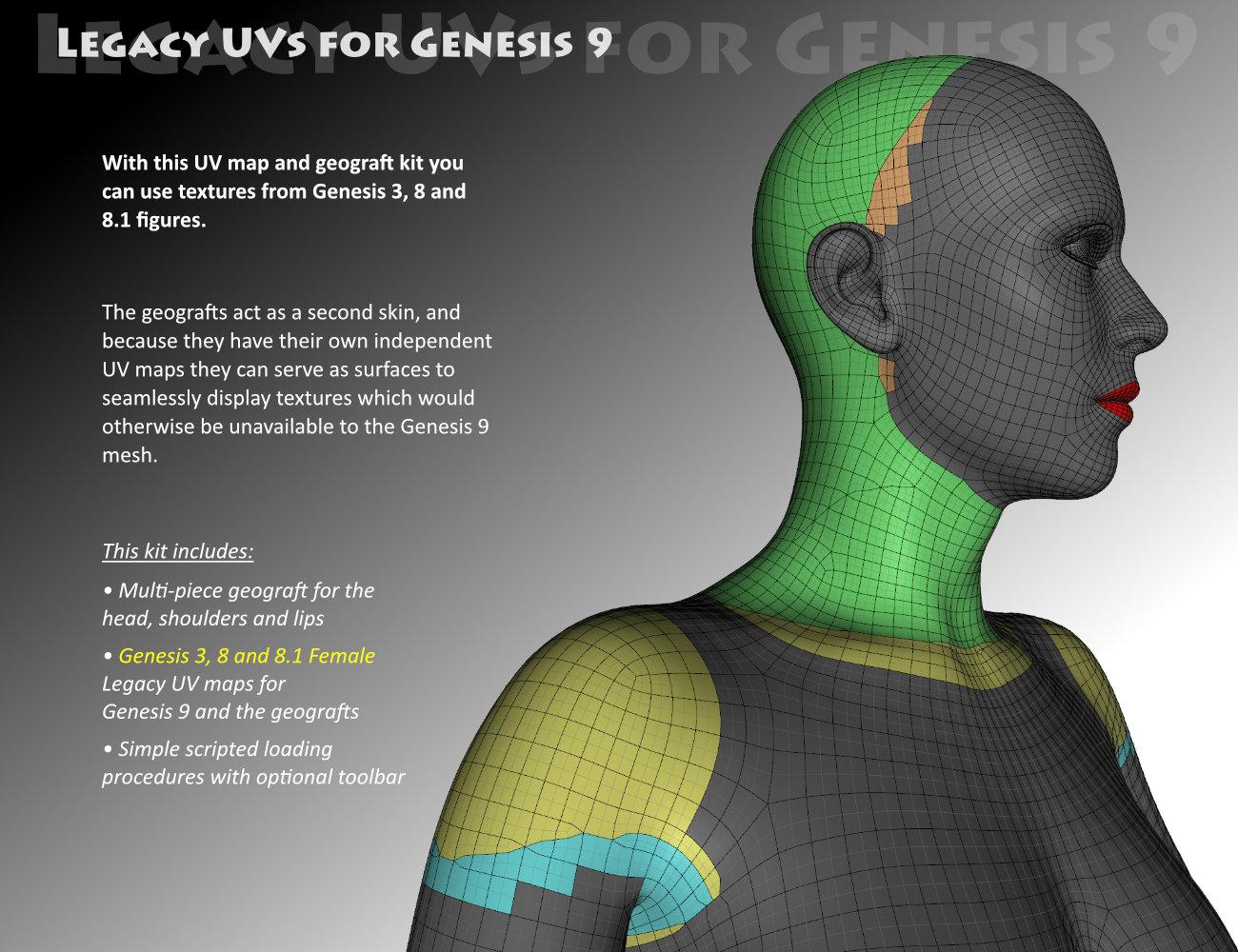
This will work in the same way as previous "Legacy UVs" releases for previous generations. The geografts with their own UVs will carry the textures that the main mesh cannot due to the incompatible inter-generational mappings. A script will load the geografts, create new Surface Selection sets so that the old surface names can be recognised by the new mesh, and select Genesis 9 and the geografts so that they are ready to take the legacy textures. Then the "Apply UVs" icon will set the appropriate UVs.
Now it looks like the majority of material presets for Genesis 3, 8 and 8.1 are Hierarchical Material presets, which means that they will not work on Genesis 9, so you will have to re-save these as ordinary Material presets before applying them to Genesis 9. Of course, once the MATs are on Genesis 9 you can save a new Hierarchical preset for Genesis 9 for extra convenience, if you wish.
I have included two separate UVs for the Anatomical Elements, one which carries the Torso/Body textures, and one which carries Anatomical Elements textures for characters which have them. The script will, by default, apply the Torso/Body UVs. If you want to use the AE UVs you will have to apply these separately and then set the UVs manually.
I should add that the Genesis 3 UVs included are for the "Base Female", not for the Daz Original 7-series characters, which have their own UVs. The vast majority of ordinary Genesis 3 characters use the Base Female UVs, but if you want to use the 7-series textures on Genesis 9 you can use the Map Transfer facility to convert them to Base Female.
The PDF includes further detailed information for further eventualities.
 Finished and in Freebies *Please Delete Thread*
zombietaggerung said:
Do you perhaps have a more toony skin you could put on this morph? Because as it stands right now, it's a bit......frightening.
Your not wrong lol, still trying different things.
Finished and in Freebies *Please Delete Thread*Do you perhaps have a more toony skin you could put on this morph? Because as it stands right now, it's a bit......frightening.
Knittingmommy's LaboratoryIceDragonArt said:
Knittingmommy said:
Playing around with a couple of new things. Used Victoria 9's skin, but the eyes textures are from Natural Eyes 9 for Genesis 9 which I'm in love with. Seriously good textures. The figure is one I created using Face Morphs Kit for Genesis 9. I had a lot of fun with that. I started with Victoria 9 and dialed her back to 75% and added in a little bit of VYK Sydney for Genesis 9 at 15% and then adjusted the nose, cheeks, mouth, and brow until I got something I liked.

LOVE this!
Thanks. I had fun with her. I have fun with each new morph kit I get though. I think it satisfies the part of me that loves puzzles while being creative at the same time.
Any model similar to the Dracthyr on WoW?JoeQuick said:
I feel like you could adjust the chest width and shoulder size as well
I've got such a shipload of different morph packages in my runtime, that I only wanted to give help using the most basic morphs everyone should have available... I think I could easily change the length of each limb, the neck, the size of the head itself, muscles of the legs/arms etc.. etc.. etc... to give Drago quite a change... Alas, I don't want to, because I like his look
 Knittingmommy's Laboratory
Knittingmommy said:
Playing around with a couple of new things. Used Victoria 9's skin, but the eyes textures are from Natural Eyes 9 for Genesis 9 which I'm in love with. Seriously good textures. The figure is one I created using Face Morphs Kit for Genesis 9. I had a lot of fun with that. I started with Victoria 9 and dialed her back to 75% and added in a little bit of VYK Sydney for Genesis 9 at 15% and then adjusted the nose, cheeks, mouth, and brow until I got something I liked.
LOVE this!
Daz 3D is part of

Connect
DAZ Productions, Inc.
7533 S Center View Ct #4664
West Jordan, UT 84084Licensing Agreement | Terms of Service | Privacy Policy | EULA
© 2026 Daz Productions Inc. All Rights Reserved.