-
Studio playing up, plan on a clean install - any tips?
junkgoshere said:
Thanks Crosswind for clarifying my points
Reference backing up library, will be reinstalling everything from scratch, but will save those folders (Scenes and Scene subsets. Appreciate the input on saving plug-ins suggestion.
I have Daz on an M2 SSD, why install on C (which has less room)?
So you have a dedicated drive to locate your Daz Libray, then what I mentioned doesn't apply for your case. You know quite a lot of users still keep using the default Daz Libary there on C drive...
Also, not fully understanding the connect suggestion. I do not want anything to install at all, as it leaves blue thumbnails in my library I cannot get rid of. Is there a way to not have it install things?
The way of not having it install things is : 1) DO NOT Update Metadata when Login... Daz Connect; 2) DO NOT right-click on a Product pushed from Cloud to Install in Smart Content. If you have point 1) done, you'll never have to worry about point 2).
But I don't quite understand what are blue thumbnails... any screenshot ? If you mean you find those thumbnails after Update Metadata, you can easily Delete them by: right-click on it > Show Product in Content Libray, then right-click > Delete.The issues I am experiencing are due to mesh grabber, and its not the first time its happened, I accidentily grab the figure and not the clothing and it srews up that base figure everytime I load one, reinstall figure does not fix. First time was with G8F and it did not matter as moved my Daz to a new machine, this time its with G8M, and will be a full reinstall on that machine.
I don't understand... I've been using Mesh Grabber for years but haven't experienced such issue you mentioned. Did you ever Saved the morph in MG's Tool Settings, then saved the figure asset to overwrite the default Base figure ?
Just got a notice about 3Delight being retired.....My personal opinion is that iray is capable enough to convert 3delight shaders, indeed this is how we import 3dl in blender converting it first to iray. There may be some bump map to adjust as iray can't convert the bump height correctly, or some complex materials may need some adjustement too, but in general the conversion is good. As for the speed iray used with the cpu is far superior to 3dl with full ray tracing, while for 3dl without raytracing you can use filament instead, though in this case the shader conversion is not that good unfortunately as filament can't do most iray features, particularly transmapped hairs don't come good with filament.
The real advantage of 3dl is memory, as iray requires a vast amount of ram to render the scene while 3dl is tiled thus a small ram is enough. But ram alone doesn't cost much and most PCs can be upgraded for that.
Workflow for making static clothing mesh poseable?As @Elor linked, I also strongly recommend Mada's series that can make you an expert. They helped me a lot. Very appreciated !
Then I'd like to share some useful tricks from my workflow.. though it's not a tutorial ~~
- Depending on the style of wearables (whatever armors, garments, accessories...), different wearable styles may bring yout different results after rigging them with Transfer Utility (TU). You have to spend a lot of time on weight mapping, fixing corrective morphs, e.g. with long skirt, long robe, etc. So each time you're happy with a certain style of such a "complex type" of wearable, better save it as a Projection Template. When you rig another similar style, you can re-use the Projection Template with TU so as to save quite a lot of time for tweaking and fixing...
(I showed you a case in screenshot 1. On the left, rigged with None or DS templates; On the right, rigged with my saved template)
Well, you can use other garment product with similar style as a template, which is also a pretty good way ~- When weight mapping, if the garment is symmetrical, try using Symmetry option or Weight Map Symmetry... That'll save you more time.
- When fixing things in ZB or Blender, the same, fix them with Symmetry if you can do. Then you can import OBJ to update corrective morphs on different sides with Attenuate option.
- Or, if you just fix one side, you can use Mirroring option to update the corrective morph on the other side. (Left to Right or Right to Left...)
All these tricks can significantly help with speeding up your workflow. Hope you'll find them helpful when practicing with your workflow. Good luck !
LEM Extra Styles for G9 Toon BrowsThis project was a result of three things:
- I wanted certain eyebrow styles for my own FilaToon renders.
- Was curious to create and properly package a DAZ asset product, so it is usable for others.
- On that last point, wanted to give back after all these years of enjoying others' freebies. My PC is too weak for modeling, but I can texture with it.
This freebie was initially uploaded to my DAZ deviantART account. It can be found here: LEM Extra Styles for G9 Toon Brows by MimicMolly on DeviantArt. In case you're not on deviantART, I've uploaded the ZIP file as an attachment, but I removed the ReadMe just to be 100% sure it wasn't too big for the forums. If you still need a ReadMe for your own personal records, just copy-paste the deviantART description. It's also up on Renderhub and Renderosity, should you need to have it available elsewhere. (It's for both commercial and personal use. Basically, to be used like any other DAZ asset you'd buy from the DAZ3D store.)
There's 8 different eyebrows in the three styles -- black, tinted, and solid. They come in 4 colors: Chocolate, Dark Roast, Mousy Blonde, and Terracotta.
I designed them to be interchangeable with the DAZ Originals eyebrows. They are all hand drawn by me, created by my own natural, God-given intellgence. (No AI. I'll even link to my Art Studio thread where you can see part of my progress.) And here are some promo renders, in case you need them. The 4 colors are each showcased on two characters.
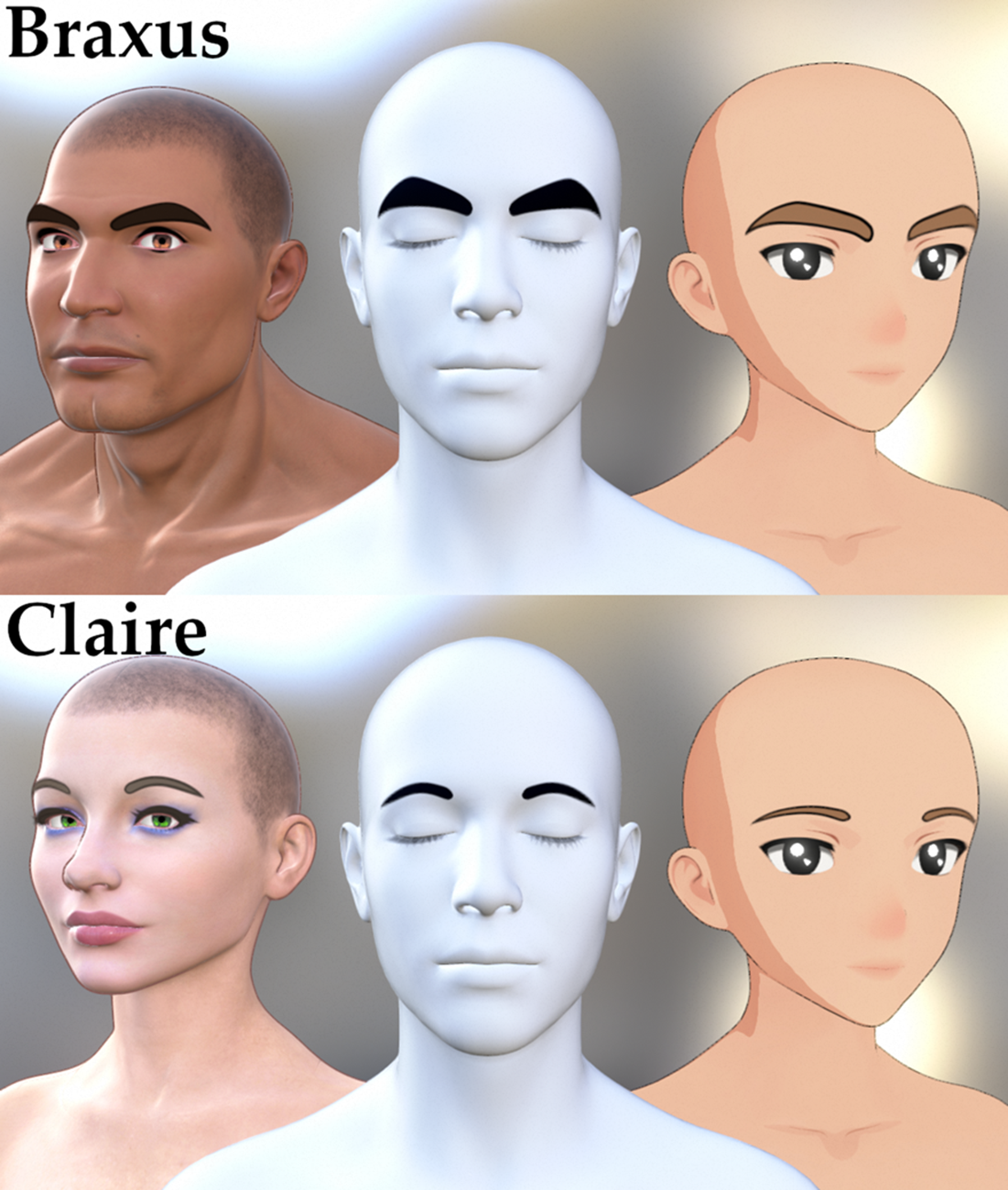


Special thanks to @Elor (sorry for all the pinging), who helped me with making the metadata, in case you guys want to access my freebie through the Smart Content tab. Please note that the DAZ forum attachment has an extra layer of folders because it renames ZIPs as letters and a buncha numbers. Just copy and paste to the correct folder structure, and you should be good.
Troubleshooting Invicta Couture Lingerie Set / Materials don´t loadHey Guys,
Have some Problems with the Asset Invicta Couture Lingerie Set from Herschel Hoffmeyer.
I loaded the Clothing on my Gen8 Model and as i wanted to load some new Material from the Midnight Gold Add-On i got just the following Message
An error occurred while reading the file, see the log file for more details
If i understand now the log text right, Daz can´t find the Files for the Midnight Gold Add-On in my Daz Folders, but instalt it manuel like any other Clothing Asset and Add-On before.
That the last Log of my test...may someone can help me to fix that problem :/
2025-08-04 19:40:13.830 [INFO] :: Unlocking viewport redraw...
2025-08-04 19:40:13.830 [INFO] :: Viewport redraw unlocked.
2025-08-04 19:44:24.022 [INFO] :: Prepare asset load (merge): /Clothing/Underwear/Invicta Couture/04 Materials/02D Thigh High Socks/InvictaCouture 01B ThighHighSocks CottonAthletic Black.duf
2025-08-04 19:44:24.022 [INFO] :: Locking viewport redraw...
2025-08-04 19:44:24.022 [INFO] :: Viewport redraw locked.
2025-08-04 19:44:24.070 [VERBOSE] :: Native format content directories: 3
2025-08-04 19:44:24.070 [VERBOSE] :: Poser format content directories: 3
2025-08-04 19:44:24.070 [VERBOSE] :: Other import format content directories: 0
2025-08-04 19:44:24.071 [INFO] :: Begin asset load (merge): /Clothing/Underwear/Invicta Couture/04 Materials/02D Thigh High Socks/InvictaCouture 01B ThighHighSocks CottonAthletic Black.duf
2025-08-04 19:44:24.086 [INFO] :: Determining missing assets...
2025-08-04 19:44:24.122 [WARNING] :: Invalid hierarchy for selected node(s) and "preset_hierarchical_material" type; no root(s) found.
2025-08-04 19:44:24.122 [WARNING] :: Error loading asset: D:/DAZ Studio Files/DAZ Studio Content/Clothing/Underwear/Invicta Couture/04 Materials/02D Thigh High Socks/InvictaCouture 01B ThighHighSocks CottonAthletic Black.duf
Operation failed
Filter by context gone blankcrosswind said:
Ah, no... that's not a "vanishing" but a "collapsing" because of a non-Default category there. You can see there're two Category groups on the left : Default and Shaders. As long as there're more than one category in the list, the category tree will be automatically collapsed.
You can just click Default category to expand it, you'll see your product thumbnails back.
That Shaders category usually comes from the wrong metadata in a Product ... if it was not created by you. Better re-assign a Default Category to the shader preset files under it, or delete that Shaders category. This "issue" will be totally gone.
OMG that was it! Thank you. I feel dumb now!
MimicMolly's Renders & WIPsHopefully I didn't make any mistake when archiving the relevant files

To keep the information about what this about, I archived a Metadata folder with a LEM Extra Styles for Toon Brows inside, this way even with the renaming done by Daz forums, it should still be easy to know what the archive was about.
In case you have some doubt about how to import metadata, the whole process is explained here, with the difference that the product to look for is 'LOCAL USER LEM Extra Styles for Toon Brows':
https://www.daz3d.com/forums/discussion/738806/render-presets-for-agent-unawares-skydomes
MimicMolly's Renders & WIPs@Elor you can attach both the metadata and the h.presets here as a reply. I'll try to repackage it later today and re-upload. Thank you.
The "original" product name was even more generic. It was just "Toon Brows" as it's written in the folder they're all found in. '^^;
MimicMolly's Renders & WIPsI don't know how Daz created their H.Mat color presets for the Toon brows, because saving a H.Mats created a file containing way more information that what is inside one of the H.Mat color presets by Daz, but it's not too hard to create them manually by modifiying your color presets to make them act like the presets from Daz.
The main changes:
- Change the type value to 'preset_hierarchical_material'
- Replace the whole 'materials' section by a 'nodes' section (copy-pasted from the H.Mats preset I created to see how they looked by default).
- Replace '@selection' by 'Genesis9ToonBrowsPaint'
I also created metadata for them, looking at how Daz did it. It's currently looking like that in Smart Content:
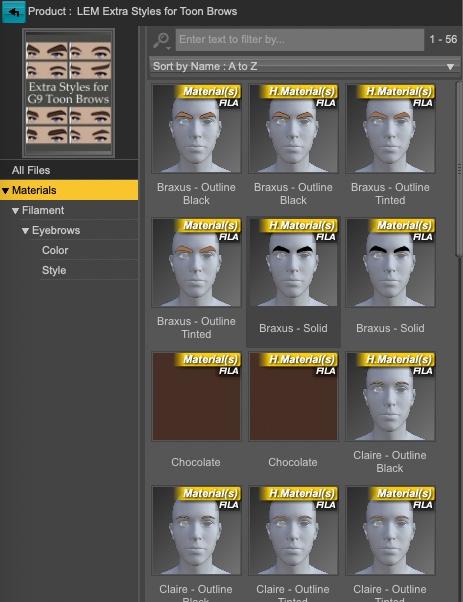
(I added LEM as a prefix because Extra Styles for Toon Brows felt a bit too generic and I wanted to avoid possible name conflict if someone else decided to create their own extra styles).
I used the main picture in your Deviantart message, just slightly ajusted to end with a 10:13 picture.
If it's okay with you, I can attach the metadata with the H.Mats color presets, with your picture used as a thumbnail, to another message.
Edit: I forgot, but thank you for the freebies :)
Render presets for Agent Unawares' SkydomesThank you Elor, for the preset and for the useful explanation on how to use metadata.:)
Bug - Studio stops remembering categoriescrosswind said:
Richard Haseltine said:
crosswind said:
I've never encountered such an issue though I also customize the categories a lot as well as handle assignments frequently.
Actually the categories shown in your screenshots look weird to me. Normally if one creates a user-defined category, the category icon should show a U mark on it (in below screenshots...). But most of yours are shown as Default (white icon with no U...).
Default category (AKA Vendor category... with pure white icon) can only be created by Daz or manually created in cms database directly... How did you create them?
No, as long as you add the metadata from a valid .dsx file with a valid Product GUID and Store ID (which doesn't have to be Daz) it will come in as Vendor data. You can create a new Store ID using http://docs.daz3d.com/doku.php/public/software/dazstudio/4/referenceguide/scripting/api_reference/samples/metadata/add_store_id/start (I have added one for the stores from which I have products, plus two for freebies - commercial use and non-commercial use). In fact the products that I have created in DS, no reimporting metadata, that meet those requirements are not user data and are not in the Local user product.
You're right ~ I forgot some vendors from 3rd-parties also create IM or XX installation package, as well as the ones made by the users.
As for Store ID, the case may vary... for instance, even if the vendor creates one store ID which is specified in product's DSX file, a user has to create the very same one in his cms database beforehand, otherwise the product will still go to LOCAL USER.
Subject to the CC 3.0 license terms a store could produce its own variant of the sample script above to add the store's chosen details, which the instalaltion (if they make the product DIM-friendly) could then use to make sure the store was valid before importing the metadata - the ,dsa files that match the metadata file in each Daz DIM product show how this can be done. That would also mean that the products would gain the right-click/thoubnail click More information option (for example, my Renderosity products use that to open the store product page).
I couldn't reproduce your issue by now but, for instance, if you assign a Default category under User to an item... maybe with a conflict or glitch, you can try going to Default to filter the item out, I suppose....
(This sort of issue can be easily checked and identified within cms database if you have a postgreSQL DBA software... I always use Navicat to edit and fix things in cms ~~)
Bug - Studio stops remembering categoriesAh, as you nailed it: re-importing user data made them Default... If so, it seems a bug to me. User-defined categories should be always marked as user-defined (non Vendor...)
I've never used export / re-import UserData, I only back up cms cluster and clean the data as needed from time to time.
But as for DS failing to assign a Category to an item, I've had no idea so far.... I hoped I could reproduce the issue but I failed ~~
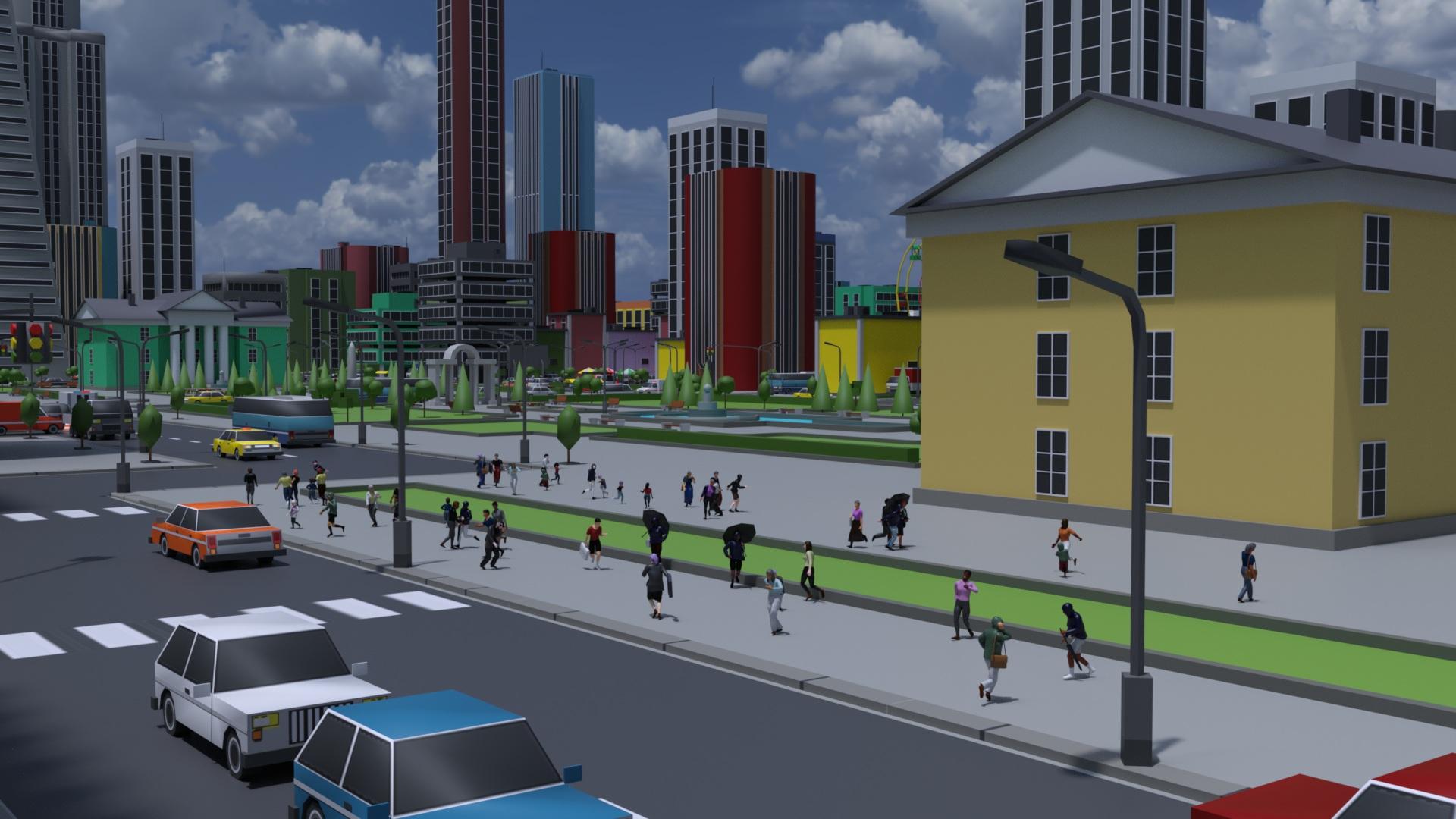
LIVE! In the store NOW!! LowPi - the Low Poly Figure, and Crowd Creator ScriptsMy trial with LowPi in the city.
Thanks to https://www.daz3d.com/blender-to-daz-studio-plugin I were able to import some large set to Daz Studio.
 Filter by context gone blank
Ah, no... that's not a "vanishing" but a "collapsing" because of a non-Default category there. You can see there're two Category groups on the left : Default and Shaders. As long as there're more than one category in the list, the category tree will be automatically collapsed.
You can just click Default category to expand it, you'll see your product thumbnails back.
That Shaders category usually comes from the wrong metadata in a Product ... if it was not created by you. Better re-assign a Default Category to the shader preset files under it, or delete that Shaders category. This "issue" will be totally gone.
Bug - Studio stops remembering categoriesRichard Haseltine said:
crosswind said:
I've never encountered such an issue though I also customize the categories a lot as well as handle assignments frequently.
Actually the categories shown in your screenshots look weird to me. Normally if one creates a user-defined category, the category icon should show a U mark on it (in below screenshots...). But most of yours are shown as Default (white icon with no U...).
Default category (AKA Vendor category... with pure white icon) can only be created by Daz or manually created in cms database directly... How did you create them?
No, as long as you add the metadata from a valid .dsx file with a valid Product GUID and Store ID (which doesn't have to be Daz) it will come in as Vendor data. You can create a new Store ID using http://docs.daz3d.com/doku.php/public/software/dazstudio/4/referenceguide/scripting/api_reference/samples/metadata/add_store_id/start (I have added one for the stores from which I have products, plus two for freebies - commercial use and non-commercial use). In fact the products that I have created in DS, no reimporting metadata, that meet those requirements are not user data and are not in the Local user product.
You're right ~ I forgot some vendors from 3rd-parties also create IM or XX installation package, as well as the ones made by the users.
As for Store ID, the case may vary... for instance, even if the vendor creates one store ID which is specified in product's DSX file, a user has to create the very same one in his cms database beforehand, otherwise the product will still go to LOCAL USER.
I couldn't reproduce your issue by now but, for instance, if you assign a Default category under User to an item... maybe with a conflict or glitch, you can try going to Default to filter the item out, I suppose....
(This sort of issue can be easily checked and identified within cms database if you have a postgreSQL DBA software... I always use Navicat to edit and fix things in cms ~~)
Bug - Studio stops remembering categoriescrosswind said:
I've never encountered such an issue though I also customize the categories a lot as well as handle assignments frequently.
Actually the categories shown in your screenshots look weird to me. Normally if one creates a user-defined category, the category icon should show a U mark on it (in below screenshots...). But most of yours are shown as Default (white icon with no U...).
Default category (AKA Vendor category... with pure white icon) can only be created by Daz or manually created in cms database directly... How did you create them?
No, as long as you add the metadata from a valid .dsx file with a valid Product GUID and Store ID (which doesn't have to be Daz) it will come in as Vendor data. You can create a new Store ID using http://docs.daz3d.com/doku.php/public/software/dazstudio/4/referenceguide/scripting/api_reference/samples/metadata/add_store_id/start (I have added one for the stores from which I have products, plus two for freebies - commercial use and non-commercial use). In fact the products that I have created in DS, no reimporting metadata, that meet those requirements are not user data and are not in the Local user product.
I couldn't reproduce your issue by now but, for instance, if you assign a Default category under User to an item... maybe with a conflict or glitch, you can try going to Default to filter the item out, I suppose....
(This sort of issue can be easily checked and identified within cms database if you have a postgreSQL DBA software... I always use Navicat to edit and fix things in cms ~~)
Filter by context gone blankPerhaps I haven't explained this well enough.
Say I want to apply G8 hair to G9. I ought to be able to select my G9 figure, then uncheck Filter by Context, and apply any hair prop I want. Right? But I can't do that, because as soon as i uncheck FBC, all of the Smart Content vanishes. If I click on empty space (no figure/prop selected) then recheck FBC, the Smart Content reappears, and then I can drag the prop to the figure. This is any figure/prop/item btw, not just G9 and not just figures.
HOWEVER. I have poses I want to convert to G9 but I can't because the script genesis-3-and-8-to-9-pose-converter requires me to have both the source post and the target figure selected and I can't do that because of the above problem. I select the pose using the above method, but the second I click on the target figure, the pose disappears.
I'm pretty sure this happened after I'd done some metadata editing (I had a problem where certain materials were showing up for everything and not just the apporpriate props) but I can't for the life of me work out what I've done and how to undo it!
Morphs Loader pro problemsPlease excuse my poor English, I'm using a translator.
"What is the name of the OBJ file? Or what is the name you're looking for in Morph Loader Pro (MLP)?"
I'm a PA, and this is a new article I created and integrated into Daz today.
"What do you mean by 'tab'? I assume you mean Path in the DS Settings pane >, like what I highlighted below (screenshot 1)."
Yes, that's right, again, forgive the translation XD
"Expand All (the name and label are named Expand All) is a morph from Fit Control for G8F. If this morph is enabled on G8F, once you rig a garment with the Transfer Utility on G8F, a hidden Expand All morph will be automatically created on the garment (via auto-tracking). Then, if you import a morph onto the garment with the same name: Expand All plus the option: Replace existing deltas of > only. The hidden Expand All morph property on the garment will be overwritten. Since it's hidden by default, you need to enable the Show hidden properties... option to find it in the Settings pane.
Check if this was the case when you have..."
Ah okay, like a ghost morph... I didn't know, that's where the problem comes from then, there's a duplicate and an error.
"Then, I'm a little confused... You said you couldn't display it, but how could you rename it? That's what you did with Show Hidden Properties... turned on, I guess."
I renamed it directly from the source in ZBrush and reimported it cleanly.
"That's not a problem for me... Well, you need to understand how a product works and what morphs are in that product, i.e., fit control. All Fit Control morphs for G8F are first activated on G8F rather than on conformers (fitted garments, accessories, etc.), and then because these morphs are defined as Auto Follow, the corresponding morphs will be automatically created by Auto Follow on the fitted garments. You have no way to "throw" them or manually compose them on the garments ~~ (screenshot 2)
So, in principle, don't use the same name as Expand All if you've triggered Fit Control morphs. Instead, give it a dedicated name that isn't in the property list, otherwise there will be problems..."
Yes, I'm aware that Fit Control is applied on G8F and then passes the morphs to the garment.
Thanks for the info, so the error came from the fact that an "Expand All" already existed in the settings... I will be for the future, thanks again !
 Will DAZ ever improve animating?
WOW!! I did not know that we could post active vimeo links here now
Glad to have it as an option

but are my animations that bad?
My most charitable answer is they are not very good from a technical perspective .

You claim you once used Iclone yet somehow you do not appear to understand how important a solid foot/floor Ik solver actually are in the core tool set of a modern character animation program.
Are the chars motions so unnatural or stiff?
Yes, frankly in many of the shots, they move like animatronic robots at Disney world or Tesla
But more importantly ,when they walk, they simply glide along weightlessly with feet sliding as though they are on roller/ice skates. and the girls feet pass ankle deep in the dirt on several occasions
Look , I get it,
you really seem to prefer to not rely on assembling canned aniblocks
as @Dartanbeck teaches in his popular animation courses..fair enough
But if you are going to hand keyframe human locomotion, you should seriously consider buying a seat of the cascaduer application because your hand key framed walking animations are not very realistic without a modern human IK system to give characters a sense of weight as I demonstrate with cascaduer in the video belowA very short & simple example of how IK actually works to give solid foot planting & weight to a character with a just few key frames (and can be baked to FK for BVH export to DS with limitations)
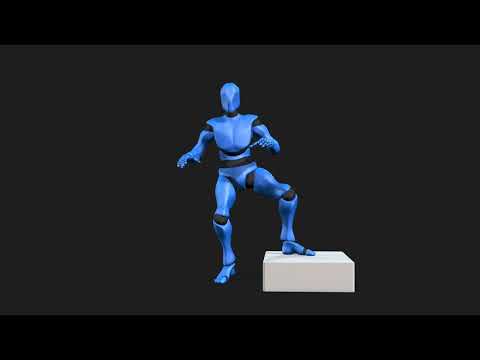
Now here is a simple hand key framed animated Character in Blender (no mocap retarget)
This is a Daz genesis 8 Male with his body rig converted to Auto rig pro
( with two mouse clicks with ARP quick rig )
but his head retains the original Daz face morphs & visemes converted to Blender shape keys for import of
mimic/Anilip/face mojo ,or whatever lipsync animation via the free Diffeomorphic
addon and his face can still be manually animated on top of the base lipsync with blenders native tools as wellNote how he leans on the table with some random
sliding forward of his left hand as he gets more "riled up" in his heated argument.
No need for scripts like “ limb stick” and hoping for ther best etc
just human IK contact solving and a true IK constraint system as it should be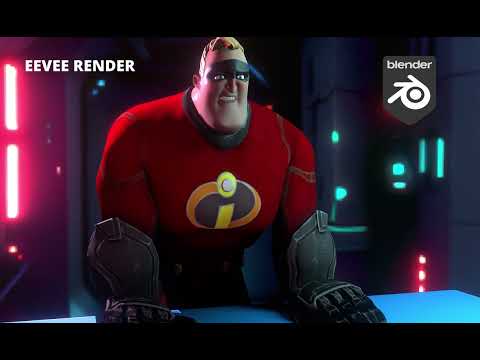 Morphs Loader pro problems
V8 Infinite said:
Hello, I wanted to create a morph for a piece of clothing. As usual, I use Morphs Loader Pro.
I import the morph, and everything is fine.
The dialog box tells me that the morph has been created successfully.
What is the name of OBJ file ? or what is the Name that you speficy in Morph Loader Pro (MLP) ?
Problem: It doesn't create the tab where it's located... or the tab is empty...
What do you mean by "tab" ? I suppose you mean Path in DS > Parameters pane, like what I highlighted in below (screenshot 1)
The morph in question is called "Expand All" and I can't display it. Its data is correctly entered but invisible in Daz.
Expand All ( both Name and Label are named as Expand All ) is a morph coming from Fit Control for G8F. (The vendor should've given it a prefix... like fc_)
If this morph is dialed on G8F, after you rig a garment with Transfer Utility on G8F, a hidden morph of Expand All will be automatically created on the garment (by Auto Follow). Then if you import a morph to the garment with a same Name: Expand All plus the option: Overwrite Existing > Deltas Only. The hidden Expand All morph property on the garment will be overwriten. Since it's hidden as default, you have to turn on Show Hidden Properties... to find it in Parameters pane.
Pls check if it's the case you have ...
I rename it to "Expand Toes" and it displays correctly.
Then I'm a bit confused... you said you can't display it but how could you rename it ? You did it with Show Hidden Properties...turned on, I suppose.
Is this a tab settings issue?
Does the latest update not like "official" names, which could conflict with certain morph creation extensions in particular? (I have Fit Control)
Not an issue to me... Well, you have to understand how a product operates and what morphs are within that Product, i.e. Fit Control. All the morphs from Fit Control for G8F are firstly activated on G8F rather than the conformers (fitted garments, accessories, etc..), then because those morpsh are set as Auto Follow, so the corresponding morphs will be automatically created by Auto Follow on the fitted garments. You have no way to manually "launch" or dial them on the garments ~~ (screenshot 2)
So, in principle, do not use the same name of Expand All if you've triggered Fit Control morphs, instead, give it a dedicated name that is not in Property List otherwise there'll be some problems...
Thanks
Daz 3D is part of

Connect
DAZ Productions, Inc.
7533 S Center View Ct #4664
West Jordan, UT 84084Licensing Agreement | Terms of Service | Privacy Policy | EULA
© 2026 Daz Productions Inc. All Rights Reserved.