-
get D-Former from Morph
I'm afraid the dForm doesn't leave any history, not even that the morph was created from a dForm (instead of another tool in DS, or a bridge to another application, or a simple OBJ import/export) so theer isn't any way to reverse the process if you don't have a saved scene or dForm preset.
iRadiance - HDR Mesh Lights Volume 2 for IrayWrite Idea said:
Richard Haseltine said:
Write Idea said:
Zo said:
Hi guys,
I bought this product from outlet store today, but it does'nt appear in product list ( either Smart content or Content librairy, i see the lite version but the full version is not found, i try to uninstal re install, removed lite version but no chance, any idea ?
* I use 4.24.0.3 premier version
Thanks
I can confirm the same.
It does work if you install in manually, however, not in smart content.
Smart Content is not an installation method, if you mean Daz Connect (installing through Daz Studio rather than Install Manager or manually) then many scripts are not written in a way that can cope with the different file locations and the way the location is reported when installed through DS.
When I install something manually, say something I purchased off Renderosity, it will appear in the Content Library, not in Smart Content. That is what I was referring to.
Content from other sites may well lack metadata, and if not it will have to be imported rather than being added during isntallation (exept for a few products that have Install Manager compatible zips). This will not be related to things working or not, however.
Daz studio 4.24.0.3 does not detect Premier, for example "Aiko 9" fails to loadHello Richard,
The option to update metadata is indeed checked.
Daz studio 4.24.0.3 does not detect Premier, for example "Aiko 9" fails to loadIs the option to update metadata checked in the Login dialogue?
Walk Designer for Genesis 9things like Mimic, Anilip, etc., that auto-generate lip sync. Performance capture is different in that it can automate a lot more of the actor's portrayal of the character. But it's still highly beneficial to edit these automated results to help finalize what we see on screen.
Indeed and its really a shame that Daz abandoned
the mimic pro software as it had a powerful editing feature where you could adjust the phonemes much like aniblocks to get a more accurate performance and even import a real life reference video as a guide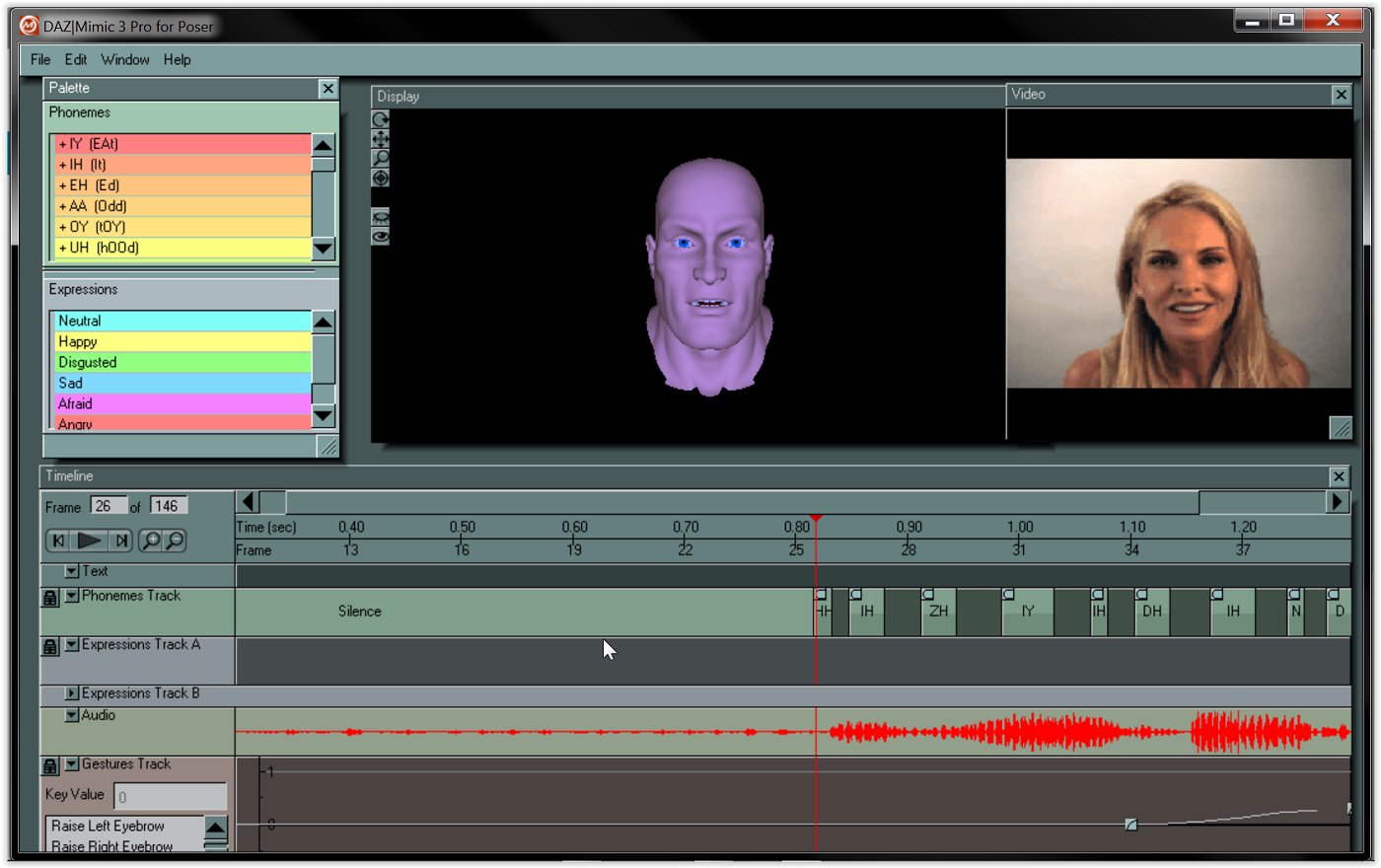 Walk Designer for Genesis 9
perhaps it would be possible to build-up a library of 'Viseme Partials' so that we can pull them from the library at will and just drop them onto the aniMate timeline, sliding them around and adjusting their length until they fit the speech!
So now I'm going to suggest a purpose-designed viseme sequencing system from 3DU.
Daz Genesis 8.1 and higher already have industry standard FACS system to support most of the Major facial mocap systems that is how PA solutions like "Face Mojo" were created.
https://www.daz3d.com/face-mojo--facial-mocap-retargeting-for-genesis-9
No need for 3DU to invent new manual lipsinc solutions and if cost is an issue just use diffeo
and import your G8-9 into Blender for free facial mocap from any video
 DAZ to Metahuman?
for metahuman head, there has already been mesh to metahuman workflow for years.
For metahuman body you would need to import your body morphs on a metahuman topology, so can use faceform wrap to create this, or a metahuman topology with genesis clone shapes on it to transfer daz figure morphs to via the transfer utility tool (transferring favorited morphs). Note: faceform wrap can also transfer textures to new topology too. But metahuman already has hundreds of textures anyway, so not sure texture transfer is really necessary.
Buy Something That Doesn't Work in Carrara? Post your Questions and Workarounds here. (please)RuudL said:
Have you tried copy and paste from one scene to the other?
you can have more than one scene file open in Carrara
no, not copy/paste I admit,
I have tried import, load from browser, drag into scene from browser to scene not anything selected, drag onto head etc
right now am rendering her with a DAZ polygon hair as gave up
can try later
Genesis Poses converted for use with UE5 skeletonI believe you can use the animation retargeter for that. Import the Genesis animation and then right click on the animation and select Retarget Animation and select the UE5 skeleton as the target and Gen8/9 as the source.
Can't seem to get imported expressions to work on HD Mesh.Had a bit of trouble getting expressions imported with figures via Favorites, but got that figured out. Whenever I import a model via Diffeo, I get a normal "Model Name" and "Model Name HD". Since I do a lot of closeups, I prefer to work with the latter. But the only expressions that seem to work are the FACS ones. If I try something like "JW The Cool Boy" from JWolf, nothing but the eyes move or the jaw just opens up.
To clarify, the imported favorite epxressions work as expected with the normal (non-HD) version. But only a couple seem to move the eyebrows/mouth a bit on the HD version. Am I missing a step? Using the wrong expressions? Is not possible? Do I have to use the HD Morphs addon for it? Kind of lost after trying several different things before positing here.
TIA.
Diffeo - Import DAZ Materials - Is that working?I see, thanks Padone.
I didn't understand the functionality of this feature and was hoping that you can import a DS shader .duf to get the material into Blender.Free Toon Characters – Released Early!I have yet to install the update, but looking at its content, the updated package seems to includes the same files inside the same folders and what was changed is the content of some of them.
If it's the case, as far as I understand metadata, no update should be necessary: the roles of each file and the links between them should still work.
Diffeo - Import DAZ Materials - Is that working?I never used "import daz materials", but I tried it with a material preset and seems to work fine here. It loads the material preset on the selected mesh. However it can't load custom shaders, if this is what you mean.
my steps:
- in daz studio save a material preset wit the iray uber shader
- in blender create a cube then "import daz materials" from the material preset
Free Toon Characters – Released Early!Ok great and I don't recall seeing any posts about updated metadata. I also know very little about it, other then it exists lol
strange error messiages when importing two different fbx assets into blender 3.6milliethegreat said:
I actually got better fbx exporter and it definitely solved the issue I was having with the error messages i mentioned. I got the assets to import into blender with zero issues and i exported the assets from blender into Daz as obj afterwards just fine too. That's one major problem solved. I'll count that as a win! Thanks for the suggestion on the plugin!
I'm ecstatic at hearing that! We really have to take the wins where we find them :)
Diffeo - Import DAZ Materials - Is that working?Hi,
I'd like to use my extensive library of DS shaders in Blender.
I tried the Import DAZ Materials function in DAZ Setup / Materials, but that doesn't generate that material for me.Couldn't find that function in the Diffeo documentation either. That section seems outdated.
Is this feature functioning?Thanks!
strange error messiages when importing two different fbx assets into blender 3.6I actually got better fbx exporter and it definitely solved the issue I was having with the error messages i mentioned. I got the assets to import into blender with zero issues and i exported the assets from blender into Daz as obj afterwards just fine too. That's one major problem solved. I'll count that as a win! Thanks for the suggestion on the plugin!
Is there a way to add a column to the Content DB Editor ?Hello,
The Content DB Editor has a lot of columns (File Name, File Ext, File Type, Type, Audience, etc), a couple who are rarely if ever useful while creating metadata, but it's missing a column to easily check if every file has its category set:

Is there a way to add it ?
How to achieve the Desaturated Rembrandt Style?Write Idea said:
Legendary Lights and Male Iray lights are SO good. Also try Fast Production Lights for Iray. I use it a lot.
Fauvist said:
If it is the colour effect that you're going for - then what you want to do is have the content in your scene to be in colours of tan, beige, brown, grey, black, muddy darkish blues, greens, orange/browns, - that would be the colours of the background or room, and the colours of the clothing and hair - you don't want bright pink or blazing red or saphire blue, or emerald green. You want darkish colours to begi with. The lighting is called LOW KEY lighting - which basically means "not bright". Then after you render your scene. Import it into virtually any image editing sofware, ad you want to DESATURATE THE COLOURS, LOWER THE CONTRAST, and apply a colour effet - like SEPIA, or TOBACCO, which gives you that old fashioned mafia look, or old west saloon look. And you'll end up with the kind of image you are describing.
The color effect is exactly what I'm looking for. Where light and shadow interact with one another (thank you for teaching me chiaroscuro). I have been toying around with this desaturated/sepia look. And I just think mine look cheap. An EXAMPLE from my DAZ3D gallery. Maybe my scenes are to bright.
Thank you everyone for the suggestions and ideas!
If you give me permission - I can upload your image to my computer and see what I can accomplish with adjusting the contrast, brightness, the sepia effect etc. If not, you can eventually try the effects yourself.
How to achieve the Desaturated Rembrandt Style?Legendary Lights and Male Iray lights are SO good. Also try Fast Production Lights for Iray. I use it a lot.
Fauvist said:
If it is the colour effect that you're going for - then what you want to do is have the content in your scene to be in colours of tan, beige, brown, grey, black, muddy darkish blues, greens, orange/browns, - that would be the colours of the background or room, and the colours of the clothing and hair - you don't want bright pink or blazing red or saphire blue, or emerald green. You want darkish colours to begi with. The lighting is called LOW KEY lighting - which basically means "not bright". Then after you render your scene. Import it into virtually any image editing sofware, ad you want to DESATURATE THE COLOURS, LOWER THE CONTRAST, and apply a colour effet - like SEPIA, or TOBACCO, which gives you that old fashioned mafia look, or old west saloon look. And you'll end up with the kind of image you are describing.
The color effect is exactly what I'm looking for. Where light and shadow interact with one another (thank you for teaching me chiaroscuro). I have been toying around with this desaturated/sepia look. And I just think mine look cheap. An EXAMPLE from my DAZ3D gallery. Maybe my scenes are to bright.
Thank you everyone for the suggestions and ideas!
Daz 3D is part of

Connect
DAZ Productions, Inc.
7533 S Center View Ct #4664
West Jordan, UT 84084Licensing Agreement | Terms of Service | Privacy Policy | EULA
© 2026 Daz Productions Inc. All Rights Reserved.















